

Microsoft’s support guidance says Windows 11 Home Single Language devices cannot install an additional Windows display language, while Windows 11 Home, Pro, Enterprise, Education, and other non-Single-Language editions can add multiple display languages through Settings. That sounds like a small licensing footnote, but it is really a reminder that Windows localization is still tied to edition, channel, and OEM decisions. For bilingual households, international students, refurbished-PC buyers, and IT departments imaging machines across regions, the difference between “Home” and “Home Single Language” is not cosmetic. It determines whether Windows can become multilingual—or whether the user must pay to escape the language they were sold.
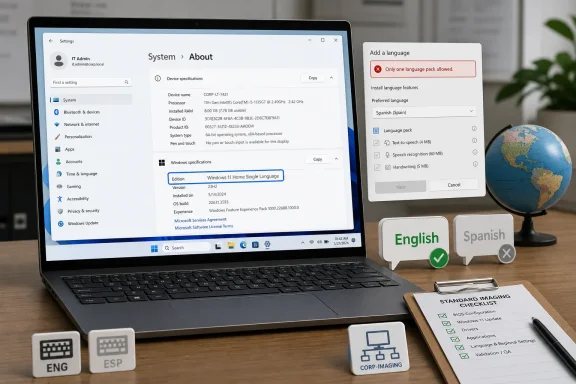
The important sentence in Microsoft’s support note is brutally simple: if Settings lists the edition as Windows 11 Home Single Language, only one display language is supported. The user can look in Start > Settings > System > About, then check the “Edition” field under Windows specifications. If that field says Home Single Language, the usual promise of modern Windows—that language packs can be added later—does not apply.
That is the kind of distinction many buyers never see until after the box is opened. A laptop advertised as “Windows 11 Home” in a storefront may, depending on region and OEM packaging, arrive with a Single Language license. The machine can be perfectly genuine, fully activated, and eligible for updates, while still refusing to do something users reasonably expect from a global operating system.
Microsoft’s error messages make the boundary clear in the least comforting way. “Only one language pack allowed” and “Your Windows license supports only one display language” are not troubleshooting hints; they are licensing verdicts. The system is not missing a download, suffering a Store glitch, or waiting for a registry nudge. It is enforcing the edition.
This matters because language in Windows is not just decoration. The display language touches Settings, system dialogs, menus, inbox apps, help surfaces, and the practical usability of a machine. For someone who bought a device abroad, inherited a laptop from family, or needs a workplace PC to match a support language, “just change the language” may be the first task they attempt—and the first place Windows tells them the license is smaller than they thought.
That distinction is where many users get trapped. Windows lets people add keyboards, change regional formats, set preferred languages for apps and websites, and use input methods that have nothing to do with the operating system’s display language. Those options can make a Single Language system look more flexible than it really is, right up until the user tries to change the Windows UI itself.
The trap is especially easy to miss because Windows has spent years moving language controls into consumer-friendly Settings pages. Users see an “Add a language” button and infer that language is now a user preference, like dark mode or a lock-screen wallpaper. In most editions, that assumption is fair. In Home Single Language, the preference runs into a commercial wall.
For IT pros, the About page check is also a procurement sanity test. Before a device enters an imaging workflow, a help desk pool, or a multilingual classroom, the edition needs to be verified. Discovering Single Language after deployment is not merely annoying; it can turn a cheap batch of machines into a support liability.
That does not mean every language-related failure is licensing. Windows language components are messy enough that downloads can fail, features can partially install, and corporate policies can hide settings. But the two messages Microsoft highlights—only one language pack allowed, and the license supporting only one display language—point to a specific cause. The operating system is telling the user that the edition is the constraint.
This is where Microsoft’s product segmentation becomes visible in a way that feels oddly old-fashioned. A display language seems like the kind of thing an operating system should treat as accessibility, mobility, or identity. Instead, Home Single Language makes it part of SKU design.
Microsoft’s likely rationale is not hard to infer. Single Language editions have historically helped OEMs sell lower-cost Windows devices in specific markets, where the expected language is known and the price sensitivity is high. But the global PC market no longer behaves as neatly as regional licensing models assume. Devices cross borders through travel, resale, remote work, gray-market imports, family hand-me-downs, and online marketplaces.
The result is a mismatch between how Windows is licensed and how Windows PCs actually circulate. The license imagines a device that stays in one language environment. The user may live in three.
That answer is clean from a licensing perspective and frustrating from a user perspective. It means the feature already associated with Windows 11 in the user’s mind is available only after changing the edition. The machine is capable; the operating system is capable; the language files exist. What is missing is entitlement.
For some users, upgrading to Pro may make sense anyway. Pro adds domain join, BitLocker management features, Group Policy, Remote Desktop host capability, Hyper-V, and other tools that matter in small business and enthusiast contexts. But if the only desired feature is a second display language, the upgrade feels like buying a toolbox to unlock a drawer.
The quieter option—upgrading from Home Single Language to regular Home—is more awkward because it is less visible in everyday Windows discourse. Most users understand Home-to-Pro as a common upgrade. Fewer understand Home Single Language-to-Home as a meaningful move, because the names are so similar that they barely read as separate products.
That naming is part of the problem. “Windows 11 Home Single Language” sounds like a variant, but many buyers and even some support staff mentally compress it to “Windows 11 Home.” The missing words become expensive only when the user needs multilingual support.
A student who buys a laptop in one country and studies in another may want the system language to match the classroom. A bilingual family may want parent and child accounts to use different display languages. A remote worker may receive a locally sourced device from a reseller and need the UI in the company’s support language. None of those scenarios are exotic in 2026.
The friction is worse in refurbished and imported-device markets. A bargain laptop may be attractive precisely because it was sourced internationally, but the installed Windows edition may reflect the original target market. A buyer who checks CPU, RAM, SSD health, battery condition, TPM support, and Windows activation can still miss the language lock until the first boot.
For administrators, the lesson is grimly practical: edition checking belongs in intake. It is not enough to ask whether a device has Windows 11. It matters which Windows 11. The difference may decide whether a machine can be assigned to a user in a multilingual support environment without extra licensing work.
That context explains why the Single Language restriction is so consequential. Adding a display language is not the same as adding a keyboard. A full Windows language experience can involve the shell, inbox apps, speech, handwriting, OCR, text-to-speech, and optional capabilities that vary by language. Enterprise administrators know this because language support affects image size, servicing, update testing, and user experience.
Windows 11 also modernized parts of the language story. Microsoft has moved more language acquisition into Settings and the Store-era component model, and non-administrator users can add certain language features in supported editions. That makes the platform feel more dynamic, but it does not erase the edition gate.
The result is a two-tier language system. In supported editions, Windows behaves like a cloud-era operating system that can adapt to the user. In Home Single Language, it behaves like an appliance configured for one market. Both are Windows 11, but they embody different assumptions about who controls the device after purchase.
This is why the issue keeps resurfacing in user forums. People are not confused because the Settings app is too complex; they are confused because Windows presents language as a personal preference almost everywhere else. The restriction appears only at the moment of enforcement.
A user moving from an older Windows 10 Pro system to a new low-cost Windows 11 laptop may reasonably expect the language flexibility to continue. Instead, the new device may be less flexible than the old one because the license class changed. Hardware progress can mask software entitlement regression.
This is especially relevant for families replacing unsupported Windows 10 PCs on a budget. They may prioritize TPM compatibility, processor generation, memory, and storage, all of which are visible in shopping filters. Windows edition granularity is harder to spot, and “Single Language” may be buried in specifications or omitted from marketing copy.
For small businesses, the Windows 10 deadline also creates a purchasing risk. A company buying inexpensive Windows 11 machines in a hurry may discover later that a subset cannot be localized for employees. The fix is not technically difficult, but it costs time, licensing budget, and support attention at precisely the moment IT teams are trying to simplify their estate.
That distinction is unintuitive but important. A Single Language system can still be usable for multilingual typing. It can still support another keyboard layout, another date format, and applications that have their own language settings. What it cannot do is become a fully multilingual Windows UI environment.
This partial flexibility is both helpful and misleading. It means a user may be able to write in Spanish, browse in English, and use Office in another language, while Settings and system prompts remain in the original display language. For some people, that is good enough. For others, particularly those who rely on the system UI for support, accessibility, or learning, it is not.
It also complicates remote troubleshooting. A support technician may ask a user to click a menu item, only to discover that the user’s Windows UI language is not the language both parties share. In a non-Single-Language edition, changing the display language could be part of the fix. In Home Single Language, the support path becomes translation, screen sharing, or upgrade.
The distinction is more than academic in security contexts. Users need to understand prompts, permission dialogs, recovery messages, and warnings. A machine locked to a language the user does not read well can make risky clicks more likely. Language support is therefore part of practical security hygiene, not just comfort.
But clarity after purchase is not the same as transparency before purchase. The better place to surface this distinction is in retail listings, OEM setup flows, and Windows activation pages. If the language limitation affects whether a device is suitable for a buyer, it should not require a support article and an error message to discover.
The out-of-box experience could do more here. During setup, Windows asks region, keyboard, account, privacy, and personalization questions. On Single Language systems, it could explicitly say that the Windows display language is limited by the installed edition and that adding another display language later requires an edition upgrade. That would be blunt, but it would prevent false expectations.
The Microsoft Store upgrade path also deserves clearer framing. If the user’s goal is multilingual support, the upgrade UI should say exactly which edition transition unlocks additional display languages and what else changes. A generic upgrade pitch risks making the fix feel like an upsell rather than a resolution.
The burden should not fall entirely on users to decode SKU terminology. Microsoft and OEMs created the distinction; they should make it visible at the points where it matters.
This matters for Autopilot, imaging, and help desk workflows. A device with the wrong edition can derail what should be a routine deployment. The fix may involve purchasing an upgrade, changing product keys, or replacing the device, none of which belongs in the middle of onboarding.
Procurement teams should also avoid assuming that devices bought from different regions are equivalent. Two laptops with the same model number can ship with different Windows editions depending on market. That is not a hardware problem, but it becomes an IT problem when employees expect a consistent desktop.
The most practical policy is simple: verify edition before assignment. If devices are being bought for multilingual users, shared labs, call centers, training rooms, or internationally mobile staff, Home Single Language should be excluded unless there is a deliberate reason to accept the limitation.
Security teams have a stake here too. A user who cannot read system prompts is more likely to make mistakes, ignore warnings, or rely on unofficial translation advice. In regulated environments, that is not a small usability issue; it is a control weakness.
There may be anecdotes about reinstalling, using installation media in another language, or forcing packages into an image. Those stories often depend on activation state, edition mismatch, regional media, or unsupported servicing behavior. They are not the same as a supported path a normal user should trust.
The clean advice is less exciting: check the edition, decide whether the existing language is acceptable, and upgrade if the device genuinely needs multiple display languages. Anything else risks creating a system that is harder to service, harder to update, or harder to explain later.
That does not mean enthusiasts should be quiet about the design. The limitation is fair game for criticism precisely because it feels out of step with how people use computers. But criticism should not be confused with a workaround.
If a user is buying a machine specifically to change its display language, the best hack is not technical. It is purchasing discipline: do not buy Home Single Language unless the single language is the one you intend to keep.
Microsoft’s latest support guidance does not introduce a new restriction so much as expose an old one at the moment users are most likely to run into it: the Windows 11 refresh cycle, the post-Windows 10 hardware churn, and a global PC market where devices rarely stay in the country, language, or household Microsoft’s licensing model imagined. The sensible path is to check before buying, upgrade when necessary, and treat language support as a first-class requirement. The more interesting question for the next era of Windows is whether Microsoft will keep selling a globally mobile operating system with a license that still assumes the user speaks only one language.
 Microsoft Turns a Language Setting Into an Edition Boundary
The important sentence in Microsoft’s support note is brutally simple: if Settings lists the edition as Windows 11 Home Single Language, only one display language is supported. The user can look in Start > Settings > System > About, then check the “Edition” field under Windows specifications. If that field says Home Single Language, the usual promise of modern Windows—that language packs can be added later—does not apply.That is the kind of distinction many buyers never see until after the box is opened. A laptop advertised as “Windows 11 Home” in a storefront may, depending on region and OEM packaging, arrive with a Single Language license. The machine can be perfectly genuine, fully activated, and eligible for updates, while still refusing to do something users reasonably expect from a global operating system.
Microsoft’s error messages make the boundary clear in the least comforting way. “Only one language pack allowed” and “Your Windows license supports only one display language” are not troubleshooting hints; they are licensing verdicts. The system is not missing a download, suffering a Store glitch, or waiting for a registry nudge. It is enforcing the edition.
This matters because language in Windows is not just decoration. The display language touches Settings, system dialogs, menus, inbox apps, help surfaces, and the practical usability of a machine. For someone who bought a device abroad, inherited a laptop from family, or needs a workplace PC to match a support language, “just change the language” may be the first task they attempt—and the first place Windows tells them the license is smaller than they thought.
The Settings App Reveals More Than the Storefront Did
Microsoft’s recommended check is straightforward enough to be useful: open Settings, go to System, choose About, and read the Windows edition. That field is the source of truth for this issue. Not the keyboard layout, not the region, not the Microsoft account language, and not the language shown on the product page where the PC was purchased.That distinction is where many users get trapped. Windows lets people add keyboards, change regional formats, set preferred languages for apps and websites, and use input methods that have nothing to do with the operating system’s display language. Those options can make a Single Language system look more flexible than it really is, right up until the user tries to change the Windows UI itself.
The trap is especially easy to miss because Windows has spent years moving language controls into consumer-friendly Settings pages. Users see an “Add a language” button and infer that language is now a user preference, like dark mode or a lock-screen wallpaper. In most editions, that assumption is fair. In Home Single Language, the preference runs into a commercial wall.
For IT pros, the About page check is also a procurement sanity test. Before a device enters an imaging workflow, a help desk pool, or a multilingual classroom, the edition needs to be verified. Discovering Single Language after deployment is not merely annoying; it can turn a cheap batch of machines into a support liability.
Single Language Is Not Broken Windows
The most common mistake is treating the Single Language restriction as a malfunction. Users search for missing language packs, reset the Microsoft Store, run DISM commands, or reinstall Windows in the hope that the language menu will behave like it does on another machine. Microsoft’s guidance cuts through that: the limitation is by design.That does not mean every language-related failure is licensing. Windows language components are messy enough that downloads can fail, features can partially install, and corporate policies can hide settings. But the two messages Microsoft highlights—only one language pack allowed, and the license supporting only one display language—point to a specific cause. The operating system is telling the user that the edition is the constraint.
This is where Microsoft’s product segmentation becomes visible in a way that feels oddly old-fashioned. A display language seems like the kind of thing an operating system should treat as accessibility, mobility, or identity. Instead, Home Single Language makes it part of SKU design.
Microsoft’s likely rationale is not hard to infer. Single Language editions have historically helped OEMs sell lower-cost Windows devices in specific markets, where the expected language is known and the price sensitivity is high. But the global PC market no longer behaves as neatly as regional licensing models assume. Devices cross borders through travel, resale, remote work, gray-market imports, family hand-me-downs, and online marketplaces.
The result is a mismatch between how Windows is licensed and how Windows PCs actually circulate. The license imagines a device that stays in one language environment. The user may live in three.
The Upgrade Path Is the Real Answer, and That Is the Problem
Microsoft’s official remedy is not to install a hidden pack or flip an advanced setting. If Windows 11 Home Single Language is installed and the user wants additional display languages, Windows must be upgraded to Windows 11 Home or Windows 11 Pro. Microsoft points users toward the Microsoft Store upgrade path and related product-key guidance.That answer is clean from a licensing perspective and frustrating from a user perspective. It means the feature already associated with Windows 11 in the user’s mind is available only after changing the edition. The machine is capable; the operating system is capable; the language files exist. What is missing is entitlement.
For some users, upgrading to Pro may make sense anyway. Pro adds domain join, BitLocker management features, Group Policy, Remote Desktop host capability, Hyper-V, and other tools that matter in small business and enthusiast contexts. But if the only desired feature is a second display language, the upgrade feels like buying a toolbox to unlock a drawer.
The quieter option—upgrading from Home Single Language to regular Home—is more awkward because it is less visible in everyday Windows discourse. Most users understand Home-to-Pro as a common upgrade. Fewer understand Home Single Language-to-Home as a meaningful move, because the names are so similar that they barely read as separate products.
That naming is part of the problem. “Windows 11 Home Single Language” sounds like a variant, but many buyers and even some support staff mentally compress it to “Windows 11 Home.” The missing words become expensive only when the user needs multilingual support.
OEM Savings Become User Friction
The PC industry loves small edition differences because they allow pricing, bundling, and regional targeting. The user experience often inherits the complexity. Home Single Language is one of those editions that can be rational in a spreadsheet and baffling at the kitchen table.A student who buys a laptop in one country and studies in another may want the system language to match the classroom. A bilingual family may want parent and child accounts to use different display languages. A remote worker may receive a locally sourced device from a reseller and need the UI in the company’s support language. None of those scenarios are exotic in 2026.
The friction is worse in refurbished and imported-device markets. A bargain laptop may be attractive precisely because it was sourced internationally, but the installed Windows edition may reflect the original target market. A buyer who checks CPU, RAM, SSD health, battery condition, TPM support, and Windows activation can still miss the language lock until the first boot.
For administrators, the lesson is grimly practical: edition checking belongs in intake. It is not enough to ask whether a device has Windows 11. It matters which Windows 11. The difference may decide whether a machine can be assigned to a user in a multilingual support environment without extra licensing work.
Language Packs Are Infrastructure, Not Decoration
Microsoft’s broader Windows deployment documentation treats language support as a serious manufacturing and deployment concern. Language packs, language interface packs, feature-on-demand components, and regional assets are part of how Windows images are built and maintained. This is not merely a Settings page convenience layered on top of the OS.That context explains why the Single Language restriction is so consequential. Adding a display language is not the same as adding a keyboard. A full Windows language experience can involve the shell, inbox apps, speech, handwriting, OCR, text-to-speech, and optional capabilities that vary by language. Enterprise administrators know this because language support affects image size, servicing, update testing, and user experience.
Windows 11 also modernized parts of the language story. Microsoft has moved more language acquisition into Settings and the Store-era component model, and non-administrator users can add certain language features in supported editions. That makes the platform feel more dynamic, but it does not erase the edition gate.
The result is a two-tier language system. In supported editions, Windows behaves like a cloud-era operating system that can adapt to the user. In Home Single Language, it behaves like an appliance configured for one market. Both are Windows 11, but they embody different assumptions about who controls the device after purchase.
This is why the issue keeps resurfacing in user forums. People are not confused because the Settings app is too complex; they are confused because Windows presents language as a personal preference almost everywhere else. The restriction appears only at the moment of enforcement.
The End of Windows 10 Raises the Stakes
The timing matters because Windows 10 is now on the wrong side of its mainstream support deadline. Microsoft ended free Windows 10 security updates for general consumers on October 14, 2025, pushing more households and small organizations toward Windows 11 hardware. That migration wave includes budget laptops, refurbished systems, and international stock—the very places where Single Language editions are most likely to surprise buyers.A user moving from an older Windows 10 Pro system to a new low-cost Windows 11 laptop may reasonably expect the language flexibility to continue. Instead, the new device may be less flexible than the old one because the license class changed. Hardware progress can mask software entitlement regression.
This is especially relevant for families replacing unsupported Windows 10 PCs on a budget. They may prioritize TPM compatibility, processor generation, memory, and storage, all of which are visible in shopping filters. Windows edition granularity is harder to spot, and “Single Language” may be buried in specifications or omitted from marketing copy.
For small businesses, the Windows 10 deadline also creates a purchasing risk. A company buying inexpensive Windows 11 machines in a hurry may discover later that a subset cannot be localized for employees. The fix is not technically difficult, but it costs time, licensing budget, and support attention at precisely the moment IT teams are trying to simplify their estate.
The User Account Is Multilingual, but the License May Not Be
Modern Windows blurs several different language concepts. A user can set a preferred language for websites and apps, add keyboard layouts, choose regional formats, install proofing tools in Office, and change Microsoft account language preferences. These settings can coexist with a Windows display language that remains locked.That distinction is unintuitive but important. A Single Language system can still be usable for multilingual typing. It can still support another keyboard layout, another date format, and applications that have their own language settings. What it cannot do is become a fully multilingual Windows UI environment.
This partial flexibility is both helpful and misleading. It means a user may be able to write in Spanish, browse in English, and use Office in another language, while Settings and system prompts remain in the original display language. For some people, that is good enough. For others, particularly those who rely on the system UI for support, accessibility, or learning, it is not.
It also complicates remote troubleshooting. A support technician may ask a user to click a menu item, only to discover that the user’s Windows UI language is not the language both parties share. In a non-Single-Language edition, changing the display language could be part of the fix. In Home Single Language, the support path becomes translation, screen sharing, or upgrade.
The distinction is more than academic in security contexts. Users need to understand prompts, permission dialogs, recovery messages, and warnings. A machine locked to a language the user does not read well can make risky clicks more likely. Language support is therefore part of practical security hygiene, not just comfort.
Microsoft’s Messaging Is Clear but Too Late
To Microsoft’s credit, the support article is direct. It gives the symptoms, the place to check the edition, the consequence of seeing Windows 11 Home Single Language, and the upgrade direction. There is no magical workaround implied.But clarity after purchase is not the same as transparency before purchase. The better place to surface this distinction is in retail listings, OEM setup flows, and Windows activation pages. If the language limitation affects whether a device is suitable for a buyer, it should not require a support article and an error message to discover.
The out-of-box experience could do more here. During setup, Windows asks region, keyboard, account, privacy, and personalization questions. On Single Language systems, it could explicitly say that the Windows display language is limited by the installed edition and that adding another display language later requires an edition upgrade. That would be blunt, but it would prevent false expectations.
The Microsoft Store upgrade path also deserves clearer framing. If the user’s goal is multilingual support, the upgrade UI should say exactly which edition transition unlocks additional display languages and what else changes. A generic upgrade pitch risks making the fix feel like an upsell rather than a resolution.
The burden should not fall entirely on users to decode SKU terminology. Microsoft and OEMs created the distinction; they should make it visible at the points where it matters.
Administrators Should Treat Language as a Procurement Requirement
For IT departments, the support note is a reminder to treat language capability as part of device qualification. A fleet standard that says “Windows 11” is incomplete. The actual requirement may be “Windows 11 Pro or another edition that supports multiple display languages,” especially in multinational teams or shared-device environments.This matters for Autopilot, imaging, and help desk workflows. A device with the wrong edition can derail what should be a routine deployment. The fix may involve purchasing an upgrade, changing product keys, or replacing the device, none of which belongs in the middle of onboarding.
Procurement teams should also avoid assuming that devices bought from different regions are equivalent. Two laptops with the same model number can ship with different Windows editions depending on market. That is not a hardware problem, but it becomes an IT problem when employees expect a consistent desktop.
The most practical policy is simple: verify edition before assignment. If devices are being bought for multilingual users, shared labs, call centers, training rooms, or internationally mobile staff, Home Single Language should be excluded unless there is a deliberate reason to accept the limitation.
Security teams have a stake here too. A user who cannot read system prompts is more likely to make mistakes, ignore warnings, or rely on unofficial translation advice. In regulated environments, that is not a small usability issue; it is a control weakness.
Enthusiasts Should Stop Hunting for a Secret Switch
Windows enthusiasts are very good at finding unsupported switches, hidden packages, and registry paths. That instinct is useful when a feature is artificially hidden, but it can become a time sink when the operating system is enforcing licensing. Home Single Language belongs in the second category.There may be anecdotes about reinstalling, using installation media in another language, or forcing packages into an image. Those stories often depend on activation state, edition mismatch, regional media, or unsupported servicing behavior. They are not the same as a supported path a normal user should trust.
The clean advice is less exciting: check the edition, decide whether the existing language is acceptable, and upgrade if the device genuinely needs multiple display languages. Anything else risks creating a system that is harder to service, harder to update, or harder to explain later.
That does not mean enthusiasts should be quiet about the design. The limitation is fair game for criticism precisely because it feels out of step with how people use computers. But criticism should not be confused with a workaround.
If a user is buying a machine specifically to change its display language, the best hack is not technical. It is purchasing discipline: do not buy Home Single Language unless the single language is the one you intend to keep.
The Five Checks That Prevent a One-Language Surprise
The fix for this problem is not glamorous, but it is concrete. Microsoft’s support note gives users and administrators enough information to avoid wasting time on false troubleshooting paths, as long as they check the right thing early.- Open Settings, go to System, then About, and read the exact Windows edition before assuming language packs are supported.
- Treat “Windows 11 Home Single Language” as a hard display-language limit, not as a missing download or a temporary Store problem.
- Remember that keyboard layouts, regional formats, and app languages do not prove that the Windows display language can be changed.
- If multiple Windows display languages are required, plan for an upgrade to Windows 11 Home, Windows 11 Pro, or another edition that supports them.
- When buying used, imported, discounted, or region-specific PCs, confirm the Windows edition in writing before purchase.
- In business deployments, make multilingual support an explicit procurement requirement rather than a help desk discovery.
Microsoft’s latest support guidance does not introduce a new restriction so much as expose an old one at the moment users are most likely to run into it: the Windows 11 refresh cycle, the post-Windows 10 hardware churn, and a global PC market where devices rarely stay in the country, language, or household Microsoft’s licensing model imagined. The sensible path is to check before buying, upgrade when necessary, and treat language support as a first-class requirement. The more interesting question for the next era of Windows is whether Microsoft will keep selling a globally mobile operating system with a license that still assumes the user speaks only one language.
References
- Primary source: Microsoft Support
Published: Tue, 02 Jun 2026 07:49:57 Z
Check whether a version of Windows supports multiple languages | Microsoft Support
Learn how to check if a version of Windows supports multiple languages or is limited to a single language.support.microsoft.com - Official source: learn.microsoft.com
Available Language Packs for Windows | Microsoft Learn
Available Language Packs for Windowslearn.microsoft.com - Official source: microsoft.com
Windows 11 Specs and System Requirements | Microsoft Windows
View Windows 11 specs, system requirements, and features from Microsoft. Learn about the device specifications, versions, and languages available for Windows 11.www.microsoft.com - Related coverage: images10.newegg.com
- Related coverage: cache.industry.siemens.com
