

Microsoft introduced Cloud Rebuild on July 6, 2026, in Windows 11 Insider Experimental Preview Build 26300.8772, giving testers a WinRE recovery path that downloads both Windows and device drivers from Windows Update instead of relying on USB media or a working local installation. The Register’s write-up correctly frames it as a rescue tool for dead PCs, but the more important story is that Microsoft is moving yet another part of endpoint recovery into its cloud management stack. For home users, that may mean fewer emergency flash drives and fewer driver hunts. For IT departments, it is another sign that the clean-room rebuild is becoming less of a bench procedure and more of a service workflow.
Cloud Rebuild is not just a prettier version of “Reset this PC.” Microsoft’s own Windows Insider release notes describe it as a full OS reinstall that works from the Windows Recovery Environment, even when Windows itself will not boot. The crucial distinction is where the new installation comes from and what assumptions it makes about the damaged machine.
Traditional recovery has always had a local bias. There is a recovery partition, an OEM image, a USB installer, a mounted ISO, a technician’s deployment share, or some mix of those things. Even Microsoft’s existing cloud download reset option still fits into the Reset this PC family, where the current Windows environment and local state matter more than administrators would like when the machine is already in trouble.
Cloud Rebuild shifts the center of gravity. The machine boots into WinRE, connects to Ethernet or Wi-Fi, checks the target build, edition, and language, warns the user about data loss, and then pulls the OS image and drivers through Windows Update. In other words, the recovery environment becomes a thin bootstrapper for Microsoft’s update infrastructure.
That is a meaningful architectural change. It treats Windows Update not merely as the thing that patches Windows, but as the service that can reconstruct Windows when the installed copy can no longer be trusted. If Microsoft can make that work reliably across enough hardware, the recovery partition stops being a static lifeboat and starts behaving more like a cloud-aware deployment agent.
That promise matters because Windows has never lacked recovery tools; it has lacked recovery tools that ordinary people trust under stress. Safe Mode, Startup Repair, System Restore, DISM, Reset this PC, OEM factory restore, and USB media all exist, but the experience is fragmented. The moment a user must decide whether a local reset, cloud reset, repair install, or clean install is the correct move, Microsoft has already lost the simplicity contest.
Cloud Rebuild tries to collapse that decision tree. It says, in effect, “This machine is not healthy enough to preserve; replace the operating system with a known-good copy and fetch the drivers required to make the hardware usable.” That is a blunt instrument, but blunt instruments have value when the alternative is an afternoon of half-failed repairs.
The catch is that the dead PC must not be too dead. Microsoft’s preview requirements are not trivial: the device needs WinRE, network access, and compatible networking support available before the full OS is installed. If the recovery environment cannot bring up Ethernet or Wi-Fi, the cloud is irrelevant. If firmware, storage, or networking is broken in ways WinRE cannot bridge, the old USB stick and the technician’s bench are not going away.
That detail is where recovery usually becomes operationally messy. A generic Windows install may boot, but it may lack the right Wi-Fi driver, chipset package, touchpad behavior, storage driver, graphics control component, or power management tuning. Anyone who has rebuilt a fleet laptop from clean media knows the difference between “Windows installed” and “the device is fully functional.”
If Cloud Rebuild can reliably identify and stage the right drivers during recovery, Microsoft will have taken a painful step out of the rebuild process. The Register emphasized the absence of USB media and custom images, but the driver pipeline is what could make the feature genuinely useful. A bare OS is only half a recovery; a working network stack, input devices, display configuration, and device-specific drivers are what get the machine back into a user’s hands.
This also explains why Microsoft is tying the feature to Windows Update. The company has spent years nudging OEMs and hardware partners into driver distribution through its update channels, with mixed but steadily improving results. Cloud Rebuild depends on that bet being right. The cleaner and more complete the Windows Update driver catalog becomes, the more credible cloud recovery becomes.
In that scenario, OOBE is not just a setup wizard. It is the front door to a policy-driven redeployment flow. The device can contact Intune, receive assigned apps and policies, and bring the user back into a managed state without a technician manually applying a custom image. Microsoft’s documentation also ties this broader recovery story to organizational backup, with user settings restored through Backup for Organizations and files becoming available through OneDrive after sign-in.
That is Microsoft’s modern endpoint management thesis in miniature. Hardware is replaceable, the OS is disposable, identity is the anchor, and the cloud management plane is the source of truth. Cloud Rebuild does not create that model, but it strengthens it at the most painful moment: when the device has failed badly enough that the local operating system cannot be relied upon.
For admins already invested in Intune and Autopilot, this is attractive. A broken machine no longer has to be routed through a traditional imaging process if the user or help desk can initiate a controlled rebuild. For distributed workforces, that matters. A remote employee with a bricked laptop is not just a support ticket; they are a logistics problem. Cloud Rebuild offers a way to turn at least some of those incidents into a guided reinstall rather than a shipment.
Microsoft has been trying to end that era for years. Autopilot, Intune, Windows Update for Business, policy CSPs, provisioning packages, and cloud identity all point toward the same conclusion: stop building monolithic images and start declaring desired state. Cloud Rebuild is recovery shaped by that same philosophy.
The appeal is obvious. Custom images are expensive to maintain, fragile across hardware generations, and often filled with historical compromises nobody wants to defend. A cloud rebuild that lays down a clean OS, fetches drivers, and lets management policy do the rest is cleaner in principle. It also reduces the gap between a new device and a recovered device, because both pass through similar cloud provisioning logic.
But this is also where administrators will be cautious. The golden image was cumbersome, but it was known. If Microsoft’s cloud-delivered rebuild pulls an unexpected driver, changes a baseline build, or depends on a service outage-free Windows Update path, IT loses some of the comforting determinism of older imaging models. The tradeoff is speed and simplicity in exchange for deeper dependence on Microsoft’s cloud and catalog decisions.
That matters because recovery features need a higher trust bar than cosmetic shell changes. If a new Start menu layout misbehaves, users complain and move on. If a recovery feature fails halfway through a rebuild, the machine may be left in a worse operational state, and the user’s confidence in the entire recovery stack takes a hit.
Microsoft is clear that testers can start Cloud Rebuild from WinRE under Troubleshoot, then Recovery and uninstall, then Cloud rebuild. The company also tells users to review the target build, edition, and language before accepting the data-loss warning. That language is doing two jobs: explaining the flow and reminding testers that this is not a nondestructive repair.
The “data-loss warning” should not be glossed over. Cloud Rebuild is positioned as a path to a clean, known-good state, not a promise to preserve apps and local files. In a world where OneDrive Known Folder Move, Enterprise State Roaming’s successors, and organizational backup policies are unevenly deployed, that distinction will decide whether the feature feels like salvation or a support escalation.
This is not a trivial edge case. Recovery often happens in hostile conditions: at home, after hours, on unfamiliar networks, with no spare accessories, and with a user who may not know whether their Wi-Fi password, Microsoft account, work account, BitLocker recovery key, and local backups are all in order. The simpler the recovery story, the more painful each prerequisite becomes when it is not met.
Microsoft can mitigate some of this through OEM requirements and inbox driver coverage. If modern Windows 11 PCs increasingly ship with network devices that WinRE can initialize reliably, the cloud path becomes more plausible. But the hardware ecosystem is still broad, and the long tail is where recovery tools earn or lose their reputation.
The best version of Cloud Rebuild would fail gracefully. It would clearly explain why the network cannot be used, preserve obvious fallback paths, and avoid trapping users in a half-technical recovery maze. Microsoft’s challenge is not merely to build the feature; it is to make the failure modes legible to people who are already having a bad day.
There is a ransomware-era logic to this. When a device is suspect, responders often prefer reimaging over remediation because reimaging gives a clearer assurance boundary. Cloud Rebuild could make that kind of response more accessible for ordinary endpoint incidents, especially if it can be initiated or guided remotely in managed environments.
But security teams will also ask hard questions. How is the target image selected? How are drivers validated? What telemetry is generated during the rebuild? How does the process interact with BitLocker, Secure Boot, device identity, hardware attestation, and corporate compliance rules? What prevents a user from rebuilding into the wrong edition, language, or management state?
Those questions are not objections so much as procurement reality. A recovery workflow becomes part of the security architecture the moment it touches identity, device enrollment, and policy redeployment. Microsoft’s cloud can be a source of assurance, but only if the chain from WinRE to Windows Update to Autopilot to Intune is transparent enough for administrators to audit and reliable enough for them to trust.
It is less elegant when the user is offline, when the network blocks recovery traffic, when device registration is stale, when Intune policies conflict, when Autopilot records are wrong, or when a user’s important files were never synced. The cloud-first model reduces one category of local fragility by accepting another category of service dependency.
That tradeoff is not unique to Microsoft. Apple’s internet recovery and modern mobile device management have pushed similar assumptions for years. ChromeOS has long made the device feel almost disposable by design. Windows is different because it carries decades of hardware variance, enterprise customization, local apps, and user habits that were never designed around total cloud reconstruction.
This is why Cloud Rebuild is both overdue and difficult. Microsoft is trying to graft cloud-native recovery expectations onto the most heterogeneous mainstream client platform in computing. If it works, it will feel obvious in hindsight. If it stumbles, every edge case will be interpreted as proof that Windows remains too sprawling to recover cleanly from the cloud.
But the more consequential story is about who owns the rebuild process. Historically, a Windows rebuild belonged to the user, the OEM, or the IT department. Cloud Rebuild moves that process closer to Microsoft’s service infrastructure, with Windows Update as the image and driver source and Intune/Autopilot as the enterprise redeployment path.
That may be exactly where the process belongs in 2026. The average user does not want to maintain boot media. The average help desk does not want to walk remote employees through ISO creation. The average enterprise does not want to rebuild golden images for every device family. The cost of local control is often paid in wasted time.
Still, ownership matters. When recovery becomes a service, service availability, catalog quality, enrollment hygiene, and policy design become part of disaster recovery. Cloud Rebuild can remove a USB dependency, but it does not remove the need for operational discipline. It simply moves that discipline higher up the stack.
On the other hand, OEMs still matter enormously because Cloud Rebuild depends on compatible networking support in WinRE and on driver availability through Microsoft’s channels. If a manufacturer ships hardware whose recovery environment cannot get online, the feature fails before it begins. If a required driver is missing, wrong, or delayed in Windows Update, the rebuilt system may not be fully functional.
This creates a useful pressure. PC makers that want lower support costs should have strong incentives to make their devices Cloud Rebuild-friendly. That means clean driver publishing, reliable firmware behavior, and recovery-compatible network hardware. The feature could become another quiet quality line between business-class machines and the cheaper end of the market.
For buyers, especially fleet buyers, this may eventually become a procurement question. Does the device support cloud recovery cleanly? Are its network drivers available in recovery? Does the vendor validate rebuild flows with Autopilot and Intune? Those are not glamorous spec-sheet items, but they affect the true cost of owning the hardware.
Microsoft’s enterprise story leans on Backup for Organizations, OneDrive, and management-driven app redeployment. That can be powerful, but only where it is configured, licensed, and used consistently. In unmanaged environments, users may still discover that their files were on the desktop but not synced, their application installers are gone, or their local-only data vanished with the clean rebuild.
This is where Microsoft’s language around a clean, known-good state matters. Clean is not the same as complete. Known-good is not the same as familiar. Recovered is not the same as restored.
A healthy Windows recovery strategy still has layers. Cloud Rebuild may become one of the better layers for OS reconstruction, but file backup, credential recovery, BitLocker key escrow, app reinstall plans, and cloud sync verification remain separate problems. The feature reduces one kind of panic; it should not encourage a false sense of invulnerability.
The first tests should be boring and methodical. Try it on supported Insider hardware, then on representative business devices. Test Ethernet and Wi-Fi. Test devices already registered with Autopilot and devices that are merely Entra joined. Test BitLocker scenarios. Test what happens when the assigned user changes, when apps are large, when policies arrive slowly, and when the network is filtered.
Help desks will also need scripts that reflect reality rather than marketing. Users must understand that Cloud Rebuild can erase local data, that they may need network credentials, and that a rebuilt device may still need time to receive apps and policy. A cloud reinstall is not the same as instant productivity.
The strongest organizations will treat Cloud Rebuild as part of an endpoint resilience plan, not as a magic repair button. If the plan already includes OneDrive folder protection, device compliance, Autopilot registration hygiene, Intune app targeting, and BitLocker recovery key escrow, Cloud Rebuild can slot into a coherent workflow. If those foundations are weak, the feature will expose the weakness.
That future will not arrive evenly. Enthusiasts will still keep Ventoy drives, ISOs, offline installers, driver packs, and recovery images. Enterprises with strict network controls or specialized workloads will still maintain deeper deployment systems. Technicians will still need fallback media because a cloud recovery path that cannot reach the cloud is not a recovery path at all.
But the direction is clear enough to act on now.
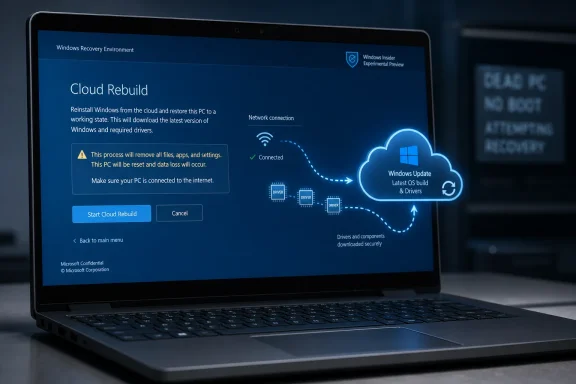 Microsoft Is Turning the Recovery Partition Into a Cloud Client
Cloud Rebuild is not just a prettier version of “Reset this PC.” Microsoft’s own Windows Insider release notes describe it as a full OS reinstall that works from the Windows Recovery Environment, even when Windows itself will not boot. The crucial distinction is where the new installation comes from and what assumptions it makes about the damaged machine.Traditional recovery has always had a local bias. There is a recovery partition, an OEM image, a USB installer, a mounted ISO, a technician’s deployment share, or some mix of those things. Even Microsoft’s existing cloud download reset option still fits into the Reset this PC family, where the current Windows environment and local state matter more than administrators would like when the machine is already in trouble.
Cloud Rebuild shifts the center of gravity. The machine boots into WinRE, connects to Ethernet or Wi-Fi, checks the target build, edition, and language, warns the user about data loss, and then pulls the OS image and drivers through Windows Update. In other words, the recovery environment becomes a thin bootstrapper for Microsoft’s update infrastructure.
That is a meaningful architectural change. It treats Windows Update not merely as the thing that patches Windows, but as the service that can reconstruct Windows when the installed copy can no longer be trusted. If Microsoft can make that work reliably across enough hardware, the recovery partition stops being a static lifeboat and starts behaving more like a cloud-aware deployment agent.
The Dead PC Is the Easy Sell
The consumer pitch is obvious because everyone has lived some version of it. A laptop fails after an update, a disk image is corrupt, the recovery partition is missing, the USB installer is in a drawer at the office, or the only available PC to create install media is the broken one. Cloud Rebuild promises a simpler answer: boot recovery, join a network, reinstall.That promise matters because Windows has never lacked recovery tools; it has lacked recovery tools that ordinary people trust under stress. Safe Mode, Startup Repair, System Restore, DISM, Reset this PC, OEM factory restore, and USB media all exist, but the experience is fragmented. The moment a user must decide whether a local reset, cloud reset, repair install, or clean install is the correct move, Microsoft has already lost the simplicity contest.
Cloud Rebuild tries to collapse that decision tree. It says, in effect, “This machine is not healthy enough to preserve; replace the operating system with a known-good copy and fetch the drivers required to make the hardware usable.” That is a blunt instrument, but blunt instruments have value when the alternative is an afternoon of half-failed repairs.
The catch is that the dead PC must not be too dead. Microsoft’s preview requirements are not trivial: the device needs WinRE, network access, and compatible networking support available before the full OS is installed. If the recovery environment cannot bring up Ethernet or Wi-Fi, the cloud is irrelevant. If firmware, storage, or networking is broken in ways WinRE cannot bridge, the old USB stick and the technician’s bench are not going away.
The Driver Piece Is the Real Advancement
The most interesting part of Cloud Rebuild is not that Windows can download Windows. Microsoft has offered cloud download reset paths before, and creating Windows installation media is already much easier than it was in the DVD era. The more important claim is that Cloud Rebuild downloads the target Windows image and the device’s drivers from Windows Update.That detail is where recovery usually becomes operationally messy. A generic Windows install may boot, but it may lack the right Wi-Fi driver, chipset package, touchpad behavior, storage driver, graphics control component, or power management tuning. Anyone who has rebuilt a fleet laptop from clean media knows the difference between “Windows installed” and “the device is fully functional.”
If Cloud Rebuild can reliably identify and stage the right drivers during recovery, Microsoft will have taken a painful step out of the rebuild process. The Register emphasized the absence of USB media and custom images, but the driver pipeline is what could make the feature genuinely useful. A bare OS is only half a recovery; a working network stack, input devices, display configuration, and device-specific drivers are what get the machine back into a user’s hands.
This also explains why Microsoft is tying the feature to Windows Update. The company has spent years nudging OEMs and hardware partners into driver distribution through its update channels, with mixed but steadily improving results. Cloud Rebuild depends on that bet being right. The cleaner and more complete the Windows Update driver catalog becomes, the more credible cloud recovery becomes.
Autopilot Makes This More Than a Home-User Rescue Trick
For unmanaged PCs, Cloud Rebuild drops the user into the familiar out-of-box experience. That is useful, but not revolutionary. The bigger enterprise implication appears when the device is enrolled with Microsoft Entra, managed through Intune, and registered with Windows Autopilot.In that scenario, OOBE is not just a setup wizard. It is the front door to a policy-driven redeployment flow. The device can contact Intune, receive assigned apps and policies, and bring the user back into a managed state without a technician manually applying a custom image. Microsoft’s documentation also ties this broader recovery story to organizational backup, with user settings restored through Backup for Organizations and files becoming available through OneDrive after sign-in.
That is Microsoft’s modern endpoint management thesis in miniature. Hardware is replaceable, the OS is disposable, identity is the anchor, and the cloud management plane is the source of truth. Cloud Rebuild does not create that model, but it strengthens it at the most painful moment: when the device has failed badly enough that the local operating system cannot be relied upon.
For admins already invested in Intune and Autopilot, this is attractive. A broken machine no longer has to be routed through a traditional imaging process if the user or help desk can initiate a controlled rebuild. For distributed workforces, that matters. A remote employee with a bricked laptop is not just a support ticket; they are a logistics problem. Cloud Rebuild offers a way to turn at least some of those incidents into a guided reinstall rather than a shipment.
Microsoft Is Quietly Retiring the Golden Image Mindset
There is an ideological fight hiding inside this feature. For decades, many Windows shops treated the corporate image as a sacred artifact: patched, customized, tested, layered with drivers, security agents, VPN clients, line-of-business apps, registry tweaks, and the institutional memory of every past deployment problem. It was not pretty, but it was controlled.Microsoft has been trying to end that era for years. Autopilot, Intune, Windows Update for Business, policy CSPs, provisioning packages, and cloud identity all point toward the same conclusion: stop building monolithic images and start declaring desired state. Cloud Rebuild is recovery shaped by that same philosophy.
The appeal is obvious. Custom images are expensive to maintain, fragile across hardware generations, and often filled with historical compromises nobody wants to defend. A cloud rebuild that lays down a clean OS, fetches drivers, and lets management policy do the rest is cleaner in principle. It also reduces the gap between a new device and a recovered device, because both pass through similar cloud provisioning logic.
But this is also where administrators will be cautious. The golden image was cumbersome, but it was known. If Microsoft’s cloud-delivered rebuild pulls an unexpected driver, changes a baseline build, or depends on a service outage-free Windows Update path, IT loses some of the comforting determinism of older imaging models. The tradeoff is speed and simplicity in exchange for deeper dependence on Microsoft’s cloud and catalog decisions.
Preview Status Is Not a Footnote
Cloud Rebuild is in preview, and that word should do real work here. Microsoft released the feature in Windows 11 Insider Experimental Preview Build 26300.8772, a channel explicitly used for concepts that may change, roll out gradually, or never ship broadly. The release notes say features in these builds may be removed or replaced before general availability.That matters because recovery features need a higher trust bar than cosmetic shell changes. If a new Start menu layout misbehaves, users complain and move on. If a recovery feature fails halfway through a rebuild, the machine may be left in a worse operational state, and the user’s confidence in the entire recovery stack takes a hit.
Microsoft is clear that testers can start Cloud Rebuild from WinRE under Troubleshoot, then Recovery and uninstall, then Cloud rebuild. The company also tells users to review the target build, edition, and language before accepting the data-loss warning. That language is doing two jobs: explaining the flow and reminding testers that this is not a nondestructive repair.
The “data-loss warning” should not be glossed over. Cloud Rebuild is positioned as a path to a clean, known-good state, not a promise to preserve apps and local files. In a world where OneDrive Known Folder Move, Enterprise State Roaming’s successors, and organizational backup policies are unevenly deployed, that distinction will decide whether the feature feels like salvation or a support escalation.
The Network Requirement Is Both Strength and Weakness
A cloud recovery feature needs a network, and that requirement is simultaneously reasonable and limiting. In a managed office with wired Ethernet, predictable Wi-Fi, and hardware that ships with inbox-capable network drivers, Cloud Rebuild could feel almost magical. On a consumer laptop with a finicky wireless adapter, captive portal, missing Wi-Fi driver, or hotel network, it may feel like yet another door that opens only in the demo.This is not a trivial edge case. Recovery often happens in hostile conditions: at home, after hours, on unfamiliar networks, with no spare accessories, and with a user who may not know whether their Wi-Fi password, Microsoft account, work account, BitLocker recovery key, and local backups are all in order. The simpler the recovery story, the more painful each prerequisite becomes when it is not met.
Microsoft can mitigate some of this through OEM requirements and inbox driver coverage. If modern Windows 11 PCs increasingly ship with network devices that WinRE can initialize reliably, the cloud path becomes more plausible. But the hardware ecosystem is still broad, and the long tail is where recovery tools earn or lose their reputation.
The best version of Cloud Rebuild would fail gracefully. It would clearly explain why the network cannot be used, preserve obvious fallback paths, and avoid trapping users in a half-technical recovery maze. Microsoft’s challenge is not merely to build the feature; it is to make the failure modes legible to people who are already having a bad day.
Security Teams Will Like the Clean State and Worry About the Trust Chain
From a security perspective, Cloud Rebuild has an attractive premise: do not trust the installed operating system when it is broken or potentially compromised. Fetch a known-good Windows image and drivers from Microsoft’s infrastructure, reinstall, and let identity and management policy reassert control. That is a cleaner story than repairing a possibly corrupted local system in place.There is a ransomware-era logic to this. When a device is suspect, responders often prefer reimaging over remediation because reimaging gives a clearer assurance boundary. Cloud Rebuild could make that kind of response more accessible for ordinary endpoint incidents, especially if it can be initiated or guided remotely in managed environments.
But security teams will also ask hard questions. How is the target image selected? How are drivers validated? What telemetry is generated during the rebuild? How does the process interact with BitLocker, Secure Boot, device identity, hardware attestation, and corporate compliance rules? What prevents a user from rebuilding into the wrong edition, language, or management state?
Those questions are not objections so much as procurement reality. A recovery workflow becomes part of the security architecture the moment it touches identity, device enrollment, and policy redeployment. Microsoft’s cloud can be a source of assurance, but only if the chain from WinRE to Windows Update to Autopilot to Intune is transparent enough for administrators to audit and reliable enough for them to trust.
The Feature Also Exposes the Limits of “Cloud-First” Windows
Cloud Rebuild fits neatly into Microsoft’s broader Windows strategy, but it also reveals the risk of that strategy. The company increasingly treats the local PC as a managed endpoint whose ideal state is described elsewhere: in Entra ID, Intune, Windows Update, OneDrive, Microsoft Store app lists, and cloud backup policy. That is elegant when every service is reachable and configured correctly.It is less elegant when the user is offline, when the network blocks recovery traffic, when device registration is stale, when Intune policies conflict, when Autopilot records are wrong, or when a user’s important files were never synced. The cloud-first model reduces one category of local fragility by accepting another category of service dependency.
That tradeoff is not unique to Microsoft. Apple’s internet recovery and modern mobile device management have pushed similar assumptions for years. ChromeOS has long made the device feel almost disposable by design. Windows is different because it carries decades of hardware variance, enterprise customization, local apps, and user habits that were never designed around total cloud reconstruction.
This is why Cloud Rebuild is both overdue and difficult. Microsoft is trying to graft cloud-native recovery expectations onto the most heterogeneous mainstream client platform in computing. If it works, it will feel obvious in hindsight. If it stumbles, every edge case will be interpreted as proof that Windows remains too sprawling to recover cleanly from the cloud.
The Register’s Framing Is Right, but the Stakes Are Bigger
The Register’s headline focuses on rebuilding dead PCs without local copies of Windows, and that is the practical hook. A PC that can reinstall itself from Microsoft’s servers, with drivers, without a USB stick, is an easy story to understand. It also makes for a refreshing change from Windows features that seem designed primarily to promote subscriptions, surface recommendations, or rearrange taskbar furniture.But the more consequential story is about who owns the rebuild process. Historically, a Windows rebuild belonged to the user, the OEM, or the IT department. Cloud Rebuild moves that process closer to Microsoft’s service infrastructure, with Windows Update as the image and driver source and Intune/Autopilot as the enterprise redeployment path.
That may be exactly where the process belongs in 2026. The average user does not want to maintain boot media. The average help desk does not want to walk remote employees through ISO creation. The average enterprise does not want to rebuild golden images for every device family. The cost of local control is often paid in wasted time.
Still, ownership matters. When recovery becomes a service, service availability, catalog quality, enrollment hygiene, and policy design become part of disaster recovery. Cloud Rebuild can remove a USB dependency, but it does not remove the need for operational discipline. It simply moves that discipline higher up the stack.
The PC Maker’s Role Gets Smaller but More Important
Cloud Rebuild also changes the OEM’s place in the recovery chain. On one hand, it reduces dependence on OEM recovery images, which have often been bloated, stale, or inconsistent across product lines. A clean Microsoft-delivered image plus drivers from Windows Update is a better default than a two-year-old factory image filled with trialware and outdated utilities.On the other hand, OEMs still matter enormously because Cloud Rebuild depends on compatible networking support in WinRE and on driver availability through Microsoft’s channels. If a manufacturer ships hardware whose recovery environment cannot get online, the feature fails before it begins. If a required driver is missing, wrong, or delayed in Windows Update, the rebuilt system may not be fully functional.
This creates a useful pressure. PC makers that want lower support costs should have strong incentives to make their devices Cloud Rebuild-friendly. That means clean driver publishing, reliable firmware behavior, and recovery-compatible network hardware. The feature could become another quiet quality line between business-class machines and the cheaper end of the market.
For buyers, especially fleet buyers, this may eventually become a procurement question. Does the device support cloud recovery cleanly? Are its network drivers available in recovery? Does the vendor validate rebuild flows with Autopilot and Intune? Those are not glamorous spec-sheet items, but they affect the true cost of owning the hardware.
Users Should Not Confuse Recovery With Backup
The most dangerous misconception around Cloud Rebuild will be the idea that it makes backups less important. It does not. A feature that reinstalls Windows and drivers is not the same thing as a feature that preserves every local file, application state, license, database, game save, or obscure folder a user forgot existed.Microsoft’s enterprise story leans on Backup for Organizations, OneDrive, and management-driven app redeployment. That can be powerful, but only where it is configured, licensed, and used consistently. In unmanaged environments, users may still discover that their files were on the desktop but not synced, their application installers are gone, or their local-only data vanished with the clean rebuild.
This is where Microsoft’s language around a clean, known-good state matters. Clean is not the same as complete. Known-good is not the same as familiar. Recovered is not the same as restored.
A healthy Windows recovery strategy still has layers. Cloud Rebuild may become one of the better layers for OS reconstruction, but file backup, credential recovery, BitLocker key escrow, app reinstall plans, and cloud sync verification remain separate problems. The feature reduces one kind of panic; it should not encourage a false sense of invulnerability.
Admins Get a New Button and a New Checklist
For IT pros, the right response to Cloud Rebuild is neither hype nor dismissal. The feature deserves attention because it attacks a real pain point, especially for remote and hybrid fleets. But it also needs testing against the messy reality of each organization’s hardware, network, security, and identity design.The first tests should be boring and methodical. Try it on supported Insider hardware, then on representative business devices. Test Ethernet and Wi-Fi. Test devices already registered with Autopilot and devices that are merely Entra joined. Test BitLocker scenarios. Test what happens when the assigned user changes, when apps are large, when policies arrive slowly, and when the network is filtered.
Help desks will also need scripts that reflect reality rather than marketing. Users must understand that Cloud Rebuild can erase local data, that they may need network credentials, and that a rebuilt device may still need time to receive apps and policy. A cloud reinstall is not the same as instant productivity.
The strongest organizations will treat Cloud Rebuild as part of an endpoint resilience plan, not as a magic repair button. If the plan already includes OneDrive folder protection, device compliance, Autopilot registration hygiene, Intune app targeting, and BitLocker recovery key escrow, Cloud Rebuild can slot into a coherent workflow. If those foundations are weak, the feature will expose the weakness.
The Cloud Rebuild Era Starts With a Data-Loss Warning
Cloud Rebuild’s preview is small in distribution but large in implication, because it makes Microsoft’s preferred future for Windows recovery unusually explicit. The OS should be disposable. Drivers should come from Windows Update. Device identity should reconnect to cloud management. User state should return from sanctioned sync and backup services.That future will not arrive evenly. Enthusiasts will still keep Ventoy drives, ISOs, offline installers, driver packs, and recovery images. Enterprises with strict network controls or specialized workloads will still maintain deeper deployment systems. Technicians will still need fallback media because a cloud recovery path that cannot reach the cloud is not a recovery path at all.
But the direction is clear enough to act on now.
- Cloud Rebuild is currently a Windows Insider Experimental feature, not a generally available recovery guarantee.
- The feature performs a full reinstall from WinRE and depends on network access plus compatible recovery-environment networking support.
- Its biggest technical promise is driver-aware recovery through Windows Update, not merely downloading a fresh Windows image.
- Managed organizations will get the most value when Entra ID, Intune, Autopilot, OneDrive, and organizational backup policies are already healthy.
- Users and admins should treat Cloud Rebuild as an OS recovery tool, not as a substitute for file backup or application recovery planning.
- Hardware vendors that validate networking and driver delivery for recovery will make their machines materially easier to support.
References
- Primary source: The Register
Published: Wed, 08 Jul 2026 04:28:39 GMT
Loading…
www.theregister.com - Related coverage: windowscentral.com
Windows 11 will soon be able to reinstall itself and your drivers without a USB drive via new 'Cloud Rebuild' recovery method | Windows Central
A new recovery option coming to Windows 11 will let you reinstall the OS and your drivers using the internet without a USB key, even when Windows itself is unbootable.www.windowscentral.com - Official source: learn.microsoft.com
Loading…
learn.microsoft.com - Related coverage: tomshardware.com
Microsoft launches Cloud‑Initiated Driver Recovery for remote rollback of faulty updates — no user action or OEM intervention will be needed to handle broken drivers delivered via Windows Update | Tom's Hardware
CIDR is rolling out now for validation and testing.www.tomshardware.com - Official source: microsoft.com
Loading…
www.microsoft.com - Official source: 9to5windows.com
Loading…
9to5windows.com
- Related coverage: profesionalreview.com
Windows 11 prueba Cloud Rebuild, una nueva recuperación desde la nube para reinstalar el sistema incluso si no arranca
Microsoft introduce Cloud Rebuild en Windows 11 para reinstalar el sistema desde WinRE con descarga de imagen y driverswww.profesionalreview.com - Related coverage: tweakers.net
Loading…
tweakers.net - Related coverage: elevenforum.com
Loading…
www.elevenforum.com - Related coverage: pureinfotech.com
Windows 11 is testing a hidden Cloud Rebuild feature for PC recovery in WinRE - Pureinfotech
Windows 11 may get a new Cloud Rebuild feature in WinRE that could automatically reinstall the OS after Quick Machine Recovery fails. pureinfotech.com
- Official source: cdn-dynmedia-1.microsoft.com
Loading…
cdn-dynmedia-1.microsoft.com - Official source: techcommunity.microsoft.com
Loading…
techcommunity.microsoft.com - Related coverage: insight.com
Loading…
www.insight.com - Official source: download.microsoft.com
