Microsoft began testing new Windows 11 taskbar and Start menu customization controls on May 15, 2026, in Insider Experimental Build 26300.8493, including taskbar placement on any screen edge, a smaller taskbar option, and new Start menu toggles for visible sections. That sentence sounds almost comically mundane, but it lands on one of the longest-running irritants in Windows 11: Microsoft removed familiar desktop behaviors, then spent years explaining why the new model was cleaner. Now it is quietly conceding that polish without agency is not enough. The result is less a redesign than a political correction inside the Windows shell.
Windows 11 launched with a confidence that often looked like stubbornness. The centered Start button, simplified taskbar, and reduced customization surface were presented as a modern reset, a calmer interface for a post-Windows 10 era. But the desktop is not merely a canvas for brand identity; it is a workbench, and people get very particular about where the tools sit.
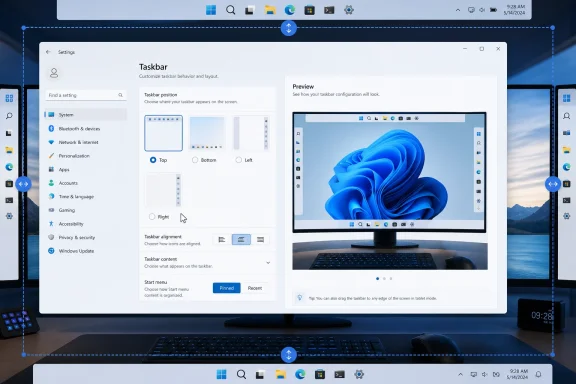
The restored ability to move the taskbar to the top, left, right, or bottom of the screen matters because it reverses one of Windows 11’s most symbolic regressions. Windows users had spent decades treating the taskbar as movable furniture. Windows 11 turned it into a fixture.
That tradeoff may have made sense to designers trying to simplify a platform with decades of accumulated affordances. It made less sense to developers with ultrawide monitors, sysadmins juggling remote sessions, accessibility users with strong muscle-memory needs, and anyone who had spent years building a workflow around a vertical bar. In that context, Microsoft’s new test build is not just adding a setting. It is restoring a contract.
The company’s language is telling. Microsoft frames the work under “performance, reliability, and craft,” not under a flashy Windows 12-style vision or an AI-first banner. That suggests the company understands that some of Windows 11’s credibility problem is not about missing features in the abstract. It is about the daily friction of a system that too often acted as if Microsoft knew the user’s workspace better than the user did.
That last point matters. A top-aligned taskbar that still spawns menus from the bottom of the display would feel like a prototype. A side taskbar that cannot handle flyouts, labels, and overflow gracefully would simply move the mess from one edge of the screen to another.
Microsoft is also pairing taskbar placement with alignment controls. On horizontal taskbars, icons can be centered or left-aligned. On vertical taskbars, they can be centered or aligned toward the top. That may sound like design trivia, but it is the kind of trivia that determines whether a feature becomes a daily tool or a novelty people turn off after ten minutes.
The vertical taskbar is especially important for modern displays. Laptop panels and desktop monitors have trended wider for years, while vertical space remains precious. Developers, writers, spreadsheet users, and anyone living in long documents can benefit from reclaiming a strip of height at the bottom of the screen. Microsoft is effectively acknowledging that a one-size-fits-all taskbar made less sense as screens became more varied.
There is also a muscle-memory argument. Many longtime Windows users prefer the Start button in a corner because corners are easy to hit with a mouse. Windows 11’s centered arrangement changed that target dynamically as pinned and running apps shifted. The option to combine edge placement with alignment gives those users a path back to predictability without forcing everyone else into a Windows 10 layout.
Windows 11’s default taskbar has always felt a little too pleased with itself. It looks spacious and touch-friendly, but that roominess has a cost on 13-inch and 14-inch screens. Every pixel consumed by the shell is a pixel unavailable to a browser tab, terminal window, timeline, spreadsheet, or code editor.
The compact taskbar is also an admission that touch friendliness and desktop density are not the same problem. Windows has to support tablets, convertibles, desktops, gaming rigs, virtual machines, and enterprise-managed notebooks. Treating all of those devices as if they benefit from the same shell geometry is tidy from a product-planning standpoint and irritating from a user standpoint.
Microsoft says the default remains unchanged, which is the right call. The problem with Windows 11 was never that Microsoft chose a modern default. The problem was that it made the default feel like a verdict. A compact option turns that verdict back into a preference.
For IT departments, this is the kind of change that can reduce small but persistent complaints after migration. No administrator wants to field tickets about taskbar height, Start layout, or “why did Microsoft move my stuff?” But those complaints shape user sentiment around an operating system rollout. If Windows 11 is to become the comfortable default before Windows 10’s long tail finally fades, Microsoft needs to make the everyday shell feel less imposed.
This is the kind of setting Windows 11 should have had from the beginning. If a user wants a clean Start menu with only pinned apps, that should not require manually removing items or spelunking through related privacy switches. If another user wants a fuller launcher with recent files and installed apps, that should be possible too. The operating system should not treat minimalism and utility as mutually exclusive camps.
The renaming of Recommended to Recent is a small but meaningful retreat from marketing language. “Recommended” suggested an intelligent system surfacing what Microsoft thought you might want. “Recent” is more honest: these are recently installed apps and recently used files, filtered and ordered by Windows. The new label lowers the rhetorical temperature.
That matters because the Recommended section became a symbol of Windows 11’s uncertain priorities. Was Start a launcher, a document hub, a Microsoft account surface, a discovery mechanism, or a promotional slot? Microsoft’s answer seemed to vary depending on the build. More granular toggles do not settle that philosophical argument, but they give users a way to opt out of the parts they do not want.
The privacy option to hide the user’s name and profile picture in Start is similarly practical. Screen sharing is no longer an edge case; it is normal work. Presentations, livestreams, remote support sessions, classrooms, and recorded demos all turn the desktop into a public surface. A Start menu that casually exposes identity details is not catastrophic, but it is unnecessary.
That list is important because it shows the difference between nostalgia and engineering reality. The Windows 11 taskbar was rebuilt, and restoring old behaviors is not as simple as flipping on dormant Windows 10 code. Every flyout, animation, tooltip, tray behavior, overflow case, touch gesture, and multi-monitor arrangement has to work in more than one orientation.
Still, users are right to be impatient. Microsoft made the original simplification decision. It chose to ship Windows 11 without capabilities that many users considered basic. The fact that rebuilding them takes time may be technically valid, but it does not erase the years in which users were told, implicitly or explicitly, to adapt.
There is also a deployment question. Experimental channel features are not promises for production PCs. They can change, move slowly, or disappear. Windows Insiders are seeing the direction of travel, not a guaranteed shipping schedule for the stable channel.
That caveat should temper excitement, especially for enterprise administrators. A feature in an Insider build is not a migration plan. It is evidence of intent. For fleet management, the real moment comes when these controls reach broadly supported Windows 11 releases, appear in policy documentation, and behave consistently across hardware, profiles, and display configurations.
That is a notable change in tone. For much of Windows 11’s life, the operating system’s most visible energy went into new surfaces: Widgets, Copilot, account prompts, redesigned apps, cloud integrations, and AI-adjacent experiences. Some of those additions were useful. Others felt like Microsoft adding new storefronts while the front door still squeaked.
The taskbar and Start menu are different. They are not optional destinations inside Windows; they are the membrane through which most users touch the system. If they feel constrained, the whole OS feels constrained. If they become more predictable and personal, Windows 11 gets credit every day without needing to ask for it.
This is also why the word “craft” matters. In software, craft is not only about rounded corners or animation curves. It is about whether a product respects the tiny routines users repeat hundreds of times a week. A movable taskbar is craft. A Start menu that can hide file recommendations without breaking recent files elsewhere is craft. A privacy toggle for presentations is craft.
The challenge for Microsoft is consistency. Windows 11 often improves in one area while adding friction in another. A better Start menu will not fully offset aggressive account nudges, unwanted recommendations, or opaque AI integration. But it can signal that Microsoft is listening to a different class of feedback: not just “add the next thing,” but “stop taking away the old thing that worked.”
A movable taskbar may sound like a personal preference until you consider multi-monitor operations centers, accessibility accommodations, virtual desktop infrastructure, remote support, and specialized line-of-business environments. In those settings, layout is part of the workflow. Moving from Windows 10 to Windows 11 was not just an upgrade; it was a forced renegotiation of habits.
The Start menu toggles could also matter in managed environments. Organizations often want cleaner, more predictable launch surfaces. They may not want recent documents appearing during screen shares or sensitive file names surfacing in a shared workspace. The ability to separate Start recommendations from other recent-file behavior gives administrators and users more room to shape the experience without bluntly disabling useful history everywhere.
The unresolved question is policy. Microsoft has not turned this Insider announcement into a full enterprise control story yet. IT pros will want to know what can be configured through Group Policy, MDM, provisioning packages, default user profiles, or future Settings catalog entries. A consumer-facing toggle is welcome; a manageable setting is what makes it operationally useful.
There is also the timing issue. Windows 10’s support lifecycle has already pushed many organizations toward Windows 11 planning, but migration decisions often lag behind availability. If these shell improvements reach production builds soon enough, they may soften one of the emotional barriers to Windows 11 adoption. If they drift through Insider channels for months, they will remain a nice promise rather than a deployment factor.
That tension is not unique to Microsoft. Every platform owner wants to move users toward the next computing paradigm. But operating systems earn the right to introduce ambitious new layers by keeping the base layer trustworthy. If the shell feels unfinished, AI features can look less like innovation and more like misdirection.
The TechRepublic report’s final note that Copilot Mode is going away as Microsoft turns AI browsing into a core Edge feature fits that pattern. Microsoft is still integrating AI deeply, but the branding and placement are shifting. The lesson from Windows 11’s taskbar saga should apply there too: integration works best when users feel they can shape it, suppress it, or ignore it without fighting the product.
The Windows shell is where that trust is either earned or squandered. Users may tolerate experiments in sidebars, browser modes, or optional assistants. They are far less forgiving when the launcher, taskbar, file history, and window-switching surfaces feel like contested territory.
If Microsoft is serious about “performance, reliability, and craft,” it should treat customization not as a concession to power users but as a reliability feature in human terms. A predictable workspace reduces cognitive load. A customizable workspace lets different users arrive at that predictability in different ways.
For Windows enthusiasts, the build is worth watching because it restores capabilities that should never have been controversial. For sysadmins, it is worth tracking because it may reduce user resistance and improve privacy hygiene during presentations and shared work. For developers and heavy multitaskers, the vertical taskbar and compact mode may finally make Windows 11 feel less wasteful on wide screens.
The most concrete read is this:
 Microsoft Finally Admits the Desktop Is Not a Phone Screen
Windows 11 launched with a confidence that often looked like stubbornness. The centered Start button, simplified taskbar, and reduced customization surface were presented as a modern reset, a calmer interface for a post-Windows 10 era. But the desktop is not merely a canvas for brand identity; it is a workbench, and people get very particular about where the tools sit.The restored ability to move the taskbar to the top, left, right, or bottom of the screen matters because it reverses one of Windows 11’s most symbolic regressions. Windows users had spent decades treating the taskbar as movable furniture. Windows 11 turned it into a fixture.
That tradeoff may have made sense to designers trying to simplify a platform with decades of accumulated affordances. It made less sense to developers with ultrawide monitors, sysadmins juggling remote sessions, accessibility users with strong muscle-memory needs, and anyone who had spent years building a workflow around a vertical bar. In that context, Microsoft’s new test build is not just adding a setting. It is restoring a contract.
The company’s language is telling. Microsoft frames the work under “performance, reliability, and craft,” not under a flashy Windows 12-style vision or an AI-first banner. That suggests the company understands that some of Windows 11’s credibility problem is not about missing features in the abstract. It is about the daily friction of a system that too often acted as if Microsoft knew the user’s workspace better than the user did.
The Taskbar’s Return to the Edges Is a Bigger Deal Than It Looks
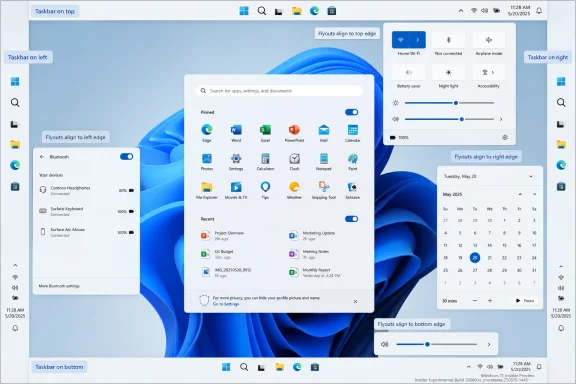
The headline feature is simple: the taskbar can move again. In the Experimental channel, users can place it along the bottom, top, left, or right edge of the screen through Settings rather than registry edits, hacks, or third-party shell replacements. Start, Search, and other flyouts are also supposed to open relative to the taskbar’s new position, which is the detail that separates a real feature from a cosmetic switch.That last point matters. A top-aligned taskbar that still spawns menus from the bottom of the display would feel like a prototype. A side taskbar that cannot handle flyouts, labels, and overflow gracefully would simply move the mess from one edge of the screen to another.
Microsoft is also pairing taskbar placement with alignment controls. On horizontal taskbars, icons can be centered or left-aligned. On vertical taskbars, they can be centered or aligned toward the top. That may sound like design trivia, but it is the kind of trivia that determines whether a feature becomes a daily tool or a novelty people turn off after ten minutes.
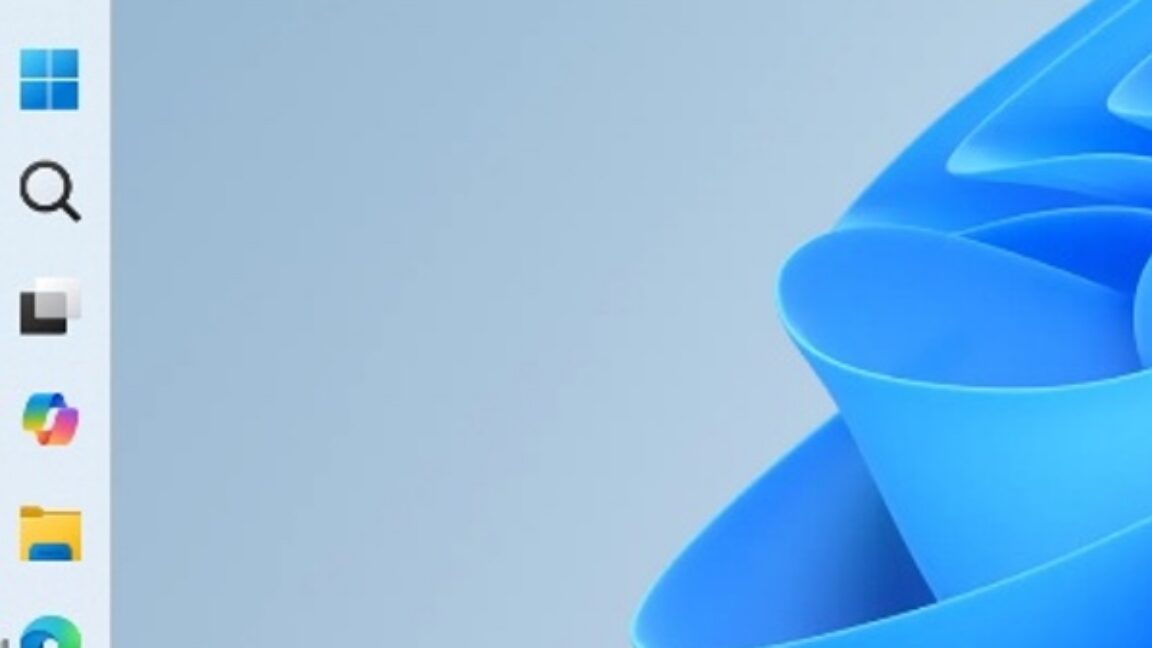
The vertical taskbar is especially important for modern displays. Laptop panels and desktop monitors have trended wider for years, while vertical space remains precious. Developers, writers, spreadsheet users, and anyone living in long documents can benefit from reclaiming a strip of height at the bottom of the screen. Microsoft is effectively acknowledging that a one-size-fits-all taskbar made less sense as screens became more varied.
There is also a muscle-memory argument. Many longtime Windows users prefer the Start button in a corner because corners are easy to hit with a mouse. Windows 11’s centered arrangement changed that target dynamically as pinned and running apps shifted. The option to combine edge placement with alignment gives those users a path back to predictability without forcing everyone else into a Windows 10 layout.
The Small Taskbar Is Microsoft’s Least Glamorous Quality-of-Life Fix
Alongside movable placement, Microsoft is testing a smaller taskbar. The setting reduces icon size and taskbar height, giving applications more room. It is not the sort of feature that wins keynote applause, but it may be one of the most useful changes for people on compact laptops.Windows 11’s default taskbar has always felt a little too pleased with itself. It looks spacious and touch-friendly, but that roominess has a cost on 13-inch and 14-inch screens. Every pixel consumed by the shell is a pixel unavailable to a browser tab, terminal window, timeline, spreadsheet, or code editor.
The compact taskbar is also an admission that touch friendliness and desktop density are not the same problem. Windows has to support tablets, convertibles, desktops, gaming rigs, virtual machines, and enterprise-managed notebooks. Treating all of those devices as if they benefit from the same shell geometry is tidy from a product-planning standpoint and irritating from a user standpoint.
Microsoft says the default remains unchanged, which is the right call. The problem with Windows 11 was never that Microsoft chose a modern default. The problem was that it made the default feel like a verdict. A compact option turns that verdict back into a preference.
For IT departments, this is the kind of change that can reduce small but persistent complaints after migration. No administrator wants to field tickets about taskbar height, Start layout, or “why did Microsoft move my stuff?” But those complaints shape user sentiment around an operating system rollout. If Windows 11 is to become the comfortable default before Windows 10’s long tail finally fades, Microsoft needs to make the everyday shell feel less imposed.
Start Menu Control Is Really a Privacy and Clutter Story
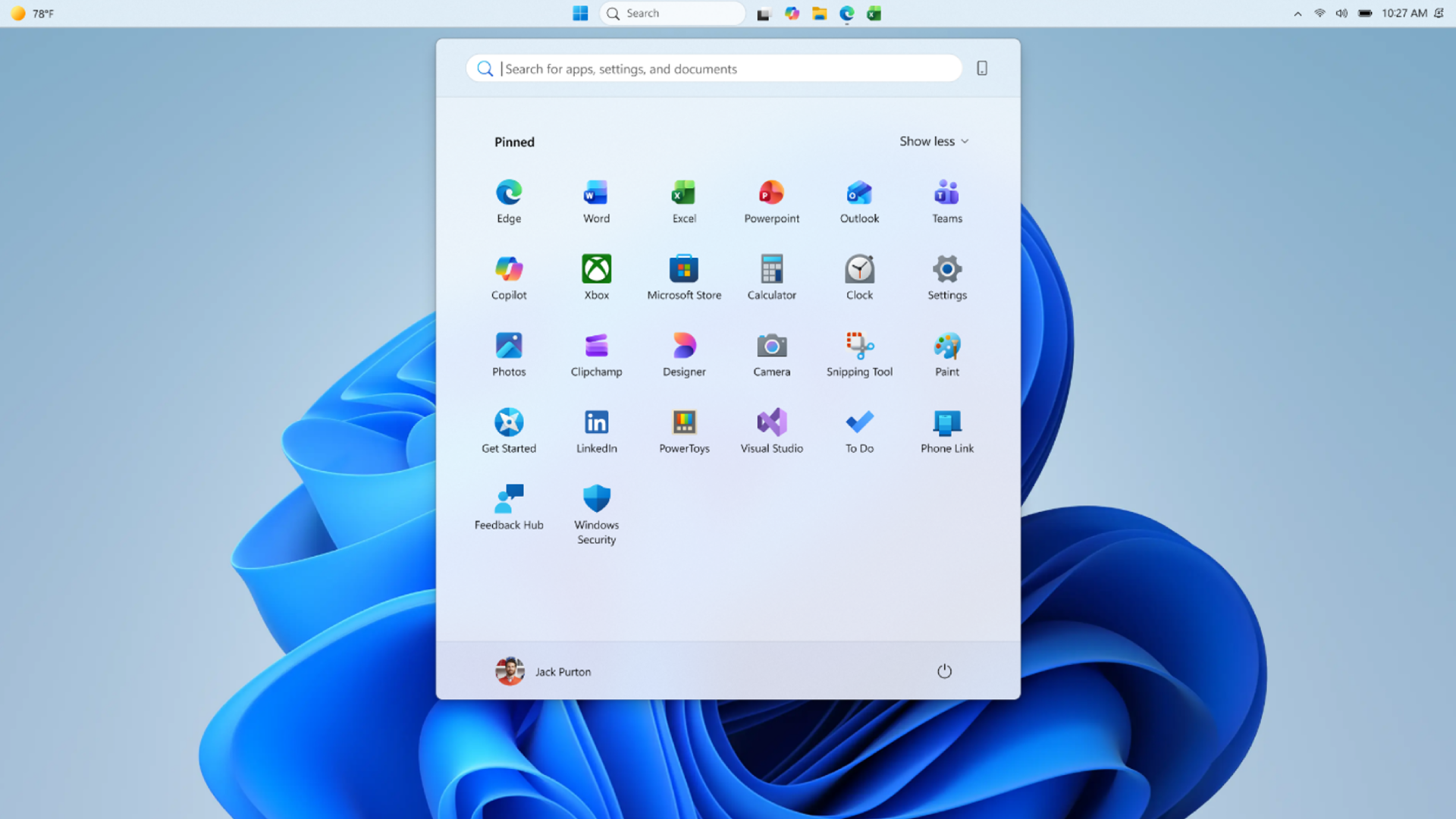
The Start menu changes are quieter but arguably more revealing. Microsoft is testing section-level toggles for Pinned, Recommended, and All, giving users direct control over which parts of Start appear. The company is also separating file recommendations in Start from recent files elsewhere in Windows, which fixes a long-standing overreach in how one preference could affect several surfaces.This is the kind of setting Windows 11 should have had from the beginning. If a user wants a clean Start menu with only pinned apps, that should not require manually removing items or spelunking through related privacy switches. If another user wants a fuller launcher with recent files and installed apps, that should be possible too. The operating system should not treat minimalism and utility as mutually exclusive camps.
The renaming of Recommended to Recent is a small but meaningful retreat from marketing language. “Recommended” suggested an intelligent system surfacing what Microsoft thought you might want. “Recent” is more honest: these are recently installed apps and recently used files, filtered and ordered by Windows. The new label lowers the rhetorical temperature.
That matters because the Recommended section became a symbol of Windows 11’s uncertain priorities. Was Start a launcher, a document hub, a Microsoft account surface, a discovery mechanism, or a promotional slot? Microsoft’s answer seemed to vary depending on the build. More granular toggles do not settle that philosophical argument, but they give users a way to opt out of the parts they do not want.
The privacy option to hide the user’s name and profile picture in Start is similarly practical. Screen sharing is no longer an edge case; it is normal work. Presentations, livestreams, remote support sessions, classrooms, and recorded demos all turn the desktop into a public surface. A Start menu that casually exposes identity details is not catastrophic, but it is unnecessary.
The Missing Pieces Show This Is Still a Rebuild, Not a Restoration
Microsoft is not bringing back every old behavior at once. Auto-hide and the tablet-optimized taskbar are not supported yet when the taskbar is moved away from the bottom. Touch gestures for alternate positions are still in progress. Search boxes appear as icons in those layouts for now. Microsoft is also still evaluating features such as different taskbar positions per monitor and drag and drop.That list is important because it shows the difference between nostalgia and engineering reality. The Windows 11 taskbar was rebuilt, and restoring old behaviors is not as simple as flipping on dormant Windows 10 code. Every flyout, animation, tooltip, tray behavior, overflow case, touch gesture, and multi-monitor arrangement has to work in more than one orientation.
Still, users are right to be impatient. Microsoft made the original simplification decision. It chose to ship Windows 11 without capabilities that many users considered basic. The fact that rebuilding them takes time may be technically valid, but it does not erase the years in which users were told, implicitly or explicitly, to adapt.
There is also a deployment question. Experimental channel features are not promises for production PCs. They can change, move slowly, or disappear. Windows Insiders are seeing the direction of travel, not a guaranteed shipping schedule for the stable channel.
That caveat should temper excitement, especially for enterprise administrators. A feature in an Insider build is not a migration plan. It is evidence of intent. For fleet management, the real moment comes when these controls reach broadly supported Windows 11 releases, appear in policy documentation, and behave consistently across hardware, profiles, and display configurations.
The Windows 11 Course Correction Is Being Written in Small Settings
The temptation is to treat these changes as Microsoft “bringing back Windows 10 features.” That is true in the narrow sense, but it undersells the strategic shift. Microsoft is trying to reframe Windows quality around visible, user-facing repairs rather than abstract platform work.That is a notable change in tone. For much of Windows 11’s life, the operating system’s most visible energy went into new surfaces: Widgets, Copilot, account prompts, redesigned apps, cloud integrations, and AI-adjacent experiences. Some of those additions were useful. Others felt like Microsoft adding new storefronts while the front door still squeaked.
The taskbar and Start menu are different. They are not optional destinations inside Windows; they are the membrane through which most users touch the system. If they feel constrained, the whole OS feels constrained. If they become more predictable and personal, Windows 11 gets credit every day without needing to ask for it.
This is also why the word “craft” matters. In software, craft is not only about rounded corners or animation curves. It is about whether a product respects the tiny routines users repeat hundreds of times a week. A movable taskbar is craft. A Start menu that can hide file recommendations without breaking recent files elsewhere is craft. A privacy toggle for presentations is craft.
The challenge for Microsoft is consistency. Windows 11 often improves in one area while adding friction in another. A better Start menu will not fully offset aggressive account nudges, unwanted recommendations, or opaque AI integration. But it can signal that Microsoft is listening to a different class of feedback: not just “add the next thing,” but “stop taking away the old thing that worked.”
Enterprise IT Will Care Less About Nostalgia Than Predictability
For enthusiasts, this update is about personalization. For enterprise IT, it is about reducing resistance. Desktop changes that seem minor in Redmond can become training issues, helpdesk noise, and adoption blockers inside organizations that still run tightly standardized workflows.A movable taskbar may sound like a personal preference until you consider multi-monitor operations centers, accessibility accommodations, virtual desktop infrastructure, remote support, and specialized line-of-business environments. In those settings, layout is part of the workflow. Moving from Windows 10 to Windows 11 was not just an upgrade; it was a forced renegotiation of habits.
The Start menu toggles could also matter in managed environments. Organizations often want cleaner, more predictable launch surfaces. They may not want recent documents appearing during screen shares or sensitive file names surfacing in a shared workspace. The ability to separate Start recommendations from other recent-file behavior gives administrators and users more room to shape the experience without bluntly disabling useful history everywhere.
The unresolved question is policy. Microsoft has not turned this Insider announcement into a full enterprise control story yet. IT pros will want to know what can be configured through Group Policy, MDM, provisioning packages, default user profiles, or future Settings catalog entries. A consumer-facing toggle is welcome; a manageable setting is what makes it operationally useful.
There is also the timing issue. Windows 10’s support lifecycle has already pushed many organizations toward Windows 11 planning, but migration decisions often lag behind availability. If these shell improvements reach production builds soon enough, they may soften one of the emotional barriers to Windows 11 adoption. If they drift through Insider channels for months, they will remain a nice promise rather than a deployment factor.
Microsoft’s AI Push Makes the Shell Repairs More Necessary, Not Less
The broader context is impossible to ignore. Microsoft has spent the last few years pushing Copilot branding across Windows, Edge, Microsoft 365, and developer tooling. At the same time, many users have been asking for less glamorous things: a better Start menu, a less rigid taskbar, fewer distractions, more control.That tension is not unique to Microsoft. Every platform owner wants to move users toward the next computing paradigm. But operating systems earn the right to introduce ambitious new layers by keeping the base layer trustworthy. If the shell feels unfinished, AI features can look less like innovation and more like misdirection.
The TechRepublic report’s final note that Copilot Mode is going away as Microsoft turns AI browsing into a core Edge feature fits that pattern. Microsoft is still integrating AI deeply, but the branding and placement are shifting. The lesson from Windows 11’s taskbar saga should apply there too: integration works best when users feel they can shape it, suppress it, or ignore it without fighting the product.
The Windows shell is where that trust is either earned or squandered. Users may tolerate experiments in sidebars, browser modes, or optional assistants. They are far less forgiving when the launcher, taskbar, file history, and window-switching surfaces feel like contested territory.
If Microsoft is serious about “performance, reliability, and craft,” it should treat customization not as a concession to power users but as a reliability feature in human terms. A predictable workspace reduces cognitive load. A customizable workspace lets different users arrive at that predictability in different ways.
The Practical Reading for WindowsForum Readers Is Cautious Optimism
This is not the triumphant return of the classic Windows desktop. It is an Insider test of several long-requested controls, with meaningful gaps still acknowledged by Microsoft. But it is also one of the clearest signs yet that the company understands how much goodwill it lost by narrowing the Windows 11 shell.For Windows enthusiasts, the build is worth watching because it restores capabilities that should never have been controversial. For sysadmins, it is worth tracking because it may reduce user resistance and improve privacy hygiene during presentations and shared work. For developers and heavy multitaskers, the vertical taskbar and compact mode may finally make Windows 11 feel less wasteful on wide screens.
The most concrete read is this:
- Microsoft is testing taskbar placement on the top, bottom, left, and right edges of the screen in Windows 11 Insider Experimental Build 26300.8493.
- Start, Search, and related flyouts are designed to open from the taskbar’s selected location rather than remaining tied to the bottom edge.
- A smaller taskbar option reduces icon size and bar height for users who want more application space.
- Start menu controls are becoming more granular, with independent visibility toggles for sections and a separate control for file recommendations.
- The Recommended section is being renamed Recent, a more accurate label for recently installed apps and recently used files.
- Important pieces remain unfinished, including alternate-position auto-hide, tablet-optimized behavior, some touch gestures, and potentially per-monitor taskbar placement.
References
- Primary source: TechRepublic
Published: Mon, 18 May 2026 14:14:56 GMT

Windows 11 Start Menu, Taskbar Are Getting More Customization
Microsoft is testing Windows 11 taskbar and Start menu updates, including movable taskbar positions, cleaner Start controls, and compact layout options.www.techrepublic.com
- Related coverage: windowscentral.com

The movable taskbar is finally back in Windows 11 — and yes, you can try it right now
Windows 11 Build 26300.8493 introduces the ability to move the Taskbar and resize icons, reversing a major launch-day limitation. www.windowscentral.com
- Official source: support.microsoft.com

Customize the Taskbar in Windows - Microsoft Support
Learn how to use the taskbar features in Windows. Hide the taskbar, pin an app, change the location, and more with taskbar settings.
support.microsoft.com
- Related coverage: bleepingcomputer.com
Microsoft testing adjustable taskbar, Start menu in Windows 11
Microsoft has finally brought back the resizable taskbar and Start menu to Windows 11 in the latest preview version rolling out to Insiders in the Experimental channel.www.bleepingcomputer.com
- Related coverage: abit.ee
Windows 11 Will Finally Let You Move the Taskbar and Resize the Start Menu
Microsoft is testing taskbar repositioning and Start menu resizing in Windows 11, currently available in the Windows Insider Experimental channel.abit.ee
- Related coverage: notebookcheck.net

Microsoft brings back Windows 10 taskbar customizations to Windows 11
Microsoft is finally giving Windows 11 users more control over the taskbar again, including full screen-edge placement and a smaller, more compact mode. The update also improves how menus and window labels behave depending on the taskbar position. www.notebookcheck.net
- Related coverage: pcworld.com

How to move Windows 11’s Start menu to the left corner
If you don't like the new, centered look of Windows 11's Start menu and Taskbar icons, here's how to move them back to their familiar left-hand corner. www.pcworld.com
- Related coverage: guidingtech.com
How to Move the Taskbar on Windows 11
Discover if it’s possible to move the taskbar in Windows 11, and how to move the taskbar on Windows 11 devices to suit your personal preferences.www.guidingtech.com
- Related coverage: howtogeek.com

Windows 11 Lets You Move the Taskbar to the Left or Right, But It's Broken
Does this mean we could have an official option soon? www.howtogeek.com
- Related coverage: windowslatest.com

Explained: Why you can't move Windows 11 taskbar like Windows 10, according to Microsoft
Windows 11 can't move the taskbar, and four years later, Microsoft still has no plans to bring it back. Here's why, according to Microsoft. www.windowslatest.com
- Related coverage: techadvisor.com

How to move the Windows 11 Start menu and taskbar icons
Windows 11's Start menu and taskbar icons are in the middle of the screen by default, but you're not stuck with them there www.techadvisor.com
- Related coverage: moneycontrol.com
Microsoft finally brings movable taskbar and resizable Start menu: Here's how to do it
Microsoft has introduced movable taskbar support and a resizable Start menu in Windows 11 Experimental builds, giving users more customization options including taskbar positioning, layout changes, and improved Start menu controls.www.moneycontrol.com - Official source: blogs.windows.com

Improving Windows quality: Making Taskbar and Start more personal
In our commitment to Windows quality, we outlined our plans to deliver improvements in performance, reliability, and craft. We are also committed toblogs.windows.com