

On June 26, 2026, Microsoft began rolling out its redesigned Windows Insider Program experience to retail Windows 11 PCs while releasing Insider Preview builds 26220.8754, 26300.8758, 28020.2366, 28120.2374, and 29617.1000 across Beta, Experimental, 26H1, and Future Platforms branches through Settings this week. The build numbers matter, but the bigger story is that Microsoft is moving Insider enrollment from a testing-club ritual into the mainstream Windows control surface. That is not just a UI change; it is a strategic bet that more Windows users will tolerate preview software if the escape hatch looks less like a reinstall and more like a channel switch.
Microsoft’s announcement lands in a Windows era increasingly defined by staggered enablement, hidden feature flags, AI-era hardware splits, and an Insider Program that no longer maps cleanly to the old Dev/Beta/Release Preview mental model. The company is trying to make experimentation feel safer, but it is also making Windows’ release machinery more complicated for anyone who has to support it.
The most consequential part of today’s announcement is not Build 29617.1000, nor even the new taskbar size setting. It is the arrival of the new Windows Insider Program channel experience on standard retail Windows 11 builds.
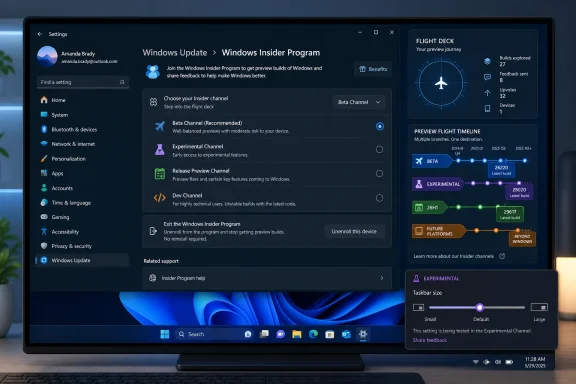
Microsoft says retail users — meaning people not already running Windows 11 Insider Preview builds — will begin seeing the new channel experience under Settings > Windows Update > Windows Insider Program. The rollout is gradual, so the absence of the new options today does not necessarily mean a machine is misconfigured or excluded. As usual with modern Windows, visibility is itself a rollout variable.
This matters because the Insider Program has always been both an engineering pipeline and a psychological threshold. Joining has historically felt like stepping off the stable branch of Windows and into a territory where documentation, recovery planning, and backup discipline mattered. Microsoft’s new pitch is simpler: try earlier Windows features, move channels in more cases, and exit without the nuclear option of a clean install.
That “in most cases” qualifier is doing a lot of work. Windows flighting is still bound to build numbers, servicing baselines, feature packages, and whether a device has crossed into a branch that cannot naturally move backward. But the message is clear: Microsoft wants the retail Windows user to see Insider participation less as a one-way door.
The refreshed experience promises more flexibility around switching channels or leaving the program. That addresses one of the program’s long-running pain points: users often joined an aggressive channel to test one feature, then discovered that returning to stability could require waiting for public builds to catch up or reinstalling Windows entirely. Microsoft is now trying to make channel movement feel more like subscription management than operating-system surgery.
That does not eliminate risk. It reframes it. A retail user who sees a friendly new Insider interface in Settings may not fully understand the difference between previewing a feature on a broadly aligned build and entering an experimental branch whose build number lives ahead of retail Windows. The UI can reduce friction, but it cannot repeal the logic of Windows servicing.
For enthusiasts, this is welcome. For IT admins, it is a reminder that Windows’ consumer-facing control panels increasingly expose choices that may conflict with organizational discipline. The redesigned WIP experience may be easier to use, but easier access to pre-release software is not automatically a win on unmanaged or lightly managed machines.
That spread is not accidental. Windows 11 development now spans release-aligned feature updates, enablement-package branches, silicon-support releases, and future-platform work that Microsoft explicitly says is not aligned to a retail Windows release. The Insider Program is no longer simply “the next Windows.” It is several Windows futures moving at different speeds.
The 26H1 branch is especially important to read correctly. Microsoft’s documentation frames Windows 11 version 26H1 as a platform-focused release for specific silicon rather than a general feature update successor to Windows 11 version 25H2. That distinction matters because consumers often interpret a higher version number as “the next Windows everyone gets.” In this case, the branch exists for platform enablement, not as a broad feature milestone for every PC.
The Future Platforms branch is even more detached from ordinary upgrade planning. Microsoft notes that the new Insider Program changes have not yet launched for Experimental Future Platforms, currently including Canary 29600-series builds. That carve-out is the quiet warning label on the whole announcement: the new channel experience may make Insider participation easier, but Microsoft is still separating the most speculative work from the polished retail-facing path.
That distinction is crucial. The rollout changes the entry point, not the fundamental contract of preview software. Insider builds remain pre-release Windows, with all the usual caveats around bugs, incomplete features, configuration drift, and features arriving or disappearing without the clean narrative of a public feature update.
Microsoft’s gradual rollout also means support conversations are about to get more uneven. Two retail Windows 11 PCs on the same apparent public build may not show the same WIP settings experience on the same day. For home users, that is merely confusing. For help desks and managed service providers, it is another example of Windows configuration becoming stateful, cloud-mediated, and difficult to explain from build number alone.
This is the modern Windows bargain. Microsoft can validate experiences more safely by rolling them out slowly and observing telemetry. Users get fewer big-bang changes. But the operating system becomes harder to describe in a single sentence, and “I’m fully updated” no longer means “I see the same thing you do.”
On paper, this is modest. In practice, taskbar customization has been one of Windows 11’s most persistent symbolic fights. Microsoft’s redesigned taskbar arrived with a cleaner visual model but removed or constrained several habits that long-time Windows users considered basic muscle memory. Every subsequent taskbar tweak has therefore carried more weight than its surface area suggests.
A dedicated Taskbar Size setting is a concession to discoverability. Power users have long been willing to hunt through registry edits, third-party tools, or hidden options to make Windows behave the way they want. Mainstream users generally are not. If Microsoft wants Windows 11 to feel both modern and personal, it has to move customization out of the folklore layer and into Settings.
The placement in Experimental also signals caution. Microsoft is not promising that this exact implementation will ship broadly unchanged. It is testing the shape of the control, the user demand, and likely the layout consequences across devices, display scales, and accessibility scenarios. A taskbar size toggle sounds simple until it collides with touch targets, multi-monitor layouts, widgets, overflow, Copilot entry points, and the system tray.
Microsoft’s language is careful: in most cases, users will be able to switch channels or exit without doing a full reinstall. That does not mean all paths are reversible, but it does mean the company recognizes that reinstall risk suppresses participation. The Insider Program needs more testers than just hobbyists with spare laptops and VM farms.
This is particularly important as Windows features become more hardware-sensitive. AI features, NPU-dependent experiences, security capabilities, and platform changes tied to new silicon all need broader validation than Microsoft can get from one monolithic preview ring. If the company wants meaningful feedback from real-world PCs, it has to make enrollment less intimidating.
Still, reversibility must be legible. A user should not need to understand every build train to know whether they can safely back out. The success of this retail WIP rollout will depend less on whether the Settings page looks cleaner and more on whether it communicates consequences before the user clicks into a branch with limited exits.
That creates a more agile Windows. It also creates an operating system that is less predictable from the outside. A user may be in Beta but not have a feature another Beta user sees. A feature may arrive in Experimental but not be tied to the next retail release. A version number may signal platform support rather than a general upgrade target.
For Windows enthusiasts, this is fascinating because it gives more surface area to explore. For admins, it is exhausting because the old idea of a single test ring matching the next production wave is weaker than ever. Testing Windows now requires understanding not just builds, but eligibility, rollout controls, policy settings, app versions, and hardware classes.
The new retail WIP interface may help Microsoft recruit more participants into that staging area. But participation without comprehension is a mixed blessing. Feedback quality depends on users knowing what they are running, why they received it, and whether their experience represents a bug, a rollout gap, or intentional segmentation.
The risk is not that a careful admin suddenly loses control of a well-managed tenant. The risk is that unmanaged executives, developer workstations, lab machines, or small-business PCs drift into preview channels because the new experience makes it feel safe. A more approachable UI can lower the barrier for exactly the users who do not read release notes.
Developers and technical users may reasonably want access. That argues for a sanctioned testing path, not a blanket cultural ban. If an organization depends on Windows endpoints, it should have designated Insider devices, documented rollback procedures, and a clear distinction between “testing next-wave Windows” and “running pre-release Windows on the machine that closes payroll.”
This is also a good moment to revisit backup assumptions. If Microsoft’s new channel model reduces reinstall frequency, excellent. But pre-release operating systems still deserve the same operational caution as any other change to a production endpoint: tested recovery media, known-good restore points where appropriate, and user data synced somewhere safer than the local disk.
That omission is sensible. Future Platforms builds are not aligned to a retail Windows release, and Microsoft should not pretend they are just another rung on a friendly ladder. They exist for early platform work, which can include changes too raw, too hardware-specific, or too structurally disruptive for mainstream preview expectations.
The old Canary branding trained users to expect instability, but channel renames and program refreshes can blur those instincts. By holding back the new experience for the 29600 series, Microsoft is effectively acknowledging that some branches should remain harder to enter or at least more explicitly caveated. Not every preview should be domesticated by better Settings UX.
That restraint is good. It would be worse if Microsoft used one polished retail-facing interface to flatten the difference between Beta, Experimental, 26H1 platform support, and future-platform engineering. The Insider Program needs clearer doors, not just prettier ones.
The company can make that tension work only if the new UI is brutally clear. It must tell users not just what channel they can join, but what branch they are on, what build train they will receive, what their exit options are, and whether their device is entering a release-aligned path or a speculative one. Anything less will turn flexibility into confusion.
There is precedent for both outcomes. Microsoft has improved Windows Update messaging over the years, but it has also leaned heavily on vague phrasing such as “coming soon,” “gradual rollout,” and “selected devices.” Those phrases are operationally convenient, but they are poor tools for users trying to make risk decisions.
The redesigned WIP experience will therefore be judged by its honesty. If it makes preview participation feel easier while preserving a clear account of consequences, it will be a real improvement. If it merely wraps a complex release graph in friendlier language, it will mostly recruit more confused testers.
Microsoft’s announcement lands in a Windows era increasingly defined by staggered enablement, hidden feature flags, AI-era hardware splits, and an Insider Program that no longer maps cleanly to the old Dev/Beta/Release Preview mental model. The company is trying to make experimentation feel safer, but it is also making Windows’ release machinery more complicated for anyone who has to support it.
 Microsoft Moves the Insider Door Into Retail Windows
The most consequential part of today’s announcement is not Build 29617.1000, nor even the new taskbar size setting. It is the arrival of the new Windows Insider Program channel experience on standard retail Windows 11 builds.Microsoft says retail users — meaning people not already running Windows 11 Insider Preview builds — will begin seeing the new channel experience under Settings > Windows Update > Windows Insider Program. The rollout is gradual, so the absence of the new options today does not necessarily mean a machine is misconfigured or excluded. As usual with modern Windows, visibility is itself a rollout variable.
This matters because the Insider Program has always been both an engineering pipeline and a psychological threshold. Joining has historically felt like stepping off the stable branch of Windows and into a territory where documentation, recovery planning, and backup discipline mattered. Microsoft’s new pitch is simpler: try earlier Windows features, move channels in more cases, and exit without the nuclear option of a clean install.
That “in most cases” qualifier is doing a lot of work. Windows flighting is still bound to build numbers, servicing baselines, feature packages, and whether a device has crossed into a branch that cannot naturally move backward. But the message is clear: Microsoft wants the retail Windows user to see Insider participation less as a one-way door.
The Channel Switch Is the Product Now
The Insider Program used to be easy to summarize: pick a ring, accept the risk, and wait for Windows to change underneath you. That model has been dissolving for years. Today’s announcement confirms that the channel framework itself has become a product Microsoft is actively retailing.The refreshed experience promises more flexibility around switching channels or leaving the program. That addresses one of the program’s long-running pain points: users often joined an aggressive channel to test one feature, then discovered that returning to stability could require waiting for public builds to catch up or reinstalling Windows entirely. Microsoft is now trying to make channel movement feel more like subscription management than operating-system surgery.
That does not eliminate risk. It reframes it. A retail user who sees a friendly new Insider interface in Settings may not fully understand the difference between previewing a feature on a broadly aligned build and entering an experimental branch whose build number lives ahead of retail Windows. The UI can reduce friction, but it cannot repeal the logic of Windows servicing.
For enthusiasts, this is welcome. For IT admins, it is a reminder that Windows’ consumer-facing control panels increasingly expose choices that may conflict with organizational discipline. The redesigned WIP experience may be easier to use, but easier access to pre-release software is not automatically a win on unmanaged or lightly managed machines.
Build Numbers Tell a Messier Story Than Channel Names
Microsoft’s build lineup for June 26 is a compact lesson in how fragmented the Windows preview pipeline has become. The company lists Beta Build 26220.8754 and Experimental Build 26300.8758 for the mainstream current-development path, plus Beta 26H1 Build 28020.2366, Experimental 26H1 Build 28120.2374, and Experimental Future Platforms Build 29617.1000.That spread is not accidental. Windows 11 development now spans release-aligned feature updates, enablement-package branches, silicon-support releases, and future-platform work that Microsoft explicitly says is not aligned to a retail Windows release. The Insider Program is no longer simply “the next Windows.” It is several Windows futures moving at different speeds.
The 26H1 branch is especially important to read correctly. Microsoft’s documentation frames Windows 11 version 26H1 as a platform-focused release for specific silicon rather than a general feature update successor to Windows 11 version 25H2. That distinction matters because consumers often interpret a higher version number as “the next Windows everyone gets.” In this case, the branch exists for platform enablement, not as a broad feature milestone for every PC.
The Future Platforms branch is even more detached from ordinary upgrade planning. Microsoft notes that the new Insider Program changes have not yet launched for Experimental Future Platforms, currently including Canary 29600-series builds. That carve-out is the quiet warning label on the whole announcement: the new channel experience may make Insider participation easier, but Microsoft is still separating the most speculative work from the polished retail-facing path.
Retail Rollout Does Not Mean Retail Stability
The phrase “retail launch” can mislead if read too quickly. Microsoft is not shipping Insider builds to everyone. It is shipping the new Insider Program experience into retail Windows 11, where users can choose to enroll and see the updated channel model.That distinction is crucial. The rollout changes the entry point, not the fundamental contract of preview software. Insider builds remain pre-release Windows, with all the usual caveats around bugs, incomplete features, configuration drift, and features arriving or disappearing without the clean narrative of a public feature update.
Microsoft’s gradual rollout also means support conversations are about to get more uneven. Two retail Windows 11 PCs on the same apparent public build may not show the same WIP settings experience on the same day. For home users, that is merely confusing. For help desks and managed service providers, it is another example of Windows configuration becoming stateful, cloud-mediated, and difficult to explain from build number alone.
This is the modern Windows bargain. Microsoft can validate experiences more safely by rolling them out slowly and observing telemetry. Users get fewer big-bang changes. But the operating system becomes harder to describe in a single sentence, and “I’m fully updated” no longer means “I see the same thing you do.”
The Taskbar Size Setting Is Small, Telling, and Overdue
The only notable user-facing feature called out in today’s announcement is a new dedicated Taskbar Size setting in the Experimental channel. Microsoft says the option is intended to make taskbar customization easier to find, understand, and personalize.On paper, this is modest. In practice, taskbar customization has been one of Windows 11’s most persistent symbolic fights. Microsoft’s redesigned taskbar arrived with a cleaner visual model but removed or constrained several habits that long-time Windows users considered basic muscle memory. Every subsequent taskbar tweak has therefore carried more weight than its surface area suggests.
A dedicated Taskbar Size setting is a concession to discoverability. Power users have long been willing to hunt through registry edits, third-party tools, or hidden options to make Windows behave the way they want. Mainstream users generally are not. If Microsoft wants Windows 11 to feel both modern and personal, it has to move customization out of the folklore layer and into Settings.
The placement in Experimental also signals caution. Microsoft is not promising that this exact implementation will ship broadly unchanged. It is testing the shape of the control, the user demand, and likely the layout consequences across devices, display scales, and accessibility scenarios. A taskbar size toggle sounds simple until it collides with touch targets, multi-monitor layouts, widgets, overflow, Copilot entry points, and the system tray.
Microsoft Is Trying to Rebuild Trust With Reversibility
The strongest argument for the new Insider experience is reversibility. Windows users have become wary of opaque rollout mechanisms, especially when new features appear through cumulative updates, enablement packages, Store components, or server-side switches. A program that lets users participate earlier but leave more cleanly addresses a real trust problem.Microsoft’s language is careful: in most cases, users will be able to switch channels or exit without doing a full reinstall. That does not mean all paths are reversible, but it does mean the company recognizes that reinstall risk suppresses participation. The Insider Program needs more testers than just hobbyists with spare laptops and VM farms.
This is particularly important as Windows features become more hardware-sensitive. AI features, NPU-dependent experiences, security capabilities, and platform changes tied to new silicon all need broader validation than Microsoft can get from one monolithic preview ring. If the company wants meaningful feedback from real-world PCs, it has to make enrollment less intimidating.
Still, reversibility must be legible. A user should not need to understand every build train to know whether they can safely back out. The success of this retail WIP rollout will depend less on whether the Settings page looks cleaner and more on whether it communicates consequences before the user clicks into a branch with limited exits.
The Insider Program Is Becoming Windows’ Public Staging Area
There is a broader strategic arc here. Microsoft is turning the Insider Program from a preview pipeline into a public staging area for Windows itself. Features do not simply move from internal builds to Insiders to release anymore; they often move through A/B testing, controlled feature rollouts, enablement packages, regional limits, device-class restrictions, and app updates.That creates a more agile Windows. It also creates an operating system that is less predictable from the outside. A user may be in Beta but not have a feature another Beta user sees. A feature may arrive in Experimental but not be tied to the next retail release. A version number may signal platform support rather than a general upgrade target.
For Windows enthusiasts, this is fascinating because it gives more surface area to explore. For admins, it is exhausting because the old idea of a single test ring matching the next production wave is weaker than ever. Testing Windows now requires understanding not just builds, but eligibility, rollout controls, policy settings, app versions, and hardware classes.
The new retail WIP interface may help Microsoft recruit more participants into that staging area. But participation without comprehension is a mixed blessing. Feedback quality depends on users knowing what they are running, why they received it, and whether their experience represents a bug, a rollout gap, or intentional segmentation.
Where IT Should Draw the Line
For managed environments, the immediate recommendation is not panic. Microsoft is rolling out the WIP UI experience to retail Windows 11, not forcing preview builds onto production fleets. But organizations should treat the announcement as a prompt to audit Windows Insider controls, update user guidance, and verify that policy prevents accidental enrollment where preview builds are not appropriate.The risk is not that a careful admin suddenly loses control of a well-managed tenant. The risk is that unmanaged executives, developer workstations, lab machines, or small-business PCs drift into preview channels because the new experience makes it feel safe. A more approachable UI can lower the barrier for exactly the users who do not read release notes.
Developers and technical users may reasonably want access. That argues for a sanctioned testing path, not a blanket cultural ban. If an organization depends on Windows endpoints, it should have designated Insider devices, documented rollback procedures, and a clear distinction between “testing next-wave Windows” and “running pre-release Windows on the machine that closes payroll.”
This is also a good moment to revisit backup assumptions. If Microsoft’s new channel model reduces reinstall frequency, excellent. But pre-release operating systems still deserve the same operational caution as any other change to a production endpoint: tested recovery media, known-good restore points where appropriate, and user data synced somewhere safer than the local disk.
The Future Platforms Exception Is the Canary in the Announcement
Microsoft’s note about Experimental Future Platforms deserves more attention than it will probably get. The company says the new WIP program changes have not yet launched for that branch, currently including Canary 29600-series builds, and that an update will come in the near future.That omission is sensible. Future Platforms builds are not aligned to a retail Windows release, and Microsoft should not pretend they are just another rung on a friendly ladder. They exist for early platform work, which can include changes too raw, too hardware-specific, or too structurally disruptive for mainstream preview expectations.
The old Canary branding trained users to expect instability, but channel renames and program refreshes can blur those instincts. By holding back the new experience for the 29600 series, Microsoft is effectively acknowledging that some branches should remain harder to enter or at least more explicitly caveated. Not every preview should be domesticated by better Settings UX.
That restraint is good. It would be worse if Microsoft used one polished retail-facing interface to flatten the difference between Beta, Experimental, 26H1 platform support, and future-platform engineering. The Insider Program needs clearer doors, not just prettier ones.
The Real Win Is Clarity, If Microsoft Can Deliver It
Microsoft’s announcement contains two competing impulses. One is democratizing: make Windows preview participation easier, safer, and more visible to ordinary retail users. The other is fragmenting: maintain several parallel development tracks whose meanings are not obvious from channel names alone.The company can make that tension work only if the new UI is brutally clear. It must tell users not just what channel they can join, but what branch they are on, what build train they will receive, what their exit options are, and whether their device is entering a release-aligned path or a speculative one. Anything less will turn flexibility into confusion.
There is precedent for both outcomes. Microsoft has improved Windows Update messaging over the years, but it has also leaned heavily on vague phrasing such as “coming soon,” “gradual rollout,” and “selected devices.” Those phrases are operationally convenient, but they are poor tools for users trying to make risk decisions.
The redesigned WIP experience will therefore be judged by its honesty. If it makes preview participation feel easier while preserving a clear account of consequences, it will be a real improvement. If it merely wraps a complex release graph in friendlier language, it will mostly recruit more confused testers.
June’s Insider Drop Turns Settings Into a Flight Deck
The practical readout from June 26 is straightforward: Microsoft is widening the front door to Windows preview testing while continuing to split Windows development across several branches. The new taskbar control is the visible feature, but the redesigned channel experience is the infrastructure story.- Microsoft is rolling the refreshed Windows Insider Program experience into retail Windows 11 gradually, so not every eligible PC will see it immediately.
- The new WIP UI lives under Settings > Windows Update > Windows Insider Program on standard retail Windows 11 builds.
- Microsoft says users will, in most cases, be able to switch channels or leave the program without a full Windows reinstall.
- Today’s build slate spans mainstream Beta and Experimental builds, 26H1 platform-focused builds, and an Experimental Future Platforms build in the 29600 series.
- The new Taskbar Size setting is currently an Experimental-channel feature, not a broad retail Windows 11 feature.
- Experimental Future Platforms, including current Canary 29600-series builds, has not yet received the new Insider Program changes.
References
- Primary source: Microsoft - Windows Insiders Blog
Published: Fri, 26 Jun 2026 17:00:19 +0000
Announcing new builds for 26 June 2026, retail launch of new WIP improvements
Hello Windows Insiders, We have new releases today with builds across Beta and Experimental, and are excited to begin rolling out the new Windows Insider experience to retail Windows 11 builds this week! New Windows Insider Program changesblogs.windows.com
