

Microsoft is testing a hidden Windows 11 Settings page in Insider Build 26300.8553 that exposes installed local AI models, shows their technical details, and lets testers uninstall at least Microsoft’s Phi Silica model on supported Copilot+ PCs. The feature is small, unfinished, and not yet officially announced, but it cuts straight into one of the biggest tensions in Microsoft’s AI-era Windows strategy. If the operating system is going to become a delivery vehicle for local models, users and administrators need more than promises about privacy and performance. They need inventory, policy, storage accounting, and a real removal path.
That is why this obscure Settings page matters more than its current build number suggests. It is not just another Insider toggle hiding behind a feature flag. It is an admission that AI models are becoming system components — and that system components cannot remain invisible forever.
The Copilot+ PC pitch has always rested on a tidy bargain: give Windows dedicated neural hardware and the operating system will give you faster, more private AI experiences that do not need to round-trip every request through the cloud. That argument is not foolish. Local inference can reduce latency, preserve some sensitive data on-device, and create APIs developers can call without building their own model distribution pipeline.
But Windows users have heard enough platform promises to know where the catch usually lands. Features that begin as optional experiences can become background packages, scheduled updates, preinstalled components, and opaque storage consumers. The model is not just a feature you see on the taskbar; it is a payload sitting somewhere on disk, serviced by Windows Update, consumed by first-party and third-party apps, and likely renewed as Microsoft iterates.
That makes local AI different from a web-based Copilot button. A cloud chatbot can be ignored, blocked, unpinned, or governed at the browser and identity layer. A local model becomes part of the machine’s software estate, and software estates require management.
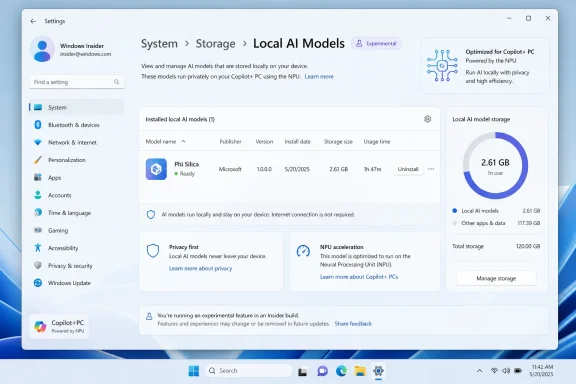
The new AI model page appears to move Windows in that direction. According to reports from testers, it lists model metadata such as publisher, version, installation date, storage size, and usage time. More importantly, it includes an uninstall button for Phi Silica, Microsoft’s small language model designed to run locally on Copilot+ PCs.
That is not yet a sweeping “remove all AI” switch. It is closer to the first visible seam in what had been a sealed part of the operating system.
That platform framing is important. If developers can assume the presence of a local language model on supported machines, Windows becomes more than a place where AI apps run. It becomes an AI runtime with shared capabilities, shared acceleration, and shared update mechanics.
For developers, that has obvious appeal. Instead of shipping a model with every app, negotiating GPU/NPU back ends, or pushing users toward a cloud API, an app can ask Windows for the capability. The operating system handles the ugly parts: model availability, hardware support, and update cadence.
For users, however, the same arrangement can feel like a loss of agency. A model that exists to help multiple apps is not easily understood as belonging to any one app. If it takes several gigabytes of storage, who asked for it? If it updates through Windows Update, who approved the servicing behavior? If an administrator wants to eliminate local generative AI from a fleet, which checkbox actually enforces that?
These are not philosophical objections. They are the ordinary questions IT departments ask about every runtime Microsoft ships: .NET, WebView2, Edge components, language packs, inbox apps, optional features, and now AI models. Once Phi Silica becomes infrastructure, it inherits infrastructure expectations.
That is why an uninstall button is symbolically powerful even if it currently applies only to one model. It suggests Microsoft understands that a model cannot be treated entirely like firmware, entirely like an app, or entirely like a hidden cache. It needs a management surface of its own.
Storage, though, is only the surface issue. The deeper problem is trust.
Windows users can forgive large components when they understand why those components exist and how to remove them. Games, creative suites, developer tools, and language packs are often enormous, but they are visible and attributable. The frustration begins when space disappears into categories that feel system-owned and user-hostile: “Other,” “System,” “Reserved,” or some package name that requires PowerShell archaeology.
The AI model page directly addresses that failure mode. It reportedly shows model size and version in Settings, which is exactly where normal users expect to manage system features. It turns an invisible model into an accountable object.
That matters because Microsoft is trying to sell local AI partly as the privacy-respecting alternative to cloud AI. Privacy claims are weaker when the underlying components arrive without clear explanation. If the user cannot see what is installed, cannot inspect basic metadata, and cannot remove it, the “local means trustworthy” argument becomes harder to sustain.
For enterprises, the calculus is even sharper. Disk space is not the only resource at stake. Admins need to know whether AI components are present for compliance, vulnerability management, procurement validation, and endpoint baselining. A model may not be a traditional executable in the user’s mind, but it is still software delivered by a vendor. It has versions, dependencies, and potential policy implications.
A visible uninstall control does not solve all of that, but it starts the conversation in the right place: local AI belongs in inventory.
Since then, Microsoft has become more careful about consent language, encryption, authentication, and administrative controls around AI features. But the broader lesson is not limited to Recall. It applies to every AI component that sits below the application layer.
The lesson is that Windows users do not want AI to be ambient if ambient means unaccountable. They may tolerate, or even welcome, AI features that are explicit, reversible, and well-governed. They are far less patient with system behavior that arrives as a fait accompli.
The hidden model management page looks like a product team internalizing that lesson. It is not flashy. It will not headline a Surface event. It does not make Phi Silica faster or more impressive. But it changes the posture from “trust us, this is part of Windows now” to “here is what is installed, and here is what you can do about it.”
That distinction is crucial for Windows, because Windows is not iOS. Microsoft cannot rely on a single hardware stack, a uniformly managed app ecosystem, or a user base conditioned to accept a tightly controlled device model. Windows runs in banks, factories, hospitals, schools, gaming rigs, developer workstations, offline labs, and heavily customized enterprise images. One-size-fits-all AI is a poor fit for that world.
A removable model does not mean Microsoft is retreating from AI. It means the company may be learning that Windows AI has to be governable if it is going to be durable.
That uncertainty matters. Windows Insider builds are full of prototypes, staged rollouts, partial interfaces, and abandoned experiments. A button appearing in Build 26300.8553 does not guarantee that users on Windows 11 25H2, 26H1, or any later release will get the same control.
It is also unclear what “uninstall” means in the long run. Does removing Phi Silica prevent it from being reinstalled by a future feature update? Does Windows Update offer it again when an app requests the capability? Is there a policy-backed block, or is this only a local cleanup operation? Can enterprises audit removals at scale? Can a standard user remove a model, or does it require elevation?
Those details decide whether this becomes real control or merely a pressure valve.
Microsoft has a habit of offering consumer-facing switches that do not map cleanly to enterprise governance. A Settings button is helpful for enthusiasts and reviewers, but IT professionals will want Group Policy, MDM configuration service providers, PowerShell support, DISM visibility, Intune reporting, and ideally a documented servicing model. The Settings page is the door; management tooling is the building.
The other open question is whether the page will cover all local AI models or only selected Microsoft-controlled components. Windows may eventually host language models, image models, vision models, OCR models, audio models, and vendor-optimized runtimes. If only one blessed model gets a removal button, the transparency story weakens quickly.
Mandatory platform features trigger resistance because users imagine the worst-case version of the future. They worry that every machine will become an AI appliance whether they want it or not, that storage and compute will be commandeered for features they never use, and that Microsoft will keep moving more core workflows behind opaque model-driven systems.
Optionality changes that psychology. A removable model is less threatening than a permanent one. A visible component is less suspicious than a hidden one. A setting that admits “this exists” does more to build confidence than a marketing page promising responsible AI.
This is especially true for Copilot+ PCs, where Microsoft and its hardware partners need to persuade buyers that neural processors are not just another sticker on the palm rest. If local AI is useful, people will keep the models installed. If it is not useful, forcing the components to remain on disk only breeds resentment.
The better long-term strategy is to make AI feel like a set of capabilities users can adopt at their own pace. Let enthusiasts experiment. Let developers build. Let enterprises stage pilots. Let skeptics remove the payloads. If the features are good, adoption will follow.
That is how mature platform features behave. Hyper-V can be enabled or disabled. Optional Windows capabilities can be added or removed. Language packs and developer components can be managed. AI models should not be exempt simply because Microsoft has a strategic mandate to talk about AI on every earnings call.
But this also makes Windows Update more politically sensitive. Users already complain that Windows updates too aggressively, changes defaults, installs new apps, and reintroduces components they removed. Add large AI models to that channel and every servicing decision becomes part of the AI control debate.
For sysadmins, model delivery through Windows Update raises familiar but difficult questions. Are these models security updates, feature updates, driver-like payloads, optional updates, Store-delivered packages, or something else? Can they be approved separately in enterprise update workflows? Will a model version be tied to a Windows build, a hardware platform, or an API contract? What happens when a model is deprecated?
The answers will shape how confidently organizations adopt Windows AI APIs. Developers want a stable runtime, but admins want a controllable one. Microsoft has to satisfy both constituencies.
If the company handles this well, Windows could become a strong platform for local AI precisely because it abstracts away fragmentation. If it handles it poorly, AI models will become the new bloatware argument — not because every model is useless, but because users feel they were drafted into Microsoft’s platform strategy without consent.
Organizations will need policy controls that can disable model installation, block reinstallation, prevent app access, and report model presence across fleets. They will need clarity on whether removing a model breaks inbox features, third-party apps, accessibility tools, or future Windows experiences. They will also need documentation that distinguishes local inference from cloud-connected AI features, because those are different risk categories.
The phrase “AI component” is too broad for serious administration. A local OCR model, a generative language model, an image transformation model, and a cloud-connected Copilot shell do not carry the same operational or compliance implications. If Microsoft wants Windows Settings to group them together for simplicity, fine. But enterprise tooling must expose the distinctions.
This is where Microsoft’s platform instincts may collide with its AI ambitions. The company wants AI to feel deeply integrated and frictionless. IT wants boundaries, switches, logs, and contracts. The Windows ecosystem works best when those needs are reconciled rather than when one is disguised as the other.
There is also a developer angle. If applications begin depending on Phi Silica or similar local models, they must handle absence gracefully. An app that fails because the user removed a model will be treated as badly designed, not as a victim of user choice. Microsoft should make that expectation explicit: local AI capabilities are discoverable, optional, and subject to policy.
That would be healthier for the ecosystem. Developers would code defensively. Users would retain agency. Enterprises could permit local AI in controlled contexts instead of banning it wholesale.
If the model stays gone until the user explicitly reinstalls it, Microsoft will have made a meaningful concession. If it returns after a cumulative update, a feature update, a Store update, or the installation of an AI-enabled app, the uninstall button will be remembered as cosmetic. Windows users have long memories for features that behave like weeds.
The same applies to storage reporting. If Settings shows the model’s size accurately and frees that space cleanly, confidence goes up. If the button removes an entry but leaves caches, runtimes, or placeholder packages behind, confidence goes down. Users do not expect every dependency to vanish, but they do expect the operating system to be honest about what remains.
Microsoft should also avoid the temptation to make removal punitive. If uninstalling Phi Silica causes Windows to litter the interface with warnings, upsell prompts, or “some features are missing” nags, the feature will become another front in the Windows annoyance wars. A clean removal path should be boring.
The best version of this system would treat AI models like optional platform capabilities. Installed models would appear in Settings. Apps would request them through documented APIs. Windows would explain which features require them. Administrators could block, allow, or defer them. Users could remove them without spelunking through package names and registry keys.
That future is not radical. It is simply Windows behaving like an operating system rather than a marketing funnel.
That is a more mature fight, and a more useful one. Local models are not inherently bad. In many cases, they are preferable to cloud-only features. They can reduce latency, limit data exposure, and enable offline workflows. But those benefits do not cancel the need for user consent and administrative control.
The practical consequences are already visible:
That is the right direction, even if the first implementation is narrow. Microsoft can keep betting on Copilot+ PCs, NPUs, Windows AI APIs, and local inference. But the bet will land better if users believe their machines still belong to them. The uninstall button is not the end of the AI-in-Windows argument; it is the first sign that Microsoft understands the argument cannot be won without control.
That is why this obscure Settings page matters more than its current build number suggests. It is not just another Insider toggle hiding behind a feature flag. It is an admission that AI models are becoming system components — and that system components cannot remain invisible forever.
 Microsoft’s AI PC Needs a Control Panel, Not a Magic Trick
The Copilot+ PC pitch has always rested on a tidy bargain: give Windows dedicated neural hardware and the operating system will give you faster, more private AI experiences that do not need to round-trip every request through the cloud. That argument is not foolish. Local inference can reduce latency, preserve some sensitive data on-device, and create APIs developers can call without building their own model distribution pipeline.But Windows users have heard enough platform promises to know where the catch usually lands. Features that begin as optional experiences can become background packages, scheduled updates, preinstalled components, and opaque storage consumers. The model is not just a feature you see on the taskbar; it is a payload sitting somewhere on disk, serviced by Windows Update, consumed by first-party and third-party apps, and likely renewed as Microsoft iterates.
That makes local AI different from a web-based Copilot button. A cloud chatbot can be ignored, blocked, unpinned, or governed at the browser and identity layer. A local model becomes part of the machine’s software estate, and software estates require management.
The new AI model page appears to move Windows in that direction. According to reports from testers, it lists model metadata such as publisher, version, installation date, storage size, and usage time. More importantly, it includes an uninstall button for Phi Silica, Microsoft’s small language model designed to run locally on Copilot+ PCs.
That is not yet a sweeping “remove all AI” switch. It is closer to the first visible seam in what had been a sealed part of the operating system.
Phi Silica Is the Test Case for Windows as an AI Runtime
Phi Silica is not just another app bundle. It is Microsoft’s on-device small language model for Copilot+ PCs, exposed through Windows AI APIs so applications can perform tasks like summarization, rewriting, and chat-style generation locally. Microsoft’s developer story depends on making this model feel like a platform capability, not a novelty demo.That platform framing is important. If developers can assume the presence of a local language model on supported machines, Windows becomes more than a place where AI apps run. It becomes an AI runtime with shared capabilities, shared acceleration, and shared update mechanics.
For developers, that has obvious appeal. Instead of shipping a model with every app, negotiating GPU/NPU back ends, or pushing users toward a cloud API, an app can ask Windows for the capability. The operating system handles the ugly parts: model availability, hardware support, and update cadence.
For users, however, the same arrangement can feel like a loss of agency. A model that exists to help multiple apps is not easily understood as belonging to any one app. If it takes several gigabytes of storage, who asked for it? If it updates through Windows Update, who approved the servicing behavior? If an administrator wants to eliminate local generative AI from a fleet, which checkbox actually enforces that?
These are not philosophical objections. They are the ordinary questions IT departments ask about every runtime Microsoft ships: .NET, WebView2, Edge components, language packs, inbox apps, optional features, and now AI models. Once Phi Silica becomes infrastructure, it inherits infrastructure expectations.
That is why an uninstall button is symbolically powerful even if it currently applies only to one model. It suggests Microsoft understands that a model cannot be treated entirely like firmware, entirely like an app, or entirely like a hidden cache. It needs a management surface of its own.
The Storage Argument Is Really a Trust Argument
The most obvious complaint about local AI models is disk space. Copilot+ PCs may ship with fast SSDs, but many users still buy 256GB or 512GB configurations, and Windows has a long history of quietly accumulating recovery files, update caches, component store growth, hibernation files, app packages, and vendor utilities. A multi-gigabyte AI model may not break a premium machine, but it becomes one more unexplained line item in a storage mystery.Storage, though, is only the surface issue. The deeper problem is trust.
Windows users can forgive large components when they understand why those components exist and how to remove them. Games, creative suites, developer tools, and language packs are often enormous, but they are visible and attributable. The frustration begins when space disappears into categories that feel system-owned and user-hostile: “Other,” “System,” “Reserved,” or some package name that requires PowerShell archaeology.
The AI model page directly addresses that failure mode. It reportedly shows model size and version in Settings, which is exactly where normal users expect to manage system features. It turns an invisible model into an accountable object.
That matters because Microsoft is trying to sell local AI partly as the privacy-respecting alternative to cloud AI. Privacy claims are weaker when the underlying components arrive without clear explanation. If the user cannot see what is installed, cannot inspect basic metadata, and cannot remove it, the “local means trustworthy” argument becomes harder to sustain.
For enterprises, the calculus is even sharper. Disk space is not the only resource at stake. Admins need to know whether AI components are present for compliance, vulnerability management, procurement validation, and endpoint baselining. A model may not be a traditional executable in the user’s mind, but it is still software delivered by a vendor. It has versions, dependencies, and potential policy implications.
A visible uninstall control does not solve all of that, but it starts the conversation in the right place: local AI belongs in inventory.
Microsoft Is Learning From the Recall Backlash, Slowly
Microsoft’s Windows AI push has been haunted by Recall, the Copilot+ feature that originally promised searchable snapshots of a user’s activity and then became a case study in how not to introduce sensitive local AI. The problem was not simply that Recall was ambitious. It was that Microsoft underestimated how aggressively users and security professionals would interrogate an always-on memory system integrated into the OS.Since then, Microsoft has become more careful about consent language, encryption, authentication, and administrative controls around AI features. But the broader lesson is not limited to Recall. It applies to every AI component that sits below the application layer.
The lesson is that Windows users do not want AI to be ambient if ambient means unaccountable. They may tolerate, or even welcome, AI features that are explicit, reversible, and well-governed. They are far less patient with system behavior that arrives as a fait accompli.
The hidden model management page looks like a product team internalizing that lesson. It is not flashy. It will not headline a Surface event. It does not make Phi Silica faster or more impressive. But it changes the posture from “trust us, this is part of Windows now” to “here is what is installed, and here is what you can do about it.”
That distinction is crucial for Windows, because Windows is not iOS. Microsoft cannot rely on a single hardware stack, a uniformly managed app ecosystem, or a user base conditioned to accept a tightly controlled device model. Windows runs in banks, factories, hospitals, schools, gaming rigs, developer workstations, offline labs, and heavily customized enterprise images. One-size-fits-all AI is a poor fit for that world.
A removable model does not mean Microsoft is retreating from AI. It means the company may be learning that Windows AI has to be governable if it is going to be durable.
Hidden Features Are Not Product Promises
There is a necessary caution here: this feature is still hidden in an experimental build. It is not a shipping promise. Microsoft has not formally announced the page, has not documented a stable administrative model for it, and has not said whether Phi Silica will remain removable when the work reaches mainstream Windows 11 releases.That uncertainty matters. Windows Insider builds are full of prototypes, staged rollouts, partial interfaces, and abandoned experiments. A button appearing in Build 26300.8553 does not guarantee that users on Windows 11 25H2, 26H1, or any later release will get the same control.
It is also unclear what “uninstall” means in the long run. Does removing Phi Silica prevent it from being reinstalled by a future feature update? Does Windows Update offer it again when an app requests the capability? Is there a policy-backed block, or is this only a local cleanup operation? Can enterprises audit removals at scale? Can a standard user remove a model, or does it require elevation?
Those details decide whether this becomes real control or merely a pressure valve.
Microsoft has a habit of offering consumer-facing switches that do not map cleanly to enterprise governance. A Settings button is helpful for enthusiasts and reviewers, but IT professionals will want Group Policy, MDM configuration service providers, PowerShell support, DISM visibility, Intune reporting, and ideally a documented servicing model. The Settings page is the door; management tooling is the building.
The other open question is whether the page will cover all local AI models or only selected Microsoft-controlled components. Windows may eventually host language models, image models, vision models, OCR models, audio models, and vendor-optimized runtimes. If only one blessed model gets a removal button, the transparency story weakens quickly.
The Copilot+ PC Becomes Easier to Defend When It Becomes Easier to De-AI
There is an irony in this development: the easier Microsoft makes AI components to remove, the easier it becomes to argue for shipping them.Mandatory platform features trigger resistance because users imagine the worst-case version of the future. They worry that every machine will become an AI appliance whether they want it or not, that storage and compute will be commandeered for features they never use, and that Microsoft will keep moving more core workflows behind opaque model-driven systems.
Optionality changes that psychology. A removable model is less threatening than a permanent one. A visible component is less suspicious than a hidden one. A setting that admits “this exists” does more to build confidence than a marketing page promising responsible AI.
This is especially true for Copilot+ PCs, where Microsoft and its hardware partners need to persuade buyers that neural processors are not just another sticker on the palm rest. If local AI is useful, people will keep the models installed. If it is not useful, forcing the components to remain on disk only breeds resentment.
The better long-term strategy is to make AI feel like a set of capabilities users can adopt at their own pace. Let enthusiasts experiment. Let developers build. Let enterprises stage pilots. Let skeptics remove the payloads. If the features are good, adoption will follow.
That is how mature platform features behave. Hyper-V can be enabled or disabled. Optional Windows capabilities can be added or removed. Language packs and developer components can be managed. AI models should not be exempt simply because Microsoft has a strategic mandate to talk about AI on every earnings call.
Windows Update Is Becoming the Model Distribution Channel
The model management page also points to a quieter but more consequential shift: Windows Update is becoming a distribution mechanism for AI models. That is logical from Microsoft’s perspective. Windows Update already solves reach, trust, versioning, rollback, and hardware targeting. It can deliver the right model to the right device class without asking every app developer to reinvent deployment.But this also makes Windows Update more politically sensitive. Users already complain that Windows updates too aggressively, changes defaults, installs new apps, and reintroduces components they removed. Add large AI models to that channel and every servicing decision becomes part of the AI control debate.
For sysadmins, model delivery through Windows Update raises familiar but difficult questions. Are these models security updates, feature updates, driver-like payloads, optional updates, Store-delivered packages, or something else? Can they be approved separately in enterprise update workflows? Will a model version be tied to a Windows build, a hardware platform, or an API contract? What happens when a model is deprecated?
The answers will shape how confidently organizations adopt Windows AI APIs. Developers want a stable runtime, but admins want a controllable one. Microsoft has to satisfy both constituencies.
If the company handles this well, Windows could become a strong platform for local AI precisely because it abstracts away fragmentation. If it handles it poorly, AI models will become the new bloatware argument — not because every model is useless, but because users feel they were drafted into Microsoft’s platform strategy without consent.
A Button Is Not Enough for the Enterprise
The consumer story is simple: show me what is installed, show me how much space it uses, and let me remove it. The enterprise story is more demanding. A Settings page is a welcome sign, but it is not a governance framework.Organizations will need policy controls that can disable model installation, block reinstallation, prevent app access, and report model presence across fleets. They will need clarity on whether removing a model breaks inbox features, third-party apps, accessibility tools, or future Windows experiences. They will also need documentation that distinguishes local inference from cloud-connected AI features, because those are different risk categories.
The phrase “AI component” is too broad for serious administration. A local OCR model, a generative language model, an image transformation model, and a cloud-connected Copilot shell do not carry the same operational or compliance implications. If Microsoft wants Windows Settings to group them together for simplicity, fine. But enterprise tooling must expose the distinctions.
This is where Microsoft’s platform instincts may collide with its AI ambitions. The company wants AI to feel deeply integrated and frictionless. IT wants boundaries, switches, logs, and contracts. The Windows ecosystem works best when those needs are reconciled rather than when one is disguised as the other.
There is also a developer angle. If applications begin depending on Phi Silica or similar local models, they must handle absence gracefully. An app that fails because the user removed a model will be treated as badly designed, not as a victim of user choice. Microsoft should make that expectation explicit: local AI capabilities are discoverable, optional, and subject to policy.
That would be healthier for the ecosystem. Developers would code defensively. Users would retain agency. Enterprises could permit local AI in controlled contexts instead of banning it wholesale.
The Real Control Test Comes After Reboot, Update, and App Install
The first time a user clicks “Uninstall,” the story begins. The real test is what happens later.If the model stays gone until the user explicitly reinstalls it, Microsoft will have made a meaningful concession. If it returns after a cumulative update, a feature update, a Store update, or the installation of an AI-enabled app, the uninstall button will be remembered as cosmetic. Windows users have long memories for features that behave like weeds.
The same applies to storage reporting. If Settings shows the model’s size accurately and frees that space cleanly, confidence goes up. If the button removes an entry but leaves caches, runtimes, or placeholder packages behind, confidence goes down. Users do not expect every dependency to vanish, but they do expect the operating system to be honest about what remains.
Microsoft should also avoid the temptation to make removal punitive. If uninstalling Phi Silica causes Windows to litter the interface with warnings, upsell prompts, or “some features are missing” nags, the feature will become another front in the Windows annoyance wars. A clean removal path should be boring.
The best version of this system would treat AI models like optional platform capabilities. Installed models would appear in Settings. Apps would request them through documented APIs. Windows would explain which features require them. Administrators could block, allow, or defer them. Users could remove them without spelunking through package names and registry keys.
That future is not radical. It is simply Windows behaving like an operating system rather than a marketing funnel.
The First Uninstall Button Draws the Map for the Next Fight
This preview feature should not be oversold. It is hidden, experimental, and apparently limited. But it reveals where the Windows AI argument is going next. The debate is moving from “Should Microsoft put AI in Windows?” to “Who controls the AI substrate once it is there?”That is a more mature fight, and a more useful one. Local models are not inherently bad. In many cases, they are preferable to cloud-only features. They can reduce latency, limit data exposure, and enable offline workflows. But those benefits do not cancel the need for user consent and administrative control.
The practical consequences are already visible:
- Windows 11 Insider Build 26300.8553 reportedly includes a hidden Settings page that lists local AI models as manageable components.
- Phi Silica appears to be the first model with a visible uninstall button, making it the test case for removable Windows AI infrastructure.
- The page reportedly exposes metadata such as publisher, version, installation date, storage use, and usage time.
- The feature is currently tied to Copilot+ PC scenarios and has not been formally announced as a shipping Windows 11 capability.
- Microsoft still needs policy, update, and fleet-management controls before this becomes enterprise-grade AI governance.
- The credibility of the uninstall button will depend on whether removed models stay removed after updates and app installs.
That is the right direction, even if the first implementation is narrow. Microsoft can keep betting on Copilot+ PCs, NPUs, Windows AI APIs, and local inference. But the bet will land better if users believe their machines still belong to them. The uninstall button is not the end of the AI-in-Windows argument; it is the first sign that Microsoft understands the argument cannot be won without control.
References
- Primary source: Research Snipers
Published: None
Windows 11 gets a button to remove all AI models – Research Snipers
Windows 11 is integrating more and more local AI functions for quick calculations on your...researchsnipers.com - Related coverage: pureinfotech.com
Windows 11 is finally getting an uninstall button for AI models - Pureinfotech
Windows 11 build 26300.8553 adds a hidden AI model page with specifications, usage data, and an uninstall option. pureinfotech.com
- Official source: learn.microsoft.com
Tutorial: Build a chat app with Phi Silica and WinUI 3 | Microsoft Learn
Step-by-step guide to building a WinUI 3 app that uses the Phi Silica on-device language model for text generation, summarization, and rewriting.learn.microsoft.com - Official source: support.microsoft.com
Windows Copilot+ AI components - Microsoft Support
 support.microsoft.com
- Related coverage: techspot.com
Windows 11 may soon let you uninstall the AI models Microsoft keeps installing on your PC | TechSpot
Windows 11 Insider Experimental Preview Build 26300.8553 rolled out last week with several new features, improvements, and bug fixes. Notable changes include expanded customization options for the...www.techspot.com - Related coverage: strathweb.com
- Related coverage: letsdatascience.com
Microsoft adds Windows 11 AI model uninstall button | Let's Data Science
Microsoft is testing a one-click control to uninstall on-device AI models in a Windows 11 Insider Experimental build (**26300.8553**), according to reporting by Neowin, Pureinfotech, and gHacks based on a hidden Settings page surfaced by Windows watchers. The page lists installed AI components... letsdatascience.com
- Related coverage: windowsforum.com
KB5089866: Phi Silica Local AI Now Updated Like a Windows Component | Windows Forum
Microsoft has published KB5089866, an automatic Windows Update package delivering Phi Silica AI component version 1.2603.373.0 to Qualcomm-powered Copilot+...windowsforum.com - Related coverage: elevenforum.com
Uninstall AI Components on Windows 11 PC | Windows 11 Forum
This tutorial will show you how to uninstall AI components on your Windows 11 PC. If your Windows 11 device (ex: Copilot+ PC) has a NPU, you will have a...www.elevenforum.com - Official source: blogs.windows.com
Announcing new builds 8 June 2026
[Update 6/11/2026: Release notes have now been published to Windows Insider release notes - Windows Insider Program | Microsoft Learn.]blogs.windows.com - Related coverage: notebookcheck.org
Windows 11 Insider Build 26300.8553 permite por fin personalizar el menú Inicio - NotebookCheck.org News
Windows 11 Insider Preview Build 26300.8553 trae un menú Inicio modular con preajustes de tamaño Pequeño, Grande y Automático y nuevas herramientas de privacidad al canal Experimental. www.notebookcheck.org
- Related coverage: notebookcheck.info
O Windows 11 Insider Build 26300.8553 finalmente permite que o usuário personalize o menu Iniciar - NotebookCheck.info News
O Windows 11 Insider Preview Build 26300.8553 traz um menu Iniciar modular com predefinições de tamanho Pequeno, Grande e Automático e novas ferramentas de privacidade para o canal Experimental. www.notebookcheck.info
- Related coverage: notebookcheck.net
Windows 11 Insider Build 26300.8553 finally lets you customize the Start menu - Notebookcheck News
Windows 11 Insider Preview Build 26300.8553 brings a modular Start menu with Small, Large, and Automatic size presets and new privacy tools to the Experimental channel. www.notebookcheck.net
- Related coverage: computerworld.com
Windows 11 Insider Previews: What’s in the latest build? – Computerworld
Get the latest info on new preview builds of Windows 11 as they roll out to Windows Insiders. Now updated for the June 26, 2026 releases for the Beta, Beta 26H1, Experimental, Experimental 26H1, and Experimental Future Platforms Channels. www.computerworld.com
- Related coverage: windowscentral.com
I dug into the Windows 11 features insiders got in May 2026 and here’s what matters most | Windows Central
May 2026 brought a wave of Windows 11 improvements, focusing on accessibility, productivity, personalization, and system modernization.www.windowscentral.com
