
Microsoft released new Windows 11 Insider preview builds on May 8, 2026, across the Beta, Experimental, and Experimental Beta channels, adding expanded precision touchpad controls and a free Windows 11 Home-to-Pro Education upgrade path for eligible K-12 environments. The builds are less interesting as a routine Friday flight than as a sign of Microsoft’s revised Insider Program settling into its new shape. What looks like housekeeping is really a preview of how Windows 11 will be tested, segmented, licensed, and managed over the next year.
The Windows Insider Program has always had a split personality. It is part enthusiast playground, part telemetry funnel, part enterprise early-warning system, and part marketing stage for features that may or may not ship. Microsoft’s latest builds land at a moment when the company is trying to make that identity less chaotic by moving testers into a cleaner channel model built around Beta and Experimental tracks.
That matters because Windows 11 development has become more fragmented than the old Dev, Beta, Canary, and Release Preview labels could comfortably explain. Some features are tied to the next annual Windows release. Some belong to longer-range platform work. Some are controlled feature rollouts that appear only when Microsoft flips a service-side switch. The result has been a program where two users on the “same” build can see different operating systems.
The new channel language is meant to reduce that ambiguity, but the transition itself is messy. Microsoft is still rolling out the new Windows Insider Program experience in phases, and the company has acknowledged that not every Insider in the older Canary or Beta lanes has moved yet. That leaves the program in an awkward middle stage: release notes now speak the new language, while many enrolled PCs still live with the old labels.
This week’s flights are therefore a stress test for more than code. They test whether Microsoft can persuade Insiders that the new naming scheme clarifies the preview pipeline rather than merely repainting it. For admins and power users, the distinction is not cosmetic. It determines which machines are safe for near-production testing, which are feature labs, and which should stay off anything resembling a work device.
Windows is no longer won or lost on Start menu rearrangements alone. It is won in hundreds of friction points: whether a laptop scrolls the way users expect, whether gestures match muscle memory from other devices, whether trackpad behavior can be tuned without OEM utilities, and whether Windows feels consistent across a $350 school notebook and a premium Surface. Precision touchpads were supposed to solve the old Wild West of Windows laptop input, but parity with the MacBook standard has always required relentless sanding of rough edges.
The Experimental placement is also telling. Microsoft is not simply dumping these controls into Beta as a near-final feature. It is testing whether the defaults, wording, and interaction model make sense before deciding how broadly they should ship. That is the right use of an experimental lane: not just to demo futuristic features, but to refine the ordinary parts of Windows that millions of users touch every day.
There is a trap here, though. The more Microsoft turns Settings into a control panel for every micro-behavior, the more it risks burying useful options under layers of interface sprawl. Windows 11’s Settings app has improved dramatically since launch, but it still carries the burden of replacing decades of Control Panel muscle memory while also absorbing new device, AI, privacy, accessibility, and update controls. Touchpad settings are welcome, but only if they remain discoverable.
For Windows enthusiasts, this is the kind of change that rewards hands-on testing. For IT shops, it is a reminder that user-experience drift can become a support issue. A gesture that feels natural to one group can trigger help desk tickets from another if it changes unexpectedly after an update.
The logic is straightforward. Many low-cost PCs ship with Windows 11 Home because Home is cheaper and common in retail channels. But Home is not what school IT departments want to manage. K-12 environments need central policy control, account integration, device enrollment, security baselines, and predictable administrative behavior. Pro Education exists to bridge that gap, giving schools a Windows edition aligned with managed education deployments.
Microsoft’s test flow reportedly requires signing in with a local account, launching an elevated Command Prompt, running
That one-way warning deserves attention. For a school district, irreversibility may be acceptable or even desirable. A device bought for managed student use should not casually drift back into unmanaged Home edition territory. For mixed-use procurement, refurbishing, resale, or donation programs, however, the lack of an easy downgrade path becomes an asset-management consideration.
The bigger strategic move is that Microsoft is lowering friction where it wants Windows 11 adoption to accelerate. Schools are under pressure from aging fleets, Windows 10’s end-of-support aftermath, budget limits, and the rise of Chromebooks in classrooms. If a district can buy cheaper Windows 11 Home hardware and convert it into centrally managed Pro Education devices without an added licensing maze, Microsoft removes one of the quiet blockers that can steer procurement away from Windows.
That is not inherently bad. For many schools, standardizing on managed Windows devices can improve security, simplify classroom support, and reduce the nightmare of unmanaged local accounts on student machines. A Windows 11 Home laptop that cannot be enrolled or controlled like the rest of the fleet is a liability. A Pro Education device can be brought under policy and made part of the institution’s operational model.
But districts should read the fine print operationally, not emotionally. A free edition upgrade does not eliminate the cost of device management, staff training, endpoint security, repair logistics, or identity governance. It also does not make bargain-bin hardware magically suitable for four years of classroom abuse. The cheapest PC is often cheap twice: once at purchase, and again in support overhead.
The upgrade path also creates a new procurement temptation. If schools can buy Windows 11 Home devices and convert them later, purchasing departments may push for consumer-grade machines because the licensing barrier appears gone. IT departments will need to push back where necessary and insist that manageability is only one requirement. Durability, firmware support, driver quality, warranty terms, Wi-Fi reliability, and battery life still matter.
This is where Microsoft’s move is clever. It gives school IT a tool, but it also shifts responsibility back onto local decision-makers. The edition barrier may fall, but the hard work of fleet planning remains.
In the older mental model, a build was a bundle. Install the build, get the features. That model is increasingly obsolete. Modern Windows is assembled from OS binaries, Store-updated inbox apps, cloud-delivered configuration, staged rollouts, A/B experiments, and policy-dependent experiences. A build number tells you something, but not everything.
For enthusiasts, that can be maddening. Two Insiders compare screenshots and discover that one has a new Settings page, a refreshed dialog, or an updated app integration, while the other does not. For Microsoft, that is the point. Controlled rollout limits blast radius and gives the company data before broad release. For users, it blurs the relationship between installation and ownership.
The new Experimental lane appears designed to normalize this reality. If a feature might change, vanish, or never ship, Microsoft wants it in a place whose name says so. Beta, meanwhile, is meant to feel closer to the next stable Windows experience. That division is useful, but it only works if Microsoft is disciplined about what belongs where.
The danger is that “Experimental” becomes a dumping ground for half-finished ideas while “Beta” still receives surprises through server-side toggles. If that happens, the rebrand will not solve the trust problem. It will merely give Microsoft more precise words for the same uncertainty.
These are not marquee items, but they are the items that decide whether an Insider build is usable. A notification stack hang can look like a broken app. An IME reliability issue can become a productivity blocker for multilingual users. File Explorer navigation polish matters because Explorer is still the shell’s daily workhorse, not a legacy accessory.
The Administrator Protection note is especially worth watching. Microsoft has been experimenting with ways to harden administrative actions and reduce the risks of overprivileged sessions. That is necessary work, but anything that changes elevation behavior or interacts with input methods can create unexpected breakage. The fact that Microsoft is fixing IME reliability in that context is a useful reminder that security features succeed only when they do not punish normal workflows.
For businesses, the lesson is familiar: never judge a preview build only by its headline features. The bug fixes often reveal where Microsoft is pushing the platform and where rough edges remain. A build with modest new features but important reliability fixes may be more meaningful than one with a flashy UI change.
For home Insiders, the calculus is different but related. If you rely on notifications, input methods, accessibility tools, or device-specific drivers, Experimental still deserves caution. Microsoft can make a build available without making it wise for your daily driver.
Schools tend to keep hardware longer than consumer marketing cycles assume. They also manage devices under budget constraints, grant timelines, academic calendars, and testing windows that do not care when Microsoft wants a migration to happen. A “simple” operating system upgrade can become a summer-long logistics campaign involving carts, classrooms, imaging, identity, applications, assistive technology, and teacher training.
The free Pro Education upgrade path should be viewed through that lens. Microsoft needs Windows 11 to be the default institutional choice before districts normalize alternatives at the next refresh. Chromebooks won education by being cheap, manageable, and good enough for browser-centered classrooms. Windows remains more flexible and powerful, but flexibility can look like complexity when an IT department is understaffed.
By allowing Home-to-Pro Education upgrades for eligible K-12 environments, Microsoft is trying to make Windows procurement feel less brittle. A school can acquire hardware from broader channels and still bring it into the managed fold. That is a meaningful advantage if implemented cleanly.
Still, implementation is the caveat. A command-line-driven Insider flow is not yet the same thing as a polished, scalable deployment story. Districts will want automation, documentation, reporting, licensing clarity, and integration with existing management tools before treating this as a production procurement strategy.
This week’s builds speak to both groups. The touchpad work is a nod to user experience and laptop polish. The K-12 upgrade path is a licensing and management story. The WPN and Administrator Protection fixes are reliability and security signals. The channel transition is a governance story about how Microsoft wants preview testing to function.
The convergence matters because Windows 11 is no longer developed as a monolithic desktop product. It is a service platform with consumer experiences, enterprise controls, education licensing, developer tools, cloud hooks, and hardware-specific features all arriving at different speeds. The Insider Program is where those speeds become visible.
That makes the program more valuable, but also harder to interpret. A build can contain a consumer feature that never ships, an enterprise policy that arrives next Patch Tuesday, and a platform change that matters two Windows releases from now. Channel labels help, but they cannot replace careful reading.
For WindowsForum readers, the practical advice is simple: treat Insider builds as signals, not promises. When a feature appears in Experimental, ask what problem Microsoft is trying to solve and who benefits if it ships. When a feature appears in Beta, ask whether it is truly near release or still gated by rollout controls. When a licensing change appears in a preview build, assume it may matter more than another visual refresh.
The upgrade being one-way is also important. Clean reinstall as the path back to Home is not a minor footnote if a device might leave institutional ownership. Schools with loaner programs, mixed-use devices, or resale workflows should document the edition change as part of asset lifecycle management.
The touchpad improvements also sit inside the broader Windows input story. Microsoft has been gradually exposing more hardware behavior in Settings and reducing dependence on OEM control panels. That is good for consistency, but it also creates another surface where defaults must be carefully chosen.
Finally, the staged move to the new Insider Program experience means some users will read about features they cannot yet see. Microsoft says the transition is continuing, but staggered rollout always produces confusion. The company’s challenge is to make phased deployment feel like risk management rather than arbitrary withholding.
Source: Thurrott.com Microsoft Issues New Windows Insider Program Builds
 Microsoft’s Insider Reset Is Becoming Real in Public
The Windows Insider Program has always had a split personality. It is part enthusiast playground, part telemetry funnel, part enterprise early-warning system, and part marketing stage for features that may or may not ship. Microsoft’s latest builds land at a moment when the company is trying to make that identity less chaotic by moving testers into a cleaner channel model built around Beta and Experimental tracks.That matters because Windows 11 development has become more fragmented than the old Dev, Beta, Canary, and Release Preview labels could comfortably explain. Some features are tied to the next annual Windows release. Some belong to longer-range platform work. Some are controlled feature rollouts that appear only when Microsoft flips a service-side switch. The result has been a program where two users on the “same” build can see different operating systems.
The new channel language is meant to reduce that ambiguity, but the transition itself is messy. Microsoft is still rolling out the new Windows Insider Program experience in phases, and the company has acknowledged that not every Insider in the older Canary or Beta lanes has moved yet. That leaves the program in an awkward middle stage: release notes now speak the new language, while many enrolled PCs still live with the old labels.
This week’s flights are therefore a stress test for more than code. They test whether Microsoft can persuade Insiders that the new naming scheme clarifies the preview pipeline rather than merely repainting it. For admins and power users, the distinction is not cosmetic. It determines which machines are safe for near-production testing, which are feature labs, and which should stay off anything resembling a work device.
The Experimental Channel Is Where Microsoft Hides the Future in Plain Sight
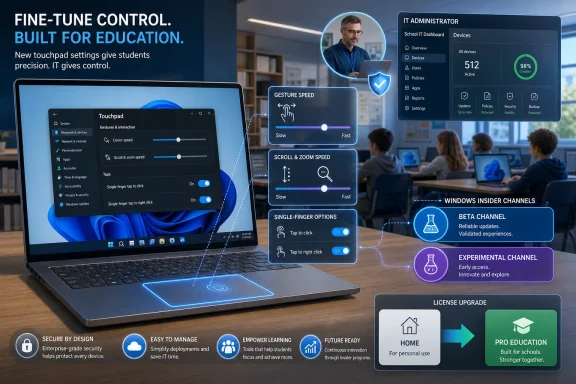
The most visible consumer-facing change in the new Experimental build is a set of touchpad improvements. Microsoft is adding more granular control over precision touchpad behavior, including gesture speed, scroll and zoom speed, automatic scrolling, accelerated scrolling, and optional single-finger scrolling support. On paper, this is small-bore input plumbing. In practice, it is exactly the sort of change that reveals how mature desktop operating systems evolve.Windows is no longer won or lost on Start menu rearrangements alone. It is won in hundreds of friction points: whether a laptop scrolls the way users expect, whether gestures match muscle memory from other devices, whether trackpad behavior can be tuned without OEM utilities, and whether Windows feels consistent across a $350 school notebook and a premium Surface. Precision touchpads were supposed to solve the old Wild West of Windows laptop input, but parity with the MacBook standard has always required relentless sanding of rough edges.
The Experimental placement is also telling. Microsoft is not simply dumping these controls into Beta as a near-final feature. It is testing whether the defaults, wording, and interaction model make sense before deciding how broadly they should ship. That is the right use of an experimental lane: not just to demo futuristic features, but to refine the ordinary parts of Windows that millions of users touch every day.
There is a trap here, though. The more Microsoft turns Settings into a control panel for every micro-behavior, the more it risks burying useful options under layers of interface sprawl. Windows 11’s Settings app has improved dramatically since launch, but it still carries the burden of replacing decades of Control Panel muscle memory while also absorbing new device, AI, privacy, accessibility, and update controls. Touchpad settings are welcome, but only if they remain discoverable.
For Windows enthusiasts, this is the kind of change that rewards hands-on testing. For IT shops, it is a reminder that user-experience drift can become a support issue. A gesture that feels natural to one group can trigger help desk tickets from another if it changes unexpectedly after an update.
The Education Upgrade Is the Bigger Story Than the Touchpad Tweaks
The more consequential change is not about scrolling. It is Microsoft’s new Insider-tested path that lets eligible K-12 education environments upgrade Windows 11 Home devices to Windows 11 Pro Education at no additional cost. That could sound like licensing minutiae, but in school IT, licensing minutiae often determines whether a device can be secured, managed, and supported at scale.The logic is straightforward. Many low-cost PCs ship with Windows 11 Home because Home is cheaper and common in retail channels. But Home is not what school IT departments want to manage. K-12 environments need central policy control, account integration, device enrollment, security baselines, and predictable administrative behavior. Pro Education exists to bridge that gap, giving schools a Windows edition aligned with managed education deployments.
Microsoft’s test flow reportedly requires signing in with a local account, launching an elevated Command Prompt, running
Clipupgrade.exe, then signing in with a K-12 organization account to validate eligibility. The machine then prepares the upgrade and completes the edition change after a restart. Microsoft also warns that the path is one-way: returning to Windows Home requires a clean OS reinstall.That one-way warning deserves attention. For a school district, irreversibility may be acceptable or even desirable. A device bought for managed student use should not casually drift back into unmanaged Home edition territory. For mixed-use procurement, refurbishing, resale, or donation programs, however, the lack of an easy downgrade path becomes an asset-management consideration.
The bigger strategic move is that Microsoft is lowering friction where it wants Windows 11 adoption to accelerate. Schools are under pressure from aging fleets, Windows 10’s end-of-support aftermath, budget limits, and the rise of Chromebooks in classrooms. If a district can buy cheaper Windows 11 Home hardware and convert it into centrally managed Pro Education devices without an added licensing maze, Microsoft removes one of the quiet blockers that can steer procurement away from Windows.
Schools Get a Cheaper Door Into Managed Windows, but Not a Free Lunch
It would be a mistake to treat the K-12 upgrade path as pure generosity. Microsoft is not simply giving away value; it is defending Windows’ position in education by making the managed version of Windows easier to reach. The move fits a broader pattern: reduce the up-front procurement obstacle, then make the device useful inside Microsoft’s identity, management, and cloud ecosystem.That is not inherently bad. For many schools, standardizing on managed Windows devices can improve security, simplify classroom support, and reduce the nightmare of unmanaged local accounts on student machines. A Windows 11 Home laptop that cannot be enrolled or controlled like the rest of the fleet is a liability. A Pro Education device can be brought under policy and made part of the institution’s operational model.
But districts should read the fine print operationally, not emotionally. A free edition upgrade does not eliminate the cost of device management, staff training, endpoint security, repair logistics, or identity governance. It also does not make bargain-bin hardware magically suitable for four years of classroom abuse. The cheapest PC is often cheap twice: once at purchase, and again in support overhead.
The upgrade path also creates a new procurement temptation. If schools can buy Windows 11 Home devices and convert them later, purchasing departments may push for consumer-grade machines because the licensing barrier appears gone. IT departments will need to push back where necessary and insist that manageability is only one requirement. Durability, firmware support, driver quality, warranty terms, Wi-Fi reliability, and battery life still matter.
This is where Microsoft’s move is clever. It gives school IT a tool, but it also shifts responsibility back onto local decision-makers. The edition barrier may fall, but the hard work of fleet planning remains.
The New Channel Model Is a Feature Flag System Wearing a Program Badge
The Insider Program’s biggest change is not any single build number. It is the move toward a model where channels, feature flags, enablement packages, and controlled rollouts all coexist. Microsoft has been heading this way for years, but the new Beta and Experimental structure makes the strategy more explicit.In the older mental model, a build was a bundle. Install the build, get the features. That model is increasingly obsolete. Modern Windows is assembled from OS binaries, Store-updated inbox apps, cloud-delivered configuration, staged rollouts, A/B experiments, and policy-dependent experiences. A build number tells you something, but not everything.
For enthusiasts, that can be maddening. Two Insiders compare screenshots and discover that one has a new Settings page, a refreshed dialog, or an updated app integration, while the other does not. For Microsoft, that is the point. Controlled rollout limits blast radius and gives the company data before broad release. For users, it blurs the relationship between installation and ownership.
The new Experimental lane appears designed to normalize this reality. If a feature might change, vanish, or never ship, Microsoft wants it in a place whose name says so. Beta, meanwhile, is meant to feel closer to the next stable Windows experience. That division is useful, but it only works if Microsoft is disciplined about what belongs where.
The danger is that “Experimental” becomes a dumping ground for half-finished ideas while “Beta” still receives surprises through server-side toggles. If that happens, the rebrand will not solve the trust problem. It will merely give Microsoft more precise words for the same uncertainty.
Admins Should Watch the Fixes, Not Just the Features
The release notes around these builds also include the kind of fixes that matter more to IT pros than new toggles do. Microsoft says it fixed a Windows Push Notification hang from the previous flight that could cause notification problems and some apps to hang at launch. It also notes improvements around desktop app shortcut icon reliability, Japanese IME behavior when Administrator Protection is enabled, and File Explorer context menu navigation.These are not marquee items, but they are the items that decide whether an Insider build is usable. A notification stack hang can look like a broken app. An IME reliability issue can become a productivity blocker for multilingual users. File Explorer navigation polish matters because Explorer is still the shell’s daily workhorse, not a legacy accessory.
The Administrator Protection note is especially worth watching. Microsoft has been experimenting with ways to harden administrative actions and reduce the risks of overprivileged sessions. That is necessary work, but anything that changes elevation behavior or interacts with input methods can create unexpected breakage. The fact that Microsoft is fixing IME reliability in that context is a useful reminder that security features succeed only when they do not punish normal workflows.
For businesses, the lesson is familiar: never judge a preview build only by its headline features. The bug fixes often reveal where Microsoft is pushing the platform and where rough edges remain. A build with modest new features but important reliability fixes may be more meaningful than one with a flashy UI change.
For home Insiders, the calculus is different but related. If you rely on notifications, input methods, accessibility tools, or device-specific drivers, Experimental still deserves caution. Microsoft can make a build available without making it wise for your daily driver.
Windows 11 Is Being Prepared for a Post-Windows-10 Support World
The timing of these changes is not accidental. Windows 10’s mainstream support ended in October 2025, and Microsoft has spent the months since trying to move the remaining installed base toward Windows 11, paid or limited security bridges, or new hardware. Education is one of the places where that transition is especially complicated.Schools tend to keep hardware longer than consumer marketing cycles assume. They also manage devices under budget constraints, grant timelines, academic calendars, and testing windows that do not care when Microsoft wants a migration to happen. A “simple” operating system upgrade can become a summer-long logistics campaign involving carts, classrooms, imaging, identity, applications, assistive technology, and teacher training.
The free Pro Education upgrade path should be viewed through that lens. Microsoft needs Windows 11 to be the default institutional choice before districts normalize alternatives at the next refresh. Chromebooks won education by being cheap, manageable, and good enough for browser-centered classrooms. Windows remains more flexible and powerful, but flexibility can look like complexity when an IT department is understaffed.
By allowing Home-to-Pro Education upgrades for eligible K-12 environments, Microsoft is trying to make Windows procurement feel less brittle. A school can acquire hardware from broader channels and still bring it into the managed fold. That is a meaningful advantage if implemented cleanly.
Still, implementation is the caveat. A command-line-driven Insider flow is not yet the same thing as a polished, scalable deployment story. Districts will want automation, documentation, reporting, licensing clarity, and integration with existing management tools before treating this as a production procurement strategy.
The Enthusiast Program Is Becoming an Enterprise Signal
One irony of the Windows Insider Program is that its loudest audience is often enthusiasts, while its most consequential audience may be enterprise IT. Enthusiasts notice the new UI, the toggles, the gestures, and the build numbers. Administrators notice which policies arrive, which upgrade paths change, which bugs get fixed, and which features imply future management burdens.This week’s builds speak to both groups. The touchpad work is a nod to user experience and laptop polish. The K-12 upgrade path is a licensing and management story. The WPN and Administrator Protection fixes are reliability and security signals. The channel transition is a governance story about how Microsoft wants preview testing to function.
The convergence matters because Windows 11 is no longer developed as a monolithic desktop product. It is a service platform with consumer experiences, enterprise controls, education licensing, developer tools, cloud hooks, and hardware-specific features all arriving at different speeds. The Insider Program is where those speeds become visible.
That makes the program more valuable, but also harder to interpret. A build can contain a consumer feature that never ships, an enterprise policy that arrives next Patch Tuesday, and a platform change that matters two Windows releases from now. Channel labels help, but they cannot replace careful reading.
For WindowsForum readers, the practical advice is simple: treat Insider builds as signals, not promises. When a feature appears in Experimental, ask what problem Microsoft is trying to solve and who benefits if it ships. When a feature appears in Beta, ask whether it is truly near release or still gated by rollout controls. When a licensing change appears in a preview build, assume it may matter more than another visual refresh.
The Fine Print Is Where This Build Gets Interesting
There are a few concrete details in these releases that deserve more attention than they will get in casual summaries. The free K-12 upgrade is not described as a general Home-to-Pro giveaway. It is tied to K-12 education eligibility validation. That distinction matters because Windows licensing history is full of misunderstood “free” upgrades that were never intended for every device owner.The upgrade being one-way is also important. Clean reinstall as the path back to Home is not a minor footnote if a device might leave institutional ownership. Schools with loaner programs, mixed-use devices, or resale workflows should document the edition change as part of asset lifecycle management.
The touchpad improvements also sit inside the broader Windows input story. Microsoft has been gradually exposing more hardware behavior in Settings and reducing dependence on OEM control panels. That is good for consistency, but it also creates another surface where defaults must be carefully chosen.
Finally, the staged move to the new Insider Program experience means some users will read about features they cannot yet see. Microsoft says the transition is continuing, but staggered rollout always produces confusion. The company’s challenge is to make phased deployment feel like risk management rather than arbitrary withholding.
The Build Notes Say More Than the Build Numbers
This week’s Insider flights are not a revolution, but they clarify where Microsoft is steering Windows 11.- Microsoft is using the new Beta and Experimental structure to separate near-term Windows 11 changes from features that may change, slip, or never ship.
- The touchpad improvements show that Windows 11 polish is increasingly about small interaction details rather than only major interface redesigns.
- The K-12 Home-to-Pro Education upgrade path could make cheap Windows hardware easier for schools to manage, but eligibility and lifecycle rules still matter.
- The one-way nature of the education upgrade means districts should treat it as an asset-management decision, not a casual toggle.
- The reliability fixes around notifications, File Explorer, IME behavior, and app icons are the parts administrators should watch before judging build quality.
- The Insider Program remains useful precisely because it exposes Microsoft’s priorities before they are fully packaged for mainstream users.
Source: Thurrott.com Microsoft Issues New Windows Insider Program Builds
