

Microsoft’s redesigned Windows Insider channel selector is reaching retail Windows 11 PCs, but managed organizations should not copy its consumer-facing choices into broad deployment rings. Release Preview should anchor production-adjacent validation, Experimental should remain isolated compatibility discovery, and Beta should be a controlled pilot used only when its business value justifies the additional operational risk.
WindowsForum users tracking the redesign describe a clearer Settings experience, simpler channel controls, less reliance on opaque controlled-feature rollouts, and easier movement between preview options. Those changes may improve testing for enthusiasts, but they do not answer enterprise questions about ownership, application support, recovery, or policy enforcement.
The selector appears under Settings > Windows Update > Windows Insider Program. A channel that is easy to select there is not automatically an appropriate enterprise deployment tier. IT still must decide who can enroll a device, what that device may access, who investigates failures, and how it returns to a supported production configuration.
Organizations should classify Insider devices by workload risk rather than treating Experimental, Beta, and Release Preview as ordinary deployment rings.
Experimental belongs in a disposable discovery environment. Its purpose is to expose applications, drivers, security agents, provisioning scripts, and management tools to early platform changes. Findings should be treated as advance compatibility signals, not as certification that a feature or behavior will appear unchanged in a production release.
Suitable placements include lab hardware, replaceable test PCs, and controlled virtual machines where loss of state will not interrupt business operations. Experimental devices should not hold unique business data or become dependencies for daily work.
Release Preview belongs in production-adjacent validation. It is the most practical boundary for checking deployment workflows, security tools, line-of-business applications, VPN clients, printing, authentication, and operating procedures against Windows code approaching general availability.
Beta belongs in a small, approved pilot. It is useful when an organization has a specific reason to test earlier than Release Preview and has the staff, spare devices, backups, and test cases needed to handle preview-related failures. The new channel name alone does not establish production readiness.
A sensible fleet mapping is:
Use this checklist:
Microsoft has not yet published, in the material available here, exact enterprise policy or profile mappings for the redesigned Experimental, Beta, Release Preview, advanced core-version, and Experimental Future Platforms taxonomy. Existing templates may still expose older terminology. Administrators should not guess that an old channel value maps directly to a new selector choice, and they should not claim to enforce a redesigned channel until Microsoft documents the supported policy names and values.
Use the following runbook during that documentation gap:
Existing administrative templates may refer to former channel terminology or older examples while retail PCs display Experimental, Beta, Release Preview, core-version choices, and Experimental Future Platforms. Until Microsoft updates the enterprise guidance, treat any migration as a controlled policy project rather than a cosmetic rename in an update-ring spreadsheet.
Internal documentation should give every preview group:
Channel and core version must be tracked separately. A device’s channel label does not fully describe its platform state when advanced choices or Future Platforms are involved. Administrators should record both before approving a transition.
Experimental Future Platforms has the clearest recovery boundary. Microsoft says it is not aligned with a retail production build, and leaving it for another channel or exiting the Insider Program requires a clean installation.
It therefore needs a separate device group, visible inventory classification, installation media, and a documented rebuild workflow. It is inappropriate for any endpoint that cannot be erased without operational impact.
The supplied enterprise guidance does not establish new-model diagnostic-data requirements or support consequences for each redesigned channel. Administrators should review Microsoft’s current privacy and diagnostic-data documentation, their own compliance obligations, and the actual enrollment prompts before approval rather than assuming that former-program requirements map unchanged to the new taxonomy.
The service desk also needs a written support boundary. Decide whether preview devices receive normal troubleshooting, best-effort troubleshooting, or reimaging after a defined time or failure threshold. Confirm support expectations with each critical application and hardware vendor; do not assume preview builds are included or excluded without checking the vendor’s policy.
A useful pilot is temporary. If it has no test question, review date, or exit condition, it is not a managed pilot.
The redesigned program is easier for individuals to understand, as WindowsForum’s user reports consistently note. For managed fleets, the correct response is tighter governance: no device should enter a preview channel without an owner, a purpose, a verified build state, and an exit plan.
WindowsForum users tracking the redesign describe a clearer Settings experience, simpler channel controls, less reliance on opaque controlled-feature rollouts, and easier movement between preview options. Those changes may improve testing for enthusiasts, but they do not answer enterprise questions about ownership, application support, recovery, or policy enforcement.
The selector appears under Settings > Windows Update > Windows Insider Program. A channel that is easy to select there is not automatically an appropriate enterprise deployment tier. IT still must decide who can enroll a device, what that device may access, who investigates failures, and how it returns to a supported production configuration.
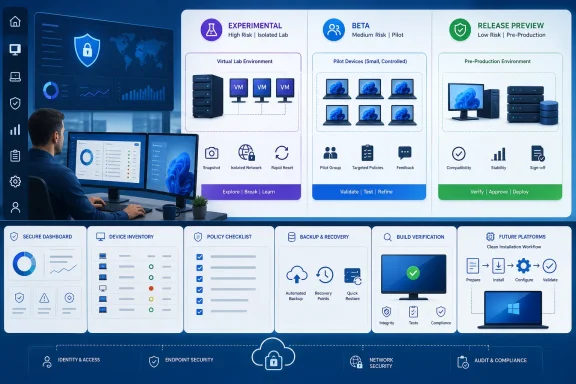 Turn Three Channel Names Into Three Risk Boundaries
Organizations should classify Insider devices by workload risk rather than treating Experimental, Beta, and Release Preview as ordinary deployment rings.Experimental belongs in a disposable discovery environment. Its purpose is to expose applications, drivers, security agents, provisioning scripts, and management tools to early platform changes. Findings should be treated as advance compatibility signals, not as certification that a feature or behavior will appear unchanged in a production release.
Suitable placements include lab hardware, replaceable test PCs, and controlled virtual machines where loss of state will not interrupt business operations. Experimental devices should not hold unique business data or become dependencies for daily work.
Release Preview belongs in production-adjacent validation. It is the most practical boundary for checking deployment workflows, security tools, line-of-business applications, VPN clients, printing, authentication, and operating procedures against Windows code approaching general availability.
Beta belongs in a small, approved pilot. It is useful when an organization has a specific reason to test earlier than Release Preview and has the staff, spare devices, backups, and test cases needed to handle preview-related failures. The new channel name alone does not establish production readiness.
A sensible fleet mapping is:
- Experimental: Isolated systems for early compatibility discovery and engineering investigation.
- Beta: A small pilot answering a documented business or technical question.
- Release Preview: Representative production-adjacent devices used for final application and operational validation.
- Retail Windows: Ordinary production endpoints.
Complete a Pre-Enrollment Check on Every Device
Before enrolling or reassigning a device, record its current state. Do not rely only on the intended assignment shown in an administration console.Use this checklist:
- Open Settings > Windows Update > Windows Insider Program and record the displayed channel, enrollment status, and any advanced core-version or Future Platforms selection.
- Open Settings > System > About and record the Windows edition, version, and OS build. Administrators can also run winver to confirm the displayed version and build.
- Record the device owner, business purpose, application set, security agents, management platform, and pilot expiration date.
- Verify that important data is backed up and that the device can be reimaged without unacceptable business impact.
- Confirm that installation media, drivers, credentials, and provisioning instructions are available.
- Check whether critical application and hardware vendors support preview Windows builds. If their policies are unclear, treat preview support as a risk to confirm with each vendor rather than assuming that an investigation will be accepted.
- Define success tests, failure thresholds, escalation ownership, and the exit or rebuild procedure before enrollment.
Use a Concrete Administrator Runbook
Microsoft’s organizational documentation identifies Group Policy, mobile device management such as Microsoft Intune, Configuration Manager, and WSUS as management mechanisms for Insider Preview deployments. However, that documentation applies to the former program model and is awaiting updates.Microsoft has not yet published, in the material available here, exact enterprise policy or profile mappings for the redesigned Experimental, Beta, Release Preview, advanced core-version, and Experimental Future Platforms taxonomy. Existing templates may still expose older terminology. Administrators should not guess that an old channel value maps directly to a new selector choice, and they should not claim to enforce a redesigned channel until Microsoft documents the supported policy names and values.
Use the following runbook during that documentation gap:
- Inventory existing controls. Identify every Group Policy object, Intune profile, Configuration Manager deployment, WSUS setting, script, and manual process associated with Insider or preview builds.
- Separate legacy controls from new-model intent. Mark configurations that use former channel names. Do not silently relabel them as Experimental, Beta, or Release Preview.
- Choose an approved governance group. This article recommends device-based groups so each approved PC or virtual machine has a recorded purpose and recovery plan. Device assignment is not inherently safer as a Microsoft platform behavior; it is a governance choice.
- Prevent assignment drift. Require a change ticket for additions, use named group owners, review membership on a fixed schedule, set pilot expiration dates, and reconcile the group roster against the device inventory.
- Limit administrative access. Only designated deployment administrators should change preview assignments. Help-desk staff may inspect and document state without automatically receiving authority to alter the pilot.
- Test with noncritical devices first. Apply any documented control to a small test group, then inspect Settings > Windows Update > Windows Insider Program and Settings > System > About or winver.
- Validate restrictions. Where the organization intends to prohibit enrollment, test on a representative managed device whether the available documented legacy control blocks the action. Record exactly what the endpoint displays.
- Do not extrapolate. If a management console lacks a documented new-model value, stop rather than selecting a similarly named legacy option.
- Document exit behavior. Record whether the planned move is an in-place transition or requires reinstallation, and test that process on replaceable hardware.
- Expand only after verification. Approve broader enrollment only when endpoint state, recovery, ownership, and test results match the written plan.
Microsoft’s Documentation Has Not Caught Up With Its Interface
The gap between the retail interface and enterprise documentation is consequential. WindowsForum reports about the overhaul highlight simpler switching, clearer channels, a more predictable Beta experience, and reduced dependence on controlled-feature-rollout uncertainty. Administrators still need exact, published mappings before translating those retail choices into centralized policy.Existing administrative templates may refer to former channel terminology or older examples while retail PCs display Experimental, Beta, Release Preview, core-version choices, and Experimental Future Platforms. Until Microsoft updates the enterprise guidance, treat any migration as a controlled policy project rather than a cosmetic rename in an update-ring spreadsheet.
Internal documentation should give every preview group:
- A named owner and deputy.
- A business or engineering purpose.
- An approved channel and recorded core version.
- A device list and membership review schedule.
- A start date and expiration date.
- Test cases and reporting cadence.
- A support and escalation route.
- Exit conditions and a rebuild plan.
Easier Switching Does Not Eliminate Recovery Planning
Microsoft says in-place upgrades can allow movement among Experimental, Beta, and Release Preview in many cases when the destination uses the same Windows core version, while preserving apps, settings, and data. That capability should not replace backups or a tested rebuild procedure.Channel and core version must be tracked separately. A device’s channel label does not fully describe its platform state when advanced choices or Future Platforms are involved. Administrators should record both before approving a transition.
Experimental Future Platforms has the clearest recovery boundary. Microsoft says it is not aligned with a retail production build, and leaving it for another channel or exiting the Insider Program requires a clean installation.
It therefore needs a separate device group, visible inventory classification, installation media, and a documented rebuild workflow. It is inappropriate for any endpoint that cannot be erased without operational impact.
Define Support and Data Decisions Before Enrollment
Preview deployments create work for local IT, application owners, security teams, and pilot users. A failure must be reproduced and classified before the organization can determine whether it comes from Windows, hardware, an application, a driver, or management configuration.The supplied enterprise guidance does not establish new-model diagnostic-data requirements or support consequences for each redesigned channel. Administrators should review Microsoft’s current privacy and diagnostic-data documentation, their own compliance obligations, and the actual enrollment prompts before approval rather than assuming that former-program requirements map unchanged to the new taxonomy.
The service desk also needs a written support boundary. Decide whether preview devices receive normal troubleshooting, best-effort troubleshooting, or reimaging after a defined time or failure threshold. Confirm support expectations with each critical application and hardware vendor; do not assume preview builds are included or excluded without checking the vendor’s policy.
A useful pilot is temporary. If it has no test question, review date, or exit condition, it is not a managed pilot.
Frequently Asked Questions
Which channel should a managed organization use first?
Release Preview is the most appropriate starting point for production-adjacent application and operational validation. Standard retail Windows should remain the default for normal production endpoints.Can Intune or Group Policy enforce the new channel names?
Microsoft identifies MDM and Group Policy as management mechanisms for Insider deployments, but the available enterprise documentation still applies to the former program and awaits updates. Do not assume an older setting maps to Experimental, Beta, or the other redesigned choices until Microsoft publishes the exact policy or profile names and supported values.Is device-based assignment required?
No. It is this article’s recommended governance model because it ties approval to an inventoried device. Prevent drift with named owners, change records, expiration dates, scheduled membership reviews, and reconciliation against endpoint state.What must be recorded before enrollment?
Inspect Settings > Windows Update > Windows Insider Program, then record the OS version and build through Settings > System > About or winver. Also document ownership, purpose, core version, applications, backups, recovery resources, test cases, and exit criteria.Can Experimental Future Platforms be used on an employee’s main PC?
It should not be used on a device that cannot be erased without business impact. Returning from Future Platforms requires a clean installation.The redesigned program is easier for individuals to understand, as WindowsForum’s user reports consistently note. For managed fleets, the correct response is tighter governance: no device should enter a preview channel without an owner, a purpose, a verified build state, and an exit plan.
References
- Primary source: learn.microsoft.com
Troubleshooting - Windows Insider Program | Microsoft Learn
Troubleshooting tipslearn.microsoft.com - Independent coverage: windowscentral.com
Microsoft rolls out 6 helpful new Windows 11 Insider features for early July, including one built to protect your PC from disaster | Windows Central
Microsoft's latest Insider builds in early July introduce Cloud rebuild, big Search improvements, Taskbar customization, and more changes.www.windowscentral.com - Independent coverage: blogs.windows.com
Announcing new builds for 26 June 2026, retail launch of new WIP improvements
Hello Windows Insiders, We have new releases today with builds across Beta and Experimental, and are excited to begin rolling out the new Windows Insider experience to retail Windows 11 builds this week! New Windows Insider Program changesblogs.windows.com - Primary source: WindowsForum
Windows 11 Insider Program Redesign: New Channel Controls on Retail PCs | Windows Forum
On June 26, 2026, Microsoft began rolling out its redesigned Windows Insider Program experience to retail Windows 11 PCs while releasing Insider Preview...windowsforum.com
