On June 12, 2026, Microsoft released a coordinated set of Windows 11 Insider builds across Beta, Experimental, Experimental Future Platforms, and Release Preview channels, while also moving inbox app release notes into their own Windows Insider documentation area. The headline feature is not any single build number, but Microsoft’s attempt to make Windows testing feel less like a maze of scattered notes and surprise restarts. For Insiders, the day’s releases show a company reorganizing both the plumbing of Windows updates and the paperwork that explains them. For IT pros, the more interesting story is that Microsoft is testing whether Windows can become more predictable without becoming less ambitious.
The June 12 Insider announcement lands with the usual rhythm: new bits, new build numbers, new release notes, and the familiar reminder that not every feature reaches every tester at once. Beta receives Build 28020.2298 for 26H1. Experimental receives Build 28120.2302 for 26H1. Experimental Future Platforms, including the Canary 29600 series, moves to Build 29610.1000. Release Preview also gets builds for both the 24H2/25H2 line and 26H1.
That is a lot of Windows in one day, but the distribution matters more than the count. Microsoft is no longer merely tossing features into a sequence of named rings and hoping enthusiasts can follow along. It is trying to make the Insider Program read like a product-development map, with different lanes for nearer-term validation, broader previewing, and earlier platform work.
The company’s new channel language is still settling in. Many Insiders have lived through Dev, Canary, Beta, Release Preview, and several rounds of channel repositioning, so another taxonomy risks sounding like inside baseball. But the June 12 announcement makes clear that Microsoft wants the documentation to follow the new system even before every device or user has fully moved through the transition.
That is a subtle but important shift. The release notes are being arranged around where Microsoft thinks the program is going, not merely where every machine happens to be today. For a testing program that has often confused even regular participants, that is both sensible and mildly dangerous: sensible because documentation has to lead the migration, dangerous because users caught between old and new labels may still struggle to know which promises apply to them.
Microsoft’s use of Experimental Future Platforms is especially telling. By placing the Canary 29600 series under that umbrella, the company is signaling that some builds are about platform direction rather than consumer feature previewing. That gives Windows engineers room to test kernel, driver, security, and servicing changes without pretending each one belongs to a named annual update.
For enthusiasts, this is less romantic than the old idea of getting tomorrow’s Windows today. The trade-off is clarity of intent. If a build is not tied to a specific release, Microsoft can stop implying that every new behavior is destined for the next feature update. That should reduce some of the whiplash that happens when a flashy Insider feature disappears, changes channels, or arrives months later under a different name.
For administrators, however, the channel names still require translation. “Experimental” is not a deployment plan. “Future Platforms” is not a support statement. The practical question remains whether a build can safely sit on a test bench, validate a driver stack, run a line-of-business app, or help prepare a pilot group for a Windows servicing change. Microsoft’s labels are improving, but they do not replace disciplined lab work.
The June 12 drop also confirms that Microsoft is willing to run multiple preview timelines in parallel. 24H2 and 25H2 continue to matter in Release Preview, while 26H1 moves through newer lanes. Windows is now serviced like a platform, previewed like a cloud product, and still installed like an operating system. That tension explains much of the Insider Program’s complexity.
Windows users experience the operating system through apps as much as through the shell. Paint gains AI features, Photos changes import behavior, Media Player alters codec handling, Camera adds device capabilities, and suddenly a “Windows update” problem may actually be a Store-delivered app change. Until now, tracking those updates has often meant chasing Store version numbers, blog posts, scattered release notes, or user reports.
A dedicated release-note page per inbox app is exactly the kind of unglamorous maintenance Windows needs. It gives testers a place to separate OS regressions from app regressions. It gives support staff a reference point when a user says “Windows changed” but the changed thing was Photos. It also gives Microsoft a cleaner way to ship app improvements without burying them under operating system build notes.
The decision also reflects a broader truth: the modern Windows inbox is no longer static. Many built-in apps have their own update cadence, independent of the core OS. That is good for iteration but bad for accountability unless the changelog follows the software. Microsoft is now acknowledging that an inbox app with independent behavior deserves independent documentation.
The catch is that release notes are only useful if they are timely, detailed, and honest about known issues. Too many Microsoft changelogs over the years have hidden behind “performance improvements and bug fixes.” If the new app pages become another lightly populated archive, they will not help anyone. If they actually document versioned changes, staged rollouts, and regressions, they could become one of the more practical improvements to the Insider experience this year.
Windows reboots are not merely annoying. They interrupt work, break meeting-room machines, delay field devices, and create uncertainty for anyone who manages fleets. Even when a restart is justified, the perceived randomness of multiple update prompts can make Windows feel less professional than it is.
Microsoft’s approach here is not to eliminate reboots, because that remains difficult for many low-level components. Instead, the company is trying to consolidate the pain. A single monthly restart is a more defensible contract than separate restarts for Windows, drivers, firmware, and runtime components that appear to arrive on their own schedules.
This is also a tacit admission that the update ecosystem is bigger than Windows itself. Firmware comes from device makers. Drivers can arrive through Windows Update but originate elsewhere. .NET has its own servicing needs. The user, however, does not care which component demanded the reboot. The user sees the Windows update UX, so Microsoft owns the experience whether or not Microsoft authored every payload.
The experimental nature of the rollout matters. Coordinating updates across firmware, driver, .NET, and OS quality releases sounds simple in a blog paragraph and brutally complex in the real world. Hardware vendors ship on different schedules. Driver quality varies. Firmware updates are higher-risk than ordinary patches. Enterprise policies may intentionally separate classes of updates. The single-restart dream has to survive all of that.
But consolidation also raises the stakes. If everything queues behind one monthly restart, that restart becomes more important. A failed firmware update, a bad driver, or a botched servicing stack issue could turn the monthly maintenance window into a larger blast radius. For home users, that means a scarier reboot. For enterprises, it means change-management discipline becomes even more important.
The right model is not “fewer reboots at all costs.” It is fewer uncoordinated reboots. Microsoft needs to preserve controls that let administrators defer, stage, or block specific update classes when risk justifies it. A firmware update for a laptop fleet should not necessarily ride along with a routine cumulative update unless the organization has chosen that policy.
This is where the Insider Program earns its keep. Experimental builds are the place to find out whether Microsoft can align servicing events without erasing meaningful admin control. Testers should watch not just whether restart counts fall, but whether failure handling, rollback, notifications, and policy reporting improve with the new system.
If the unified update experience matures, it could become one of those Windows changes that users barely notice because it removes a recurring irritation. That would be success. The best update experience is not the one that wins a demo, but the one that stops becoming dinner-table tech support.
This is not glamorous AI. It is the basic forgiveness people expect from any search box in 2026. Users have been trained by web search, phone launchers, and productivity tools to assume that search understands sloppy input. When Windows Search fails because a user missed the first letter of an app name, the system feels older than it should.
The Settings ranking work may be even more important than app typo tolerance. Windows Settings has absorbed more of Control Panel over time, but discoverability remains uneven. A user searching for display scaling, BitLocker, printer defaults, startup apps, DNS, or power settings should not need to know Microsoft’s preferred wording. Search is the bridge between user intent and Microsoft’s taxonomy.
For IT pros, better Settings search cuts both ways. It helps users solve routine problems without tickets, but it can also expose more configuration surfaces to people who do not understand the consequences. That is not an argument against better search. It is an argument for sensible policy boundaries and clear UI copy.
The broader lesson is that Windows usability increasingly depends on ranking systems. The Start menu, Settings, File Explorer suggestions, Copilot surfaces, and Store search all ask Microsoft to infer what the user meant. When those systems work, Windows feels responsive. When they fail, the OS feels arbitrary.
System Guard sits in the part of Windows where hardware, firmware, virtualization, and boot integrity intersect. Problems there are not cosmetic. If a build interacts badly with a security capability on a class of machines, pausing the rollout is not only reasonable; it is the responsible choice.
The resolved AMD issue also underscores why Experimental Future Platforms cannot be treated like a daily-driver channel. Early platform work often collides with the diversity of the PC ecosystem. Two systems can both run Windows 11 and still differ sharply in firmware behavior, security configuration, chipset implementation, and driver maturity.
For AMD users in the Insider Program, the practical news is simple: the block has been lifted for affected System Guard-capable machines. For everyone else, the lesson is that staged rollout is not just a throttling strategy. It is damage containment.
This is where Microsoft’s controlled release model deserves more credit than it often gets. Enthusiasts dislike waiting for features, and forum threads inevitably fill with “why don’t I have it yet?” complaints. But the alternative is pretending that a billion-device ecosystem behaves like a single Surface laptop in a lab. It does not.
The coexistence of 24H2, 25H2, and 26H1 previewing reflects the layered nature of modern Windows. Microsoft is no longer shipping a single monolithic “next Windows” story. It is servicing current releases, preparing enablement-style transitions, and testing future work at the same time.
That creates a reading challenge. A feature appearing in Experimental does not mean it is bound for the next public release. A fix in Release Preview is much closer to practical relevance. A Future Platforms change may be important but not productized. The Insider Program only makes sense if readers keep those distinctions in mind.
For business users, Release Preview should remain the least theatrical and most useful channel. It offers a window into near-term changes without the churn of deeper development lanes. It is not risk-free, but its risk profile is closer to what organizations can evaluate in pilot groups.
The June 12 package therefore has two audiences. Enthusiasts will look at Experimental for features and platform movement. Admins should look at Release Preview for the servicing line that may soon matter to managed machines. Microsoft’s challenge is to serve both groups without making either feel like the documentation is written for someone else.
This is especially true for Insiders, who agree to instability in exchange for visibility. A tester can tolerate a bug more easily if they know whether it is expected, newly introduced, hardware-specific, or already fixed in a later flight. Poor documentation turns every bug into a mystery. Good documentation turns bugs into data.
The same applies to app updates. A Paint change may matter to a teacher. A Photos change may matter to a photographer. A Camera change may matter to a remote worker. A Sound Recorder change may matter to someone capturing interviews or lectures. These are not “small” just because they are not kernel changes.
There is also a trust dimension. Windows users have grown wary of silent behavior changes, especially when they touch defaults, search, privacy, AI features, or update timing. Detailed release notes do not eliminate controversy, but they reduce the sense that Microsoft is moving controls around in the dark.
The Insider Program is the right place to improve this discipline. If Microsoft can train itself to document app changes, staged rollouts, and update behavior more clearly for testers, that habit can carry into mainstream Windows servicing. The long-term benefit is not a prettier documentation hub. It is a less adversarial relationship between Windows and the people who maintain it.
Microsoft’s Windows problem in 2026 is not that the OS lacks features. It is that the operating system often feels like several delivery systems sharing a desktop: Store apps, cumulative updates, drivers, firmware, Copilot-era services, staged feature flags, and legacy control surfaces. The company’s task is to make those systems feel coordinated.
The unified update experience is the most ambitious attempt in this batch because it attacks a problem users actually feel. Search tolerance attacks another. App release notes attack a support and transparency gap. The channel reorganization attacks Insider confusion, though perhaps less cleanly than Microsoft would like.
This is the right kind of Windows work. It is not the kind that produces a glossy launch video, but it is the kind that makes daily use less irritating. A more predictable Windows is more valuable than a more surprising one.
Still, Microsoft has to resist the temptation to declare victory early. Fewer reboots must not mean less control. Better search must not become a substitute for coherent settings design. More release notes must not become more pages with less substance. New channel names must not become a fresh layer of abstraction over the same old uncertainty.
For a spare test machine, Experimental may be exactly where the action is. For a primary laptop, Release Preview remains the saner bet. For hardware validation, the AMD System Guard note is a reminder that even supported systems can hit channel-specific blocks.
The new inbox app release notes also create a new habit for testers. When something changes in Calculator, Camera, Clock, Media Player, Paint, Photos, or Sound Recorder, do not assume the OS build is the whole story. Check the app’s own release trail. That is where the actionable clue may be.
The update restart work deserves particular attention from administrators and power users. Anyone testing the Experimental channel should watch whether Windows actually consolidates restart prompts, how it communicates bundled update classes, and what happens when one component fails. The feature’s success will depend less on the happy path than on the messy edge cases.
Microsoft is trying to keep multiple Windows futures alive at once. One branch stabilizes what users already have. Another tests what may come next. Another probes platform work that may not align to a named consumer release. Meanwhile, inbox apps increasingly evolve on their own track.
That strategy is rational, but it asks more from everyone. Users must understand staged delivery. Admins must map channels to risk. Developers must test against changing platform assumptions. Microsoft must document enough of the moving parts to make the program worth participating in.
The risk is that Windows becomes easier for Microsoft to engineer and harder for everyone else to understand. The opportunity is that Microsoft can use better documentation, cleaner update orchestration, and more explicit channel boundaries to make the complexity manageable.
This June 12 drop sits right at that crossroads. It shows both the burden of modern Windows and the beginnings of a better operating model.
 Microsoft Turns a Build Drop Into a Process Story
The June 12 Insider announcement lands with the usual rhythm: new bits, new build numbers, new release notes, and the familiar reminder that not every feature reaches every tester at once. Beta receives Build 28020.2298 for 26H1. Experimental receives Build 28120.2302 for 26H1. Experimental Future Platforms, including the Canary 29600 series, moves to Build 29610.1000. Release Preview also gets builds for both the 24H2/25H2 line and 26H1.That is a lot of Windows in one day, but the distribution matters more than the count. Microsoft is no longer merely tossing features into a sequence of named rings and hoping enthusiasts can follow along. It is trying to make the Insider Program read like a product-development map, with different lanes for nearer-term validation, broader previewing, and earlier platform work.
The company’s new channel language is still settling in. Many Insiders have lived through Dev, Canary, Beta, Release Preview, and several rounds of channel repositioning, so another taxonomy risks sounding like inside baseball. But the June 12 announcement makes clear that Microsoft wants the documentation to follow the new system even before every device or user has fully moved through the transition.
That is a subtle but important shift. The release notes are being arranged around where Microsoft thinks the program is going, not merely where every machine happens to be today. For a testing program that has often confused even regular participants, that is both sensible and mildly dangerous: sensible because documentation has to lead the migration, dangerous because users caught between old and new labels may still struggle to know which promises apply to them.
The New Insider Map Is Built for Microsoft First, Users Second
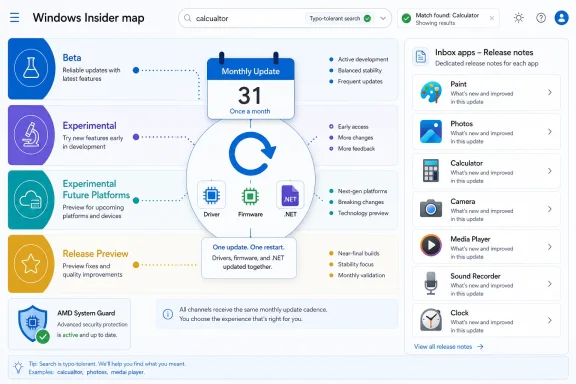
The current channel structure is easier to defend from Microsoft’s side than from a tester’s desk. Beta and Release Preview remain comparatively understandable: one is for features and fixes closer to broad Windows 11 delivery, the other for validation before public servicing. Experimental and Experimental Future Platforms are harder to explain because their names imply both risk and distance from release, but their actual payload can vary from visible UI changes to plumbing that may never ship in recognizable form.Microsoft’s use of Experimental Future Platforms is especially telling. By placing the Canary 29600 series under that umbrella, the company is signaling that some builds are about platform direction rather than consumer feature previewing. That gives Windows engineers room to test kernel, driver, security, and servicing changes without pretending each one belongs to a named annual update.
For enthusiasts, this is less romantic than the old idea of getting tomorrow’s Windows today. The trade-off is clarity of intent. If a build is not tied to a specific release, Microsoft can stop implying that every new behavior is destined for the next feature update. That should reduce some of the whiplash that happens when a flashy Insider feature disappears, changes channels, or arrives months later under a different name.
For administrators, however, the channel names still require translation. “Experimental” is not a deployment plan. “Future Platforms” is not a support statement. The practical question remains whether a build can safely sit on a test bench, validate a driver stack, run a line-of-business app, or help prepare a pilot group for a Windows servicing change. Microsoft’s labels are improving, but they do not replace disciplined lab work.
The June 12 drop also confirms that Microsoft is willing to run multiple preview timelines in parallel. 24H2 and 25H2 continue to matter in Release Preview, while 26H1 moves through newer lanes. Windows is now serviced like a platform, previewed like a cloud product, and still installed like an operating system. That tension explains much of the Insider Program’s complexity.
Inbox Apps Finally Get Their Own Paper Trail
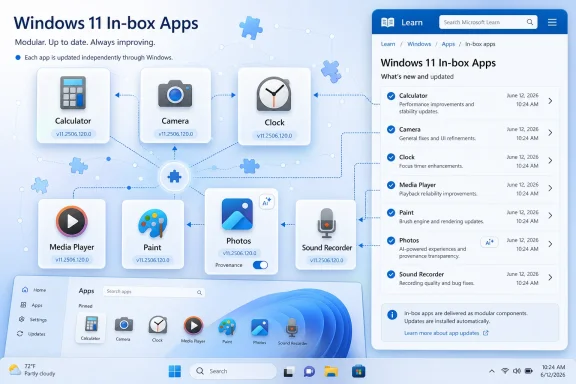
The sleeper announcement is the new release notes section for Windows 11 inbox apps on the Windows Insider Program Documentation Hub. Calculator, Camera, Clock, Media Player, Paint, Photos, and Sound Recorder are among the first apps called out for Experimental updates, with more promised over time. It sounds mundane, but it fixes a real documentation gap.Windows users experience the operating system through apps as much as through the shell. Paint gains AI features, Photos changes import behavior, Media Player alters codec handling, Camera adds device capabilities, and suddenly a “Windows update” problem may actually be a Store-delivered app change. Until now, tracking those updates has often meant chasing Store version numbers, blog posts, scattered release notes, or user reports.
A dedicated release-note page per inbox app is exactly the kind of unglamorous maintenance Windows needs. It gives testers a place to separate OS regressions from app regressions. It gives support staff a reference point when a user says “Windows changed” but the changed thing was Photos. It also gives Microsoft a cleaner way to ship app improvements without burying them under operating system build notes.
The decision also reflects a broader truth: the modern Windows inbox is no longer static. Many built-in apps have their own update cadence, independent of the core OS. That is good for iteration but bad for accountability unless the changelog follows the software. Microsoft is now acknowledging that an inbox app with independent behavior deserves independent documentation.
The catch is that release notes are only useful if they are timely, detailed, and honest about known issues. Too many Microsoft changelogs over the years have hidden behind “performance improvements and bug fixes.” If the new app pages become another lightly populated archive, they will not help anyone. If they actually document versioned changes, staged rollouts, and regressions, they could become one of the more practical improvements to the Insider experience this year.
The Reboot Problem Gets a More Serious Answer
The most consequential feature in the June 12 announcement is Microsoft’s new unified update experience in the Experimental channel. The company says it is starting by coordinating driver, .NET, and firmware updates so they align with the monthly quality update, reducing the experience to a single monthly restart. That is the kind of sentence that sounds small until you remember how much user hostility Windows Update has accumulated over two decades.Windows reboots are not merely annoying. They interrupt work, break meeting-room machines, delay field devices, and create uncertainty for anyone who manages fleets. Even when a restart is justified, the perceived randomness of multiple update prompts can make Windows feel less professional than it is.
Microsoft’s approach here is not to eliminate reboots, because that remains difficult for many low-level components. Instead, the company is trying to consolidate the pain. A single monthly restart is a more defensible contract than separate restarts for Windows, drivers, firmware, and runtime components that appear to arrive on their own schedules.
This is also a tacit admission that the update ecosystem is bigger than Windows itself. Firmware comes from device makers. Drivers can arrive through Windows Update but originate elsewhere. .NET has its own servicing needs. The user, however, does not care which component demanded the reboot. The user sees the Windows update UX, so Microsoft owns the experience whether or not Microsoft authored every payload.
The experimental nature of the rollout matters. Coordinating updates across firmware, driver, .NET, and OS quality releases sounds simple in a blog paragraph and brutally complex in the real world. Hardware vendors ship on different schedules. Driver quality varies. Firmware updates are higher-risk than ordinary patches. Enterprise policies may intentionally separate classes of updates. The single-restart dream has to survive all of that.
One Restart a Month Is a Promise Windows Has to Earn
The promise of fewer reboots is powerful because it addresses an emotional Windows complaint with an operational fix. Users are not asking for the technical purity of hot patching across every component. They are asking for Windows to stop feeling like it is negotiating with them every few days. If Microsoft can make the monthly quality update the natural rendezvous point for related updates, it will make Windows feel calmer.But consolidation also raises the stakes. If everything queues behind one monthly restart, that restart becomes more important. A failed firmware update, a bad driver, or a botched servicing stack issue could turn the monthly maintenance window into a larger blast radius. For home users, that means a scarier reboot. For enterprises, it means change-management discipline becomes even more important.
The right model is not “fewer reboots at all costs.” It is fewer uncoordinated reboots. Microsoft needs to preserve controls that let administrators defer, stage, or block specific update classes when risk justifies it. A firmware update for a laptop fleet should not necessarily ride along with a routine cumulative update unless the organization has chosen that policy.
This is where the Insider Program earns its keep. Experimental builds are the place to find out whether Microsoft can align servicing events without erasing meaningful admin control. Testers should watch not just whether restart counts fall, but whether failure handling, rollback, notifications, and policy reporting improve with the new system.
If the unified update experience matures, it could become one of those Windows changes that users barely notice because it removes a recurring irritation. That would be success. The best update experience is not the one that wins a demo, but the one that stops becoming dinner-table tech support.
Search Gets the Kind of Forgiveness Users Already Expect
The Search changes in the Experimental channel are smaller but revealing. Microsoft says app search is getting better at handling typos, dropped letters, extra letters, and partial words. Its example is “utlook” still finding Outlook. Settings results are also getting ranking improvements so more relevant items appear higher.This is not glamorous AI. It is the basic forgiveness people expect from any search box in 2026. Users have been trained by web search, phone launchers, and productivity tools to assume that search understands sloppy input. When Windows Search fails because a user missed the first letter of an app name, the system feels older than it should.
The Settings ranking work may be even more important than app typo tolerance. Windows Settings has absorbed more of Control Panel over time, but discoverability remains uneven. A user searching for display scaling, BitLocker, printer defaults, startup apps, DNS, or power settings should not need to know Microsoft’s preferred wording. Search is the bridge between user intent and Microsoft’s taxonomy.
For IT pros, better Settings search cuts both ways. It helps users solve routine problems without tickets, but it can also expose more configuration surfaces to people who do not understand the consequences. That is not an argument against better search. It is an argument for sensible policy boundaries and clear UI copy.
The broader lesson is that Windows usability increasingly depends on ranking systems. The Start menu, Settings, File Explorer suggestions, Copilot surfaces, and Store search all ask Microsoft to infer what the user meant. When those systems work, Windows feels responsive. When they fail, the OS feels arbitrary.
The AMD System Guard Fix Restores Confidence in the Risk Lane
Microsoft also notes that an issue affecting AMD machines supporting System Guard has been resolved, meaning those devices will again be offered the Experimental Future Platforms build as usual. That sentence will matter most to the subset of Insiders who were blocked or delayed, but it carries a larger signal. Microsoft is still willing to hold back risky platform builds from specific hardware configurations when security or firmware-adjacent features are implicated.System Guard sits in the part of Windows where hardware, firmware, virtualization, and boot integrity intersect. Problems there are not cosmetic. If a build interacts badly with a security capability on a class of machines, pausing the rollout is not only reasonable; it is the responsible choice.
The resolved AMD issue also underscores why Experimental Future Platforms cannot be treated like a daily-driver channel. Early platform work often collides with the diversity of the PC ecosystem. Two systems can both run Windows 11 and still differ sharply in firmware behavior, security configuration, chipset implementation, and driver maturity.
For AMD users in the Insider Program, the practical news is simple: the block has been lifted for affected System Guard-capable machines. For everyone else, the lesson is that staged rollout is not just a throttling strategy. It is damage containment.
This is where Microsoft’s controlled release model deserves more credit than it often gets. Enthusiasts dislike waiting for features, and forum threads inevitably fill with “why don’t I have it yet?” complaints. But the alternative is pretending that a billion-device ecosystem behaves like a single Surface laptop in a lab. It does not.
Release Preview Remains the Channel That Enterprises Should Actually Watch
The June 12 announcement includes Release Preview builds for 24H2/25H2 and 26H1, specifically Build 26100.8728/26200.8728 and Build 28000.2333. These are not the sexiest entries in the post, but they are often the most operationally relevant. Release Preview is where administrators should look when they want a sense of what is nearing broader servicing.The coexistence of 24H2, 25H2, and 26H1 previewing reflects the layered nature of modern Windows. Microsoft is no longer shipping a single monolithic “next Windows” story. It is servicing current releases, preparing enablement-style transitions, and testing future work at the same time.
That creates a reading challenge. A feature appearing in Experimental does not mean it is bound for the next public release. A fix in Release Preview is much closer to practical relevance. A Future Platforms change may be important but not productized. The Insider Program only makes sense if readers keep those distinctions in mind.
For business users, Release Preview should remain the least theatrical and most useful channel. It offers a window into near-term changes without the churn of deeper development lanes. It is not risk-free, but its risk profile is closer to what organizations can evaluate in pilot groups.
The June 12 package therefore has two audiences. Enthusiasts will look at Experimental for features and platform movement. Admins should look at Release Preview for the servicing line that may soon matter to managed machines. Microsoft’s challenge is to serve both groups without making either feel like the documentation is written for someone else.
Documentation Is Becoming Part of the Product
Microsoft’s decision to split inbox app release notes into dedicated pages fits a larger pattern: documentation is no longer a sidecar to Windows development. It is part of the user experience. If update channels, app versions, staged features, and known issues are opaque, the product feels chaotic even when the engineering work is sound.This is especially true for Insiders, who agree to instability in exchange for visibility. A tester can tolerate a bug more easily if they know whether it is expected, newly introduced, hardware-specific, or already fixed in a later flight. Poor documentation turns every bug into a mystery. Good documentation turns bugs into data.
The same applies to app updates. A Paint change may matter to a teacher. A Photos change may matter to a photographer. A Camera change may matter to a remote worker. A Sound Recorder change may matter to someone capturing interviews or lectures. These are not “small” just because they are not kernel changes.
There is also a trust dimension. Windows users have grown wary of silent behavior changes, especially when they touch defaults, search, privacy, AI features, or update timing. Detailed release notes do not eliminate controversy, but they reduce the sense that Microsoft is moving controls around in the dark.
The Insider Program is the right place to improve this discipline. If Microsoft can train itself to document app changes, staged rollouts, and update behavior more clearly for testers, that habit can carry into mainstream Windows servicing. The long-term benefit is not a prettier documentation hub. It is a less adversarial relationship between Windows and the people who maintain it.
The June 12 Builds Show a Windows Team Trying to Reduce Friction Without Slowing Down
There is no single blockbuster feature in the June 12 release. That is the point. The announcement is about friction: the friction of too many restarts, the friction of hard-to-find app changelogs, the friction of mistyped searches, the friction of channel transitions, and the friction of hardware-specific rollout blocks.Microsoft’s Windows problem in 2026 is not that the OS lacks features. It is that the operating system often feels like several delivery systems sharing a desktop: Store apps, cumulative updates, drivers, firmware, Copilot-era services, staged feature flags, and legacy control surfaces. The company’s task is to make those systems feel coordinated.
The unified update experience is the most ambitious attempt in this batch because it attacks a problem users actually feel. Search tolerance attacks another. App release notes attack a support and transparency gap. The channel reorganization attacks Insider confusion, though perhaps less cleanly than Microsoft would like.
This is the right kind of Windows work. It is not the kind that produces a glossy launch video, but it is the kind that makes daily use less irritating. A more predictable Windows is more valuable than a more surprising one.
Still, Microsoft has to resist the temptation to declare victory early. Fewer reboots must not mean less control. Better search must not become a substitute for coherent settings design. More release notes must not become more pages with less substance. New channel names must not become a fresh layer of abstraction over the same old uncertainty.
The Practical Reading for Insiders Who Install First and Regret Later
The concrete lesson from June 12 is that channel choice matters more than build enthusiasm. Experimental and Experimental Future Platforms are not simply faster versions of Windows 11. They are different risk contracts. The more Microsoft uses those lanes for servicing, platform, and rollout experiments, the more users need to decide what kind of instability they are actually volunteering for.For a spare test machine, Experimental may be exactly where the action is. For a primary laptop, Release Preview remains the saner bet. For hardware validation, the AMD System Guard note is a reminder that even supported systems can hit channel-specific blocks.
The new inbox app release notes also create a new habit for testers. When something changes in Calculator, Camera, Clock, Media Player, Paint, Photos, or Sound Recorder, do not assume the OS build is the whole story. Check the app’s own release trail. That is where the actionable clue may be.
The update restart work deserves particular attention from administrators and power users. Anyone testing the Experimental channel should watch whether Windows actually consolidates restart prompts, how it communicates bundled update classes, and what happens when one component fails. The feature’s success will depend less on the happy path than on the messy edge cases.
The Signal Hidden in Microsoft’s Build Numbers
The June 12 release is easy to skim as a pile of numbers: 28020.2298, 28120.2302, 29610.1000, 26100.8728, 26200.8728, 28000.2333. That would be a mistake. The numbers are the scaffolding around a broader platform-management strategy.Microsoft is trying to keep multiple Windows futures alive at once. One branch stabilizes what users already have. Another tests what may come next. Another probes platform work that may not align to a named consumer release. Meanwhile, inbox apps increasingly evolve on their own track.
That strategy is rational, but it asks more from everyone. Users must understand staged delivery. Admins must map channels to risk. Developers must test against changing platform assumptions. Microsoft must document enough of the moving parts to make the program worth participating in.
The risk is that Windows becomes easier for Microsoft to engineer and harder for everyone else to understand. The opportunity is that Microsoft can use better documentation, cleaner update orchestration, and more explicit channel boundaries to make the complexity manageable.
This June 12 drop sits right at that crossroads. It shows both the burden of modern Windows and the beginnings of a better operating model.
A More Predictable Windows Starts With the Boring Stuff
The biggest take from this release is that Microsoft’s most important Windows improvements may increasingly look administrative rather than theatrical. The visible features matter, but the platform’s credibility depends on whether updates, app changes, search, and preview channels behave in ways users can understand.- Microsoft released new Insider builds on June 12, 2026 across Beta, Experimental, Experimental Future Platforms, and Release Preview channels.
- Windows 11 inbox apps are getting dedicated release-note pages, starting with apps such as Calculator, Camera, Clock, Media Player, Paint, Photos, and Sound Recorder.
- The Experimental channel is testing a unified update experience that aims to coordinate driver, .NET, firmware, and monthly quality updates around a single monthly restart.
- Windows Search in Experimental is becoming more tolerant of typos, missing letters, extra letters, and partial app names, while Settings search ranking is also being improved.
- Microsoft says the AMD System Guard issue that affected Experimental Future Platforms delivery has been resolved, allowing those devices to receive the build again.
- Release Preview remains the channel most relevant to organizations watching near-term servicing for Windows 11 24H2, 25H2, and 26H1.
References
- Primary source: Microsoft - Windows Insiders Blog
Published: Fri, 12 Jun 2026 17:05:12 +0000
Announcing new builds for 12 June 2026
Hello Windows Insiders, We have a number of releases today with new builds across Beta, Experimental and Release Preview. Release notes for inbox Windows 11 apps Windows 11 inbox apps are now getting their own release notes sectioblogs.windows.com - Official source: learn.microsoft.com
Experimental (26H1) Preview Build 28020.2134 - Windows Insider Program | Microsoft Learn
Release notes for Experimental (26H1) Preview Build 28020.2134learn.microsoft.com