

Microsoft’s June 2026 optional Windows 11 update quietly fixed a storage bug in which the CapabilityAccessManager.db-wal file could grow from a tiny permissions log into a disk-eating monster of tens or hundreds of gigabytes. The affected file belongs to Windows’ privacy-permissions machinery, the part of the operating system that tracks access to capabilities such as camera, microphone, and location. As reported by It’s FOSS and amplified by Windows Central, PCWorld, TechRadar, and Windows Latest, Microsoft acknowledged the issue only obliquely in update notes that said disk-space usage for the file had been improved. That phrasing is doing a lot of work.
The bug is embarrassing not because a log file grew too large; software does that, databases do that, and Windows has enough moving parts that the occasional pathological file is inevitable. It is embarrassing because the failure mode collided with three of Windows 11’s worst habits: hiding system complexity from the user until it becomes a crisis, treating opaque “System and Reserved” storage as an answer, and communicating fixes as if users were not the ones paying for the SSDs being consumed.
The file at the center of the story is
A write-ahead log is not inherently suspicious. It is a standard database technique: changes are written to a log before being committed into the main database, improving reliability and recoverability. On a healthy system, that log should not become the dominant object on the disk. It should be checkpointed, trimmed, merged, or otherwise kept under control.
The reports that surfaced around this file show the opposite pattern. Users saw Windows report massive “System” storage use while ordinary cleanup tools found little to delete. Third-party disk analyzers and command-line inspection eventually pointed to
That is the first architectural sin here. If Windows is going to classify a runaway internal log as system storage, then Windows also needs to give users a credible path to understand what that storage is. A Settings page that says “System and Reserved” has consumed 111GB is not diagnostics. It is a shrug with a progress bar.
That is why this bug stings. The component responsible for mediating access to sensitive capabilities became, in some cases, a silent storage leak. The thing designed to make Windows more controlled instead made Windows feel less accountable.
The affected file is not a Copilot cache, a Teams installer, a game asset, or one of the consumer-facing annoyances users already love to blame for Windows bloat. It is deeper and duller than that. It is the kind of file that makes sense only after someone opens a disk analyzer, searches forums, finds a path, learns what a WAL file is, and then wonders why the operating system itself did not say anything.
That matters because the Windows 11 storage story is already overloaded with mistrust. Users routinely see space vanish into update staging, component store growth, hibernation files, restore points, delivery optimization, app caches, and OEM recovery partitions. Some of that is defensible. Some of it is poorly explained. All of it trains users to assume that Windows is doing something expensive in the background and not telling them why.
That anecdote is not proof of a systemic support policy. Front-line support is messy, outsourced, scripted, and often underpowered. But it is a perfect illustration of how Windows problems become user problems before they become Microsoft problems. The machine is losing space. The user cannot see the cause. The support channel does not recognize the pattern. The suggested remedy is more storage.
Reddit threads and forum posts suggest the issue may have existed before March 2026, with some users reporting the same file growing to hundreds of gigabytes. As always with Reddit, the evidence is noisy: different builds, different hardware, different cleanup attempts, different measurements. But the pattern is consistent enough that Microsoft’s later release-note entry looks less like a proactive improvement and more like a belated admission.
The official wording is almost comically minimal. Microsoft did not publish a consumer-facing explainer, a known-issue bulletin, or a diagnostic guide prominently tied to the symptom of disappearing disk space. It added an item to a Windows 11 preview update changelog saying disk-space usage for the file had been improved. That may be accurate engineering language. It is not adequate user communication.
For a minor UI glitch, that model makes sense. For a bug that can consume tens or hundreds of gigabytes of storage, it feels awkward. The users most affected may be precisely the ones least able to install a preview update because their system drive is already gasping for space. The fix exists, but the path to it may require the resource the bug is exhausting.
This is not an argument that Microsoft should recklessly rush every fix into every supported Windows 11 machine. Storage bugs can have edge cases, and changes to system databases deserve testing. But it is an argument that Microsoft’s update-channel language often maps poorly onto user pain. To Microsoft, this is a quality improvement in a preview cumulative update. To a user with a 256GB SSD and 500GB of phantom growth, it is an emergency.
The enterprise calculus is different but no less annoying. Administrators generally do not want to deploy optional previews fleet-wide unless they have a specific reason. A storage leak in a system permission database is a specific reason, but Microsoft’s terse changelog forces admins to reverse-engineer the severity from community reporting. That is backwards. The vendor should say enough for IT to triage without requiring a scavenger hunt.
There are good reasons for that. A database governing privacy permissions should not be casually editable by every desktop user or every poorly behaved app. If malware could trivially alter capability state, the privacy model would be weaker. Protection is not the problem.
The problem is that protection without observability becomes paternalism. Windows can lock down the folder and still expose accurate storage diagnostics. It can say, in plain language, that the Capability Access Manager database is consuming abnormal space. It can offer a repair action that stops the service, checkpoints or rebuilds the database safely, and restarts the service. It can direct administrators to an event log entry or remediation command.
Instead, users got a blob of “System and Reserved” storage. Some found the answer by running WizTree or similar tools as administrator. Some tried Safe Mode deletion. Some used command-line workarounds shared in forums. Some presumably never found the answer and blamed Windows, their SSD, OneDrive, games, malware, or themselves.
That is not just a bug. That is a diagnostic failure.
On those systems, a 60GB leak is not a curiosity. It is the difference between a usable machine and a machine that cannot install updates. A 100GB leak can break development environments, local mail stores, game installs, virtual machines, and restore points. A 500GB leak can dominate an entire drive.
Windows is also not alone on the disk anymore. The operating system competes with local AI models, WSL distributions, Docker images, cached cloud files, browser profiles, Teams and Outlook data, game launchers, and OEM utilities. Microsoft itself is pushing more local AI capability into Windows, which makes storage discipline more important, not less.
That is why the phrase “improves disk space usage” feels inadequate. Disk usage is not a cosmetic metric. It is operational capacity. When Windows consumes storage invisibly, it erodes the user’s ability to trust every other promise the platform makes.
That ambiguity has consequences. If a support response is wrong, users do not usually distinguish between “a Microsoft employee,” “a contractor,” “an independent advisor,” and “someone answering on Microsoft Q&A.” They see Microsoft. They judge Microsoft.
In this case, the reported suggestion to buy another hard drive landed badly because it converted a software defect into a hardware upsell. It also missed the obvious proportionality problem. A 66.5GB log file on a 221GB drive is not a user who needs to rethink storage strategy. It is an operating system failing to maintain its own bookkeeping.
This is where Microsoft’s Windows scale cuts both ways. Supporting hundreds of millions of PCs means every weird edge case will appear somewhere. But the same scale means Microsoft has telemetry, crash data, feedback channels, Insider reports, Q&A posts, and support interactions that should reveal patterns. When a single internal file repeatedly appears as the culprit in disappearing-storage reports, the company should be able to close the loop faster.
The Storage page can be useful for obvious categories: temporary files, installed apps, documents, pictures, and cleanup recommendations. But when the culprit sits under system-managed data, the UI often loses specificity. Users see a giant category and no practical hierarchy underneath it.
That is tolerable only if the system category behaves. Once it misbehaves, abstraction becomes obstruction. A power user can drop into PowerShell, run directory-size scripts, or boot into alternate environments. A normal user cannot. A help desk technician may not have time. A remote admin may be constrained by policy.
Microsoft should treat this as a design bug as much as an engineering bug. If a protected system component exceeds a reasonable threshold, Windows should surface that fact in a safe, non-destructive way. It does not need to expose every internal file to every user. It does need to distinguish “Windows needs this space” from “Windows has probably lost control of this space.”
That contrast is why the community reaction has a sharper edge. Users notice when Microsoft finds room for new interface experiments and AI plumbing while longstanding quality issues linger. That does not mean the same engineer who worked on a Start menu change should have been debugging Capability Access Manager. Large software organizations are not that simple. But from the outside, prioritization is judged by outcomes, not org charts.
The Windows team has spent years asking users to accept faster iteration. New features arrive through enablement packages, controlled feature rollouts, Store updates, WebView components, servicing stack changes, and cumulative updates. The operating system is more fluid than it used to be. The bargain should be that fixes move faster too.
When a bug can eat a drive and the public fix note arrives months after visible reports, that bargain looks lopsided.
A mature endpoint-management shop can detect this. Microsoft Intune, Defender for Endpoint advanced hunting, PowerShell remediation scripts, configuration baselines, and third-party RMM tools can all be used to inventory file sizes and flag outliers. But it is telling that customers may need to build their own guardrails around a Windows internal file.
The right enterprise response is not panic deletion. The file has a function, and Capability Access Manager should not be treated casually. The better response is targeted detection: identify machines where the WAL file is abnormally large, validate whether they have the cumulative update containing Microsoft’s fix, and use vendor-supported repair or deletion methods only after testing.
This is also a reminder that disk-space monitoring should not stop at free-space thresholds. By the time an endpoint has 2GB free, the user is already in trouble. Monitoring should catch abnormal growth patterns in known system paths. Windows itself should do more of that, but administrators who wait for Windows to explain itself are often waiting too long.
That is the Windows ecosystem at its best and worst. Best, because the community is technically literate enough to identify a specific file, infer its role, test workarounds, and pressure the vendor into visibility. Worst, because the community had to do so much of the explanatory labor in the first place.
There is a long tradition of Windows users solving Windows before Microsoft documents Windows. Registry hacks, Safe Mode rituals, DISM commands,
This is especially true for bugs inside privacy and security-adjacent components. If the file had been a game cache, the fix would still matter. Because it is tied to capability permissions, the company owes users more clarity about what happened, what was at risk, and what was merely waste. So far, the public evidence points to disk bloat rather than a privacy exposure, but Microsoft has not done much to help users separate those concerns.
This is where Microsoft needs to be explicit. Users do not just need to know that disk-space usage has been improved. They need to know what to expect after installing the update. If a machine has a 100GB
Microsoft’s Q&A responses and community workarounds suggest that deleting the WAL file may be possible and that Windows can recreate it, but that is not the same as a formal recommendation for broad use. A database log is part of a database system. Deleting it at the wrong moment is exactly the sort of advice that should come with caution.
The safest public message would be simple: install the cumulative update, reboot, check whether storage normalizes, and use official guidance if the file remains huge. The missing piece is that official guidance needs to exist in a place normal users can find.
Modern operating systems are full of databases. They track notifications, search indexes, update state, app deployments, credentials, permissions, telemetry queues, device inventory, and user activity. Most of the time, users never see them. That invisibility is part of the promise: the OS handles the boring things.
But invisibility has to be earned. When the boring thing grows to 500GB, the operating system must stop pretending it is boring. It must surface, explain, repair, and apologize in the dry, practical way good infrastructure does. Windows 11 still too often does only the first half of the job: it hides complexity, but it does not reliably rescue users when the complexity breaks.
The public fix is welcome. The lack of a fuller public explanation is not. Microsoft does not need to turn every bug into a confessional blog post, but it should recognize when a bug has crossed from “quality improvement” into “users are buying storage because we leaked a log file.”
The report also highlights a safer verification method for admins and advanced users who suspect the bug but do not want to browse or modify the protected Capability Access Manager folder directly. Windows Latest’s suggested elevated Robocopy command is list-only, meaning it can report file sizes without copying or deleting anything.
Practically, the advice remains cautious: if System & reserved or System files is unexpectedly huge, check whether CapabilityAccessManager.db-wal is the culprit, then install the optional update or wait for the July Patch Tuesday rollout. If the file is only a few megabytes, this specific bug is probably not the cause of the storage loss.
The bug is embarrassing not because a log file grew too large; software does that, databases do that, and Windows has enough moving parts that the occasional pathological file is inevitable. It is embarrassing because the failure mode collided with three of Windows 11’s worst habits: hiding system complexity from the user until it becomes a crisis, treating opaque “System and Reserved” storage as an answer, and communicating fixes as if users were not the ones paying for the SSDs being consumed.
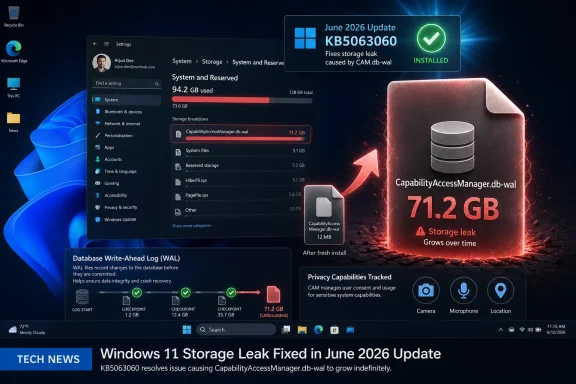 Microsoft Fixed the File, Not the Trust Problem
The file at the center of the story is CapabilityAccessManager.db-wal, a write-ahead log associated with the database used by the Windows Capability Access Manager service. In normal terms, it is part of the plumbing that records and coordinates app requests for privacy-sensitive capabilities. If an app asks for access to the camera, microphone, location, or similar resources, Windows needs a database-backed mechanism to remember policy, state, and access events.A write-ahead log is not inherently suspicious. It is a standard database technique: changes are written to a log before being committed into the main database, improving reliability and recoverability. On a healthy system, that log should not become the dominant object on the disk. It should be checkpointed, trimmed, merged, or otherwise kept under control.
The reports that surfaced around this file show the opposite pattern. Users saw Windows report massive “System” storage use while ordinary cleanup tools found little to delete. Third-party disk analyzers and command-line inspection eventually pointed to
C:\ProgramData\Microsoft\Windows\CapabilityAccessManager\CapabilityAccessManager.db-wal, a location that ordinary users are not expected to browse and may not be able to inspect easily without elevation.That is the first architectural sin here. If Windows is going to classify a runaway internal log as system storage, then Windows also needs to give users a credible path to understand what that storage is. A Settings page that says “System and Reserved” has consumed 111GB is not diagnostics. It is a shrug with a progress bar.
A Privacy Component Became a Storage Leak
The irony is hard to miss. Capability Access Manager exists because modern Windows has to behave like a permissioned operating system. Users expect to know which apps can touch the webcam. Enterprises expect policy enforcement. Security-conscious administrators expect auditability and state consistency.That is why this bug stings. The component responsible for mediating access to sensitive capabilities became, in some cases, a silent storage leak. The thing designed to make Windows more controlled instead made Windows feel less accountable.
The affected file is not a Copilot cache, a Teams installer, a game asset, or one of the consumer-facing annoyances users already love to blame for Windows bloat. It is deeper and duller than that. It is the kind of file that makes sense only after someone opens a disk analyzer, searches forums, finds a path, learns what a WAL file is, and then wonders why the operating system itself did not say anything.
That matters because the Windows 11 storage story is already overloaded with mistrust. Users routinely see space vanish into update staging, component store growth, hibernation files, restore points, delivery optimization, app caches, and OEM recovery partitions. Some of that is defensible. Some of it is poorly explained. All of it trains users to assume that Windows is doing something expensive in the background and not telling them why.
The Timeline Makes the Fix Look Smaller Than the Problem
According to Microsoft Q&A posts and reporting from Windows Latest and others, public complaints about this particular file were visible months before the June optional update. One Microsoft Q&A thread from March 2026 involved a user named Donald Gibson, whose system storage had ballooned dramatically and whoseCapabilityAccessManager.db-wal file reportedly reached 66.5GB on a 221GB drive. It’s FOSS highlighted the grimly comic detail: a Microsoft support interaction that reportedly resulted in advice to buy a portable hard drive.That anecdote is not proof of a systemic support policy. Front-line support is messy, outsourced, scripted, and often underpowered. But it is a perfect illustration of how Windows problems become user problems before they become Microsoft problems. The machine is losing space. The user cannot see the cause. The support channel does not recognize the pattern. The suggested remedy is more storage.
Reddit threads and forum posts suggest the issue may have existed before March 2026, with some users reporting the same file growing to hundreds of gigabytes. As always with Reddit, the evidence is noisy: different builds, different hardware, different cleanup attempts, different measurements. But the pattern is consistent enough that Microsoft’s later release-note entry looks less like a proactive improvement and more like a belated admission.
The official wording is almost comically minimal. Microsoft did not publish a consumer-facing explainer, a known-issue bulletin, or a diagnostic guide prominently tied to the symptom of disappearing disk space. It added an item to a Windows 11 preview update changelog saying disk-space usage for the file had been improved. That may be accurate engineering language. It is not adequate user communication.
Optional Updates Are a Strange Place to Hide Relief
The fix appeared in the June 2026 optional preview update, with broader rollout expected in the July 2026 Patch Tuesday cycle. That distinction matters. Optional preview updates are Microsoft’s staging area for non-security fixes, the place where adventurous users and IT departments with test rings can pick up changes before the mainstream cumulative update lands.For a minor UI glitch, that model makes sense. For a bug that can consume tens or hundreds of gigabytes of storage, it feels awkward. The users most affected may be precisely the ones least able to install a preview update because their system drive is already gasping for space. The fix exists, but the path to it may require the resource the bug is exhausting.
This is not an argument that Microsoft should recklessly rush every fix into every supported Windows 11 machine. Storage bugs can have edge cases, and changes to system databases deserve testing. But it is an argument that Microsoft’s update-channel language often maps poorly onto user pain. To Microsoft, this is a quality improvement in a preview cumulative update. To a user with a 256GB SSD and 500GB of phantom growth, it is an emergency.
The enterprise calculus is different but no less annoying. Administrators generally do not want to deploy optional previews fleet-wide unless they have a specific reason. A storage leak in a system permission database is a specific reason, but Microsoft’s terse changelog forces admins to reverse-engineer the severity from community reporting. That is backwards. The vendor should say enough for IT to triage without requiring a scavenger hunt.
The Folder Windows Protects Is the Folder Users Needed to See
One of the most frustrating details in the reports is the location of the file.ProgramData is not an exotic Windows internals cave, but the specific Capability Access Manager folder is not meant for casual browsing. Permissions and system ownership can make it difficult for users to inspect or delete files there through normal means.There are good reasons for that. A database governing privacy permissions should not be casually editable by every desktop user or every poorly behaved app. If malware could trivially alter capability state, the privacy model would be weaker. Protection is not the problem.
The problem is that protection without observability becomes paternalism. Windows can lock down the folder and still expose accurate storage diagnostics. It can say, in plain language, that the Capability Access Manager database is consuming abnormal space. It can offer a repair action that stops the service, checkpoints or rebuilds the database safely, and restarts the service. It can direct administrators to an event log entry or remediation command.
Instead, users got a blob of “System and Reserved” storage. Some found the answer by running WizTree or similar tools as administrator. Some tried Safe Mode deletion. Some used command-line workarounds shared in forums. Some presumably never found the answer and blamed Windows, their SSD, OneDrive, games, malware, or themselves.
That is not just a bug. That is a diagnostic failure.
Windows 11 Still Treats Disk Space as an Infinite Abstraction
Microsoft’s product strategy often assumes modern PCs have enough storage to absorb complexity. That assumption is increasingly fragile. Premium laptops may ship with 1TB or 2TB drives, but plenty of mainstream machines still carry 256GB or 512GB SSDs. Corporate fleets often standardize on smaller drives because the workload is supposed to live in the cloud. Education devices, low-cost laptops, mini PCs, and older upgradeable desktops all live closer to the edge.On those systems, a 60GB leak is not a curiosity. It is the difference between a usable machine and a machine that cannot install updates. A 100GB leak can break development environments, local mail stores, game installs, virtual machines, and restore points. A 500GB leak can dominate an entire drive.
Windows is also not alone on the disk anymore. The operating system competes with local AI models, WSL distributions, Docker images, cached cloud files, browser profiles, Teams and Outlook data, game launchers, and OEM utilities. Microsoft itself is pushing more local AI capability into Windows, which makes storage discipline more important, not less.
That is why the phrase “improves disk space usage” feels inadequate. Disk usage is not a cosmetic metric. It is operational capacity. When Windows consumes storage invisibly, it erodes the user’s ability to trust every other promise the platform makes.
The Support Story Is the Real Windows Story
The Donald Gibson support anecdote resonated because it feels plausible to anyone who has ever chased a Windows issue across official forums. Microsoft’s support ecosystem is vast, uneven, and often strangely disconnected from the engineering reality of the product. A user can encounter community volunteers, independent advisors, AI-generated boilerplate, support agents, MVPs, and official employees, all under branding that looks Microsoft-adjacent.That ambiguity has consequences. If a support response is wrong, users do not usually distinguish between “a Microsoft employee,” “a contractor,” “an independent advisor,” and “someone answering on Microsoft Q&A.” They see Microsoft. They judge Microsoft.
In this case, the reported suggestion to buy another hard drive landed badly because it converted a software defect into a hardware upsell. It also missed the obvious proportionality problem. A 66.5GB log file on a 221GB drive is not a user who needs to rethink storage strategy. It is an operating system failing to maintain its own bookkeeping.
This is where Microsoft’s Windows scale cuts both ways. Supporting hundreds of millions of PCs means every weird edge case will appear somewhere. But the same scale means Microsoft has telemetry, crash data, feedback channels, Insider reports, Q&A posts, and support interactions that should reveal patterns. When a single internal file repeatedly appears as the culprit in disappearing-storage reports, the company should be able to close the loop faster.
The Bug Also Exposes the Limits of Settings-First Windows
Windows 11 has spent years moving users from old Control Panel surfaces into the modern Settings app. In theory, that is the right direction. The problem is that Settings often simplifies categories without improving explanations. Storage is one of the clearest examples.The Storage page can be useful for obvious categories: temporary files, installed apps, documents, pictures, and cleanup recommendations. But when the culprit sits under system-managed data, the UI often loses specificity. Users see a giant category and no practical hierarchy underneath it.
That is tolerable only if the system category behaves. Once it misbehaves, abstraction becomes obstruction. A power user can drop into PowerShell, run directory-size scripts, or boot into alternate environments. A normal user cannot. A help desk technician may not have time. A remote admin may be constrained by policy.
Microsoft should treat this as a design bug as much as an engineering bug. If a protected system component exceeds a reasonable threshold, Windows should surface that fact in a safe, non-destructive way. It does not need to expose every internal file to every user. It does need to distinguish “Windows needs this space” from “Windows has probably lost control of this space.”
The Fix Arrives Amid a Busier Windows 11 Agenda
The timing also matters because Microsoft is not merely maintaining Windows 11. It is reshaping it around AI features, Start menu changes, recovery improvements, and hardware-accelerated local intelligence. The June preview update that carried the storage fix was not a single-purpose emergency patch. It arrived in the normal machinery of Windows evolution, surrounded by more visible features.That contrast is why the community reaction has a sharper edge. Users notice when Microsoft finds room for new interface experiments and AI plumbing while longstanding quality issues linger. That does not mean the same engineer who worked on a Start menu change should have been debugging Capability Access Manager. Large software organizations are not that simple. But from the outside, prioritization is judged by outcomes, not org charts.
The Windows team has spent years asking users to accept faster iteration. New features arrive through enablement packages, controlled feature rollouts, Store updates, WebView components, servicing stack changes, and cumulative updates. The operating system is more fluid than it used to be. The bargain should be that fixes move faster too.
When a bug can eat a drive and the public fix note arrives months after visible reports, that bargain looks lopsided.
Enterprises Will Read This as a Monitoring Problem
For home users, the advice is relatively straightforward: install the fixed update when it reaches the stable channel, check abnormal system storage, and avoid deleting protected files unless you know what you are doing or have a backup. For enterprises, the question is broader. How many internal Windows databases can grow without obvious alerting? How many endpoints are carrying silent waste underProgramData? How many help desk tickets are symptoms of opaque system storage rather than user behavior?A mature endpoint-management shop can detect this. Microsoft Intune, Defender for Endpoint advanced hunting, PowerShell remediation scripts, configuration baselines, and third-party RMM tools can all be used to inventory file sizes and flag outliers. But it is telling that customers may need to build their own guardrails around a Windows internal file.
The right enterprise response is not panic deletion. The file has a function, and Capability Access Manager should not be treated casually. The better response is targeted detection: identify machines where the WAL file is abnormally large, validate whether they have the cumulative update containing Microsoft’s fix, and use vendor-supported repair or deletion methods only after testing.
This is also a reminder that disk-space monitoring should not stop at free-space thresholds. By the time an endpoint has 2GB free, the user is already in trouble. Monitoring should catch abnormal growth patterns in known system paths. Windows itself should do more of that, but administrators who wait for Windows to explain itself are often waiting too long.
The Community Did Microsoft’s Triage Work
The most useful reporting on this bug did not begin with a glossy Microsoft advisory. It began with users comparing notes. It moved through Microsoft Q&A, Reddit, enthusiast sites, and Windows-focused publications. It’s FOSS framed the story with appropriate disbelief. Windows Latest dug into the update-note timing. PCWorld and TechRadar translated the issue into practical consumer terms. Windows Central brought it to a broader Windows audience.That is the Windows ecosystem at its best and worst. Best, because the community is technically literate enough to identify a specific file, infer its role, test workarounds, and pressure the vendor into visibility. Worst, because the community had to do so much of the explanatory labor in the first place.
There is a long tradition of Windows users solving Windows before Microsoft documents Windows. Registry hacks, Safe Mode rituals, DISM commands,
sfc /scannow, driver rollbacks, hidden folders, update cache purges: the culture is resilient because it has had to be. But resilience can become an excuse. Microsoft should not rely on enthusiast archaeology to explain why a system drive disappeared.This is especially true for bugs inside privacy and security-adjacent components. If the file had been a game cache, the fix would still matter. Because it is tied to capability permissions, the company owes users more clarity about what happened, what was at risk, and what was merely waste. So far, the public evidence points to disk bloat rather than a privacy exposure, but Microsoft has not done much to help users separate those concerns.
The July Patch Tuesday Rollout Will Be the Real Test
Assuming the fix lands broadly with the July 2026 Patch Tuesday update, the next question is whether it prevents future growth, cleans up existing bloat, or both. Those are not the same thing. A patch can stop a WAL file from growing uncontrollably while leaving already-bloated files in place. It can improve checkpoint behavior without reclaiming every byte immediately. It can fix the trigger but require a reboot, service restart, or database maintenance cycle before users see relief.This is where Microsoft needs to be explicit. Users do not just need to know that disk-space usage has been improved. They need to know what to expect after installing the update. If a machine has a 100GB
CapabilityAccessManager.db-wal file, will the update shrink it automatically? If not, what is the supported remediation path? Is Safe Mode deletion acceptable? Should users run a repair install? Is there a risk of resetting app permissions?Microsoft’s Q&A responses and community workarounds suggest that deleting the WAL file may be possible and that Windows can recreate it, but that is not the same as a formal recommendation for broad use. A database log is part of a database system. Deleting it at the wrong moment is exactly the sort of advice that should come with caution.
The safest public message would be simple: install the cumulative update, reboot, check whether storage normalizes, and use official guidance if the file remains huge. The missing piece is that official guidance needs to exist in a place normal users can find.
A Small File Became a Big Windows 11 Metaphor
The CapabilityAccessManager.db-wal bug is not the biggest Windows 11 failure, not the most dangerous security flaw, and not the most disruptive update incident Microsoft has ever shipped. It is more revealing than that. It shows how a small internal maintenance failure can become a referendum on Windows’ opacity.Modern operating systems are full of databases. They track notifications, search indexes, update state, app deployments, credentials, permissions, telemetry queues, device inventory, and user activity. Most of the time, users never see them. That invisibility is part of the promise: the OS handles the boring things.
But invisibility has to be earned. When the boring thing grows to 500GB, the operating system must stop pretending it is boring. It must surface, explain, repair, and apologize in the dry, practical way good infrastructure does. Windows 11 still too often does only the first half of the job: it hides complexity, but it does not reliably rescue users when the complexity breaks.
The public fix is welcome. The lack of a fuller public explanation is not. Microsoft does not need to turn every bug into a confessional blog post, but it should recognize when a bug has crossed from “quality improvement” into “users are buying storage because we leaked a log file.”
The 500GB Log File Leaves Windows Users With a Short Checklist
The practical lesson is not to fear every protected Windows file or start deleting database logs across the system. The lesson is to treat unexplained storage growth as a diagnosable failure, not as a vague personality trait of Windows. If Microsoft will not always make the cause obvious, users and admins need a few grounded checks.- If Windows 11 shows unusually high “System and Reserved” storage, the Capability Access Manager folder is now one of the specific places worth checking with an elevated disk-usage tool.
- If
CapabilityAccessManager.db-walis only a few megabytes, this particular bug is probably not your storage problem. - If the file is tens or hundreds of gigabytes, installing the Windows 11 update that contains Microsoft’s June 2026 preview fix or its July 2026 Patch Tuesday successor should be the first remediation step.
- If the file remains huge after updating and rebooting, deletion or repair should be handled cautiously because the file belongs to a Windows permissions database, not a disposable application cache.
- If you manage fleets of Windows 11 machines, this is a good candidate for proactive detection because the symptom may appear to users only after free space has already collapsed.
- If Microsoft wants users to trust Windows’ privacy controls, it should document failures in the components that maintain those controls with more than a single changelog sentence.
Update: TechSpot identifies KB5095093 builds carrying the storage fix (July 7, 2026)
TechSpot’s follow-up coverage adds a more specific remediation target for affected Windows 11 systems: installing optional update KB5095093, which it says includes builds 26200.8737 and 26100.8737. That is the update TechSpot points users to for Microsoft’s stated improvement to disk-space usage for the CapabilityAccessManager.db-wal file.The report also highlights a safer verification method for admins and advanced users who suspect the bug but do not want to browse or modify the protected Capability Access Manager folder directly. Windows Latest’s suggested elevated Robocopy command is list-only, meaning it can report file sizes without copying or deleting anything.
Practically, the advice remains cautious: if System & reserved or System files is unexpectedly huge, check whether CapabilityAccessManager.db-wal is the culprit, then install the optional update or wait for the July Patch Tuesday rollout. If the file is only a few megabytes, this specific bug is probably not the cause of the storage loss.
References
- Primary source: It's FOSS
Published: Tue, 07 Jul 2026 12:56:15 GMT
LOL! Storage Bug on Microsoft Windows 11 Could Eat Up 500 GB Disk Space
Microsoft customer support agent even suggested buying new disk instead of acknolwedging the problem. itsfoss.com
- Related coverage: techradar.com
Keep running low on storage and don't know why? Mysterious Windows 11 file that ate tons of drive space is fixed in latest update | TechRadar
Latest update finally fixes a 'notorious culprit for system bloat'www.techradar.com - Related coverage: windowscentral.com
Windows 11 is accidentally wasting up to 500GB of your PC's storage | Windows Central
A bloated file related to app permissions is gobbling up hard drive space, but Microsoft's latest update addresses the issue.www.windowscentral.com - Related coverage: pcworld.com
A Windows 11 bug can eat 500GB of your storage. Here's how to check | PCWorld
A Windows 11 update reveals a bug that can silently consume up to 500GB of storage. Here's how to check if you're affected and fix it.www.pcworld.com - Related coverage: computerbase.de
Microsoft bestätigt Bug: Windows 11 kann fehlerbedingt um bis zu 500 GB anwachsen - ComputerBase
Microsoft hat einen Fehler in Windows 11 bestätigt, durch den auf der Systempartition bis zu mehrere hundert Gigabyte belegt werden können.www.computerbase.de
- Related coverage: tecnoblog.net
Bug faz Windows 11 ocupar 500 GB de armazenamento com "lixo" • Tecnoblog
falha no Windows 11 de alguns PCs faz recursos do sistema ocupar dezenas ou até centenas de gigabytes indevidamente na unidade C. Problema já tem correção. tecnoblog.net
- Related coverage: windowslatest.com
Microsoft admits a Windows 11 bug is eating up to 500GB of storage, verify if you are affected
Microsoft admits a Windows 11 bug is silently eating up to 500GB of your storage, fix coming July 14, 2026. www.windowslatest.com
- Official source: support.microsoft.com
23 juni 2026—KB5095091 (OS-build 28000.2340) Preview - Microsoft Ondersteuning
 support.microsoft.com
- Official source: learn.microsoft.com
CapabilityAccessManager is devouring my hard drive - Microsoft Q&A
Checking Storage in Settings (Windows 11) shows I have 83GB of Installed apps and 111GB of System and Reserved. Most people report System and Reserve should represent ~40GB. What is the extra 70GB? Turns out it is a single file , a database for…learn.microsoft.com - Related coverage: canaltech.com.br
Bug no Windows 11 consome quase todo o armazenamento do PC - Canaltech
Um bug no Windows 11 pode ocupar centenas de gigabytes de armazenamento do computador sem que o usuário perceba. A falha faz o arquivo CapabilityAccessMacanaltech.com.br - Related coverage: ad-hoc-news.de
Windows 11: Patch KB5095093 stoppt 500-GB-Speicherfresser
Microsoft veröffentlicht dringenden Patch gegen überbordende System-Logs. Zusätzlich laufen Secure-Boot-Zertifikate ab und Windows 10 erhält ein Jahr Verlängerung.www.ad-hoc-news.de - Related coverage: itzine.ru
Файл на 500 ГБ. Microsoft подтвердила баг Windows 11 с утечкой места на диске C
Microsoft подтвердила баг Windows 11: файл CapabilityAccessManager.db-wal может разрастаться до сотен гигабайт и забивать диск C.itzine.ru
Last edited:

