

Microsoft is preparing Windows 11's native interface to feel faster in 2026, using its Windows K2 responsiveness push to tune WinUI 3, reduce File Explorer launch overhead, and pair framework fixes with short CPU boost behavior known as Low Latency Profile. The interesting part is not that Microsoft has found another performance knob to turn. It is that the company appears to be admitting, indirectly but unmistakably, that Windows 11’s perceived slowness is a product problem, not just a benchmark problem. If K2 works, the win will not be a prettier Start menu or another settings page redesign; it will be the return of trust in the operating system’s most basic promise: when you click, something should happen.
For years, Windows 11 has had a peculiar performance problem. It can score well on modern CPUs, drive high-end GPUs, juggle heavyweight developer stacks, and still make users wait for a context menu, a folder window, or a search box in ways that feel absurd on expensive hardware. That is the kind of slowness that does not always show up in a headline benchmark but instantly registers in the hand.
The reported WinUI 3 work goes directly at that sort of latency. Microsoft engineers are said to be measuring File Explorer and Notepad not as demo apps, but as stand-ins for the everyday Windows loop: launch, paint, respond, close, repeat. That is the right test bed because nobody buys a workstation to marvel at how quickly an empty window can allocate memory, but everyone notices when File Explorer hesitates before doing the one job it has had since the 1990s.
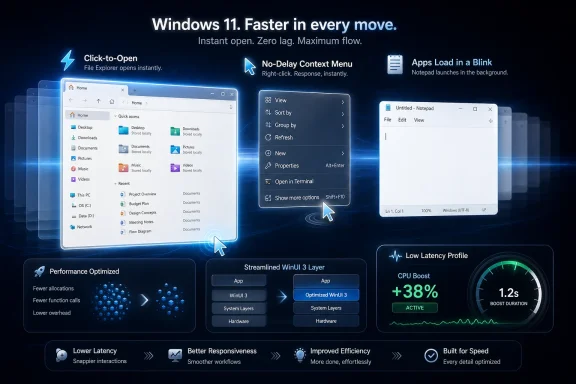
The numbers being discussed are unusually specific: 41 percent fewer allocations, 63 percent fewer transient allocations, 45 percent fewer function calls, and 25 percent less time spent inside the WinUI code path that powers the framework. Those figures are not the same as saying File Explorer will open 41 percent faster. They are still important because they target the hidden tax that makes a modern UI feel heavier than it ought to.
Windows has always been judged by feel as much as throughput. Windows 7 earned affection not because it was architecturally pure, but because common actions felt direct. Windows 11 has often felt like a visually modern system carrying too many translation layers between the user and the machine.
That is why Microsoft’s apparent use of File Explorer as a benchmark matters. A faster Calculator is nice; a faster Explorer changes the emotional temperature of the OS. Every administrator copying logs, every developer moving build artifacts, every user opening Downloads after a browser save is touching the same surface.
The problem is that Explorer has become a hybrid creature. It carries old Win32 assumptions, modern command surfaces, cloud hooks, tabs, search integration, OneDrive status, shell extensions, preview handlers, and newer XAML-based UI. Some of those changes are useful. Together, they created a file manager that can feel as though it needs to hold a committee meeting before drawing a window.
The K2-era fix appears to be less about one silver bullet and more about removing friction from the launch path. If the new patches mean Explorer has less background work to perform before it becomes interactive, that is a better answer than simply preloading more of it into memory and declaring victory. Preloading can hide latency. It does not necessarily reduce complexity.
That distinction matters for IT pros. A fast system that becomes fast by burning more RAM at startup is not the same as a fast system that does less work. On fleets of mixed hardware, VDI environments, and lower-end business laptops, shaving framework overhead is more defensible than asking every machine to keep more shell components warm just in case the user opens a folder.
That tension is not accidental. Microsoft has spent years trying to modernize Windows without breaking the vast Win32 universe that makes Windows Windows. The result is a platform where the old and the new often coexist inside the same workflow, sometimes inside the same app, and occasionally inside the same window.
WinUI 3 was supposed to be the native answer to the fear that Windows was drifting into web-wrapper territory. But “native” is not a magic word. A native framework can still allocate too much, call too deeply, initialize too slowly, or compose too many layers before the first useful frame appears.
That is what makes the current work more credible than a typical “we improved performance” claim. Allocation counts and function-call reductions are not marketing fluff in the same way that “more fluid” can be. They suggest Microsoft is looking at the machinery under the animation, not just adding another animation to distract from the pause.
The challenge is that WinUI 3 must now carry two burdens at once. It has to become the framework Microsoft wants third-party developers to trust, and it has to prove that Windows itself can use it without making the OS feel slower. If File Explorer gets faster because WinUI gets leaner, that is a platform argument, not just a shell patch.
The timing is not subtle. Windows 10 support pressure has forced more users and organizations toward Windows 11, but migration does not equal affection. Many users have moved because the calendar pushed them, not because the Start menu, taskbar, search, or Explorer won them over.
Microsoft’s problem is not that Windows 11 is unusable. It is that the OS too often makes high-performance hardware feel strangely overqualified for routine work. A premium laptop should not make a folder window feel like a web app waking from a nap. A desktop with a modern NVMe drive should not make shell navigation feel dependent on luck.
K2’s apparent premise is that Windows can no longer treat responsiveness as a secondary polish item. The operating system has to feel immediate in the places users touch hundreds of times a day. That means fewer stalls, fewer delayed paints, fewer context menus that arrive in installments, and fewer transitions that look smooth only after the system has already made the user wait.
This is also why the “craft” part of the rumored initiative matters. UI consistency is not just aesthetic neatness. Inconsistent interfaces are often inconsistent because they are built from different eras of technology with different performance profiles, accessibility models, and deployment assumptions. Cleaning that up is not glamorous, but it is the kind of engineering debt payment Windows has deferred for too long.
There is a cynical reading: Microsoft is using more power to paper over slow software. There is also a practical reading: modern operating systems are judged by burst responsiveness, and short, targeted boosts can make sense if they are disciplined. Both readings can be true.
Apple has long benefited from tight coordination between software, silicon, and power behavior. Windows has to operate across a wildly broader hardware ecosystem, from bargain laptops to workstation towers to handheld gaming PCs. A smart latency profile could help normalize the first few seconds of interaction across that diversity.
But CPU boosting is not a substitute for reducing work. If opening Explorer wakes a large stack, allocates aggressively, initializes unnecessary components, and then relies on a burst of clock speed to look acceptable, Microsoft has not solved the root cause. It has merely made the machine run faster while doing avoidable work.
That is why the WinUI allocation reductions and Low Latency Profile belong in the same conversation but should not be confused. One is a software diet. The other is a power-management sprint. Windows needs both only if the sprint is used to amplify leaner code, not to excuse heavier code.
A more coherent framework strategy could make Windows easier to maintain and easier to improve. If Microsoft can fix a performance path in WinUI and that fix benefits File Explorer, Notepad, settings surfaces, and future shell components, the platform gets compounding returns. That is exactly what a first-party UI framework is supposed to do.
The risk is that framework migrations often get sold as user benefits before the user benefits are real. Developers hear “modern.” Users experience “slower.” Administrators hear “consistent.” Help desks receive tickets about broken muscle memory and missing affordances.
Microsoft has lived this pattern before. The company modernizes a piece of Windows, removes a familiar behavior, ships an incomplete replacement, and then spends years backfilling what the old thing already did. Windows 11’s taskbar was the most obvious recent example, but the same tension exists across the shell.
For K2 to succeed, Microsoft has to avoid confusing uniformity with quality. A slow, modern, consistent interface is still slow. A fast interface that removes useful density can still frustrate power users. The goal should not be WinUI everywhere for its own sake. The goal should be a Windows surface that feels native, immediate, accessible, and complete.
For independent developers, WinUI has suffered from a perception problem. It has often looked like the future of Windows desktop development while also feeling like a moving target with packaging complexity, performance concerns, and uneven documentation history. If Microsoft can show visible gains in its own flagship shell surfaces, it gives developers a stronger reason to believe the framework is not a cul-de-sac.
There is also a strategic issue here. Microsoft cannot credibly ask developers to build polished, responsive Windows apps on a stack that users associate with sluggish built-in experiences. The platform has to prove itself in the most demanding and visible places first.
That means File Explorer and Notepad are not random examples. Notepad is small enough that performance regressions look embarrassing. Explorer is complex enough that performance wins look meaningful. Together, they form a useful test: can WinUI be lean in the simple case and resilient in the messy case?
The answer matters beyond aesthetics. Enterprise developers deciding between Win32, WPF, WinForms, Electron, WebView2, React Native for Windows, and WinUI are not making philosophical choices. They are choosing maintenance cost, deployment model, accessibility behavior, memory footprint, and user acceptance. A faster WinUI changes that calculation only if the improvement is measurable and durable.
That is where K2’s focus on foreground responsiveness could matter. In real environments, users do not complain because a synthetic benchmark dropped five percent. They complain because right-clicking a file pauses, search lags during a meeting, Explorer hangs on a network path, or the Start menu feels unreliable after resume.
If Microsoft is serious about reducing latency under load, it will need to test Windows the way organizations actually run it. That means messy startup sequences, heavily managed profiles, redirected folders, OneDrive known-folder move, cloud content indexing, and security tools inspecting file operations. A snappy lab machine is the beginning of the story, not the ending.
There is also a policy question waiting in the wings. If Low Latency Profile changes power behavior, enterprises will want to know whether it can be configured, audited, disabled, or tuned for battery-sensitive fleets. A one-to-three-second boost sounds harmless, but multiplied across thousands of devices and countless interactions, power behavior becomes operational behavior.
Microsoft should be transparent here. If the feature ships, administrators need to understand whether it is default-on, workload-specific, hardware-dependent, or tied to particular power modes. The worst outcome would be another opaque Windows behavior that improves one metric while creating uncertainty elsewhere.
That bargain is why responsiveness now carries symbolic weight. If Microsoft makes Windows 11 feel instant, users may forgive some of the visual churn. If it remains inconsistent and hesitant, every new feature will arrive under suspicion.
This is especially true because modern PCs are so powerful. Users do not need to understand allocations or compositor paths to know that a twelve-core machine should not stutter while opening a file manager. The intuitive expectation is correct: basic UI should be cheap.
Microsoft’s challenge is that Windows is not a clean-room OS. Compatibility is the product. The same system that must host a modern WinUI shell also has to tolerate decades of extensions, drivers, installers, and enterprise assumptions. That makes performance harder, but it also makes performance more valuable.
K2, if executed well, could become the Windows 11 course correction users have been asking for. Not because it adds a headline feature, but because it removes friction from the experience users already have. In operating systems, subtraction is often the most underrated form of innovation.
A successful K2 push would make the OS feel less theatrical. Menus would appear without drama. Folder windows would open without a warm-up act. Notepad would behave like a small native utility again. The Start menu would not feel like a service endpoint with icons.
That kind of improvement is difficult to market because it is mostly noticed as the absence of annoyance. Yet it is exactly the kind of improvement that changes daily sentiment. Users rarely praise an operating system for not wasting their time, but they punish it relentlessly when it does.
Microsoft should resist the temptation to overclaim. The reported figures are framework-level improvements, not a universal guarantee. Some File Explorer delays come from storage, network paths, shell extensions, cloud sync, indexing, antivirus inspection, or broken third-party hooks. WinUI can make the front end leaner, but it cannot make every slow folder fast.
Still, making the front end leaner is the right place to start. The user should not have to wonder whether the shell itself is the bottleneck before troubleshooting everything else. If K2 can make Windows’ own UI disappear into the background, administrators and power users can spend less time fighting the platform and more time fixing the actual problem.
Source: TechPowerUp Microsoft's Windows 11 UI Is About to Get Much More Responsive | TechPowerUp}
 Microsoft Has Finally Found the Right Enemy: Waiting
For years, Windows 11 has had a peculiar performance problem. It can score well on modern CPUs, drive high-end GPUs, juggle heavyweight developer stacks, and still make users wait for a context menu, a folder window, or a search box in ways that feel absurd on expensive hardware. That is the kind of slowness that does not always show up in a headline benchmark but instantly registers in the hand.The reported WinUI 3 work goes directly at that sort of latency. Microsoft engineers are said to be measuring File Explorer and Notepad not as demo apps, but as stand-ins for the everyday Windows loop: launch, paint, respond, close, repeat. That is the right test bed because nobody buys a workstation to marvel at how quickly an empty window can allocate memory, but everyone notices when File Explorer hesitates before doing the one job it has had since the 1990s.
The numbers being discussed are unusually specific: 41 percent fewer allocations, 63 percent fewer transient allocations, 45 percent fewer function calls, and 25 percent less time spent inside the WinUI code path that powers the framework. Those figures are not the same as saying File Explorer will open 41 percent faster. They are still important because they target the hidden tax that makes a modern UI feel heavier than it ought to.
Windows has always been judged by feel as much as throughput. Windows 7 earned affection not because it was architecturally pure, but because common actions felt direct. Windows 11 has often felt like a visually modern system carrying too many translation layers between the user and the machine.
File Explorer Became the Symbol Because It Is the System
File Explorer is not just another app. It is the front door to the file system, the shell’s public face, and the place where many users decide whether Windows feels healthy or sick. When Explorer is slow, the entire operating system feels slow, even if Task Manager says the CPU is mostly idle.That is why Microsoft’s apparent use of File Explorer as a benchmark matters. A faster Calculator is nice; a faster Explorer changes the emotional temperature of the OS. Every administrator copying logs, every developer moving build artifacts, every user opening Downloads after a browser save is touching the same surface.
The problem is that Explorer has become a hybrid creature. It carries old Win32 assumptions, modern command surfaces, cloud hooks, tabs, search integration, OneDrive status, shell extensions, preview handlers, and newer XAML-based UI. Some of those changes are useful. Together, they created a file manager that can feel as though it needs to hold a committee meeting before drawing a window.
The K2-era fix appears to be less about one silver bullet and more about removing friction from the launch path. If the new patches mean Explorer has less background work to perform before it becomes interactive, that is a better answer than simply preloading more of it into memory and declaring victory. Preloading can hide latency. It does not necessarily reduce complexity.
That distinction matters for IT pros. A fast system that becomes fast by burning more RAM at startup is not the same as a fast system that does less work. On fleets of mixed hardware, VDI environments, and lower-end business laptops, shaving framework overhead is more defensible than asking every machine to keep more shell components warm just in case the user opens a folder.
WinUI 3 Is Both the Cure and Part of the Diagnosis
WinUI 3 occupies an awkward role in this story. It is Microsoft’s modern native UI framework for Windows desktop apps, delivered through the Windows App SDK and designed to give developers Fluent controls, modern rendering, and a forward-looking Windows app model. It is also the framework many Windows power users have blamed, fairly or not, for making formerly instant system surfaces feel gummy.That tension is not accidental. Microsoft has spent years trying to modernize Windows without breaking the vast Win32 universe that makes Windows Windows. The result is a platform where the old and the new often coexist inside the same workflow, sometimes inside the same app, and occasionally inside the same window.
WinUI 3 was supposed to be the native answer to the fear that Windows was drifting into web-wrapper territory. But “native” is not a magic word. A native framework can still allocate too much, call too deeply, initialize too slowly, or compose too many layers before the first useful frame appears.
That is what makes the current work more credible than a typical “we improved performance” claim. Allocation counts and function-call reductions are not marketing fluff in the same way that “more fluid” can be. They suggest Microsoft is looking at the machinery under the animation, not just adding another animation to distract from the pause.
The challenge is that WinUI 3 must now carry two burdens at once. It has to become the framework Microsoft wants third-party developers to trust, and it has to prove that Windows itself can use it without making the OS feel slower. If File Explorer gets faster because WinUI gets leaner, that is a platform argument, not just a shell patch.
K2 Sounds Like a Cleanup Project Because Windows Needed One
Windows K2, as reported, is broader than WinUI. It is a performance, reliability, and polish campaign aimed at the complaints that have followed Windows 11 since launch: sluggish shell surfaces, inconsistent UI, noisy feature churn, and the sense that Microsoft was more excited about adding things than finishing things. Whether K2 is a formal brand inside Microsoft or simply a convenient label, the work it describes is the work Windows needs.The timing is not subtle. Windows 10 support pressure has forced more users and organizations toward Windows 11, but migration does not equal affection. Many users have moved because the calendar pushed them, not because the Start menu, taskbar, search, or Explorer won them over.
Microsoft’s problem is not that Windows 11 is unusable. It is that the OS too often makes high-performance hardware feel strangely overqualified for routine work. A premium laptop should not make a folder window feel like a web app waking from a nap. A desktop with a modern NVMe drive should not make shell navigation feel dependent on luck.
K2’s apparent premise is that Windows can no longer treat responsiveness as a secondary polish item. The operating system has to feel immediate in the places users touch hundreds of times a day. That means fewer stalls, fewer delayed paints, fewer context menus that arrive in installments, and fewer transitions that look smooth only after the system has already made the user wait.
This is also why the “craft” part of the rumored initiative matters. UI consistency is not just aesthetic neatness. Inconsistent interfaces are often inconsistent because they are built from different eras of technology with different performance profiles, accessibility models, and deployment assumptions. Cleaning that up is not glamorous, but it is the kind of engineering debt payment Windows has deferred for too long.
The Low Latency Profile Is Clever, but It Cannot Be the Whole Story
The Low Latency Profile idea is easy to understand: when the user performs a high-priority interactive action, Windows briefly pushes the CPU toward maximum frequency for a second or three, helping the app or shell surface appear faster. Modern devices already perform many versions of this dance through boost behavior, scheduler hints, and power-management policy. The novelty is in applying it deliberately to perceived UI responsiveness.There is a cynical reading: Microsoft is using more power to paper over slow software. There is also a practical reading: modern operating systems are judged by burst responsiveness, and short, targeted boosts can make sense if they are disciplined. Both readings can be true.
Apple has long benefited from tight coordination between software, silicon, and power behavior. Windows has to operate across a wildly broader hardware ecosystem, from bargain laptops to workstation towers to handheld gaming PCs. A smart latency profile could help normalize the first few seconds of interaction across that diversity.
But CPU boosting is not a substitute for reducing work. If opening Explorer wakes a large stack, allocates aggressively, initializes unnecessary components, and then relies on a burst of clock speed to look acceptable, Microsoft has not solved the root cause. It has merely made the machine run faster while doing avoidable work.
That is why the WinUI allocation reductions and Low Latency Profile belong in the same conversation but should not be confused. One is a software diet. The other is a power-management sprint. Windows needs both only if the sprint is used to amplify leaner code, not to excuse heavier code.
The Framework Migration Is Really a Bet on Coherence
The larger promise in the submitted report is that Microsoft wants to move more of the Windows user experience toward desktop-focused WinUI 3 rather than relying on a patchwork of older UI frameworks, web surfaces, and intermediate layers. That is an appealing story because Windows 11’s inconsistency has become almost comical in places. One dialog looks modern, the next looks inherited, the next feels embedded, and the next behaves as though it escaped from a control panel museum.A more coherent framework strategy could make Windows easier to maintain and easier to improve. If Microsoft can fix a performance path in WinUI and that fix benefits File Explorer, Notepad, settings surfaces, and future shell components, the platform gets compounding returns. That is exactly what a first-party UI framework is supposed to do.
The risk is that framework migrations often get sold as user benefits before the user benefits are real. Developers hear “modern.” Users experience “slower.” Administrators hear “consistent.” Help desks receive tickets about broken muscle memory and missing affordances.
Microsoft has lived this pattern before. The company modernizes a piece of Windows, removes a familiar behavior, ships an incomplete replacement, and then spends years backfilling what the old thing already did. Windows 11’s taskbar was the most obvious recent example, but the same tension exists across the shell.
For K2 to succeed, Microsoft has to avoid confusing uniformity with quality. A slow, modern, consistent interface is still slow. A fast interface that removes useful density can still frustrate power users. The goal should not be WinUI everywhere for its own sake. The goal should be a Windows surface that feels native, immediate, accessible, and complete.
Developers Should Watch the Windows App SDK, Not Just Explorer
The reported integration path through WinAppSDK 2.x is important for developers. If the WinUI improvements land in the Windows App SDK rather than only in private Windows builds, they could benefit third-party WinUI apps as well as Microsoft’s own surfaces. That would make this more than a Windows 11 shell tune-up.For independent developers, WinUI has suffered from a perception problem. It has often looked like the future of Windows desktop development while also feeling like a moving target with packaging complexity, performance concerns, and uneven documentation history. If Microsoft can show visible gains in its own flagship shell surfaces, it gives developers a stronger reason to believe the framework is not a cul-de-sac.
There is also a strategic issue here. Microsoft cannot credibly ask developers to build polished, responsive Windows apps on a stack that users associate with sluggish built-in experiences. The platform has to prove itself in the most demanding and visible places first.
That means File Explorer and Notepad are not random examples. Notepad is small enough that performance regressions look embarrassing. Explorer is complex enough that performance wins look meaningful. Together, they form a useful test: can WinUI be lean in the simple case and resilient in the messy case?
The answer matters beyond aesthetics. Enterprise developers deciding between Win32, WPF, WinForms, Electron, WebView2, React Native for Windows, and WinUI are not making philosophical choices. They are choosing maintenance cost, deployment model, accessibility behavior, memory footprint, and user acceptance. A faster WinUI changes that calculation only if the improvement is measurable and durable.
Administrators Will Believe It When the Help Desk Gets Quieter
For sysadmins, the promise of a more responsive Windows 11 has to pass a different test. It is not enough for a clean Insider build on new hardware to feel good in a demo. The system has to stay responsive after endpoint protection, VPN clients, shell extensions, sync agents, printer software, Teams, Office add-ins, browser updaters, and management tooling all take their seats at the table.That is where K2’s focus on foreground responsiveness could matter. In real environments, users do not complain because a synthetic benchmark dropped five percent. They complain because right-clicking a file pauses, search lags during a meeting, Explorer hangs on a network path, or the Start menu feels unreliable after resume.
If Microsoft is serious about reducing latency under load, it will need to test Windows the way organizations actually run it. That means messy startup sequences, heavily managed profiles, redirected folders, OneDrive known-folder move, cloud content indexing, and security tools inspecting file operations. A snappy lab machine is the beginning of the story, not the ending.
There is also a policy question waiting in the wings. If Low Latency Profile changes power behavior, enterprises will want to know whether it can be configured, audited, disabled, or tuned for battery-sensitive fleets. A one-to-three-second boost sounds harmless, but multiplied across thousands of devices and countless interactions, power behavior becomes operational behavior.
Microsoft should be transparent here. If the feature ships, administrators need to understand whether it is default-on, workload-specific, hardware-dependent, or tied to particular power modes. The worst outcome would be another opaque Windows behavior that improves one metric while creating uncertainty elsewhere.
The Windows 11 Reputation Problem Is Now a Performance Problem
Windows 11’s UI debate has never been only about speed. It has been about agency. Users felt Microsoft took away taskbar options, pushed cloud integration harder, rearranged familiar surfaces, added recommendation space, and then delivered a system that did not always feel faster in exchange.That bargain is why responsiveness now carries symbolic weight. If Microsoft makes Windows 11 feel instant, users may forgive some of the visual churn. If it remains inconsistent and hesitant, every new feature will arrive under suspicion.
This is especially true because modern PCs are so powerful. Users do not need to understand allocations or compositor paths to know that a twelve-core machine should not stutter while opening a file manager. The intuitive expectation is correct: basic UI should be cheap.
Microsoft’s challenge is that Windows is not a clean-room OS. Compatibility is the product. The same system that must host a modern WinUI shell also has to tolerate decades of extensions, drivers, installers, and enterprise assumptions. That makes performance harder, but it also makes performance more valuable.
K2, if executed well, could become the Windows 11 course correction users have been asking for. Not because it adds a headline feature, but because it removes friction from the experience users already have. In operating systems, subtraction is often the most underrated form of innovation.
The Real Test Is Whether Windows Stops Feeling Like Layers
The most concrete near-term expectation is that File Explorer should launch with less visible delay once the relevant WinUI 3 patches and application-side changes arrive. But the broader test is subtler: Windows should stop feeling like a stack of UI eras negotiating with one another in real time.A successful K2 push would make the OS feel less theatrical. Menus would appear without drama. Folder windows would open without a warm-up act. Notepad would behave like a small native utility again. The Start menu would not feel like a service endpoint with icons.
That kind of improvement is difficult to market because it is mostly noticed as the absence of annoyance. Yet it is exactly the kind of improvement that changes daily sentiment. Users rarely praise an operating system for not wasting their time, but they punish it relentlessly when it does.
Microsoft should resist the temptation to overclaim. The reported figures are framework-level improvements, not a universal guarantee. Some File Explorer delays come from storage, network paths, shell extensions, cloud sync, indexing, antivirus inspection, or broken third-party hooks. WinUI can make the front end leaner, but it cannot make every slow folder fast.
Still, making the front end leaner is the right place to start. The user should not have to wonder whether the shell itself is the bottleneck before troubleshooting everything else. If K2 can make Windows’ own UI disappear into the background, administrators and power users can spend less time fighting the platform and more time fixing the actual problem.
The Click-to-Window Gap Is the Metric That Now Matters
The practical picture is clearer than the branding. Microsoft appears to be attacking Windows 11 responsiveness from both sides: doing less work in the UI framework and giving interactive tasks a short performance runway when the user asks for something now. That combination could produce visible improvements, provided it survives the messy reality of Windows hardware and software diversity.- File Explorer is the right benchmark because its responsiveness shapes users’ perception of the entire operating system.
- The reported WinUI 3 reductions in allocations, transient allocations, function calls, and framework time suggest Microsoft is targeting real overhead rather than only masking delay.
- Low Latency Profile may help interactive actions feel faster, but it should complement leaner code rather than compensate for bloated paths.
- WinAppSDK 2.x integration would matter because framework gains could flow to third-party WinUI apps, not just Microsoft’s built-in experiences.
- Enterprise administrators should watch for policy controls, power implications, and behavior under managed, extension-heavy environments.
- The success of K2 will be judged less by Microsoft’s claims than by whether everyday Windows actions stop feeling delayed on ordinary machines.
Source: TechPowerUp Microsoft's Windows 11 UI Is About to Get Much More Responsive | TechPowerUp}
