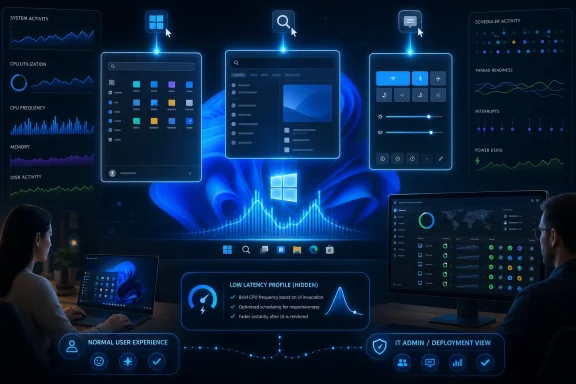
Microsoft’s May 26, 2026 Windows 11 preview update KB5089573 began rolling out a background performance change that briefly raises CPU responsiveness during Start menu, Search, Action Center, and some launch interactions on supported Windows 11 24H2 and 25H2 systems. The feature is being discussed under the name Low Latency Profile, but Microsoft’s public changelog buries it under the plainer promise of “general performance” improvements. That mismatch is the story: Windows 11 is not suddenly getting a turbo button so much as Microsoft is admitting that the shell needs one. For users, the effect may be real; for administrators, the rollout model may be more interesting than the speedup itself.
The first thing to understand about Low Latency Profile is that it is not a new app, not a Settings page, and not a gaming mode. It is an operating-system behavior that attempts to make brief, interactive work feel less sluggish by pushing CPU frequency and scheduling responsiveness at the moment the user asks Windows to do something visible. Click Start, invoke Search, open Action Center, and the system tries to be ready before the animation or content load turns into a perceived delay.
That makes the feature easy to misunderstand. A CPU “boost” sounds like overclocking, battery abuse, or a desperate workaround for bloated interface code. In practice, modern processors already spend their lives moving between low-power and high-performance states, and operating systems already influence when those transitions happen. Low Latency Profile appears to tune that dance for Windows 11’s most reputation-damaging moments: the half-second hesitations that make a premium machine feel oddly cheap.
Microsoft’s public language is careful. The KB5089573 notes say the update accelerates app launch and core shell experiences such as Start menu, Search, and Action Center. That is true as far as it goes, but it avoids the more provocative explanation: Windows is briefly asking the CPU to wake up harder and faster when the shell needs to respond.
The invisibility is probably intentional. A user-facing toggle would invite ritualized tweaking, benchmark theater, and support cases from people who turned it off because a forum post told them to. Microsoft is instead treating the feature as plumbing. If it works, the best outcome is that users stop thinking about it.
Task Manager is often the wrong instrument for this job. Its update cadence can miss the very spikes users are trying to observe, especially if the boost is measured in fractions of a second. A hardware monitor with faster polling, such as HWiNFO, is better suited to catching the behavior because it can display per-core clocks and transient frequency changes that Task Manager smooths away.
This matters because the perceived improvement and the measurable improvement do not always appear together. On a low-powered virtual machine or older laptop, the boost may look dramatic: visible CPU jumps, snappier flyouts, and fewer moments where the shell appears to think before it paints. On a high-end desktop or a recent premium laptop, the difference may be more subtle. The system was already fast enough that the improvement presents less as speed and more as the absence of tiny irritations.
That distinction is important for anyone trying to judge whether the feature “works.” If your Start menu already opens quickly, Low Latency Profile may not make it look twice as fast. It may instead make repeated shell interactions feel more consistent, smoothing the animation and reducing the small rendering stutters that Windows 11 users have learned to tolerate.
This is one of Microsoft’s least satisfying but most defensible habits. Controlled Feature Rollout lets the company stage new Windows behaviors, watch telemetry, and halt or slow distribution if something goes wrong. For a background performance change that touches power behavior and user interaction timing across a vast hardware ecosystem, that caution is not irrational.
But it also makes user-facing communication worse. The changelog says performance has improved. The update is installed. The machine reboots. Then the user opens Start and feels nothing obvious. Is the feature absent, disabled, hardware-limited, blocked by policy, or simply too subtle to notice? The answer may be “yes” to several of those at once.
That is why this update has generated a predictable cottage industry of verification guides. If Microsoft will not expose the state, enthusiasts will infer it from clocks, flyout latency, and feature IDs. That is fine for WindowsForum readers and Insider-channel hobbyists. It is less fine for ordinary users who are told an update makes their PC faster but are given no trustworthy way to know whether the relevant component is actually active.
That puts Low Latency Profile in an awkward position. Microsoft wants to improve the feel of Windows 11, and the users most likely to complain about Windows 11 sluggishness are also the users most likely to notice optional update behavior. But the broader population will mostly encounter the change later, when it is bundled into a mandatory cumulative update cycle.
For IT departments, the preview status is a warning label. Even a benign performance change can alter thermals, battery behavior, fan curves, or perceived responsiveness in ways that matter across fleets of laptops. A short boost during shell interactions is not the same as running Cinebench all day, but it is still a change in system behavior. On tightly managed devices, especially those with custom power policies, administrators will want to test rather than assume.
The good news is that this is not a new driver stack, a UI redesign, or a security boundary change. The risk profile is likely lower than many Windows updates. The bad news is that performance features are notoriously difficult to validate at scale because their success depends on subjective feel, hardware variance, background load, and the particular irritations of each user’s workflow.
That is useful investigative work, but it is not a recommendation for production machines. ViveTool is a powerful community utility because it exposes Windows feature flags that Microsoft may be staging, hiding, or testing. It is also exactly the kind of tool that can turn a managed Windows environment into a support mystery if used casually.
On a personal test machine, flipping a feature ID can answer a narrow question: are the bits present, and does this behavior change the shell? On a work laptop, lab fleet, classroom image, or executive device, that same experiment bypasses the rollout system Microsoft uses to limit blast radius. If the feature is delayed on a given device because of telemetry, compatibility, or a staged policy decision, forcing it on may remove a guardrail you cannot see.
There is also a larger editorial point here. Microsoft’s rollout opacity creates the demand for tools like ViveTool. Users do not like being told an update includes a feature while their machine behaves as if it does not. If Microsoft wants fewer people forcing feature flags, it could expose more reliable status information for staged Windows features, at least in Insider and Pro contexts.
What it can do is shorten the delay between intent and response. That is the part of performance users actually feel. A benchmark may tell you that a machine is powerful, but the user judges it by whether the interface reacts immediately when clicked. A system that hesitates during simple shell actions violates the expectation created by modern hardware.
This is why the backlash is both understandable and incomplete. Critics are right that boosting CPU clocks is not a substitute for lean code. If the Start menu or shell flyouts are slow because they are burdened by too much abstraction, network-aware content, advertising surfaces, or framework overhead, then the purest fix is to simplify the software. Windows 11 still has work to do there.
But critics are wrong if they frame CPU boosting as inherently illegitimate. Interactive boost behavior is a normal part of modern computing. Phones do it. Laptops do it. Desktop operating systems do it. The scandal is not that Windows is using the CPU to make interactions feel faster; the scandal is that Windows 11 has sometimes needed such obvious help for interactions as basic as opening Start.
Windows 11’s Start experience has been controversial from the beginning because it changed behavior users had internalized for years. Centered taskbar icons, a simplified Start layout, recommendations, search integration, and evolving web-backed experiences have all contributed to the sense that the shell is less direct than it used to be. Some of that is preference. Some of it is measurable latency.
Low Latency Profile attacks the symptom users notice first. It does not need to make the whole system faster to improve the first impression. If Start opens more cleanly, if Search appears without a hitch, if Action Center feels less gummy, Windows 11 benefits disproportionately because those interactions frame the OS.
That is also why Microsoft should be careful not to oversell the feature. A smoother Start menu is welcome, but it will not silence criticism of account prompts, promotional surfaces, inconsistent settings migration, or the fractured mix of legacy and modern UI. Performance is one pillar of trust. It is not the whole building.
For normal users, that is too much work. They will notice only three things: whether Windows feels faster, whether the laptop gets noisier, and whether battery life changes. The first is what Microsoft wants. The second and third are the risks.
Short boosts should not automatically imply major battery damage. A system that completes interactive work faster can sometimes return to idle sooner. But laptops vary widely in firmware tuning, cooling capacity, silicon efficiency, and vendor power profiles. A premium ultraportable may handle brief boosts quietly; a thin budget notebook may spin up its fan more often. A desktop user may never care.
This is where Microsoft’s gradual rollout is doing more than hiding a feature. It is gathering evidence across messy reality. The company needs to know whether the smoother Start menu is worth any increase in thermal noise, power draw, or edge-case instability. If the tradeoff is invisible to most users, the feature wins. If users begin hearing their fans every time they open Search, the story changes quickly.
There are legitimate reasons an enterprise might want this feature. Help desks receive plenty of vague complaints that “the laptop is slow,” and shell latency contributes to that perception. If a background OS change makes frontline devices feel more responsive without new hardware, that is a win. It may extend the useful life of machines that are technically adequate but feel unimpressive under Windows 11.
There are also reasons to test carefully. Call centers, classrooms, healthcare carts, and field laptops often run under strict power and thermal expectations. Fleet managers may prefer consistent battery behavior over marginally faster flyouts. Kiosk-like devices may not care about Start menu responsiveness at all.
Microsoft does not need to give every user a shiny toggle, but it should give administrators clarity. A documented policy state, performance counter, or release-health note would go a long way. Windows is no longer a boxed product installed on a handful of beige towers; it is a managed service running across fleets whose owners need to understand what changed.
That reaction is not irrational. Users remember older Windows releases feeling instant on weaker hardware. They remember context menus that did not need a second pass, control panels that opened plainly, and shell components that seemed less interested in serving a product strategy. Nostalgia exaggerates some of this, but not all of it.
At the same time, the purity argument can become self-defeating. Windows runs on a brutal range of hardware, driver stacks, firmware implementations, background utilities, security products, and enterprise agents. Even perfectly written code benefits from scheduling and power policies that favor interactive responsiveness. The correct answer is not “optimize code or boost CPU.” It is both.
The trust problem comes from Microsoft’s tendency to hide the levers while exposing the consequences. Users see the ads, the prompts, the new UI layers, and the update surprises. They do not see the engineering tradeoffs, the staged rollouts, or the telemetry thresholds. Low Latency Profile is another invisible system that may improve Windows while also reminding users how little of Windows they are allowed to understand.
There is a harsher reading: Windows 11’s shell has accumulated enough latency that Microsoft now needs processor-level urgency to make basic interactions feel modern. That is also partly true. The fact that both readings can coexist is what makes this update interesting.
Performance work is often unglamorous. Rewriting shell components, removing unnecessary dependencies, reducing content load paths, and simplifying animations will not generate the same quick headline as “menus open 70 percent faster.” A CPU boost, by contrast, is tangible. It produces a visible spike and a perceptible result.
But the deeper win would be for Microsoft to make Low Latency Profile less necessary over time. The best shell is the one that feels immediate because it is lean, not because the CPU was told to sprint every time the user clicked a system flyout. Until then, the boost is a practical patch over an architectural bruise.
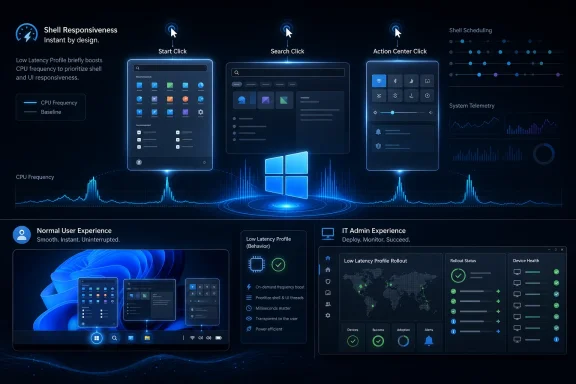 Microsoft’s New Performance Fix Is Small, Fast, and Deliberately Invisible
The first thing to understand about Low Latency Profile is that it is not a new app, not a Settings page, and not a gaming mode. It is an operating-system behavior that attempts to make brief, interactive work feel less sluggish by pushing CPU frequency and scheduling responsiveness at the moment the user asks Windows to do something visible. Click Start, invoke Search, open Action Center, and the system tries to be ready before the animation or content load turns into a perceived delay.That makes the feature easy to misunderstand. A CPU “boost” sounds like overclocking, battery abuse, or a desperate workaround for bloated interface code. In practice, modern processors already spend their lives moving between low-power and high-performance states, and operating systems already influence when those transitions happen. Low Latency Profile appears to tune that dance for Windows 11’s most reputation-damaging moments: the half-second hesitations that make a premium machine feel oddly cheap.
Microsoft’s public language is careful. The KB5089573 notes say the update accelerates app launch and core shell experiences such as Start menu, Search, and Action Center. That is true as far as it goes, but it avoids the more provocative explanation: Windows is briefly asking the CPU to wake up harder and faster when the shell needs to respond.
The invisibility is probably intentional. A user-facing toggle would invite ritualized tweaking, benchmark theater, and support cases from people who turned it off because a forum post told them to. Microsoft is instead treating the feature as plumbing. If it works, the best outcome is that users stop thinking about it.
The CPU Spike Is the Evidence, Not the Product
The Windows Latest testing captures the feature’s most useful diagnostic clue: when Low Latency Profile is active, monitoring tools can show sharp, short-lived CPU frequency jumps during specific shell interactions. Open Start, click Search, pull down Action Center, and active cores may briefly surge. That is not an accident or a bug; it is the mechanism showing through the floorboards.Task Manager is often the wrong instrument for this job. Its update cadence can miss the very spikes users are trying to observe, especially if the boost is measured in fractions of a second. A hardware monitor with faster polling, such as HWiNFO, is better suited to catching the behavior because it can display per-core clocks and transient frequency changes that Task Manager smooths away.
This matters because the perceived improvement and the measurable improvement do not always appear together. On a low-powered virtual machine or older laptop, the boost may look dramatic: visible CPU jumps, snappier flyouts, and fewer moments where the shell appears to think before it paints. On a high-end desktop or a recent premium laptop, the difference may be more subtle. The system was already fast enough that the improvement presents less as speed and more as the absence of tiny irritations.
That distinction is important for anyone trying to judge whether the feature “works.” If your Start menu already opens quickly, Low Latency Profile may not make it look twice as fast. It may instead make repeated shell interactions feel more consistent, smoothing the animation and reducing the small rendering stutters that Windows 11 users have learned to tolerate.
Controlled Rollout Turns Testing Into Guesswork
KB5089573 is an optional preview update, and the Low Latency Profile behavior is also subject to Microsoft’s usual gradual rollout machinery. That means two people can install the same update, reboot into the same OS build family, and still see different results. One machine may receive the new behavior; another may carry the bits but not have the feature enabled.This is one of Microsoft’s least satisfying but most defensible habits. Controlled Feature Rollout lets the company stage new Windows behaviors, watch telemetry, and halt or slow distribution if something goes wrong. For a background performance change that touches power behavior and user interaction timing across a vast hardware ecosystem, that caution is not irrational.
But it also makes user-facing communication worse. The changelog says performance has improved. The update is installed. The machine reboots. Then the user opens Start and feels nothing obvious. Is the feature absent, disabled, hardware-limited, blocked by policy, or simply too subtle to notice? The answer may be “yes” to several of those at once.
That is why this update has generated a predictable cottage industry of verification guides. If Microsoft will not expose the state, enthusiasts will infer it from clocks, flyout latency, and feature IDs. That is fine for WindowsForum readers and Insider-channel hobbyists. It is less fine for ordinary users who are told an update makes their PC faster but are given no trustworthy way to know whether the relevant component is actually active.
Optional Preview Today, Patch Tuesday Tomorrow
The timing also matters. Optional Windows preview updates are not the same thing as Patch Tuesday security updates. They are effectively Microsoft’s late-month staging lane for non-security fixes and feature improvements that will generally ride into broader release later. Enthusiasts install them early; many enterprises avoid them unless they are chasing a specific fix.That puts Low Latency Profile in an awkward position. Microsoft wants to improve the feel of Windows 11, and the users most likely to complain about Windows 11 sluggishness are also the users most likely to notice optional update behavior. But the broader population will mostly encounter the change later, when it is bundled into a mandatory cumulative update cycle.
For IT departments, the preview status is a warning label. Even a benign performance change can alter thermals, battery behavior, fan curves, or perceived responsiveness in ways that matter across fleets of laptops. A short boost during shell interactions is not the same as running Cinebench all day, but it is still a change in system behavior. On tightly managed devices, especially those with custom power policies, administrators will want to test rather than assume.
The good news is that this is not a new driver stack, a UI redesign, or a security boundary change. The risk profile is likely lower than many Windows updates. The bad news is that performance features are notoriously difficult to validate at scale because their success depends on subjective feel, hardware variance, background load, and the particular irritations of each user’s workflow.
ViveTool Is a Flashlight, Not a Deployment Plan
The enthusiast workaround is already familiar: use ViveTool to enable the feature ID associated with Low Latency Profile, reboot, and test again. In the Windows Latest report, forcing the feature on made the difference clearer, especially when combined with HWiNFO monitoring. The Start menu, Search, and Action Center became smoother, and CPU frequency behavior lined up with those interactions.That is useful investigative work, but it is not a recommendation for production machines. ViveTool is a powerful community utility because it exposes Windows feature flags that Microsoft may be staging, hiding, or testing. It is also exactly the kind of tool that can turn a managed Windows environment into a support mystery if used casually.
On a personal test machine, flipping a feature ID can answer a narrow question: are the bits present, and does this behavior change the shell? On a work laptop, lab fleet, classroom image, or executive device, that same experiment bypasses the rollout system Microsoft uses to limit blast radius. If the feature is delayed on a given device because of telemetry, compatibility, or a staged policy decision, forcing it on may remove a guardrail you cannot see.
There is also a larger editorial point here. Microsoft’s rollout opacity creates the demand for tools like ViveTool. Users do not like being told an update includes a feature while their machine behaves as if it does not. If Microsoft wants fewer people forcing feature flags, it could expose more reliable status information for staged Windows features, at least in Insider and Pro contexts.
The Performance Win Is Real Enough to Matter and Small Enough to Misread
The most credible way to describe Low Latency Profile is as a latency optimization, not a raw performance revolution. It does not make a slow SSD fast. It does not make a weak CPU strong. It does not rewrite the Start menu, remove web-dependent interface layers, or undo every design decision that made Windows 11 feel heavier than Windows 10 or Windows 7 in certain interactions.What it can do is shorten the delay between intent and response. That is the part of performance users actually feel. A benchmark may tell you that a machine is powerful, but the user judges it by whether the interface reacts immediately when clicked. A system that hesitates during simple shell actions violates the expectation created by modern hardware.
This is why the backlash is both understandable and incomplete. Critics are right that boosting CPU clocks is not a substitute for lean code. If the Start menu or shell flyouts are slow because they are burdened by too much abstraction, network-aware content, advertising surfaces, or framework overhead, then the purest fix is to simplify the software. Windows 11 still has work to do there.
But critics are wrong if they frame CPU boosting as inherently illegitimate. Interactive boost behavior is a normal part of modern computing. Phones do it. Laptops do it. Desktop operating systems do it. The scandal is not that Windows is using the CPU to make interactions feel faster; the scandal is that Windows 11 has sometimes needed such obvious help for interactions as basic as opening Start.
The Start Menu Has Become the Symbol of Windows 11’s Heaviness
No part of Windows carries more emotional load than the Start menu. It is the front door to the operating system, the gesture users repeat thousands of times, and the place where Microsoft’s product priorities become visible. If Start feels slow, the whole OS feels slow, even if games, compilers, browsers, and productivity apps perform well.Windows 11’s Start experience has been controversial from the beginning because it changed behavior users had internalized for years. Centered taskbar icons, a simplified Start layout, recommendations, search integration, and evolving web-backed experiences have all contributed to the sense that the shell is less direct than it used to be. Some of that is preference. Some of it is measurable latency.
Low Latency Profile attacks the symptom users notice first. It does not need to make the whole system faster to improve the first impression. If Start opens more cleanly, if Search appears without a hitch, if Action Center feels less gummy, Windows 11 benefits disproportionately because those interactions frame the OS.
That is also why Microsoft should be careful not to oversell the feature. A smoother Start menu is welcome, but it will not silence criticism of account prompts, promotional surfaces, inconsistent settings migration, or the fractured mix of legacy and modern UI. Performance is one pillar of trust. It is not the whole building.
Power Users Will Watch the Clocks, Everyone Else Will Watch the Fans
For enthusiasts, the diagnostic path is straightforward. Install the update, wait for background tasks to settle, open a monitoring tool, and repeatedly trigger Start, Search, and Action Center. If Low Latency Profile is active, the tell is a quick clock response aligned with the interaction, ideally paired with a smoother shell.For normal users, that is too much work. They will notice only three things: whether Windows feels faster, whether the laptop gets noisier, and whether battery life changes. The first is what Microsoft wants. The second and third are the risks.
Short boosts should not automatically imply major battery damage. A system that completes interactive work faster can sometimes return to idle sooner. But laptops vary widely in firmware tuning, cooling capacity, silicon efficiency, and vendor power profiles. A premium ultraportable may handle brief boosts quietly; a thin budget notebook may spin up its fan more often. A desktop user may never care.
This is where Microsoft’s gradual rollout is doing more than hiding a feature. It is gathering evidence across messy reality. The company needs to know whether the smoother Start menu is worth any increase in thermal noise, power draw, or edge-case instability. If the tradeoff is invisible to most users, the feature wins. If users begin hearing their fans every time they open Search, the story changes quickly.
Enterprise IT Sees a Different Performance Problem
For sysadmins, Low Latency Profile is less about whether one Start menu opens faster and more about how Windows changes under management. The feature is currently presented as a general performance improvement rather than a clearly named administrative control. That may be fine for consumer PCs, but it is not ideal for organizations that document baselines, validate updates, and tune power behavior for battery life or acoustics.There are legitimate reasons an enterprise might want this feature. Help desks receive plenty of vague complaints that “the laptop is slow,” and shell latency contributes to that perception. If a background OS change makes frontline devices feel more responsive without new hardware, that is a win. It may extend the useful life of machines that are technically adequate but feel unimpressive under Windows 11.
There are also reasons to test carefully. Call centers, classrooms, healthcare carts, and field laptops often run under strict power and thermal expectations. Fleet managers may prefer consistent battery behavior over marginally faster flyouts. Kiosk-like devices may not care about Start menu responsiveness at all.
Microsoft does not need to give every user a shiny toggle, but it should give administrators clarity. A documented policy state, performance counter, or release-health note would go a long way. Windows is no longer a boxed product installed on a handful of beige towers; it is a managed service running across fleets whose owners need to understand what changed.
The Backlash Is Really About Trust
The argument around Low Latency Profile has become larger than the feature because it touches a sore spot in the Windows community. Many users believe Windows 11’s interface performance problems are self-inflicted. They see web content in system surfaces, promotional panels in places that used to be utilitarian, and modern replacements that still fail to match the speed of old Win32 components. Then Microsoft arrives with a CPU boost and asks for applause.That reaction is not irrational. Users remember older Windows releases feeling instant on weaker hardware. They remember context menus that did not need a second pass, control panels that opened plainly, and shell components that seemed less interested in serving a product strategy. Nostalgia exaggerates some of this, but not all of it.
At the same time, the purity argument can become self-defeating. Windows runs on a brutal range of hardware, driver stacks, firmware implementations, background utilities, security products, and enterprise agents. Even perfectly written code benefits from scheduling and power policies that favor interactive responsiveness. The correct answer is not “optimize code or boost CPU.” It is both.
The trust problem comes from Microsoft’s tendency to hide the levers while exposing the consequences. Users see the ads, the prompts, the new UI layers, and the update surprises. They do not see the engineering tradeoffs, the staged rollouts, or the telemetry thresholds. Low Latency Profile is another invisible system that may improve Windows while also reminding users how little of Windows they are allowed to understand.
The Hidden Boost Says More About Windows 11 Than the Changelog Does
There is a charitable reading of KB5089573: Microsoft identified a real responsiveness problem, adopted a standard operating-system technique, and is rolling it out cautiously. That is the reading Microsoft would prefer. It is also partly true.There is a harsher reading: Windows 11’s shell has accumulated enough latency that Microsoft now needs processor-level urgency to make basic interactions feel modern. That is also partly true. The fact that both readings can coexist is what makes this update interesting.
Performance work is often unglamorous. Rewriting shell components, removing unnecessary dependencies, reducing content load paths, and simplifying animations will not generate the same quick headline as “menus open 70 percent faster.” A CPU boost, by contrast, is tangible. It produces a visible spike and a perceptible result.
But the deeper win would be for Microsoft to make Low Latency Profile less necessary over time. The best shell is the one that feels immediate because it is lean, not because the CPU was told to sprint every time the user clicked a system flyout. Until then, the boost is a practical patch over an architectural bruise.
What Windows Users Should Actually Watch After KB5089573
The most useful way to evaluate this update is not to chase a single benchmark or assume every machine will behave the same way. Treat it as a responsiveness change whose value depends on hardware, rollout state, and the interactions you repeat all day. If Microsoft’s staged deployment is doing its job, the feature should expand quietly as confidence grows.- KB5089573 is an optional preview update for Windows 11 24H2 and 25H2, so many users will not receive the same behavior until a broader cumulative update rollout.
- Low Latency Profile is not exposed as a normal Settings toggle, and its activation may vary because Microsoft is using staged rollout controls.
- Task Manager may miss the short CPU frequency bursts that reveal the feature, while faster hardware-monitoring tools are more likely to catch them.
- The most obvious improvements should appear in shell interactions such as Start, Search, and Action Center, with app-launch gains depending on how broadly Microsoft enables the behavior.
- Powerful desktops and premium laptops may show less dramatic speed gains but can still feel smoother if the feature reduces small animation and rendering stalls.
- For managed environments, the sensible path is to validate thermals, battery behavior, and user-perceived responsiveness before treating the update as a fleet-wide performance cure.
References
- Primary source: Windows Latest
Published: Thu, 28 May 2026 09:59:12 GMT

What actually happens to your CPU when Windows 11's Low Latency Profile is working
Windows 11 Low Latency Profile triggers real-time CPU spikes for smoother Start menu and Search experiences after KB5089573. www.windowslatest.com
- Related coverage: windowscentral.com
Windows 11's latest OS update is packing serious performance gains
Windows 11 update KB5089573 is now generally available as Microsoft's non-security preview update for May, and is packing genuinely notable performance improvements. www.windowscentral.com
- Related coverage: technobezz.com
Windows 11 KB5089573 update speeds up system flyouts by 70 percent and app launches by 40 percent
Windows 11's KB5089573 update boosts system flyouts by 70% and app launches by 40% under a new performance initiative. www.technobezz.com
- Related coverage: ebisuda.net

Windows 11「Low Latency Profile」が2026年6月に全PC展開——アプリ起動の瞬間だけCPUを全力稼働させる新機能の実態
MicrosoftがWindows 11のCPUブースト機能「Low Latency Profile」を2026年6月Patch Tuesdayで全ユーザーに展開すると正式確認。 www.ebisuda.net
- Related coverage: games.gg

Windows 11 Low Latency Profile: Up to 70% Faster Load Times
Microsoft's rumored Windows 11 Low Latency Profile promises up to 70% faster interface loads and 40% quicker app launches by briefly maxing out your CPU.games.gg
- Related coverage: computerbase.de
Optionales Mai-Update: Windows 11 lässt Apps mit CPU-Boost schneller starten
Mit dem optionalen Mai-Update erhält Windows 11 Neuerungen wie den CPU-Boost für schnellere App-Starts sowie Multi-Kamera-Unterstützung.www.computerbase.de
- Related coverage: tomshardware.com
Microsoft staunchly defends its new 'Low Latency Profile' for Windows 11 after community backlash — says every other OS already boosts CPU speeds for quicker load times
The quest to fix Windows 11 is a bumpy one.www.tomshardware.com
- Related coverage: xenospectrum.com

Windows 11の最新アップデートKB5089573で最大70%高速化されるCPUブースト機能が導入 | XenoSpectrum
MicrosoftはWindows 11のプレビューアップデート(KB5089573)にて、UI操作時にCPUクロックを瞬間的に最大化する新機能「Low Latency Profile」を導入した。「Race to Sleep」の設計思想のもと、OSの体感速度を劇的に向上させるこの技術のメカニズムから、一部ゲーム環境への影響、そしてネイティブUI化に向けた今後の展望までを詳しく解説。 xenospectrum.com
- Related coverage: fdaytalk.com

How to Enable Low Latency Profile (CPU Boost) on Windows 11
Windows 11 Low Latency Profile boosts your CPU for 1 to 3 seconds during app launches and Start menu interactions. Here is how to enable it now using ViveTool. www.fdaytalk.com
- Related coverage: techradar.com
- Related coverage: pureinfotech.com

Microsoft is experimenting with a new way to make Windows 11 feel snappier
Windows 11 may soon feel faster thanks to a new Low Latency Profile feature you can already test in the Release Preview or using ViveTool. pureinfotech.com
- Related coverage: windowsforum.com

Windows 11 KB5089573 Low Latency Profile: Faster Start, Search, and Action Center
Microsoft released the optional Windows 11 KB5089573 preview update on May 26, 2026, for Windows 11 24H2 and 25H2 systems, bringing a phased performance change that accelerates app launch paths and shell surfaces such as Start, Search, Action Center, and related UI flyouts. The feature is not... windowsforum.com
- Related coverage: pcgamer.com
'Let Windows cook': Microsoft defends new Low Latency mode and asks you 'see it yourself'
The new mode is reportedly snappier.www.pcgamer.com
- Related coverage: cincodias.elpais.com
- Related coverage: amd.com
- Related coverage: builders.intel.com
- Related coverage: techrounder.com