

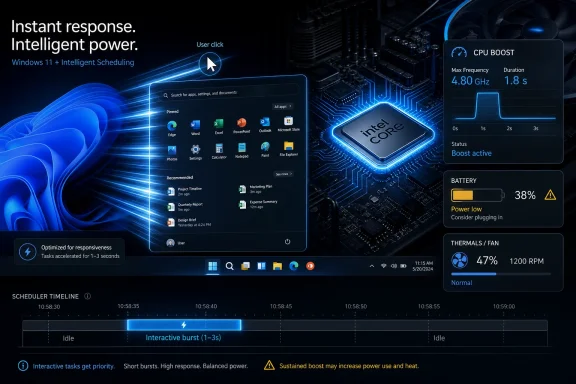
Microsoft is reportedly testing a Windows 11 “Low Latency Profile” in Insider builds that briefly drives a PC’s CPU to maximum frequency for roughly one to three seconds when users launch apps or trigger priority shell actions such as Start, menus, and system flyouts. The pitch is simple: make Windows feel faster by treating latency as an emergency, not a background optimization problem. The risk is just as simple: Microsoft may be solving a trust problem with a turbo button.
There is something almost refreshingly blunt about the idea. Modern operating systems spend enormous effort hiding the complexity of power states, boost clocks, scheduler hints, and thermal limits from users, only for Microsoft to arrive at a performance complaint and say, in effect, what if we just made the chip sprint?
That is reportedly what Low Latency Profile does. When Windows detects a high-priority interactive action, it temporarily pushes the processor toward its maximum frequency, then lets it fall back after the short burst has passed. The reported window is tiny — one to three seconds — but it lands exactly where Windows 11 has often felt least flattering: not during a benchmark, but during the first half-second after a click.
That distinction matters. Users do not usually decide an operating system is slow because a spreadsheet recalculates 8 percent behind expectations. They decide it is slow because the Start menu hesitates, File Explorer drags its feet, context menus feel gummy, and a supposedly modern PC behaves as if it has to think about whether it really wants to open Settings.
Microsoft’s reported early numbers are eye-catching: built-in apps such as Edge and Outlook launching up to 40 percent faster, and some native UI surfaces such as Start and context menus responding up to 70 percent faster. Those figures should be treated as preliminary and vendor-adjacent until broad independent testing exists, but they show the target. This is not about beating Linux in a compile test. This is about shaving irritation out of the everyday loop.
The bigger story is that Microsoft appears to be acknowledging something power users have said for years: perceived performance is not the same thing as peak performance. A machine can be objectively fast and still feel reluctant. Windows 11 has too often occupied that uncomfortable middle ground.
That reputation is not built only on nostalgia. Windows 11 arrived with redesigned surfaces, new menus, new animations, and a layered visual language that often made the OS look newer while making some interactions feel less direct. The infamous right-click context menu became a symbol of the problem: cleaner at a glance, slower in muscle memory, and frequently still requiring a trip to “Show more options” for the command a user actually wanted.
Microsoft’s own recent messaging around Windows quality has leaned into performance, reliability, and craft. That is a telling trio. Performance is the measurable piece. Reliability is the support-cost piece. Craft is the part Windows users notice when something feels weird but cannot easily describe in a Feedback Hub report.
Low Latency Profile fits all three, but uneasily. It could make Windows faster in the places users actually perceive. It could also paper over deeper architectural drag with a power-management workaround. And if implemented without transparency, it could become one more invisible behavior in an OS already criticized for doing too much behind the user’s back.
The central question is not whether a short CPU boost can make app launches faster. Of course it can, under the right conditions. The question is whether Windows should need this maneuver to make its own shell feel sharp on hardware that is already dramatically more capable than the PCs Windows 7 made feel crisp.
That context makes the CPU-boost feature more interesting than it would be in isolation. A scheduler hint or power profile tweak would normally be buried in release notes, if mentioned at all. Here, it becomes evidence that Microsoft understands Windows 11’s malaise is not confined to a few bugs. The platform has a feel problem.
Windows 11 has spent much of its life asking users to accept trade-offs: stricter hardware requirements, more Microsoft account pressure, heavier cloud integration, more Copilot positioning, more promoted surfaces, and a shell that often needed months or years to regain familiar capabilities. Some of those decisions may be defensible from Microsoft’s strategic view. From the user’s chair, they accumulated into a sense that the OS was being optimized for everyone except the person clicking the mouse.
K2, at least in the way it has been described, attempts to reverse that narrative. Microsoft is not merely promising new features; it is promising to fix the friction. That makes Low Latency Profile symbolically useful. It says Microsoft is willing to touch the fundamentals of responsiveness rather than shipping another sidebar.
But symbolism cuts both ways. If the most visible Windows performance improvement is “run the CPU harder for a moment,” users will reasonably ask why the shell, inbox apps, and modern frameworks needed that help in the first place.
The Start menu is not merely an app launcher. It is a trust surface. When it opens instantly, the computer feels available. When it delays, even slightly, the user starts narrating the machine’s failure: indexing again, updating again, doing whatever Windows does when Windows is being Windows.
That is why a reported 70 percent improvement in some shell interactions is potentially more meaningful than a similar gain in a rarely used background operation. A half-second saved in a benchmark disappears into a chart. A half-second saved every time the user invokes Start changes the emotional texture of the OS.
Microsoft has learned this lesson before. Windows 7’s reputation was built not only on stability after Vista, but on the sense that the OS responded cleanly to ordinary intent. Windows 10, for all its inconsistencies, settled into a rhythm that many users found predictable. Windows 11 disrupted that rhythm, then asked users to admire the rounded corners.
Low Latency Profile appears to attack the most visible residue of that disruption. It does not make Windows 11 simpler. It does not remove ads, streamline settings, or undo every controversial design choice. But if it can make basic interactions feel immediate, it addresses the layer of irritation that magnifies every other complaint.
That is why the feature deserves attention even if the mechanism sounds crude. Responsiveness is cumulative. A PC that reacts instantly ten times in a row earns patience the eleventh time. A PC that stutters on the first interaction loses the room.
Short boost windows are not automatically wasteful. In some workloads, racing to finish and returning quickly to idle can be more efficient than running longer at lower frequency. This is the classic race to idle argument, and modern processors are designed around exactly these transient bursts. Intel, AMD, and Arm-based systems all rely on rapid changes in frequency and power state to balance responsiveness with efficiency.
But the details matter. A single app launch is one thing. A day full of microbursts across Start, Search, Settings, context menus, notifications, widgets, Edge, Outlook, Teams, and background shell components is another. Windows is not a clean lab workload. It is a messy swarm of user intent, telemetry, indexing, sync clients, drivers, security tools, and vendor utilities.
If Low Latency Profile is too eager, it could create a pattern of tiny power spikes that do not show up as catastrophic battery drain but still change the curve. Users might not see a dramatic temperature rise, yet they could see a machine that wakes the fan more often, loses a little more battery during light use, or behaves differently on thin-and-light systems with limited thermal headroom.
This is especially important because “maximum frequency” is not the same experience across devices. A high-end desktop cooler may absorb the burst without ceremony. A fanless tablet, a budget laptop, a gaming handheld, or an enterprise fleet machine tuned for quiet operation may hit different limits. The same Windows feature can feel like polish on one device and noise on another.
Microsoft will need to be careful not just with the algorithm, but with the policy surface. If the feature is enabled by default in Insider builds, that may be sensible for testing. If it ships broadly without user-visible control, administrators and power users will want to know how it interacts with power mode, battery saver, OEM utilities, and enterprise policy.
Modern PCs are heterogeneous in practice even when their cores are nominally similar. Intel hybrid CPUs split work across performance and efficiency cores. AMD systems make their own boost and residency decisions. Qualcomm-based Windows machines bring a different power-management model into the conversation. Add virtualization, security isolation, browser multiprocess architectures, and Electron apps, and “launch this app quickly” becomes a surprisingly complex instruction.
A good implementation would not simply hit the gas for every process creation. It would understand which interactions are latency-sensitive, which can wait, which are user-initiated, and which are background churn wearing a fake mustache. The difference between a snappy OS and a noisy OS is often classification.
That is where Microsoft has an advantage. Windows owns the shell, the scheduler, the power framework, and the app lifecycle hooks. It can theoretically coordinate across layers in ways third-party tools cannot. It can treat opening Start differently from a background updater spawning a helper process. It can learn from telemetry across an absurdly large device base.
It also has a disadvantage: the Windows ecosystem is chaotic. OEM control panels, antivirus products, overlay software, peripheral suites, game launchers, browser updaters, enterprise agents, and driver services all want their slice of “important.” If Low Latency Profile is exposed to abuse or misclassification, the feature could become another battleground where every app insists it deserves priority.
Microsoft’s challenge is to make the feature boring. Users should not have to know it exists. Admins should be able to measure and control it. Developers should not be handed a new excuse to demand foreground-level urgency for routine nonsense.
Microsoft reportedly sees K2 as part of a broader effort to make Windows more competitive on gaming hardware and more tolerable on constrained devices. Low Latency Profile is not a gaming feature in the narrow sense, but it aligns with that battlefield. Handhelds expose Windows’ latency, background activity, and UI overhead more brutally than a desktop tower ever did.
On a gaming handheld, the Start menu being slow is not just a desktop annoyance. It is evidence that the OS was not designed for the form factor. App launch delays, context-menu lag, and background bloat all become part of the argument for a console-like alternative. SteamOS does not need to run every Windows app to embarrass Windows in moments where simplicity wins.
That puts Microsoft in an awkward position. Windows’ value proposition has always been breadth: every app, every peripheral, every game store, every weird enterprise dependency. But breadth does not excuse sluggishness. If Microsoft wants Windows to remain the default environment for gaming handhelds and everyday PCs, it has to make the general-purpose OS feel less like a tax.
Low Latency Profile is therefore more than an app-launch tweak. It is part of a larger attempt to make Windows feel less bureaucratic. The OS can keep its compatibility empire only if the basics stop feeling like paperwork.
The danger is that Microsoft mistakes boost behavior for product discipline. SteamOS does not feel good merely because it handles clocks well. It feels good because the user experience is narrower, more intentional, and less cluttered. Windows cannot become that without ceasing to be Windows, but it can stop making its broad mission harder with self-inflicted latency.
These questions are not anti-performance. They are what happens when a feature moves from a demo machine to a fleet. A two-second CPU burst is trivial until it is multiplied across thousands of laptops, remote users, docking stations, video calls, and vendor-specific firmware.
IT departments have spent years trying to make Windows predictable. They manage update rings, power policies, device health, driver baselines, and battery expectations. A hidden latency profile that changes CPU behavior in response to interactive events is exactly the kind of thing admins will want documented before it appears in a semi-annual rollout.
There is also the support optics problem. If users notice fans spinning after common actions, or if monitoring tools show sudden frequency spikes, the help desk gets the ticket. “Windows is maxing out my CPU” is a phrase that can travel through an organization faster than any measured explanation about short-duration boosts.
Microsoft can reduce that risk with transparency. The feature does not necessarily need a big consumer-facing switch, but it should be visible in documentation, power policy, and diagnostic tooling. Enterprise admins should not have to reverse-engineer an OS behavior that Microsoft introduced to make the OS feel better.
The irony is that good performance engineering often succeeds by disappearing. But in Windows, invisible behavior is now politically expensive. Microsoft has trained users and admins to look for hidden motives. Rebuilding trust means explaining even the improvements.
The more realistic concerns are thermals, acoustics, battery life, and consistency. A feature can be safe for silicon and still annoying for humans. It can be technically efficient and still produce fan noise at the wrong moment. It can improve average launch times and still make a few devices feel worse because their cooling or firmware policies are marginal.
That is why independent testing will matter. The reported gains sound promising, but the review matrix needs to include low-end laptops, premium ultrabooks, gaming handhelds, desktops, Arm systems, battery saver mode, balanced mode, plugged-in operation, and enterprise-managed configurations. The question is not whether Microsoft can find a scenario where the feature helps. The question is whether it helps broadly without creating new classes of complaint.
There is also a fairness issue in how the gains are distributed. First-party Microsoft apps reportedly benefit heavily. That makes sense if Microsoft is tuning the feature around inbox experiences and shell surfaces, but Windows lives or dies by third-party software. If Edge, Outlook, Start, and Settings get special treatment while other apps see modest or inconsistent gains, users will notice.
The best version of Low Latency Profile improves Windows as a platform, not just Microsoft’s own furniture inside it. The worst version becomes another quiet advantage for bundled apps in an OS already accused of steering users toward Microsoft services. That does not mean the feature is anti-competitive by design. It means Microsoft has to be careful about optics as well as engineering.
The less generous reading is that Microsoft is compensating for bloat by spending more power at the moment users notice the bloat. That would be a very Windows solution in the worst sense: add machinery to counteract machinery. Users asked for a leaner OS and got a cleverer way to brute-force the parts that feel slow.
Reality is probably between those poles. Operating systems routinely use policy hints to prioritize interactive responsiveness. Smartphones do it. Game consoles do it. Desktop Linux has evolved its own scheduling and responsiveness mechanisms. The idea that Windows should treat a user click as urgent is not scandalous. It is overdue.
But the feature cannot carry K2 by itself. If File Explorer remains inconsistent, if settings remain fragmented, if ads and prompts keep reappearing in core surfaces, if Copilot hooks feel more strategic than useful, a faster launch animation will not save Windows 11’s reputation. Performance is necessary, not sufficient.
Microsoft’s quality push will be judged by whether the OS becomes calmer. Faster is part of calmer. So is fewer interruptions, fewer regressions, fewer dark patterns, fewer duplicated controls, and fewer moments where the user feels like the operating system is negotiating against them.
Source: TweakTown New Windows 11 feature may speed up app launches by maxing out CPU frequency
 Microsoft Reaches for the Oldest Performance Trick in the Book
There is something almost refreshingly blunt about the idea. Modern operating systems spend enormous effort hiding the complexity of power states, boost clocks, scheduler hints, and thermal limits from users, only for Microsoft to arrive at a performance complaint and say, in effect, what if we just made the chip sprint?That is reportedly what Low Latency Profile does. When Windows detects a high-priority interactive action, it temporarily pushes the processor toward its maximum frequency, then lets it fall back after the short burst has passed. The reported window is tiny — one to three seconds — but it lands exactly where Windows 11 has often felt least flattering: not during a benchmark, but during the first half-second after a click.
That distinction matters. Users do not usually decide an operating system is slow because a spreadsheet recalculates 8 percent behind expectations. They decide it is slow because the Start menu hesitates, File Explorer drags its feet, context menus feel gummy, and a supposedly modern PC behaves as if it has to think about whether it really wants to open Settings.
Microsoft’s reported early numbers are eye-catching: built-in apps such as Edge and Outlook launching up to 40 percent faster, and some native UI surfaces such as Start and context menus responding up to 70 percent faster. Those figures should be treated as preliminary and vendor-adjacent until broad independent testing exists, but they show the target. This is not about beating Linux in a compile test. This is about shaving irritation out of the everyday loop.
The bigger story is that Microsoft appears to be acknowledging something power users have said for years: perceived performance is not the same thing as peak performance. A machine can be objectively fast and still feel reluctant. Windows 11 has too often occupied that uncomfortable middle ground.
Windows 11’s Problem Was Never Just Raw Speed
Windows 11 has always been a strange performance product. On one hand, it runs acceptably on a wide range of modern hardware, benefits from years of scheduler work, and has slowly absorbed improvements for newer hybrid processors. On the other hand, it has earned a reputation for feeling less immediate than Windows 10 on similar machines, especially in shell interactions that should be boringly instant.That reputation is not built only on nostalgia. Windows 11 arrived with redesigned surfaces, new menus, new animations, and a layered visual language that often made the OS look newer while making some interactions feel less direct. The infamous right-click context menu became a symbol of the problem: cleaner at a glance, slower in muscle memory, and frequently still requiring a trip to “Show more options” for the command a user actually wanted.
Microsoft’s own recent messaging around Windows quality has leaned into performance, reliability, and craft. That is a telling trio. Performance is the measurable piece. Reliability is the support-cost piece. Craft is the part Windows users notice when something feels weird but cannot easily describe in a Feedback Hub report.
Low Latency Profile fits all three, but uneasily. It could make Windows faster in the places users actually perceive. It could also paper over deeper architectural drag with a power-management workaround. And if implemented without transparency, it could become one more invisible behavior in an OS already criticized for doing too much behind the user’s back.
The central question is not whether a short CPU boost can make app launches faster. Of course it can, under the right conditions. The question is whether Windows should need this maneuver to make its own shell feel sharp on hardware that is already dramatically more capable than the PCs Windows 7 made feel crisp.
The K2 Framing Turns a Tweak Into a Confession
The reported Low Latency Profile is being discussed as part of Microsoft’s broader Windows K2 effort, the internal push said to focus on making Windows 11 more reliable, less bloated, more responsive, and more respectful of the people who actually use it all day. Whether K2 becomes a real course correction or another Windows branding footnote depends on how many of these changes land as engineering improvements rather than talking points.That context makes the CPU-boost feature more interesting than it would be in isolation. A scheduler hint or power profile tweak would normally be buried in release notes, if mentioned at all. Here, it becomes evidence that Microsoft understands Windows 11’s malaise is not confined to a few bugs. The platform has a feel problem.
Windows 11 has spent much of its life asking users to accept trade-offs: stricter hardware requirements, more Microsoft account pressure, heavier cloud integration, more Copilot positioning, more promoted surfaces, and a shell that often needed months or years to regain familiar capabilities. Some of those decisions may be defensible from Microsoft’s strategic view. From the user’s chair, they accumulated into a sense that the OS was being optimized for everyone except the person clicking the mouse.
K2, at least in the way it has been described, attempts to reverse that narrative. Microsoft is not merely promising new features; it is promising to fix the friction. That makes Low Latency Profile symbolically useful. It says Microsoft is willing to touch the fundamentals of responsiveness rather than shipping another sidebar.
But symbolism cuts both ways. If the most visible Windows performance improvement is “run the CPU harder for a moment,” users will reasonably ask why the shell, inbox apps, and modern frameworks needed that help in the first place.
A Faster Start Menu Is a Bigger Deal Than It Sounds
It is tempting to trivialize improvements to Start, menus, and flyouts as cosmetic. That misses how operating systems are judged in daily use. The shell is the front door to the machine, and Windows 11’s front door has too often felt like it was waiting for a committee.The Start menu is not merely an app launcher. It is a trust surface. When it opens instantly, the computer feels available. When it delays, even slightly, the user starts narrating the machine’s failure: indexing again, updating again, doing whatever Windows does when Windows is being Windows.
That is why a reported 70 percent improvement in some shell interactions is potentially more meaningful than a similar gain in a rarely used background operation. A half-second saved in a benchmark disappears into a chart. A half-second saved every time the user invokes Start changes the emotional texture of the OS.
Microsoft has learned this lesson before. Windows 7’s reputation was built not only on stability after Vista, but on the sense that the OS responded cleanly to ordinary intent. Windows 10, for all its inconsistencies, settled into a rhythm that many users found predictable. Windows 11 disrupted that rhythm, then asked users to admire the rounded corners.
Low Latency Profile appears to attack the most visible residue of that disruption. It does not make Windows 11 simpler. It does not remove ads, streamline settings, or undo every controversial design choice. But if it can make basic interactions feel immediate, it addresses the layer of irritation that magnifies every other complaint.
That is why the feature deserves attention even if the mechanism sounds crude. Responsiveness is cumulative. A PC that reacts instantly ten times in a row earns patience the eleventh time. A PC that stutters on the first interaction loses the room.
The Battery Question Is Where the Marketing Gets Complicated
The obvious concern is power. A desktop user may shrug at one-to-three-second boost bursts, especially on a system already configured for aggressive performance. A laptop user has a different bargain with Windows: stay responsive, but do not spend battery like a teenager with a stolen credit card.Short boost windows are not automatically wasteful. In some workloads, racing to finish and returning quickly to idle can be more efficient than running longer at lower frequency. This is the classic race to idle argument, and modern processors are designed around exactly these transient bursts. Intel, AMD, and Arm-based systems all rely on rapid changes in frequency and power state to balance responsiveness with efficiency.
But the details matter. A single app launch is one thing. A day full of microbursts across Start, Search, Settings, context menus, notifications, widgets, Edge, Outlook, Teams, and background shell components is another. Windows is not a clean lab workload. It is a messy swarm of user intent, telemetry, indexing, sync clients, drivers, security tools, and vendor utilities.
If Low Latency Profile is too eager, it could create a pattern of tiny power spikes that do not show up as catastrophic battery drain but still change the curve. Users might not see a dramatic temperature rise, yet they could see a machine that wakes the fan more often, loses a little more battery during light use, or behaves differently on thin-and-light systems with limited thermal headroom.
This is especially important because “maximum frequency” is not the same experience across devices. A high-end desktop cooler may absorb the burst without ceremony. A fanless tablet, a budget laptop, a gaming handheld, or an enterprise fleet machine tuned for quiet operation may hit different limits. The same Windows feature can feel like polish on one device and noise on another.
Microsoft will need to be careful not just with the algorithm, but with the policy surface. If the feature is enabled by default in Insider builds, that may be sensible for testing. If it ships broadly without user-visible control, administrators and power users will want to know how it interacts with power mode, battery saver, OEM utilities, and enterprise policy.
This Is Also a Scheduler Story, Not Just a Clock-Speed Story
The simple version of Low Latency Profile is that Windows sees a launch and asks the CPU to go fast. The more interesting version is that Windows is trying to classify human-facing work differently from background work. That is a scheduler and policy problem as much as a frequency problem.Modern PCs are heterogeneous in practice even when their cores are nominally similar. Intel hybrid CPUs split work across performance and efficiency cores. AMD systems make their own boost and residency decisions. Qualcomm-based Windows machines bring a different power-management model into the conversation. Add virtualization, security isolation, browser multiprocess architectures, and Electron apps, and “launch this app quickly” becomes a surprisingly complex instruction.
A good implementation would not simply hit the gas for every process creation. It would understand which interactions are latency-sensitive, which can wait, which are user-initiated, and which are background churn wearing a fake mustache. The difference between a snappy OS and a noisy OS is often classification.
That is where Microsoft has an advantage. Windows owns the shell, the scheduler, the power framework, and the app lifecycle hooks. It can theoretically coordinate across layers in ways third-party tools cannot. It can treat opening Start differently from a background updater spawning a helper process. It can learn from telemetry across an absurdly large device base.
It also has a disadvantage: the Windows ecosystem is chaotic. OEM control panels, antivirus products, overlay software, peripheral suites, game launchers, browser updaters, enterprise agents, and driver services all want their slice of “important.” If Low Latency Profile is exposed to abuse or misclassification, the feature could become another battleground where every app insists it deserves priority.
Microsoft’s challenge is to make the feature boring. Users should not have to know it exists. Admins should be able to measure and control it. Developers should not be handed a new excuse to demand foreground-level urgency for routine nonsense.
The SteamOS Shadow Makes Latency Political
The timing is hard to ignore. Windows is under unusual pressure from SteamOS and Linux-based handheld experiences, not because Linux has conquered the desktop, but because it has shown how good a focused gaming appliance can feel when the OS stays out of the way. On handheld PCs, Windows’ flexibility is both its strength and its burden.Microsoft reportedly sees K2 as part of a broader effort to make Windows more competitive on gaming hardware and more tolerable on constrained devices. Low Latency Profile is not a gaming feature in the narrow sense, but it aligns with that battlefield. Handhelds expose Windows’ latency, background activity, and UI overhead more brutally than a desktop tower ever did.
On a gaming handheld, the Start menu being slow is not just a desktop annoyance. It is evidence that the OS was not designed for the form factor. App launch delays, context-menu lag, and background bloat all become part of the argument for a console-like alternative. SteamOS does not need to run every Windows app to embarrass Windows in moments where simplicity wins.
That puts Microsoft in an awkward position. Windows’ value proposition has always been breadth: every app, every peripheral, every game store, every weird enterprise dependency. But breadth does not excuse sluggishness. If Microsoft wants Windows to remain the default environment for gaming handhelds and everyday PCs, it has to make the general-purpose OS feel less like a tax.
Low Latency Profile is therefore more than an app-launch tweak. It is part of a larger attempt to make Windows feel less bureaucratic. The OS can keep its compatibility empire only if the basics stop feeling like paperwork.
The danger is that Microsoft mistakes boost behavior for product discipline. SteamOS does not feel good merely because it handles clocks well. It feels good because the user experience is narrower, more intentional, and less cluttered. Windows cannot become that without ceasing to be Windows, but it can stop making its broad mission harder with self-inflicted latency.
Enterprise IT Will Ask the Boring Questions First
For enthusiasts, Low Latency Profile will invite benchmarks. For enterprise IT, it will invite policy questions. Can it be disabled? Is it tied to Windows power mode? Does it behave differently on AC and battery? Is there telemetry to show when it triggers? Can security tools or line-of-business apps accidentally provoke it? Will it complicate thermal behavior in dense office deployments or shared workstations?These questions are not anti-performance. They are what happens when a feature moves from a demo machine to a fleet. A two-second CPU burst is trivial until it is multiplied across thousands of laptops, remote users, docking stations, video calls, and vendor-specific firmware.
IT departments have spent years trying to make Windows predictable. They manage update rings, power policies, device health, driver baselines, and battery expectations. A hidden latency profile that changes CPU behavior in response to interactive events is exactly the kind of thing admins will want documented before it appears in a semi-annual rollout.
There is also the support optics problem. If users notice fans spinning after common actions, or if monitoring tools show sudden frequency spikes, the help desk gets the ticket. “Windows is maxing out my CPU” is a phrase that can travel through an organization faster than any measured explanation about short-duration boosts.
Microsoft can reduce that risk with transparency. The feature does not necessarily need a big consumer-facing switch, but it should be visible in documentation, power policy, and diagnostic tooling. Enterprise admins should not have to reverse-engineer an OS behavior that Microsoft introduced to make the OS feel better.
The irony is that good performance engineering often succeeds by disappearing. But in Windows, invisible behavior is now politically expensive. Microsoft has trained users and admins to look for hidden motives. Rebuilding trust means explaining even the improvements.
The Silicon Is Probably Fine; the Trust Layer Is More Fragile
Some early discussion around the feature has raised the specter of long-term CPU wear from frequent boosting. That concern is understandable but easy to overstate. Modern processors are built to boost aggressively within firmware-defined electrical and thermal limits. A one-to-three-second excursion to high frequency is not exotic behavior on a contemporary PC.The more realistic concerns are thermals, acoustics, battery life, and consistency. A feature can be safe for silicon and still annoying for humans. It can be technically efficient and still produce fan noise at the wrong moment. It can improve average launch times and still make a few devices feel worse because their cooling or firmware policies are marginal.
That is why independent testing will matter. The reported gains sound promising, but the review matrix needs to include low-end laptops, premium ultrabooks, gaming handhelds, desktops, Arm systems, battery saver mode, balanced mode, plugged-in operation, and enterprise-managed configurations. The question is not whether Microsoft can find a scenario where the feature helps. The question is whether it helps broadly without creating new classes of complaint.
There is also a fairness issue in how the gains are distributed. First-party Microsoft apps reportedly benefit heavily. That makes sense if Microsoft is tuning the feature around inbox experiences and shell surfaces, but Windows lives or dies by third-party software. If Edge, Outlook, Start, and Settings get special treatment while other apps see modest or inconsistent gains, users will notice.
The best version of Low Latency Profile improves Windows as a platform, not just Microsoft’s own furniture inside it. The worst version becomes another quiet advantage for bundled apps in an OS already accused of steering users toward Microsoft services. That does not mean the feature is anti-competitive by design. It means Microsoft has to be careful about optics as well as engineering.
A Turbo Button Cannot Replace Real Diet and Exercise
The most generous reading of Low Latency Profile is that it is a pragmatic layer atop deeper cleanup. Windows has decades of compatibility obligations, modern UI transitions, security overhead, and a huge range of supported hardware. If short boost hints make the user experience better while Microsoft also reduces memory footprint, improves File Explorer, modernizes shell components, and cleans up background work, then this is a sensible piece of a larger plan.The less generous reading is that Microsoft is compensating for bloat by spending more power at the moment users notice the bloat. That would be a very Windows solution in the worst sense: add machinery to counteract machinery. Users asked for a leaner OS and got a cleverer way to brute-force the parts that feel slow.
Reality is probably between those poles. Operating systems routinely use policy hints to prioritize interactive responsiveness. Smartphones do it. Game consoles do it. Desktop Linux has evolved its own scheduling and responsiveness mechanisms. The idea that Windows should treat a user click as urgent is not scandalous. It is overdue.
But the feature cannot carry K2 by itself. If File Explorer remains inconsistent, if settings remain fragmented, if ads and prompts keep reappearing in core surfaces, if Copilot hooks feel more strategic than useful, a faster launch animation will not save Windows 11’s reputation. Performance is necessary, not sufficient.
Microsoft’s quality push will be judged by whether the OS becomes calmer. Faster is part of calmer. So is fewer interruptions, fewer regressions, fewer dark patterns, fewer duplicated controls, and fewer moments where the user feels like the operating system is negotiating against them.
The Real Test Is Whether Windows Stops Feeling Negotiated
The most concrete lesson from Low Latency Profile is that Microsoft is finally spending engineering attention on the small pauses that make Windows 11 feel heavier than it should. That is welcome, but the implementation details will decide whether this becomes a meaningful improvement or another inscrutable background behavior.- Microsoft is reportedly testing Low Latency Profile in Windows 11 Insider builds as part of the broader K2 quality push.
- The feature reportedly boosts CPU frequency for about one to three seconds during high-priority interactive actions such as app launches and shell flyouts.
- Early reported gains include up to 40 percent faster launches for some Microsoft apps and up to 70 percent faster response for certain native Windows UI surfaces.
- The biggest open questions are battery impact, fan behavior, administrative control, and whether third-party apps benefit as consistently as Microsoft’s own experiences.
- The feature will matter most if it ships alongside deeper reductions in Windows overhead rather than serving as a turbocharged mask for old latency.
Source: TweakTown New Windows 11 feature may speed up app launches by maxing out CPU frequency
