

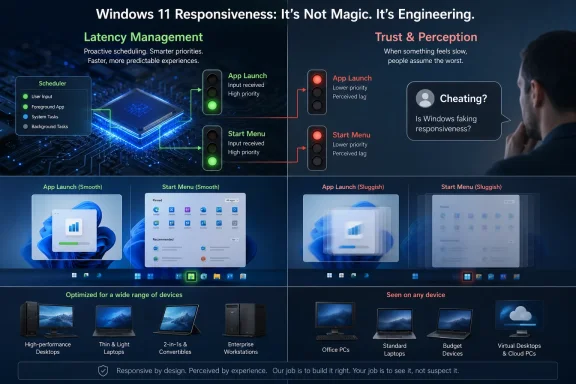
Microsoft has defended Windows 11’s Low Latency Profile after online critics accused the company of “cheating” by temporarily boosting CPU responsiveness for app launches and interface actions, with Microsoft executive Scott Hanselman arguing in May 2026 that the technique is normal operating-system behavior. The argument sounds narrow, almost comically so: whether Windows should be allowed to goose the processor for a moment so the Start menu feels less sluggish. But the flare-up lands because it touches the rawest nerve in the Windows community: the suspicion that modern Windows needs clever tricks to recover the immediacy older versions delivered by default. Microsoft is right that latency management is not cheating, yet the company should pay attention to why so many users were ready to believe the worst.
The controversy centers on a Windows power-management behavior known as Low Latency Profile, a mode Microsoft documentation has long described as active during boot and app launch time. In plain English, Windows can temporarily favor responsiveness by adjusting CPU behavior when the user is waiting for something obvious to happen. That is not a scandal; it is a basic premise of interactive computing.
Modern operating systems constantly arbitrate between speed, battery life, heat, fan noise, foreground tasks, background tasks, and hardware topology. A laptop with efficiency cores, performance cores, aggressive power limits, and multiple vendor firmware layers is not a beige-box Pentium with one scheduler decision to make. The job of the OS is to hide that complexity, not pretend it does not exist.
Hanselman’s reported response — that macOS and Linux use similar techniques and that users praise Apple for the same class of optimization — is directionally fair. Platforms increasingly use short-lived performance boosts, thread prioritization, and latency-aware scheduling to make user-facing actions feel immediate without running the whole machine at full tilt all day.
But being technically correct is not the same as being done. If Windows users interpret a responsiveness fix as a confession of bloat, Microsoft has a perception problem that cannot be solved by telling people they misunderstand schedulers.
That is why the “cheating” complaint stuck. Users were not really alleging that Microsoft had violated some imaginary benchmark rulebook. They were asking why a modern PC with many cores, fast storage, and absurd memory bandwidth should need special handling to open a menu.
Microsoft’s answer is that modern responsiveness is engineered, not accidental. That is true. The counterargument from users is that Windows 11 too often makes engineering visible at precisely the moments when it should disappear.
The Start menu has carried too many jobs: launcher, search interface, recommendation surface, Microsoft account funnel, web-search endpoint, and policy battlefield. When the UI becomes a negotiation among product goals, telemetry goals, cloud goals, and user goals, every millisecond of delay feels political. A low-latency boost then looks less like optimization and more like makeup.
A system can be objectively powerful and still feel poor if the first interaction after idle is sticky. A search box that responds 300 milliseconds late feels worse than a background export finishing 10 seconds slower. Humans are exquisitely sensitive to delay when they believe the computer has ignored them.
That is why Microsoft’s focus on interaction latency is sensible. Windows 11 runs across gaming desktops, fanless tablets, corporate laptops, handheld PCs, and Arm devices. It has to make tiny bursts of foreground work feel instant while preserving battery and thermals for everything else.
Low Latency Profile fits that world. It is less a cheat code than a traffic signal: give the foreground interaction a green light because the human is waiting. The real issue is that Windows has trained users to suspect the traffic engineer.
But the comparison also exposes Microsoft’s disadvantage. Apple controls the silicon roadmap, the device thermal envelope, the OS stack, the app-distribution model, and the design language with far more authority than Microsoft can exercise over the Windows ecosystem. Windows has to work with an unruly sprawl of OEM firmware, drivers, peripherals, overlays, enterprise agents, shell extensions, antivirus tools, and vendor utilities.
That openness is Windows’ superpower and its tax. It lets gamers build absurd rigs, lets enterprises integrate obscure hardware, and lets developers ship tools without waiting for a gatekeeper. It also means Microsoft gets blamed for sluggishness caused by a BIOS setting, a third-party driver, a corporate endpoint agent, or an OEM control panel that should have been retired three product cycles ago.
So yes, Apple uses similar ideas. The difference is that Apple’s optimizations arrive inside a curated performance story, while Microsoft’s arrive inside a platform where users have spent years disabling services, uninstalling bundled apps, and hunting for the setting that makes the machine feel like theirs again.
Still, nostalgia contains a useful accusation. Older Windows interfaces often did less work before responding. A menu was a menu. A search box searched the machine. A control panel did not feel like a web service in disguise.
Windows 11 has improved in many areas, but it still carries the burden of a modern shell that can feel overcomposed. Animations, acrylic effects, cloud hooks, recommendations, account prompts, and search federation may each be defensible in isolation. Together they create the impression of an operating system that is asking permission from too many internal stakeholders before honoring the user’s click.
That is the backdrop against which Low Latency Profile is judged. Microsoft sees a standard power-management mechanism. Some users see an operating system compensating for decisions that made basic interactions heavier than they needed to be.
In that culture, a hidden boost can sound suspicious, especially when low-latency features from GPU vendors have sometimes collided with anti-cheat systems or competitive integrity debates. The phrase carries baggage. It suggests an artificial advantage, a trick that changes the result rather than improves the experience.
But Windows is not a benchmark referee when it opens the Start menu. It is an interactive system trying to minimize the gap between intention and response. Temporarily prioritizing the task the user just invoked is not comparable to manipulating a game’s memory or bypassing competitive rules.
The better gaming analogy is not cheating; it is frame pacing. A game that produces high average FPS but stutters badly feels worse than one with slightly lower throughput and consistent responsiveness. Windows has the same problem at the shell level. Users do not care that the CPU spent most of the last minute sipping power if the next click feels late.
But enterprise Windows teams will recognize the broader pattern. Microsoft is reshaping Windows around adaptive behavior: power modes, security baselines, AI features, cloud-connected search, endpoint telemetry, and hardware-aware scheduling. The OS is making more decisions dynamically, which is good when the decisions are right and maddening when they are opaque.
Predictability matters in managed environments. If a fleet of laptops behaves differently on battery, docked, under load, during app launch, or after a firmware update, help desks inherit the ambiguity. Users report “slowness,” and admins have to determine whether the culprit is Windows, firmware, security software, a Teams update, a browser extension, or the corporate VPN.
Microsoft can blunt that risk by making performance behavior observable. Power and latency policies do not need to become consumer-facing clutter, but administrators should be able to understand what mode a device entered, why it entered it, and whether it is producing heat, battery drain, or user-visible benefit.
A quiet OS is not an OS without features. It is an OS whose features do not constantly announce themselves through prompts, delays, background churn, or unwanted surfaces. Windows 11 sometimes feels like it is trying to be calm, modern, secure, monetizable, AI-native, gaming-first, enterprise-manageable, and battery-friendly all at once.
That is a hard brief. It is also Microsoft’s chosen brief.
The company’s recent messaging around Windows quality suggests it knows responsiveness has become a reputational issue. Reducing interaction latency, modernizing core experiences, and improving shell performance are not cosmetic projects. They are necessary repairs to the emotional contract between Windows and its most invested users.
Yet Microsoft does not get to declare victory by explaining the mechanism. Windows users have endured enough regressions, nags, half-migrations from Control Panel to Settings, web-connected shell experiments, and inconsistent UI rewrites to be skeptical of any performance story that sounds like a workaround. Skepticism is not ignorance. Sometimes it is institutional memory.
The burden now is to turn the boost into a broader pattern users can feel. App launches should be faster. The Start menu should be boringly immediate. Search should respect local intent. Settings should stop feeling like a scavenger hunt. Background services should not make a premium PC feel like it is negotiating with itself.
If Microsoft does that, nobody will care whether Low Latency Profile is “cheating.” They will simply say Windows feels better.
The concrete lessons from this flare-up are not complicated, which is precisely why Microsoft should treat them as product guidance rather than social-media noise.
Source: PCMag UK Microsoft Pushes Back on Complaints of 'Cheating' With Low Latency Feature
Source: PCMag Australia Microsoft Pushes Back on Complaints of 'Cheating' With Low Latency Feature
 Microsoft Wins the Technical Argument and Still Has a Trust Problem
The controversy centers on a Windows power-management behavior known as Low Latency Profile, a mode Microsoft documentation has long described as active during boot and app launch time. In plain English, Windows can temporarily favor responsiveness by adjusting CPU behavior when the user is waiting for something obvious to happen. That is not a scandal; it is a basic premise of interactive computing.Modern operating systems constantly arbitrate between speed, battery life, heat, fan noise, foreground tasks, background tasks, and hardware topology. A laptop with efficiency cores, performance cores, aggressive power limits, and multiple vendor firmware layers is not a beige-box Pentium with one scheduler decision to make. The job of the OS is to hide that complexity, not pretend it does not exist.
Hanselman’s reported response — that macOS and Linux use similar techniques and that users praise Apple for the same class of optimization — is directionally fair. Platforms increasingly use short-lived performance boosts, thread prioritization, and latency-aware scheduling to make user-facing actions feel immediate without running the whole machine at full tilt all day.
But being technically correct is not the same as being done. If Windows users interpret a responsiveness fix as a confession of bloat, Microsoft has a perception problem that cannot be solved by telling people they misunderstand schedulers.
The Start Menu Has Become a Referendum on Windows Itself
The Start menu is not just another shell component. It is the front door of Windows, the thing users hit when muscle memory outruns patience. If it hesitates, flickers, searches the web when the user wanted a local app, or feels heavier than the machine underneath it, the whole operating system feels suspect.That is why the “cheating” complaint stuck. Users were not really alleging that Microsoft had violated some imaginary benchmark rulebook. They were asking why a modern PC with many cores, fast storage, and absurd memory bandwidth should need special handling to open a menu.
Microsoft’s answer is that modern responsiveness is engineered, not accidental. That is true. The counterargument from users is that Windows 11 too often makes engineering visible at precisely the moments when it should disappear.
The Start menu has carried too many jobs: launcher, search interface, recommendation surface, Microsoft account funnel, web-search endpoint, and policy battlefield. When the UI becomes a negotiation among product goals, telemetry goals, cloud goals, and user goals, every millisecond of delay feels political. A low-latency boost then looks less like optimization and more like makeup.
Latency Is the Metric Users Actually Feel
For years, PC performance marketing leaned on throughput: faster renders, higher frame rates, better benchmark scores, more cores, more TOPS, more bandwidth. Yet much of the daily Windows experience is governed by latency. The user clicks, types, switches, wakes, searches, and waits.A system can be objectively powerful and still feel poor if the first interaction after idle is sticky. A search box that responds 300 milliseconds late feels worse than a background export finishing 10 seconds slower. Humans are exquisitely sensitive to delay when they believe the computer has ignored them.
That is why Microsoft’s focus on interaction latency is sensible. Windows 11 runs across gaming desktops, fanless tablets, corporate laptops, handheld PCs, and Arm devices. It has to make tiny bursts of foreground work feel instant while preserving battery and thermals for everything else.
Low Latency Profile fits that world. It is less a cheat code than a traffic signal: give the foreground interaction a green light because the human is waiting. The real issue is that Windows has trained users to suspect the traffic engineer.
The Apple Comparison Is Useful, but It Cuts Both Ways
Microsoft’s “Apple does this too” defense is effective because it punctures the idea that responsive systems are somehow pure if they never boost or prioritize. Apple’s platforms are famously aggressive about controlling hardware, scheduling, animation timing, background behavior, and power states. The smoothness users praise is not magic; it is policy.But the comparison also exposes Microsoft’s disadvantage. Apple controls the silicon roadmap, the device thermal envelope, the OS stack, the app-distribution model, and the design language with far more authority than Microsoft can exercise over the Windows ecosystem. Windows has to work with an unruly sprawl of OEM firmware, drivers, peripherals, overlays, enterprise agents, shell extensions, antivirus tools, and vendor utilities.
That openness is Windows’ superpower and its tax. It lets gamers build absurd rigs, lets enterprises integrate obscure hardware, and lets developers ship tools without waiting for a gatekeeper. It also means Microsoft gets blamed for sluggishness caused by a BIOS setting, a third-party driver, a corporate endpoint agent, or an OEM control panel that should have been retired three product cycles ago.
So yes, Apple uses similar ideas. The difference is that Apple’s optimizations arrive inside a curated performance story, while Microsoft’s arrive inside a platform where users have spent years disabling services, uninstalling bundled apps, and hunting for the setting that makes the machine feel like theirs again.
Windows 11 Is Fighting the Ghosts of Windows 7 and XP
The nostalgia argument is not always fair, but it is powerful. Users remember Windows XP and Windows 7 as snappy because many interactions were simpler, local, and less visually ambitious. They also forget driver crashes, hard-disk stalls, slow boots, malware misery, and all the ways older Windows made users pay in reliability and security.Still, nostalgia contains a useful accusation. Older Windows interfaces often did less work before responding. A menu was a menu. A search box searched the machine. A control panel did not feel like a web service in disguise.
Windows 11 has improved in many areas, but it still carries the burden of a modern shell that can feel overcomposed. Animations, acrylic effects, cloud hooks, recommendations, account prompts, and search federation may each be defensible in isolation. Together they create the impression of an operating system that is asking permission from too many internal stakeholders before honoring the user’s click.
That is the backdrop against which Low Latency Profile is judged. Microsoft sees a standard power-management mechanism. Some users see an operating system compensating for decisions that made basic interactions heavier than they needed to be.
The Gaming Word “Cheating” Did Microsoft No Favors
Calling the feature “cheating” also reflects how Windows performance debates increasingly borrow language from PC gaming. Gamers understand latency obsessively. They tune frame pacing, input delay, driver queues, shader compilation, monitor refresh rates, and mouse polling because small delays can change the feel of a game.In that culture, a hidden boost can sound suspicious, especially when low-latency features from GPU vendors have sometimes collided with anti-cheat systems or competitive integrity debates. The phrase carries baggage. It suggests an artificial advantage, a trick that changes the result rather than improves the experience.
But Windows is not a benchmark referee when it opens the Start menu. It is an interactive system trying to minimize the gap between intention and response. Temporarily prioritizing the task the user just invoked is not comparable to manipulating a game’s memory or bypassing competitive rules.
The better gaming analogy is not cheating; it is frame pacing. A game that produces high average FPS but stutters badly feels worse than one with slightly lower throughput and consistent responsiveness. Windows has the same problem at the shell level. Users do not care that the CPU spent most of the last minute sipping power if the next click feels late.
Enterprises Will Care Less About the Drama and More About Predictability
For IT departments, the Low Latency Profile debate is unlikely to trigger emergency change boards. Admins generally care about measurable stability, battery impact, device thermals, policy control, and whether a feature breaks specialized workloads. A short foreground responsiveness boost is not inherently alarming.But enterprise Windows teams will recognize the broader pattern. Microsoft is reshaping Windows around adaptive behavior: power modes, security baselines, AI features, cloud-connected search, endpoint telemetry, and hardware-aware scheduling. The OS is making more decisions dynamically, which is good when the decisions are right and maddening when they are opaque.
Predictability matters in managed environments. If a fleet of laptops behaves differently on battery, docked, under load, during app launch, or after a firmware update, help desks inherit the ambiguity. Users report “slowness,” and admins have to determine whether the culprit is Windows, firmware, security software, a Teams update, a browser extension, or the corporate VPN.
Microsoft can blunt that risk by making performance behavior observable. Power and latency policies do not need to become consumer-facing clutter, but administrators should be able to understand what mode a device entered, why it entered it, and whether it is producing heat, battery drain, or user-visible benefit.
The Real Test Is Whether Windows Gets Quieter
The strongest version of Microsoft’s argument is that users should not have to know Low Latency Profile exists. The operating system should quietly do the right thing, make the interface feel faster, and leave enthusiasts to discover the mechanism later. Instead, the feature became a symbol because Windows performance has become too discussable.A quiet OS is not an OS without features. It is an OS whose features do not constantly announce themselves through prompts, delays, background churn, or unwanted surfaces. Windows 11 sometimes feels like it is trying to be calm, modern, secure, monetizable, AI-native, gaming-first, enterprise-manageable, and battery-friendly all at once.
That is a hard brief. It is also Microsoft’s chosen brief.
The company’s recent messaging around Windows quality suggests it knows responsiveness has become a reputational issue. Reducing interaction latency, modernizing core experiences, and improving shell performance are not cosmetic projects. They are necessary repairs to the emotional contract between Windows and its most invested users.
The Feature Is Sensible; the Burden of Proof Is Microsoft’s
Low Latency Profile should not be treated as evidence that Windows is broken. If anything, it is evidence that Windows is finally taking perceived performance seriously enough to optimize for the moments users notice. Operating systems that ignore latency in the name of purity are not virtuous; they are annoying.Yet Microsoft does not get to declare victory by explaining the mechanism. Windows users have endured enough regressions, nags, half-migrations from Control Panel to Settings, web-connected shell experiments, and inconsistent UI rewrites to be skeptical of any performance story that sounds like a workaround. Skepticism is not ignorance. Sometimes it is institutional memory.
The burden now is to turn the boost into a broader pattern users can feel. App launches should be faster. The Start menu should be boringly immediate. Search should respect local intent. Settings should stop feeling like a scavenger hunt. Background services should not make a premium PC feel like it is negotiating with itself.
If Microsoft does that, nobody will care whether Low Latency Profile is “cheating.” They will simply say Windows feels better.
The Snappiness Fight Is Really About Who Windows Serves
This argument has a practical edge because responsiveness is not a luxury feature. It affects accessibility, productivity, gaming, battery life, and trust. A sluggish interface taxes everyone, but it especially punishes users on lower-end hardware and workers who repeat the same actions hundreds of times a day.The concrete lessons from this flare-up are not complicated, which is precisely why Microsoft should treat them as product guidance rather than social-media noise.
- Windows 11’s Low Latency Profile is a normal latency-management technique, not evidence of benchmark manipulation or gaming-style cheating.
- Microsoft’s defense is technically credible, but users are reacting to years of frustration with shell weight, cloud hooks, and inconsistent responsiveness.
- The Start menu matters disproportionately because it is the most visible test of whether Windows respects the user’s intent.
- Enterprise admins will care less about the online argument than about observability, predictability, and whether adaptive performance behavior creates support ambiguity.
- The best outcome for Microsoft is not winning the debate, but making Windows responsive enough that the debate stops being interesting.
Source: PCMag UK Microsoft Pushes Back on Complaints of 'Cheating' With Low Latency Feature
Source: PCMag Australia Microsoft Pushes Back on Complaints of 'Cheating' With Low Latency Feature
