

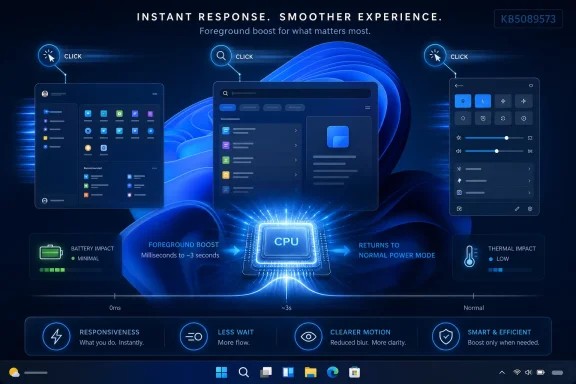
Windows 11’s Low Latency Profile is an under-the-hood performance feature now tied to the May 26, 2026 KB5089573 preview update for Windows 11 versions 24H2 and 25H2, designed to speed app launches and shell interactions by briefly boosting CPU frequency during foreground actions. The short version is not that Microsoft invented a magic “fast mode,” but that Windows is becoming more aggressive about spending a little power at the moment users are most likely to notice delay. That is both more mundane and more important than the online argument suggests. The controversy says as much about trust in Windows 11 as it does about CPU clocks.
The confusion around Low Latency Profile starts with the word performance. For decades, PC users have been trained to think of performance as throughput: higher frame rates, faster renders, shorter compile times, better benchmark scores, more work completed per unit of time. Low Latency Profile is aimed at a different problem, which is the half-second of dead air between a click and a response.
That distinction matters because Windows 11’s reputation problem has rarely been that a well-equipped desktop cannot run a heavy workload. The complaint is that the operating system can feel oddly hesitant while doing ordinary things: opening Start, invoking Search, launching File Explorer, displaying a context menu, or switching attention between apps. These are small actions, but they define whether a system feels immediate or slightly upholstered.
Microsoft’s public wording for KB5089573 is deliberately broad. The company says the update accelerates app launch and core shell experiences such as Start menu, Search, and Action Center. Reporting around the feature connects that line item to Low Latency Profile, a mechanism that reportedly pushes the processor toward maximum frequency for a very short burst when Windows detects certain interactive actions.
That is why the feature is easy to misunderstand. It is not a new app, not a visible power plan, not a gaming latency switch, and not a traditional “high performance” mode. It is closer to a scheduler-and-power-management hint: when the user does something that should feel instant, Windows temporarily stops being coy about clock speed.
But burst boosting is not exotic. Modern operating systems and processors already live in a world of dynamic voltage and frequency scaling, preferred cores, heterogeneous scheduling, idle-state tradeoffs, boost windows, thermal budgets, and workload classification. Phones do this constantly. Laptops do it constantly. Linux, macOS, Android, iOS, and Windows all participate in versions of the same bargain: conserve energy when nothing urgent is happening, then spend energy quickly when the user is waiting.
What appears to be new here is not the concept of boosting, but the packaging of a more deliberate responsiveness policy inside Windows 11’s shell experience. If a processor can complete a tiny foreground task faster by waking hard for a second, the user may perceive a smoother system even if the total amount of work has barely changed. That kind of improvement will not impress someone staring at Cinebench, but it may matter every time a laptop user taps Start and does not have time to wonder whether the click registered.
The uncomfortable part for Microsoft is that users do not evaluate these features in a vacuum. They evaluate them against years of Start menu rewrites, Explorer regressions, search weirdness, Settings migrations, and taskbar compromises. Low Latency Profile may be a legitimate operating-system optimization, but it arrives in a climate where many Windows enthusiasts assume the company is fixing symptoms because it lacks the discipline to fix causes.
A three-second boost is not the same thing as locking a laptop into a high-performance power plan. It is not supposed to keep fans spinning through an afternoon of email. It is supposed to compress the time between cause and effect: click, launch, show, respond, return to normal. If the work is truly brief, the CPU may spend more power for a moment but less time keeping the user waiting.
This is the same logic behind many “race to idle” designs. A system can sometimes be more efficient, or at least more tolerable, by completing urgent work quickly and then returning to a lower-power state. The danger is that the real world is messy. If Windows misclassifies too much activity as latency-sensitive, or if apps learn to trigger the behavior too often, the feature could become another invisible source of battery drain on thin-and-light machines.
For now, the important boundary is that Low Latency Profile appears aimed at foreground interactivity rather than sustained compute. It is about the Start menu, Search, Action Center, app launches, flyouts, and similar actions. A long export, game session, video encode, or background indexing run is a different category of workload.
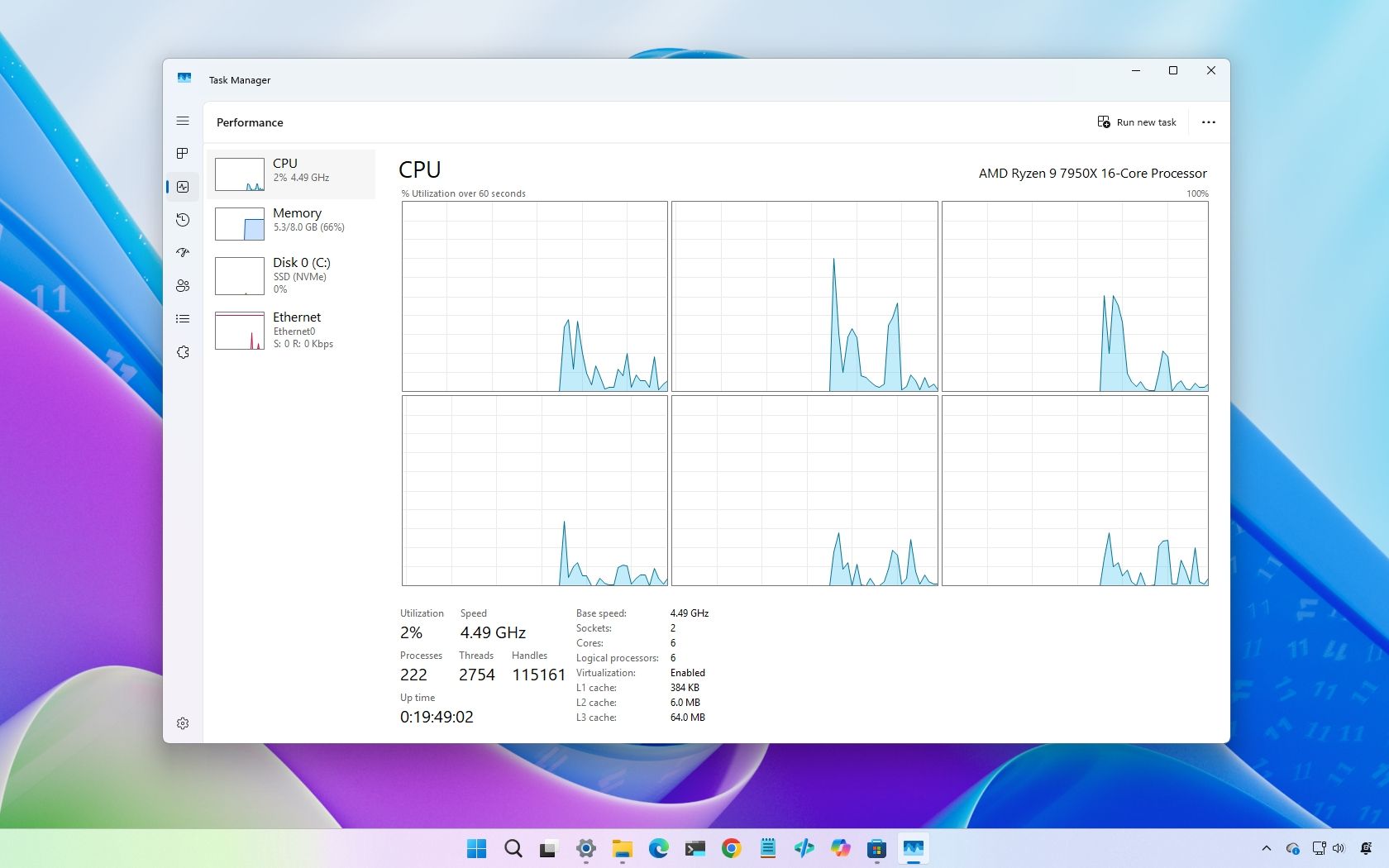
Task Manager’s Performance tab may show the processor jumping toward boost clocks when the user opens Start, launches File Explorer, or triggers Search. That can be a hint that the new behavior is active. It is not proof, because processors have boosted for short bursts long before this feature existed, and any number of background services can cause similar movement.
This is where casual testing can mislead. Open Start five times, watch the graph twitch, and it is tempting to declare victory or fraud. But Windows already uses prefetching, caching, memory compression, app startup optimizations, and shell process reuse. The first launch of an app is not the same as the third. A clean boot is not the same as a warmed-up session. A laptop on battery is not the same as one on AC power.
The better way to think about Low Latency Profile is probabilistic. It may make a class of short interactions faster across many machines and many sessions. It will not make every click measurably faster on every device, and it will be difficult for end users to isolate from the rest of Windows’ performance machinery without controlled testing.
Microsoft appears to be treating Low Latency Profile as a background system behavior rather than a user preference. That is consistent with the company’s broader direction in Windows 11: fewer exposed internals, more adaptive defaults, more cloud-informed rollout logic, and more silent tuning. In consumer terms, that makes sense. Most people do not want to decide whether the Start menu deserves a one-second CPU burst.
In enterprise terms, the answer is less satisfying. Managed environments often care less about a snappier Start menu than about predictability, auditability, and repeatability. If a feature changes power behavior, thermal behavior, app launch timing, or user-session responsiveness, administrators will reasonably ask how to test it, stage it, disable it, or explain it to a help desk.
Microsoft may eventually document Group Policy, MDM, registry, or power policy controls if the feature becomes significant enough. But at launch, the message is clear: this is not being presented as a mode users manage. It is being presented as part of how Windows behaves.
This does not mean the feature is only for weak PCs. Even fast machines can suffer from poor responsiveness when background tasks, power states, graphics delays, or shell overhead converge at the wrong moment. But the perceived gain is always relative to the irritation it removes. If the irritation was barely visible, the fix will be barely visible too.
There is also a hardware nuance that Microsoft will need to handle well. Modern x86 laptops increasingly rely on hybrid CPU designs with performance cores, efficiency cores, and firmware-specific power behavior. A short boost on one machine may look very different from a short boost on another, depending on silicon generation, cooling, OEM tuning, power mode, battery charge, and whether the device is plugged in.
That variability is why sweeping claims about “up to 40 percent faster app launches” and “up to 70 percent faster shell interactions” should be read carefully. They may be real in the tested cases and still not describe the average user’s daily experience. “Up to” numbers are ceilings, not promises.
The more useful question is whether the cost is large enough to matter. If the burst is genuinely short and tied to a narrow set of interactions, the effect may be hard to notice across a workday. A few milliseconds or seconds of higher frequency while opening menus is not the same as a browser tab running hot for hours or a background sync client misbehaving on battery.
Still, Microsoft has work to do here. Windows power behavior is already opaque to most users, and battery drain investigations are among the most frustrating tasks on a PC. When an update adds invisible boosting, even for defensible reasons, it becomes one more variable in a system that users already struggle to explain.
The best outcome would be for Microsoft to provide better observability without turning the feature into another checkbox maze. A simple performance diagnostics event, power report detail, or administrative note would go a long way. Users do not necessarily need a consumer-facing toggle, but IT pros need evidence.
Low Latency Profile, as currently described, is not a gaming performance feature. It is aimed at shell and foreground interaction responsiveness. If a game is running full-screen and the user is not invoking Windows shell surfaces, the trigger conditions should be mostly irrelevant. It should not be a hidden FPS booster, and it should not be a hidden FPS tax in normal play.
The caveat is that PC gaming rarely happens in a pure environment. Players alt-tab, open overlays, summon Start, adjust audio, launch chat apps, and interact with notification surfaces. In those edge moments, a short boost might occur. Whether that helps, hurts, or disappears into the noise will depend on the game, the CPU, the scheduler, the graphics driver, and the rest of the system.
For most gamers, the practical advice is boring: do not treat Low Latency Profile as a magic competitive setting, and do not blame it for stutter without evidence. Frame pacing problems are usually more complicated than one new Windows shell optimization.
That rollout model is useful for Microsoft because it reduces blast radius. It is maddening for administrators because two machines with the same KB number may not behave the same way on the same day. Gradual enablement can be good engineering practice and bad operational communication at the same time.
Low Latency Profile sits directly in that tension. If it improves responsiveness, Microsoft will be tempted to fold it quietly into the platform and move on. But if users cannot tell whether they have it, cannot measure whether it is active, and cannot disable it for troubleshooting, then every unexplained frequency spike becomes a rumor factory.
That is especially true because “performance” is subjective. One user’s snappy Start menu is another user’s fan ramp. One laptop’s successful race to idle is another laptop’s warm palm rest. Microsoft does not need to expose every internal knob, but it does need to respect the audience that keeps Windows fleets running.
The real work is less glamorous. Explorer reliability, Start menu responsiveness, Settings performance, update quality, driver compatibility, touch latency, resume behavior, app framework overhead, and background service discipline all matter more than a single profile. Windows 11’s rough edges are not caused by one missing boost policy, and they will not be solved by one.
But dismissing Low Latency Profile as merely lazy also misses the point. Perceived responsiveness is a legitimate engineering target. Users do not live inside architectural diagrams; they live inside clicks, transitions, launches, and pauses. A system that responds immediately feels better, even if the underlying cleanup continues.
The right standard is not whether Low Latency Profile is philosophically pure. The right standard is whether Microsoft pairs it with structural improvements and honest documentation. A burst boost can be part of a serious performance program. It cannot be the performance program.
 Microsoft Is Selling Responsiveness, Not Raw Speed
The confusion around Low Latency Profile starts with the word performance. For decades, PC users have been trained to think of performance as throughput: higher frame rates, faster renders, shorter compile times, better benchmark scores, more work completed per unit of time. Low Latency Profile is aimed at a different problem, which is the half-second of dead air between a click and a response.That distinction matters because Windows 11’s reputation problem has rarely been that a well-equipped desktop cannot run a heavy workload. The complaint is that the operating system can feel oddly hesitant while doing ordinary things: opening Start, invoking Search, launching File Explorer, displaying a context menu, or switching attention between apps. These are small actions, but they define whether a system feels immediate or slightly upholstered.
Microsoft’s public wording for KB5089573 is deliberately broad. The company says the update accelerates app launch and core shell experiences such as Start menu, Search, and Action Center. Reporting around the feature connects that line item to Low Latency Profile, a mechanism that reportedly pushes the processor toward maximum frequency for a very short burst when Windows detects certain interactive actions.
That is why the feature is easy to misunderstand. It is not a new app, not a visible power plan, not a gaming latency switch, and not a traditional “high performance” mode. It is closer to a scheduler-and-power-management hint: when the user does something that should feel instant, Windows temporarily stops being coy about clock speed.
The Trick Is Old; The Admission Is New
The backlash to Low Latency Profile has leaned heavily on the idea that Microsoft is papering over Windows 11 bloat by throwing CPU frequency at the problem. There is some emotional truth in that complaint, even if the technical version is too simplistic. Users have spent years watching Windows accumulate layers of shell code, web-backed surfaces, background services, account prompts, widgets, telemetry, sync clients, and AI entry points. When Microsoft says a faster Start menu may involve briefly maxing out the CPU, many people hear an admission that the Start menu should not have needed rescuing in the first place.But burst boosting is not exotic. Modern operating systems and processors already live in a world of dynamic voltage and frequency scaling, preferred cores, heterogeneous scheduling, idle-state tradeoffs, boost windows, thermal budgets, and workload classification. Phones do this constantly. Laptops do it constantly. Linux, macOS, Android, iOS, and Windows all participate in versions of the same bargain: conserve energy when nothing urgent is happening, then spend energy quickly when the user is waiting.
What appears to be new here is not the concept of boosting, but the packaging of a more deliberate responsiveness policy inside Windows 11’s shell experience. If a processor can complete a tiny foreground task faster by waking hard for a second, the user may perceive a smoother system even if the total amount of work has barely changed. That kind of improvement will not impress someone staring at Cinebench, but it may matter every time a laptop user taps Start and does not have time to wonder whether the click registered.
The uncomfortable part for Microsoft is that users do not evaluate these features in a vacuum. They evaluate them against years of Start menu rewrites, Explorer regressions, search weirdness, Settings migrations, and taskbar compromises. Low Latency Profile may be a legitimate operating-system optimization, but it arrives in a climate where many Windows enthusiasts assume the company is fixing symptoms because it lacks the discipline to fix causes.
The One-to-Three-Second Burst Explains Most of the Feature
The clearest explanation of Low Latency Profile is also the least dramatic one: Windows detects a short, user-facing action and briefly allows the CPU to run at or near peak frequency so the task finishes sooner. Reports describe the boost window as lasting from milliseconds up to roughly three seconds. That duration is the key to understanding why Microsoft can plausibly argue the battery and thermal impact should be limited.A three-second boost is not the same thing as locking a laptop into a high-performance power plan. It is not supposed to keep fans spinning through an afternoon of email. It is supposed to compress the time between cause and effect: click, launch, show, respond, return to normal. If the work is truly brief, the CPU may spend more power for a moment but less time keeping the user waiting.
This is the same logic behind many “race to idle” designs. A system can sometimes be more efficient, or at least more tolerable, by completing urgent work quickly and then returning to a lower-power state. The danger is that the real world is messy. If Windows misclassifies too much activity as latency-sensitive, or if apps learn to trigger the behavior too often, the feature could become another invisible source of battery drain on thin-and-light machines.
For now, the important boundary is that Low Latency Profile appears aimed at foreground interactivity rather than sustained compute. It is about the Start menu, Search, Action Center, app launches, flyouts, and similar actions. A long export, game session, video encode, or background indexing run is a different category of workload.
Task Manager Will Show Clues, Not Proof
One reason the feature is generating so many forum arguments is that users want a way to see it, measure it, and decide whether it is doing anything. Microsoft has not provided a dedicated Low Latency Profile indicator in Settings, Task Manager, Event Viewer, or Control Panel. That means the most visible symptom is also the least conclusive one: a brief CPU frequency spike while opening shell surfaces or apps.Task Manager’s Performance tab may show the processor jumping toward boost clocks when the user opens Start, launches File Explorer, or triggers Search. That can be a hint that the new behavior is active. It is not proof, because processors have boosted for short bursts long before this feature existed, and any number of background services can cause similar movement.
This is where casual testing can mislead. Open Start five times, watch the graph twitch, and it is tempting to declare victory or fraud. But Windows already uses prefetching, caching, memory compression, app startup optimizations, and shell process reuse. The first launch of an app is not the same as the third. A clean boot is not the same as a warmed-up session. A laptop on battery is not the same as one on AC power.
The better way to think about Low Latency Profile is probabilistic. It may make a class of short interactions faster across many machines and many sessions. It will not make every click measurably faster on every device, and it will be difficult for end users to isolate from the rest of Windows’ performance machinery without controlled testing.
The Missing Toggle Is a Philosophy, Not an Oversight
The absence of a user-facing switch has annoyed the exact audience most likely to understand what Low Latency Profile is. Power users want knobs. Administrators want policy. Enthusiasts want before-and-after tests. Gamers want guarantees. Battery hawks want a way to disable anything that smells like automatic boosting.Microsoft appears to be treating Low Latency Profile as a background system behavior rather than a user preference. That is consistent with the company’s broader direction in Windows 11: fewer exposed internals, more adaptive defaults, more cloud-informed rollout logic, and more silent tuning. In consumer terms, that makes sense. Most people do not want to decide whether the Start menu deserves a one-second CPU burst.
In enterprise terms, the answer is less satisfying. Managed environments often care less about a snappier Start menu than about predictability, auditability, and repeatability. If a feature changes power behavior, thermal behavior, app launch timing, or user-session responsiveness, administrators will reasonably ask how to test it, stage it, disable it, or explain it to a help desk.
Microsoft may eventually document Group Policy, MDM, registry, or power policy controls if the feature becomes significant enough. But at launch, the message is clear: this is not being presented as a mode users manage. It is being presented as part of how Windows behaves.
Older PCs May Feel the Benefit First
Low Latency Profile is likely to be most noticeable on systems with just enough hardware headroom to be annoying. That means older laptops, low-power processors, machines with modest memory, and systems where the shell already feels slightly late. On a high-end desktop with a modern CPU, fast NVMe storage, and plenty of RAM, Start and Search may already appear quickly enough that shaving milliseconds becomes hard to feel.This does not mean the feature is only for weak PCs. Even fast machines can suffer from poor responsiveness when background tasks, power states, graphics delays, or shell overhead converge at the wrong moment. But the perceived gain is always relative to the irritation it removes. If the irritation was barely visible, the fix will be barely visible too.
There is also a hardware nuance that Microsoft will need to handle well. Modern x86 laptops increasingly rely on hybrid CPU designs with performance cores, efficiency cores, and firmware-specific power behavior. A short boost on one machine may look very different from a short boost on another, depending on silicon generation, cooling, OEM tuning, power mode, battery charge, and whether the device is plugged in.
That variability is why sweeping claims about “up to 40 percent faster app launches” and “up to 70 percent faster shell interactions” should be read carefully. They may be real in the tested cases and still not describe the average user’s daily experience. “Up to” numbers are ceilings, not promises.
Battery Anxiety Is Rational, Even If Panic Is Not
Laptop users are right to ask whether Low Latency Profile costs battery life. Any feature that raises CPU frequency more aggressively can consume extra power in the moment. Physics does not care whether the intent is good.The more useful question is whether the cost is large enough to matter. If the burst is genuinely short and tied to a narrow set of interactions, the effect may be hard to notice across a workday. A few milliseconds or seconds of higher frequency while opening menus is not the same as a browser tab running hot for hours or a background sync client misbehaving on battery.
Still, Microsoft has work to do here. Windows power behavior is already opaque to most users, and battery drain investigations are among the most frustrating tasks on a PC. When an update adds invisible boosting, even for defensible reasons, it becomes one more variable in a system that users already struggle to explain.
The best outcome would be for Microsoft to provide better observability without turning the feature into another checkbox maze. A simple performance diagnostics event, power report detail, or administrative note would go a long way. Users do not necessarily need a consumer-facing toggle, but IT pros need evidence.
Gamers Are Probably Looking in the Wrong Place
The gaming concern is understandable but probably overstated. Competitive players are trained to be suspicious of anything that touches scheduling, CPU frequency, latency, overlays, background tasks, or the shell. Windows has earned some of that suspicion through years of game-bar quirks, driver interactions, hybrid-core scheduling drama, and update timing.Low Latency Profile, as currently described, is not a gaming performance feature. It is aimed at shell and foreground interaction responsiveness. If a game is running full-screen and the user is not invoking Windows shell surfaces, the trigger conditions should be mostly irrelevant. It should not be a hidden FPS booster, and it should not be a hidden FPS tax in normal play.
The caveat is that PC gaming rarely happens in a pure environment. Players alt-tab, open overlays, summon Start, adjust audio, launch chat apps, and interact with notification surfaces. In those edge moments, a short boost might occur. Whether that helps, hurts, or disappears into the noise will depend on the game, the CPU, the scheduler, the graphics driver, and the rest of the system.
For most gamers, the practical advice is boring: do not treat Low Latency Profile as a magic competitive setting, and do not blame it for stutter without evidence. Frame pacing problems are usually more complicated than one new Windows shell optimization.
The Real Risk Is Not the CPU Spike, But the Black Box
The strongest criticism of Low Latency Profile is not that it boosts the CPU. The strongest criticism is that Microsoft is asking users to trust another invisible subsystem in an operating system that already contains too many invisible subsystems. Windows 11 is full of features that appear gradually, behave differently by region or account type, and change across cumulative updates.That rollout model is useful for Microsoft because it reduces blast radius. It is maddening for administrators because two machines with the same KB number may not behave the same way on the same day. Gradual enablement can be good engineering practice and bad operational communication at the same time.
Low Latency Profile sits directly in that tension. If it improves responsiveness, Microsoft will be tempted to fold it quietly into the platform and move on. But if users cannot tell whether they have it, cannot measure whether it is active, and cannot disable it for troubleshooting, then every unexplained frequency spike becomes a rumor factory.
That is especially true because “performance” is subjective. One user’s snappy Start menu is another user’s fan ramp. One laptop’s successful race to idle is another laptop’s warm palm rest. Microsoft does not need to expose every internal knob, but it does need to respect the audience that keeps Windows fleets running.
K2 Has to Be More Than a Turbo Button
Low Latency Profile is being discussed as part of Windows K2, Microsoft’s broader effort to improve Windows 11 performance, reliability, and responsiveness. That context matters because a short CPU boost cannot carry the weight of the whole operating system’s reputation. If K2 becomes synonymous with “make the CPU run faster when the shell feels slow,” Microsoft will lose the argument even if the feature works.The real work is less glamorous. Explorer reliability, Start menu responsiveness, Settings performance, update quality, driver compatibility, touch latency, resume behavior, app framework overhead, and background service discipline all matter more than a single profile. Windows 11’s rough edges are not caused by one missing boost policy, and they will not be solved by one.
But dismissing Low Latency Profile as merely lazy also misses the point. Perceived responsiveness is a legitimate engineering target. Users do not live inside architectural diagrams; they live inside clicks, transitions, launches, and pauses. A system that responds immediately feels better, even if the underlying cleanup continues.
The right standard is not whether Low Latency Profile is philosophically pure. The right standard is whether Microsoft pairs it with structural improvements and honest documentation. A burst boost can be part of a serious performance program. It cannot be the performance program.
The Update That Makes Windows Feel Faster Also Tests Microsoft’s Trust Deficit
For users and administrators trying to translate the noise into action, the picture is clearer than the debate makes it sound. Low Latency Profile is a small but meaningful change in how Windows spends CPU power during moments of interaction, and its value will depend heavily on hardware, workload, and Microsoft’s rollout discipline.- Low Latency Profile is not a visible mode or Settings toggle; it is an automatic background optimization tied to short foreground interactions.
- The feature reportedly boosts CPU frequency for very brief windows, often described as milliseconds to roughly three seconds, to reduce perceived delay.
- Microsoft’s KB5089573 preview update for Windows 11 24H2 and 25H2 includes the public “general performance” change associated with faster app launches and shell surfaces.
- The biggest improvements are likely to be felt on machines where Start, Search, File Explorer, or app launches already feel sluggish.
- Battery and thermal impact should be limited if the trigger logic remains narrow, but Microsoft still owes administrators better visibility and control.
- The feature should not be treated as a gaming latency setting, because its apparent target is the Windows shell rather than sustained full-screen workloads.
References
- Primary source: Windows Central
Published: 2026-05-28T18:37:13.183692
People are unsure what Windows 11’s Low Latency Profile does, so here is the clearest explanation yet
Windows 11 Low Latency Profile explainer on how it boosts responsiveness, affects battery life, and what users can expect from this new feature. www.windowscentral.com
- Related coverage: games.gg

Windows 11 Low Latency Profile: Up to 70% Faster Load Times
Microsoft's rumored Windows 11 Low Latency Profile promises up to 70% faster interface loads and 40% quicker app launches by briefly maxing out your CPU.games.gg
- Related coverage: techradar.com
- Related coverage: winbuzzer.com

Windows 11 Tests Low Latency Profile to Speed Up App Launches and Context Menu Actions
Microsoft is testing a Low Latency Profile in Windows 11 that briefly maxes the CPU on key actions, with potential 40% faster app launches and snappier menus. winbuzzer.com
- Related coverage: techgear-guide.com
Windows 11に「Low Latency Profile」——アプリ起動が最大40%、スタートメニューが最大70%高速化か
MicrosoftがWindows 11向けに開発中の「Low Latency Profile」は、CPUクロックを1〜3秒間最大化することでEdge・Outlookの起動を最大40%、スタートメニュー等のUIを最大70%高速化する可能性があると報じられています。 techgear-guide.com
- Related coverage: techspot.com

- Related coverage: hardware.com.br

“Low Latency Profile": Windows 11 testa aceleração automática para abrir aplicativos mais rápido
A Microsoft testa o Perfil de Baixa Latência no Windows 11. O sistema força o processador ao máximo por 3 segundos para abrir menus e apps até 70% mais rápido. www.hardware.com.br
- Official source: blogs.windows.com

Releasing Windows 11 Builds 26100.7918 and 26200.7918 to the Release Preview Channel
[UPDATE 2/19] We are releasing Builds 26100.7921 and 26200.7921 (KB blogs.windows.com
- Related coverage: digitbin.com

Windows 11 Low Latency Profile: Faster App Launches in June 2026
Windows 11 Low Latency Profile boosts CPU to max frequency for 1 to 3 seconds when you launch apps or open the Start menu. It rolls out in June 2026. www.digitbin.com
- Related coverage: pureinfotech.com
Windows 11 is becoming faster and more responsive – and this K2 update shows how
KB5089573 – Windows 11 June 2026 update introduces K2 improvements, including Low Latency Profile, Shared Audio, AI monitoring, and better system responsiveness. pureinfotech.com
- Related coverage: computerbase.de

App-Starts bis zu 40 Prozent schneller: Integrierter CPU-Boost soll Windows 11 beschleunigen
Es ist ein Performance-Boost für Windows 11. Eine 1 bis 3 Sekunden hochgetaktete CPU soll Apps und Programme schneller starten lassen.www.computerbase.de
- Related coverage: tomshardware.com
Microsoft staunchly defends its new 'Low Latency Profile' for Windows 11 after community backlash — says every other OS already boosts CPU speeds for quicker load times
The quest to fix Windows 11 is a bumpy one.www.tomshardware.com
- Related coverage: pcgamer.com
'Let Windows cook': Microsoft defends new Low Latency mode and asks you 'see it yourself'
The new mode is reportedly snappier.www.pcgamer.com
- Related coverage: cincodias.elpais.com
- Related coverage: cyber.gov.au
- Official source: techcommunity.microsoft.com
- Official source: learn.microsoft.com

Windows 11, version 24H2 known issues and notifications
View announcements and review known issues and fixes for Windows 11, version 24H2learn.microsoft.com - Official source: support.microsoft.com
May 26, 2026—KB5089573 (OS Builds 26200.8524 and 26100.8524) Preview - Microsoft Support
 support.microsoft.com
- Related coverage: wccftech.com

Windows 11's New Low Latency Profile Pushes Your CPU Into Short Overclocking Bursts To Kill Start Menu Stutter
Microsoft's optional update KB5089573 introduces the Low Latency Profile, boosting CPU performance for faster app launches in Windows 11. wccftech.com
- Related coverage: windowsforum.com

KB5089573 Preview for Windows 11 Boosts Start, Search, and App Launch Latency
Microsoft’s May 26, 2026 preview update KB5089573 for Windows 11 versions 24H2 and 25H2 introduces a general performance improvement that accelerates app launches and core shell surfaces including Start, Search, and Action Center, with reports tying it to a short-burst CPU “Low Latency Profile.”... windowsforum.com
- Related coverage: bleepingcomputer.com
Windows 11 KB5089573 update released with performance improvements
Microsoft has released the KB5089573 preview cumulative update for Windows 11 versions 25H2 and 24H2, which comes with 30 changes, including performance and reliability improvements.www.bleepingcomputer.com
