

Microsoft is testing a bundle of Windows 11 Insider features in May 2026 that restores movable and smaller taskbar options, softens Windows Update behavior, cleans up widgets, recasts Copilot integrations, and exposes experimental feature flags to ordinary testers. The larger story is not that Windows 11 is suddenly becoming Windows 10 again. It is that Microsoft appears to be conceding, feature by feature, that the operating system’s most controversial simplifications were not acts of clarity but accumulated friction. The future of Windows 11, at least in the Insider channels, looks less like a grand redesign than a long-delayed apology with settings toggles.
The taskbar has always been more than a strip of icons. In Windows, it is muscle memory, spatial orientation, window management, and user identity compressed into a few dozen pixels. That is why Windows 11’s original taskbar retreat landed so badly: Microsoft did not merely modernize it; it removed options that many power users had treated as baseline operating-system behavior for years.
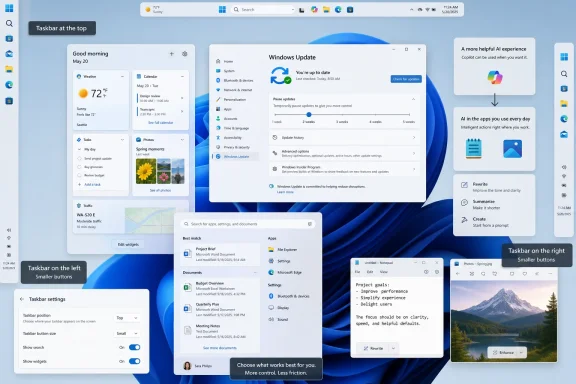
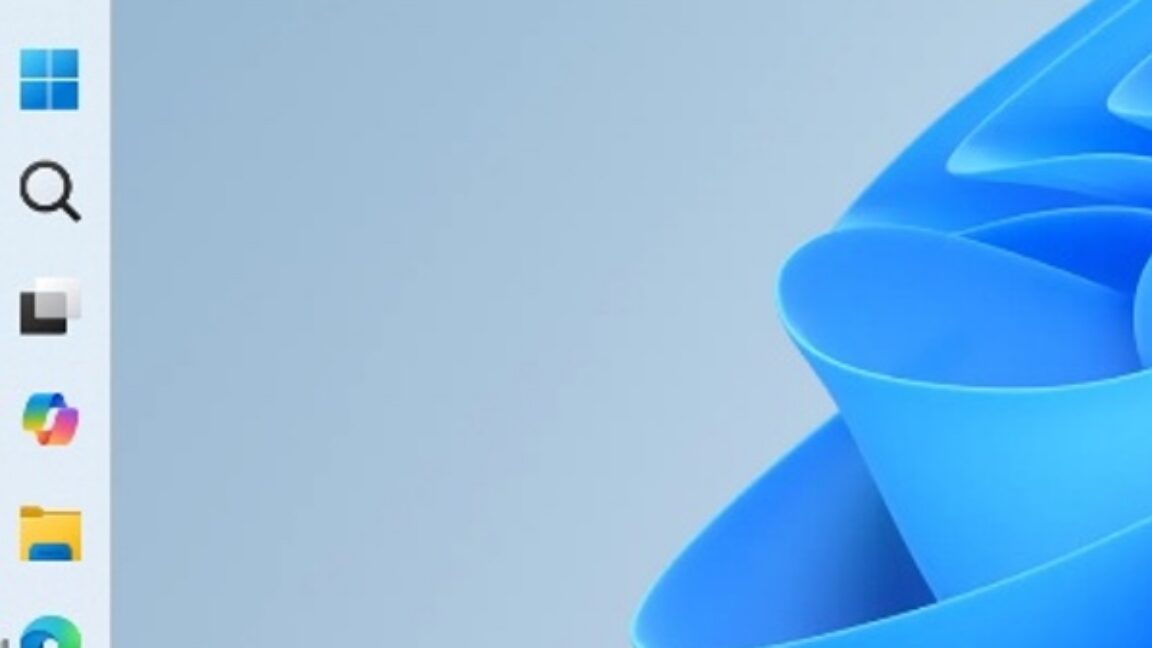
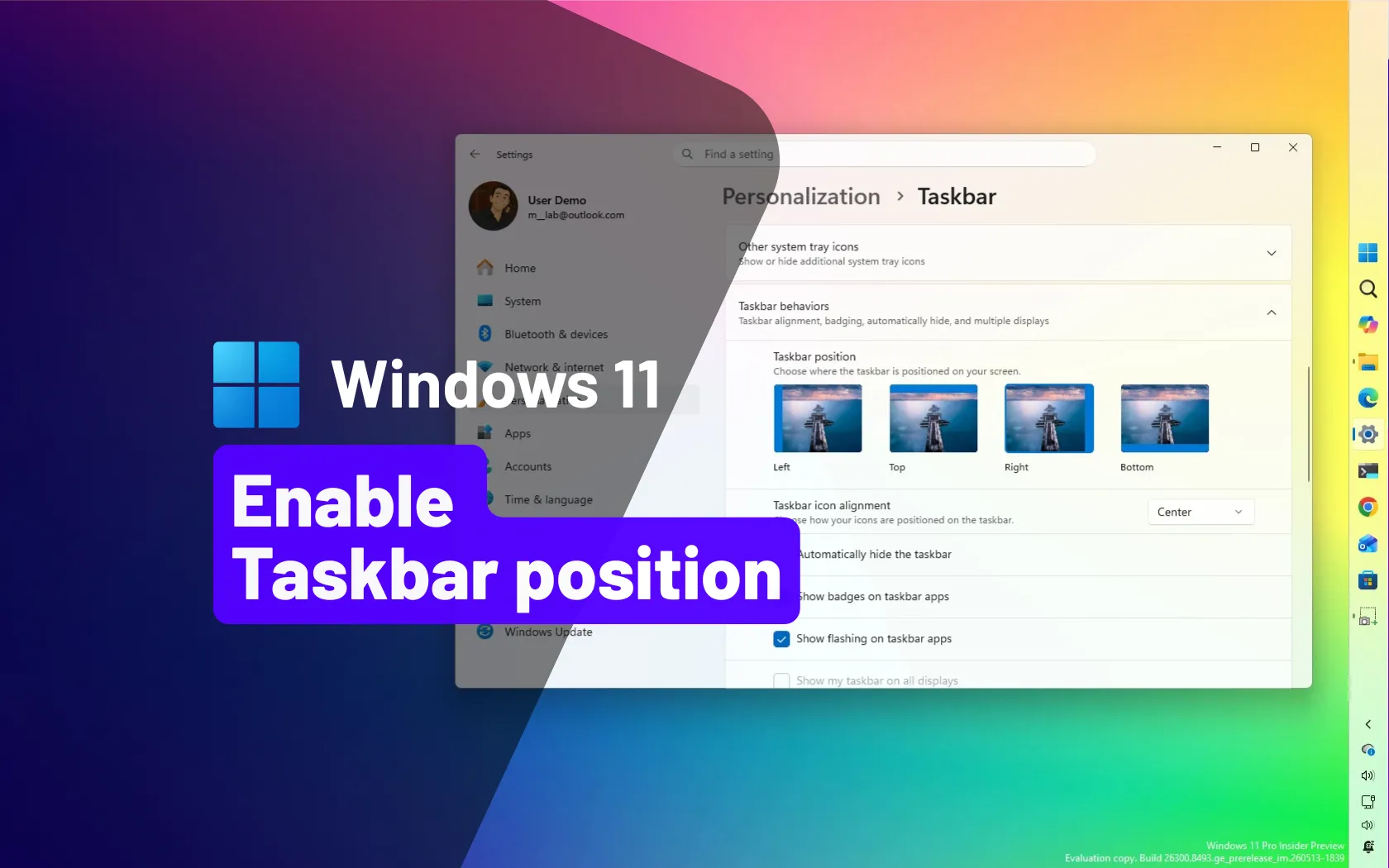
The Insider work now under test reverses some of that damage. The taskbar can be moved to the top, left, or right edge of the display, bringing back a choice Windows 11 abandoned at launch. On ultrawide monitors, a vertical taskbar is not nostalgia. It is ergonomics: horizontal space is plentiful, vertical space is precious, and labeled windows down the side can make multitasking easier than a bottom row of nearly identical icons.
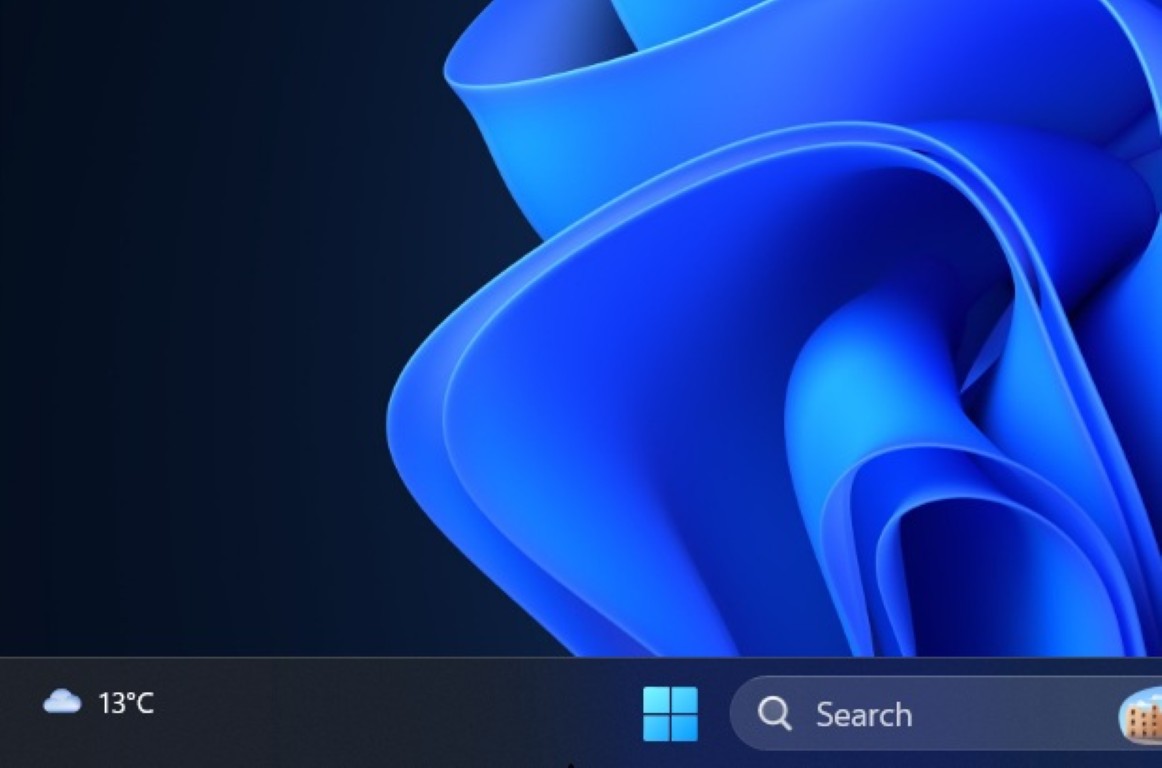
The smaller taskbar option matters for the same reason. Windows 11 has long had a setting that makes taskbar buttons smaller, but the bar itself remained visually and spatially bulky. The newer Insider behavior shrinks the taskbar surface too, giving back screen real estate that laptop users in particular notice every day.
This is Microsoft relearning an old Windows lesson. A desktop operating system does not win affection by enforcing one ideal workflow. It wins by letting users make the machine feel like theirs.
The return of movable and smaller taskbar modes suggests that the company has finally accepted that polish without agency is not a productivity feature. A centered taskbar is fine for users who like it. It becomes a problem when Windows assumes that preference should crowd out every other arrangement.
There are still caveats. Insider features can change, disappear, or ship in incomplete form. Some taskbar behaviors may not yet work perfectly in alternate positions, and Microsoft still has to prove that flyouts, search, tray interactions, multi-monitor behavior, touch optimization, and auto-hide can survive the move from demo to daily driver.
Even so, the direction is unmistakable. Microsoft is no longer pretending that the Windows 11 taskbar controversy was just resistance to change. It is treating missing taskbar flexibility as a quality issue.
That matters because update policy is where Microsoft’s consumer and enterprise instincts often collide. Microsoft wants a healthier fleet: patched machines, fewer botnets, fewer known vulnerabilities lingering for months. Users want control over the moment their machine changes, especially when an update risks breaking a workflow, consuming bandwidth, or interrupting travel, gaming, production, or live work.
The new setup behavior is similarly practical. If Windows can allow a new PC to shut down or restart without forcing the user through update choreography, it acknowledges something obvious: setup is often not the ideal time to install everything. Users unbox laptops in airports, offices, classrooms, and hotel rooms. They are not always sitting on perfect power, perfect connectivity, and unlimited patience.
The crucial question is whether Microsoft can loosen the leash without weakening the patching culture it has spent years building. More control is welcome, but the company will not want Windows 11 to drift back into the bad old days of permanently unpatched home PCs. The right balance is not “never update me.” It is “do not hijack the machine while I am trying to use it.”
Insider builds that separate the default widgets view from the Discover feed point toward a healthier version of the idea. Weather, calendar information, stocks, reminders, traffic, and system-adjacent information can all make sense in a widgets surface. A churn of outrage headlines does not need to be the default experience every time a user brushes the wrong corner of the screen.
Microsoft’s apparent emphasis on “calm” is revealing. Calm is not a feature category that appears on spec sheets, but it is exactly what desktop operating systems have been losing. Notifications, feeds, AI prompts, badge counts, recommended files, suggested searches, and promotional panels have made modern desktops feel less like tools and more like surfaces competing for attention.
If Windows 11 is to become better, it does not only need to be faster or more reliable. It needs to be quieter. A widget panel that stops harassing users is a small step, but it points in the right direction.
Over the past two years, Microsoft pushed Copilot as a master label for almost every AI-adjacent experience across Windows, Microsoft 365, Edge, and developer tools. The result was brand saturation without consistent meaning. Was Copilot a chatbot, a writing assistant, a system agent, a search layer, a subscription upsell, a button, or a policy headache? The answer was often yes.
Pulling Copilot branding out of smaller app-level features may be a sign that Microsoft is learning to distinguish between AI as a capability and Copilot as a product. Users may be more willing to accept a rewrite option in Notepad or a background-removal tool in Photos when it is presented as a specific action rather than another invitation into the Copilot universe.
This also reduces administrative ambiguity. For IT departments, “Copilot” is not just a friendly icon; it raises questions about data handling, licensing, tenant boundaries, compliance, and user training. App-specific AI tools still require governance, but clearer labeling helps administrators explain what is enabled, what is disabled, and what data may be involved.
The irony is that reducing Copilot’s visual sprawl may make Microsoft’s AI strategy more credible. A useful AI feature does not need to shout “Copilot” from every toolbar. It needs to solve a problem at the moment the user has it.
The Insider change that prioritizes local files over Bing results in Start menu search is therefore more than a ranking tweak. It is a philosophical correction. The Start menu is not primarily a web portal. It is the front door to the PC.
This does not mean Microsoft is abandoning web integration. Bing results remain part of the Windows search experience unless users take more aggressive steps to disable them. But ordering matters. If Windows first helps users find what they own, where they are, on the device in front of them, web search becomes an extension rather than an intrusion.
For administrators, this is also a manageability issue. Users who cannot reliably find local files are more likely to create duplicates, save documents in strange locations, or bypass managed workflows. Better local search is not glamorous, but it reduces support friction.
Windows laptops have always faced a hardware-diversity problem. Apple can optimize macOS for a narrower set of trackpads and machines. Microsoft has to support a broad ecosystem of OEM devices, firmware implementations, drivers, form factors, and price points. A gesture that feels natural on one machine can feel inconsistent on another.
By building more of this behavior into Windows rather than leaving it to vendor utilities, Microsoft can make the baseline experience more predictable. That helps users moving between devices, and it helps IT departments that standardize settings across mixed fleets.
The important point is not that edge scrolling is revolutionary. It is that Microsoft is spending engineering attention on tactile, everyday input. Windows 11’s reputation will improve less from keynote features than from hundreds of small interactions becoming less annoying.
Accessibility work often benefits everyone. Noise reduction designed for voice access can help in crowded offices. Visual comfort settings can help users working late, recovering from migraines, or managing bright displays in difficult lighting. Better speech recognition can help people who are temporarily injured, multitasking, or using a PC in a hands-limited environment.
Microsoft has often been strongest when it treats accessibility not as a compliance appendix but as a core design discipline. Windows has to serve people using cheap laptops, giant monitors, shared office machines, tablets, gaming rigs, assistive devices, and industrial PCs. The operating system’s breadth is a burden, but it is also the reason accessibility improvements matter so much.
The risk is discoverability. Windows already contains a deep well of accessibility settings that many users never find. If Microsoft adds more powerful controls without making them understandable, the features will help fewer people than they should. Quality here means not only capability but placement, language, defaults, and guidance.
By exposing experimental toggles more directly, Microsoft is formalizing what the community was already doing. That has obvious benefits. Testers can enable features without command-line incantations. Microsoft can gather feedback from a wider group. The line between “available in the build” and “actually enabled for testing” becomes less opaque.
It also changes the psychological contract. If a feature flag is visible in Settings, users understand that they are opting into something unfinished. That is healthier than burying work behind hidden IDs and then acting surprised when enthusiasts enable it anyway.
There is a danger, however, in making experimentation feel too casual. Feature flags are not preferences in the normal sense. They are switches for unfinished code paths that may break, vanish, or behave inconsistently across devices. Microsoft needs to present them as test controls, not as a secret advanced-settings panel for production PCs.
That is a notable shift from the tone of early Windows 11. The original release was visually confident but behaviorally rigid. It assumed users would adapt to a simplified taskbar, a centered Start experience, a more curated shell, and tighter service integration. Many did, but the complaints never really went away.
Now the company appears to be moving from this is the new Windows to tell us where the new Windows is still getting in your way. That is a healthier posture, especially for an OS that has to satisfy gamers, enterprise administrators, accessibility users, developers, students, creators, and casual web users on wildly different hardware.
The timing also matters. With Windows 10 support pressure still influencing upgrade decisions, Microsoft needs Windows 11 to feel like a destination rather than a compromise. Restoring familiar controls does not make Windows 11 less modern. It makes it less stubborn.
For WindowsForum readers, the practical advice is familiar: test Insider builds on secondary hardware, virtual machines, or machines you can afford to rebuild. The Beta channel is safer than the most experimental tracks, but “safer” does not mean “safe.” A feature that looks polished in a screenshot can still misbehave when mixed with third-party shell tools, enterprise policy, multiple monitors, old drivers, or unusual input hardware.
The bigger issue is trust. Microsoft has spent years asking users to accept Windows as a continuously evolving service. That bargain only works if users feel the evolution is improving their machine rather than rearranging it for someone else’s metrics.
The best of these Insider changes rebuild trust because they give control back. The weakest would be those that merely rearrange branding or hide annoyances without changing the underlying incentives. A calmer widgets board is good. A widgets board that later backslides into engagement bait would remind users why they were skeptical in the first place.
Taskbar movement, for example, is only truly back if it works consistently with multi-monitor setups, auto-hide preferences, tray icons, notification overflow, search, accessibility tools, and touch modes. Windows Update flexibility is only meaningful if users can understand what they are pausing and what risks they are accepting. AI rebranding only matters if Microsoft gives administrators clear control over the underlying services.
There is also the question of defaults. Windows enthusiasts tend to focus on whether a setting exists. Most users live with whatever Microsoft ships out of the box. A feature hidden three layers deep in Settings or behind an Insider feature flag is not the same as a mainstream design correction.
Still, Microsoft deserves credit for moving in the right direction. The Windows team is not simply adding another promotional surface or another cloud integration. It is addressing complaints that users have repeated for years.
Windows 11 does not need to become Windows 10 with rounded corners, and Microsoft should not let nostalgia dictate every design choice. But the Insider builds now under discussion show a company slowly accepting that modern Windows must be personal, quiet, flexible, and governable if it wants users to follow it into the next update cycle. If these features survive the trip from experimental builds to stable PCs later in 2026, the future of Windows 11 may look less like a dramatic leap forward and more like something users have been asking for all along: a desktop that gets out of the way.
 Microsoft’s Windows 11 Reset Is Being Written in the Taskbar
The taskbar has always been more than a strip of icons. In Windows, it is muscle memory, spatial orientation, window management, and user identity compressed into a few dozen pixels. That is why Windows 11’s original taskbar retreat landed so badly: Microsoft did not merely modernize it; it removed options that many power users had treated as baseline operating-system behavior for years.The Insider work now under test reverses some of that damage. The taskbar can be moved to the top, left, or right edge of the display, bringing back a choice Windows 11 abandoned at launch. On ultrawide monitors, a vertical taskbar is not nostalgia. It is ergonomics: horizontal space is plentiful, vertical space is precious, and labeled windows down the side can make multitasking easier than a bottom row of nearly identical icons.
The smaller taskbar option matters for the same reason. Windows 11 has long had a setting that makes taskbar buttons smaller, but the bar itself remained visually and spatially bulky. The newer Insider behavior shrinks the taskbar surface too, giving back screen real estate that laptop users in particular notice every day.
This is Microsoft relearning an old Windows lesson. A desktop operating system does not win affection by enforcing one ideal workflow. It wins by letting users make the machine feel like theirs.
The Best New Windows Feature Is an Undo Button for 2021
There is a temptation to treat the restored taskbar controls as minor personalization candy. That understates the issue. When Windows 11 launched in 2021, Microsoft stripped back parts of the shell in the name of polish, consistency, and simplified design. The result was cleaner in screenshots but weaker in lived use.The return of movable and smaller taskbar modes suggests that the company has finally accepted that polish without agency is not a productivity feature. A centered taskbar is fine for users who like it. It becomes a problem when Windows assumes that preference should crowd out every other arrangement.
There are still caveats. Insider features can change, disappear, or ship in incomplete form. Some taskbar behaviors may not yet work perfectly in alternate positions, and Microsoft still has to prove that flyouts, search, tray interactions, multi-monitor behavior, touch optimization, and auto-hide can survive the move from demo to daily driver.
Even so, the direction is unmistakable. Microsoft is no longer pretending that the Windows 11 taskbar controversy was just resistance to change. It is treating missing taskbar flexibility as a quality issue.
Windows Update Gets Less Theological About Reboots
The Windows Update changes may be less photogenic than a vertical taskbar, but they cut closer to the daily resentment many users feel toward Windows. In current stable builds, users can pause updates from Settings for a limited window, after which the operating system expects compliance. Insider builds are testing the ability to extend that pause more freely, reducing the sense that Windows is counting down to a forced negotiation.That matters because update policy is where Microsoft’s consumer and enterprise instincts often collide. Microsoft wants a healthier fleet: patched machines, fewer botnets, fewer known vulnerabilities lingering for months. Users want control over the moment their machine changes, especially when an update risks breaking a workflow, consuming bandwidth, or interrupting travel, gaming, production, or live work.
The new setup behavior is similarly practical. If Windows can allow a new PC to shut down or restart without forcing the user through update choreography, it acknowledges something obvious: setup is often not the ideal time to install everything. Users unbox laptops in airports, offices, classrooms, and hotel rooms. They are not always sitting on perfect power, perfect connectivity, and unlimited patience.
The crucial question is whether Microsoft can loosen the leash without weakening the patching culture it has spent years building. More control is welcome, but the company will not want Windows 11 to drift back into the bad old days of permanently unpatched home PCs. The right balance is not “never update me.” It is “do not hijack the machine while I am trying to use it.”
Calm Is the New Feature Microsoft Should Have Shipped Earlier
The Widgets board has been one of Windows 11’s strangest self-inflicted wounds. It promised glanceable information and personal utility, but too often behaved like a tabloid feed bolted to the desktop. The animated taskbar lure and viral news panel made the feature feel less like a Windows surface and more like a monetization experiment waiting for a click.Insider builds that separate the default widgets view from the Discover feed point toward a healthier version of the idea. Weather, calendar information, stocks, reminders, traffic, and system-adjacent information can all make sense in a widgets surface. A churn of outrage headlines does not need to be the default experience every time a user brushes the wrong corner of the screen.
Microsoft’s apparent emphasis on “calm” is revealing. Calm is not a feature category that appears on spec sheets, but it is exactly what desktop operating systems have been losing. Notifications, feeds, AI prompts, badge counts, recommended files, suggested searches, and promotional panels have made modern desktops feel less like tools and more like surfaces competing for attention.
If Windows 11 is to become better, it does not only need to be faster or more reliable. It needs to be quieter. A widget panel that stops harassing users is a small step, but it points in the right direction.
Copilot Is Being Pulled Back From Everywhere, Which May Help It Survive Somewhere
One of the more interesting Insider changes is not the addition of AI but the removal or rebranding of Copilot icons from places like Notepad, Photos, and Snipping Tool. The functionality may not vanish entirely; in some cases it appears to be recast as AI writing tools or app-specific assistance. But the branding shift matters.Over the past two years, Microsoft pushed Copilot as a master label for almost every AI-adjacent experience across Windows, Microsoft 365, Edge, and developer tools. The result was brand saturation without consistent meaning. Was Copilot a chatbot, a writing assistant, a system agent, a search layer, a subscription upsell, a button, or a policy headache? The answer was often yes.
Pulling Copilot branding out of smaller app-level features may be a sign that Microsoft is learning to distinguish between AI as a capability and Copilot as a product. Users may be more willing to accept a rewrite option in Notepad or a background-removal tool in Photos when it is presented as a specific action rather than another invitation into the Copilot universe.
This also reduces administrative ambiguity. For IT departments, “Copilot” is not just a friendly icon; it raises questions about data handling, licensing, tenant boundaries, compliance, and user training. App-specific AI tools still require governance, but clearer labeling helps administrators explain what is enabled, what is disabled, and what data may be involved.
The irony is that reducing Copilot’s visual sprawl may make Microsoft’s AI strategy more credible. A useful AI feature does not need to shout “Copilot” from every toolbar. It needs to solve a problem at the moment the user has it.
Start Menu Search Finally Remembers That Files Exist
Windows search has suffered from a long-running identity crisis. Users open Start, type a filename, setting, or local app name, and Windows sometimes behaves as if the best answer is a Bing web result. That may make sense for Microsoft’s services strategy, but it is maddening when the user is trying to find a document already sitting on the machine.The Insider change that prioritizes local files over Bing results in Start menu search is therefore more than a ranking tweak. It is a philosophical correction. The Start menu is not primarily a web portal. It is the front door to the PC.
This does not mean Microsoft is abandoning web integration. Bing results remain part of the Windows search experience unless users take more aggressive steps to disable them. But ordering matters. If Windows first helps users find what they own, where they are, on the device in front of them, web search becomes an extension rather than an intrusion.
For administrators, this is also a manageability issue. Users who cannot reliably find local files are more likely to create duplicates, save documents in strange locations, or bypass managed workflows. Better local search is not glamorous, but it reduces support friction.
Touchpads Get the Kind of Small Gesture Work That Makes Hardware Feel Better
The new touchpad gestures under test are easy to overlook because they sound modest: edge scrolling, automatic scrolling when fingers reach the touchpad boundary, and related refinements. Yet these are exactly the kinds of details that separate a laptop that feels tuned from one that feels merely functional.Windows laptops have always faced a hardware-diversity problem. Apple can optimize macOS for a narrower set of trackpads and machines. Microsoft has to support a broad ecosystem of OEM devices, firmware implementations, drivers, form factors, and price points. A gesture that feels natural on one machine can feel inconsistent on another.
By building more of this behavior into Windows rather than leaving it to vendor utilities, Microsoft can make the baseline experience more predictable. That helps users moving between devices, and it helps IT departments that standardize settings across mixed fleets.
The important point is not that edge scrolling is revolutionary. It is that Microsoft is spending engineering attention on tactile, everyday input. Windows 11’s reputation will improve less from keynote features than from hundreds of small interactions becoming less annoying.
Accessibility Is Where Windows Quality Becomes Measurable
The Insider accessibility improvements deserve more than a footnote. Screen tint options that overlay a customizable color can help users reduce eye strain or visual discomfort. Voice isolation for Voice Access can make speech control more reliable in noisy environments. These are practical changes for users whose relationship with Windows is shaped by fatigue, motor ability, vision, hearing, or working conditions.Accessibility work often benefits everyone. Noise reduction designed for voice access can help in crowded offices. Visual comfort settings can help users working late, recovering from migraines, or managing bright displays in difficult lighting. Better speech recognition can help people who are temporarily injured, multitasking, or using a PC in a hands-limited environment.
Microsoft has often been strongest when it treats accessibility not as a compliance appendix but as a core design discipline. Windows has to serve people using cheap laptops, giant monitors, shared office machines, tablets, gaming rigs, assistive devices, and industrial PCs. The operating system’s breadth is a burden, but it is also the reason accessibility improvements matter so much.
The risk is discoverability. Windows already contains a deep well of accessibility settings that many users never find. If Microsoft adds more powerful controls without making them understandable, the features will help fewer people than they should. Quality here means not only capability but placement, language, defaults, and guidance.
Feature Flags Turn Insiders Into Participants Instead of Archaeologists
The new Feature flags page in Insider settings may be the most revealing change in the whole set. For years, Windows enthusiasts have used tools like ViVeTool to uncover and enable hidden features before Microsoft flips them on broadly. That practice became part of the Insider culture: half testing program, half scavenger hunt.By exposing experimental toggles more directly, Microsoft is formalizing what the community was already doing. That has obvious benefits. Testers can enable features without command-line incantations. Microsoft can gather feedback from a wider group. The line between “available in the build” and “actually enabled for testing” becomes less opaque.
It also changes the psychological contract. If a feature flag is visible in Settings, users understand that they are opting into something unfinished. That is healthier than burying work behind hidden IDs and then acting surprised when enthusiasts enable it anyway.
There is a danger, however, in making experimentation feel too casual. Feature flags are not preferences in the normal sense. They are switches for unfinished code paths that may break, vanish, or behave inconsistently across devices. Microsoft needs to present them as test controls, not as a secret advanced-settings panel for production PCs.
The Insider Program Is Becoming Microsoft’s Public Workshop
Taken together, these nine features show a Windows team trying to use the Insider Program as more than a pre-release conveyor belt. The changes are not all aimed at the same audience. Some satisfy power users, some reduce consumer annoyance, some help accessibility, some clean up brand confusion, and some improve testing itself. The common thread is that Microsoft is trying to make Windows feel less imposed.That is a notable shift from the tone of early Windows 11. The original release was visually confident but behaviorally rigid. It assumed users would adapt to a simplified taskbar, a centered Start experience, a more curated shell, and tighter service integration. Many did, but the complaints never really went away.
Now the company appears to be moving from this is the new Windows to tell us where the new Windows is still getting in your way. That is a healthier posture, especially for an OS that has to satisfy gamers, enterprise administrators, accessibility users, developers, students, creators, and casual web users on wildly different hardware.
The timing also matters. With Windows 10 support pressure still influencing upgrade decisions, Microsoft needs Windows 11 to feel like a destination rather than a compromise. Restoring familiar controls does not make Windows 11 less modern. It makes it less stubborn.
The 26H2 Story Is Really a Trust Story
PCMag frames many of these changes as likely candidates for stable Windows 11 builds later this year, potentially around the annual update expected in the fall. That timing is plausible, but Insider features should never be treated as shipping promises. Microsoft can delay, alter, or remove them depending on telemetry, bugs, feedback, and internal priorities.For WindowsForum readers, the practical advice is familiar: test Insider builds on secondary hardware, virtual machines, or machines you can afford to rebuild. The Beta channel is safer than the most experimental tracks, but “safer” does not mean “safe.” A feature that looks polished in a screenshot can still misbehave when mixed with third-party shell tools, enterprise policy, multiple monitors, old drivers, or unusual input hardware.
The bigger issue is trust. Microsoft has spent years asking users to accept Windows as a continuously evolving service. That bargain only works if users feel the evolution is improving their machine rather than rearranging it for someone else’s metrics.
The best of these Insider changes rebuild trust because they give control back. The weakest would be those that merely rearrange branding or hide annoyances without changing the underlying incentives. A calmer widgets board is good. A widgets board that later backslides into engagement bait would remind users why they were skeptical in the first place.
Windows Veterans Should Watch the Small Print, Not Just the Screenshots
The new Insider work is promising, but Windows history encourages caution. Features can arrive partially, ship to some regions first, depend on hardware, require Microsoft account integration, or appear only in certain editions. Enterprise policy support can lag consumer settings. Documentation can be thin until late in the cycle.Taskbar movement, for example, is only truly back if it works consistently with multi-monitor setups, auto-hide preferences, tray icons, notification overflow, search, accessibility tools, and touch modes. Windows Update flexibility is only meaningful if users can understand what they are pausing and what risks they are accepting. AI rebranding only matters if Microsoft gives administrators clear control over the underlying services.
There is also the question of defaults. Windows enthusiasts tend to focus on whether a setting exists. Most users live with whatever Microsoft ships out of the box. A feature hidden three layers deep in Settings or behind an Insider feature flag is not the same as a mainstream design correction.
Still, Microsoft deserves credit for moving in the right direction. The Windows team is not simply adding another promotional surface or another cloud integration. It is addressing complaints that users have repeated for years.
The Windows 11 Future Looks More Like a Repair Job Than a Revolution
The most concrete lesson from this Insider wave is that Windows 11’s next chapter may be defined by restoration rather than reinvention.- The movable taskbar is a direct response to one of Windows 11’s longest-running user complaints.
- The smaller taskbar option gives laptop and small-screen users a practical way to reclaim space.
- The Windows Update changes suggest Microsoft is trying to reduce interruption without abandoning security discipline.
- The widgets cleanup shows that Microsoft understands attention-grabbing surfaces can damage trust.
- The Copilot retreat from every corner of the shell may make individual AI tools easier to understand and govern.
- The feature flags page turns hidden experimentation into a more transparent Insider workflow.
Windows 11 does not need to become Windows 10 with rounded corners, and Microsoft should not let nostalgia dictate every design choice. But the Insider builds now under discussion show a company slowly accepting that modern Windows must be personal, quiet, flexible, and governable if it wants users to follow it into the next update cycle. If these features survive the trip from experimental builds to stable PCs later in 2026, the future of Windows 11 may look less like a dramatic leap forward and more like something users have been asking for all along: a desktop that gets out of the way.
References
- Primary source: PCMag UK
Published: Sat, 30 May 2026 16:00:00 GMT

The Future of Windows 11 Is Already Here: 9 Insider Features You Need to See
You don't have to wait for the next big update—these Windows 11 changes are already being tested in Insider builds right now.uk.pcmag.com
- Related coverage: windowscentral.com
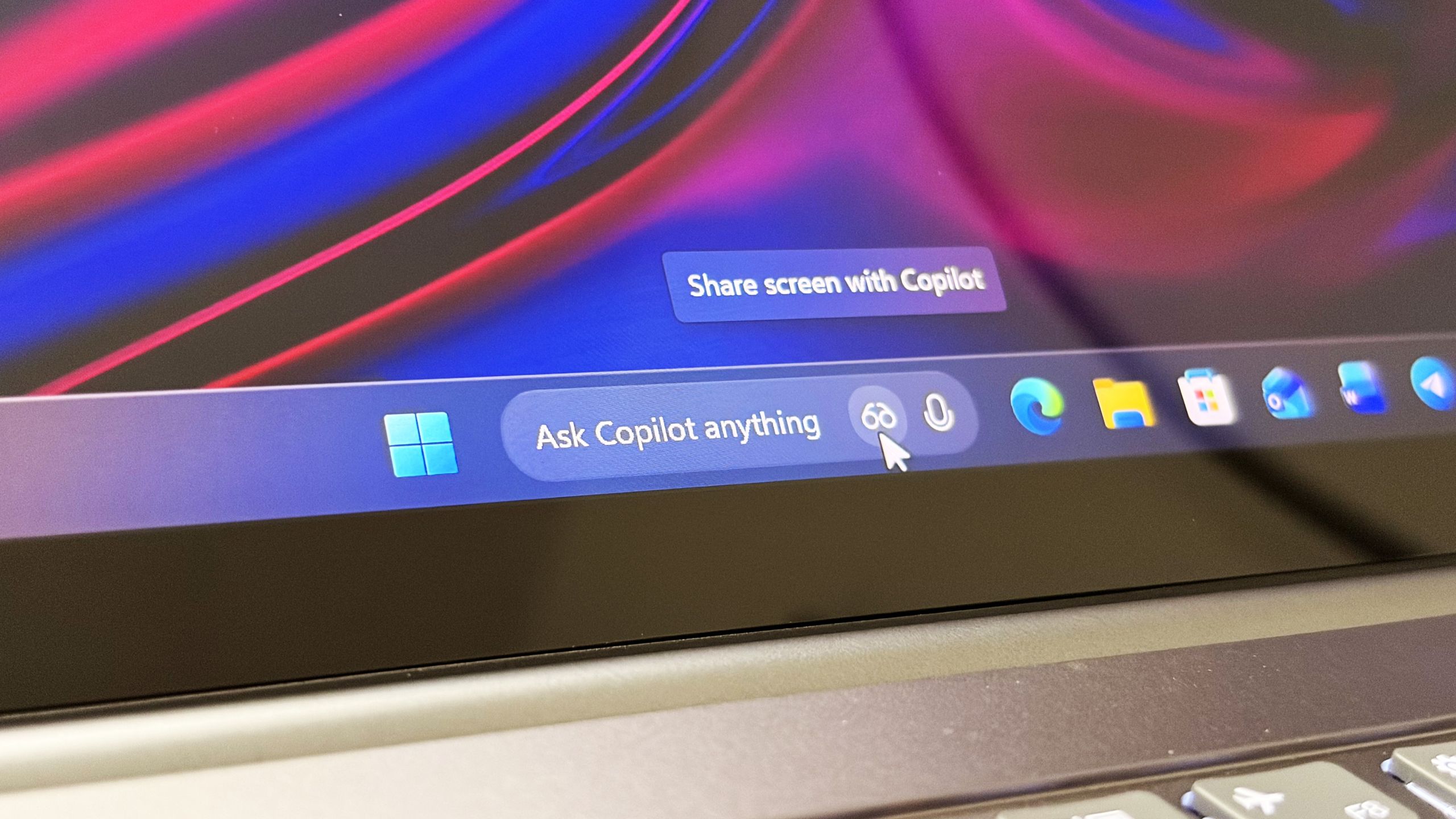
Microsoft confirms Ask Copilot is still coming to Windows 11's Taskbar this summer
First announced last year, a new document has confirmed that Microsoft's upcoming "Ask Copilot" feature for Windows 11's Taskbar is arriving mid-2026. www.windowscentral.com
- Official source: blogs.windows.com
Improving Windows quality: Making Taskbar and Start more personal
In our commitment to Windows quality, we outlined our plans to deliver improvements in performance, reliability, and craft. We are also committed to blogs.windows.com
- Related coverage: windowslatest.com
Microsoft finally begins testing Windows 10-like smaller taskbar for Windows 11 after removing it in 2021
In 2021, Microsoft removed smaller taskbar from Windows 11, and forced users to stick to a standard size. Now, it's bringing it back. www.windowslatest.com
- Related coverage: notebookcheck.net

Microsoft brings back Windows 10 taskbar customizations to Windows 11
Microsoft is finally giving Windows 11 users more control over the taskbar again, including full screen-edge placement and a smaller, more compact mode. The update also improves how menus and window labels behave depending on the taskbar position. www.notebookcheck.net
- Related coverage: arstechnica.com
Five years later, Windows 11 brings back much-missed taskbar options (and more)
Microsoft is also testing a smaller taskbar and more customizable Start menu. arstechnica.com
- Related coverage: windowsnews.ai
Windows 11 25H2 Build 26300.8493 Restores Taskbar Positioning and Smaller Mode – What You Need to Know
Windows 11 build 26300.8493 for 25H2 restores movable taskbar to top, left, or right and adds a smaller taskbar mode. Get the details on this Insider...windowsnews.ai
- Related coverage: pcworld.com

Windows 11 26H2 is coming: Meet all the new features
Windows 11 26H2 is the next major free update for all Windows users. Among other things, it brings improvements to Explorer, camera control, and AI. Here's an overview. www.pcworld.com
- Related coverage: windowsforum.com

Windows 11 Taskbar Returns: Move It Anywhere + Smaller Buttons in Insider Build 26300
Microsoft began testing a movable and smaller Windows 11 taskbar on May 15, 2026, in Experimental Preview Build 26300.8493, giving Windows Insiders controls to place the taskbar on the bottom, top, left, or right edge of the screen. That sentence sounds almost absurdly modest for a feature... windowsforum.com
- Related coverage: thewincentral.com
Windows 11 Small Taskbar Appears in Build 26300.8346 - WinCentral
Early signs of Windows 11’s new compact taskbar appear in build 26300.8346, including a smaller widgets icon and UI changes. - Read in Latest News on WinCentral thewincentral.com
- Related coverage: pureinfotech.com
Enable new Taskbar position and smaller settings on Windows 11 using Flags and ViveTool
Learn how to enable the hidden Windows 11 Taskbar position and smaller Taskbar features using flags or ViveTool. pureinfotech.com
- Related coverage: tomshardware.com
Microsoft simplifies Windows Insider program — fewer channels, and switching without wiping your device
The company will also make it easier to ensure you get all of the latest features.www.tomshardware.com
- Related coverage: tomsguide.com
