

Windows 11 users are again objecting to Microsoft’s increasingly forceful Microsoft account requirement after renewed forum and Reddit complaints on June 17, 2026, highlighted how Windows setup, recovery, cloud services, and identity prompts now converge around online sign-in. The controversy is not really about whether Microsoft accounts are useful. It is about whether Windows still behaves like a general-purpose PC operating system when the first act of ownership is authentication into Microsoft’s ecosystem. For a company trying to convince customers that Windows 11 is becoming more responsive to feedback, the account mandate has become the stubborn exception that makes every other concession look smaller.
The Windows 11 account fight has lasted long enough that it now feels less like a setup annoyance and more like a referendum on what kind of product Windows is supposed to be. Microsoft’s position is easy to understand: a signed-in PC can sync settings, back up recovery keys, connect OneDrive, enable Store purchases, support Find My Device, and reduce the number of users who lock themselves out. A Microsoft account turns a cold installation into a managed identity experience.
That is also exactly why users are angry. For many Windows enthusiasts and administrators, the setup screen is not a marketing page, a cloud onboarding path, or a loyalty checkpoint. It is the point at which the owner of the hardware creates an account on the machine they bought.
Windows 8 introduced Microsoft account sign-in as a modern convenience, but it still left local accounts visible enough that users could treat online identity as optional. Windows 11 changed the emotional contract. Over time, Microsoft moved from encouragement to friction, and from friction to removal of obvious paths.
The most controversial step came when Microsoft began removing known mechanisms for creating local accounts during the out-of-box experience, arguing that those workarounds could skip important setup screens and leave devices incompletely configured. That explanation is not absurd. But it also reframes user choice as a configuration hazard, which is precisely the kind of corporate logic that makes technically literate users reach for Rufus, command prompts, unattended install files, and anything else that restores control.
That is why users are not merely complaining that Microsoft added an extra step. They are complaining that Microsoft hid a still-supported path from normal people. The operating system can run with a local account, but setup increasingly behaves as if the option is illegitimate unless the user knows the trick.
This distinction matters. Removing a feature because it is genuinely impossible to maintain is one thing. Burying it because it does not serve the company’s preferred onboarding model is another.
The result is a two-tier Windows setup culture. Power users trade commands and workarounds. IT staff know which editions, network states, or deployment tools preserve local control. Ordinary buyers see a sign-in screen and conclude, reasonably, that Microsoft account login is mandatory because Microsoft designed the experience to make that conclusion unavoidable.
That is the anger visible in the latest complaints. The issue is not that a Microsoft account exists. The issue is that Windows appears to be enforcing an account relationship before the user has even reached the desktop.
Microsoft can describe these as unsupported bypasses, and in many cases that description is fair. But a mature platform should not require folk knowledge to perform a task as basic as creating a local user on a personal computer. When the workaround becomes the product experience for a large class of technically competent users, the vendor has lost the argument over simplicity.
The company’s stated concern is that bypass methods may also skip configuration screens users actually need. That is plausible. A setup hack that jumps over privacy settings, device encryption notices, update checks, or recovery configuration can produce a messy first boot.
But that is an argument for designing a proper local-account path, not for forcing everyone through the Microsoft account path. Microsoft already knows how to build conditional setup flows. It does this constantly across Windows editions, enterprise enrollment scenarios, hardware capabilities, regional rules, and managed-device states.
If the company can detect unsupported processors, warn about TPM requirements, offer BitLocker recovery key messaging, and vary setup by SKU, it can offer a supported local-account option with the same warnings and safeguards. The absence of that option is not a technical inevitability. It is a product decision.
That matters. Modern Windows devices increasingly ship with device encryption enabled by default, and recovery keys are not abstract details when a firmware change or hardware problem triggers a BitLocker prompt. A user who never backed up a recovery key can lose access to their data permanently. From Microsoft’s perspective, online account association is a safety net.
Yet even here, the company’s case is weaker than it first appears because consent and comprehension are not the same thing. Many users do not understand that their recovery key may be tied to an account they created under pressure during setup. Others do not remember which email address they used, especially when setting up a family PC, a spare laptop, or a machine for someone else.
A forced Microsoft account can reduce one category of disaster while creating another: the mystery identity problem. The machine is recoverable only if the owner can reconstruct the account relationship Microsoft insisted on creating. That is not exactly user empowerment.
Security-minded users also object for a different reason. They may prefer a local account precisely because they want fewer cloud dependencies, fewer tokens, fewer sync surfaces, and less coupling between operating system login and online identity. Those users are not confused. They are making a deliberate threat-model choice, and Windows increasingly treats that choice as a nuisance.
A local account does not magically turn Windows into an offline appliance. Windows Update, Defender, activation, Store services, telemetry controls, Edge, Widgets, Copilot integrations, and bundled apps can still communicate with Microsoft depending on configuration. Anyone selling local accounts as a complete privacy shield is overselling them.
But an online account does change the relationship. It links the Windows session more directly to a persistent identity, subscription surfaces, OneDrive prompts, Store purchases, recovery data, device association, and cross-device personalization. That is not just telemetry. That is ecosystem gravity.
Users feel this even when they cannot diagram the identity stack. They see OneDrive folder backup nudges, Microsoft 365 trial prompts, Edge sign-in encouragement, Store account dependencies, and Windows setup all pointing in the same direction. The account requirement becomes the symbolic center of a broader complaint: Microsoft is treating the desktop as territory to be enrolled.
That is why the backlash has outlasted the technical details. The fight is not only about a login screen. It is about who gets to decide whether a Windows PC starts life as a local machine with optional cloud services or a cloud-connected endpoint with local functionality underneath.
Windows 10 was hardly free of Microsoft account nudges. It promoted cloud sign-in, OneDrive, Edge, and Microsoft services aggressively over its lifetime. But it preserved enough visible flexibility that many users could still feel in control.
Windows 11 arrived with stricter hardware requirements, a redesigned taskbar that initially removed familiar behaviors, a Start menu many users considered less efficient, and a setup process that increasingly centered Microsoft identity. Even when Microsoft later restored or improved pieces of the interface, the account mandate continued to sit there as evidence that the company’s listening has limits.
That is why Scott Hanselman’s public “I hate that” response to the account requirement landed so strongly. It suggested that even inside Microsoft, some influential people understand the complaint. But it also raised expectations. Once a senior Microsoft figure says the company is working on the problem, the absence of visible change becomes harder to excuse.
The risk for Microsoft is not that enthusiasts will abandon Windows overnight. Most will not. The risk is that the Windows 11 narrative hardens into something corrosive: an operating system that improves only after users fight it, and even then only on issues that do not threaten Microsoft’s services strategy.
That does not mean IT departments can ignore the controversy. Small businesses, consultants, break-fix shops, schools with mixed hardware, labs, kiosks, field devices, and offline environments all encounter the messy edge where consumer setup assumptions collide with real-world deployment needs. Not every Windows machine is a polished corporate endpoint on a reliable network.
The local account also remains an important tool for troubleshooting. Administrators use local administrator accounts, break-glass access, isolated test profiles, lab builds, and machines that must function before network identity is available. A platform that makes local identity feel like contraband sends the wrong message to the people who keep Windows estates running.
Microsoft would likely argue that enterprise-grade deployment remains supported, and that is mostly true. But perception matters in IT. When admins watch consumer Windows become more coercive, they reasonably ask whether today’s consumer friction is tomorrow’s managed-device default.
There is also a support cost. Friends, relatives, and small-business users do not call Microsoft when they cannot remember which account they used at setup. They call the technically inclined person in their life. That person then has to unwind identity, recovery, OneDrive backup, encryption, and account-state confusion that could have been avoided with a clearer choice at the beginning.
Users tolerate aggressive modernization when it produces coherence. They are less forgiving when Microsoft removes familiar choices in one place while leaving unfinished transitions everywhere else. If Control Panel and Settings still coexist, why is the local account path treated as too old-fashioned to expose?
This is the inconsistency that bothers veteran Windows users. Microsoft often moves slowly where cleanup is hard but quickly where cloud enrollment is valuable. That may not be a fair characterization of every engineering decision, but it is the pattern many users perceive.
The company’s challenge is that Windows is not a phone OS. It runs CNC machines, gaming rigs, classroom laptops, ham-radio stations, development workstations, church office PCs, point-of-sale systems, air-gapped labs, and family desktops held together by habits older than some of Windows 11’s designers. A single blessed setup flow will always clash with that diversity.
The account mandate makes Windows feel narrower than the hardware ecosystem it serves. That is a strategic mistake for a platform whose enduring strength has always been its tolerance for weird use cases.
A Chromebook without a Google account is barely the product most buyers intended to use. A Mac can be used with local accounts, but Apple’s hardware-software integration and services posture create a different ownership model. Windows, by contrast, has spent decades as the common operating layer for wildly diverse hardware and institutional habits.
Microsoft cannot simply borrow the identity assumptions of more vertically controlled ecosystems without changing what Windows means. The PC is not just another endpoint in a cloud graph. It is still, culturally and practically, the place where users expect the most autonomy.
This is especially true for enthusiasts. The same people who reinstall Windows, dual-boot Linux, disable startup apps, tune drivers, and debate filesystem choices are never going to appreciate being told that a local account is too dangerous or inconvenient for setup. These users may not represent the average buyer, but they influence the support culture around Windows.
Microsoft has benefited for decades from that unpaid support culture. Enthusiasts explain Windows to everyone else. Alienating them over a setup choice is a poor trade, especially when the practical upside of hiding local accounts is so closely tied to Microsoft’s own service ambitions.
That would be defensible. It would preserve safety for mainstream users while respecting the fact that not every Windows installation should begin with a Microsoft identity. It would also reduce reliance on fragile workarounds that can leave systems in exactly the incomplete states Microsoft says it wants to avoid.
The setup flow could be blunt without being coercive. It could say that Microsoft recommends an online account for recovery, device encryption backup, and service integration. It could then offer “Create a local account instead” in plain language, not as a hidden escape hatch.
Such a design would not satisfy everyone. Some users dislike Microsoft accounts entirely and would still object to nudges. But it would shift the controversy from compulsion to persuasion, and that is a much healthier place for a platform vendor to stand.
Microsoft has already shown it can reverse unpopular Windows 11 decisions. Taskbar changes, interface refinements, and performance work all suggest a company trying to repair some of the early damage. The account mandate is the remaining test of whether that responsiveness applies only to surface polish or also to product philosophy.
That instability is itself part of the story. A supported choice does not require a calendar of bypass methods. If Microsoft changes the workaround every few months, the company is not simplifying Windows; it is turning first boot into an arms race with its own customers.
For administrators and power users, the lesson is to plan Windows deployments rather than assume the setup screen will cooperate. Installation media, provisioning strategy, recovery-key handling, and account policy should be decided before the device is unboxed. For home users, the lesson is harsher: Microsoft wants the default answer to be an online account, and resisting that default increasingly requires technical confidence.
The larger lesson belongs to Microsoft. If the company wants Windows 11 to feel like a platform users choose rather than inherit under pressure, it has to stop treating local ownership as an edge case. The PC’s flexibility is not a bug in need of setup-time correction.
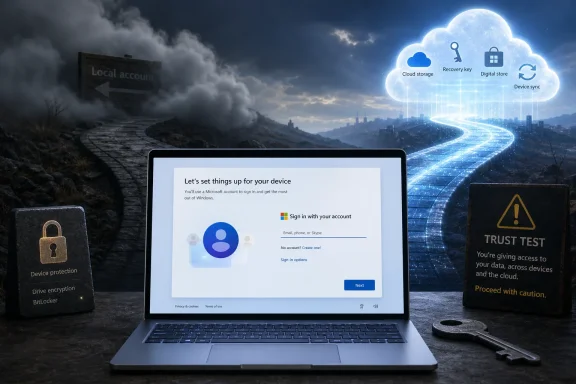 Microsoft Turned Setup Into an Enrollment Funnel
The Windows 11 account fight has lasted long enough that it now feels less like a setup annoyance and more like a referendum on what kind of product Windows is supposed to be. Microsoft’s position is easy to understand: a signed-in PC can sync settings, back up recovery keys, connect OneDrive, enable Store purchases, support Find My Device, and reduce the number of users who lock themselves out. A Microsoft account turns a cold installation into a managed identity experience.That is also exactly why users are angry. For many Windows enthusiasts and administrators, the setup screen is not a marketing page, a cloud onboarding path, or a loyalty checkpoint. It is the point at which the owner of the hardware creates an account on the machine they bought.
Windows 8 introduced Microsoft account sign-in as a modern convenience, but it still left local accounts visible enough that users could treat online identity as optional. Windows 11 changed the emotional contract. Over time, Microsoft moved from encouragement to friction, and from friction to removal of obvious paths.
The most controversial step came when Microsoft began removing known mechanisms for creating local accounts during the out-of-box experience, arguing that those workarounds could skip important setup screens and leave devices incompletely configured. That explanation is not absurd. But it also reframes user choice as a configuration hazard, which is precisely the kind of corporate logic that makes technically literate users reach for Rufus, command prompts, unattended install files, and anything else that restores control.
The Local Account Never Actually Died
Part of what makes the controversy so irritating is the strange half-truth at its center: local accounts still exist in Windows 11. They are not some obsolete authentication relic that the operating system can no longer support. They remain part of Windows’ account model, administration tools, enterprise workflows, and recovery assumptions.That is why users are not merely complaining that Microsoft added an extra step. They are complaining that Microsoft hid a still-supported path from normal people. The operating system can run with a local account, but setup increasingly behaves as if the option is illegitimate unless the user knows the trick.
This distinction matters. Removing a feature because it is genuinely impossible to maintain is one thing. Burying it because it does not serve the company’s preferred onboarding model is another.
The result is a two-tier Windows setup culture. Power users trade commands and workarounds. IT staff know which editions, network states, or deployment tools preserve local control. Ordinary buyers see a sign-in screen and conclude, reasonably, that Microsoft account login is mandatory because Microsoft designed the experience to make that conclusion unavoidable.
That is the anger visible in the latest complaints. The issue is not that a Microsoft account exists. The issue is that Windows appears to be enforcing an account relationship before the user has even reached the desktop.
The Bypass Culture Is Proof of a Design Failure
Every time Microsoft tightens the setup flow, the Windows community responds with new instructions. Disconnect the network at the right moment. Use a command prompt. Create installation media with modified options. Pick a domain-join path. Run a tool that strips the requirement before setup even begins.Microsoft can describe these as unsupported bypasses, and in many cases that description is fair. But a mature platform should not require folk knowledge to perform a task as basic as creating a local user on a personal computer. When the workaround becomes the product experience for a large class of technically competent users, the vendor has lost the argument over simplicity.
The company’s stated concern is that bypass methods may also skip configuration screens users actually need. That is plausible. A setup hack that jumps over privacy settings, device encryption notices, update checks, or recovery configuration can produce a messy first boot.
But that is an argument for designing a proper local-account path, not for forcing everyone through the Microsoft account path. Microsoft already knows how to build conditional setup flows. It does this constantly across Windows editions, enterprise enrollment scenarios, hardware capabilities, regional rules, and managed-device states.
If the company can detect unsupported processors, warn about TPM requirements, offer BitLocker recovery key messaging, and vary setup by SKU, it can offer a supported local-account option with the same warnings and safeguards. The absence of that option is not a technical inevitability. It is a product decision.
Microsoft’s Best Argument Is Security, and It Still Isn’t Enough
The strongest case for Microsoft’s approach is not advertising or subscription growth. It is security and recoverability. A signed-in Microsoft account can store a BitLocker recovery key, support password recovery, synchronize credentials, and make it easier for nontechnical users to survive device failures.That matters. Modern Windows devices increasingly ship with device encryption enabled by default, and recovery keys are not abstract details when a firmware change or hardware problem triggers a BitLocker prompt. A user who never backed up a recovery key can lose access to their data permanently. From Microsoft’s perspective, online account association is a safety net.
Yet even here, the company’s case is weaker than it first appears because consent and comprehension are not the same thing. Many users do not understand that their recovery key may be tied to an account they created under pressure during setup. Others do not remember which email address they used, especially when setting up a family PC, a spare laptop, or a machine for someone else.
A forced Microsoft account can reduce one category of disaster while creating another: the mystery identity problem. The machine is recoverable only if the owner can reconstruct the account relationship Microsoft insisted on creating. That is not exactly user empowerment.
Security-minded users also object for a different reason. They may prefer a local account precisely because they want fewer cloud dependencies, fewer tokens, fewer sync surfaces, and less coupling between operating system login and online identity. Those users are not confused. They are making a deliberate threat-model choice, and Windows increasingly treats that choice as a nuisance.
The Privacy Debate Is Really a Power Debate
The Microsoft account fight is often framed as privacy theater, with one side warning about telemetry and the other pointing out that Windows collects data regardless of account type. Both points can be true, and neither captures the full issue.A local account does not magically turn Windows into an offline appliance. Windows Update, Defender, activation, Store services, telemetry controls, Edge, Widgets, Copilot integrations, and bundled apps can still communicate with Microsoft depending on configuration. Anyone selling local accounts as a complete privacy shield is overselling them.
But an online account does change the relationship. It links the Windows session more directly to a persistent identity, subscription surfaces, OneDrive prompts, Store purchases, recovery data, device association, and cross-device personalization. That is not just telemetry. That is ecosystem gravity.
Users feel this even when they cannot diagram the identity stack. They see OneDrive folder backup nudges, Microsoft 365 trial prompts, Edge sign-in encouragement, Store account dependencies, and Windows setup all pointing in the same direction. The account requirement becomes the symbolic center of a broader complaint: Microsoft is treating the desktop as territory to be enrolled.
That is why the backlash has outlasted the technical details. The fight is not only about a login screen. It is about who gets to decide whether a Windows PC starts life as a local machine with optional cloud services or a cloud-connected endpoint with local functionality underneath.
Windows 10 Casts a Long Shadow Over the Argument
The timing makes Microsoft’s position more precarious. Windows 10’s mainstream support deadline pushed millions of users toward Windows 11, including many who were satisfied with the older operating system and skeptical of the new one. For those users, the account requirement is not experienced as a nice modern default. It is experienced as one more toll gate on an upgrade they did not particularly want.Windows 10 was hardly free of Microsoft account nudges. It promoted cloud sign-in, OneDrive, Edge, and Microsoft services aggressively over its lifetime. But it preserved enough visible flexibility that many users could still feel in control.
Windows 11 arrived with stricter hardware requirements, a redesigned taskbar that initially removed familiar behaviors, a Start menu many users considered less efficient, and a setup process that increasingly centered Microsoft identity. Even when Microsoft later restored or improved pieces of the interface, the account mandate continued to sit there as evidence that the company’s listening has limits.
That is why Scott Hanselman’s public “I hate that” response to the account requirement landed so strongly. It suggested that even inside Microsoft, some influential people understand the complaint. But it also raised expectations. Once a senior Microsoft figure says the company is working on the problem, the absence of visible change becomes harder to excuse.
The risk for Microsoft is not that enthusiasts will abandon Windows overnight. Most will not. The risk is that the Windows 11 narrative hardens into something corrosive: an operating system that improves only after users fight it, and even then only on issues that do not threaten Microsoft’s services strategy.
Enterprise IT Sees a Consumer Problem Creeping Toward Managed Reality
In large organizations, the account mandate is less straightforward because Windows setup often flows through Autopilot, Entra ID, domain join, provisioning packages, imaging systems, or other managed deployment paths. Many enterprise administrators are not creating consumer Microsoft accounts during setup, and Windows Pro, Enterprise, and Education scenarios have different enrollment assumptions.That does not mean IT departments can ignore the controversy. Small businesses, consultants, break-fix shops, schools with mixed hardware, labs, kiosks, field devices, and offline environments all encounter the messy edge where consumer setup assumptions collide with real-world deployment needs. Not every Windows machine is a polished corporate endpoint on a reliable network.
The local account also remains an important tool for troubleshooting. Administrators use local administrator accounts, break-glass access, isolated test profiles, lab builds, and machines that must function before network identity is available. A platform that makes local identity feel like contraband sends the wrong message to the people who keep Windows estates running.
Microsoft would likely argue that enterprise-grade deployment remains supported, and that is mostly true. But perception matters in IT. When admins watch consumer Windows become more coercive, they reasonably ask whether today’s consumer friction is tomorrow’s managed-device default.
There is also a support cost. Friends, relatives, and small-business users do not call Microsoft when they cannot remember which account they used at setup. They call the technically inclined person in their life. That person then has to unwind identity, recovery, OneDrive backup, encryption, and account-state confusion that could have been avoided with a clearer choice at the beginning.
The Control Panel Complaint Belongs in the Same Story
One Reddit commenter’s aside about the continuing split between Control Panel and Settings may seem unrelated, but it belongs in the same argument. Windows 11 still carries multiple generations of interface thinking, with modern surfaces layered over legacy tools that remain necessary for serious configuration. That split is not just aesthetic; it is a trust problem.Users tolerate aggressive modernization when it produces coherence. They are less forgiving when Microsoft removes familiar choices in one place while leaving unfinished transitions everywhere else. If Control Panel and Settings still coexist, why is the local account path treated as too old-fashioned to expose?
This is the inconsistency that bothers veteran Windows users. Microsoft often moves slowly where cleanup is hard but quickly where cloud enrollment is valuable. That may not be a fair characterization of every engineering decision, but it is the pattern many users perceive.
The company’s challenge is that Windows is not a phone OS. It runs CNC machines, gaming rigs, classroom laptops, ham-radio stations, development workstations, church office PCs, point-of-sale systems, air-gapped labs, and family desktops held together by habits older than some of Windows 11’s designers. A single blessed setup flow will always clash with that diversity.
The account mandate makes Windows feel narrower than the hardware ecosystem it serves. That is a strategic mistake for a platform whose enduring strength has always been its tolerance for weird use cases.
The Mac and Chromebook Comparisons Only Go So Far
Microsoft defenders sometimes point out that Apple and Google strongly prefer online accounts too. That is true, but the comparison is incomplete. macOS and ChromeOS were built around different platform expectations, business models, and device ecosystems.A Chromebook without a Google account is barely the product most buyers intended to use. A Mac can be used with local accounts, but Apple’s hardware-software integration and services posture create a different ownership model. Windows, by contrast, has spent decades as the common operating layer for wildly diverse hardware and institutional habits.
Microsoft cannot simply borrow the identity assumptions of more vertically controlled ecosystems without changing what Windows means. The PC is not just another endpoint in a cloud graph. It is still, culturally and practically, the place where users expect the most autonomy.
This is especially true for enthusiasts. The same people who reinstall Windows, dual-boot Linux, disable startup apps, tune drivers, and debate filesystem choices are never going to appreciate being told that a local account is too dangerous or inconvenient for setup. These users may not represent the average buyer, but they influence the support culture around Windows.
Microsoft has benefited for decades from that unpaid support culture. Enthusiasts explain Windows to everyone else. Alienating them over a setup choice is a poor trade, especially when the practical upside of hiding local accounts is so closely tied to Microsoft’s own service ambitions.
A Real Compromise Is Obvious
The frustrating part is that Microsoft does not need to abandon Microsoft accounts to fix this. It could make online sign-in the recommended default while restoring a clear local-account option. It could explain what users lose by skipping online sign-in, including recovery-key backup, settings sync, Store convenience, and OneDrive integration. It could require an explicit acknowledgment for users who decline cloud recovery.That would be defensible. It would preserve safety for mainstream users while respecting the fact that not every Windows installation should begin with a Microsoft identity. It would also reduce reliance on fragile workarounds that can leave systems in exactly the incomplete states Microsoft says it wants to avoid.
The setup flow could be blunt without being coercive. It could say that Microsoft recommends an online account for recovery, device encryption backup, and service integration. It could then offer “Create a local account instead” in plain language, not as a hidden escape hatch.
Such a design would not satisfy everyone. Some users dislike Microsoft accounts entirely and would still object to nudges. But it would shift the controversy from compulsion to persuasion, and that is a much healthier place for a platform vendor to stand.
Microsoft has already shown it can reverse unpopular Windows 11 decisions. Taskbar changes, interface refinements, and performance work all suggest a company trying to repair some of the early damage. The account mandate is the remaining test of whether that responsiveness applies only to surface polish or also to product philosophy.
The Setup Screen Has Become a Trust Test
The practical advice for users remains messy because the exact bypass landscape changes by build, edition, and setup path. Some workarounds still exist. Some have been removed in preview builds or made less reliable. Third-party tools can help, but they also move users away from the supported path.That instability is itself part of the story. A supported choice does not require a calendar of bypass methods. If Microsoft changes the workaround every few months, the company is not simplifying Windows; it is turning first boot into an arms race with its own customers.
For administrators and power users, the lesson is to plan Windows deployments rather than assume the setup screen will cooperate. Installation media, provisioning strategy, recovery-key handling, and account policy should be decided before the device is unboxed. For home users, the lesson is harsher: Microsoft wants the default answer to be an online account, and resisting that default increasingly requires technical confidence.
The larger lesson belongs to Microsoft. If the company wants Windows 11 to feel like a platform users choose rather than inherit under pressure, it has to stop treating local ownership as an edge case. The PC’s flexibility is not a bug in need of setup-time correction.
The Windows 11 Account Fight Has Narrowed to One Honest Choice
The latest backlash does not reveal a new technical problem so much as a long-running product argument finally stripped of ambiguity. Microsoft can keep tightening setup around online identity, or it can admit that a supported local path is part of what makes Windows Windows.- Windows 11 still supports local accounts, but Microsoft has made them increasingly difficult to create during normal setup.
- Microsoft’s security and recovery arguments are real, especially around encryption keys and account recovery, but they do not justify hiding a supported ownership model.
- Workarounds prove user demand, but they also create fragile setup paths that can be worse than an official local-account option.
- The controversy matters to IT pros because local accounts remain useful for troubleshooting, labs, offline systems, small-business deployments, and break-glass access.
- Microsoft could resolve most of the anger by making Microsoft account sign-in the recommended default while exposing a clear, warned, supported local-account alternative.
References
- Primary source: GIGAZINE
Published: 2026-06-17T13:10:54.163416
Users are complaining about the strong pressure to use a Microsoft account in Windows 11. - GIGAZINE
The news blog specialized in Japanese culture, odd news, gadgets and all other funny stuffs. Updated everyday.gigazine.net - Related coverage: windowscentral.com
Windows 11 users say Microsoft account requirements are creeping into everything and they are tired of it | Windows Central
A Reddit discussion about local accounts turns into a bigger debate over privacy, transparency, and user control on Windows 11.www.windowscentral.com - Related coverage: pureinfotech.com
Microsoft blocks bypass to skip Microsoft Account during setup on Windows 11 - Pureinfotech
Microsoft removes workarounds to bypass the Microsoft account when setting up Windows 11, including "bypassnro" and ms-cxh:localonly." pureinfotech.com
- Related coverage: tomshardware.com
How to Install and Log In to Windows 11 Without a Microsoft Account | Tom's Hardware
Maintain only a local account on your Windows 11 PC.www.tomshardware.com - Related coverage: toptechguides.com
- Related coverage: tech2geek.net
Windows 11: Microsoft Permanently Blocks Local Account Creation During Setup - Tech2Geek
Not long ago, a single command line was enough to bypass the mandatory Microsoft account requirement during the Windows 11 OOBE (Out-of-Box Experience) setupwww.tech2geek.net
- Related coverage: windowsforum.com
Windows 11 Setup May Get Local Account Option Back After Hanselman ‘Working On It’ | Windows Forum
A long-running irritation in Windows 11 setup may finally be headed for a fix. Microsoft’s Scott Hanselman has publicly acknowledged frustration with the...windowsforum.com - Related coverage: techradar.com
Microsoft is 'removing known mechanisms for creating a local account' from Windows 11 setup - get ready to use a Microsoft account | TechRadar
This isn't a popular decision...www.techradar.com - Related coverage: winbuzzer.com
Microsoft VP Wants to End Windows 11 Microsoft Account Mandate
Microsoft VP Scott Hanselman has revealed he is working to end Windows 11's mandatory Microsoft account requirement, amid a growing internal campaign.winbuzzer.com - Related coverage: techspot.com
New and simpler hack lets you bypass Microsoft account requirement when installing Windows | TechSpot
The removed "BypassNRO.cmd" script previously allowed users to bypass the mandatory Microsoft Account login during setup and create a local account instead.www.techspot.com - Related coverage: tomsguide.com
Microsoft might be cracking down on Windows 11 local account setups — here's what we know so far | Tom's Guide
Microsoft is attempting to restrict account access for local accounts.www.tomsguide.com - Related coverage: howtogeek.com
How to Set Up Windows 11 Without a Microsoft Account
Did anyone ask for compulsory Microsoft logins? www.howtogeek.com
- Related coverage: mikenation.net
- Related coverage: askwoody.com
