

On June 14, 2026, a Windows 11 subreddit post by a user named 2025Fishy asked Microsoft to restore a local-account setup path for new PCs, reigniting a years-old fight over Microsoft accounts, BitLocker recovery, and user consent. The complaint was not technically novel, but it landed because it described the thing Microsoft keeps trying to treat as a setup preference: a trust problem. Windows users are not merely irritated that Microsoft wants them signed in. They are increasingly aware that signing in can trigger a chain of security, recovery, cloud, and identity decisions they were never clearly asked to approve.
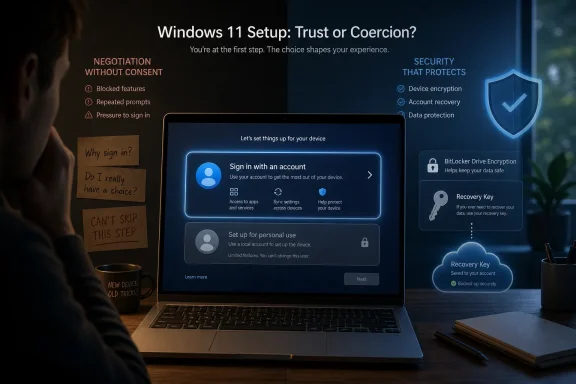
The modern Windows setup process has become a strange kind of negotiation, except one side does not get to negotiate. A new PC asks for a network, nudges the user into a Microsoft account, and moves briskly toward the desktop. The experience is designed to feel ordinary, almost administrative, the sort of thing one does before installing Chrome or copying files from an old machine.
That is precisely why the backlash has staying power. If Windows said, plainly and early, that an online account was required because Microsoft wanted to bind the device to cloud services, backup recovery material remotely, steer users toward OneDrive, and maintain a persistent consumer identity layer, at least the bargain would be visible. Instead, the company presents the requirement as a natural part of setup, then explains objections afterward in the language of safety.
Security is the strongest argument Microsoft has, and it is not a fake one. Automatic device encryption and cloud-backed BitLocker recovery keys can save ordinary users from a catastrophe. Anyone who has watched a nontechnical relative lose access to years of photos because a drive failed or a password was forgotten understands the appeal of designing recovery into the system rather than expecting users to build it themselves.
But the strongest version of Microsoft’s argument still leaves the central complaint intact. A safety feature can be useful and still be poorly disclosed. A default can be sensible and still be coercive. A recovery key stored in a Microsoft account can prevent data loss, while the path that put it there can still fail the basic test of informed consent.
For decades, that expectation was not radical. A Windows PC could be bought, powered on, named, and used. It might later connect to a domain, a Microsoft account, an email account, a game service, or a cloud backup provider, but those were subsequent choices layered on top of the machine.
Windows 11 inverted that relationship for many consumer scenarios. The Microsoft account became the gate to the desktop rather than an optional layer above it. That may look small from Redmond, where account identity is the connective tissue between Windows, OneDrive, Microsoft 365, Edge, Store, Xbox, and device recovery. It looks very different from the living room, repair bench, school lab, small office, rural home, or air-gapped workshop where “just sign in” is not always a neutral instruction.
The frustration in the latest Reddit flare-up came from that distinction. The original request was not for a better hack, a cleverer command, or a new registry incantation. It was for Microsoft to restore the choice directly in the setup experience. That is why replies offering Rufus options, console tricks, or post-install account conversions missed the point. A workaround is evidence that the policy is being resisted, not proof that the policy is acceptable.
The problem is that many users do not experience this as a thoughtfully explained security feature. They experience it as a trapdoor. They set up a laptop, follow the prompts, maybe switch to a PIN, maybe ignore the Microsoft account afterward, and months later encounter a recovery screen that assumes they understand a cloud-backed recovery model they were never taught.
That is not a BitLocker failure in the narrow technical sense. It is a disclosure failure. The system may have behaved as designed, but the user was not made meaningfully aware of the design.
The industry has spent years learning this lesson in other contexts. Consent is not just the presence of an “I agree” button somewhere in a setup flow. It is whether the user understands the consequential thing being done, what alternatives exist, and what happens if the account, key, device, or network is unavailable later. Windows 11’s account-first setup does not meet that higher standard when it quietly bundles identity, encryption recovery, cloud services, and device initialization into one fast-moving funnel.
Instead, Microsoft has spent years progressively narrowing the escape routes. Windows 11 Home launched with a Microsoft account requirement during setup. Windows 11 Pro later moved closer to the same consumer-account model for personal use. Insider builds then began removing familiar bypass methods, including the widely used OOBE bypass command and later other local-only commands that had become the enthusiast community’s survival kit.
That engineering effort matters. Companies reveal priorities not only through what they say, but through what they choose to fix, preserve, or close. Microsoft has devoted real attention to making local setup harder, which makes the “this is only for user safety” explanation feel incomplete.
There are reasonable technical concerns behind some of those changes. Unsupported bypasses can skip screens, create inconsistent configurations, or strand users in states Microsoft cannot easily support. But that is an argument for replacing hacks with a supported path, not for treating the absence of choice as a product virtue.
The workaround ecosystem has become a referendum on the policy. Rufus did not become a Windows account-politics tool because users woke up one morning desperate to customize installers. It did so because a mainstream operating system removed an expected path, and the community rebuilt it outside the official experience.
A Microsoft account makes it easier to promote OneDrive backup, synchronize settings, tie Store purchases to identity, recover apps, attach Microsoft 365 subscriptions, integrate Edge, surface Xbox features, and connect the device to Microsoft’s broader consumer ecosystem. Those integrations can be convenient. They can also blur the line between operating system setup and customer acquisition.
That is why the disclosure problem is so hard for Microsoft to name. If the company admits the account requirement is partly about ecosystem strategy, it validates the suspicion that users are being pushed into a commercial identity layer under the cover of security. If it insists the requirement is only about safety, it has to explain why a properly warned local-account option remains unacceptable.
The truth is probably messier than either slogan. Windows is both a security product and a business platform. Microsoft wants fewer unrecoverable consumer devices, fewer support disasters, and more users attached to services that make Windows more valuable to Microsoft. Those goals are not inherently illegitimate, but they require more candor than the current setup experience provides.
That internal tension is familiar to anyone who has watched Windows over the past decade. Microsoft is not one mind. It contains engineers who care deeply about user agency, executives who measure cloud attachment, security teams focused on recoverability, support teams trying to reduce failure cases, and product groups trying to make Windows feel less fragmented. The account requirement is where those incentives collide.
The public, however, only sees the outcome. Users see bypasses close. They see setup screens become more insistent. They see Microsoft talk about listening while leaving one of the most persistent complaints untouched.
That disconnect is corrosive because Windows is not a free web service users can casually abandon. It is infrastructure. It runs workstations, home PCs, point-of-sale systems, classrooms, labs, gaming rigs, repair shops, and family laptops. When Microsoft changes the terms of first boot, it is not merely optimizing an onboarding funnel; it is changing the social contract around the PC.
But Windows has never belonged only to the clean scenario. It thrives precisely because it runs in messy ones.
There are administrators staging machines where internet access is limited or deliberately restricted. There are technicians preparing PCs for relatives, clients, classrooms, or small offices where using a personal Microsoft account is inappropriate. There are users who want a local emergency account before joining work or school systems. There are families setting up devices for children or elderly relatives without wanting to entangle ownership, recovery, and personal credentials. There are privacy-conscious users who are not extremists for wanting a computer to start locally before it starts socially.
These are not edge cases in the moral sense, even if they are inconvenient for a mass-market setup funnel. They are part of the reason Windows became Windows. The platform’s reach came from accommodating hardware, networks, institutions, and user habits that did not fit a single polished path.
Microsoft’s current posture treats deviation as a support burden. The community sees it as legitimate use.
But the account requirement is harder than a Start menu toggle because it touches Microsoft’s broader identity strategy. Restoring a visible local-account option would be a small user-interface change with large symbolic meaning. It would tell users that Microsoft trusts them to choose, even when the company believes one choice is safer or more profitable.
That symbolism is exactly why the issue keeps returning. Users are not only debating setup mechanics. They are debating whether Microsoft sees the PC as something the customer owns or something the customer accesses through Microsoft’s permission structure.
The answer does not have to be binary. Microsoft could recommend a Microsoft account, explain the security benefits, offer cloud recovery, warn about local-account risks, and still provide a clear offline option. It could require users to acknowledge that they are responsible for saving recovery keys if they decline account backup. It could make the safe path obvious without making the alternate path adversarial.
The fact that this compromise has not materialized tells users something. Perhaps not the whole story, but enough to deepen suspicion.
That clarity is dangerous for Microsoft because it strips away the usual escape hatches in the debate. The company cannot answer “give us a choice” with “there are benefits to signing in.” Users know there are benefits. The issue is whether benefits justify compulsion.
Nor can Microsoft rely indefinitely on the existence of unsupported workarounds. Workarounds are unstable by design, and Microsoft has been removing them when they become too popular. Telling users they can still hack around a policy while simultaneously closing the hacks is not a sustainable trust strategy.
The real test is whether Microsoft can build a setup flow that treats adults like adults. That means explaining what account sign-in does, what encryption recovery means, where keys are stored, what happens if the account is lost, and how to proceed locally if the user accepts the tradeoffs. Anything less keeps the company trapped in the same cycle: mandate, workaround, closure, backlash, repeat.
 Microsoft Turned Setup Into a Contract Users Never Read
The modern Windows setup process has become a strange kind of negotiation, except one side does not get to negotiate. A new PC asks for a network, nudges the user into a Microsoft account, and moves briskly toward the desktop. The experience is designed to feel ordinary, almost administrative, the sort of thing one does before installing Chrome or copying files from an old machine.That is precisely why the backlash has staying power. If Windows said, plainly and early, that an online account was required because Microsoft wanted to bind the device to cloud services, backup recovery material remotely, steer users toward OneDrive, and maintain a persistent consumer identity layer, at least the bargain would be visible. Instead, the company presents the requirement as a natural part of setup, then explains objections afterward in the language of safety.
Security is the strongest argument Microsoft has, and it is not a fake one. Automatic device encryption and cloud-backed BitLocker recovery keys can save ordinary users from a catastrophe. Anyone who has watched a nontechnical relative lose access to years of photos because a drive failed or a password was forgotten understands the appeal of designing recovery into the system rather than expecting users to build it themselves.
But the strongest version of Microsoft’s argument still leaves the central complaint intact. A safety feature can be useful and still be poorly disclosed. A default can be sensible and still be coercive. A recovery key stored in a Microsoft account can prevent data loss, while the path that put it there can still fail the basic test of informed consent.
The Local Account Was Never Just a Nostalgia Feature
Microsoft often talks about local accounts as though they are a legacy preference, the sort of thing power users cling to because they resent change. That framing badly undersells the issue. A local account is not just an old way to log in; it is the simplest expression of the idea that a general-purpose computer can be initialized, owned, and used without first creating a relationship with the operating-system vendor.For decades, that expectation was not radical. A Windows PC could be bought, powered on, named, and used. It might later connect to a domain, a Microsoft account, an email account, a game service, or a cloud backup provider, but those were subsequent choices layered on top of the machine.
Windows 11 inverted that relationship for many consumer scenarios. The Microsoft account became the gate to the desktop rather than an optional layer above it. That may look small from Redmond, where account identity is the connective tissue between Windows, OneDrive, Microsoft 365, Edge, Store, Xbox, and device recovery. It looks very different from the living room, repair bench, school lab, small office, rural home, or air-gapped workshop where “just sign in” is not always a neutral instruction.
The frustration in the latest Reddit flare-up came from that distinction. The original request was not for a better hack, a cleverer command, or a new registry incantation. It was for Microsoft to restore the choice directly in the setup experience. That is why replies offering Rufus options, console tricks, or post-install account conversions missed the point. A workaround is evidence that the policy is being resisted, not proof that the policy is acceptable.
BitLocker Is the Best Defense and the Worst Disclosure
BitLocker is where Microsoft’s case is most compelling and most vulnerable. Device encryption protects data at rest, which matters more than ever in a world of portable laptops, stolen devices, and recycled hardware. Backing up recovery keys to a Microsoft account can spare users from the brutal moment when a firmware change, motherboard issue, TPM event, or recovery scenario leaves Windows asking for a key they cannot produce.The problem is that many users do not experience this as a thoughtfully explained security feature. They experience it as a trapdoor. They set up a laptop, follow the prompts, maybe switch to a PIN, maybe ignore the Microsoft account afterward, and months later encounter a recovery screen that assumes they understand a cloud-backed recovery model they were never taught.
That is not a BitLocker failure in the narrow technical sense. It is a disclosure failure. The system may have behaved as designed, but the user was not made meaningfully aware of the design.
The industry has spent years learning this lesson in other contexts. Consent is not just the presence of an “I agree” button somewhere in a setup flow. It is whether the user understands the consequential thing being done, what alternatives exist, and what happens if the account, key, device, or network is unavailable later. Windows 11’s account-first setup does not meet that higher standard when it quietly bundles identity, encryption recovery, cloud services, and device initialization into one fast-moving funnel.
Microsoft’s Workaround War Says More Than Its Security Pitch
If Microsoft merely preferred online accounts, it could leave the local-account path visible but discouraged. If the company believed local setup was risky for ordinary users, it could place a warning in front of it. If the concern was that bypass commands skipped important screens, it could build a supported offline path that preserved those screens while still allowing local identity.Instead, Microsoft has spent years progressively narrowing the escape routes. Windows 11 Home launched with a Microsoft account requirement during setup. Windows 11 Pro later moved closer to the same consumer-account model for personal use. Insider builds then began removing familiar bypass methods, including the widely used OOBE bypass command and later other local-only commands that had become the enthusiast community’s survival kit.
That engineering effort matters. Companies reveal priorities not only through what they say, but through what they choose to fix, preserve, or close. Microsoft has devoted real attention to making local setup harder, which makes the “this is only for user safety” explanation feel incomplete.
There are reasonable technical concerns behind some of those changes. Unsupported bypasses can skip screens, create inconsistent configurations, or strand users in states Microsoft cannot easily support. But that is an argument for replacing hacks with a supported path, not for treating the absence of choice as a product virtue.
The workaround ecosystem has become a referendum on the policy. Rufus did not become a Windows account-politics tool because users woke up one morning desperate to customize installers. It did so because a mainstream operating system removed an expected path, and the community rebuilt it outside the official experience.
The Corporate Incentives Are the Part Microsoft Won’t Explain
The uncomfortable part of this debate is that Microsoft’s account requirement sits at the intersection of security, support, telemetry, cloud retention, subscription economics, and platform control. That does not mean every product manager involved is scheming to trap users. It does mean the company benefits from a signed-in Windows population in ways that extend far beyond BitLocker recovery.A Microsoft account makes it easier to promote OneDrive backup, synchronize settings, tie Store purchases to identity, recover apps, attach Microsoft 365 subscriptions, integrate Edge, surface Xbox features, and connect the device to Microsoft’s broader consumer ecosystem. Those integrations can be convenient. They can also blur the line between operating system setup and customer acquisition.
That is why the disclosure problem is so hard for Microsoft to name. If the company admits the account requirement is partly about ecosystem strategy, it validates the suspicion that users are being pushed into a commercial identity layer under the cover of security. If it insists the requirement is only about safety, it has to explain why a properly warned local-account option remains unacceptable.
The truth is probably messier than either slogan. Windows is both a security product and a business platform. Microsoft wants fewer unrecoverable consumer devices, fewer support disasters, and more users attached to services that make Windows more valuable to Microsoft. Those goals are not inherently illegitimate, but they require more candor than the current setup experience provides.
Hanselman’s Dissent Made the Silence Louder
Scott Hanselman’s public opposition to the mandatory-account experience is important because it punctures the idea that this is merely a user-versus-Microsoft argument. When a senior Microsoft figure says, in effect, that the policy should change, the debate moves inside the building. It becomes a question not of whether Microsoft has heard the complaint, but of why the people who agree with it have not won.That internal tension is familiar to anyone who has watched Windows over the past decade. Microsoft is not one mind. It contains engineers who care deeply about user agency, executives who measure cloud attachment, security teams focused on recoverability, support teams trying to reduce failure cases, and product groups trying to make Windows feel less fragmented. The account requirement is where those incentives collide.
The public, however, only sees the outcome. Users see bypasses close. They see setup screens become more insistent. They see Microsoft talk about listening while leaving one of the most persistent complaints untouched.
That disconnect is corrosive because Windows is not a free web service users can casually abandon. It is infrastructure. It runs workstations, home PCs, point-of-sale systems, classrooms, labs, gaming rigs, repair shops, and family laptops. When Microsoft changes the terms of first boot, it is not merely optimizing an onboarding funnel; it is changing the social contract around the PC.
The Real User Base Is Broader Than Microsoft’s Happy Path
The account mandate assumes a clean, connected, consumer-friendly scenario: one person, one device, reliable internet, a Microsoft account they control, and a willingness to attach that device to a personal cloud identity. That scenario exists. It may even be the most common one for new retail laptops.But Windows has never belonged only to the clean scenario. It thrives precisely because it runs in messy ones.
There are administrators staging machines where internet access is limited or deliberately restricted. There are technicians preparing PCs for relatives, clients, classrooms, or small offices where using a personal Microsoft account is inappropriate. There are users who want a local emergency account before joining work or school systems. There are families setting up devices for children or elderly relatives without wanting to entangle ownership, recovery, and personal credentials. There are privacy-conscious users who are not extremists for wanting a computer to start locally before it starts socially.
These are not edge cases in the moral sense, even if they are inconvenient for a mass-market setup funnel. They are part of the reason Windows became Windows. The platform’s reach came from accommodating hardware, networks, institutions, and user habits that did not fit a single polished path.
Microsoft’s current posture treats deviation as a support burden. The community sees it as legitimate use.
User Trust Is Harder to Patch Than the Setup Screen
Microsoft has recently shown that it can reverse or soften unpopular Windows decisions when pressure accumulates. Changes to update controls, Start menu customization, and quality-of-life behaviors suggest that the company knows Windows 11 cannot simply be a delivery vehicle for corporate priorities. The Windows user base is too large, too technical, and too historically scarred for that.But the account requirement is harder than a Start menu toggle because it touches Microsoft’s broader identity strategy. Restoring a visible local-account option would be a small user-interface change with large symbolic meaning. It would tell users that Microsoft trusts them to choose, even when the company believes one choice is safer or more profitable.
That symbolism is exactly why the issue keeps returning. Users are not only debating setup mechanics. They are debating whether Microsoft sees the PC as something the customer owns or something the customer accesses through Microsoft’s permission structure.
The answer does not have to be binary. Microsoft could recommend a Microsoft account, explain the security benefits, offer cloud recovery, warn about local-account risks, and still provide a clear offline option. It could require users to acknowledge that they are responsible for saving recovery keys if they decline account backup. It could make the safe path obvious without making the alternate path adversarial.
The fact that this compromise has not materialized tells users something. Perhaps not the whole story, but enough to deepen suspicion.
The Reddit Thread Was a Symptom, Not the Event
The latest flare-up matters less as a standalone social-media moment than as a pressure reading. A single post did not create the backlash. It condensed years of irritation into a clean demand: stop making users trick the operating system to use the operating system.That clarity is dangerous for Microsoft because it strips away the usual escape hatches in the debate. The company cannot answer “give us a choice” with “there are benefits to signing in.” Users know there are benefits. The issue is whether benefits justify compulsion.
Nor can Microsoft rely indefinitely on the existence of unsupported workarounds. Workarounds are unstable by design, and Microsoft has been removing them when they become too popular. Telling users they can still hack around a policy while simultaneously closing the hacks is not a sustainable trust strategy.
The real test is whether Microsoft can build a setup flow that treats adults like adults. That means explaining what account sign-in does, what encryption recovery means, where keys are stored, what happens if the account is lost, and how to proceed locally if the user accepts the tradeoffs. Anything less keeps the company trapped in the same cycle: mandate, workaround, closure, backlash, repeat.
The Choice Microsoft Keeps Hiding in Plain Sight
The practical lesson for Windows users is not that Microsoft accounts are bad. For many people, they are useful. The lesson is that account identity, device encryption, and recovery access are now intertwined deeply enough that setup choices deserve more attention than Microsoft gives them.- Users setting up a new Windows 11 PC should understand whether device encryption or BitLocker is enabled and where the recovery key is stored.
- Anyone using a Microsoft account during setup should verify that they can actually access that account later, including recovery email, phone, and multifactor authentication methods.
- People who prefer local accounts should expect Microsoft’s official setup path to resist that preference unless the company changes course.
- IT professionals and family tech helpers should document recovery keys before handing a machine to its final user.
- Microsoft could reduce much of the anger by adding a supported local-account path with explicit recovery-key warnings instead of forcing users into unsupported bypasses.
References
- Primary source: The Eastern Herald
Published: 2026-06-15T18:03:16.257512
Windows 11 Microsoft Account Backlash Reveals a Disclosure Failure
Windows 11 users are furious over the mandatory Microsoft account requirement. But the real issue isn't sign-in — it's what Microsoft never told them it controls.easternherald.com - Related coverage: windowscentral.com
Windows 11 users say Microsoft account requirements are creeping into everything and they are tired of it | Windows Central
A Reddit discussion about local accounts turns into a bigger debate over privacy, transparency, and user control on Windows 11.www.windowscentral.com - Related coverage: techspot.com
Microsoft is removing the ability to easily install Windows 11 with a local account | TechSpot
Microsoft has released a new Windows 11 preview build for beta testers in the Insider program. Build 26220.6772 (KB5065797) introduces several changes that will gradually roll out...www.techspot.com - Related coverage: tomshardware.com
Microsoft clamping down on Windows 11 local account setup — latest Insider build removes 'local-only commands,' skipping Microsoft account sign-in will crash setup process | Tom's Hardware
Microsoft is clamping down on the practicewww.tomshardware.com - Related coverage: arstechnica.com
New Windows 11 build makes mandatory Microsoft Account sign-in even more mandatory - Ars Technica
Bypassnro" is an easy MS Account workaround for Home and Pro Windows editions.arstechnica.com - Related coverage: pureinfotech.com
Microsoft blocks bypass to skip Microsoft Account during setup on Windows 11 - Pureinfotech
Microsoft removes workarounds to bypass the Microsoft account when setting up Windows 11, including "bypassnro" and ms-cxh:localonly." pureinfotech.com
- Related coverage: windowsreport.com
Windows 11 test build kills more local‑account hacks — Microsoft account now required
New Dev and Beta builds remove the ‘bypassnro’ and ‘ms‑cxh:localonly’ tricks. Microsoft also adds a small perk: a command to choose your C:Users folder name during setup. Quick take Why it matters What changed in setup Does ‘Domain join’ still work on Pro? Workarounds after setup Timeline &... windowsreport.com
- Related coverage: howtogeek.com
Windows 11 Pro's Setup Process Will Need a Microsoft Account
You can't dodge a Microsoft account with Windows 11 Pro anymore. www.howtogeek.com
- Related coverage: toptechguides.com
- Related coverage: tech2geek.net
Windows 11: Microsoft Permanently Blocks Local Account Creation During Setup - Tech2Geek
Not long ago, a single command line was enough to bypass the mandatory Microsoft account requirement during the Windows 11 OOBE (Out-of-Box Experience) setupwww.tech2geek.net - Related coverage: tomsguide.com
Microsoft might be cracking down on Windows 11 local account setups — here's what we know so far | Tom's Guide
Microsoft is attempting to restrict account access for local accounts.www.tomsguide.com - Related coverage: winbuzzer.com
Microsoft VP Wants to End Windows 11 Microsoft Account Mandate
Microsoft VP Scott Hanselman has revealed he is working to end Windows 11's mandatory Microsoft account requirement, amid a growing internal campaign.winbuzzer.com - Related coverage: pcworld.com
Windows 11 Pro lets you install Windows 11 with a local account | PCWorld
A source close to Microsoft has confirmed: Windows 10 Home will require a Microsoft account during the signup process.www.pcworld.com - Related coverage: notebookcheck.net
Microsoft doubles down on local account restrictions in Windows 11 setup - Notebookcheck News
In the latest preview builds of Windows 11, Microsoft has made it harder to create a local account than before. The company has blocked most of the known workarounds, and the initial setup now requires an internet connection. www.notebookcheck.net
- Related coverage: windowsforum.com
Windows 11 Setup May Get Local Account Option Back After Hanselman ‘Working On It’ | Windows Forum
A long-running irritation in Windows 11 setup may finally be headed for a fix. Microsoft’s Scott Hanselman has publicly acknowledged frustration with the...windowsforum.com - Related coverage: pcgamer.com
Microsoft is planning to make it harder than ever to install Windows without an internet connection and a Microsoft account | PC Gamer
The number of work arounds is ever shrinking...www.pcgamer.com
