

PCMag’s updated 2026 mini-desktop guide is a useful reminder that the category is no longer limited to low-power office boxes. Current systems span inexpensive Windows machines for browsing and productivity, business-focused units built for VESA mounting and wired networks, and compact workstations using high-end mobile processors.
The defining trade-off remains physical size. Most mini PCs use laptop-class AMD Ryzen, Intel Core, or Core Ultra processors because cooling and power budgets are constrained. That is sufficient for mainstream office work, web use, media playback, and many light development tasks, but buyers expecting desktop-class graphics performance should look closely at the specifications rather than the enclosure.
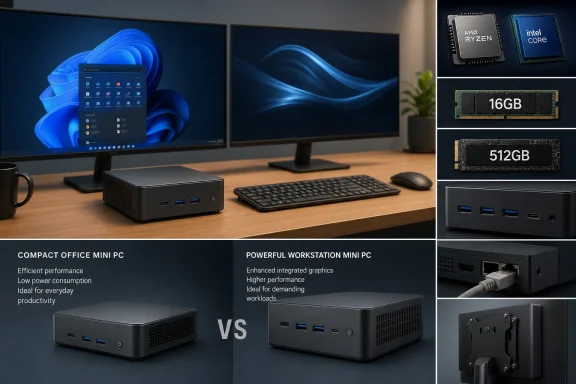
PCMag’s guidance is straightforward: treat a mini PC much like a laptop purchase, but pay more attention to expansion and ports. A machine with 16GB of RAM and a 512GB SSD is a safer baseline for Windows 11 than the cheapest 8GB/256GB configurations, particularly where Teams, browser-heavy workloads, or local virtual machines are involved.
Storage and memory upgradeability matter. Many mini PCs use M.2 SSDs and laptop-style memory, but some low-cost models solder components in place or leave only one storage slot. That can turn an initially cheap system into a short-lived purchase. Bare-bones kits can offer better value for builders who already have compatible RAM, SSDs, and a Windows license, but they require careful compatibility checks.
Ports also deserve more scrutiny than on a conventional tower. Confirm the number and placement of USB-A and USB-C ports, display outputs, Ethernet speed, Wi-Fi generation, and whether the system can drive the required number of monitors at the desired resolution and refresh rate. Front-facing ports are especially relevant when the unit will be mounted behind a display or placed in a cabinet.
For IT buyers, that means the NUC badge alone does not establish a common support model, warranty path, firmware cadence, or internal layout. Check the actual manufacturer, processor generation, operating-system support, and service terms before standardizing on a model.
Apple remains outside the Windows equation, but its Mac mini and Mac Studio illustrate where compact-desktop hardware is heading; Apple’s current Mac Studio configurations use M4 Max or M3 Ultra chips, according to Apple.
For most Windows users, the practical choice is still a well-cooled mini PC with 16GB of RAM, upgradeable SSD storage, full-size Ethernet, and verified multi-display support.
The defining trade-off remains physical size. Most mini PCs use laptop-class AMD Ryzen, Intel Core, or Core Ultra processors because cooling and power budgets are constrained. That is sufficient for mainstream office work, web use, media playback, and many light development tasks, but buyers expecting desktop-class graphics performance should look closely at the specifications rather than the enclosure.
 What Windows buyers should check
PCMag’s guidance is straightforward: treat a mini PC much like a laptop purchase, but pay more attention to expansion and ports. A machine with 16GB of RAM and a 512GB SSD is a safer baseline for Windows 11 than the cheapest 8GB/256GB configurations, particularly where Teams, browser-heavy workloads, or local virtual machines are involved.Storage and memory upgradeability matter. Many mini PCs use M.2 SSDs and laptop-style memory, but some low-cost models solder components in place or leave only one storage slot. That can turn an initially cheap system into a short-lived purchase. Bare-bones kits can offer better value for builders who already have compatible RAM, SSDs, and a Windows license, but they require careful compatibility checks.
Ports also deserve more scrutiny than on a conventional tower. Confirm the number and placement of USB-A and USB-C ports, display outputs, Ethernet speed, Wi-Fi generation, and whether the system can drive the required number of monitors at the desired resolution and refresh rate. Front-facing ports are especially relevant when the unit will be mounted behind a display or placed in a cabinet.
NUC is still a name, not a single platform
The guide notes that “NUC” remains widely used despite Intel ending its direct NUC product initiative in 2023. Intel announced an agreement that gave Asus a non-exclusive license to manufacture, sell, and develop NUC systems, while support for many existing Intel NUC products transitioned to Asus in January 2024.For IT buyers, that means the NUC badge alone does not establish a common support model, warranty path, firmware cadence, or internal layout. Check the actual manufacturer, processor generation, operating-system support, and service terms before standardizing on a model.
Performance ceilings are rising
PCMag highlights newer high-end options such as AMD’s Ryzen AI Max+ 395 platform, which can use shared system memory for graphics and AI workloads. These designs can deliver substantially more capability than conventional integrated-graphics mini PCs, though they are still specialist purchases rather than replacements for an upgradeable tower with a discrete GPU.Apple remains outside the Windows equation, but its Mac mini and Mac Studio illustrate where compact-desktop hardware is heading; Apple’s current Mac Studio configurations use M4 Max or M3 Ultra chips, according to Apple.
For most Windows users, the practical choice is still a well-cooled mini PC with 16GB of RAM, upgradeable SSD storage, full-size Ethernet, and verified multi-display support.
References
- Primary source: PCMag UK
Published: 2026-07-13T19:57:12+00:00
The Best Mini Desktops for 2026
Looking to save space without sacrificing power? Our experts tested the latest mini desktops—Windows and macOS alike—to find the most capable, customizable, and cost-effective tiny PCs for every user.uk.pcmag.com
