

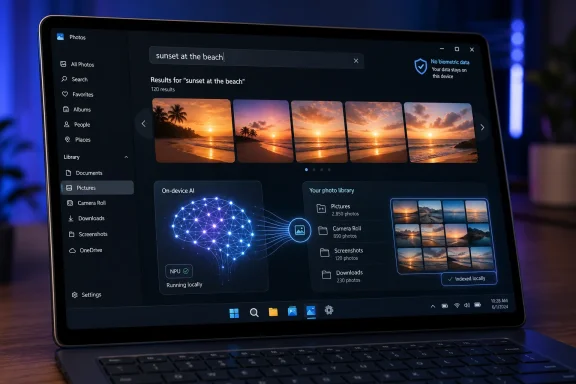
Microsoft has added semantic, natural-language photo search to the Windows 11 Photos app for Copilot+ PCs, letting users find locally indexed pictures and videos by typing descriptions such as “sunset at the beach” or “family time.” The feature sounds small, almost quaint, compared with Recall, Copilot, and the rest of Microsoft’s AI push. But it may be one of the clearest examples yet of where Windows AI is actually useful: not as a chatbot hovering over the desktop, but as a local retrieval layer for the messy personal archive that most PCs have become.
The catch is that Microsoft is still asking users to accept a new kind of indexing bargain. Photos search is not facial recognition, Microsoft says, and the company says no biometric data is collected, processed, or stored for the semantic feature. Even so, the arrival of natural-language search inside Photos shows how quickly Windows is moving from file names and folders toward machine-interpreted meaning.
For years, Windows search has been a paradox. It is one of the operating system’s most frequently used features, and also one of the first things power users learn not to fully trust. Search for the exact file name and it might work; search for what the file is about and the experience has historically depended on metadata, indexing scope, file type, and a little luck.
The Photos app update attacks that problem in the place where old search breaks most visibly. People do not usually name their photos well. They accumulate images from phones, downloads, screenshots, cameras, messaging apps, cloud sync folders, and SD cards, then expect to find “that receipt,” “the dog at the lake,” or “the family dinner where everyone was outside.”
That is the real problem Microsoft is solving here. “IMG_4821” is not a memory. “Sunset at the beach” is. Semantic search is an attempt to make Windows retrieve files the way humans remember them, not the way file systems store them.
It is also a clever place to introduce local AI because the user benefit is immediately legible. Nobody needs a keynote to understand why searching for “red car in snow” is better than scrolling through 9,000 thumbnails. This is precisely the kind of feature that makes an NPU feel less like a spec-sheet trophy and more like a practical addition to a PC.
Copilot+ PCs are defined by their neural processing capability, with Microsoft positioning them as Windows machines able to run a growing set of AI features locally. In practice, that means many users on perfectly capable Windows 11 PCs will still see the older search model, while newer devices get the machine-learning layer that understands visual content and descriptive queries.
That split is becoming one of the defining tensions of modern Windows. Microsoft wants AI features to justify new hardware, and OEMs certainly want a stronger reason for users to upgrade. But Windows users are accustomed to feature updates arriving broadly across compatible PCs, especially when those features appear inside inbox apps like Photos.
The result is a product message that is both technically defensible and commercially convenient. Local semantic indexing can be compute-intensive, and Microsoft has good reasons to prefer hardware that can process AI workloads efficiently. But users will also read the limitation as a familiar form of platform segmentation: the future of Windows is here, just not necessarily on the PC they already own.
That shift changes the job of search. A query for “pasta” can surface images containing lasagna. A query for “family time” can plausibly return pictures that never included the words “family” or “time” anywhere in the file name, EXIF metadata, or folder path. The system is not merely matching; it is interpreting.
This is why Photos is such an important test case. Documents at least contain text. Photos are mostly opaque to traditional search unless they have metadata, tags, location information, or file names supplied by a human or a cloud service. Visual semantic search gives Windows a way to treat images as searchable content without asking users to curate their libraries by hand.
That is a major usability win, but it also means the index becomes more sensitive than a list of file names. A semantic index is a machine-generated map of what the system thinks is inside your files. Even when it stays local, it deserves more scrutiny than ordinary thumbnail caching.
That last sentence is doing a lot of work. Consumers have been trained by years of cloud photo products to associate smart photo search with face grouping, identity inference, and remote processing. Microsoft is drawing a line: this is not facial recognition, and it is not a biometric database.
The distinction matters. Searching for “birthday party” or “person on a bicycle” is different from identifying a specific person across a photo library. The first describes visual content; the second creates a persistent identity relationship. Microsoft is trying to make the former feel useful without triggering the fear attached to the latter.
Still, privacy-minded users and admins will want to understand the implementation, not just the promise. Microsoft says semantic indexing data is stored locally on the PC, or local to Cloud PC storage for AI-enabled Windows 365 devices, and that it is not stored by Microsoft or used to train AI models. That is the right privacy posture for a feature like this, but it also shifts responsibility back to endpoint security. If the index is local, then local device compromise, malicious software, profile access, and backup handling become the operational questions.
Microsoft’s own broader search documentation notes that installed apps may be able to read data in the index, which is a plain reminder that Windows is an ecosystem, not a sealed appliance. The practical lesson is simple: semantic search reduces one category of concern by avoiding Microsoft cloud storage and model training, but it does not remove the need to trust the endpoint.
For home users, that means the feature is likely a net positive if the device is personal, encrypted, and reasonably maintained. For family PCs, shared accounts, or machines that mix personal and work data, the calculus becomes more complicated. A search feature that makes photos easier for you to find can also make them easier for someone else at the keyboard to find.
For enterprise IT, the issue is less emotional and more procedural. What data is indexed? Which folders are included? Can indexing be limited by location or file type? How does this interact with device management, profile separation, eDiscovery expectations, and data loss prevention tools? Those are not reasons to reject semantic search, but they are reasons to treat it as part of the endpoint data surface.
That strategy makes sense. Photos are emotionally valuable, computationally rich, and chronically disorganized. They are also an easier sell than asking users to let an assistant read every window on the desktop. If Microsoft can make AI feel helpful in Photos, it can normalize the broader idea that Windows should understand user content at a higher level.
There is a product lesson here that Microsoft sometimes forgets. Users are not necessarily opposed to AI in Windows. They are opposed to AI that feels imposed, vague, or primarily useful to Microsoft’s platform ambitions. Semantic photo search has a concrete job and a visible result. Type a description, get the picture. That is a much stronger pitch than a floating button that promises productivity in the abstract.
The risk is feature sprawl. Photos has to remain understandable as a photo app, not become a showroom for every consumer AI model Microsoft wants to ship. If the app’s interface becomes cluttered with generation, editing, restyling, cloud handoffs, search modes, and promotional prompts, the utility of semantic search could be buried under the very AI branding it is meant to validate.
This is a pragmatic scope. These are the files people lose, search for, and complain about. They are also the file types where semantic understanding can provide immediate value without requiring every app developer to reinvent search inside their own silo.
But the limited format list is also a reminder that semantic Windows is not yet universal Windows. If your workflow depends on RAW photo formats, niche design files, code repositories, scientific data, encrypted containers, or proprietary application formats, the old world still applies. The AI index is only as useful as what it can see and parse.
Language support is another boundary. Microsoft says improved semantic search is optimized for a limited set of languages, including major English variants, French, German, Spanish, Japanese, and Simplified Chinese. That is a large audience, but not the whole Windows audience. For everyone else, traditional lexical search remains part of the daily reality.
That makes the indexing boundary a privacy and usability boundary. If a folder is included, it may become part of the semantic retrieval experience. If it is excluded, natural-language search may miss it. The same tradeoff applies to file types and content indexing settings.
For admins, this is familiar territory with a new layer of meaning. Search indexing has long been manageable, but semantic indexing makes those choices more consequential. Organizations that already separate sensitive data into protected locations will be better positioned than those that rely on user habit and folder chaos.
For consumers, Microsoft needs to make these controls plain. If Photos can search locally indexed pictures by description, users should be able to understand what “indexed” means without spelunking through legacy control panels and modern Settings pages. The feature will earn more trust if the control surface is visible, coherent, and written for normal people.
Semantic Photos search is a narrower and more defensible version of the same general idea. Instead of indexing everything the user sees, it searches a known class of content inside a familiar app. Instead of promising to reconstruct activity, it helps retrieve media the user already chose to store. Instead of identity-based face recognition, Microsoft says it avoids biometric data.
That narrowing is not a weakness. It is exactly how local AI should reach Windows users: bounded, explainable, useful, and controllable. The best AI features in an operating system will often be the least theatrical ones. They will not announce themselves as revolutions; they will remove a daily annoyance.
If Microsoft has learned anything from Recall, it should be that trust is earned at the feature boundary. Users need to know what is indexed, where the index lives, what leaves the device, what can be disabled, and what the feature explicitly does not do. Photos semantic search appears designed with those concerns in mind, though the proof will be in behavior across real devices and updates.
The same semantic indexing model that helps a user find vacation photos can also help employees find documents, screenshots, diagrams, scanned receipts, and project images. That can reduce friction and help desk tickets, especially in organizations where file naming practices are aspirational at best.
The governance challenge is that better retrieval changes data behavior. When users can find things more easily, they may also rediscover old sensitive files, duplicate data into local folders, or rely more heavily on endpoint storage. Semantic search does not create those files, but it lowers the friction of surfacing them.
Admins should therefore treat Copilot+ search features as part of endpoint planning. Device encryption, account separation, retention policy, local storage rules, and app trust all become more relevant when the OS is better at understanding local content. The feature is not inherently dangerous, but it is powerful enough to deserve policy attention.
Semantic photo search is different because everyone understands the problem. People have too many photos. They cannot find the one they want. They remember scenes, people, objects, places, seasons, and feelings better than file names. A PC that helps bridge that gap is doing something useful.
That does not mean users will buy a new laptop just for Photos search. They probably will not. But features like this accumulate. Better search, better captions, better camera effects, better image tools, better local assistance in Settings — together, they form the argument that a newer Windows PC can feel meaningfully more capable without sending every task to the cloud.
This is the more plausible future of AI PCs. Not one killer app, but dozens of small local conveniences, each attached to a familiar workflow. The danger for Microsoft is overbranding them until they feel like ads. The opportunity is to let them fade into Windows until users simply expect their PC to understand more.
That shift has implications far beyond Photos. If Windows can understand that a picture contains a beach, a document concerns a budget, a screenshot shows an error message, and a spreadsheet relates to a client project, then the desktop becomes less dependent on user-imposed order. The operating system starts compensating for human messiness.
This is both liberating and slightly unsettling. The PC has historically been a user-directed machine: you create folders, name files, choose locations, and invoke programs. Semantic indexing asks the machine to infer structure where the user did not provide it. That can make computing easier, but it also gives the system more interpretive authority.
The best version of this future keeps the user in command. AI should make forgotten files findable, not make assumptions invisible. It should expose why a result appeared, respect excluded locations, and fail gracefully when it does not understand. Search that feels magical for the first week can become maddening if users cannot predict or control it.
That gives users and admins a practical checklist before they decide how much to trust it.
Microsoft’s natural-language Photos search is the kind of Windows AI feature that deserves to survive the hype cycle because it solves a real problem in a bounded way. It also previews the operating system Microsoft is trying to build: one where the PC understands local content well enough to retrieve it by meaning, while insisting that privacy can be preserved through on-device processing and careful limits. The next test is whether Microsoft can keep that bargain as semantic indexing spreads from Photos into more of Windows, because the future users will accept is not the loudest AI desktop — it is the one that helps without making them wonder what else it has learned.
The catch is that Microsoft is still asking users to accept a new kind of indexing bargain. Photos search is not facial recognition, Microsoft says, and the company says no biometric data is collected, processed, or stored for the semantic feature. Even so, the arrival of natural-language search inside Photos shows how quickly Windows is moving from file names and folders toward machine-interpreted meaning.
 Microsoft’s Most Convincing AI Feature Is Hiding in the Camera Roll
For years, Windows search has been a paradox. It is one of the operating system’s most frequently used features, and also one of the first things power users learn not to fully trust. Search for the exact file name and it might work; search for what the file is about and the experience has historically depended on metadata, indexing scope, file type, and a little luck.The Photos app update attacks that problem in the place where old search breaks most visibly. People do not usually name their photos well. They accumulate images from phones, downloads, screenshots, cameras, messaging apps, cloud sync folders, and SD cards, then expect to find “that receipt,” “the dog at the lake,” or “the family dinner where everyone was outside.”
That is the real problem Microsoft is solving here. “IMG_4821” is not a memory. “Sunset at the beach” is. Semantic search is an attempt to make Windows retrieve files the way humans remember them, not the way file systems store them.
It is also a clever place to introduce local AI because the user benefit is immediately legible. Nobody needs a keynote to understand why searching for “red car in snow” is better than scrolling through 9,000 thumbnails. This is precisely the kind of feature that makes an NPU feel less like a spec-sheet trophy and more like a practical addition to a PC.
The Copilot+ Wall Is the Product Strategy
Microsoft’s support page is explicit about the boundary: semantic, natural-language search in Photos is for Windows 11 users on Copilot+ PCs. That matters. This is not just a Photos feature; it is another brick in the wall Microsoft is building around the Copilot+ hardware class.Copilot+ PCs are defined by their neural processing capability, with Microsoft positioning them as Windows machines able to run a growing set of AI features locally. In practice, that means many users on perfectly capable Windows 11 PCs will still see the older search model, while newer devices get the machine-learning layer that understands visual content and descriptive queries.
That split is becoming one of the defining tensions of modern Windows. Microsoft wants AI features to justify new hardware, and OEMs certainly want a stronger reason for users to upgrade. But Windows users are accustomed to feature updates arriving broadly across compatible PCs, especially when those features appear inside inbox apps like Photos.
The result is a product message that is both technically defensible and commercially convenient. Local semantic indexing can be compute-intensive, and Microsoft has good reasons to prefer hardware that can process AI workloads efficiently. But users will also read the limitation as a familiar form of platform segmentation: the future of Windows is here, just not necessarily on the PC they already own.
Search Is No Longer About Strings
The important phrase in Microsoft’s documentation is semantic indexing. Traditional indexing is largely about strings, properties, locations, and in some cases file contents. Semantic indexing adds a conceptual layer, allowing results to appear because they are related to the meaning of a query rather than because they contain the exact query term.That shift changes the job of search. A query for “pasta” can surface images containing lasagna. A query for “family time” can plausibly return pictures that never included the words “family” or “time” anywhere in the file name, EXIF metadata, or folder path. The system is not merely matching; it is interpreting.
This is why Photos is such an important test case. Documents at least contain text. Photos are mostly opaque to traditional search unless they have metadata, tags, location information, or file names supplied by a human or a cloud service. Visual semantic search gives Windows a way to treat images as searchable content without asking users to curate their libraries by hand.
That is a major usability win, but it also means the index becomes more sensitive than a list of file names. A semantic index is a machine-generated map of what the system thinks is inside your files. Even when it stays local, it deserves more scrutiny than ordinary thumbnail caching.
Microsoft Knows Privacy Is the Feature’s Make-or-Break Issue
Microsoft’s support language is carefully chosen. The company says semantic search works with photos stored locally on the device that have been indexed. It also says no biometric data is collected, processed, or stored for the Photos semantic search feature, even if images include humans or faces.That last sentence is doing a lot of work. Consumers have been trained by years of cloud photo products to associate smart photo search with face grouping, identity inference, and remote processing. Microsoft is drawing a line: this is not facial recognition, and it is not a biometric database.
The distinction matters. Searching for “birthday party” or “person on a bicycle” is different from identifying a specific person across a photo library. The first describes visual content; the second creates a persistent identity relationship. Microsoft is trying to make the former feel useful without triggering the fear attached to the latter.
Still, privacy-minded users and admins will want to understand the implementation, not just the promise. Microsoft says semantic indexing data is stored locally on the PC, or local to Cloud PC storage for AI-enabled Windows 365 devices, and that it is not stored by Microsoft or used to train AI models. That is the right privacy posture for a feature like this, but it also shifts responsibility back to endpoint security. If the index is local, then local device compromise, malicious software, profile access, and backup handling become the operational questions.
The Index Is Local, but Local Does Not Mean Invisible
A local index is far preferable to a cloud service scanning private photo libraries by default. But “local” should not be mistaken for “irrelevant to risk.” Local data can still be read by software with sufficient access, swept into backups, exposed through compromised accounts, or mishandled on shared machines.Microsoft’s own broader search documentation notes that installed apps may be able to read data in the index, which is a plain reminder that Windows is an ecosystem, not a sealed appliance. The practical lesson is simple: semantic search reduces one category of concern by avoiding Microsoft cloud storage and model training, but it does not remove the need to trust the endpoint.
For home users, that means the feature is likely a net positive if the device is personal, encrypted, and reasonably maintained. For family PCs, shared accounts, or machines that mix personal and work data, the calculus becomes more complicated. A search feature that makes photos easier for you to find can also make them easier for someone else at the keyboard to find.
For enterprise IT, the issue is less emotional and more procedural. What data is indexed? Which folders are included? Can indexing be limited by location or file type? How does this interact with device management, profile separation, eDiscovery expectations, and data loss prevention tools? Those are not reasons to reject semantic search, but they are reasons to treat it as part of the endpoint data surface.
Photos Is Becoming an AI App by Accretion
The Photos app has been quietly changing from a basic viewer into one of Microsoft’s front doors for consumer AI. Image Creator, Restyle Image, super-resolution features, Designer integration, and now semantic search all point in the same direction. Photos is no longer just where Windows opens JPEGs; it is becoming a local-and-cloud AI workspace for personal media.That strategy makes sense. Photos are emotionally valuable, computationally rich, and chronically disorganized. They are also an easier sell than asking users to let an assistant read every window on the desktop. If Microsoft can make AI feel helpful in Photos, it can normalize the broader idea that Windows should understand user content at a higher level.
There is a product lesson here that Microsoft sometimes forgets. Users are not necessarily opposed to AI in Windows. They are opposed to AI that feels imposed, vague, or primarily useful to Microsoft’s platform ambitions. Semantic photo search has a concrete job and a visible result. Type a description, get the picture. That is a much stronger pitch than a floating button that promises productivity in the abstract.
The risk is feature sprawl. Photos has to remain understandable as a photo app, not become a showroom for every consumer AI model Microsoft wants to ship. If the app’s interface becomes cluttered with generation, editing, restyling, cloud handoffs, search modes, and promotional prompts, the utility of semantic search could be buried under the very AI branding it is meant to validate.
The Supported File List Reveals the Shape of Windows AI
Semantic search on Copilot+ PCs is not just about Photos. Microsoft’s improved Windows search also supports a defined set of document and image formats, including common Office documents, PDFs, text files, spreadsheets, presentations, and image types such as JPEG, PNG, GIF, BMP, and ICO. That tells us where Microsoft thinks the first wave of local AI retrieval matters most: office files and personal media.This is a pragmatic scope. These are the files people lose, search for, and complain about. They are also the file types where semantic understanding can provide immediate value without requiring every app developer to reinvent search inside their own silo.
But the limited format list is also a reminder that semantic Windows is not yet universal Windows. If your workflow depends on RAW photo formats, niche design files, code repositories, scientific data, encrypted containers, or proprietary application formats, the old world still applies. The AI index is only as useful as what it can see and parse.
Language support is another boundary. Microsoft says improved semantic search is optimized for a limited set of languages, including major English variants, French, German, Spanish, Japanese, and Simplified Chinese. That is a large audience, but not the whole Windows audience. For everyone else, traditional lexical search remains part of the daily reality.
The Old Search Settings Suddenly Matter More
One underrated consequence of semantic search is that Windows indexing settings become more important. In the past, many users ignored indexing unless search was slow, broken, or consuming too many resources. Now indexing decides not just what file names can be found quickly, but what content can be interpreted semantically.That makes the indexing boundary a privacy and usability boundary. If a folder is included, it may become part of the semantic retrieval experience. If it is excluded, natural-language search may miss it. The same tradeoff applies to file types and content indexing settings.
For admins, this is familiar territory with a new layer of meaning. Search indexing has long been manageable, but semantic indexing makes those choices more consequential. Organizations that already separate sensitive data into protected locations will be better positioned than those that rely on user habit and folder chaos.
For consumers, Microsoft needs to make these controls plain. If Photos can search locally indexed pictures by description, users should be able to understand what “indexed” means without spelunking through legacy control panels and modern Settings pages. The feature will earn more trust if the control surface is visible, coherent, and written for normal people.
This Is the Recall Lesson, Applied More Carefully
It is impossible to discuss local AI indexing on Windows without the shadow of Recall. Recall’s original pitch — searchable snapshots of PC activity — collided with concerns about surveillance, sensitive data capture, and whether Microsoft had moved too quickly in pursuit of an AI narrative. Even after changes, the episode left a mark.Semantic Photos search is a narrower and more defensible version of the same general idea. Instead of indexing everything the user sees, it searches a known class of content inside a familiar app. Instead of promising to reconstruct activity, it helps retrieve media the user already chose to store. Instead of identity-based face recognition, Microsoft says it avoids biometric data.
That narrowing is not a weakness. It is exactly how local AI should reach Windows users: bounded, explainable, useful, and controllable. The best AI features in an operating system will often be the least theatrical ones. They will not announce themselves as revolutions; they will remove a daily annoyance.
If Microsoft has learned anything from Recall, it should be that trust is earned at the feature boundary. Users need to know what is indexed, where the index lives, what leaves the device, what can be disabled, and what the feature explicitly does not do. Photos semantic search appears designed with those concerns in mind, though the proof will be in behavior across real devices and updates.
IT Departments Will See Both Help Desk Relief and New Governance Work
For managed environments, semantic search in Photos may seem like a consumer feature at first glance. Many corporate images live in SharePoint, OneDrive, Teams, asset libraries, and line-of-business systems rather than the local Photos app. But the underlying direction of Windows search matters deeply to IT.The same semantic indexing model that helps a user find vacation photos can also help employees find documents, screenshots, diagrams, scanned receipts, and project images. That can reduce friction and help desk tickets, especially in organizations where file naming practices are aspirational at best.
The governance challenge is that better retrieval changes data behavior. When users can find things more easily, they may also rediscover old sensitive files, duplicate data into local folders, or rely more heavily on endpoint storage. Semantic search does not create those files, but it lowers the friction of surfacing them.
Admins should therefore treat Copilot+ search features as part of endpoint planning. Device encryption, account separation, retention policy, local storage rules, and app trust all become more relevant when the OS is better at understanding local content. The feature is not inherently dangerous, but it is powerful enough to deserve policy attention.
The AI PC Finally Gets a Normal Use Case
The PC industry has spent the past two years trying to explain why ordinary users need AI hardware. Some of the answers have been compelling for narrow audiences: developers experimenting with local models, creators using AI-assisted editing, remote workers benefiting from camera and audio enhancements. But much of the mainstream pitch has floated above daily computing.Semantic photo search is different because everyone understands the problem. People have too many photos. They cannot find the one they want. They remember scenes, people, objects, places, seasons, and feelings better than file names. A PC that helps bridge that gap is doing something useful.
That does not mean users will buy a new laptop just for Photos search. They probably will not. But features like this accumulate. Better search, better captions, better camera effects, better image tools, better local assistance in Settings — together, they form the argument that a newer Windows PC can feel meaningfully more capable without sending every task to the cloud.
This is the more plausible future of AI PCs. Not one killer app, but dozens of small local conveniences, each attached to a familiar workflow. The danger for Microsoft is overbranding them until they feel like ads. The opportunity is to let them fade into Windows until users simply expect their PC to understand more.
The Real Upgrade Is From Metadata to Memory
The most interesting thing about searching for “family time” is not the phrase itself. It is that Microsoft is designing for memory rather than storage. Folders, file names, and metadata describe how computers organize information. Natural-language search describes how people recall it.That shift has implications far beyond Photos. If Windows can understand that a picture contains a beach, a document concerns a budget, a screenshot shows an error message, and a spreadsheet relates to a client project, then the desktop becomes less dependent on user-imposed order. The operating system starts compensating for human messiness.
This is both liberating and slightly unsettling. The PC has historically been a user-directed machine: you create folders, name files, choose locations, and invoke programs. Semantic indexing asks the machine to infer structure where the user did not provide it. That can make computing easier, but it also gives the system more interpretive authority.
The best version of this future keeps the user in command. AI should make forgotten files findable, not make assumptions invisible. It should expose why a result appeared, respect excluded locations, and fail gracefully when it does not understand. Search that feels magical for the first week can become maddening if users cannot predict or control it.
The Fine Print Windows Users Should Actually Read
Microsoft’s support note is short, but its implications are concrete. This is not a universal Photos search upgrade for every Windows 11 PC, and it is not a cloud photo-recognition service in the usual sense. It is a local semantic search feature tied to indexed content and Copilot+ hardware.That gives users and admins a practical checklist before they decide how much to trust it.
- Semantic photo search in the Windows 11 Photos app is available on Copilot+ PCs, not broadly across all Windows 11 hardware.
- The feature works on photos stored locally on the device that have been indexed, so indexing scope determines what Photos can find.
- Microsoft says the Photos semantic search feature does not collect, process, or store biometric data, even when pictures include people or faces.
- Microsoft’s broader semantic indexing documentation says index data is stored locally and is not used by Microsoft to train AI models.
- Supported semantic search formats and optimized languages remain limited, so some files and languages will continue to fall back to traditional search behavior.
- Users who handle sensitive local files should review Windows search indexing locations and file type settings rather than assuming defaults match their risk tolerance.
Microsoft’s natural-language Photos search is the kind of Windows AI feature that deserves to survive the hype cycle because it solves a real problem in a bounded way. It also previews the operating system Microsoft is trying to build: one where the PC understands local content well enough to retrieve it by meaning, while insisting that privacy can be preserved through on-device processing and careful limits. The next test is whether Microsoft can keep that bargain as semantic indexing spreads from Photos into more of Windows, because the future users will accept is not the loudest AI desktop — it is the one that helps without making them wonder what else it has learned.
References
- Primary source: Microsoft Support
Published: Fri, 05 Jun 2026 04:56:52 Z
Search photos | Microsoft Support
Learn how to search your photos and videos by location in Photos.support.microsoft.com
