Microsoft has added point-in-time restore to Windows 11 version 24H2 and later, giving Home, Pro, and Enterprise PCs a built-in way to roll back the operating system, apps, settings, and local files to an automatically captured earlier state from the previous 72 hours. It is a recovery feature with a familiar ancestry, but a more ambitious target: less diagnosis, less rebuilding, and fewer support tickets that begin with “it worked yesterday.” The important shift is not that Windows can make restore points; it is that Microsoft is trying to turn restore into a managed, predictable recovery primitive for the Windows fleet.
For years, System Restore occupied an odd place in the Windows toolbox. Everyone knew it existed, many people had a story about it saving a machine once, and just as many had a story about discovering too late that no useful restore point existed. It was a parachute packed by habit, luck, or a third-party installer, not a recovery plan.
Point-in-time restore is Microsoft’s attempt to make that old idea operationally serious. Restore points are captured automatically, by default roughly every 24 hours, and the recovery scope is broader than traditional System Restore. Microsoft describes it as returning the PC to the exact earlier state captured by the restore point, including Windows itself, applications, configuration, settings, and local user files.
That last part changes the emotional temperature of the feature. Traditional System Restore was usually described as something that affected system files and settings, while user data lived in a separate conceptual bucket. Point-in-time restore collapses that distinction, which makes it more useful in a real “this machine is broken” moment and more dangerous if users treat it casually.
This is not backup, and Microsoft is careful not to sell it as backup. It is a short-term rollback mechanism, stored locally, constrained by disk space, and designed for the kind of failure that shows up shortly after a bad update, driver conflict, configuration change, or software install. The feature is strongest when the problem is fresh and the desired answer is not forensic elegance but a working PC.
This is not a nostalgia machine for users who want to recover a document from last month. It is a blast shield for recent damage. If a driver update wedges a device, an application install corrupts a dependency, or a configuration change breaks sign-in or networking, the admin or user has a small set of recent states to choose from.
The short retention period also keeps Microsoft from pretending local storage is infinite. Restore points can consume space quickly, particularly when they include local files and broad system state. Microsoft’s default maximum disk usage is 2 percent, with configurable limits in supported scenarios, and restore points are removed under age, storage, and low-disk-pressure conditions.
That makes point-in-time restore less like Time Machine and more like an airbag. It is intended to deploy in the immediate aftermath of impact. If you discover the problem days or weeks later, you are back in the world of backups, cloud sync, endpoint management, reinstall images, and human judgment.
The difference is the contract. Traditional System Restore was built around event-triggered or manual restore points and lived largely in legacy Control Panel territory. Point-in-time restore lives in the modern Settings recovery experience and is designed around automatic scheduled capture, bounded retention, and remote-management hooks.
That matters to administrators because reliability is often less about what a feature can technically do than whether it behaves consistently enough to be part of a runbook. A manually created restore point is a memory test. A scheduled restore point is at least the beginning of a policy.
Still, the VSS heritage brings old constraints along for the ride. VSS snapshots compete for disk space, can be evicted under pressure, and can fail when the system is under heavy I/O load or when storage is too constrained. Microsoft has not repealed the physics of local storage; it has wrapped those physics in a more deliberate recovery workflow.
But Microsoft’s real audience is not just the person sitting at a kitchen table with a broken laptop. It is the IT team that has spent the past several years trying to make Windows endpoints more cloud-managed, more resilient, and less dependent on desk-side intervention. In that context, point-in-time restore is a small but important piece of a larger endpoint recovery strategy.
The current version still has a major limitation: restoration is initiated locally through the Windows Recovery Environment. Users enter WinRE, choose point-in-time restore, provide a BitLocker recovery key if necessary, select a restore point, and confirm the rollback. That is workable for a single PC, but it is not yet the kind of remote fleet action administrators want when a bad change affects hundreds of endpoints.
Microsoft’s roadmap matters here. The company has signaled future remote management capabilities, including integration with Microsoft Intune. If that arrives in a robust form, point-in-time restore could evolve from a local panic button into an administrative recovery action. That is where the feature becomes strategically interesting.
The downside is equally plain. The restore points live on the same device that is experiencing trouble. Disk failure, severe file-system corruption, encryption complications, or low storage can undermine the very mechanism meant to rescue the machine.
This is why point-in-time restore should not be confused with endpoint backup, OneDrive, Windows Backup, or enterprise imaging. It does not replace any of them. It reduces the number of cases where those heavier tools are necessary.
The best mental model is layered recovery. OneDrive or another cloud storage system protects many user files from device loss. Enterprise backup and management tools protect business continuity. Windows reset and reinstall options remain available for deeper damage. Point-in-time restore sits closer to the incident, catching the common “recent change broke the PC” scenario before it becomes a rebuild.
That is not a bug; it is the point. A complete rollback must be ruthless to be useful. The feature is designed to trade recent changes for a known working state.
Cloud-synced data softens the blow but does not eliminate complexity. Files stored in OneDrive or another sync service may still exist in the cloud, but local cache state, sync conflicts, and application-specific data can create messy edge cases. Microsoft already documents known issues around some application data, including Outlook cache behavior, which is exactly the sort of thing administrators will want to test before recommending broad use.
BitLocker adds another operational wrinkle. A local restore from WinRE may require the recovery key. In consumer scenarios, that key may be tied to a Microsoft account. In enterprise scenarios, it should be escrowed and retrievable through established management processes. If the help desk cannot get the key when the user is stranded, the recovery workflow becomes theater.
Point-in-time restore is enabled by default on many non-enterprise-managed systems, including Windows Home devices and unmanaged Windows Pro devices, subject to requirements such as sufficient OS volume size. In enterprise-managed environments, Microsoft is more cautious, with the feature disabled by default at least until the Windows 11 version 26H2 timeframe.
That split is sensible. Consumers benefit from protection they did not know to configure. Enterprises need to decide whether the storage trade-offs, data-loss semantics, support processes, and compliance implications fit their environment.
The awkward middle is the enthusiast or small-business Pro machine. These devices often have enough complexity to break in interesting ways but not enough management maturity to make recovery predictable. For that audience, point-in-time restore may be one of the most practically useful Windows 11 reliability improvements in years, provided users understand that it is not a substitute for backup.
Those settings matter because one organization’s safety net is another organization’s storage incident. A fleet of thinly provisioned devices will not experience point-in-time restore the same way as a fleet of modern laptops with large SSDs and disciplined OneDrive Known Folder Move policies. Microsoft’s design tries to avoid catastrophic disk consumption, but low storage is still a first-class limitation.
There is also a governance question hiding inside the recovery promise. If a restore can roll back security updates, certificates, policy state, or endpoint agent configuration, then post-restore validation is not optional. A machine that boots is not necessarily compliant, patched, or safe.
That does not make the feature bad. It makes it real. Recovery is always a negotiation between speed and certainty, and point-in-time restore leans toward speed. Enterprises that adopt it seriously will need scripts, device compliance checks, and help-desk guidance for what happens after the desktop comes back.
Point-in-time restore is not a magic answer to every failure in that category. If a device cannot enter a usable recovery environment, if storage is damaged, or if the restore points themselves are unavailable, admins still need other tools. But the feature clearly belongs to the same post-outage era of Windows thinking: assume things will break, then reduce the number of hands required to unbreak them.
Microsoft has been talking more openly about Windows resiliency, recovery from boot failures, safer driver models, and the need to minimize the blast radius of bad updates. Point-in-time restore fits that narrative because it gives Windows a more immediate self-rescue option. It also lets Microsoft argue that resilience is not only a cloud management feature but something built into the client operating system.
The most important cultural change may be that Microsoft is treating recovery as a product experience, not an afterthought. For too long, Windows recovery felt like a basement full of old tools: Control Panel dialogs, command-line utilities, recovery partitions, reset options, installation media, and support articles. Point-in-time restore does not clean out the basement, but it does put a better-marked door upstairs.
That model matters for features like point-in-time restore. If Windows 11 versions increasingly share a servicing base, with features staged and activated over time, then recovery tools need to be durable across that rolling delivery model. The old boundary between “feature update” and “monthly update” has already blurred for users; recovery has to account for that reality.
For administrators, the enablement-package model can reduce upgrade friction, but it also changes planning. New capabilities may arrive as part of cumulative servicing before they are fully visible or activated. The operational question becomes not merely “what version are we on?” but “which features are enabled, managed, and tested?”
Point-in-time restore is a good example of that shift. It is tied to Windows 11 24H2 and later, but its usefulness depends on defaults, policy, storage, WinRE readiness, BitLocker key availability, and future Intune integration. Version numbers are the beginning of the story, not the end.
System Restore remains familiar and, in some cases, useful. Its restore points may be created manually or triggered by events, and some users know exactly how to reach it. But it belongs to an older Windows management era, one in which local control and manual intervention were assumed.
Point-in-time restore is designed for a different era: scheduled capture, Settings integration, broader system scope, disk limits, enterprise policy, and eventual remote orchestration. That does not make it automatically better in every case. It makes it aligned with where Microsoft wants Windows administration to go.
The demotion of System Restore is also a reminder that Windows rarely replaces old machinery cleanly. Instead, it layers. Power users will continue to find old tools, enterprises will maintain older runbooks, and Microsoft will keep adding newer experiences on top. The result is flexibility, but also confusion, which is why naming and documentation will matter more than Microsoft may expect.
A user who rolls back to fix a broken driver might also remove a locally saved file created that morning. An admin who restores a laptop to recover from a faulty app deployment might also revert a security baseline. A help-desk technician who sees “restore” may assume it behaves like traditional System Restore, only to discover that the data scope is broader.
Microsoft can mitigate some of this through warnings in WinRE and Settings, but warnings are not a substitute for education. The term point-in-time restore sounds enterprise-grade and precise, but to many users it will simply mean “undo.” Undo is one of the most beloved concepts in computing because it feels safe. This undo is powerful precisely because it is not always safe.
There is a product-design tension here. If Microsoft makes the warnings too severe, users will hesitate and choose worse options, including full resets or unnecessary support escalation. If Microsoft makes the experience too casual, users will blame Windows for doing exactly what a rollback is designed to do. The right balance will come from clear language, good defaults, and repeated exposure.
For Windows enthusiasts, it is worth turning the feature on where available and understanding how it behaves before relying on it. For administrators, it is worth testing across device classes, disk sizes, encryption states, and application profiles. For everyone, it is worth remembering that a rollback is not a backup strategy.
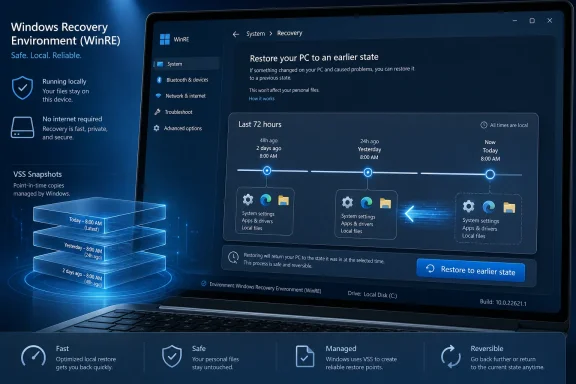 Microsoft Is Rebuilding the Safety Net Windows Users Stopped Trusting
For years, System Restore occupied an odd place in the Windows toolbox. Everyone knew it existed, many people had a story about it saving a machine once, and just as many had a story about discovering too late that no useful restore point existed. It was a parachute packed by habit, luck, or a third-party installer, not a recovery plan.Point-in-time restore is Microsoft’s attempt to make that old idea operationally serious. Restore points are captured automatically, by default roughly every 24 hours, and the recovery scope is broader than traditional System Restore. Microsoft describes it as returning the PC to the exact earlier state captured by the restore point, including Windows itself, applications, configuration, settings, and local user files.
That last part changes the emotional temperature of the feature. Traditional System Restore was usually described as something that affected system files and settings, while user data lived in a separate conceptual bucket. Point-in-time restore collapses that distinction, which makes it more useful in a real “this machine is broken” moment and more dangerous if users treat it casually.
This is not backup, and Microsoft is careful not to sell it as backup. It is a short-term rollback mechanism, stored locally, constrained by disk space, and designed for the kind of failure that shows up shortly after a bad update, driver conflict, configuration change, or software install. The feature is strongest when the problem is fresh and the desired answer is not forensic elegance but a working PC.
The 72-Hour Window Reveals the Real Product Philosophy
The most telling number in Microsoft’s design is not the default 24-hour capture cadence. It is the retention window: up to 72 hours. That is a narrow band of time, and it says a great deal about what problem Microsoft thinks it is solving.This is not a nostalgia machine for users who want to recover a document from last month. It is a blast shield for recent damage. If a driver update wedges a device, an application install corrupts a dependency, or a configuration change breaks sign-in or networking, the admin or user has a small set of recent states to choose from.
The short retention period also keeps Microsoft from pretending local storage is infinite. Restore points can consume space quickly, particularly when they include local files and broad system state. Microsoft’s default maximum disk usage is 2 percent, with configurable limits in supported scenarios, and restore points are removed under age, storage, and low-disk-pressure conditions.
That makes point-in-time restore less like Time Machine and more like an airbag. It is intended to deploy in the immediate aftermath of impact. If you discover the problem days or weeks later, you are back in the world of backups, cloud sync, endpoint management, reinstall images, and human judgment.
VSS Gets a New Job Title
Under the covers, point-in-time restore uses the Volume Shadow Copy Service, the same Windows technology that has long supported snapshots, backup software, and System Restore. That matters because this is not an exotic new recovery substrate dropped into Windows from nowhere. It is a new policy and user-experience layer around infrastructure Windows already knows how to use.The difference is the contract. Traditional System Restore was built around event-triggered or manual restore points and lived largely in legacy Control Panel territory. Point-in-time restore lives in the modern Settings recovery experience and is designed around automatic scheduled capture, bounded retention, and remote-management hooks.
That matters to administrators because reliability is often less about what a feature can technically do than whether it behaves consistently enough to be part of a runbook. A manually created restore point is a memory test. A scheduled restore point is at least the beginning of a policy.
Still, the VSS heritage brings old constraints along for the ride. VSS snapshots compete for disk space, can be evicted under pressure, and can fail when the system is under heavy I/O load or when storage is too constrained. Microsoft has not repealed the physics of local storage; it has wrapped those physics in a more deliberate recovery workflow.
The Consumer Win Is Obvious, but the Enterprise Story Is More Interesting
For a home user, the appeal is simple. Something breaks, the machine still has a recent working state, and Windows offers a way back without asking the user to understand servicing stacks, driver packages, or registry hives. That alone could prevent a lot of needless resets and support calls.But Microsoft’s real audience is not just the person sitting at a kitchen table with a broken laptop. It is the IT team that has spent the past several years trying to make Windows endpoints more cloud-managed, more resilient, and less dependent on desk-side intervention. In that context, point-in-time restore is a small but important piece of a larger endpoint recovery strategy.
The current version still has a major limitation: restoration is initiated locally through the Windows Recovery Environment. Users enter WinRE, choose point-in-time restore, provide a BitLocker recovery key if necessary, select a restore point, and confirm the rollback. That is workable for a single PC, but it is not yet the kind of remote fleet action administrators want when a bad change affects hundreds of endpoints.
Microsoft’s roadmap matters here. The company has signaled future remote management capabilities, including integration with Microsoft Intune. If that arrives in a robust form, point-in-time restore could evolve from a local panic button into an administrative recovery action. That is where the feature becomes strategically interesting.
Local Restore Is Fast Because It Is Local, and Fragile for the Same Reason
The great advantage of storing restore points locally is speed. A PC does not have to pull an image over the internet or wait for a full rebuild pipeline. If the restore point is intact and the system volume is healthy enough, the machine can roll back in minutes.The downside is equally plain. The restore points live on the same device that is experiencing trouble. Disk failure, severe file-system corruption, encryption complications, or low storage can undermine the very mechanism meant to rescue the machine.
This is why point-in-time restore should not be confused with endpoint backup, OneDrive, Windows Backup, or enterprise imaging. It does not replace any of them. It reduces the number of cases where those heavier tools are necessary.
The best mental model is layered recovery. OneDrive or another cloud storage system protects many user files from device loss. Enterprise backup and management tools protect business continuity. Windows reset and reinstall options remain available for deeper damage. Point-in-time restore sits closer to the incident, catching the common “recent change broke the PC” scenario before it becomes a rebuild.
The Data-Loss Warning Is Not Boilerplate
The phrase “restore to an earlier state” sounds comforting until you follow it to its logical end. If the whole system goes back to yesterday afternoon, then work performed after yesterday afternoon may disappear from the local machine. Apps installed after the restore point vanish. Settings changed after the restore point revert. Local files created after the restore point can be lost.That is not a bug; it is the point. A complete rollback must be ruthless to be useful. The feature is designed to trade recent changes for a known working state.
Cloud-synced data softens the blow but does not eliminate complexity. Files stored in OneDrive or another sync service may still exist in the cloud, but local cache state, sync conflicts, and application-specific data can create messy edge cases. Microsoft already documents known issues around some application data, including Outlook cache behavior, which is exactly the sort of thing administrators will want to test before recommending broad use.
BitLocker adds another operational wrinkle. A local restore from WinRE may require the recovery key. In consumer scenarios, that key may be tied to a Microsoft account. In enterprise scenarios, it should be escrowed and retrievable through established management processes. If the help desk cannot get the key when the user is stranded, the recovery workflow becomes theater.
Defaults Will Decide Whether This Feature Actually Exists
Windows features often live or die by default behavior. A recovery feature that users must enable before disaster strikes is often indistinguishable from a feature that does not exist. Microsoft appears to understand this.Point-in-time restore is enabled by default on many non-enterprise-managed systems, including Windows Home devices and unmanaged Windows Pro devices, subject to requirements such as sufficient OS volume size. In enterprise-managed environments, Microsoft is more cautious, with the feature disabled by default at least until the Windows 11 version 26H2 timeframe.
That split is sensible. Consumers benefit from protection they did not know to configure. Enterprises need to decide whether the storage trade-offs, data-loss semantics, support processes, and compliance implications fit their environment.
The awkward middle is the enthusiast or small-business Pro machine. These devices often have enough complexity to break in interesting ways but not enough management maturity to make recovery predictable. For that audience, point-in-time restore may be one of the most practically useful Windows 11 reliability improvements in years, provided users understand that it is not a substitute for backup.
Enterprise IT Will Care About the Knobs
The consumer version of this story is a toggle. The enterprise version is a policy surface. Administrators can configure whether the feature is enabled, how often restore points are captured, how long they are retained, and how much disk space VSS can consume for the feature.Those settings matter because one organization’s safety net is another organization’s storage incident. A fleet of thinly provisioned devices will not experience point-in-time restore the same way as a fleet of modern laptops with large SSDs and disciplined OneDrive Known Folder Move policies. Microsoft’s design tries to avoid catastrophic disk consumption, but low storage is still a first-class limitation.
There is also a governance question hiding inside the recovery promise. If a restore can roll back security updates, certificates, policy state, or endpoint agent configuration, then post-restore validation is not optional. A machine that boots is not necessarily compliant, patched, or safe.
That does not make the feature bad. It makes it real. Recovery is always a negotiation between speed and certainty, and point-in-time restore leans toward speed. Enterprises that adopt it seriously will need scripts, device compliance checks, and help-desk guidance for what happens after the desktop comes back.
The CrowdStrike Lesson Hovers Over Every Windows Recovery Feature
Microsoft does not have to say “CrowdStrike” for everyone in IT to hear it. The 2024 outage turned endpoint recovery from an abstract best practice into boardroom vocabulary. It showed how quickly a faulty component at the wrong layer can turn managed Windows fleets into a global logistics problem.Point-in-time restore is not a magic answer to every failure in that category. If a device cannot enter a usable recovery environment, if storage is damaged, or if the restore points themselves are unavailable, admins still need other tools. But the feature clearly belongs to the same post-outage era of Windows thinking: assume things will break, then reduce the number of hands required to unbreak them.
Microsoft has been talking more openly about Windows resiliency, recovery from boot failures, safer driver models, and the need to minimize the blast radius of bad updates. Point-in-time restore fits that narrative because it gives Windows a more immediate self-rescue option. It also lets Microsoft argue that resilience is not only a cloud management feature but something built into the client operating system.
The most important cultural change may be that Microsoft is treating recovery as a product experience, not an afterthought. For too long, Windows recovery felt like a basement full of old tools: Control Panel dialogs, command-line utilities, recovery partitions, reset options, installation media, and support articles. Point-in-time restore does not clean out the basement, but it does put a better-marked door upstairs.
Windows 11 26H2 Turns Recovery Into Part of the Servicing Story
The timing is not accidental. Microsoft is also preparing Windows 11 version 26H2, which it says will arrive through an enablement package for supported devices already on recent Windows 11 releases. That means the next wave of Windows client changes is being framed less as a disruptive OS replacement and more as a servicing continuation.That model matters for features like point-in-time restore. If Windows 11 versions increasingly share a servicing base, with features staged and activated over time, then recovery tools need to be durable across that rolling delivery model. The old boundary between “feature update” and “monthly update” has already blurred for users; recovery has to account for that reality.
For administrators, the enablement-package model can reduce upgrade friction, but it also changes planning. New capabilities may arrive as part of cumulative servicing before they are fully visible or activated. The operational question becomes not merely “what version are we on?” but “which features are enabled, managed, and tested?”
Point-in-time restore is a good example of that shift. It is tied to Windows 11 24H2 and later, but its usefulness depends on defaults, policy, storage, WinRE readiness, BitLocker key availability, and future Intune integration. Version numbers are the beginning of the story, not the end.
The Old System Restore Is Not Dead, but It Has Been Demoted
Microsoft’s comparison between point-in-time restore and System Restore is revealing. Both use VSS, both can revert a device to an earlier state, and both exist to rescue users from changes that went wrong. But Microsoft clearly wants point-in-time restore to be understood as the more modern, reliable, and manageable mechanism.System Restore remains familiar and, in some cases, useful. Its restore points may be created manually or triggered by events, and some users know exactly how to reach it. But it belongs to an older Windows management era, one in which local control and manual intervention were assumed.
Point-in-time restore is designed for a different era: scheduled capture, Settings integration, broader system scope, disk limits, enterprise policy, and eventual remote orchestration. That does not make it automatically better in every case. It makes it aligned with where Microsoft wants Windows administration to go.
The demotion of System Restore is also a reminder that Windows rarely replaces old machinery cleanly. Instead, it layers. Power users will continue to find old tools, enterprises will maintain older runbooks, and Microsoft will keep adding newer experiences on top. The result is flexibility, but also confusion, which is why naming and documentation will matter more than Microsoft may expect.
The Feature’s Biggest Risk Is Misunderstanding
Point-in-time restore will be marketed, inevitably, as easy. That is not wrong, but it is incomplete. The restore process may be easy; the consequences require thought.A user who rolls back to fix a broken driver might also remove a locally saved file created that morning. An admin who restores a laptop to recover from a faulty app deployment might also revert a security baseline. A help-desk technician who sees “restore” may assume it behaves like traditional System Restore, only to discover that the data scope is broader.
Microsoft can mitigate some of this through warnings in WinRE and Settings, but warnings are not a substitute for education. The term point-in-time restore sounds enterprise-grade and precise, but to many users it will simply mean “undo.” Undo is one of the most beloved concepts in computing because it feels safe. This undo is powerful precisely because it is not always safe.
There is a product-design tension here. If Microsoft makes the warnings too severe, users will hesitate and choose worse options, including full resets or unnecessary support escalation. If Microsoft makes the experience too casual, users will blame Windows for doing exactly what a rollback is designed to do. The right balance will come from clear language, good defaults, and repeated exposure.
The Windows Recovery Button Now Has a Short Fuse
The practical lesson is that point-in-time restore is most valuable when treated as a rapid-response feature, not a long-term archive. It belongs in the first hour of troubleshooting, after basic checks but before a rebuild. It should make some Windows failures boring, which is one of the highest compliments an IT feature can earn.For Windows enthusiasts, it is worth turning the feature on where available and understanding how it behaves before relying on it. For administrators, it is worth testing across device classes, disk sizes, encryption states, and application profiles. For everyone, it is worth remembering that a rollback is not a backup strategy.
- Point-in-time restore is available on Windows 11 version 24H2 and later, with defaults that vary between consumer and enterprise-managed devices.
- Restore points are captured automatically, typically about every 24 hours, and are retained for up to 72 hours unless storage conditions remove them earlier.
- The feature can restore Windows, installed applications, configurations, settings, and local files to the selected earlier state.
- Restoring from a point can remove changes made after that point, including local files, apps, settings, policies, certificates, and updates.
- Current recovery is initiated locally through Windows RE, while future enterprise value depends heavily on remote management through tools such as Intune.
- Point-in-time restore should complement cloud sync, endpoint backup, compliance checks, and rebuild processes rather than replace them.
References
- Primary source: Petri IT Knowledgebase
Published: 2026-06-24T14:13:29.864949
Windows 11 Adds Point‑in‑Time Restore for System Recovery
Microsoft introduces point‑in‑time restore in Windows 11, allowing systems to roll back to a previous state using automatic recovery points. petri.com
- Official source: learn.microsoft.com
Restauración a un momento dado para Windows | Microsoft Learn
documentación para la característica de restauración a un momento dadolearn.microsoft.com - Related coverage: windowscentral.com
"Minimize downtime and simplify troubleshooting": Microsoft's powerful new recovery tool is quietly fixing System Restore. Here's how it actually works. | Windows Central
System Restore has long been the go-to option for Windows recovery, but it's certainly not perfect. Microsoft's new Point-in-Time Restore aims to fill in the blanks.www.windowscentral.com - Related coverage: techrepublic.com
Windows 11 26H2 Is Coming: Microsoft Shares New Details
Microsoft confirmed Windows 11 26H2 will use an enablement package, giving IT teams a faster upgrade path and support reset for supported PCs.www.techrepublic.com
- Official source: techcommunity.microsoft.com
Scalable Windows Resiliency with new recovery tools - Windows IT Pro Blog
From isolated issues to widespread outages, new Windows recovery tools help minimize downtime and deliver resilience at scale. techcommunity.microsoft.com
- Related coverage: pcworld.com
Windows 11 26H2 is coming: Meet all the new features | PCWorld
Windows 11 26H2 is the next major free update for all Windows users. Among other things, it brings improvements to Explorer, camera control, and AI. Here's an overview.www.pcworld.com
- Related coverage: windowslatest.com
Windows 11 24H2 System Restore points now expire after 60 days, Microsoft confirms
Microsoft has confirmed that Windows 11 System Restore points will be deleted after 60 days, so you need to be more careful. www.windowslatest.com
- Official source: support.microsoft.com
Backup, restore, and recovery in Windows | Microsoft Support
Learn about the different tools to backup and restore your data, and to recover Windows in case of a system failure.support.microsoft.com - Related coverage: techradar.com
Microsoft brings Windows restore to more enterprise devices - so you don't have to worry about continuous backups | TechRadar
It's now easier to reinstate previous Windows apps/settingswww.techradar.com - Official source: adoption.microsoft.com