

IT should enable Windows 11 Point-in-Time Restore only in a controlled pilot, not across the fleet. The feature becomes operationally valuable only after an organization proves the entire recovery chain: entering Windows Recovery Environment, retrieving a BitLocker recovery key, finding a usable local snapshot, completing the rollback, and returning the device to a compliant security and policy state.
WindowsForum users describe Point-in-Time Restore as a built-in rewind button for recent Windows problems, particularly bad updates and configuration changes. That is the right use case, but the reports also reinforce its defining limitation: it is a fast, local rollback mechanism based on Volume Shadow Copy Service, not a replacement for backup, reimaging, or a rehearsed support process.
Microsoft’s current documentation describes restoration as a preview workflow initiated locally from WinRE, not from the Windows desktop or a remote management console. Point-in-Time Restore is therefore a recovery capability that IT must rehearse with users and support staff—not a background safety net that can simply be switched on and forgotten.
Enabling the feature is only the beginning. A meaningful pilot must deliberately change a device, restore it, and measure what IT must validate or repair afterward.
The following sequence combines Microsoft’s documented requirements with WindowsForum operational recommendations for a production-readiness test:
The pilot should test retrieval under realistic conditions. The user may be locked out, the normal Windows session may be unavailable, and the technician may be communicating by phone while the device is in WinRE. Organizations should confirm who may retrieve keys, how requesters are authenticated, what happens outside business hours, and whether access is logged.
A technically valid snapshot is of little practical use if the recovery key cannot reach the device when needed. Conversely, overly permissive key retrieval introduces its own security problem. Point-in-Time Restore should not move beyond the pilot until key access is both controlled and repeatable.
WinRE access deserves a separate test. Verify Advanced Startup entry and, where practical, recovery entry following repeated boot failures. WindowsForum’s recommendation is to measure both paths because a planned test from a working desktop is not identical to assisting a device that can no longer boot normally.
Restoration requires at least as much free space as the total size of all restore points. This creates an important distinction between having enough capacity to capture a snapshot and having enough free space to use it later.
WindowsForum recommends recording free disk space before capture, after restore points accumulate, immediately before restoration, and after recovery. Test devices resembling the storage-constrained end of the production fleet instead of validating only systems with abundant capacity.
VSS provides local storage with finite capacity; it should not be treated as an isolated or unlimited vault. The documented capacity requirements mean that insufficient space can prevent capture or restoration. File-system corruption can also cause restoration to fail. The pilot should establish alerting or support checks that reveal these conditions before a rollback is urgently needed.
EFS introduces another stop condition. Microsoft warns that changes involving Encrypting File System-encrypted files can prevent restoration, so departments using EFS need a separate test profile. BitLocker and EFS are not interchangeable: BitLocker creates a recovery-key requirement, while changes to EFS files can obstruct restoration.
Its scope includes Windows, applications, settings, and local files. Consequently, changes made after the selected restore point may not remain after rollback. Pilot testing should use controlled files and approved application changes so the organization can observe the result without risking production data.
WindowsForum reports consistently frame the feature as a quick response to a recent problem, such as a bad update, rather than a general data-protection system. That distinction should shape support documentation. Point-in-Time Restore can sit between ordinary troubleshooting and full device recovery, but it does not replace endpoint backup, deployment media, application recovery procedures, or reimaging.
The table below separates documented rollback scope from WindowsForum’s recommended validation steps:
Devices should remain in the organization’s chosen remediation state until these checks pass. Network isolation, restricted access, and the exact compliance workflow are organizational controls, not documented behavior of Point-in-Time Restore.
The exercise also needs an agreed failure path. Microsoft warns that insufficient space, changed EFS files, power loss, or file-system corruption can make restoration fail, and interruption can leave a computer corrupt or unbootable. Connect pilot devices to power and decide in advance whether the next approved action is another WinRE option, repair, reset, or reimaging.
WindowsForum’s enablement guidance recommends a pilot-or-wait decision built around four practical areas: OS and storage suitability, healthy free space and VSS capacity, recoverable BitLocker keys, and a tested post-restore process. These are operational recommendations for deciding whether to proceed, not guarantees about product behavior.
The go decision should be based on demonstrated recoverability. IT can expand the pilot when representative devices consistently produce usable snapshots, WinRE is reachable, recovery keys are available through normal procedures, storage remains sufficient, restores complete reliably, and remediation returns endpoints to compliance within the organization’s chosen support window.
Point-in-Time Restore is promising because it offers a fast local path out of recent Windows failures. Until the entire operational chain has been rehearsed, it should remain a tested recovery option beside established backup and reimaging procedures—not a fleet-wide toggle and never a substitute for backup.
WindowsForum users describe Point-in-Time Restore as a built-in rewind button for recent Windows problems, particularly bad updates and configuration changes. That is the right use case, but the reports also reinforce its defining limitation: it is a fast, local rollback mechanism based on Volume Shadow Copy Service, not a replacement for backup, reimaging, or a rehearsed support process.
Microsoft’s current documentation describes restoration as a preview workflow initiated locally from WinRE, not from the Windows desktop or a remote management console. Point-in-Time Restore is therefore a recovery capability that IT must rehearse with users and support staff—not a background safety net that can simply be switched on and forgotten.
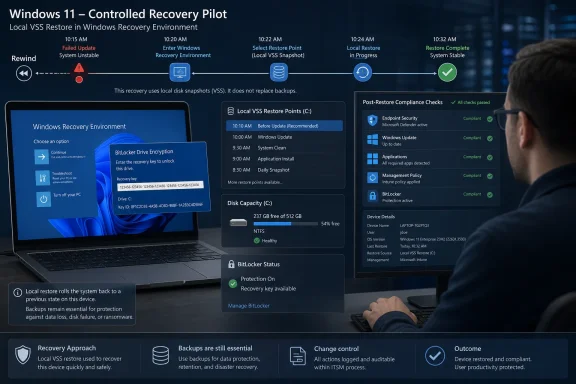 Build the Pilot Around Recovery, Not Enablement
Enabling the feature is only the beginning. A meaningful pilot must deliberately change a device, restore it, and measure what IT must validate or repair afterward.The following sequence combines Microsoft’s documented requirements with WindowsForum operational recommendations for a production-readiness test:
- Select representative devices. Cover the organization’s primary hardware, storage, encryption, endpoint-security, management, and line-of-business application profiles. Include systems with realistic free-space conditions rather than testing only freshly provisioned laboratory PCs.
- Verify BitLocker recovery-key retrieval. Confirm that keys are escrowed and retrievable through the same identity checks and help-desk process that would be used during a real incident. A key copied in advance by the pilot administrator does not prove operational readiness.
- Enable and configure the feature through the controls available on the pilot device. Record the configured capture frequency, retention, and storage allocation. Available options may depend on the device’s edition and management state.
- Wait for automatic capture and verify the result. Microsoft describes automatic, administrator-configurable capture with an approximately 24-hour default cadence. A configured schedule is not proof that a usable restore point exists, so confirm that the pilot device presents an appropriately timestamped point before continuing.
- Record the starting state. As a WindowsForum operational recommendation, document installed Windows updates, policy and compliance status, endpoint-security health, BitLocker status, available disk space, critical applications, and a controlled set of local test files.
- Introduce representative changes. Install an approved test update or application revision, change a test setting, modify the controlled local files, and permit normal management and security activity to continue.
- Enter WinRE and perform the restore. Use a supported route into Advanced Startup or test recovery entry after repeated boot failures. Retrieve and enter the BitLocker recovery key when required, select the intended restore point, review the information presented by Windows, and start restoration.
- Validate the recovered endpoint. Measure elapsed time, rescan for Windows updates, verify endpoint protection, test critical applications, inspect the controlled files, and confirm that management tools once again report the device as compliant.
Pilot acceptance checklist
Each organization should choose and document its own measurable thresholds. At minimum, a pilot device should meet all five criteria:- [ ] WinRE entry succeeds using a supported route within the organization’s chosen time limit.
- [ ] The BitLocker recovery key is retrieved through the normal help-desk procedure, with required identity verification and logging.
- [ ] A usable restore point is available with a timestamp that meets the organization’s recovery objective.
- [ ] Restoration completes successfully within the organization’s maximum recovery window.
- [ ] The endpoint returns to compliance, including the organization’s required update, security-agent, application, and management-policy checks.
BitLocker Makes Key Escrow a Hard Dependency
On a BitLocker-encrypted device, local restoration requires the BitLocker recovery key. That places identity verification, key escrow, and help-desk access directly in the critical path.The pilot should test retrieval under realistic conditions. The user may be locked out, the normal Windows session may be unavailable, and the technician may be communicating by phone while the device is in WinRE. Organizations should confirm who may retrieve keys, how requesters are authenticated, what happens outside business hours, and whether access is logged.
A technically valid snapshot is of little practical use if the recovery key cannot reach the device when needed. Conversely, overly permissive key retrieval introduces its own security problem. Point-in-Time Restore should not move beyond the pilot until key access is both controlled and repeatable.
WinRE access deserves a separate test. Verify Advanced Startup entry and, where practical, recovery entry following repeated boot failures. WindowsForum’s recommendation is to measure both paths because a planned test from a working desktop is not identical to assisting a device that can no longer boot normally.
VSS Capacity Must Be Tested on Realistic Devices
Point-in-Time Restore stores snapshots locally through Volume Shadow Copy Service. Microsoft sets a default maximum usage of 2% of disk capacity, with configurable limits between 2 GB and 50 GB.Restoration requires at least as much free space as the total size of all restore points. This creates an important distinction between having enough capacity to capture a snapshot and having enough free space to use it later.
WindowsForum recommends recording free disk space before capture, after restore points accumulate, immediately before restoration, and after recovery. Test devices resembling the storage-constrained end of the production fleet instead of validating only systems with abundant capacity.
VSS provides local storage with finite capacity; it should not be treated as an isolated or unlimited vault. The documented capacity requirements mean that insufficient space can prevent capture or restoration. File-system corruption can also cause restoration to fail. The pilot should establish alerting or support checks that reveal these conditions before a rollback is urgently needed.
EFS introduces another stop condition. Microsoft warns that changes involving Encrypting File System-encrypted files can prevent restoration, so departments using EFS need a separate test profile. BitLocker and EFS are not interchangeable: BitLocker creates a recovery-key requirement, while changes to EFS files can obstruct restoration.
A Restore Point Is Not a Backup
Point-in-Time Restore returns a PC to a recent local state. It does not create an off-device copy, provide long-term retention, or establish a recovery boundary independent of that computer.Its scope includes Windows, applications, settings, and local files. Consequently, changes made after the selected restore point may not remain after rollback. Pilot testing should use controlled files and approved application changes so the organization can observe the result without risking production data.
WindowsForum reports consistently frame the feature as a quick response to a recent problem, such as a bad update, rather than a general data-protection system. That distinction should shape support documentation. Point-in-Time Restore can sit between ordinary troubleshooting and full device recovery, but it does not replace endpoint backup, deployment media, application recovery procedures, or reimaging.
The Real Work Begins After Windows Boots
A successful boot is not the end of the operation. Microsoft requires organizations to validate security agents, critical applications, and policy posture following restoration. It also warns that recent security updates and policies may be reverted.The table below separates documented rollback scope from WindowsForum’s recommended validation steps:
| Area | What is established | WindowsForum operational check |
|---|---|---|
| Local files | Changes after the selected point may not remain. | Compare controlled test files with the recorded pre-restore and post-change states. |
| Windows updates | Recent security updates may be reverted. | Rescan for updates and confirm the organization’s approved patch level. |
| Security software | Microsoft requires security-agent validation after restoration. | Verify service health, protection status, management connectivity, and policy reporting rather than assuming a particular component was reverted. |
| Management policy | Recent policies may be reverted, and policy posture must be validated. | Trigger the organization’s normal synchronization process and confirm compliance in its management platform. |
| BitLocker | A recovery key is required for local restoration on encrypted devices. | Confirm that protection is active and that the normal recovery-key process remains operational. |
| Business applications | Point-in-Time Restore includes applications and settings; Microsoft calls for critical-application validation. | Launch each critical application and complete a representative test transaction rather than assuming its configuration changed. |
The exercise also needs an agreed failure path. Microsoft warns that insufficient space, changed EFS files, power loss, or file-system corruption can make restoration fail, and interruption can leave a computer corrupt or unbootable. Connect pilot devices to power and decide in advance whether the next approved action is another WinRE option, repair, reset, or reimaging.
Availability Should Not Drive the Rollout
Microsoft currently presents the local WinRE restore workflow as a preview. Availability, default enablement, and management exposure can vary with device and deployment conditions, so a visible setting should not be treated as proof of production readiness.WindowsForum’s enablement guidance recommends a pilot-or-wait decision built around four practical areas: OS and storage suitability, healthy free space and VSS capacity, recoverable BitLocker keys, and a tested post-restore process. These are operational recommendations for deciding whether to proceed, not guarantees about product behavior.
The go decision should be based on demonstrated recoverability. IT can expand the pilot when representative devices consistently produce usable snapshots, WinRE is reachable, recovery keys are available through normal procedures, storage remains sufficient, restores complete reliably, and remediation returns endpoints to compliance within the organization’s chosen support window.
Frequently Asked Questions
Should IT enable Point-in-Time Restore across every Windows 11 device?
No. Start with a controlled pilot covering representative hardware, storage, encryption, security, management, and application profiles. Expand only after every acceptance criterion is met repeatedly.Can Point-in-Time Restore replace endpoint backup?
No. It is a recent, local rollback capability. It does not provide an off-device backup, long-term retention, or an independent recovery boundary.Does enabling automatic capture prove that recovery will work?
No. Microsoft describes automatic, configurable capture with an approximately daily default, but IT must verify that a usable restore point exists and then complete an actual restoration test.Why must the help desk participate in the pilot?
BitLocker recovery-key retrieval and WinRE guidance are part of the real recovery path. A test performed only by an administrator with pre-collected information does not validate normal support operations.What determines whether the pilot passes?
The organization should define measurable limits, but the essential outcomes are successful WinRE entry, normal recovery-key retrieval, an available restore point, a completed restore, and a compliant post-restore endpoint.Point-in-Time Restore is promising because it offers a fast local path out of recent Windows failures. Until the entire operational chain has been rehearsed, it should remain a tested recovery option beside established backup and reimaging procedures—not a fleet-wide toggle and never a substitute for backup.
References
- Primary source: learn.microsoft.com
Point-in-time restore for Windows | Microsoft Learn
documentation for point-in-time restore featurelearn.microsoft.com - Independent coverage: windowscentral.com
What’s new in Windows 11’s March 2026 Insider build | Windows Central
Microsoft quietly delivers significant Windows 11 changes in March 2026, including a customizable user folder during setup, stronger driver policies, and new admin protections.www.windowscentral.com - Independent coverage: microsoft.com
Windows Resiliency Initiative | Windows Security & Business Continuity
Strengthen enterprise resilience with Microsoft’s Windows Resiliency Initiative. Prevent outages, accelerate recovery, and ensure business continuity with Windows 11 Pro.www.microsoft.com
- Independent coverage: techrepublic.com
Microsoft Makes Windows 11 Point-in-Time Restore Generally Available
Microsoft’s Point-in-Time Restore gives Windows 11 users a built-in way to roll back PCs after failed updates, driver issues, or corruption.www.techrepublic.com
- Independent coverage: blogs.windows.com
Ignite 2025: Windows at the frontier of work
Welcome to the new frontier Every year at Microsoft Ignite, we are reminded of the extraordinary community that powers the world’s organizations. Whether you’re an IT professblogs.windows.com - Independent coverage: reddit.com

Reddit - Please wait for verification
www.reddit.com
