

Windows 11 remains a study in tension: it is the only broadly supported Microsoft desktop platform now that Windows 10’s regular security updates have ended, yet it still frustrates a large slice of power users with defaults that feel more opinionated than optional. The good news is that many of the most annoying parts of the shell are either configurable or replaceable, and the workaround ecosystem around them is healthier than it first appears. The PCMag UK piece you shared captures that reality well by focusing on five pain points—Start, taskbar, account setup, the File Explorer context menu, and Widgets—and by pointing readers toward practical fixes rather than simply complaining about the OS.
The underlying story is bigger than five tweaks. Windows 11 launched with a cleaner visual design, but it also removed or constrained behaviors that had become second nature for many users, especially around taskbar placement, Start menu density, and shell customization. Microsoft’s 10X-era design influence made the interface feel more curated, but for a desktop operating system that historically prized flexibility, that curation often reads as restriction. That tension explains why third-party utilities such as Start11, ExplorerPatcher, Rufus, and ContextMenuManager keep showing up in power-user conversations.
Windows 11’s complaints are also tightly connected to Microsoft’s broader platform direction. The company has spent years pushing account linkage, cloud services, and Copilot-style AI into more of the experience, while many users are asking for the opposite: fewer prompts, fewer interruptions, and more direct control. That is why even relatively small shell changes attract outsized attention. When Microsoft trims friction, users notice; when it adds it, they notice even faster.
There is also a practical migration angle. With Windows 10 out of regular support, users who preferred the older shell now have less room to avoid Windows 11. That shifts the conversation from “should I switch?” to “how do I make this thing tolerable?” In that context, workaround tools stop looking like hobbyist toys and start looking like everyday productivity infrastructure.
Microsoft has begun to acknowledge the frustration, at least indirectly. Recent coverage in the forum dataset points to a broader Windows reset that emphasizes fewer unnecessary Copilot entry points, more control over taskbar placement, and quieter, more optional widget behavior. That does not erase the current annoyances, but it suggests the company knows the criticism is no longer coming from a small fringe. It is coming from the people who actually live in Windows all day.
The deeper significance is that Start menu replacement is not merely cosmetic. It is a signal that users are willing to accept a different management layer if the native shell refuses to adapt. In other words, third-party tools are not just adding polish; they are correcting a design philosophy. That is a very different kind of market demand.
The article’s appeal is that it does not pretend the default is fixed by ideology. It frames Start11 as a practical response to a workflow mismatch, which is the right way to think about it. If your Start menu is part app drawer, part dashboard, and part memory aid, then layout control is not a luxury. It is table stakes.
ExplorerPatcher has become a practical fix because it restores that missing choice. It also gives users access to settings for taskbar alignment, search presentation, and overall shell behavior. In effect, it turns a stubborn native control into something more like the configurable strip Windows users expected from earlier versions.
There is a competitive angle here too. Linux desktop environments and macOS each have their own rigidity, but Windows traditionally sold itself as the customizable platform. The more Microsoft narrows that promise, the easier it becomes for critics to argue that Windows is losing one of its defining strengths. Reintroducing choice is not just a quality-of-life issue; it is brand repair.
Rufus has become useful because it lets users prepare Windows installation media with account and setup options configured in advance. That means you can walk into a clean installation without having to play setup games, and the system arrives in a more controlled state. For technicians and enthusiasts, that is a substantial time saver.
The broader problem is trust. If a setup flow feels like it is optimizing for Microsoft’s ecosystem first, users assume the rest of the OS will do the same. That perception may be unfair in some cases, but perceptions matter in desktop software, especially when people are being asked to live with it for years. Perceived coercion can be almost as damaging as actual technical friction.
The article notes a few ways around this: holding Shift while right-clicking, disabling the Windows 11 context menu through ExplorerPatcher, or editing things more directly with a Registry approach. The most interesting of those is not the shortcut itself, but the fact that a tool like ContextMenuManager exists to let users selectively disable entries from the old menu. That moves the conversation from “less clutter” to “better curation.”
There is a product design lesson here for Microsoft. Shell components become much less controversial when the operating system gives users a straightforward way to tune them. Instead of asking people to accept the company’s idea of tidy, Windows could give them first-class controls for what “tidy” means in their own workflow. That would solve more than one complaint at once.
This is a classic example of how one default behavior can poison a feature. Widgets themselves are not the problem. The problem is that they arrive in a way that feels too eager. Once users associate a feature with accidental activation, they begin to dislike it more than its actual utility warrants.
This is where the company’s AI ambitions complicate things. A widget feed can be useful when it delivers weather, calendar, or quick status updates. It becomes much less welcome when it feels like a carrier for promotions or attention-grabbing content. The feature succeeds only if Microsoft remembers that a desktop is not a social feed.
There is a positive side to this. Third-party utilities create a proving ground for features Microsoft might later restore natively. They also give the company a live signal about what users will actually adopt. In that sense, the ecosystem acts like a pressure valve for dissatisfaction.
This is why native solutions matter so much. When Microsoft itself restores a feature, it eliminates the long-term uncertainty. That is especially important for IT departments that cannot afford to debug shell mods after every feature update. Native support is boring in the best possible way.
If Microsoft restores missing controls, reduces unnecessary Copilot surfaces, and quiets the default widgets experience, it may finally shift the public conversation from “Windows 11 is annoying” to “Windows 11 is workable.” That sounds modest, but for a desktop OS, it is huge. The best operating systems are often the ones that stop calling attention to themselves.
A sensible rollout order would look something like this:
What to watch next is straightforward:
Source: PCMag UK These 5 Windows 11 Features Drive Me Nuts, But I Figured Out How to Fix Them
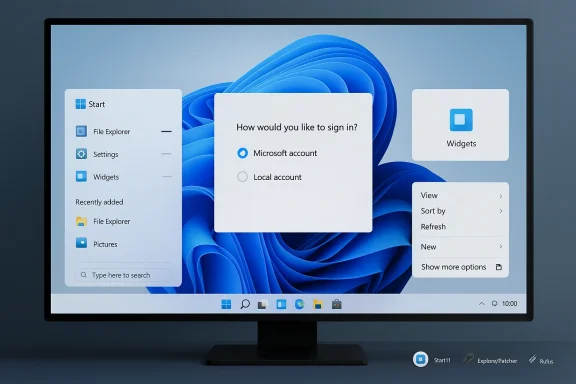 Overview
The underlying story is bigger than five tweaks. Windows 11 launched with a cleaner visual design, but it also removed or constrained behaviors that had become second nature for many users, especially around taskbar placement, Start menu density, and shell customization. Microsoft’s 10X-era design influence made the interface feel more curated, but for a desktop operating system that historically prized flexibility, that curation often reads as restriction. That tension explains why third-party utilities such as Start11, ExplorerPatcher, Rufus, and ContextMenuManager keep showing up in power-user conversations.Windows 11’s complaints are also tightly connected to Microsoft’s broader platform direction. The company has spent years pushing account linkage, cloud services, and Copilot-style AI into more of the experience, while many users are asking for the opposite: fewer prompts, fewer interruptions, and more direct control. That is why even relatively small shell changes attract outsized attention. When Microsoft trims friction, users notice; when it adds it, they notice even faster.
There is also a practical migration angle. With Windows 10 out of regular support, users who preferred the older shell now have less room to avoid Windows 11. That shifts the conversation from “should I switch?” to “how do I make this thing tolerable?” In that context, workaround tools stop looking like hobbyist toys and start looking like everyday productivity infrastructure.
Microsoft has begun to acknowledge the frustration, at least indirectly. Recent coverage in the forum dataset points to a broader Windows reset that emphasizes fewer unnecessary Copilot entry points, more control over taskbar placement, and quieter, more optional widget behavior. That does not erase the current annoyances, but it suggests the company knows the criticism is no longer coming from a small fringe. It is coming from the people who actually live in Windows all day.
1. The Start Menu Still Feels Overly Prescriptive
The Windows 11 Start menu is the first thing many users want to fix because it sits at the center of daily navigation. Microsoft’s default layout prioritizes a cleaner look and a narrower set of choices, but that comes at the cost of density and speed. For people used to the more expansive and information-rich menus of earlier Windows versions, the current Start experience can feel like a compromise too far.Why third-party replacements remain popular
Start11 keeps appearing in user recommendations because it does something Microsoft has not fully restored: it lets the desktop behave the way the owner wants. The utility offers multiple menu styles, including a Windows 7-like layout and a more modernized two-column view, while also allowing deeper control over shortcuts, folders, and appearance. That flexibility matters because the Start menu is not just a launcher; it is the front door to the PC.The deeper significance is that Start menu replacement is not merely cosmetic. It is a signal that users are willing to accept a different management layer if the native shell refuses to adapt. In other words, third-party tools are not just adding polish; they are correcting a design philosophy. That is a very different kind of market demand.
- Start11 is popular because it restores layout choice.
- It allows more direct control over pinned items and shortcuts.
- It can help users rebuild a more efficient launch workflow.
- It is aimed at power users, not casual clickers.
- It reflects dissatisfaction with Microsoft’s default opinionated design.
The cost of clean design
Microsoft’s cleaner Start menu does have one genuine advantage: it reduces visual clutter for mainstream users. But the trade-off is that a lot of users now need extra clicks to reach the same outcome. That is the recurring Windows 11 problem in miniature—an interface that may look better in screenshots while feeling slower in practice.The article’s appeal is that it does not pretend the default is fixed by ideology. It frames Start11 as a practical response to a workflow mismatch, which is the right way to think about it. If your Start menu is part app drawer, part dashboard, and part memory aid, then layout control is not a luxury. It is table stakes.
When the native Start menu is “good enough”
To be fair, not every user needs a replacement. Someone who launches only a handful of apps and leans heavily on Search may be perfectly happy with the default menu. But the moment you manage many programs, maintain multiple work contexts, or want a more compact menu with fewer distractions, the native Windows 11 design starts to feel underpowered. That is why this grievance persists even years after launch.2. The Taskbar Still Needs More Freedom
The taskbar is where Windows 11’s design rigidity becomes impossible to ignore. Microsoft’s decision to keep it locked to the bottom of the screen remains one of the operating system’s most criticized limits, especially for users with ultrawide monitors, vertical displays, or elaborate multi-monitor setups. The PCMag UK article points to ExplorerPatcher as a free way to recover some of that control.Why taskbar placement matters
Taskbar positioning is not an aesthetic preference in the narrow sense. It affects cursor travel, available vertical space, visibility across display geometries, and how fast your eyes land on system state and running apps. A side taskbar can be genuinely better on a tall monitor; a top taskbar can match user muscle memory or workflow habits; a bottom taskbar remains best for others. The point is not that one placement wins, but that users should be able to choose.ExplorerPatcher has become a practical fix because it restores that missing choice. It also gives users access to settings for taskbar alignment, search presentation, and overall shell behavior. In effect, it turns a stubborn native control into something more like the configurable strip Windows users expected from earlier versions.
- The taskbar is a workflow surface, not decoration.
- Placement affects ergonomics on different monitor types.
- ExplorerPatcher can restore top, side, or bottom positioning.
- Search display behavior can also be tweaked.
- The tool appeals most to power users and multi-monitor users.
The real issue is platform trust
Microsoft’s reluctance to restore flexibility has always felt bigger than the taskbar itself. Users did not just lose a setting; they lost confidence that Windows would continue to respect familiar desktop habits. When the OS starts removing long-standing options, every later omission looks intentional, even when it might be architectural. That is why taskbar customization has become symbolic.There is a competitive angle here too. Linux desktop environments and macOS each have their own rigidity, but Windows traditionally sold itself as the customizable platform. The more Microsoft narrows that promise, the easier it becomes for critics to argue that Windows is losing one of its defining strengths. Reintroducing choice is not just a quality-of-life issue; it is brand repair.
Free fixes, but with caveats
ExplorerPatcher is a useful workaround, but it also illustrates the fragility of the current ecosystem. Third-party shell tools can be excellent, yet they depend on Microsoft not changing internals too aggressively. That means users gain flexibility now at the cost of some future maintenance risk. That is the hidden tax of living outside the native experience.3. Microsoft Account Friction Is Still a Real Complaint
The setup process is another place where Windows 11 often feels more intrusive than it needs to be. Microsoft has made it harder to complete initial installation with a local account, especially in newer builds, which reinforces the sense that users are being pushed into the company’s ecosystem before they have even reached the desktop. PCMag UK points to Rufus as a way to create installation media that preserves local-account setup.Why local-account setup still matters
For some users, this is about privacy and control. They do not want a Microsoft account tied to a personal PC, and they want to avoid syncing choices they never opted into. For others, it is about simplicity—fewer prompts, fewer cloud dependencies, and fewer complications during provisioning. Either way, the complaint is not ideological. It is operational.Rufus has become useful because it lets users prepare Windows installation media with account and setup options configured in advance. That means you can walk into a clean installation without having to play setup games, and the system arrives in a more controlled state. For technicians and enthusiasts, that is a substantial time saver.
- Local accounts reduce dependency on Microsoft’s online services.
- Rufus helps automate a preferred setup path.
- It is useful for fresh installs and virtual machines.
- It can also bypass some hardware checks.
- It is especially handy for IT maintainers and advanced users.
Consumer convenience versus vendor control
Microsoft’s preference for Microsoft accounts is understandable from a business perspective. Accounts enable sync, cloud backup, device continuity, and service integration. But the company has arguably overplayed that hand by making the local path less visible and less convenient than it once was. When setup starts to feel like persuasion, users resist it harder.The broader problem is trust. If a setup flow feels like it is optimizing for Microsoft’s ecosystem first, users assume the rest of the OS will do the same. That perception may be unfair in some cases, but perceptions matter in desktop software, especially when people are being asked to live with it for years. Perceived coercion can be almost as damaging as actual technical friction.
Enterprise and home users want different things
Enterprise IT often wants Microsoft accounts, Entra integration, and standardized identity management. Home users usually want the opposite: fewer obligations and less data linkage. Windows 11’s setup choices matter because they hit both groups, but they hit them in different ways. That is why the setup debate will likely continue long after this specific workaround falls out of favor.4. File Explorer’s Right-Click Menu Is Simultaneously Too Simplified and Too Messy
Microsoft tried to solve one problem in File Explorer and ended up creating another. The new right-click menu in Windows 11 is cleaner at first glance, but many commands are hidden behind “Show more options,” which adds a click and brings back the clutter people were trying to avoid. That makes the whole design feel like an unresolved compromise.A better default, but not enough control
There is a legitimate argument for the simplified context menu. The old one could become a junk drawer, especially after installing many applications that registered shell extensions. Windows 11’s shorter menu reduces visual noise and makes the most common actions easier to reach. But when you need the full menu, the extra step feels like a penalty for being an advanced user.The article notes a few ways around this: holding Shift while right-clicking, disabling the Windows 11 context menu through ExplorerPatcher, or editing things more directly with a Registry approach. The most interesting of those is not the shortcut itself, but the fact that a tool like ContextMenuManager exists to let users selectively disable entries from the old menu. That moves the conversation from “less clutter” to “better curation.”
- Shift-right-click exposes the classic full menu.
- ExplorerPatcher can disable the Windows 11 menu.
- ContextMenuManager lets users toggle individual entries.
- The goal is less clutter without losing functionality.
- The native UI still lacks deep menu editing tools.
Why menu editing matters more than menu hiding
The old Windows menu had too much in it; the new one sometimes has too little. The ideal answer is not to force users into one or the other, but to let them prune exactly what they do not want. That is the key insight behind tools like ContextMenuManager. Users do not necessarily want a simplified menu in the abstract; they want a personal one.There is a product design lesson here for Microsoft. Shell components become much less controversial when the operating system gives users a straightforward way to tune them. Instead of asking people to accept the company’s idea of tidy, Windows could give them first-class controls for what “tidy” means in their own workflow. That would solve more than one complaint at once.
The hidden enterprise angle
Context menus are especially important in managed environments because they often reveal third-party integrations, document workflow shortcuts, and IT tooling. When those become harder to reach—or too crowded to trust—support teams lose efficiency. So this is not just a home-user annoyance. It is a real productivity issue in business settings too.5. Widgets Remain Useful Only If They Stay Out of the Way
Widgets are probably the most polarizing of the five issues because they can be genuinely useful while also feeling intrusive. Windows 11’s widget entry point is easy to trigger by accident, especially when hover behavior is enabled. That makes a potentially helpful panel feel more like an interruption than a dashboard.Quiet widgets are better widgets
PCMag UK’s advice is sensible: if you do not use Widgets, turn them off entirely in Taskbar settings. If you do use them, disable the open-on-hover behavior so the panel appears only when you click it intentionally. That is a small setting, but it changes the whole experience from accidental pop-up to deliberate tool.This is a classic example of how one default behavior can poison a feature. Widgets themselves are not the problem. The problem is that they arrive in a way that feels too eager. Once users associate a feature with accidental activation, they begin to dislike it more than its actual utility warrants.
- Widgets can be disabled entirely if unused.
- Hover activation is the most irritating part for many users.
- Turning off hover preserves intentional access.
- Weather, news, and quick info remain available on demand.
- The feature works best when it behaves like a dashboard, not a popup.
The fine line between helpful and noisy
Microsoft clearly sees Widgets as a strategic content surface, not just a utility panel. That is why the company keeps expanding its role across the shell. But the more content and suggestions it carries, the more careful Microsoft has to be about restraint. Users will tolerate a glanceable panel; they will not tolerate something that behaves like a billboard.This is where the company’s AI ambitions complicate things. A widget feed can be useful when it delivers weather, calendar, or quick status updates. It becomes much less welcome when it feels like a carrier for promotions or attention-grabbing content. The feature succeeds only if Microsoft remembers that a desktop is not a social feed.
A “less intrusive” future is the right direction
The forum material suggests Microsoft is moving toward more optional, less intrusive taskbar and widget behavior, which is the right instinct. Users do not necessarily want widgets gone; they want them tamed. If Microsoft keeps leaning into quiet defaults and explicit opt-in behavior, Widgets can become genuinely useful rather than merely tolerated.6. Third-Party Fixes Are a Symptom, Not Just a Solution
It would be easy to frame the tool ecosystem as proof that Windows is fine because problems can be patched. That misses the point. The existence of Start11, ExplorerPatcher, Rufus, and ContextMenuManager is evidence that there is real unmet demand for control, and that Microsoft’s defaults have not fully satisfied it.Why the workaround market keeps growing
These tools survive because Windows users are not just looking for novelty; they are looking for restoration. They want their desktop to behave like a desktop, not like a curated app shelf. That is why the same names recur across enthusiast coverage: they fix areas Microsoft has either neglected, delayed, or intentionally constrained.There is a positive side to this. Third-party utilities create a proving ground for features Microsoft might later restore natively. They also give the company a live signal about what users will actually adopt. In that sense, the ecosystem acts like a pressure valve for dissatisfaction.
- Workarounds show where Microsoft’s defaults fall short.
- Popular tools reveal genuine user demand.
- Power users are often the first to test future feature ideas.
- Community utilities can improve the daily Windows experience quickly.
- But they also create dependency on outside developers.
The maintenance risk nobody likes to mention
The downside is fragility. A workaround can disappear after a Windows update, break on a new build, or require manual adjustment after Microsoft changes shell internals. Users who build their workflow around those tools gain freedom, but they also inherit a maintenance burden. That is manageable for enthusiasts, less so for average consumers.This is why native solutions matter so much. When Microsoft itself restores a feature, it eliminates the long-term uncertainty. That is especially important for IT departments that cannot afford to debug shell mods after every feature update. Native support is boring in the best possible way.
What the popularity of these tools really says
The real message is simple: Windows users want to feel that their desktop is theirs. The more they need external tools to get back familiar behavior, the more they conclude that Windows 11 shipped with the wrong balance of control and convenience. That perception is now part of the OS’s identity, whether Microsoft likes it or not.7. Microsoft’s Direction Suggests a Slow Course Correction
The most interesting part of the story is not the individual fixes, but the direction they point toward. Forum coverage and related reporting suggest Microsoft is gradually backing away from the most intrusive parts of its recent Windows strategy and leaning more toward user choice, performance, and reliability. That is a meaningful shift in tone, even if it is not yet a full reversal in practice.Why restraint may become a feature
Microsoft has spent several years trying to make Windows feel smarter, more connected, and more AI-driven. But many users judge an operating system first by whether it gets out of the way. That makes restraint a powerful product attribute, even if it is harder to market than flashy new functionality.If Microsoft restores missing controls, reduces unnecessary Copilot surfaces, and quiets the default widgets experience, it may finally shift the public conversation from “Windows 11 is annoying” to “Windows 11 is workable.” That sounds modest, but for a desktop OS, it is huge. The best operating systems are often the ones that stop calling attention to themselves.
Sequencing matters
One reason this transition is slow is that Microsoft cannot simply undo everything at once. It has to preserve compatibility, support existing builds, and avoid breaking managed environments. That means the company is likely to keep rolling changes out gradually through Insider channels, then broaden them once the feedback supports it. That is frustrating, but it is also how modern Windows evolves.A sensible rollout order would look something like this:
- Restore the highest-demand shell controls first.
- Make intrusive defaults optional rather than mandatory.
- Improve setup and account flows for clearer user choice.
- Test changes in Insider channels before wider release.
- Preserve enterprise policy control where needed.
The competition angle
This matters because Windows is no longer competing only with itself. macOS, Linux, Chromebooks, and cloud-first desktops all offer different balances of simplicity and control. Microsoft still has the broadest install base, but it cannot assume users will forgive every rough edge just because they have fewer alternatives. If anything, the absence of Windows 10 support makes the company’s responsibility to get Windows 11 right even heavier.Strengths and Opportunities
The good news is that Windows 11 is still flexible enough to be improved in meaningful ways, and the surrounding tool ecosystem proves that users are not asking for the impossible. They are asking for the OS to respect how desktops are actually used. That creates an opportunity for Microsoft to repair trust without redesigning the entire product from scratch.- Start11 shows there is strong demand for better Start menu layouts.
- ExplorerPatcher proves taskbar flexibility still matters.
- Rufus makes clean, controlled installs easier.
- ContextMenuManager lets users curate context menus instead of just hiding them.
- Windows 11 can become more usable if Microsoft restores choice natively.
- Less intrusive Widgets behavior would reduce accidental interruptions.
- More explicit setup options would improve first impressions on new PCs.
Risks and Concerns
The biggest risk is that Microsoft treats partial fixes as if they are full solutions. Users who have complained for years about Windows 11 will not be won over by small concessions if the overall experience still feels overmanaged, overpromoted, or inconsistent. The company also has to avoid making shell flexibility so constrained that third-party tools remain necessary just to get sensible defaults.- Microsoft could ship changes slowly enough to lose momentum.
- Third-party tools may break after future Windows updates.
- Widgets may remain too eager or content-heavy.
- Account setup may still feel too cloud-driven for many users.
- The taskbar return may arrive with limitations.
- Enterprise environments may need stronger policy controls than consumer builds provide.
- AI-related prompts could keep undermining the “less intrusive” message.
Looking Ahead
The next phase of Windows 11 will be defined less by dramatic launches than by small but important acts of restraint. If Microsoft keeps restoring the controls users care about most, it can gradually turn the operating system from a source of irritation into a platform that feels predictable again. That would not make Windows 11 exciting, but it would make it dependable, and dependability is what the desktop market rewards over time.What to watch next is straightforward:
- Whether taskbar repositioning becomes broadly available or stays limited.
- Whether Widgets become quieter by default.
- Whether setup continues to favor Microsoft accounts over local choice.
- Whether Start menu customization gets deeper without third-party tools.
- Whether File Explorer’s context menu becomes more editable in native Windows.
Source: PCMag UK These 5 Windows 11 Features Drive Me Nuts, But I Figured Out How to Fix Them
