

Microsoft is quietly previewing a built‑in Windows 11 feature that can stream the same audio feed to two Bluetooth LE Audio devices at once — a practical, standards‑based step toward one‑to‑many wireless audio on the PC that’s currently rolling out to Windows Insiders on select Copilot+ systems.
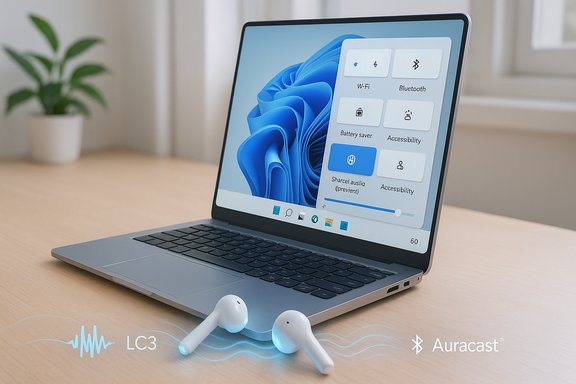
Microsoft’s new Shared audio (preview) surfaces as a Quick Settings control that lets a Windows 11 PC transmit a single synchronized audio stream to two paired Bluetooth Low Energy (LE) Audio sinks — headphones, earbuds, speakers, or compatible hearing aids. The feature builds on the LE Audio family — the LC3 codec, isochronous channels (ISO), and broadcast/multi‑stream primitives (commonly associated with Auracast) — to duplicate output without the old Bluetooth Classic compromises. Microsoft has begun offering the preview to Windows Insiders in the Dev and Beta channels, and the company initially gates it to a short list of Copilot+ PCs where the Bluetooth radio, firmware and vendor drivers already expose the necessary LE Audio stack. That constrained rollout is intentional: delivering a synchronized multi‑sink experience depends on coordination across headset firmware, PC Bluetooth controllers, and OEM drivers.
Microsoft’s preview is the first clear signal that Windows intends to make LE Audio a first‑class scenario on the desktop. If the ecosystem plays along — firmware updates, consistent driver delivery, and vendor tuning — Shared audio could become one of those quietly transformative platform features that simply makes life easier for millions of PC users.
Source: WebProNews Microsoft Tests Windows 11 Multi-Device Bluetooth Audio Sharing
 Background / Overview
Microsoft’s new Shared audio (preview) surfaces as a Quick Settings control that lets a Windows 11 PC transmit a single synchronized audio stream to two paired Bluetooth Low Energy (LE) Audio sinks — headphones, earbuds, speakers, or compatible hearing aids. The feature builds on the LE Audio family — the LC3 codec, isochronous channels (ISO), and broadcast/multi‑stream primitives (commonly associated with Auracast) — to duplicate output without the old Bluetooth Classic compromises. Microsoft has begun offering the preview to Windows Insiders in the Dev and Beta channels, and the company initially gates it to a short list of Copilot+ PCs where the Bluetooth radio, firmware and vendor drivers already expose the necessary LE Audio stack. That constrained rollout is intentional: delivering a synchronized multi‑sink experience depends on coordination across headset firmware, PC Bluetooth controllers, and OEM drivers. Why this matters: the Bluetooth problem Windows has lived with
For more than a decade, desktop Bluetooth audio has been hamstrung by a protocol‑level tradeoff: A2DP provided one‑way, high‑quality stereo playback while HFP/HSP handled microphone input but at low fidelity and often mono. The moment a mic was used, many headsets and OS stacks would fall back to the telephony path and degrade playback quality — the familiar “music goes to mud” problem. LE Audio was specifically designed to remove that binary choice by providing:- LC3 codec — better perceived audio quality at far lower bitrates than SBC, enabling energy savings or higher fidelity.
- Isochronous Channels (ISO) — transport primitives that provide synchronized timing for multi‑stream audio.
- TMAP / multi‑stream — profiles that support simultaneous media and telephony streams, and left/right independent streams for earbuds.
How Shared audio (preview) actually works
The technical building blocks
At a high level, Microsoft’s Shared audio uses LE Audio transport and codec primitives to create synchronized streams that multiple receivers can consume. Key pieces:- LC3 codec compresses the source audio efficiently and supports sample rates up to 48 kHz, which helps keep audio quality high while minimizing radio airtime.
- Isochronous channels provide the timing guarantees required to keep multiple sinks in sync and reduce perceptible lag between listeners.
- Multi‑stream / broadcast primitives permit duplicating the same audio feed to more than one sink; Microsoft starts conservatively (two sinks in preview) rather than enabling unlimited Auracast‑style broadcasts immediately.
User flow (what Insiders see)
- Enroll the Copilot+ PC in the Windows Insider Program (Dev or Beta) and install the build that includes the preview.
- Ensure both Bluetooth accessories are paired and show as connected in Settings > Bluetooth & devices.
- Open Quick Settings and tap the Shared audio (preview) tile, select two compatible connected accessories and press Share to start streaming. A Stop sharing control ends the session.
Supported hardware, driver dependencies and the Copilot+ gate
Why Copilot+ PCs first?
Microsoft is limiting the first wave to Copilot+ PCs — devices certified to deliver on‑device AI experiences and shipped with newer NPUs (Neural Processing Units) and validated driver stacks. The rationale Microsoft and observers give is pragmatic: these devices tend to ship with more recent Bluetooth radios, chipset firmware, and vendor drivers that already support LE Audio primitives, which reduces interoperability variables during testing. The Insider rollout and Microsoft’s blog posts explicitly name a set of Surface devices and a “coming soon” list of other OEM models.Copilot+ hardware checklist (the practical minimums)
- Modern Bluetooth radio with LE Audio support (Bluetooth Core 5.2+ and vendor firmware).
- Windows 11 build that exposes LE Audio plumbing (Insider builds for the preview; broader support folded into 24H2+ servicing for other LE Audio capabilities).
- Vendor Bluetooth and audio drivers that expose LE ISO and LC3 negotiation to Windows. This often requires OEM driver updates via Windows Update or vendor pages.
What Microsoft promises and what it doesn’t
- What is being delivered: a native, OS‑level option to stream the same audio to two LE Audio sinks simultaneously in preview, surfaced in Quick Settings and intended for social sharing and accessibility scenarios (family movie watching, students sharing audio, direct streaming to hearing aids).
- What Microsoft has not promised: a universal rollout schedule or a guaranteed date when the feature will hit stable Windows builds for all devices. Press coverage and community rumors estimate broader availability over coming months, but Microsoft’s public communications so far emphasize an incremental driver‑and‑OEM‑driven expansion rather than a fixed calendar. Treat any “early 2026” target reported in rumor threads as speculative unless Microsoft publishes an explicit timeline.
Practical benefits and early use cases
- Private co‑watching on a plane or train — two people can watch a movie from a single PC while using their own earbuds, each controlling their volume independently.
- Student or classroom scenarios — synchronized playback for two participants during a study session or lab demo.
- Accessibility for hearing devices — LE Audio is a genuine enabler for hearing aids and assistive listening; Windows’ LE Audio support and Shared audio can simplify direct streaming to such devices. Microsoft has been explicitly progressing hearing‑device features in Windows 11 and added new hearing aid controls in recent servicing updates.
- Simpler workflows than third‑party hacks — until now, reproducing this behavior on Windows often required software workarounds (Voicemeeter, audio routing tools) or hardware splitters; a native implementation reduces complexity for casual users.
Performance, latency and battery trade‑offs: the real risks
Shared audio is attractive, but several practical challenges must be understood and tested:- Device synchronization and lip‑sync: Even with ISO timing, different accessories employ different buffering, ANC algorithms and post‑processing. That can create perceptible offset between two sinks when watching video if one device applies heavier processing. Early reports emphasize that Microsoft limited the preview to two sinks to keep the synchronization problem manageable. Expect variable results across accessory pairs; wired playback remains the lowest‑latency fallback.
- Battery impact: LC3 is efficient, but broadcasting to two receivers doubles the number of sink transmissions and may increase host radio airtime. Accessory batteries will behave according to vendor tuning; some devices may see reduced runtime during multi‑sink sessions.
- Driver / firmware divergence: The experience depends on drivers from chipset vendors and OEMs. Until drivers converge across manufacturers and Windows Update becomes the consistent delivery channel for LE Audio stacks, users may see inconsistent behavior between otherwise similar machines. Microsoft’s preview aims to collect telemetry and feedback to stabilize this.
- Compatibility limits: The preview requires LE Audio‑capable accessories. A device marketed as “Bluetooth 5.x” is not guaranteed to support LC3, TMAP or Auracast‑like features unless the vendor explicitly lists LE Audio or Auracast compatibility.
Accessibility and hearing aids — why LE Audio matters
One of the most consequential aspects of LE Audio is its potential to improve accessibility. LE Audio includes specifications specifically targeted at hearing devices, enabling direct pairing and more granular audio presets and ambient‑sound controls. Microsoft has been rolling out hearing‑device features in Windows 11 settings that let users adjust presets and ambient sound behavior for compatible hearing aids, and Shared audio’s ability to stream to hearing devices aligns with that accessibility focus. That said, compatibility depends on the hearing device vendor and audiologist configurations; users should confirm support with the manufacturer.Competitive landscape: what Apple, Google and Samsung are doing
- Android / Auracast: Google and several OEMs have already implemented Auracast‑style broadcast experiences on phones, enabling one‑to‑many listening on compatible earbuds and hearing aids. The Bluetooth SIG’s Auracast specification underpins many of these mobile features. Microsoft’s Shared audio is a desktop‑oriented, curated take on the same underlying standard.
- Apple / AirPlay: Apple offers multi‑device streaming in its ecosystem via AirPlay and device‑specific features; Microsoft’s move narrows the gap on cross‑device shared listening for Windows users and could influence enterprise AV setups where cross‑platform compatibility matters. The two approaches are different technically (AirPlay over IP vs. Bluetooth LE broadcast), but they converge on the same user need: easy, low‑friction multi‑listener experiences.
Security and privacy considerations
Broadcast audio brings legitimate policy questions. Auracast broadcasts can be open (any compatible sink can join) or closed (controlled via passkeys/encryption), and different implementations expose different controls. Microsoft’s current preview restricts Shared audio to paired devices the user explicitly selects, minimizing public broadcast risks. However, enterprise or public‑space Auracast deployments will require clear guidance on:- Access control and encryption for broadcasts
- Licensing or DRM implications (streaming copyrighted audio into a public broadcast)
- User consent and privacy in shared listening scenarios
What this means for buyers, IT admins and everyday users
- Buyers seeking shared audio today: prioritize accessories explicitly labeled LE Audio or Auracast compatible and buy from vendors that actively publish firmware updates. Confirm manufacturer app update cadence.
- Home users who want to try the preview: enroll a supported Copilot+ PC in the Windows Insider Dev/Beta channel, update OS and OEM drivers, ensure accessory firmware is current, pair two LE Audio devices and use the Quick Settings tile. Be ready to troubleshoot (re‑pairing after firmware updates is commonly required).
- IT and AV professionals: do pilot testing before adopting Shared audio in production or public venues. Validate driver delivery paths and check vendor policies for broadcast encryption and content restrictions. Treat the preview as a testable capability, not a production‑ready AV standard yet.
Timeline and rollout expectations — realistic framing
Microsoft’s current communications and the Windows Insider releases show a measured, telemetry‑driven rollout approach: preview in Dev/Beta for Copilot+ hardware now, gradual OEM driver distribution next, then wider availability as driver and firmware ecosystems mature. Press reports and community speculation suggest broader availability may come in later servicing updates, but Microsoft has not published a firm date for general consumer availability across the Windows 11 installed base. Any explicit calendar (for example, “early 2026”) should be regarded as tentative unless Microsoft confirms it.Strengths, risks and final assessment
Strengths
- Standards‑based: Built on Bluetooth LE Audio and LC3, not a proprietary hack. That increases long‑term interoperability potential.
- Practical UX: A Quick Settings tile is an approachable, low‑friction way to share audio without third‑party software.
- Accessibility gains: Native hearing aid support and direct streaming deliver real user value beyond novelty.
Risks and caveats
- Fragmented driver/firmware landscape can produce inconsistent results across devices and accessories.
- Latency/desync remains a real problem for mixed accessory pairs and video playback. Expect iterative improvements rather than instant perfection.
- Perceived exclusivity: gating to Copilot+ PCs may provoke criticism that the feature is being used to differentiate hardware unnecessarily; much of the capability depends on Bluetooth radios and drivers rather than NPUs. Microsoft’s decision reduces variables for testing but could be perceived as marketing‑driven. Community threads are already debating this point.
Practical checklist: how to try Shared audio (preview) today
- Confirm your PC is a supported Copilot+ model (check the list in Microsoft’s Insider post).
- Enroll in the Windows Insider Program (Dev or Beta channel) and install Build 26220.7051 or later where the feature is rolling out.
- Update Windows, then check Windows Update for optional Bluetooth and audio driver packages from your OEM.
- Update accessory firmware using the manufacturer companion app and re‑pair devices.
- Pair two LE Audio devices and use Quick Settings > Shared audio (preview) to start sharing. Test with short local video clips to spot lip‑sync issues.
Conclusion
Microsoft’s Shared audio (preview) in Windows 11 is a pragmatic, standards‑driven step that shows how Bluetooth LE Audio can finally deliver the multi‑listener experiences consumers have had on mobile for a while. By leveraging LC3, isochronous channels and broadcast primitives, Microsoft gives Windows users a native path to share synchronized audio without third‑party tools — and its early focus on Copilot+ PCs reflects the company’s desire to stabilize the experience by narrowing hardware variables during testing. The technical foundation is sound and the accessibility implications are significant, but the rollout will be defined by how quickly chipset vendors, OEMs and accessory makers align firmware and drivers. Users and IT teams should welcome the capability but plan pilot deployments, set realistic latency expectations, and verify that the specific accessory pairs they care about behave acceptably before relying on the feature in critical scenarios.Microsoft’s preview is the first clear signal that Windows intends to make LE Audio a first‑class scenario on the desktop. If the ecosystem plays along — firmware updates, consistent driver delivery, and vendor tuning — Shared audio could become one of those quietly transformative platform features that simply makes life easier for millions of PC users.
Source: WebProNews Microsoft Tests Windows 11 Multi-Device Bluetooth Audio Sharing
