

Neowin’s look at Raditya Aryaputra’s latest Windows 11 redesign concept lands at a moment when Microsoft’s desktop is carrying more ambition, more AI, and more promotional surface area than many longtime users would like. The concept imagines a cleaner, more customizable Windows 11 that strips away much of the AI clutter, removes intrusive recommendations, and refocuses the shell on apps, search, calendar, widgets, and task switching. It is attractive, thoughtful, and undeniably closer to what many enthusiasts say they want — but it also exposes the oldest tension in Windows design: every “simplification” can become a new learning curve.
Windows has always been more than an operating system interface. It is a workplace, a launcher, a file cabinet, a gaming platform, a remote management endpoint, and for many users, the only computer environment they have known for decades. That history makes every major shell change unusually sensitive, because Windows users build muscle memory around tiny details that designers often see as outdated.
Windows 11 arrived with a visual reset that leaned heavily on centered taskbar icons, rounded corners, softened materials, and a calmer Fluent Design language. Microsoft presented it as cleaner and more modern, but the first reaction from power users was not universally warm. Missing taskbar behaviors, reduced Start menu flexibility, and a sense that form had outrun function created a backlash that has lingered ever since.
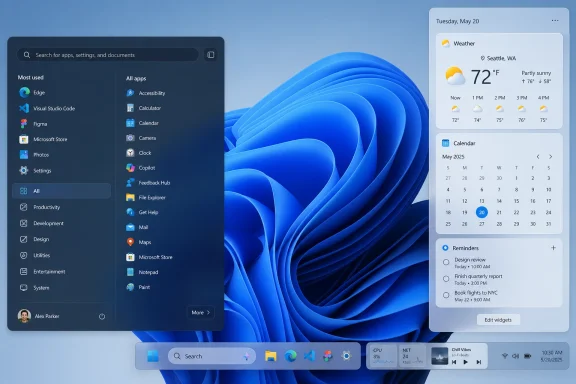
The latest fan concept highlighted by Neowin sits directly inside that unresolved argument. Aryaputra’s redesign is not simply a prettier skin; it proposes a different hierarchy for Windows itself. The Start menu becomes more organized, the taskbar becomes more modular, Widgets become less like a news feed, and Copilot moves from front-and-center branding into a more contextual search role.
That makes the concept compelling, but also potentially divisive. It answers real complaints about recommendations, advertising, and AI overexposure, yet it introduces a denser interface that could feel overwhelming to casual users. In other words, it is a concept about going “back to basics” that may still ask users to learn a new definition of basic.
That is an important editorial choice. Many redesign concepts fail because they chase spectacle: translucent panels, animated surfaces, and futuristic effects that would be exhausting in a real workday. This one is more grounded because its core premise is that Windows should be quieter, faster-feeling, and more respectful of user intent.
The concept’s philosophy can be summarized in a few shifts:
Aryaputra’s concept tries to reassert intentionality. The Start menu looks like a place for launching and organizing apps. Search looks like a place for finding things. Widgets look like glanceable utilities. Calendar looks like calendar, not a sidecar for unrelated alerts.
That sounds simple, but simplicity in Windows is never simple. A billion-device ecosystem must serve touch users, keyboard users, pen users, gamers, enterprise workers, accessibility workflows, kiosk systems, hybrid work setups, and low-cost laptops. A concept can optimize for clarity; Microsoft has to optimize for survivability at scale.
Aryaputra’s concept appears to reject the current Windows 11 emphasis on recommended content. Instead, it organizes apps into categories and vertical lists, with a section for commonly used apps that feels closer to user-driven frequency than algorithmic suggestion. That is a subtle but crucial distinction.
A most-used apps area can be helpful because it reflects behavior without necessarily becoming promotional. A recommendation area, by contrast, can become a contested space if users suspect it is shaped by Microsoft’s commercial priorities. The concept benefits from making that boundary clearer.
The Start menu changes would likely appeal to users who want:
A categorized Start menu could improve scanning. Creative tools, communication apps, system utilities, games, and productivity software each have different mental buckets. If Windows can make those buckets visible without burying the user in menus, the result could be both faster and calmer.
The danger is misclassification. If Windows automatically groups apps incorrectly, users will blame the Start menu. If it requires too much manual organization, casual users will ignore it. The concept’s success would depend on a balance between automatic structure and manual override.
Windows has long struggled with the taskbar’s identity. Is it an app switcher, a status strip, a launcher, a notification surface, a system tray, or a productivity dashboard? The honest answer is “all of the above,” which is why redesigning it is so difficult.
A modular taskbar could be a major improvement if users can decide what appears there. CPU load, weather, media controls, network status, calendar context, clipboard tools, virtual desktops, and focus modes all make sense for some workflows. They do not make sense for everyone at the same time.
The key design question is whether the taskbar remains glanceable. A glanceable interface gives information without forcing interpretation. Once the user has to parse too many modules, badges, meters, and controls, the taskbar stops being a foundation and becomes another app.
A richer taskbar would need careful defaults:
Aryaputra’s concept reportedly removes or minimizes the AI-curated news feed, which may be the single most enthusiast-friendly decision in the redesign. Many users do not object to widgets as a category. They object to a widget board that feels like a web portal living inside the operating system.
A feed-free Widgets panel would better align with the original promise of desktop widgets: fast, personal, low-friction information. It would also make the feature easier to defend in enterprise environments, where consumer news feeds can look unprofessional or distracting.
A cleaner Widgets board could prioritize:
Windows is most valuable when users forget it is there. That is a difficult idea for a company trying to showcase AI services and cloud subscriptions, but it remains true. The OS should reduce friction, not manufacture attention.
This concept understands that distinction. By making Widgets less about discovery and more about utility, it imagines a Windows 11 that feels less needy. That alone explains why the design is likely to win praise from the same users who normally disable Widgets immediately after setup.
Microsoft’s broader strategy is clear: Windows is becoming an AI PC platform, particularly through Copilot+ PCs, improved semantic search, Recall-style history features, settings assistance, and contextual help. The question is not whether AI will appear in Windows. The question is whether users experience it as assistance or occupation.
A search-centered Copilot can be genuinely useful. If a user types “make text easier to read,” “find the file I edited yesterday,” or “turn off distracting notifications,” AI can bridge the gap between human language and buried settings. That is a productive use of intelligence in the shell.
The problem begins when AI becomes a permanent visual layer over unrelated tasks. A Copilot prompt in every corner may impress in a keynote, but it can feel like pressure in daily use. Aryaputra’s approach suggests that AI should appear when intent is clear, not when the system wants to advertise its capabilities.
For consumers, a quieter Copilot could reduce annoyance and increase voluntary use. For businesses, it could make AI easier to evaluate under governance rules. In both cases, less intrusion may lead to more acceptance.
Windows has spent years experimenting with notification surfaces. Action Center, Quick Settings, calendar flyouts, Focus Assist, Do Not Disturb, and Teams integration have all shifted over time. The result is functional, but not always elegant.
A cleaner calendar flyout would be especially useful for hybrid workers. Many users live by Outlook, Teams, Google Calendar, or a mixture of personal and work accounts. A calendar panel that offers date context, meetings, join buttons, and perhaps travel buffers could become a daily anchor.
But the calendar must avoid becoming another recommendations surface. It should not be a place for “suggested productivity,” AI agenda coaching, or promotional prompts unless users request them. Calendars are trusted because they are boring, and that is not an insult.
A separated model would have benefits:
The current Windows 11 interface may be imperfect, but it is familiar to hundreds of millions of users. A concept that reorganizes core surfaces risks making the OS feel new again in ways that some users would appreciate and others would resent. That is especially true for people who use Windows under time pressure rather than as a hobby.
The Start menu could be seen as cleaner by enthusiasts and more confusing by casual users. The modular taskbar could be seen as powerful by IT professionals and cluttered by students or home users. The reduced AI presence could please skeptics while disappointing users who actually like Copilot’s visibility.
Potential friction points include:
Aryaputra’s concept does not repeat Windows 8’s mistake directly. It keeps the desktop metaphor, respects the taskbar, and appears designed for mouse and keyboard users. Still, its broader ambition raises the same strategic question: how much should Microsoft ask users to relearn at once?
The best answer would be gradualism. Microsoft could adopt pieces of this thinking without shipping the whole concept. A cleaner Start menu toggle, a feed-free Widgets mode, modular taskbar options, and a dedicated calendar flyout would each be easier to absorb than a complete shell reset.
A Windows shell with fewer recommendations and clearer module controls would be easier to defend in business settings. Organizations want employees to find apps, files, settings, and meetings quickly. They generally do not want news feeds, Store promotions, or consumer AI prompts appearing in the middle of managed workflows.
The enterprise upside would include:
For home users, the removal of feed-like content may be immediately welcome. Many people buy a PC to browse, play, create, communicate, and manage personal files. They may not want the operating system to behave like a shopping mall or content network.
At the same time, recommendations can be convenient for less technical users. Recent documents, newly installed apps, and suggested settings can reduce friction when implemented honestly. The challenge is to preserve usefulness without eroding trust.
A consumer-friendly version of this concept would need plain-language toggles. “Show recent files,” “Show app suggestions,” “Show news,” “Show Copilot in Search,” and “Show taskbar modules” would do more for trust than burying choices under vague personalization menus.
macOS has generally kept a clearer separation between launcher, dock, widgets, Spotlight, and notifications. ChromeOS emphasizes simplicity and web-first search. Linux desktops such as KDE Plasma and GNOME offer different answers: one leans toward deep customization, the other toward opinionated minimalism.
Windows sits in the hardest position because it must be all things to more people. It needs to satisfy gamers, accountants, students, developers, schools, governments, creators, frontline workers, and enthusiasts. That breadth makes every design choice a compromise.
Aryaputra’s concept borrows some energy from customizable desktop environments while retaining the polished visual language of Windows 11. That combination is appealing because it suggests Microsoft could make Windows feel personal again without abandoning mainstream polish.
The concept’s quieter Copilot treatment points toward a possible middle path. Let AI improve search, accessibility, settings, summaries, and workflows, but do not make every desktop surface an AI advertisement. The best AI integration may be the kind users notice only after it saves them time.
This matters competitively because trust will become a differentiator. Users may accept powerful AI tools inside their PC if they believe the OS is acting on their behalf. They will resist if they feel the OS is steering them toward services they did not request.
For Microsoft, that distinction is not philosophical. It affects adoption, enterprise policy decisions, regulator attention, and customer satisfaction. A cleaner shell could make Windows AI feel more credible, not less.
Microsoft’s public design guidance for Windows 11 emphasizes ideas such as effortless, calm, personal, familiar, and coherent experiences. Aryaputra’s concept clearly engages with those values, especially calm and personal. The harder question is whether it preserves familiarity strongly enough.
A design that looks clean in a Behance presentation may behave differently after six months of real-world use. What happens when a user has 120 apps installed? What happens when a school disables Copilot? What happens when the taskbar modules collide with accessibility scaling? What happens when a user has three calendars and two work accounts?
Those are not reasons to reject the concept. They are reasons to treat it as a design provocation rather than a product plan. Its value lies in showing which parts of Windows 11 people want Microsoft to rethink.
The strongest candidates are:
The most likely future is not a wholesale redesign like Aryaputra’s concept. It is a slow absorption of similar ideas through feature updates: more toggles, more flexible Start layouts, cleaner power and calendar experiences, better search, more optional AI, and a Widgets board that becomes easier to tame. Microsoft rarely admits that fan concepts influence Windows directly, but the conversation around them helps define the boundaries of acceptable change.
Key areas to watch include:
Source: Neowin This Windows 11 concept looks clean, but may be controversial
 Overview
Windows has always been more than an operating system interface. It is a workplace, a launcher, a file cabinet, a gaming platform, a remote management endpoint, and for many users, the only computer environment they have known for decades. That history makes every major shell change unusually sensitive, because Windows users build muscle memory around tiny details that designers often see as outdated.Windows 11 arrived with a visual reset that leaned heavily on centered taskbar icons, rounded corners, softened materials, and a calmer Fluent Design language. Microsoft presented it as cleaner and more modern, but the first reaction from power users was not universally warm. Missing taskbar behaviors, reduced Start menu flexibility, and a sense that form had outrun function created a backlash that has lingered ever since.
The latest fan concept highlighted by Neowin sits directly inside that unresolved argument. Aryaputra’s redesign is not simply a prettier skin; it proposes a different hierarchy for Windows itself. The Start menu becomes more organized, the taskbar becomes more modular, Widgets become less like a news feed, and Copilot moves from front-and-center branding into a more contextual search role.
That makes the concept compelling, but also potentially divisive. It answers real complaints about recommendations, advertising, and AI overexposure, yet it introduces a denser interface that could feel overwhelming to casual users. In other words, it is a concept about going “back to basics” that may still ask users to learn a new definition of basic.
A Concept Built Around Subtraction
Less AI, Less Feed, More Shell
The most striking thing about this Windows 11 concept is not what it adds, but what it removes. In recent years, Microsoft has treated the Windows desktop as a strategic gateway to services: Microsoft 365, OneDrive, Edge, Bing, Copilot, Store apps, cloud files, and personalized feeds. Aryaputra’s concept pushes in the opposite direction by asking what Windows might feel like if the shell stopped competing for attention.That is an important editorial choice. Many redesign concepts fail because they chase spectacle: translucent panels, animated surfaces, and futuristic effects that would be exhausting in a real workday. This one is more grounded because its core premise is that Windows should be quieter, faster-feeling, and more respectful of user intent.
The concept’s philosophy can be summarized in a few shifts:
- Remove the sense that every surface must recommend something.
- Restore the Start menu as an app-first launcher.
- Make the taskbar a customizable control surface rather than a fixed strip.
- Reduce the prominence of AI unless the user actively seeks it.
- Keep widgets useful without turning them into a content portal.
- Separate calendar, meetings, and notifications more cleanly.
- Give users more control over what the desktop shows at rest.
The Return of Intentional Interfaces
A good desktop shell should make the next action feel obvious. When a user opens Start, they may want an app, a document, a setting, a shutdown option, or a quick search. When that same space contains promotions, AI prompts, recent documents, cloud suggestions, and Store recommendations, the interface becomes less predictable.Aryaputra’s concept tries to reassert intentionality. The Start menu looks like a place for launching and organizing apps. Search looks like a place for finding things. Widgets look like glanceable utilities. Calendar looks like calendar, not a sidecar for unrelated alerts.
That sounds simple, but simplicity in Windows is never simple. A billion-device ecosystem must serve touch users, keyboard users, pen users, gamers, enterprise workers, accessibility workflows, kiosk systems, hybrid work setups, and low-cost laptops. A concept can optimize for clarity; Microsoft has to optimize for survivability at scale.
Start Menu Returns to Organization
From Recommendations to Retrieval
The Start menu is the emotional center of Windows. It has been reinvented repeatedly, from the cascading menus of Windows 95 to the full-screen Start screen of Windows 8, the hybrid tiles of Windows 10, and the simplified launcher in Windows 11. Each redesign has carried a theory about how people find their software.Aryaputra’s concept appears to reject the current Windows 11 emphasis on recommended content. Instead, it organizes apps into categories and vertical lists, with a section for commonly used apps that feels closer to user-driven frequency than algorithmic suggestion. That is a subtle but crucial distinction.
A most-used apps area can be helpful because it reflects behavior without necessarily becoming promotional. A recommendation area, by contrast, can become a contested space if users suspect it is shaped by Microsoft’s commercial priorities. The concept benefits from making that boundary clearer.
The Start menu changes would likely appeal to users who want:
- Faster access to installed applications.
- Less visual competition from recent files and Store suggestions.
- More predictable app grouping.
- Better use of vertical space.
- Search positioned as a utility rather than the dominant experience.
- Fewer ambiguous “recommended” tiles.
- A stronger sense that the menu belongs to the user.
Why Categories Matter
App categories sound old-fashioned until you look at the mess of a real PC. Many Windows installations contain dozens or hundreds of entries: legacy Win32 utilities, Store apps, browser apps, vendor tools, game launchers, driver panels, updaters, and administrative consoles. Alphabetical lists are reliable, but not always efficient.A categorized Start menu could improve scanning. Creative tools, communication apps, system utilities, games, and productivity software each have different mental buckets. If Windows can make those buckets visible without burying the user in menus, the result could be both faster and calmer.
The danger is misclassification. If Windows automatically groups apps incorrectly, users will blame the Start menu. If it requires too much manual organization, casual users will ignore it. The concept’s success would depend on a balance between automatic structure and manual override.
Taskbar Reimagined as a Dashboard
Power-User Appeal and Cognitive Load
The concept’s taskbar may be its most controversial element. Neowin notes that it becomes more modular and shows more information than the standard Windows 11 taskbar. That is exciting for users who want system awareness, but risky for those who value the taskbar precisely because it is simple.Windows has long struggled with the taskbar’s identity. Is it an app switcher, a status strip, a launcher, a notification surface, a system tray, or a productivity dashboard? The honest answer is “all of the above,” which is why redesigning it is so difficult.
A modular taskbar could be a major improvement if users can decide what appears there. CPU load, weather, media controls, network status, calendar context, clipboard tools, virtual desktops, and focus modes all make sense for some workflows. They do not make sense for everyone at the same time.
The key design question is whether the taskbar remains glanceable. A glanceable interface gives information without forcing interpretation. Once the user has to parse too many modules, badges, meters, and controls, the taskbar stops being a foundation and becomes another app.
Customization Is Not a Magic Fix
Designers often solve controversy by saying a feature is customizable. That helps, but it does not eliminate the problem. Defaults still matter because most users never deeply customize their operating system.A richer taskbar would need careful defaults:
- Start with a minimal layout that resembles today’s familiar taskbar.
- Offer optional modules through a clear customization panel.
- Allow enterprise administrators to lock or standardize layouts.
- Avoid promotional modules by default.
- Preserve keyboard navigation and accessibility labels.
- Ensure touch targets remain usable on tablets and small laptops.
- Keep performance overhead low, especially on older hardware.
Widgets Without the News Feed Problem
The Feed Has Always Been the Complication
Widgets should be one of Windows 11’s easiest wins. Weather, calendar, sports scores, stocks, traffic, reminders, battery information, package tracking, and quick notes are all useful at a glance. The problem is that Windows Widgets have often been associated less with utility and more with the MSN-style content feed attached to them.Aryaputra’s concept reportedly removes or minimizes the AI-curated news feed, which may be the single most enthusiast-friendly decision in the redesign. Many users do not object to widgets as a category. They object to a widget board that feels like a web portal living inside the operating system.
A feed-free Widgets panel would better align with the original promise of desktop widgets: fast, personal, low-friction information. It would also make the feature easier to defend in enterprise environments, where consumer news feeds can look unprofessional or distracting.
A cleaner Widgets board could prioritize:
- Weather and severe alerts.
- Calendar events and meetings.
- To-do lists and reminders.
- Device battery and connectivity status.
- Microsoft 365 work context, when appropriate.
- Third-party widgets with strict user control.
- A clear off switch for organizations.
Utility Beats Engagement
The business temptation behind feeds is obvious. Feeds drive engagement, and engagement creates measurable value for platforms. But operating systems are not social networks, and the metrics that make sense for a news portal can damage trust when imported into the desktop shell.Windows is most valuable when users forget it is there. That is a difficult idea for a company trying to showcase AI services and cloud subscriptions, but it remains true. The OS should reduce friction, not manufacture attention.
This concept understands that distinction. By making Widgets less about discovery and more about utility, it imagines a Windows 11 that feels less needy. That alone explains why the design is likely to win praise from the same users who normally disable Widgets immediately after setup.
Copilot Becomes a Search Companion
Assistant, Not Landlord
The concept does not appear to remove Copilot entirely. Instead, it makes Copilot less intrusive by integrating it mainly with Windows Search. That is a smarter compromise than pretending AI has no place in modern Windows.Microsoft’s broader strategy is clear: Windows is becoming an AI PC platform, particularly through Copilot+ PCs, improved semantic search, Recall-style history features, settings assistance, and contextual help. The question is not whether AI will appear in Windows. The question is whether users experience it as assistance or occupation.
A search-centered Copilot can be genuinely useful. If a user types “make text easier to read,” “find the file I edited yesterday,” or “turn off distracting notifications,” AI can bridge the gap between human language and buried settings. That is a productive use of intelligence in the shell.
The problem begins when AI becomes a permanent visual layer over unrelated tasks. A Copilot prompt in every corner may impress in a keynote, but it can feel like pressure in daily use. Aryaputra’s approach suggests that AI should appear when intent is clear, not when the system wants to advertise its capabilities.
The Right Level of Integration
A practical Windows AI model would need to follow a disciplined sequence:- Search first, because search is already where users ask for help.
- Explain clearly, especially before changing system settings.
- Request permission, particularly for actions that affect files or privacy.
- Show reversibility, so users can undo AI-driven changes.
- Stay out of workflows where deterministic controls are faster.
- Respect policy, especially on managed enterprise devices.
For consumers, a quieter Copilot could reduce annoyance and increase voluntary use. For businesses, it could make AI easier to evaluate under governance rules. In both cases, less intrusion may lead to more acceptance.
Calendar and Notifications Get Cleaner Boundaries
Time Management Needs Focus
The concept’s calendar changes sound modest, but they matter. Separating the calendar from notifications and emphasizing meetings restores a sense of purpose to a panel that many users open for one reason: to check dates and upcoming commitments. When that simple action is bundled with unrelated alerts, the interface feels heavier than it should.Windows has spent years experimenting with notification surfaces. Action Center, Quick Settings, calendar flyouts, Focus Assist, Do Not Disturb, and Teams integration have all shifted over time. The result is functional, but not always elegant.
A cleaner calendar flyout would be especially useful for hybrid workers. Many users live by Outlook, Teams, Google Calendar, or a mixture of personal and work accounts. A calendar panel that offers date context, meetings, join buttons, and perhaps travel buffers could become a daily anchor.
But the calendar must avoid becoming another recommendations surface. It should not be a place for “suggested productivity,” AI agenda coaching, or promotional prompts unless users request them. Calendars are trusted because they are boring, and that is not an insult.
Notifications Need Their Own Logic
Notifications have different behavior than calendars. They are interruptive, time-sensitive, and often disposable. Calendar information is structured, scheduled, and persistent. Combining the two may save space, but it weakens both metaphors.A separated model would have benefits:
- Calendar opens quickly and stays focused on time.
- Notifications remain grouped by app and urgency.
- Meeting controls become easier to find.
- Missed alerts do not visually pollute date browsing.
- Focus modes can apply more cleanly.
- Users can build habits around predictable panels.
Why This Would Be Controversial
Windows Users Hate Forced Relearning
The controversy around this concept is not simply that it changes things. Windows users tolerate change when the payoff is obvious. The issue is that any redesign of Start, taskbar, search, widgets, and calendar simultaneously touches the core loop of desktop computing.The current Windows 11 interface may be imperfect, but it is familiar to hundreds of millions of users. A concept that reorganizes core surfaces risks making the OS feel new again in ways that some users would appreciate and others would resent. That is especially true for people who use Windows under time pressure rather than as a hobby.
The Start menu could be seen as cleaner by enthusiasts and more confusing by casual users. The modular taskbar could be seen as powerful by IT professionals and cluttered by students or home users. The reduced AI presence could please skeptics while disappointing users who actually like Copilot’s visibility.
Potential friction points include:
- Users needing to relearn where search lives.
- A denser taskbar creating visual overload.
- App categories feeling arbitrary or unnecessary.
- Copilot becoming harder to discover for new users.
- Fewer recommendations reducing convenience for some workflows.
- Customization settings becoming too complex.
- Existing support documentation becoming outdated.
The Windows 8 Lesson Still Matters
Any ambitious Windows interface concept exists in the shadow of Windows 8. Microsoft’s attempt to force a touch-first Start screen onto traditional PCs remains the cautionary tale for desktop redesign. The lesson was not that Windows should never change; it was that Windows cannot ignore established input patterns and user expectations.Aryaputra’s concept does not repeat Windows 8’s mistake directly. It keeps the desktop metaphor, respects the taskbar, and appears designed for mouse and keyboard users. Still, its broader ambition raises the same strategic question: how much should Microsoft ask users to relearn at once?
The best answer would be gradualism. Microsoft could adopt pieces of this thinking without shipping the whole concept. A cleaner Start menu toggle, a feed-free Widgets mode, modular taskbar options, and a dedicated calendar flyout would each be easier to absorb than a complete shell reset.
Enterprise vs Consumer Impact
Admins Value Predictability
For enterprises, the most attractive part of the concept is not its beauty. It is the possibility of a less noisy Windows environment. IT administrators often spend time disabling consumer features, removing promotional experiences, standardizing Start layouts, and reducing distractions on managed devices.A Windows shell with fewer recommendations and clearer module controls would be easier to defend in business settings. Organizations want employees to find apps, files, settings, and meetings quickly. They generally do not want news feeds, Store promotions, or consumer AI prompts appearing in the middle of managed workflows.
The enterprise upside would include:
- Cleaner provisioning for new devices.
- Less need for post-install cleanup scripts.
- More predictable Start and taskbar layouts.
- Fewer distractions in shared workspaces.
- Better alignment with compliance requirements.
- More control over AI entry points.
- Easier user training and onboarding.
Consumers Want Control Without Homework
Consumers have a different problem. They want the PC to feel personal, but many do not want to spend an afternoon configuring it. A concept like this must therefore offer strong defaults and simple customization paths.For home users, the removal of feed-like content may be immediately welcome. Many people buy a PC to browse, play, create, communicate, and manage personal files. They may not want the operating system to behave like a shopping mall or content network.
At the same time, recommendations can be convenient for less technical users. Recent documents, newly installed apps, and suggested settings can reduce friction when implemented honestly. The challenge is to preserve usefulness without eroding trust.
A consumer-friendly version of this concept would need plain-language toggles. “Show recent files,” “Show app suggestions,” “Show news,” “Show Copilot in Search,” and “Show taskbar modules” would do more for trust than burying choices under vague personalization menus.
Competitive Implications
Microsoft Is Not Designing in a Vacuum
The debate over this concept also reflects a broader market shift. Apple, Google, and Linux desktop environments are all wrestling with AI, widgets, notifications, and launcher design. No major platform wants to look stagnant, but no mature platform can afford to alienate its core users.macOS has generally kept a clearer separation between launcher, dock, widgets, Spotlight, and notifications. ChromeOS emphasizes simplicity and web-first search. Linux desktops such as KDE Plasma and GNOME offer different answers: one leans toward deep customization, the other toward opinionated minimalism.
Windows sits in the hardest position because it must be all things to more people. It needs to satisfy gamers, accountants, students, developers, schools, governments, creators, frontline workers, and enthusiasts. That breadth makes every design choice a compromise.
Aryaputra’s concept borrows some energy from customizable desktop environments while retaining the polished visual language of Windows 11. That combination is appealing because it suggests Microsoft could make Windows feel personal again without abandoning mainstream polish.
The AI PC Branding Challenge
Microsoft’s AI PC push creates a branding challenge that rivals also face. If AI features are too hidden, users may not understand why they should buy new hardware. If AI features are too visible, the operating system risks feeling like a billboard for a strategy.The concept’s quieter Copilot treatment points toward a possible middle path. Let AI improve search, accessibility, settings, summaries, and workflows, but do not make every desktop surface an AI advertisement. The best AI integration may be the kind users notice only after it saves them time.
This matters competitively because trust will become a differentiator. Users may accept powerful AI tools inside their PC if they believe the OS is acting on their behalf. They will resist if they feel the OS is steering them toward services they did not request.
For Microsoft, that distinction is not philosophical. It affects adoption, enterprise policy decisions, regulator attention, and customer satisfaction. A cleaner shell could make Windows AI feel more credible, not less.
Design Reality Check
Concepts Versus Shipping Software
The Neowin piece correctly notes that a concept is still a concept. That caveat is not a dismissal; it is the central reality of interface design. Screenshots can ignore engineering debt, localization, accessibility edge cases, enterprise policy, telemetry, low-resolution displays, high-DPI scaling, input diversity, and the cost of maintaining code across years of updates.Microsoft’s public design guidance for Windows 11 emphasizes ideas such as effortless, calm, personal, familiar, and coherent experiences. Aryaputra’s concept clearly engages with those values, especially calm and personal. The harder question is whether it preserves familiarity strongly enough.
A design that looks clean in a Behance presentation may behave differently after six months of real-world use. What happens when a user has 120 apps installed? What happens when a school disables Copilot? What happens when the taskbar modules collide with accessibility scaling? What happens when a user has three calendars and two work accounts?
Those are not reasons to reject the concept. They are reasons to treat it as a design provocation rather than a product plan. Its value lies in showing which parts of Windows 11 people want Microsoft to rethink.
What Microsoft Could Realistically Borrow
Microsoft would not need to adopt the entire redesign to benefit from it. The most practical ideas are modular, opt-in, and aligned with complaints already visible in the Windows community.The strongest candidates are:
- A fully removable Recommended area in Start.
- Better app organization without third-party Start replacements.
- A “utility-only” Widgets mode with no news feed.
- More taskbar modules, disabled by default.
- A dedicated calendar flyout focused on dates and meetings.
- Clearer controls for Copilot entry points.
- A first-run personalization screen that asks what users actually want.
- Better separation between system functions and promotional content.
Strengths and Opportunities
The strongest part of this concept is its willingness to challenge the direction of modern Windows without rejecting modern design altogether. It does not ask Microsoft to return to Windows 7, nor does it pretend that AI, widgets, and cloud services should vanish. Instead, it argues for user agency, calmer defaults, and a clearer separation between operating system utility and engagement-driven surfaces.- Cleaner Start menu philosophy could restore trust in the launcher as a user-owned space.
- Reduced AI intrusiveness could make Copilot feel more useful when invoked intentionally.
- Feed-free Widgets would address one of the most common complaints about the feature.
- Modular taskbar controls could give power users the information density they want.
- Separated calendar and notifications would make both experiences easier to understand.
- More customization would help Windows compete with highly configurable desktop environments.
- Back-to-basics positioning could appeal to users tired of promotional surfaces inside the OS.
Risks and Concerns
The risk is that a concept designed to reduce clutter may introduce a different kind of complexity. Windows does not merely need to look cleaner in screenshots; it must remain predictable under pressure, accessible across hardware, manageable by IT departments, and understandable to users who never read release notes. If Microsoft borrowed from this redesign too aggressively, it could trade one controversy for another.- The taskbar may become too dense if modular information is enabled without restraint.
- Start menu categories may confuse users if grouping logic is opaque or inconsistent.
- Hiding Copilot too much could weaken discoverability for users who benefit from AI help.
- Customization overload could make Windows feel less approachable to casual users.
- Enterprise policy gaps could create support problems in managed environments.
- Accessibility regressions could appear if new panels prioritize aesthetics over navigation.
- Performance concerns could grow if live modules and widgets add background overhead.
Looking Ahead
Microsoft is already moving through a period of Windows recalibration. The end of Windows 10 support in October 2025 pushed more users toward Windows 11, while the Copilot+ PC era has given Microsoft a strong incentive to make AI feel native to the desktop. At the same time, user feedback has repeatedly shown that people want more control over Start, taskbar behavior, recommendations, and system surfaces.The most likely future is not a wholesale redesign like Aryaputra’s concept. It is a slow absorption of similar ideas through feature updates: more toggles, more flexible Start layouts, cleaner power and calendar experiences, better search, more optional AI, and a Widgets board that becomes easier to tame. Microsoft rarely admits that fan concepts influence Windows directly, but the conversation around them helps define the boundaries of acceptable change.
Key areas to watch include:
- Whether Microsoft expands Start menu customization beyond current controls.
- Whether Widgets gain a true utility-only mode without algorithmic news.
- Whether Copilot becomes more contextual and less visually persistent.
- Whether taskbar modularity returns in a controlled, modern form.
- Whether enterprise policy keeps pace with consumer-facing AI features.
Source: Neowin This Windows 11 concept looks clean, but may be controversial
