

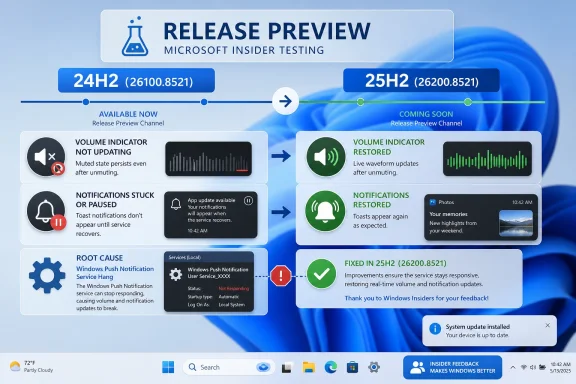
Microsoft updated the Windows 11 Release Preview builds for versions 24H2 and 25H2 on May 19, 2026, moving KB5089573 to builds 26100.8521 and 26200.8521 with fixes for unexpectedly muted audio and a Windows Push Notification service hang that could stop apps and notifications from working. The timing matters because this is the last public proving ground before the same payload is expected to ride into the optional May non-security update and then the June Patch Tuesday cumulative update. In other words, Microsoft is not merely polishing a preview; it is testing whether two everyday failures are contained before they reach the broad Windows population.
The interesting part is not that Windows has bugs. Windows always has bugs, and Release Preview exists because Microsoft would rather discover them among volunteers than among every enterprise desktop in the fleet. The more revealing story is that two failures as basic as muted audio and dead notifications can still appear late enough in the pipeline to force a build-number bump days after a preview went out.
The May 14 Release Preview build began as 26100.8514 for Windows 11 24H2 and 26200.8514 for Windows 11 25H2. By May 19, Microsoft had revised the release notes and replaced those with 26100.8521 and 26200.8521. That is a small numerical jump with a large operational meaning: the company found enough pain after the first flight to reissue the package before the optional update window closed.
For Insiders, this is the mundane rhythm of Windows testing. For everyone else, it is a reminder that Release Preview is not just a marketing lane for nearly finished features. It is where cumulative updates encounter the weird, driver-heavy, app-stuffed reality of real PCs before Microsoft stamps them for broader availability.
The two headline fixes are not obscure edge cases. Audio volume being unexpectedly muted is the kind of bug that looks trivial until it lands on a machine used for Teams calls, classroom instruction, accessibility tools, or production monitoring. A Windows Push Notification service hang is even broader, because it can make apps appear broken even when the app itself is innocent.
That distinction matters. Users often blame the visible application: Outlook is not notifying, WhatsApp is not opening, a Store app seems dead, a reminder never arrives. But when the failure sits in the notification plumbing, the symptom spreads across the ecosystem and turns Windows itself into the suspect.
Audio is one of those subsystems users expect to be boring. They will tolerate a redesigned Start menu, a delayed feature rollout, or another settings migration if the machine still behaves predictably. But when volume silently changes state, the user has to diagnose whether the problem is Windows, the app, the driver, Bluetooth, the headset, a meeting platform, or a hardware key they never pressed.
Notifications occupy a similar category. They are not glamorous, but they are part of the social contract of a modern desktop. Calendar alerts, authentication prompts, messaging apps, device warnings, and background task updates all depend on Windows reliably waking the user at the right moment.
The WPN issue is particularly nasty because it reportedly could prevent some apps from launching as well as stop notifications. That makes it less a cosmetic notification bug than a service dependency problem. When a shared Windows component hangs, the failure looks random from the user’s chair and systemic from the administrator’s console.
This has become the shape of modern Windows. Feature labels still matter for lifecycle, eligibility, and deployment rings, but cumulative update servicing increasingly behaves like a shared stream of platform changes. Microsoft can move fixes and features across adjacent releases without making each version feel like a wholly separate operating system.
For administrators, that is both helpful and uncomfortable. It means fixes for one branch are less likely to lag far behind another. It also means a regression in shared servicing can propagate across more than one Windows version at once.
The May Release Preview update underscores that tradeoff. If the audio and WPN issues were introduced or exposed by the earlier 8514 builds, then both 24H2 and 25H2 needed the corrective 8521 builds. Parallel servicing reduces fragmentation, but it also raises the blast radius of late-stage defects.
Shared audio is the most consumer-friendly addition. It allows two people to listen to the same PC audio through supported Bluetooth LE Audio devices. This is the kind of feature Apple users have treated as normal for years in parts of that ecosystem, and Windows is catching up in the more complicated world of heterogeneous PC hardware.
Task Manager is getting better visibility into NPU activity, including optional NPU and NPU Engine columns, plus NPU memory information. This is not just a nerd feature. If Microsoft and its OEM partners are going to sell AI PCs on the promise of local acceleration, users and admins need some way to see whether workloads are actually using that silicon.
The camera changes are aimed at both consumers and organizations. Multi-App Camera mode allows multiple applications to access a camera stream at the same time, while Basic Camera mode provides a simplified path for troubleshooting and stability. Enterprise administrators can control those modes through Group Policy, which is exactly where camera behavior belongs in managed environments.
There are also smaller quality improvements that reveal Microsoft’s current priorities. USB4 display reliability, USB3 resilience, sensor power behavior, HID battery life, touch keyboard reliability, clipboard history performance, wallpaper persistence, and File Explorer-adjacent reliability all fall into the category of fixes users notice only when they are absent. Windows 11’s reputation is built less on launch-day features than on whether these rough edges gradually disappear.
That system is rational, but it has a psychological problem. Users who install preview builds expect roughness; users who install optional production previews expect polish; users who wait for Patch Tuesday expect Microsoft to have sorted it out. When a Release Preview build needs a quick replacement, the system is working, but it also shows how narrow the final runway can be.
The May schedule makes that runway visible. The updated Release Preview builds arrived on May 19. The optional May 2026 non-security update is expected in the final week of May. The mandatory June Patch Tuesday update lands on June 9, 2026. That gives Microsoft roughly three weeks between the corrected Insider flight and the broad security cumulative update.
That is not much time in enterprise terms. A corporate desktop team may need days simply to validate audio, VPN, printing, collaboration tools, endpoint security, line-of-business apps, and device-management compliance across hardware models. The fix may be welcome, but the calendar remains unforgiving.
That is consistent with how 26H1 is being positioned. Microsoft has described it as a targeted Windows release for specific device hardware and silicon rather than the broad mainstream client branch. In plain English, this is Windows increasingly split between the PC everyone owns and the PC Microsoft wants the market to buy next.
The 24H2 and 25H2 updates are about the installed base: audio, notifications, USB, camera, Task Manager, accessibility, wallpaper, and reliability. The 26H1 line is about the future hardware funnel, where silicon capabilities and AI workloads increasingly define what Windows can do. Those two realities now coexist in the Insider program, but they do not carry the same public clarity.
For WindowsForum readers, that split is worth watching. Microsoft may continue to insist that Windows 11 is one platform, but servicing notes increasingly tell a more nuanced story. Some changes are broad quality work for current PCs; others are scaffolding for a hardware generation that many users do not yet own.
Modern Windows apps lean on shared services more than many users realize. Notifications, identity prompts, packaged app activation, Store infrastructure, WebView components, device broker services, and shell integrations all sit between the user and the application. When one of those layers stalls, help desks get tickets that do not map cleanly to a single vendor or executable.
That is why the WPN fix deserves more attention than the changelog gives it. Notifications are a visible symptom, but app launch failures are operational impact. If a managed app does not start because a Windows service is hung, the remediation path is not obvious to the user and may not be obvious to first-line support.
The same goes for audio. A muted-volume bug may sound like a user annoyance, but in organizations it can become a meeting failure, a training failure, or an accessibility failure. The cost is not the seconds it takes to unmute a device; it is the uncertainty created when the device no longer behaves as configured.
The May 2026 Release Preview revision is evidence in both directions. On the positive side, the process caught issues quickly and Microsoft turned around updated builds. On the negative side, the affected areas were foundational enough to make people wonder how close these bugs came to production.
This is the paradox of transparency. When Microsoft documents a late fix, it gives administrators actionable information and reassures Insiders that feedback still matters. It also exposes how much of Windows servicing is a race against the next fixed date on the calendar.
The answer is not to stop shipping features in monthly updates. That ship sailed years ago. The answer is for Microsoft to keep drawing a sharper line between safe quality fixes, staged feature rollouts, and changes that touch core service dependencies.
The interesting part is not that Windows has bugs. Windows always has bugs, and Release Preview exists because Microsoft would rather discover them among volunteers than among every enterprise desktop in the fleet. The more revealing story is that two failures as basic as muted audio and dead notifications can still appear late enough in the pipeline to force a build-number bump days after a preview went out.
 Microsoft’s Late Build Bump Says the Preview Ring Is Doing Its Job
The May 14 Release Preview build began as 26100.8514 for Windows 11 24H2 and 26200.8514 for Windows 11 25H2. By May 19, Microsoft had revised the release notes and replaced those with 26100.8521 and 26200.8521. That is a small numerical jump with a large operational meaning: the company found enough pain after the first flight to reissue the package before the optional update window closed.For Insiders, this is the mundane rhythm of Windows testing. For everyone else, it is a reminder that Release Preview is not just a marketing lane for nearly finished features. It is where cumulative updates encounter the weird, driver-heavy, app-stuffed reality of real PCs before Microsoft stamps them for broader availability.
The two headline fixes are not obscure edge cases. Audio volume being unexpectedly muted is the kind of bug that looks trivial until it lands on a machine used for Teams calls, classroom instruction, accessibility tools, or production monitoring. A Windows Push Notification service hang is even broader, because it can make apps appear broken even when the app itself is innocent.
That distinction matters. Users often blame the visible application: Outlook is not notifying, WhatsApp is not opening, a Store app seems dead, a reminder never arrives. But when the failure sits in the notification plumbing, the symptom spreads across the ecosystem and turns Windows itself into the suspect.
Audio and Notifications Are Not “Minor” Quality Fixes
Microsoft’s changelog language is characteristically dry: certain devices could have audio volume unexpectedly muted, and a WPN hang could lead to apps not launching and notifications not working. It reads like two bullets in a long servicing note. In practice, those bullets describe two failures that strike at the confidence layer of an operating system.Audio is one of those subsystems users expect to be boring. They will tolerate a redesigned Start menu, a delayed feature rollout, or another settings migration if the machine still behaves predictably. But when volume silently changes state, the user has to diagnose whether the problem is Windows, the app, the driver, Bluetooth, the headset, a meeting platform, or a hardware key they never pressed.
Notifications occupy a similar category. They are not glamorous, but they are part of the social contract of a modern desktop. Calendar alerts, authentication prompts, messaging apps, device warnings, and background task updates all depend on Windows reliably waking the user at the right moment.
The WPN issue is particularly nasty because it reportedly could prevent some apps from launching as well as stop notifications. That makes it less a cosmetic notification bug than a service dependency problem. When a shared Windows component hangs, the failure looks random from the user’s chair and systemic from the administrator’s console.
24H2 and 25H2 Are Moving Together, Which Is the Real Servicing Story
The paired build numbers are not incidental. Windows 11 24H2 sits on the 26100 branch, while 25H2 sits on the 26200 branch, but Microsoft is servicing them in parallel here through the same KB package. That tells IT departments something useful: the practical distance between the two releases, at least for this update train, is narrower than the version branding suggests.This has become the shape of modern Windows. Feature labels still matter for lifecycle, eligibility, and deployment rings, but cumulative update servicing increasingly behaves like a shared stream of platform changes. Microsoft can move fixes and features across adjacent releases without making each version feel like a wholly separate operating system.
For administrators, that is both helpful and uncomfortable. It means fixes for one branch are less likely to lag far behind another. It also means a regression in shared servicing can propagate across more than one Windows version at once.
The May Release Preview update underscores that tradeoff. If the audio and WPN issues were introduced or exposed by the earlier 8514 builds, then both 24H2 and 25H2 needed the corrective 8521 builds. Parallel servicing reduces fragmentation, but it also raises the blast radius of late-stage defects.
The Feature Payload Is Bigger Than the Bug Fixes
The muted-audio and WPN fixes will get the attention because they are urgent. But KB5089573 is also carrying a substantial batch of Windows 11 changes that show where Microsoft is pushing the client platform in 2026: AI hardware visibility, Bluetooth LE Audio, camera management, performance tuning, storage polish, USB reliability, and more enterprise controls.Shared audio is the most consumer-friendly addition. It allows two people to listen to the same PC audio through supported Bluetooth LE Audio devices. This is the kind of feature Apple users have treated as normal for years in parts of that ecosystem, and Windows is catching up in the more complicated world of heterogeneous PC hardware.
Task Manager is getting better visibility into NPU activity, including optional NPU and NPU Engine columns, plus NPU memory information. This is not just a nerd feature. If Microsoft and its OEM partners are going to sell AI PCs on the promise of local acceleration, users and admins need some way to see whether workloads are actually using that silicon.
The camera changes are aimed at both consumers and organizations. Multi-App Camera mode allows multiple applications to access a camera stream at the same time, while Basic Camera mode provides a simplified path for troubleshooting and stability. Enterprise administrators can control those modes through Group Policy, which is exactly where camera behavior belongs in managed environments.
There are also smaller quality improvements that reveal Microsoft’s current priorities. USB4 display reliability, USB3 resilience, sensor power behavior, HID battery life, touch keyboard reliability, clipboard history performance, wallpaper persistence, and File Explorer-adjacent reliability all fall into the category of fixes users notice only when they are absent. Windows 11’s reputation is built less on launch-day features than on whether these rough edges gradually disappear.
Release Preview Is Now a Negotiation Between Features and Risk
Microsoft’s Windows update model has become a monthly negotiation. The optional non-security preview update gives enthusiasts and administrators early access to fixes and features. The following Patch Tuesday update makes the payload mandatory for supported machines. Release Preview sits just before that optional channel, giving Microsoft one more telemetry-rich checkpoint.That system is rational, but it has a psychological problem. Users who install preview builds expect roughness; users who install optional production previews expect polish; users who wait for Patch Tuesday expect Microsoft to have sorted it out. When a Release Preview build needs a quick replacement, the system is working, but it also shows how narrow the final runway can be.
The May schedule makes that runway visible. The updated Release Preview builds arrived on May 19. The optional May 2026 non-security update is expected in the final week of May. The mandatory June Patch Tuesday update lands on June 9, 2026. That gives Microsoft roughly three weeks between the corrected Insider flight and the broad security cumulative update.
That is not much time in enterprise terms. A corporate desktop team may need days simply to validate audio, VPN, printing, collaboration tools, endpoint security, line-of-business apps, and device-management compliance across hardware models. The fix may be welcome, but the calendar remains unforgiving.
The 26H1 Footnote Shows Microsoft’s Split Windows Future
Microsoft also updated the Windows 11 26H1 Release Preview build, moving that line from 28000.2173 to 28000.2175 in the original reporting and later documentation showing 28000.2175 or 28000.2176 depending on the page refresh and channel note. The important point is less the last digit than the opacity: Microsoft has offered fewer public details about what changed in that 26H1 servicing move.That is consistent with how 26H1 is being positioned. Microsoft has described it as a targeted Windows release for specific device hardware and silicon rather than the broad mainstream client branch. In plain English, this is Windows increasingly split between the PC everyone owns and the PC Microsoft wants the market to buy next.
The 24H2 and 25H2 updates are about the installed base: audio, notifications, USB, camera, Task Manager, accessibility, wallpaper, and reliability. The 26H1 line is about the future hardware funnel, where silicon capabilities and AI workloads increasingly define what Windows can do. Those two realities now coexist in the Insider program, but they do not carry the same public clarity.
For WindowsForum readers, that split is worth watching. Microsoft may continue to insist that Windows 11 is one platform, but servicing notes increasingly tell a more nuanced story. Some changes are broad quality work for current PCs; others are scaffolding for a hardware generation that many users do not yet own.
Enterprise IT Will Care Less About Shared Audio Than Service Dependencies
The consumer headline in this update is shared audio. The enterprise headline is dependency risk. A notification service hang that can interfere with app launches is exactly the kind of thing that makes administrators wary of “minor” cumulative updates.Modern Windows apps lean on shared services more than many users realize. Notifications, identity prompts, packaged app activation, Store infrastructure, WebView components, device broker services, and shell integrations all sit between the user and the application. When one of those layers stalls, help desks get tickets that do not map cleanly to a single vendor or executable.
That is why the WPN fix deserves more attention than the changelog gives it. Notifications are a visible symptom, but app launch failures are operational impact. If a managed app does not start because a Windows service is hung, the remediation path is not obvious to the user and may not be obvious to first-line support.
The same goes for audio. A muted-volume bug may sound like a user annoyance, but in organizations it can become a meeting failure, a training failure, or an accessibility failure. The cost is not the seconds it takes to unmute a device; it is the uncertainty created when the device no longer behaves as configured.
Microsoft’s Windows Quality Problem Is About Trust, Not Volume
Every cumulative update contains a long list of fixes. That is the nature of an operating system with decades of compatibility commitments and a hardware ecosystem that ranges from premium Copilot+ laptops to aging desktops with exotic peripherals. The question is not whether Windows will have defects. The question is whether users trust Microsoft’s process to catch the worst ones before they become ordinary Tuesday problems.The May 2026 Release Preview revision is evidence in both directions. On the positive side, the process caught issues quickly and Microsoft turned around updated builds. On the negative side, the affected areas were foundational enough to make people wonder how close these bugs came to production.
This is the paradox of transparency. When Microsoft documents a late fix, it gives administrators actionable information and reassures Insiders that feedback still matters. It also exposes how much of Windows servicing is a race against the next fixed date on the calendar.
The answer is not to stop shipping features in monthly updates. That ship sailed years ago. The answer is for Microsoft to keep drawing a sharper line between safe quality fixes, staged feature rollouts, and changes that touch core service dependencies.
The May Preview Leaves Admins With a Short Checklist
The practical lesson from builds 26100.8521 and 26200.8521 is not to panic, and not to shrug. This is a preview-channel correction that should reduce risk before the optional and mandatory releases. But it is also a useful prompt for anyone managing Windows 11 devices to test the boring things before celebrating the new ones.- Organizations running Release Preview should move from the earlier 26100.8514 or 26200.8514 builds to the newer 26100.8521 or 26200.8521 builds before drawing conclusions about KB5089573 stability.
- Test plans for the May optional update should include audio state persistence, Bluetooth audio devices, Teams or Zoom calls, and devices with vendor audio utilities installed.
- App validation should include notification-heavy workloads and packaged apps that depend on Windows Push Notification service behavior.
- Administrators should treat the shared 24H2 and 25H2 servicing path as a convenience, but not as a reason to skip version-specific pilot rings.
- Users who do not need the optional May preview should wait for the June 9, 2026 Patch Tuesday rollout, when Microsoft is expected to include the same improvements in the mandatory cumulative update.
References
- Primary source: Neowin
Published: Tue, 19 May 2026 18:04:00 GMT
Windows 11 24H2 and 25H2 get fixes for muted audio and non-working apps and notifications - Neowin
Another Windows 11 update is rolling out in preview, this time addressing a couple of important bugs with audio, apps, and notifications. www.neowin.net
- Official source: blogs.windows.com
Announcing new Release Preview builds for 14 May 2026
[19 May 2026: Updated build numbers for new releases containing bug fixes - see release notes for details] Hello Windows Insiders, Today we're releasing new builds for Release Preview across our supported versions of Windows 11. Please see the bublogs.windows.com - Related coverage: elevenforum.com
KB5089573 Windows 11 Insider Release Preview build 26100.8521 (24H2) and 26200.8521 (25H2) - May 19 | Page 3 | Windows 11 Forum
UPDATE 6/12: https://www.elevenforum.com/t/kb5095093-windows-11-insider-release-preview-build-26100-8728-24h2-and-26200-8728-25h2-june-12.47489/ Windows...www.elevenforum.com - Official source: learn.microsoft.com
Windows 11 - release information | Microsoft Learn
Learn release information for Windows 11 releaseslearn.microsoft.com - Related coverage: windowsreport.com
Windows 11 KB5089573 Release Preview Brings Shared Audio, Multi-App Camera & More
Windows 11 KB5089573 improves performance, accessibility, and reliability with Shared Audio, Task Manager upgrades, USB fixes, and more. windowsreport.com
- Related coverage: igorslab.de
Windows 11: New Release Preview builds for 24H2/25H2 and 26H1|igor´sL…
Microsoft has released new Release Preview builds for several supported Windows 11 branches.www.igorslab.de
- Related coverage: techrounder.com
windows 11 24h2 kb5058411 build 26100 4061 everything you need to know
PDF documentwww.techrounder.com
- Related coverage: pureinfotech.com
KB5094126 (build 26200.8655) for Windows 11 drops as part of the June 2026 update - Pureinfotech
KB5094126 (build 26200.8655) for Windows 11 brings Shared Audio, NPU tracking in Task Manager, and faster app launch improvements for 25H2 and 24H2. pureinfotech.com
- Related coverage: notebookcheck.net
Windows 11 Release Preview: Copilot in Excel and critical security patches now live - Notebookcheck News
Windows 11 Release Preview builds KB5089573 and KB5089570 landed May 14 with Copilot in Excel, zero-day patches, Shared LE Audio, and new IT admin AI controls. www.notebookcheck.net
- Related coverage: deskmodder.de
KB5089573 Windows 11 25H2 / 24H2 [Manueller Download] als optionales Update Mai 2026 [Jetzt für alle] - Deskmodder.de
(Update 27.05.2026): Microsoft hat noch einmal ein paar kleinere Änderungen vorgenommen und das Update KB 5089573 jetzt für alle freigegeben. Die Versionsnummer ist jetzt die Windows 11 25H2 26200.8524 und Windows 11 24H2 26100.8524 (Update 19.05.2026): Microsoft hat die KB…www.deskmodder.de
