

Microsoft released Windows 11 Release Preview builds 26100.8514 and 26200.8514 for versions 24H2 and 25H2 on May 14, 2026, alongside build 28000.2173 for version 26H1, giving Insiders another near-public test of quality fixes, hardware enablement, and a few user-facing features. The interesting part is not that Release Preview got new bits; that happens all the time. The interesting part is that Microsoft’s official notes tell a more restrained story than the splashier retellings circulating around the web. This is a preview drop about plumbing, policy, peripherals, and platform segmentation—not the sudden arrival of offline Copilot-in-Excel magic inside Windows.
Release Preview has always been Microsoft’s least theatrical Insider channel. Canary and Dev are where speculative UI experiments go to live, die, and occasionally confuse the entire Windows press corps. Release Preview is where Microsoft tests builds that are close enough to production that IT departments should start paying attention, even if they are not yet obligated to deploy them.
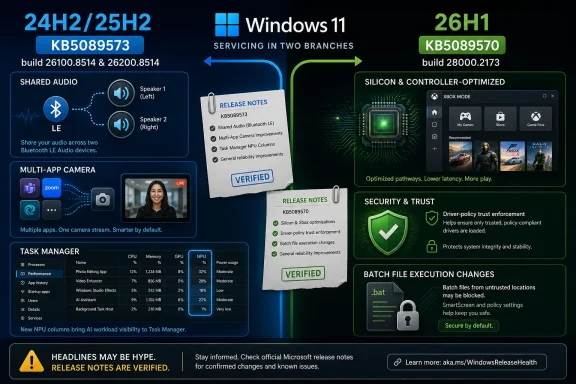
That is exactly what happened on May 14. Microsoft posted a short Windows Insider announcement pointing users to two sets of release notes: one for Windows 11 versions 24H2 and 25H2 under KB5089573, and one for Windows 11 version 26H1 under KB5089570. The former moves 24H2 to build 26100.8514 and 25H2 to build 26200.8514. The latter moves 26H1 to build 28000.2173.
The distinction matters because Microsoft is no longer treating every Windows 11 version as a simple annual ladder rung. Windows 11 24H2 and 25H2 remain the mainstream track for existing PCs. Windows 11 26H1 is a targeted release for specific device hardware and silicon, not a normal feature update that every Windows 11 user should expect to see in Windows Update.
That alone should cool some of the more breathless framing. This is not “the next Windows” landing for everyone in preview form. It is Microsoft maintaining parallel Windows branches while it prepares mainstream users for one set of cumulative improvements and new hardware vendors for another.
Shared audio is the most consumer-visible change. Microsoft describes it as a Bluetooth LE Audio broadcast feature that lets two people listen to the same audio from one Windows 11 PC at the same time. That is not revolutionary in a world where phones and tablets have long pushed shared listening experiences, but on Windows it closes a real gap. The PC is increasingly a travel screen, a dorm-room TV, and a living-room gaming device; shared audio acknowledges that.
Multi-App Camera is the more interesting change for power users. Windows 11 will allow multiple applications to access the same camera stream simultaneously, with a basic camera mode available for troubleshooting and stability. This is the sort of thing that sounds minor until you are juggling Teams, OBS, a browser-based webinar platform, and a recording workflow.
It is also one of those changes that exposes Windows’ age. The operating system has spent decades mediating access to hardware designed around a single foreground application. Modern work assumes simultaneous capture, monitoring, enhancement, recording, and streaming. Multi-App Camera is Microsoft conceding that camera access is now a shared service, not a single-app privilege.
Microsoft is adding optional NPU and NPU Engine columns on the Processes, Users, and Details pages, plus dedicated and shared NPU memory columns on the Details page. Neural engines that are part of a GPU will also appear on the Performance page. In plain English, Windows is beginning to make AI acceleration visible as a normal system resource.
That is a bigger deal than it sounds. For the past two years, the PC industry has sold the NPU as a magic box: a slab of silicon that would make AI local, efficient, private, and responsive. But users and administrators have had very little practical visibility into what is actually using that hardware. If an app quietly burns CPU, memory, disk, network, or GPU, Task Manager can usually help. If an AI feature leans on an NPU, the story has been murkier.
Making NPU activity visible in Task Manager is the boring prerequisite for making AI PCs governable. You cannot troubleshoot what you cannot see. You cannot write useful policy for workloads that look like mist. Before Windows AI becomes a trusted platform layer, it needs mundane administrative affordances: counters, columns, logs, policy hooks, and failure modes that do not require faith.
That is why this build matters more as infrastructure than spectacle. Microsoft’s AI PC pitch has often sounded like marketing wrapped around silicon procurement. These Task Manager changes move the pitch one step closer to operational reality.
That does not mean Microsoft has no Copilot story in Excel. Microsoft 365 Copilot and Excel integration are real product areas. It also does not mean Microsoft will never cache language models locally for certain workloads. But this Windows Release Preview drop, as documented by Microsoft, is not the evidence for that claim.
The same problem appears with the article’s description of a Windows AI Studio toolkit shipping in these builds with pre-trained NPU-only models for image classification, sentiment analysis, and text summarization. Microsoft’s official notes for these two May 14 builds do not say that. The 26H1 notes do mention a taskbar experience for monitoring “agents” across first- and third-party apps, with Researcher in the Microsoft 365 Copilot app as the first adopter. That is not the same thing as a bundled offline developer toolkit landing across all three Release Preview builds.
This distinction is not pedantry. Windows coverage increasingly lives at the collision point between operating system features, Microsoft 365 cloud services, local AI frameworks, OEM silicon requirements, and Insider-channel experiments. If a story collapses those layers into one big “Copilot is here” headline, it can mislead both users and administrators.
For consumers, the risk is inflated expectation. They install a preview build and go hunting for a feature that may belong to a Microsoft 365 rollout, an A/B test, a Copilot app update, or a future Windows SDK. For IT pros, the risk is worse: they may begin planning policy, compliance, and training around a capability that is not actually in the Windows build being discussed.
The release notes for 26H1 are also noticeably different from the 24H2 and 25H2 notes. They include Xbox mode for Windows 11 PCs, expanded File Explorer archive support, haptic feedback improvements for compatible pens and devices, a renamed Drop Tray, taskbar monitoring for agents, Enterprise State Roaming management through Windows Backup for Organizations policies, policy-based removal of preinstalled Microsoft apps, driver policy changes, and batch file processing hardening.
That is a strange and revealing mix. Some of it is user experience polish. Some of it is enterprise hygiene. Some of it is developer-facing API groundwork. Some of it is platform security. Taken together, it reads like Microsoft preparing a hardware-specific Windows branch to behave like a first-class citizen rather than a science project.
Xbox mode is the flashiest 26H1 feature. It brings a streamlined, full-screen, controller-friendly interface to Windows 11 PCs, with entry points through the Xbox app, Game Bar settings, or a keyboard shortcut. The intent is obvious: Windows handhelds and living-room PCs have exposed how clumsy desktop Windows can feel when the user is not sitting upright with a keyboard and mouse.
But the more consequential 26H1 items are probably lower down the page. The driver policy update removes default trust for cross-signed drivers while preserving drivers from the Windows Hardware Compatibility Program and a trusted legacy allow list. Windows audits compatibility for at least 100 hours and three reboots before enabling enforcement. That is classic Microsoft: security hardening with a long compatibility runway because breaking drivers is still one of the fastest ways to turn a good Windows idea into a support disaster.
The 26H1 driver-policy change is therefore more important than its release-note phrasing suggests. Microsoft is trying to narrow the trust path for kernel-adjacent code without detonating the hardware ecosystem. That is why the audit period matters. It gives Windows a chance to observe whether a device and its drivers can survive normal use before enforcement begins.
For enterprises, this is both good news and a testing burden. Anything that reduces sketchy driver trust is welcome in managed environments. But organizations with specialized peripherals, legacy industrial systems, lab equipment, security tools, or older VPN and endpoint agents will want to know exactly what gets blocked and when.
The build also adds a more secure processing mode for batch files and Command Prompt scripts. Administrators and Application Control for Business policy authors can enable a setting that prevents batch files from changing during execution. That is not glamorous, but it is exactly the kind of small hardening measure that closes off ugly real-world abuse patterns.
It is worth noting what this says about Microsoft’s priorities. Even inside an AI-era Windows build, the company is still spending engineering energy on drivers, batch files, print mode icons, kiosk configuration, and File Explorer reliability. The future may be agentic, but the attack surface is still full of old doors.
That sounds modest, but it hints at Microsoft’s view of the desktop. The company expects more software to do long-running work on the user’s behalf: research, summarization, automation, content generation, perhaps eventually system maintenance and workflow orchestration. If that happens, the taskbar cannot remain merely a strip of app icons and notification badges. It has to become a status surface for delegated work.
There is a UX trap here. The more Windows exposes background AI activity, the more it risks becoming another noisy layer of ambient progress indicators. The old Windows notification problem could become the new Windows agent problem: too many apps, too many claims of importance, too many little signs that the machine is “working” without enough clarity about what it is doing.
Microsoft’s first implementation starting with its own Researcher feature is predictable. The harder test will come when third-party agents want the same real estate. If every productivity suite, security agent, browser assistant, and developer tool wants a taskbar progress surface, Windows will need strong conventions and strong controls.
This is where enterprise policy will matter. AI agent visibility is not just a convenience feature. In regulated environments, background work can implicate data handling, retention, privilege boundaries, and auditability. A taskbar indicator is useful only if administrators can decide which agents are allowed to run, what data they can touch, and how their activity is logged.
Release Preview builds often are close to what ships publicly, but “close” is not the same as “scheduled.” Microsoft now uses controlled feature rollouts, gradual rollouts, enablement packages, cumulative updates, app updates, Store updates, cloud-side switches, and Microsoft 365 service deployments. A feature can be in the notes and still not appear immediately on a given PC. A capability can be part of the Windows platform and still depend on app updates, hardware, region, account type, or commercial policy.
This is especially true for KB5089573, where Microsoft explicitly separates gradual rollout from normal rollout. Gradual rollout means features arrive in phases and availability varies by device. Normal rollout is the broad release path once the update reaches general availability. For administrators, that means a Release Preview build is a signal to test, not a reason to assume uniform behavior next month.
The old model was easier to explain: install build, get features. The current model is messier but more realistic for a billion-device operating system. Microsoft wants to reduce catastrophic regressions by turning features on slowly. Users want clear answers about what is in an update. Those two goals often collide.
The practical reading is simple. KB5089573 gives us a strong preview of what Microsoft wants to ship to 24H2 and 25H2 users. KB5089570 shows what Microsoft is preparing for the 26H1 hardware-specific path. Neither should be read as a universal release calendar, and neither validates every AI-related claim attached to them by secondary reporting.
For 24H2 and 25H2, the clearest new policy item is camera-related. Enterprise administrators can set Multi-App Camera mode or Basic Camera mode through Group Policy under the Windows Components camera policy path. That is useful and concrete, especially for organizations with support desks, compliance concerns, or app compatibility requirements around camera access.
For 26H1, the official notes include Enterprise State Roaming management through Windows Backup for Organizations policies and policy-based removal of preinstalled Microsoft apps for Enterprise and Education. The latter is a long-running admin wish in a new wrapper: give organizations more control over which inbox Microsoft Store apps survive on managed images.
The notes also point developers toward an API for taskbar agent monitoring. That is not the same as a fully described administrative framework for governing all AI agents. It may become part of one. It should become part of one. But the documented May 14 build should not be inflated into a complete AI governance suite.
This matters because Microsoft’s enterprise credibility around AI will depend on boring controls arriving before flashy features become unavoidable. IT departments do not merely want a toggle that says “Copilot: on/off.” They need data boundary controls, audit trails, workload visibility, licensing clarity, model provenance, retention settings, and compatibility with existing management stacks.
The May 14 builds show movement in the right direction, particularly around visibility and policy surfaces. They do not yet prove that Microsoft has solved enterprise AI governance inside Windows.
Microsoft’s official release notes for these May 14 Release Preview builds describe the updates as non-security updates that include quality improvements. They do include a normal-rollout item related to Secure Boot certificate targeting data, but the release notes do not name those CVEs. That does not automatically mean no security-adjacent code exists in the cumulative package; Windows servicing can be layered and complicated. But if an article names two zero-days and says they are “fully baked into” the builds, the burden of proof is higher than a generic preview note.
For WindowsForum readers, the safe operational advice is unchanged. Patch Tuesday security updates remain the production security baseline. Release Preview builds are for testing, validation, and early exposure—not a substitute for deploying supported security updates through normal channels.
This is one of the recurring problems with Windows update coverage. Cumulative updates blur the boundary between security fixes, quality fixes, feature enablement, and servicing-stack behavior. Microsoft’s documentation sometimes separates these categories cleanly and sometimes leaves readers to infer relationships between KBs. Secondary articles then overstate what is bundled where.
In security reporting, overstating certainty is not harmless. Administrators need to know whether a vulnerability is patched in production, whether a preview build contains a fix, whether exploitation is known, and whether mitigations exist. If those facts are not documented in the release notes, they should be framed as unconfirmed or attributed carefully, not presented as settled.
That complexity is not entirely bad. Hardware-specific releases can let Microsoft support new silicon faster. Gradual rollouts can reduce blast radius. Microsoft Store and Microsoft 365 updates can deliver application features without waiting for OS releases. Enterprise policies can keep organizations from being dragged into consumer experiments.
But complexity has a trust cost. Users increasingly cannot tell whether a feature is missing because their build is wrong, their hardware is unsupported, their region is excluded, their account lacks a subscription, their administrator disabled it, or Microsoft has simply not flipped the rollout switch. Windows Update says “up to date” while the product experience remains probabilistic.
The NPU is the perfect example. A PC can be a Copilot+ PC, have an NPU, run a Release Preview build, and still not necessarily receive every AI feature being discussed in the press. Some AI functionality belongs to Windows. Some belongs to Microsoft 365. Some belongs to OEM utilities. Some belongs to developer frameworks. Some is local, some is cloud, and some is hybrid.
That makes precise reporting more important, not less. “Copilot is live” is no longer a sufficiently meaningful sentence. Which Copilot? In which app? In which build? On which hardware? With which license? Running locally or in the cloud? Governed by which policy? Available to consumers, commercial tenants, or Insiders only?
These are annoying questions, but they are now the Windows beat.
Source: Notebookcheck Windows 11 Release Preview: Copilot in Excel and critical security patches now live
 Microsoft Ships a Preview That Looks Less Like a Revolution Than a Dress Rehearsal
Release Preview has always been Microsoft’s least theatrical Insider channel. Canary and Dev are where speculative UI experiments go to live, die, and occasionally confuse the entire Windows press corps. Release Preview is where Microsoft tests builds that are close enough to production that IT departments should start paying attention, even if they are not yet obligated to deploy them.That is exactly what happened on May 14. Microsoft posted a short Windows Insider announcement pointing users to two sets of release notes: one for Windows 11 versions 24H2 and 25H2 under KB5089573, and one for Windows 11 version 26H1 under KB5089570. The former moves 24H2 to build 26100.8514 and 25H2 to build 26200.8514. The latter moves 26H1 to build 28000.2173.
The distinction matters because Microsoft is no longer treating every Windows 11 version as a simple annual ladder rung. Windows 11 24H2 and 25H2 remain the mainstream track for existing PCs. Windows 11 26H1 is a targeted release for specific device hardware and silicon, not a normal feature update that every Windows 11 user should expect to see in Windows Update.
That alone should cool some of the more breathless framing. This is not “the next Windows” landing for everyone in preview form. It is Microsoft maintaining parallel Windows branches while it prepares mainstream users for one set of cumulative improvements and new hardware vendors for another.
The 24H2 and 25H2 Build Is Really About Everyday Windows Getting Less Awkward
For most WindowsForum readers, KB5089573 is the practical build. It applies to the versions of Windows 11 that are either already broadly deployed or will soon sit in the mainstream enterprise conversation. Its headline features are not sci-fi. They are the kind of irritating, overdue refinements that make Windows feel a little less brittle.Shared audio is the most consumer-visible change. Microsoft describes it as a Bluetooth LE Audio broadcast feature that lets two people listen to the same audio from one Windows 11 PC at the same time. That is not revolutionary in a world where phones and tablets have long pushed shared listening experiences, but on Windows it closes a real gap. The PC is increasingly a travel screen, a dorm-room TV, and a living-room gaming device; shared audio acknowledges that.
Multi-App Camera is the more interesting change for power users. Windows 11 will allow multiple applications to access the same camera stream simultaneously, with a basic camera mode available for troubleshooting and stability. This is the sort of thing that sounds minor until you are juggling Teams, OBS, a browser-based webinar platform, and a recording workflow.
It is also one of those changes that exposes Windows’ age. The operating system has spent decades mediating access to hardware designed around a single foreground application. Modern work assumes simultaneous capture, monitoring, enhancement, recording, and streaming. Multi-App Camera is Microsoft conceding that camera access is now a shared service, not a single-app privilege.
Task Manager Becomes the AI Reality Check
The most strategically revealing part of KB5089573 is not a Copilot button. It is Task Manager.Microsoft is adding optional NPU and NPU Engine columns on the Processes, Users, and Details pages, plus dedicated and shared NPU memory columns on the Details page. Neural engines that are part of a GPU will also appear on the Performance page. In plain English, Windows is beginning to make AI acceleration visible as a normal system resource.
That is a bigger deal than it sounds. For the past two years, the PC industry has sold the NPU as a magic box: a slab of silicon that would make AI local, efficient, private, and responsive. But users and administrators have had very little practical visibility into what is actually using that hardware. If an app quietly burns CPU, memory, disk, network, or GPU, Task Manager can usually help. If an AI feature leans on an NPU, the story has been murkier.
Making NPU activity visible in Task Manager is the boring prerequisite for making AI PCs governable. You cannot troubleshoot what you cannot see. You cannot write useful policy for workloads that look like mist. Before Windows AI becomes a trusted platform layer, it needs mundane administrative affordances: counters, columns, logs, policy hooks, and failure modes that do not require faith.
That is why this build matters more as infrastructure than spectacle. Microsoft’s AI PC pitch has often sounded like marketing wrapped around silicon procurement. These Task Manager changes move the pitch one step closer to operational reality.
The Copilot-in-Excel Claim Does Not Survive Contact With the Release Notes
The Notebookcheck article that prompted this discussion makes several claims that are not supported by Microsoft’s official May 14 Release Preview notes. Most notably, it says Copilot in Excel is live in all three builds, works through a taskbar pane, generates formulas and pivot tables, requires Microsoft 365, and runs on locally cached language models offline. That is a very specific claim. It is also not in Microsoft’s release notes for KB5089573 or KB5089570.That does not mean Microsoft has no Copilot story in Excel. Microsoft 365 Copilot and Excel integration are real product areas. It also does not mean Microsoft will never cache language models locally for certain workloads. But this Windows Release Preview drop, as documented by Microsoft, is not the evidence for that claim.
The same problem appears with the article’s description of a Windows AI Studio toolkit shipping in these builds with pre-trained NPU-only models for image classification, sentiment analysis, and text summarization. Microsoft’s official notes for these two May 14 builds do not say that. The 26H1 notes do mention a taskbar experience for monitoring “agents” across first- and third-party apps, with Researcher in the Microsoft 365 Copilot app as the first adopter. That is not the same thing as a bundled offline developer toolkit landing across all three Release Preview builds.
This distinction is not pedantry. Windows coverage increasingly lives at the collision point between operating system features, Microsoft 365 cloud services, local AI frameworks, OEM silicon requirements, and Insider-channel experiments. If a story collapses those layers into one big “Copilot is here” headline, it can mislead both users and administrators.
For consumers, the risk is inflated expectation. They install a preview build and go hunting for a feature that may belong to a Microsoft 365 rollout, an A/B test, a Copilot app update, or a future Windows SDK. For IT pros, the risk is worse: they may begin planning policy, compliance, and training around a capability that is not actually in the Windows build being discussed.
26H1 Is the Hardware Branch, Not the Windows Upgrade Everyone Is Waiting For
The 26H1 build is where Microsoft’s platform strategy becomes more complicated. Build 28000.2173 under KB5089570 is part of a targeted Windows 11 release for specific hardware and silicon. Microsoft’s own Insider post repeats that reminder. This is not just another annual consumer feature update.The release notes for 26H1 are also noticeably different from the 24H2 and 25H2 notes. They include Xbox mode for Windows 11 PCs, expanded File Explorer archive support, haptic feedback improvements for compatible pens and devices, a renamed Drop Tray, taskbar monitoring for agents, Enterprise State Roaming management through Windows Backup for Organizations policies, policy-based removal of preinstalled Microsoft apps, driver policy changes, and batch file processing hardening.
That is a strange and revealing mix. Some of it is user experience polish. Some of it is enterprise hygiene. Some of it is developer-facing API groundwork. Some of it is platform security. Taken together, it reads like Microsoft preparing a hardware-specific Windows branch to behave like a first-class citizen rather than a science project.
Xbox mode is the flashiest 26H1 feature. It brings a streamlined, full-screen, controller-friendly interface to Windows 11 PCs, with entry points through the Xbox app, Game Bar settings, or a keyboard shortcut. The intent is obvious: Windows handhelds and living-room PCs have exposed how clumsy desktop Windows can feel when the user is not sitting upright with a keyboard and mouse.
But the more consequential 26H1 items are probably lower down the page. The driver policy update removes default trust for cross-signed drivers while preserving drivers from the Windows Hardware Compatibility Program and a trusted legacy allow list. Windows audits compatibility for at least 100 hours and three reboots before enabling enforcement. That is classic Microsoft: security hardening with a long compatibility runway because breaking drivers is still one of the fastest ways to turn a good Windows idea into a support disaster.
The Driver Crackdown Is the Security Story Hiding in Plain Sight
Windows security is rarely won through one dramatic patch. It is won by reducing the number of old assumptions that attackers can abuse. Cross-signed drivers have long been part of the Windows compatibility bargain, but driver trust is also a favorite battleground for attackers, cheats, rootkits, and dubious system utilities.The 26H1 driver-policy change is therefore more important than its release-note phrasing suggests. Microsoft is trying to narrow the trust path for kernel-adjacent code without detonating the hardware ecosystem. That is why the audit period matters. It gives Windows a chance to observe whether a device and its drivers can survive normal use before enforcement begins.
For enterprises, this is both good news and a testing burden. Anything that reduces sketchy driver trust is welcome in managed environments. But organizations with specialized peripherals, legacy industrial systems, lab equipment, security tools, or older VPN and endpoint agents will want to know exactly what gets blocked and when.
The build also adds a more secure processing mode for batch files and Command Prompt scripts. Administrators and Application Control for Business policy authors can enable a setting that prevents batch files from changing during execution. That is not glamorous, but it is exactly the kind of small hardening measure that closes off ugly real-world abuse patterns.
It is worth noting what this says about Microsoft’s priorities. Even inside an AI-era Windows build, the company is still spending engineering energy on drivers, batch files, print mode icons, kiosk configuration, and File Explorer reliability. The future may be agentic, but the attack surface is still full of old doors.
The AI Taskbar Is Microsoft’s Next Attempt to Make Background Work Visible
The 26H1 taskbar agent experience is the AI item that actually appears in the official notes. Windows is adding a way to monitor agents from the taskbar, starting with Researcher in the Microsoft 365 Copilot app. When the agent works on a report, Windows shows progress through the taskbar, then notifies the user when the result is ready.That sounds modest, but it hints at Microsoft’s view of the desktop. The company expects more software to do long-running work on the user’s behalf: research, summarization, automation, content generation, perhaps eventually system maintenance and workflow orchestration. If that happens, the taskbar cannot remain merely a strip of app icons and notification badges. It has to become a status surface for delegated work.
There is a UX trap here. The more Windows exposes background AI activity, the more it risks becoming another noisy layer of ambient progress indicators. The old Windows notification problem could become the new Windows agent problem: too many apps, too many claims of importance, too many little signs that the machine is “working” without enough clarity about what it is doing.
Microsoft’s first implementation starting with its own Researcher feature is predictable. The harder test will come when third-party agents want the same real estate. If every productivity suite, security agent, browser assistant, and developer tool wants a taskbar progress surface, Windows will need strong conventions and strong controls.
This is where enterprise policy will matter. AI agent visibility is not just a convenience feature. In regulated environments, background work can implicate data handling, retention, privilege boundaries, and auditability. A taskbar indicator is useful only if administrators can decide which agents are allowed to run, what data they can touch, and how their activity is logged.
Release Preview Is Close to Shipping, But It Is Not a Promise of June Magic
Notebookcheck’s write-up says Microsoft sources indicate that Windows 11 24H2 and 25H2 could reach general availability as early as June 2026, while 26H1 is on track for a late-third-quarter launch. That phrasing should be treated carefully. Microsoft’s official May 14 Insider post does not make those general-availability commitments.Release Preview builds often are close to what ships publicly, but “close” is not the same as “scheduled.” Microsoft now uses controlled feature rollouts, gradual rollouts, enablement packages, cumulative updates, app updates, Store updates, cloud-side switches, and Microsoft 365 service deployments. A feature can be in the notes and still not appear immediately on a given PC. A capability can be part of the Windows platform and still depend on app updates, hardware, region, account type, or commercial policy.
This is especially true for KB5089573, where Microsoft explicitly separates gradual rollout from normal rollout. Gradual rollout means features arrive in phases and availability varies by device. Normal rollout is the broad release path once the update reaches general availability. For administrators, that means a Release Preview build is a signal to test, not a reason to assume uniform behavior next month.
The old model was easier to explain: install build, get features. The current model is messier but more realistic for a billion-device operating system. Microsoft wants to reduce catastrophic regressions by turning features on slowly. Users want clear answers about what is in an update. Those two goals often collide.
The practical reading is simple. KB5089573 gives us a strong preview of what Microsoft wants to ship to 24H2 and 25H2 users. KB5089570 shows what Microsoft is preparing for the 26H1 hardware-specific path. Neither should be read as a universal release calendar, and neither validates every AI-related claim attached to them by secondary reporting.
The Enterprise Controls Are More Incremental Than the AI Hype Suggests
The Notebookcheck article describes new Group Policy Objects that let administrators disable or restrict Copilot integrations, manage which applications can access the NPU, and set policies for how AI agents interact with the taskbar. Microsoft’s official May 14 notes do mention several enterprise-relevant controls, but not that full package in the way the article states.For 24H2 and 25H2, the clearest new policy item is camera-related. Enterprise administrators can set Multi-App Camera mode or Basic Camera mode through Group Policy under the Windows Components camera policy path. That is useful and concrete, especially for organizations with support desks, compliance concerns, or app compatibility requirements around camera access.
For 26H1, the official notes include Enterprise State Roaming management through Windows Backup for Organizations policies and policy-based removal of preinstalled Microsoft apps for Enterprise and Education. The latter is a long-running admin wish in a new wrapper: give organizations more control over which inbox Microsoft Store apps survive on managed images.
The notes also point developers toward an API for taskbar agent monitoring. That is not the same as a fully described administrative framework for governing all AI agents. It may become part of one. It should become part of one. But the documented May 14 build should not be inflated into a complete AI governance suite.
This matters because Microsoft’s enterprise credibility around AI will depend on boring controls arriving before flashy features become unavoidable. IT departments do not merely want a toggle that says “Copilot: on/off.” They need data boundary controls, audit trails, workload visibility, licensing clarity, model provenance, retention settings, and compatibility with existing management stacks.
The May 14 builds show movement in the right direction, particularly around visibility and policy surfaces. They do not yet prove that Microsoft has solved enterprise AI governance inside Windows.
The Security Patch Claims Need the Same Careful Treatment
Notebookcheck also says the Release Preview builds integrate fixes for two zero-day vulnerabilities from the May 2026 Patch Tuesday: CVE-2026-1127 and CVE-2026-1139. That is another claim that should be handled cautiously in this specific context.Microsoft’s official release notes for these May 14 Release Preview builds describe the updates as non-security updates that include quality improvements. They do include a normal-rollout item related to Secure Boot certificate targeting data, but the release notes do not name those CVEs. That does not automatically mean no security-adjacent code exists in the cumulative package; Windows servicing can be layered and complicated. But if an article names two zero-days and says they are “fully baked into” the builds, the burden of proof is higher than a generic preview note.
For WindowsForum readers, the safe operational advice is unchanged. Patch Tuesday security updates remain the production security baseline. Release Preview builds are for testing, validation, and early exposure—not a substitute for deploying supported security updates through normal channels.
This is one of the recurring problems with Windows update coverage. Cumulative updates blur the boundary between security fixes, quality fixes, feature enablement, and servicing-stack behavior. Microsoft’s documentation sometimes separates these categories cleanly and sometimes leaves readers to infer relationships between KBs. Secondary articles then overstate what is bundled where.
In security reporting, overstating certainty is not harmless. Administrators need to know whether a vulnerability is patched in production, whether a preview build contains a fix, whether exploitation is known, and whether mitigations exist. If those facts are not documented in the release notes, they should be framed as unconfirmed or attributed carefully, not presented as settled.
The Windows 11 Roadmap Is Becoming a Branching Map, Not a Straight Road
The deeper story behind these builds is that Windows 11 is becoming harder to summarize. For years, Microsoft wanted users to think of Windows as a service: one evolving product, continuously updated. In practice, 2026 Windows looks more like a branching map of hardware tracks, feature flags, app-layer updates, cloud entitlements, and enterprise policy gates.That complexity is not entirely bad. Hardware-specific releases can let Microsoft support new silicon faster. Gradual rollouts can reduce blast radius. Microsoft Store and Microsoft 365 updates can deliver application features without waiting for OS releases. Enterprise policies can keep organizations from being dragged into consumer experiments.
But complexity has a trust cost. Users increasingly cannot tell whether a feature is missing because their build is wrong, their hardware is unsupported, their region is excluded, their account lacks a subscription, their administrator disabled it, or Microsoft has simply not flipped the rollout switch. Windows Update says “up to date” while the product experience remains probabilistic.
The NPU is the perfect example. A PC can be a Copilot+ PC, have an NPU, run a Release Preview build, and still not necessarily receive every AI feature being discussed in the press. Some AI functionality belongs to Windows. Some belongs to Microsoft 365. Some belongs to OEM utilities. Some belongs to developer frameworks. Some is local, some is cloud, and some is hybrid.
That makes precise reporting more important, not less. “Copilot is live” is no longer a sufficiently meaningful sentence. Which Copilot? In which app? In which build? On which hardware? With which license? Running locally or in the cloud? Governed by which policy? Available to consumers, commercial tenants, or Insiders only?
These are annoying questions, but they are now the Windows beat.
What This Build Actually Tells WindowsForum Readers
The May 14 Release Preview drops are worth testing, but they should be understood as a measured servicing milestone rather than a grand AI launch. Microsoft is adding useful features, making hardware acceleration more observable, and hardening parts of the platform that still matter enormously to admins.- KB5089573 moves Windows 11 24H2 and 25H2 Release Preview systems to builds 26100.8514 and 26200.8514, with shared audio, Multi-App Camera, Task Manager NPU visibility, performance improvements, and assorted reliability fixes.
- KB5089570 moves Windows 11 26H1 Release Preview systems to build 28000.2173, but 26H1 remains a targeted hardware-and-silicon release rather than a normal upgrade path for every existing PC.
- Microsoft’s official notes do not substantiate the claim that Copilot in Excel with offline local models is live across all three Windows Release Preview builds.
- The most important AI-related Windows change in these notes may be visibility into NPU usage, because manageability begins with being able to see what the system is doing.
- Enterprise administrators should pay attention to the camera Group Policy changes, app-removal policy work, Windows Backup for Organizations integration, driver trust changes, and batch-file hardening.
- Release Preview is close enough to production to justify lab testing, but gradual rollout language means no one should assume every feature appears everywhere at once.
Source: Notebookcheck Windows 11 Release Preview: Copilot in Excel and critical security patches now live
