

Microsoft’s quietly useful continuity feature in Windows 11 — known simply as Resume — is finally showing signs of life beyond the handful of first-party and high-profile partners that have demonstrated it so far. Recent Insider updates change the developer integration model and add new resume targets, which could make it a practical day‑to‑day convenience for anyone who bridges work between an Android phone and a Windows PC. The shift is technical but meaningful: Microsoft is adding a second integration route (via the Windows Push Notification Service) alongside the existing Link to Windows / Continuity SDK path, and Insider releases have already expanded supported resume scenarios to include browser tabs and online Microsoft 365 Copilot documents from several OEMs. These changes nudge Resume from a buried toggle into a feature you’re likely to notice — provided developers and OEMs choose to adopt it.
Windows 11’s Resume (sometimes referred to as Cross‑Device Resume or XDR) is Microsoft’s answer to Apple’s Handoff: a continuity mechanism that surfaces a one‑click prompt on a Windows PC when you’ve been working on an activity on a paired Android phone. Unlike UI streaming or full device mirroring, Resume relies on compact metadata descriptors that tell Windows what the user was doing so the desktop can open the same content in the most appropriate handler — a native desktop app if available, or a browser fallback otherwise. That design keeps the desktop experience native and lowers bandwidth and security exposure compared with streaming an Android UI to the PC.
Resume has been in Microsoft’s labs and preview channels for some time, but uptake felt limited because the original integration path required Android apps to adopt the Continuity SDK and pair with Link to Windows — a nontrivial integration and, historically, a process Microsoft gated behind partner programs. Early public examples were narrow (Spotify’s audio resume being the canonical demo) and the feature often felt invisible to ordinary users. Recent Insider builds, however, show two important shifts: broader resume targets and a lower‑friction integration option using the Windows Notification System.
Key user‑facing constraints to be aware of:
By allowing a push-notification-based trigger via WNS, Microsoft offers a far less intrusive path: developers that already support server push can emit an AppContext-like payload to Windows using existing infrastructure, reducing engineering friction. That lowers the cost of support and should increase the pool of adoptable apps — but it does not eliminate all work. Apps still need to produce meaningful context descriptors, design a resume flow that makes sense, and map deep links or web fallbacks so the desktop can handle the activity.
Developer responsibilities and expectations:
Longer term, several advances would strengthen Resume’s value proposition:
However, success is not guaranteed. Resume depends on developer buy‑in, sensible curation to avoid notification noise, OEM cooperation, and strong admin controls for enterprises. The feature is a metadata‑driven shortcut rather than a full session handoff, and users should temper expectations accordingly. For people who use Android and Windows together, Resume is now worth watching and — for Insiders and early adopters — worth testing. For Microsoft, the challenge is to turn the convenience of a few polished demos into the steady utility of daily continuity across the fragmented Android ecosystem.
Source: Digital Trends If you use Android, Windows 11’s Resume feature might get useful
 Background
Windows 11’s Resume (sometimes referred to as Cross‑Device Resume or XDR) is Microsoft’s answer to Apple’s Handoff: a continuity mechanism that surfaces a one‑click prompt on a Windows PC when you’ve been working on an activity on a paired Android phone. Unlike UI streaming or full device mirroring, Resume relies on compact metadata descriptors that tell Windows what the user was doing so the desktop can open the same content in the most appropriate handler — a native desktop app if available, or a browser fallback otherwise. That design keeps the desktop experience native and lowers bandwidth and security exposure compared with streaming an Android UI to the PC.Resume has been in Microsoft’s labs and preview channels for some time, but uptake felt limited because the original integration path required Android apps to adopt the Continuity SDK and pair with Link to Windows — a nontrivial integration and, historically, a process Microsoft gated behind partner programs. Early public examples were narrow (Spotify’s audio resume being the canonical demo) and the feature often felt invisible to ordinary users. Recent Insider builds, however, show two important shifts: broader resume targets and a lower‑friction integration option using the Windows Notification System.
How Resume works — a technical overview
AppContext: metadata, not UI
Resume is built around a small metadata packet called an AppContext. The AppContext contains a context identifier, a short title or preview, and a pointer to the resource — typically a deep link/intent URI or a web link that Windows can open. The phone (or the app’s backend) publishes that AppContext, which Link to Windows or another delivery path forwards to Windows. The PC then resolves the AppContext to a handler and surfaces a lightweight resume affordance in the taskbar or notification area. Clicking the card launches the appropriate desktop app or opens the link in the default browser. This metadata-driven design is intentional: it minimizes bandwidth use, reduces complexity, and avoids streaming user interfaces across devices.Two delivery routes for activity descriptors
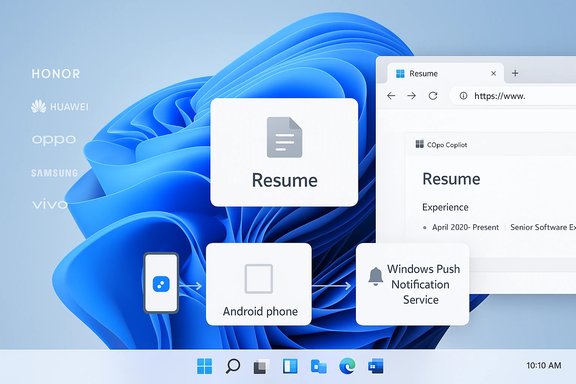
Historically, resume relied on the Link to Windows + Continuity SDK route on Android. That meant app developers had to integrate specific SDK code and request limited access to the continuity APIs. The recent change adds a second channel: the Windows Push Notification Service (WNS). By using WNS, Android apps that already use notification infrastructure can trigger resume prompts without the heavier Link to Windows provisioning, lowering the integration barrier significantly. This is a pragmatic move: many developers already rely on push notifications, so a WNS path reduces friction and could dramatically increase the number of apps that can offer resume.Native handler or web fallback
When Windows receives an AppContext, it attempts to open the activity in the most natural place. If a matching Windows app is installed and registered to handle the deep link or protocol, that app launches and resumes the activity. If there is no installed native handler, Windows falls back to opening the provided web link in the default browser. That behavior ensures broad compatibility — the phone can offer a resume even if the exact desktop counterpart isn’t present, but the experience is better when the service provides a Windows client.What changed in recent Insider builds
Microsoft’s Insider Preview updates around Build 26220.x (delivered in patch form such as KB5070307) have been the most visible push to expand Resume’s reach. The practical additions include:- Resume from certain OEM browsers (vivo Browser) to the PC’s default browser, enabling one‑click continuation of an open webpage.
- Resume Microsoft 365 Copilot online documents (Word, Excel, PowerPoint) from supported OEM phones (Honor, Huawei, Oppo, Samsung, vivo) into the desktop Office apps or the browser as a fallback. Local files stored only on the phone are not currently supported.
- Continued support for media resume scenarios (Spotify) and other partner-driven examples.
User experience: what to expect day to day
The Resume affordance is intentionally minimal: a small card or notification appears in the taskbar or notification center, telling you an activity on your paired phone can be continued on the PC. Click it, and Windows launches the appropriate app or opens the link. This is not a full session transfer; you should not expect the exact phone screen to be recreated on the desktop. Instead, think of Resume as a fast shortcut — a productivity nudge that gets you into the same app and context with fewer clicks than manually finding the app, tab, or file yourself.Key user‑facing constraints to be aware of:
- The resume window is ephemeral: AppContexts carry short lifetimes, typically just a few minutes. If you wait too long, the resume card may expire.
- Resume only appears for activities the system recognizes and for which a suitable handler exists (native app or web). If a matching Windows app doesn’t exist and there’s no web fallback, nothing will be surfaced.
- The feature is gated and server‑side in many Insider releases; having the Insider build alone doesn’t guarantee you’ll see every resume scenario.
Developer perspective: what changed and what remains
From a developer point of view, Microsoft’s introduction of a WNS-based route is the headline item. Previously, developers who wanted to support Resume needed to integrate the Continuity SDK and provision their app for Link to Windows usage. Microsoft treated the Continuity SDK as a Limited Access Feature — vendors requested access and Microsoft coordinated onboarding. That model limited adoption to partners and high-profile integrations.By allowing a push-notification-based trigger via WNS, Microsoft offers a far less intrusive path: developers that already support server push can emit an AppContext-like payload to Windows using existing infrastructure, reducing engineering friction. That lowers the cost of support and should increase the pool of adoptable apps — but it does not eliminate all work. Apps still need to produce meaningful context descriptors, design a resume flow that makes sense, and map deep links or web fallbacks so the desktop can handle the activity.
Developer responsibilities and expectations:
- Integrate AppContext generation or use a push route and follow Microsoft’s metadata contract.
- Register deep link handlers in the Windows app (if available) so resume opens the right place on desktop.
- Apply (where required) for continuity access and comply with any onboarding checks Microsoft applies to prevent spammy or low-value resume prompts.
Privacy, security, and governance
Any cross‑device continuity feature raises legitimate privacy and security questions. Microsoft’s design choices mitigate some risks — the AppContext approach is far less intrusive than streaming an active phone UI — but other concerns remain:- Sensitive content exposure: If a resume card surfaces for an activity that contains personal or corporate data (e.g., a draft email, private chat, or confidential document), organizations need control over whether such handoffs are allowed. Microsoft’s staged rollout and governance controls indicate administrators will have policy levers, but those controls must be clear and enforceable.
- Access gating and vetting: Microsoft’s use of limited access and partner onboarding can reduce abuse but also centralizes control. That helps with quality control, but it also raises questions about transparency — which apps are allowed, and what criteria does Microsoft use to approve them?
- Network and cloud dependency: Some resume flows (notably M365 Copilot online files) rely on cloud continuity. Offline files stored only on the device are explicitly not supported in several announced scenarios, which influences what can and cannot be handed off securely.
Comparison with Apple’s Handoff: similarities and limits
On the surface, Resume and Handoff are both continuity features that let you pick up activity across devices. In practice, however, there are important distinctions:- Platform control: Apple owns both the hardware and the OS stack for iPhone + Mac, enabling deep, system‑level continuity with consistent APIs and a closed app ecosystem. Microsoft must operate across Android’s fragmentation and numerous OEMs, which complicates parity and polish.
- Session fidelity: Apple’s Handoff often provides a more seamless transfer because the app behavior is tightly integrated across platforms and developers target Apple’s continuity APIs. Microsoft’s Resume explicitly transmits metadata rather than streaming UI, which means it’s a fast shortcut rather than a full session recreation. That’s efficient but less “magical.”
- Adoption model: Handoff is a built‑in OS capability many Apple apps adopt by default. Resume’s success depends on third‑party app adoption and OEM cooperation; it will take time and broad buy‑in to reach the same seamless feel.
Risks, friction points, and what could keep Resume stuck in niche use
Resume’s potential is real, but a number of practical and strategic risks could limit its impact:- Developer uptake: Even with a WNS path, developers still must design for resume and provide useful context descriptors. If the UX isn’t compelling or if resume launches users into incoherent app states, adoption will stall.
- Notification noise: If Resume becomes a stream of low‑value nudges — “continue listening to X,” “open Y” — users will disable it. Microsoft and partners must curate when and how resume prompts appear. Quality over quantity matters.
- OEM and regional gating: The early examples skew toward specific OEMs (Honor, Huawei, Oppo, Samsung, vivo) and the rollout has been gated in Insider flights. Broader support requires OEM cooperation and Microsoft’s ability to scale server‑side approvals without leaving users behind.
- Enterprise exposures: Without clear admin controls and auditability, enterprises may block the feature entirely rather than micro‑govern it. That would reduce the practical install base for business workflows.
Practical tips: how to try Resume today (Insider testers and curious users)
- Join the Windows Insider program and install the relevant Insider Preview channel that includes the cross‑device resume work (recent builds in the 26220.x family have been used in early tests). Availability is gated, so you may need to opt into faster toggles or wait for server authorization.
- Pair your Android phone with your PC using Link to Windows / Phone Link and ensure background permissions and notification access are enabled.
- Use supported apps on the phone (Spotify, demo OEM browsers, or Copilot mobile apps on supported OEMs) and look for the resume card to appear on your PC shortly after locking or leaving the phone.
- If you’re a developer, evaluate the WNS integration route first if your app already uses push notifications; it’s the lower‑friction path that can get you to a resume prompt more quickly than the Continuity SDK route.
Outlook: where Resume could go next
Resume’s new WNS path and the OEM‑driven expansions in Insider builds are practical, evolutionary steps rather than a single “big reveal.” In the best case, this lowers the barrier for developers and accelerates adoption across common categories: messaging, email, documents, browsers, and music. Those are precisely the app types that will make Resume feel indispensable when it works well.Longer term, several advances would strengthen Resume’s value proposition:
- Broader developer adoption and an easy, well‑documented onboarding process.
- Richer context semantics so resume can convey more actionable state without leaking sensitive data.
- Admin and enterprise controls that allow organizations to safely permit or restrict resume scenarios.
Conclusion
Windows 11’s Resume feature has moved from proof‑of‑concept to a pragmatic platform capability. Recent Insider updates add both new resume targets (browser tabs, online M365 Copilot documents) and a second integration route (WNS) that significantly lowers the bar for third‑party app support. Those moves address two of the biggest adoption bottlenecks — limited partner onboarding and heavy SDK integration — and create a real path to scale.However, success is not guaranteed. Resume depends on developer buy‑in, sensible curation to avoid notification noise, OEM cooperation, and strong admin controls for enterprises. The feature is a metadata‑driven shortcut rather than a full session handoff, and users should temper expectations accordingly. For people who use Android and Windows together, Resume is now worth watching and — for Insiders and early adopters — worth testing. For Microsoft, the challenge is to turn the convenience of a few polished demos into the steady utility of daily continuity across the fragmented Android ecosystem.
Source: Digital Trends If you use Android, Windows 11’s Resume feature might get useful
