

On June 21, 2026, Paul Thurrott’s Windows 11 Field Guide surfaced a refreshed look at Windows Search, placing Microsoft’s long-troubled desktop search experience back under the microscope for everyday Windows 11 users. The timing matters because Search is no longer just a box on the taskbar. It is where Microsoft’s local indexing, Bing ambitions, cloud accounts, File Explorer habits, and Copilot+ PC strategy all collide. The result is a deceptively small Windows feature that explains a much larger tension in Windows 11: Microsoft wants Search to be intelligent, but users still need it to be trustworthy.
Windows Search should be one of the least controversial parts of the operating system. A user types a few letters, Windows finds the app, setting, document, or folder, and the day continues. That is the compact bargain desktop operating systems made with users decades ago.
Windows 11 complicates that bargain. Search is now present in Start, on the taskbar, inside File Explorer, and across Settings. It also straddles local storage, OneDrive, Outlook, Bing, Microsoft Store suggestions, work accounts, and—on newer hardware—AI-assisted semantic indexing.
That makes Search an unusually revealing feature. It shows where Microsoft has improved Windows 11, where the company still cannot resist steering users toward services, and where the operating system’s future depends on whether the PC can become meaningfully smarter without becoming noisier.
The Thurrott.com Field Guide context is important because it treats Search not as a marketing bullet but as a working surface. This is how Windows users actually encounter it: not in a keynote, but while trying to open Calculator, find last month’s invoice, locate a missing photo, or jump to a setting buried three panes deep.
The default experience remains conservative. Windows typically indexes common user locations such as Desktop, Documents, Pictures, and Music, while offering broader indexing through Enhanced search. That split is sensible: indexing an entire PC costs battery, CPU, storage churn, and patience, especially on portable systems.
But the interface around this machinery has never fully escaped Windows’ habit of layering new settings over old plumbing. Users may find modern Search settings in the Windows 11 Settings app, but deeper indexing controls still lead back to older-style dialogs and concepts. For enthusiasts and administrators, that is familiar. For everyone else, it can feel like opening a modern door and finding a filing cabinet from 2009 behind it.
This is not merely aesthetic debt. When Search fails, users need to understand whether the problem is indexing scope, cloud content, permissions, account integration, corruption, policy, or Microsoft’s own ranking choices. Windows 11 still asks too many users to become part-time diagnosticians for a feature that should feel invisible.
The more corrosive problem is confidence. A slow search result can be tolerated if it is accurate. A fast result that prioritizes the web, a Store suggestion, or a Bing answer over the local item the user clearly intended teaches people not to trust the box in the first place.
That is why third-party utilities such as Everything became folk heroes among Windows power users. They did not win because they were pretty or deeply integrated into Microsoft’s cloud. They won because they did one job with ruthless clarity: find local files quickly.
Windows Search, by contrast, has often behaved like a product manager’s compromise. It wants to be an app launcher, file finder, web search field, settings navigator, document index, cloud gateway, and advertising-adjacent discovery surface. In theory, that breadth is useful. In practice, every additional ambition raises the cost of being wrong.
The best version of Windows Search would not necessarily be the most feature-rich one. It would be the one that understands the user’s likely intent and gets out of the way. That is why recent signs that Microsoft is reducing web clutter and improving local result handling matter more than another cosmetic refresh.
There is a defensible version of that idea. Some users do want quick web answers from the taskbar. A search box that can find both a local app and a weather forecast is not inherently offensive. The problem is priority.
When Windows treats a web result as more important than a local application or file, it violates the mental model of the PC. Users generally do not open Start because they want an undifferentiated internet search; they open it because they are already inside the operating system and want something on that system.
This distinction is especially sharp for IT pros. In managed environments, search behavior is not just a user-experience preference. It affects data exposure, policy compliance, training, and support volume. A search interface that blends local, cloud, consumer, and web results can be powerful, but only if administrators can predict and govern it.
Microsoft has improved policy controls over time, and enterprise editions can be managed more tightly than consumer PCs. Still, the reputational damage lingers. Once users conclude that Search is trying to sell or redirect rather than serve, every result becomes suspect.
That design pushes users toward typing. For power users, this is fine. Keyboard-driven launch flows are faster than hunting through menus, and Start search remains one of the quickest ways to open apps and settings. The Win key followed by a few characters is muscle memory for millions of Windows users.
But making Search central also raises the stakes when it misfires. If Start is no longer a rich navigational space, then Search has to carry more of the burden. When app results disappear, Store suggestions intrude, or settings searches become inconsistent, the Start menu itself feels broken.
This is where Windows 11’s minimalism can backfire. A clean interface is only better if the hidden machinery underneath is reliable. Otherwise, simplicity becomes concealment.
The trouble is that File Explorer search has often felt disconnected from the broader Search experience. It has its own rhythms, delays, filters, and frustrations. Users may not know whether results are coming from indexed locations, live file-system scanning, metadata, content search, or some combination of all three.
Windows 11 has modernized many surfaces around File Explorer, but search remains one of the areas where the old and new Windows visibly rub against each other. The interface may look cleaner, yet the behavior can still feel opaque. Progress indicators, delayed results, and inconsistent ranking make it hard to know whether Windows is still searching, has failed, or simply does not understand the query.
That opacity matters because file search is one of the operating system’s trust anchors. If a user cannot find a document they know exists, the PC feels unreliable. It does not matter whether the underlying cause is indexing scope, filename tokenization, cloud sync delay, or a bug. To the user, Windows lost the file.
That sounds minor until you remember how people actually name files. Real-world filenames are messy: “ProjectBudgetFinalJune2026,” “ClientDeck_v7_REALLYFINAL,” “IMG_ConferenceBadgeScan,” “TaxDocumentsArchive,” and so on. Users do not always remember the beginning of a filename. They remember the one word that matters.
Better substring handling is not glamorous AI. It is not a keynote feature. But it is exactly the kind of improvement that makes Search feel competent.
The same is true of typo tolerance. If a user types “utlook” and Windows still finds Outlook, that is not magic; it is table stakes for modern search. Web search engines trained users to expect forgiveness years ago. Desktop search has no excuse for treating a dropped letter as a dead end.
These changes also show where Microsoft’s priorities may finally be bending back toward utility. Windows Search does not need to impress users with an answer card when they are looking for a file. It needs to recover gracefully from human imprecision.
Semantic search is different. The pitch is easier to understand and less inherently alarming: let users find files, photos, and settings by describing what they are looking for, even if the exact words do not appear in the filename. On Copilot+ PCs, Microsoft has paired traditional indexing with semantic indexing to make Windows more tolerant of natural language.
This is the AI feature Windows always needed. Not a chatbot hovering over every app. Not another assistant button. A better memory for the machine itself.
The best use of AI in an operating system is not to make the PC talk more. It is to reduce the number of times the user has to translate human intent into computer syntax. “Find the photos from the beach with the red umbrella” is a better query than remembering a file name or folder path. “Open the setting for changing my display refresh rate” is better than knowing where Microsoft moved the toggle this year.
Still, semantic search has to earn its place. It must be local where Microsoft says it is local, governable where businesses require governance, and transparent enough that users understand what is being indexed. AI search that feels like a black box will inherit all the old Windows Search distrust and add new privacy anxiety on top.
This creates an uncomfortable split. Microsoft wants to present Windows 11 as a unified platform, but the most interesting search improvements increasingly live on newer hardware. Owners of ordinary Windows 11 PCs may get practical fixes such as better substring matching or result ranking, while Copilot+ PC owners get the more ambitious semantic layer.
There is a reasonable technical explanation. On-device AI features need performance and power efficiency, and Microsoft does not want every natural-language query to become a cloud round trip. The NPU is supposed to make the PC smarter without turning privacy and latency into permanent trade-offs.
But from a user’s perspective, the distinction is still messy. Two PCs can both run Windows 11, both be up to date, and still offer different search capabilities. That makes documentation harder, support harder, and expectations harder to manage.
For WindowsForum readers, this hardware divide is not abstract. It affects buying advice. If semantic search becomes genuinely useful, Copilot+ PCs gain a practical advantage beyond battery-life charts and AI demos. If it remains inconsistent or poorly communicated, it becomes another sticker on the palm rest that users learn to ignore.
Microsoft has tried to address this with local processing language, permissions controls, and settings that separate device search from cloud content. Windows indexing itself is not new, and local indexes are a normal part of modern operating systems. But the AI era changes the emotional texture of the feature.
Traditional indexing feels mechanical. Semantic indexing feels interpretive. Recall-like experiences feel observational. Those differences matter even when the data remains on the device, because users are not only asking where information is stored; they are asking what the system is doing with it.
For administrators, this becomes a policy problem. Organizations need clear answers about what is indexed, where indexes are stored, whether content leaves the device, how work and personal accounts are separated, and how features can be disabled or constrained. Vague reassurance will not be enough in regulated environments.
For consumers, the question is simpler: can I make Search better without feeling watched? Microsoft’s answer must be legible in the product, not buried in support pages. If the privacy controls are scattered, renamed, or hidden behind feature branding, users will assume the worst.
Microsoft has spent years migrating settings into a modern app, reorganizing pages, renaming controls, and adding new categories for privacy, AI, accounts, accessibility, gaming, and updates. The result is often better-looking than classic Windows, but not always easier to navigate.
A smarter Settings search can paper over that sprawl. If users can type “turn off web results,” “change lid close behavior,” or “find my printer,” they do not need to know the taxonomy. This is one of the strongest arguments for natural-language search in Windows: it lets Microsoft keep evolving the interface without forcing users to memorize each redesign.
But search should not become an excuse for poor information architecture. If the only reliable way to use Settings is to search, then Settings has become a database with a decorative sidebar. Windows still needs predictable navigation, especially for support technicians walking users through steps remotely.
The best outcome is a hybrid: a Settings app organized well enough to browse and a search layer smart enough to jump directly to intent. Windows 11 is closer to that than Windows 8 ever was, but it is not finished.
Search is a perfect example. Many users would welcome better indexing, typo tolerance, semantic file discovery, and faster local results. The resistance begins when web results cannot be cleanly removed, when cloud content appears unexpectedly, when Store suggestions outrank installed apps, or when settings move behind vague toggles.
The enthusiast demand is not “make Windows dumb.” It is “make Windows obey.” Let Search be powerful, but let users decide whether it searches the web, which folders it indexes, whether it includes cloud accounts, and how aggressively it uses AI-derived metadata.
That is also the enterprise demand, expressed in policy language. Consumer annoyance and admin governance are two versions of the same principle: the operating system should not surprise the person responsible for it.
Microsoft sometimes treats customization as legacy complexity. In Search, customization is the path to trust. A user who can turn off unwanted surfaces is more likely to try the new ones.
Everything’s appeal is brutally simple: it indexes filenames quickly and returns results instantly. It does not try to be Bing. It does not reinterpret the task. It does not turn a file hunt into a content surface.
Microsoft should not copy that model wholesale. Windows Search has broader responsibilities, including app launching, settings discovery, content indexing, accessibility, enterprise management, and cloud integration. But it should absorb the lesson: users reward tools that are predictable.
There is a product strategy lesson here too. Microsoft’s services strategy often assumes that integration increases value. Sometimes it does. But integration also increases the chance that a simple task is contaminated by unrelated priorities.
Search is most valuable when it feels like infrastructure. The moment it feels like a channel, the user starts looking for an alternative.
That kind of invisibility is hard to market. It does not produce the same demo energy as Recall, Copilot Vision, or an AI agent in Settings. But it is exactly the sort of daily improvement that can make Windows 11 feel less hostile and more competent.
Microsoft’s recent direction suggests it understands at least part of the problem. Better local prioritization, substring handling, typo tolerance, and semantic indexing all attack real pain points. They are not merely decorative changes.
The risk is that Microsoft wraps these improvements in too much product ambition. If AI search becomes another reason to upsell hardware, push cloud accounts, or blur local and web boundaries, the company will squander the goodwill generated by the underlying work.
Search needs a hierarchy of obligations. First, find what is on the PC. Second, respect user and admin intent. Third, extend into cloud and web only when clearly useful and allowed. Everything else should be subordinate.
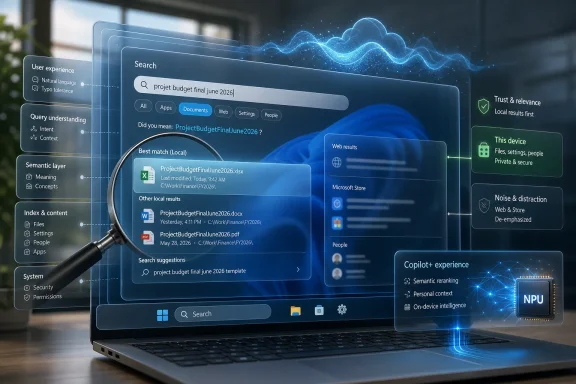 Windows Search Is Where Windows 11’s Promises Meet Its Habits
Windows Search should be one of the least controversial parts of the operating system. A user types a few letters, Windows finds the app, setting, document, or folder, and the day continues. That is the compact bargain desktop operating systems made with users decades ago.Windows 11 complicates that bargain. Search is now present in Start, on the taskbar, inside File Explorer, and across Settings. It also straddles local storage, OneDrive, Outlook, Bing, Microsoft Store suggestions, work accounts, and—on newer hardware—AI-assisted semantic indexing.
That makes Search an unusually revealing feature. It shows where Microsoft has improved Windows 11, where the company still cannot resist steering users toward services, and where the operating system’s future depends on whether the PC can become meaningfully smarter without becoming noisier.
The Thurrott.com Field Guide context is important because it treats Search not as a marketing bullet but as a working surface. This is how Windows users actually encounter it: not in a keynote, but while trying to open Calculator, find last month’s invoice, locate a missing photo, or jump to a setting buried three panes deep.
The Old Indexer Still Carries the New Interface
Strip away the centered taskbar and redesigned Start menu, and much of Windows Search still rests on the old idea of indexing. Windows builds a catalog of files, metadata, and locations so that searches do not require a slow crawl through storage every time a user types a query. That foundation is practical, mature, and still essential.The default experience remains conservative. Windows typically indexes common user locations such as Desktop, Documents, Pictures, and Music, while offering broader indexing through Enhanced search. That split is sensible: indexing an entire PC costs battery, CPU, storage churn, and patience, especially on portable systems.
But the interface around this machinery has never fully escaped Windows’ habit of layering new settings over old plumbing. Users may find modern Search settings in the Windows 11 Settings app, but deeper indexing controls still lead back to older-style dialogs and concepts. For enthusiasts and administrators, that is familiar. For everyone else, it can feel like opening a modern door and finding a filing cabinet from 2009 behind it.
This is not merely aesthetic debt. When Search fails, users need to understand whether the problem is indexing scope, cloud content, permissions, account integration, corruption, policy, or Microsoft’s own ranking choices. Windows 11 still asks too many users to become part-time diagnosticians for a feature that should feel invisible.
Microsoft’s Biggest Search Problem Was Never Speed Alone
For years, complaints about Windows Search have been framed as a performance problem. It is too slow, too inconsistent, or too willing to miss files that are obviously present. Those criticisms are real, but speed is only half the story.The more corrosive problem is confidence. A slow search result can be tolerated if it is accurate. A fast result that prioritizes the web, a Store suggestion, or a Bing answer over the local item the user clearly intended teaches people not to trust the box in the first place.
That is why third-party utilities such as Everything became folk heroes among Windows power users. They did not win because they were pretty or deeply integrated into Microsoft’s cloud. They won because they did one job with ruthless clarity: find local files quickly.
Windows Search, by contrast, has often behaved like a product manager’s compromise. It wants to be an app launcher, file finder, web search field, settings navigator, document index, cloud gateway, and advertising-adjacent discovery surface. In theory, that breadth is useful. In practice, every additional ambition raises the cost of being wrong.
The best version of Windows Search would not necessarily be the most feature-rich one. It would be the one that understands the user’s likely intent and gets out of the way. That is why recent signs that Microsoft is reducing web clutter and improving local result handling matter more than another cosmetic refresh.
The Bing Detour Damaged the Brand of Search
Microsoft has spent more than a decade trying to make Windows a distribution channel for Bing and adjacent services. Search became one of the most obvious places to do that. Type into Start, and the local machine could suddenly behave like a web portal.There is a defensible version of that idea. Some users do want quick web answers from the taskbar. A search box that can find both a local app and a weather forecast is not inherently offensive. The problem is priority.
When Windows treats a web result as more important than a local application or file, it violates the mental model of the PC. Users generally do not open Start because they want an undifferentiated internet search; they open it because they are already inside the operating system and want something on that system.
This distinction is especially sharp for IT pros. In managed environments, search behavior is not just a user-experience preference. It affects data exposure, policy compliance, training, and support volume. A search interface that blends local, cloud, consumer, and web results can be powerful, but only if administrators can predict and govern it.
Microsoft has improved policy controls over time, and enterprise editions can be managed more tightly than consumer PCs. Still, the reputational damage lingers. Once users conclude that Search is trying to sell or redirect rather than serve, every result becomes suspect.
The Start Menu Became a Search Front End
Windows 11’s Start menu is simpler than its Windows 10 predecessor, but it is also more dependent on Search. The centered Start panel is not primarily a sprawling launcher. It is a compact surface with pinned apps, recommendations, and a search field that quickly becomes the real interface.That design pushes users toward typing. For power users, this is fine. Keyboard-driven launch flows are faster than hunting through menus, and Start search remains one of the quickest ways to open apps and settings. The Win key followed by a few characters is muscle memory for millions of Windows users.
But making Search central also raises the stakes when it misfires. If Start is no longer a rich navigational space, then Search has to carry more of the burden. When app results disappear, Store suggestions intrude, or settings searches become inconsistent, the Start menu itself feels broken.
This is where Windows 11’s minimalism can backfire. A clean interface is only better if the hidden machinery underneath is reliable. Otherwise, simplicity becomes concealment.
File Explorer Search Still Feels Like a Different Product
File Explorer search remains the obvious tool for users who think spatially: go to a folder, search within it, refine from there. It is an old-school workflow, but it matches how many people organize work. A sysadmin looking through logs, a photographer searching folders by date, or a student digging through downloads may prefer Explorer’s context to Start’s global search.The trouble is that File Explorer search has often felt disconnected from the broader Search experience. It has its own rhythms, delays, filters, and frustrations. Users may not know whether results are coming from indexed locations, live file-system scanning, metadata, content search, or some combination of all three.
Windows 11 has modernized many surfaces around File Explorer, but search remains one of the areas where the old and new Windows visibly rub against each other. The interface may look cleaner, yet the behavior can still feel opaque. Progress indicators, delayed results, and inconsistent ranking make it hard to know whether Windows is still searching, has failed, or simply does not understand the query.
That opacity matters because file search is one of the operating system’s trust anchors. If a user cannot find a document they know exists, the PC feels unreliable. It does not matter whether the underlying cause is indexing scope, filename tokenization, cloud sync delay, or a bug. To the user, Windows lost the file.
Substring Search Is a Small Fix With Outsized Meaning
Recent reporting around Windows 11 Search improvements has highlighted a deceptively important change: better handling of partial words and substrings. In plain English, Windows should become better at finding a file even when the user searches for a meaningful fragment embedded inside a longer filename.That sounds minor until you remember how people actually name files. Real-world filenames are messy: “ProjectBudgetFinalJune2026,” “ClientDeck_v7_REALLYFINAL,” “IMG_ConferenceBadgeScan,” “TaxDocumentsArchive,” and so on. Users do not always remember the beginning of a filename. They remember the one word that matters.
Better substring handling is not glamorous AI. It is not a keynote feature. But it is exactly the kind of improvement that makes Search feel competent.
The same is true of typo tolerance. If a user types “utlook” and Windows still finds Outlook, that is not magic; it is table stakes for modern search. Web search engines trained users to expect forgiveness years ago. Desktop search has no excuse for treating a dropped letter as a dead end.
These changes also show where Microsoft’s priorities may finally be bending back toward utility. Windows Search does not need to impress users with an answer card when they are looking for a file. It needs to recover gracefully from human imprecision.
Semantic Search Is the AI Feature That Actually Fits the PC
Microsoft’s AI push in Windows has often suffered from a mismatch between ambition and trust. Recall became the symbol of that problem: potentially useful, technically impressive, and immediately radioactive because of privacy concerns around capturing and searching user activity.Semantic search is different. The pitch is easier to understand and less inherently alarming: let users find files, photos, and settings by describing what they are looking for, even if the exact words do not appear in the filename. On Copilot+ PCs, Microsoft has paired traditional indexing with semantic indexing to make Windows more tolerant of natural language.
This is the AI feature Windows always needed. Not a chatbot hovering over every app. Not another assistant button. A better memory for the machine itself.
The best use of AI in an operating system is not to make the PC talk more. It is to reduce the number of times the user has to translate human intent into computer syntax. “Find the photos from the beach with the red umbrella” is a better query than remembering a file name or folder path. “Open the setting for changing my display refresh rate” is better than knowing where Microsoft moved the toggle this year.
Still, semantic search has to earn its place. It must be local where Microsoft says it is local, governable where businesses require governance, and transparent enough that users understand what is being indexed. AI search that feels like a black box will inherit all the old Windows Search distrust and add new privacy anxiety on top.
Copilot+ PCs Turn Search Into a Hardware Divide
The arrival of Copilot+ PCs changed the Windows feature map. Some capabilities now depend not just on Windows 11, but on having a machine with the right neural processing unit and platform support. Improved Windows Search is part of that story.This creates an uncomfortable split. Microsoft wants to present Windows 11 as a unified platform, but the most interesting search improvements increasingly live on newer hardware. Owners of ordinary Windows 11 PCs may get practical fixes such as better substring matching or result ranking, while Copilot+ PC owners get the more ambitious semantic layer.
There is a reasonable technical explanation. On-device AI features need performance and power efficiency, and Microsoft does not want every natural-language query to become a cloud round trip. The NPU is supposed to make the PC smarter without turning privacy and latency into permanent trade-offs.
But from a user’s perspective, the distinction is still messy. Two PCs can both run Windows 11, both be up to date, and still offer different search capabilities. That makes documentation harder, support harder, and expectations harder to manage.
For WindowsForum readers, this hardware divide is not abstract. It affects buying advice. If semantic search becomes genuinely useful, Copilot+ PCs gain a practical advantage beyond battery-life charts and AI demos. If it remains inconsistent or poorly communicated, it becomes another sticker on the palm rest that users learn to ignore.
Privacy Is the Price of a Better Memory
Search is intimate. It knows filenames, document contents, locations, account connections, recent activity, and sometimes cloud data. The more useful it becomes, the more sensitive it becomes.Microsoft has tried to address this with local processing language, permissions controls, and settings that separate device search from cloud content. Windows indexing itself is not new, and local indexes are a normal part of modern operating systems. But the AI era changes the emotional texture of the feature.
Traditional indexing feels mechanical. Semantic indexing feels interpretive. Recall-like experiences feel observational. Those differences matter even when the data remains on the device, because users are not only asking where information is stored; they are asking what the system is doing with it.
For administrators, this becomes a policy problem. Organizations need clear answers about what is indexed, where indexes are stored, whether content leaves the device, how work and personal accounts are separated, and how features can be disabled or constrained. Vague reassurance will not be enough in regulated environments.
For consumers, the question is simpler: can I make Search better without feeling watched? Microsoft’s answer must be legible in the product, not buried in support pages. If the privacy controls are scattered, renamed, or hidden behind feature branding, users will assume the worst.
The Settings App Shows the Cost of Windows Sprawl
Windows Search is also a workaround for Windows’ own complexity. As Settings grows and Control Panel recedes without fully disappearing, search becomes the only sane way to find many system options. That is both useful and damning.Microsoft has spent years migrating settings into a modern app, reorganizing pages, renaming controls, and adding new categories for privacy, AI, accounts, accessibility, gaming, and updates. The result is often better-looking than classic Windows, but not always easier to navigate.
A smarter Settings search can paper over that sprawl. If users can type “turn off web results,” “change lid close behavior,” or “find my printer,” they do not need to know the taxonomy. This is one of the strongest arguments for natural-language search in Windows: it lets Microsoft keep evolving the interface without forcing users to memorize each redesign.
But search should not become an excuse for poor information architecture. If the only reliable way to use Settings is to search, then Settings has become a database with a decorative sidebar. Windows still needs predictable navigation, especially for support technicians walking users through steps remotely.
The best outcome is a hybrid: a Settings app organized well enough to browse and a search layer smart enough to jump directly to intent. Windows 11 is closer to that than Windows 8 ever was, but it is not finished.
Enthusiasts Want Control, Not Just Intelligence
Windows enthusiasts are not hostile to smarter features. They are hostile to features that remove agency. That distinction explains much of the backlash to Windows 11 changes that Microsoft frames as modernization.Search is a perfect example. Many users would welcome better indexing, typo tolerance, semantic file discovery, and faster local results. The resistance begins when web results cannot be cleanly removed, when cloud content appears unexpectedly, when Store suggestions outrank installed apps, or when settings move behind vague toggles.
The enthusiast demand is not “make Windows dumb.” It is “make Windows obey.” Let Search be powerful, but let users decide whether it searches the web, which folders it indexes, whether it includes cloud accounts, and how aggressively it uses AI-derived metadata.
That is also the enterprise demand, expressed in policy language. Consumer annoyance and admin governance are two versions of the same principle: the operating system should not surprise the person responsible for it.
Microsoft sometimes treats customization as legacy complexity. In Search, customization is the path to trust. A user who can turn off unwanted surfaces is more likely to try the new ones.
The Third-Party Search Lesson Microsoft Cannot Ignore
The enduring popularity of third-party Windows search utilities is a quiet indictment. Tools such as Everything became essential not because Microsoft lacked the engineering talent to build fast search, but because Microsoft’s integrated experience became too diluted.Everything’s appeal is brutally simple: it indexes filenames quickly and returns results instantly. It does not try to be Bing. It does not reinterpret the task. It does not turn a file hunt into a content surface.
Microsoft should not copy that model wholesale. Windows Search has broader responsibilities, including app launching, settings discovery, content indexing, accessibility, enterprise management, and cloud integration. But it should absorb the lesson: users reward tools that are predictable.
There is a product strategy lesson here too. Microsoft’s services strategy often assumes that integration increases value. Sometimes it does. But integration also increases the chance that a simple task is contaminated by unrelated priorities.
Search is most valuable when it feels like infrastructure. The moment it feels like a channel, the user starts looking for an alternative.
The Real Test Is Whether Search Can Disappear Again
The highest compliment for Windows Search would be that nobody thinks about it. A user presses the Windows key, types three letters, hits Enter, and the right thing happens. No drama, no web panel, no second-guessing.That kind of invisibility is hard to market. It does not produce the same demo energy as Recall, Copilot Vision, or an AI agent in Settings. But it is exactly the sort of daily improvement that can make Windows 11 feel less hostile and more competent.
Microsoft’s recent direction suggests it understands at least part of the problem. Better local prioritization, substring handling, typo tolerance, and semantic indexing all attack real pain points. They are not merely decorative changes.
The risk is that Microsoft wraps these improvements in too much product ambition. If AI search becomes another reason to upsell hardware, push cloud accounts, or blur local and web boundaries, the company will squander the goodwill generated by the underlying work.
Search needs a hierarchy of obligations. First, find what is on the PC. Second, respect user and admin intent. Third, extend into cloud and web only when clearly useful and allowed. Everything else should be subordinate.
The Windows Search Rebuild Will Be Judged One Query at a Time
The state of Windows Search in 2026 is not a simple story of failure or redemption. It is a feature in transition, with old indexing machinery, newer Windows 11 surfaces, cloud-era temptations, and AI-era possibilities all occupying the same box.- Windows Search remains essential because Start, Settings, File Explorer, and app launching increasingly depend on it working quickly and accurately.
- Microsoft’s most useful near-term improvements are practical ones, including better local result ranking, substring matching, and tolerance for imperfect queries.
- Copilot+ PCs give Microsoft room to make Search genuinely smarter through semantic indexing, but they also create a widening feature gap between new and ordinary Windows 11 hardware.
- Privacy and policy controls will determine whether AI-assisted search is accepted in business environments or treated as another feature to disable.
- The strongest competitor to Windows Search is not another AI assistant, but the user’s memory of third-party tools that simply find local files without drama.
References
- Primary source: thurrott.com
Published: Sun, 21 Jun 2026 20:17:39 GMT
windows-search-thumb - Thurrott.com
 www.thurrott.com
- Related coverage: techradar.com
Windows 11 search is getting a fix for a glaring issue that really bugs me — and it's about time | TechRadar
Long compound file names will no longer confuse the search function (hopefully)www.techradar.com - Related coverage: digitaltrends.com
Microsoft is fixing a Windows 11 search issue that has probably troubled you a dozen times - Digital Trends
Windows 11 Search may finally stop sending you to Bing when you are just trying to find local files on your PC. Microsoft is testing a fix that gives local results better priority.www.digitaltrends.com - Related coverage: teachucomp.com
- Related coverage: documentation.help
- Related coverage: fullcirclecomputing.com
What's New in Windows 11 Quick Reference
Handy What's New in Windows 11 with commonly used shortcuts, tips and tricks. Free for personal and professional training.www.fullcirclecomputing.com
- Related coverage: pcgamer.com
Windows 11 Search will soon see through your typos and actually find what you're looking for | PC Gamer
Dotting the 'i's, crossing the 't's.www.pcgamer.com - Official source: support.microsoft.com
Search indexing in Windows - Microsoft Support
Learn more about how indexing affects searches in Windows.support.microsoft.com - Related coverage: windowscentral.com
Microsoft ships Windows Recall after almost year long delay | Windows Central
First announced in May 2024, Microsoft's Recall for Windows 11 is now generally available on Copilot+ PCs, with new Click To Do and AI-powered Search features.www.windowscentral.com - Official source: blogs.windows.com
Previewing Improved Windows Search on Copilot+ PCs with Windows Insiders in the Dev Channel
Hello Windows Insiders, today we are releasing Windows 11 Insider Preview Build 26120.2992 (KB5050083) to the Dev Channel. With this update, we are previewing improved Windows Search with Windows Insiders with Snapdrblogs.windows.com - Related coverage: pcworld.com
Microsoft tests AI-powered file search in Windows 11 with Copilot | PCWorld
You'll be able to control which files and folders are accessible to Copilot via settings.www.pcworld.com - Official source: learn.microsoft.com
What's new in Windows 11, version 25H2 for IT pros | Microsoft Learn
Learn more about what's new in Windows 11 version 25H2, including servicing updates.learn.microsoft.com - Related coverage: tomshardware.com
Microsoft launches Recall to Windows 11 general availability — Click to Do and Improved Search also coming | Tom's Hardware
It's been a long road, but the long-awaited — and maligned — AI feature is finally here.www.tomshardware.com - Related coverage: gadgets360.com
- Related coverage: laptopmag.com
Microsoft Recall is gradually rolling out — will new privacy features get you to try Windows AI? | Laptop Mag
Microsoft Recall is rolling out gradually as part of the latest Windows Insider update almost a year after its announcement. Here's a look at what's changed.www.laptopmag.com - Official source: news.microsoft.com
- Official source: cdn-dynmedia-1.microsoft.com
