

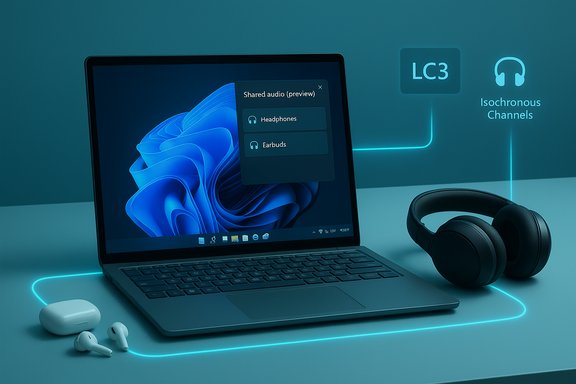
Microsoft is rolling out a long‑requested convenience to Windows 11: a built‑in “Shared audio (preview)” that can stream the same sound to two Bluetooth headphones, earbuds, speakers, or compatible hearing aids at once — powered by Bluetooth Low Energy (LE) Audio and appearing first to Windows Insiders on select Copilot+ PCs.
Bluetooth audio on PCs has long been hamstrung by legacy protocol trade‑offs that forced users to choose between high‑quality stereo playback and usable microphone support. The old Bluetooth Classic stack separated roles across A2DP (one‑way high‑fidelity media) and HFP/HSP (telephony voice), which often caused audio to fall back to low‑quality mono while a headset mic was active. The new Shared audio feature is Microsoft's practical, standards‑based response: it leverages Bluetooth LE Audio, the LC3 codec, and LE Audio’s synchronization primitives to enable synchronized, two‑sink playback from a single PC. Microsoft published the feature as part of Windows 11 Insider Preview Build 26220.7051, making it available to Insiders in the Dev and Beta channels and gating initial exposure to a short list of Copilot+ PCs while OEM drivers and accessory firmware catch up. The official Windows Insider blog lays out the rollout approach and compatibility notes.
Microsoft’s Shared audio (preview) demonstrates how standards‑driven platform work can deliver straightforward real‑world benefits — provided the ecosystem does its part. For now, the path to a smooth two‑headphone experience is clear: update firmware, test on supported Copilot+ hardware, and give vendors time to roll out the required device‑level updates.
Source: Moneycontrol https://www.moneycontrol.com/techno...headphones-at-once-article-13647463.html/amp/
 Background
Bluetooth audio on PCs has long been hamstrung by legacy protocol trade‑offs that forced users to choose between high‑quality stereo playback and usable microphone support. The old Bluetooth Classic stack separated roles across A2DP (one‑way high‑fidelity media) and HFP/HSP (telephony voice), which often caused audio to fall back to low‑quality mono while a headset mic was active. The new Shared audio feature is Microsoft's practical, standards‑based response: it leverages Bluetooth LE Audio, the LC3 codec, and LE Audio’s synchronization primitives to enable synchronized, two‑sink playback from a single PC. Microsoft published the feature as part of Windows 11 Insider Preview Build 26220.7051, making it available to Insiders in the Dev and Beta channels and gating initial exposure to a short list of Copilot+ PCs while OEM drivers and accessory firmware catch up. The official Windows Insider blog lays out the rollout approach and compatibility notes. What Shared audio (preview) actually does
At a high level, Shared audio (preview):- Streams a single, synchronized audio feed from a Windows 11 PC to two paired Bluetooth LE Audio sinks simultaneously.
- Is surfaced as a Shared audio (preview) tile in Quick Settings; users select two connected accessories and click Share to begin.
- Is intentionally conservative in scope — the preview limits the experience to two sinks and to Copilot+ systems that already have compatible radios, firmware and drivers.
Why LE Audio makes this possible
LC3 codec and efficiency
The LC3 codec — the centerpiece of LE Audio — delivers improved perceptual audio quality at much lower bitrates compared with the legacy SBC codec. Lower bitrates reduce on‑air time, congestion, and power drain for both the PC and the accessory, which is essential when sending one feed to multiple receivers. LC3 supports sample rates up to 48 kHz, giving headroom for high‑quality media while preserving battery life.Isochronous Channels and synchronization
LE Audio introduces Isochronous Channels (ISO) as the transport primitive that provides timing guarantees. ISO lets a transmitter coordinate packet timing so multiple sinks play the same stream in tight sync, minimizing perceivable latency differences between listeners. That synchronization is the technical core of Shared audio — it’s why Microsoft’s implementation is built on LE Audio rather than a stopgap classic‑Bluetooth hack.TMAP and super wideband stereo
LE Audio’s profiles (including the Telephony and Media Audio Profile, or TMAP) permit simultaneous, high‑quality media and microphone streams. Microsoft’s integration of LE Audio into Windows 11 is also tied to the company’s “super wideband stereo” improvements that let headsets retain stereo fidelity even while using a microphone — an important companion to multi‑sink playback when voice and media have to coexist.How to try Shared audio (preview) — step by step
- Enroll a Copilot+ Windows 11 PC in the Windows Insider Program (Dev or Beta channel) and install Windows 11 Insider Preview Build 26220.7051 (or later), plus any OEM Bluetooth/audio driver updates distributed via Windows Update.
- Ensure both Bluetooth accessories are LE Audio‑capable and have the latest firmware installed via their vendor companion apps; many vendors expose LC3/LE functionality only after a firmware update.
- Pair and connect the two accessories in Settings > Bluetooth & devices.
- Open Quick Settings (Win+A) and tap the Shared audio (preview) tile. Select the two connected accessories and press Share to begin streaming. Use Stop sharing to end the session.
What hardware and accessories are supported (initial list and caveats)
Microsoft currently limits the preview to select Copilot+ PCs, with an explicit “available today” group and a “coming soon” roster. The initial availability list includes Surface devices powered by Qualcomm Snapdragon X silicon (Surface Laptop 13.8" and 15", Surface Pro 13"), while Samsung Galaxy Book5 models and additional Surface SKUs are on the “coming soon” list. This device gating is deliberate: LE Audio support depends on the PC’s Bluetooth controller, firmware and vendor drivers in addition to the OS. Early reporting and Microsoft’s blog also mention compatible accessories used during testing — examples include Samsung Galaxy Buds2 Pro, Buds3, Buds3 Pro and Sony WH‑1000XM6 — but these lists are illustrative, not exhaustive. Successful use requires an accessory’s firmware and the PC’s driver stack to expose the necessary LE Audio capabilities. Treat public accessory lists as guidance rather than a guaranteed compatibility roster.Strengths and user value
- Simple UX for a common problem: Shared audio replaces awkward wired splitters and multi‑app routing with a one‑tap Quick Settings control. That’s immediate convenience for travelers, study partners, and small group viewing.
- Standards‑based approach: Because Microsoft implements Shared audio on LE Audio primitives (LC3, ISO, TMAP), it’s not a proprietary trick — it’s an OS‑level feature aligned with the Bluetooth SIG’s roadmap. That improves long‑term interoperability prospects.
- Better efficiency and battery: LC3’s efficiency reduces radio airtime and accessory power draw, making two‑device streaming less punishing on battery life than legacy methods.
- Accessibility potential: LE Audio has profiles for hearing devices and broadcast‑style workflows (Auracast). Windows supporting two‑sink sharing is a small step toward assistive and venue uses where audience members tune in with personal receivers.
Risks, limitations and places to watch
Ecosystem dependency and fragmentation
Shared audio’s real‑world reliability depends on coordination across three layers: the PC’s Bluetooth silicon and firmware, vendor drivers provided to Windows, and accessory firmware. Microsoft’s preview is deliberately limited to Copilot+ hardware because many Windows PCs and Bluetooth stacks still lack complete LE Audio support. Users should expect a patchwork of compatibility in the early weeks and months of rollout.Latency and synchronization edge cases
LE Audio’s ISO channels are designed for tight sync, but real‑world latency depends on each accessory’s internal buffering and decoding timelines. Users in latency‑sensitive scenarios (e.g., gaming, live monitoring) should validate timing across their accessory pairs before relying on Shared audio for mission‑critical audio. Microsoft’s preview caps the experience at two sinks to limit these variables during testing.Battery and performance tradeoffs
Although LC3 reduces bitrate and radio time, driving two receivers still increases throughput and processing on the host. Expect modest additional battery draw and CPU/bus activity on the PC; on thin‑and‑light devices and older Bluetooth radios, performance impacts or thermal effects could surface. This is another reason Microsoft restricts early availability to hardware where the radio and drivers are known to handle LE Audio well.Privacy, discoverability and policy considerations
Broadcast‑style audio raises legitimate privacy and policy questions. While Shared audio is a controlled, paired experience, broader Auracast‑style scenarios allow public or venue broadcasts. Windows and OEMs will need to clarify discoverability controls, encryption and administrative policy for enterprise or public deployments. Expect Microsoft to add administrative controls and telemetry to inform certification decisions as the feature matures.Compatibility assumptions to flag
Vendor lists published in early coverage are demonstrative — Microsoft and media outlets named examples like Samsung’s Galaxy Buds and Sony headsets, but successful operation requires matching firmware and drivers. Where coverage says “works with X,” take it as a useful hint, not a guarantee; verify via the accessory maker’s firmware notes and Microsoft’s updated compatibility list.Enterprise and IT implications
For IT teams and procurement groups, Shared audio is strategically useful but operationally nuanced:- Include Bluetooth radio model, driver and firmware support for LE Audio as explicit criteria in RFPs and pilots; do not assume every Bluetooth 5.x adapter supports LE Audio out of the box.
- For controlled environments (training rooms, courts, healthcare), validate interoperability between proposed headsets and targeted Copilot+ host models before approving broad deployments.
- Maintain wired fallbacks and documented procedures for critical sessions (e.g., court reporting, live captioning) until the ecosystem shows deterministic behavior under load.
Real‑world scenarios and testing notes
- Travel and in‑flight entertainment: two travelers can privately watch the same movie without disturbing cabin mates. This is one of Microsoft’s explicit consumer scenarios and an immediate practical win.
- Study groups and co‑working: classroom or library listening where two students share the same audio without speaker volume.
- Accessibility at venues: with Auracast and LE Audio’s hearing‑aid profiles, venues might later use a Windows machine as a local transmitter for patrons’ hearing devices. Shared audio is an incremental step toward that use case.
Security and privacy considerations
Shared audio is a paired, user‑initiated experience rather than an open broadcast by default; however, as LE Audio’s Auracast ecosystem expands, Windows must balance convenience with security:- Expect Microsoft to require authenticated pairing and encrypted streams for personal sharing flows.
- Administrative controls will likely follow for enterprise or public uses to prevent unauthorized broadcasts in controlled spaces.
- Users should update device firmware only from vendor apps or official channels to reduce supply‑chain risk.
What to do if you want this today
- Confirm whether your Windows 11 PC is a Copilot+ model listed as “available today” or “coming soon” in Microsoft’s Insider notes. If it is not, you can still monitor driver updates from your OEM.
- Enroll in the Windows Insider Dev or Beta Channel, install Build 26220.7051 (or later), and keep Windows Update enabled so OEM drivers can be delivered.
- Update accessory firmware using the vendor’s companion app and re‑pair the device to the PC if it fails to show up in Shared audio.
Independent verification and reporting notes
Key technical and rollout claims in this article were cross‑checked against multiple independent sources:- Microsoft’s official Windows Insider blog and announcement for Build 26220.7051, which details the Shared audio preview and the Copilot+ PC lists.
- Major technology press coverage (The Verge, HowToGeek, Tom’s Hardware) corroborated the feature’s functionality, the LE Audio foundation, and the staged rollout approach to Copilot+ hardware.
- Microsoft Support documentation and LE Audio explanatory pages were consulted to verify codec capabilities (LC3), sample‑rate support and the relationship between LE Audio and stereo‑while‑mic scenarios.
Verdict — pragmatic progress, ecosystem work remains
Microsoft’s Shared audio (preview) is a meaningful, standards‑based advance for Windows audio: it solves a long‑standing usability problem with a simple UI built on modern Bluetooth specs. By making LE Audio a first‑class part of Windows’ audio plumbing, Microsoft helps align PCs with what modern headsets and phones already offer. The preview’s conservative launch — limited to two sinks, tied to Copilot+ hardware, and gated behind firmware/driver updates — is the right approach for minimizing user frustration while the ecosystem catches up. However, the experience you’ll get depends heavily on accessory firmware and OEM drivers. Early adopters who want to test the feature should expect a few bumps, confirm firmware updates, and keep wired fallbacks for critical sessions. IT teams and procurement managers should bake LE Audio compatibility into pilots and purchasing decisions rather than assuming universal support. Shared audio is not an instant universal solution for large‑scale broadcasting or deterministic low‑latency multi‑monitoring, but it is a practical first step toward a more flexible, accessible audio ecosystem on Windows. If Microsoft, OEMs and accessory makers coordinate on drivers and firmware, the feature will graduate from a nice preview to a broadly useful capability for millions of Windows users.Microsoft’s Shared audio (preview) demonstrates how standards‑driven platform work can deliver straightforward real‑world benefits — provided the ecosystem does its part. For now, the path to a smooth two‑headphone experience is clear: update firmware, test on supported Copilot+ hardware, and give vendors time to roll out the required device‑level updates.
Source: Moneycontrol https://www.moneycontrol.com/techno...headphones-at-once-article-13647463.html/amp/
