

Microsoft is rolling out a long‑promised convenience: Windows 11 can now stream the same audio to two Bluetooth devices at once — but only on a narrow set of machines and with several important caveats that will keep many PCs and headphones on the wrong side of the fence for months to come.
Bluetooth Low Energy (LE) Audio is a generational upgrade to Bluetooth audio that introduces a new codec (LC3), isochronous channels for tighter timing, and a broadcast mode that lets one source transmit the same stream to many receivers. The broadcast capability is commonly known in the industry by the Bluetooth SIG’s Auracast name, and it’s the technical foundation that makes multi‑device streaming practical without the awkward cable splitters or third‑party toolchains people have used until now.
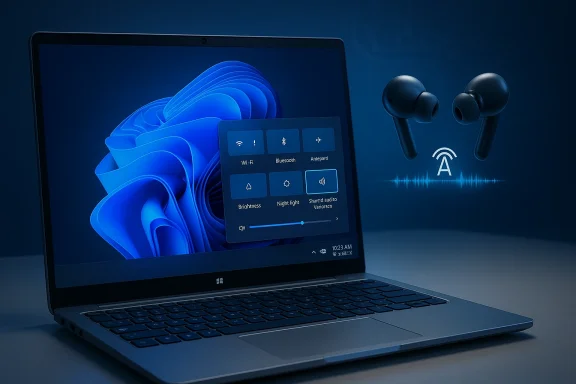
Microsoft’s implementation appears as a quick‑settings tile called “Shared audio (preview)” in Windows 11 Insider Preview Build 26220.7051. When present, the tile lets you pick two paired, LE‑Audio‑capable accessories and share the same audio output between them. That experience is currently in preview and restricted to a small group of Copilot+ Windows 11 laptops and tablets while Microsoft and OEMs test drivers and firmware behavior.
Key examples from the published preview compatibility list:
That said, the early rollout illustrates the broader reality of Bluetooth’s transition periods: capabilities are defined by standards, but user experience depends on a chain of independent actors coordinating firmware, drivers, and software. Until OEMs and accessory makers ship updates en masse, many users will see the feature as a tantalizing promise rather than a day‑to‑day convenience. Microsoft’s cautious preview approach — gated to Copilot+ models and Insider builds — reflects that coordination challenge.
If you own a Copilot+ PC on Microsoft’s compatibility list and have LE‑Audio‑capable accessories, the preview is worth trying — and your testing and feedback through the Windows Insider channels will help iron out the inconsistencies. If your hardware isn’t on the list, patience is required: the feature is coming to more devices, but the timeline depends on OEM updates, accessory vendor uptake, and continued refinement from Microsoft.
Microsoft’s Shared audio is evidence that Bluetooth LE Audio is finally moving from specification documents and demos into everyday experiences. The broader industry must now finish the job of making that future seamless, across laptops, phones, earbuds, and public spaces alike.
Source: Windows Central Windows 11 will get dual-audio streaming — but your PC may be left out
 Background
Bluetooth Low Energy (LE) Audio is a generational upgrade to Bluetooth audio that introduces a new codec (LC3), isochronous channels for tighter timing, and a broadcast mode that lets one source transmit the same stream to many receivers. The broadcast capability is commonly known in the industry by the Bluetooth SIG’s Auracast name, and it’s the technical foundation that makes multi‑device streaming practical without the awkward cable splitters or third‑party toolchains people have used until now. Microsoft’s implementation appears as a quick‑settings tile called “Shared audio (preview)” in Windows 11 Insider Preview Build 26220.7051. When present, the tile lets you pick two paired, LE‑Audio‑capable accessories and share the same audio output between them. That experience is currently in preview and restricted to a small group of Copilot+ Windows 11 laptops and tablets while Microsoft and OEMs test drivers and firmware behavior.
What exactly is being tested in Windows 11?
The feature, in practical terms
- Pair two compatible Bluetooth LE Audio accessories to your PC.
- Open Quick Settings, select the Shared audio (preview) tile, choose both devices and click Share.
- Both receivers play the same audio stream from a single source; click Stop sharing to end the session.
What Microsoft says (and what it doesn’t)
Microsoft’s Insider post describes the feature as “built on top of Bluetooth LE Audio broadcast technology.” Noticeably, Microsoft didn’t attach a commercial trademark like Auracast to the announcement — the company used the generic technical terminology instead. That matters because Auracast is the Bluetooth SIG’s marketing name for its broadcast topology; features that are functionally equivalent might be implemented without carrying the brand name in vendor messaging. In short: Windows is using LE Audio broadcast tech, but Microsoft’s post stops short of saying “Auracast.”Which PCs and accessories can use Shared audio today?
Supported PCs (preview)
At the time of the preview rollout, Microsoft limited Shared audio to a list of Copilot+ Windows 11 devices that have the required Bluetooth stack and updated audio drivers. The initial list includes several Qualcomm‑powered Surface models and — after an update to the rollout — Samsung’s Galaxy Book4 Edge. Microsoft also published a “coming soon” list that includes select Galaxy Book5 models running Intel Core Ultra chips. Expect that list to grow, but not overnight.Key examples from the published preview compatibility list:
- Surface Laptop (13.8‑inch and 15‑inch) and Business variants — Qualcomm Snapdragon X platform.
- Surface Pro (12‑ and 13‑inch) and Business variants — Qualcomm Snapdragon X.
- Samsung Galaxy Book4 Edge — Qualcomm Snapdragon X (added later in the Insider rollout).
- Coming soon: Samsung Galaxy Book5 360, Galaxy Book5 Pro, Galaxy Book5 Pro 360 (Intel Core Ultra Series 200).
Supported accessories
Microsoft’s notes and early coverage name several LE‑Audio‑capable headsets and hearing aids that should work in the preview: Samsung Galaxy Buds2 Pro, Buds3 and Buds3 Pro, Sony WH‑1000XM6, and recent LE Audio hearing aids from manufacturers such as ReSound and Beltone. That list is explicitly non‑exhaustive because the ecosystem is still expanding. As with the PCs, accessory compatibility depends on both hardware capabilities and up‑to‑date firmware.Why most PCs (and many headphones) will be left out — the technical and ecosystem reality
There are three separate layers that must align for Shared audio to work: Bluetooth radio capability, software/drivers on the PC, and accessory firmware that implements LE Audio.- Bluetooth radio and IC support: LE Audio requires the Bluetooth Core Specification 5.2 (or later) feature called LE Isochronous Channels. In practice, that means the laptop’s Bluetooth controller (chip and firmware) must implement LE Isochronous Channels; merely advertising “Bluetooth 5.2” on the spec sheet is not sufficient. Many laptops that shipped with Bluetooth 5.2 or later either use older Bluetooth stacks or haven’t had their firmware fully updated to enable LE Audio features.
- Drivers and OS stack: Windows needs the right Bluetooth and audio drivers to expose the new LE Audio primitives to the OS and to the Quick Settings UI. For most OEMs this requires vendor‑supplied driver updates. Microsoft’s preview explicitly requires “compatible Bluetooth and audio driver updates” and has chosen to gate the feature to Copilot+ PCs where those updates are available first. That’s why a hardware‑capable laptop can still be excluded: no driver = no feature.
- Accessory firmware: Both the source (PC) and the sinks (headphones/earbuds/hearing aids) must implement LE Audio features. Many consumer headphones launched before LE Audio certifications existed; some recent flagships still omit LE Audio intentionally. That means even if your PC is ready, your earbuds might not be. Conversely, some earbuds support LE Audio but the PC’s Bluetooth controller or driver may still block the experience.
Real‑world limits you should expect in early testing
Latency and lip‑sync
LE Audio brings lower latency and improved timing, but synchronizing audio between two independent Bluetooth receivers remains technically tricky. Small differences in clocking, codec handling, or buffer strategies on accessory firmware can create slight out‑of‑sync playback between devices. Microsoft constrains the preview to two devices as a pragmatic way to keep synchronization problems manageable, but users should still expect occasional drift or brief rebuffering while the stacks negotiate.Quality trade‑offs
LE Audio’s LC3 codec is designed to be more efficient than legacy SBC and to deliver better perceived quality at lower bitrates. However, real‑world codec performance depends on implementation choices and bitrate profiles selected by phone/headset vendors. Shared audio may default to interoperability profiles that prioritize stability and low bandwidth, which in practice could reduce peak fidelity compared with a single‑device, high‑bitrate connection.Battery and coexistence
Broadcasting to multiple devices has power costs for the transmitter, and handling multiple active Bluetooth sessions requires more CPU and radio activity. Expect some battery impact on laptops that aren’t explicitly engineered for continuous LE Audio broadcasting workloads — again, one reason Microsoft limited the preview to a set of Copilot+ designs that have known hardware/drivers.Accessibility: an important, often‑overlooked win
One of LE Audio’s most consequential benefits is assistive listening. LE Audio standardizes streaming to hearing aids, improving latency, battery life, and direct connectivity without intermediary devices. Microsoft highlights hearing aids from industry names as supported accessories for Shared audio. For people who rely on hearing aids, the ability to receive the same audio as another listener — from a lecture, a movie, or a call — is a meaningful accessibility improvement. That has public‑service implications for schools, public transit, and venues where audio access is currently limited.Security and privacy considerations
Broadcasting audio to multiple receivers involves trade‑offs beyond simple convenience.- Broadcast modes like Auracast can be configured as open or private. Open broadcasts let any compatible receiver tune in; private broadcasts require an invitation or passphrase mechanism managed by the transmitter or via a companion app. Microsoft’s initial preview focuses on small private sharing (two devices), but the broader LE Audio broadcast model in public deployments raises potential privacy and content‑control questions.
- Tracking and profile leakage: publicly advertised broadcasts could reveal device presence in a location unless privacy protections are enabled in the implementation. The Bluetooth SIG’s specification includes privacy mechanisms, but their correct implementation across vendors is essential. Microsoft’s preview doesn’t change Bluetooth’s fundamental telemetry surface; it relies on the usual Bluetooth pairing and connection model for private sharing.
- DRM and secure content: Protected audio streams (DRM content) can introduce additional constraints that may limit how or whether broadcast sharing is allowed. Content providers and playback applications may need to adapt to ensure that DRM restrictions are respected when audio is broadcasted to multiple devices.
How to check whether your PC and headphones will work (step‑by‑step)
- Check your Windows 11 build and Insider enrollment: Shared audio was introduced in Insider Preview Build 26220.7051 and rolled out to Dev and Beta channels; ensure your PC is enrolled and updated via Windows Update.
- Confirm your PC is one of the supported Copilot+ models (or on the “coming soon” list): consult your OEM’s Windows update notes and Microsoft’s Insider post to see whether your model is listed. If it isn’t listed, the Quick Settings tile won’t appear even if your Bluetooth hardware is capable.
- Verify Bluetooth controller capability: check Device Manager > Bluetooth and query the controller model. Then consult your OEM or the chipset vendor documentation to confirm LE Isochronous Channels / LE Audio support. A “Bluetooth 5.2” label is necessary but not sufficient.
- Update drivers and firmware: install Windows Update driver updates and use your accessory manufacturer app to upgrade headphone firmware. Microsoft explicitly recommends the accessory vendor apps to ensure correct LE Audio behavior.
- Pair accessories and look for the Shared audio tile: once everything is updated and paired, open Quick Settings to see the Shared audio (preview) tile and test the flow. If one accessory doesn’t appear, try removing and re‑pairing it.
What OEMs and accessory makers need to do next
For this capability to become broadly useful, multiple stakeholders must act:- OEMs must deliver Bluetooth controller firmware updates and Windows drivers that enable LE Isochronous Channels and expose broadcast primitives in the Windows Bluetooth stack.
- Accessory vendors must ship and clearly document LE Audio support and provide simple firmware update paths for customers.
- App and content developers should plan for multi‑sink topologies where required (for example, letting users control per‑device volume or select primary listeners in group viewing scenarios).
- Venue operators and public spaces aiming to deploy broadcast audio must consider management, privacy, and accessibility policies when setting up Auracast‑style transmitters.
Consumer recommendations and practical tips
- If you want Shared audio sooner rather than later, prioritize devices that Microsoft lists as supported in the Insider rollout; those Copilot+ machines are the first to get updated drivers.
- When buying new headphones with the intention of sharing audio, explicitly check for LE Audio or Auracast support in vendor specs and marketing materials; do not rely solely on the Bluetooth version number.
- Keep accessory firmware and vendor apps updated — many compatibility issues arise from out‑of‑date headset firmware rather than the PC itself.
- For critical use (presentations, assistive listening), test the exact PC/headphone combination in advance; don’t assume multi‑device sharing will work seamlessly across different brands.
The long view: where this fits in the audio ecosystem
Shared audio on Windows 11 is a small but meaningful step toward a future where audio is more flexible, accessible, and social. LE Audio and Auracast change the constraints that previously tied sound to a single device, and that has ripple effects across content accessibility, public UX, and product design.That said, the early rollout illustrates the broader reality of Bluetooth’s transition periods: capabilities are defined by standards, but user experience depends on a chain of independent actors coordinating firmware, drivers, and software. Until OEMs and accessory makers ship updates en masse, many users will see the feature as a tantalizing promise rather than a day‑to‑day convenience. Microsoft’s cautious preview approach — gated to Copilot+ models and Insider builds — reflects that coordination challenge.
Final assessment: useful today, ubiquitous tomorrow — but not without speed bumps
Shared audio in Windows 11 is an earned and welcome upgrade: it simplifies a real‑world task, opens accessibility benefits, and leverages modern Bluetooth architecture to provide better audio efficiency and flexibility. However, the initial experience will be uneven. Expect restricted device support, interoperability quirks, and the usual driver/firmware headaches that accompany any major standards shift in consumer hardware.If you own a Copilot+ PC on Microsoft’s compatibility list and have LE‑Audio‑capable accessories, the preview is worth trying — and your testing and feedback through the Windows Insider channels will help iron out the inconsistencies. If your hardware isn’t on the list, patience is required: the feature is coming to more devices, but the timeline depends on OEM updates, accessory vendor uptake, and continued refinement from Microsoft.
Microsoft’s Shared audio is evidence that Bluetooth LE Audio is finally moving from specification documents and demos into everyday experiences. The broader industry must now finish the job of making that future seamless, across laptops, phones, earbuds, and public spaces alike.
Source: Windows Central Windows 11 will get dual-audio streaming — but your PC may be left out
