

Microsoft is putting AI agents on the Windows 11 taskbar, turning the familiar search/launcher area into a live control center where autonomous assistants can be invoked, monitored, and managed without taking over the screen.
The taskbar is the one UI surface Windows users glance at dozens of times every hour. Microsoft’s latest strategy — revealed across Ignite 2025 briefings and preview documentation — treats that surface not just as a place to launch apps or search files, but as the front door for a new class of software: AI agents that can act on behalf of users, in the background, with visible status and controls. This reframing is deliberate: Microsoft wants agents to be as easy to use and as discoverable as any installed application. The company calls the overall vision an “agentic OS”: Windows remains the host, but now hosts identity-bound, auditable agents that can reason, plan, and execute workflows spanning local apps, cloud services, and even other agents. The strategy folds together several pieces Microsoft has been pushing for months: Ask Copilot (a taskbar composer), Copilot Vision and Voice, Copilot Actions, the Model Context Protocol (MCP), and a new Agent Workspace runtime. The result is a layered platform intended for consumers and enterprise customers alike.
However, the promise comes with new responsibilities. Admins must treat agents as principals in their environment, demand strong signing and telemetry, and phase adoption through careful pilots. Users must be educated about consent semantics and the continued need to verify agent outputs. Until Microsoft publishes comprehensive operational documentation and the preview matures into stable enterprise patterns, organizations should adopt a cautious, staged approach that prioritizes auditability and least privilege. Microsoft’s taskbar agents show how quickly Windows is evolving from an OS that answers questions to one that can do work for you — a helpful, powerful step forward if implemented with rigorous controls and clear governance.
Source: Windows Latest Microsoft is putting an AI agent on the Windows 11 taskbar, here's your first look
 Background: why the taskbar matters now
The taskbar is the one UI surface Windows users glance at dozens of times every hour. Microsoft’s latest strategy — revealed across Ignite 2025 briefings and preview documentation — treats that surface not just as a place to launch apps or search files, but as the front door for a new class of software: AI agents that can act on behalf of users, in the background, with visible status and controls. This reframing is deliberate: Microsoft wants agents to be as easy to use and as discoverable as any installed application. The company calls the overall vision an “agentic OS”: Windows remains the host, but now hosts identity-bound, auditable agents that can reason, plan, and execute workflows spanning local apps, cloud services, and even other agents. The strategy folds together several pieces Microsoft has been pushing for months: Ask Copilot (a taskbar composer), Copilot Vision and Voice, Copilot Actions, the Model Context Protocol (MCP), and a new Agent Workspace runtime. The result is a layered platform intended for consumers and enterprise customers alike. What Microsoft announced at a glance
- Ask Copilot on the taskbar — an opt‑in composer that blends local search results with Copilot-generated responses and direct agent invocation using a tools menu or the @ syntax.
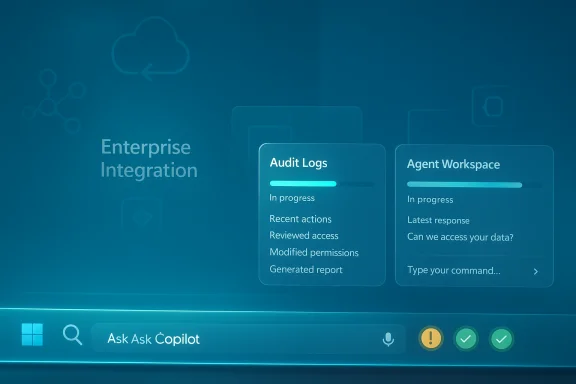
- Agents on the taskbar — long‑running agents appear as icons with status badges and hover cards showing progress; they run in the background inside a contained workspace so your main session isn’t disrupted.
- Model Context Protocol (MCP) and Agent Connectors — MCP provides a standardized way for agents to discover and call into apps, services, and tools via secure connectors.
- Agent Workspace — a sandboxed, policy‑controlled environment where agents run under their own agent accounts and limited permissions, offering auditable logs and explicit consent gates for sensitive operations.
- Preview and staged rollout — these features are being previewed to Insiders and enterprise customers, gated behind opt‑in toggles and staged server-side entitlements rather than a blanket consumer release.
How the taskbar experience actually looks and behaves
Ask Copilot as a composer and agent launcher
Ask Copilot replaces or augments the traditional taskbar search pill with a compact composer that accepts typed prompts, voice activation, and vision inputs. The composer returns hybrid results: immediate, indexed local hits (apps, settings, files) plus generative suggestions that can escalate into Copilot conversations or agent actions. Users can summon a specific agent directly by typing “@” in the composer or by using a tools menu. This design keeps low‑latency lookups local while routing more compositional or multi‑document reasoning to Copilot or an agent. The idea is to reduce context switching: ask for an outcome, pick an agent, and then let the agent execute while you continue working.Taskbar agents: icons, badges, and hover cards
Once an agent begins work, it appears as a taskbar icon — much like any running app — but with distinct status badges:- A yellow exclamation mark indicates the agent needs input, consent, or clarification.
- A green check mark signals the agent completed its assigned task successfully.
- Hovering over the agent shows a floating card with progress, recent actions, and any outstanding prompts the agent has raised.
Agent lifecycle and non‑blocking background execution
Agents don’t run in the same interactive desktop as the user. Instead, they execute inside a parallel Agent Workspace so they can open apps, click through UI flows, read files, or interact with services without disturbing the user’s session. If the agent needs more permissions — for example, access to a protected folder or to send an email — it will surface a prompt for explicit consent. Progress updates, errors, and request-for-input notifications are channeled to the taskbar icon’s hover card and through system notifications.Under the hood: Model Context Protocol (MCP) and Agent Connectors
What is MCP?
The Model Context Protocol (MCP) is Microsoft’s call for a standardized, discoverable protocol that lets agents find and call tools, services, and app capabilities in a consistent, auditable way. MCP servers (or connectors) expose a catalog of tools and actions an agent can use; the agent requests a capability via MCP and receives a bounded, mediated interface that enforces policies and logs operations. This helps bridge an agent’s internal reasoning with the external world — files, calendars, enterprise systems — while preserving governance. MCP is a reuse of ideas Microsoft discussed earlier in 2025 and now being deployed across Windows, Microsoft 365, Dynamics/Fabric, and Power Platform surfaces — a cross‑stack effort to make agents interoperable with enterprise systems.Agent Connectors
Agent connectors are the implementation points for MCP within Windows: standardized bridges that map agent requests into app APIs, file access, or cloud services. Connectors run under guarded policies and are discoverable by agents via MCP; they’re the equivalent of a plugin catalog that operators can control. Because connectors are registered and mediated, admins can audit what agent was allowed to do and revoke or restrict capabilities centrally.Why this matters technically
By standardizing tool access with MCP, Microsoft avoids ad‑hoc automation that’s brittle and insecure. Instead of every agent inventing its own way to access Outlook, File Explorer, or an ERP system, MCP defines a common contract. That lowers development friction, improves auditability, and gives IT a handle to enforce least‑privilege policies across agents.Security, privacy, and governance: built into the design (but not solved)
Microsoft’s messaging emphasizes opt‑in enablement, sandboxing, and auditable agent identities. Important technical controls include:- Agent Workspace isolation — agents run in contained sessions under dedicated agent accounts with limited privileges.
- Signed agents and provisioning — Microsoft intends agents to be cryptographically signed and provisioned through managed channels, reducing the risk of arbitrary code execution.
- Per‑operation consent — sensitive actions (accessing TOTP credentials, sending mail, or touching protected folders) require explicit user confirmation.
- Administrative controls and auditing — enterprise IT can govern which agents are allowed, enforce policies, and collect logs to trace agent actions.
Attack surface, insider risk, and supply chain
Making autonomous software act on behalf of users expands the attack surface in several ways:- Malicious or compromised agents could attempt to exfiltrate data via permitted connectors if policy misconfiguration occurs.
- UI automation introduces the risk that agents interact with sensitive dialogs (e.g., credential prompts) in unexpected ways.
- Third‑party agent marketplaces or custom-built agents require supply‑chain controls and code signing to avoid introducing rogue agents.
Developer and partner implications
For ISVs and developers
MCP and the Agent Connector model open a new integration surface. Vendors can:- Expose safe, documented tools to agents via MCP servers so agents can perform high‑value operations on behalf of users.
- Build certified connectors that enterprises can trust and centrally manage.
- Create specialized agents that become discoverable inside Ask Copilot or via in‑OS agent stores.
For independent agent builders
Third‑party agents (for example, generative LLM vendors) can run in Windows provided they implement MCP connectors and meet Microsoft’s signing/permissioning requirements. Microsoft has said results from any agent will show up in the Microsoft 365 Copilot app as a unified surface, which means partners must play by Microsoft’s integration model to achieve the same UX and discoverability. This balance encourages openness but routes visibility through Microsoft’s management surfaces.Manageability and enterprise adoption: a practical roadmap
Enterprises should assume the following phased approach for a safe rollout:- Inventory business processes that are repetitive, high‑value, and low‑risk (e.g., extracting tables from standardized PDFs).
- Pilot a single signed agent with strict connector permissions and detailed telemetry for a subset of users.
- Validate audit logs, forensic telemetry, and incident response workflows to ensure agent actions are traceable.
- Expand agent capabilities incrementally and use role‑based access to manage sensitive connectors.
- Adapt procurement language to require code signing, secure update channels, and data handling guarantees from third‑party agents.
UX and consumer impact: convenience versus control
For everyday users, the promise is compelling: say what you want done, pick an agent, and the agent quietly performs steps while you keep working. The taskbar integration lowers friction: launching, monitoring, and responding to agent requests happens in the same place you already look for quick tasks. But the convenience tradeoffs are real:- Users must understand agent scopes and consent dialogs; defaults matter.
- Always‑on voice and vision inputs raise understandable privacy concerns, even when described as opt‑in and local.
- Misleading or incorrect agent outputs remain a hazard; users and organizations need to continue to verify authoritative outcomes rather than relying on agent confidence signals.
What is verifiable today — and what remains uncertain
Verifiable, cross‑checked claims:- Agents will be invokable from Ask Copilot on the taskbar and monitorable via taskbar icons and hover cards.
- The Model Context Protocol (MCP) is the standardized framework Microsoft will use to connect agents and tools; MCP servers and connectors were described in Microsoft’s Ignite Book of News.
- Agent Workspace exists as a preview concept that runs agents in a contained environment under separate agent accounts.
- Precise consumer availability dates and which Windows 11 release channels (beyond Insider previews) will get the taskbar agents experience remain unspecified; Microsoft says the functionality will roll out in preview and over time but has not published a universal GA timeline for home users. Treat any specific availability claims as provisional until Microsoft publishes firm dates.
- The exact mechanics of third‑party agent certification, code signing, and marketplace listing rules were described in general terms but still require detailed operator documentation that may arrive after initial previews; assume enterprise contracting will be required.
Practical recommendations for IT and enthusiasts
- Start small: pilot agents for clearly defined, low‑risk automations (e.g., document summarization, scheduled report generation).
- Require signed agents and use allowlists for connectors; block unsigned or unvetted agents by policy.
- Instrument comprehensively: collect agent action logs, prompts, result artifacts, and correlate them with identity and device telemetry.
- Update incident response playbooks to include agent activity: how to freeze, revoke, and investigate an agent’s workspace.
- Train users: make sure they understand badge semantics (yellow = attention needed, green = completed) and consent prompts so accidental approvals are minimized.
The competitive and industry context
Microsoft’s move is part of a wider industry shift toward agentic interfaces: cloud vendors, LLM providers, and OS makers are experimenting with agents that can act across services. By putting agents into the taskbar and standardizing connectors with MCP, Microsoft is positioning Windows as the platform that stitches enterprise systems, Copilot, and third‑party agents together — a strategic play to keep the desktop central to productivity in an AI era. That positioning will be tested in enterprise pilots and by the ease with which third‑party vendors can integrate securely.Conclusion: a practical verdict
Microsoft’s introduction of AI agents to the Windows 11 taskbar is a meaningful platform shift: it converts the taskbar from a passive launcher into an agentic control surface and pairs that surface with a standardized connectivity model (MCP) and a sandboxed runtime (Agent Workspace). The move is coherent and technically convincing on paper, and it promises genuine productivity gains — especially for repetitive, multi‑step workflows.However, the promise comes with new responsibilities. Admins must treat agents as principals in their environment, demand strong signing and telemetry, and phase adoption through careful pilots. Users must be educated about consent semantics and the continued need to verify agent outputs. Until Microsoft publishes comprehensive operational documentation and the preview matures into stable enterprise patterns, organizations should adopt a cautious, staged approach that prioritizes auditability and least privilege. Microsoft’s taskbar agents show how quickly Windows is evolving from an OS that answers questions to one that can do work for you — a helpful, powerful step forward if implemented with rigorous controls and clear governance.
Source: Windows Latest Microsoft is putting an AI agent on the Windows 11 taskbar, here's your first look
