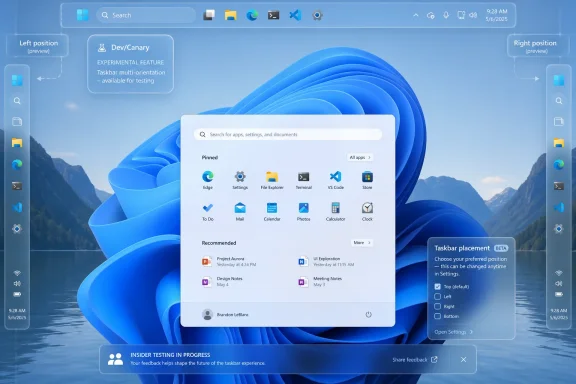
Microsoft began testing a movable Windows 11 taskbar on May 15, 2026, in Insider Experimental Preview Build 26300.8493, letting eligible Windows Insiders place the taskbar on the bottom, top, left, or right edge through Settings rather than registry hacks or third-party shells. That is the plain answer to a request Windows 11 users have been making since the operating system’s launch. It is also a revealing moment for a product that spent nearly five years treating a familiar desktop behavior as technical debt. The taskbar’s return to motion is small in pixels and large in symbolism: Microsoft is rediscovering that Windows is not just an interface to be simplified, but a workspace to be negotiated.

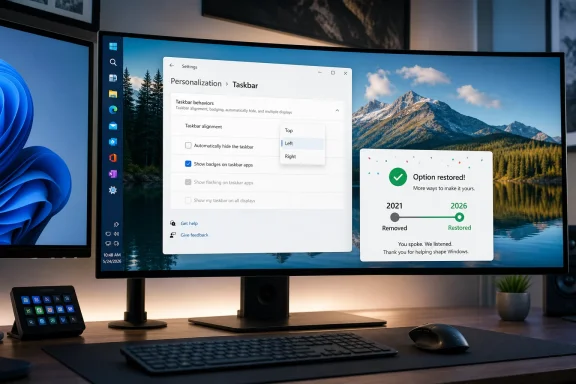
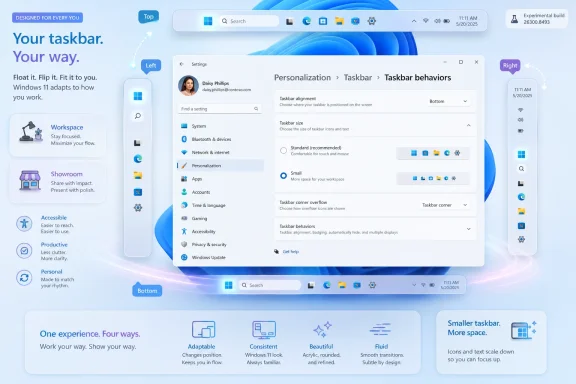
Windows 11 personalization screen showing taskbar alignment, size, and behaviors with side previews.Microsoft Moves the Taskbar and Admits the Desktop Still Matters​

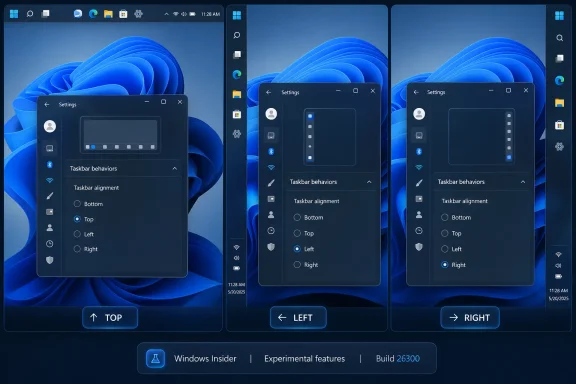
The change arrives in the new Experimental channel, formerly known as Dev for many Insiders, as part of Windows 11 build 26300.8493. Microsoft says the option lives under Settings, then Personalization, then Taskbar, then Taskbar behaviors. From there, users can choose bottom, top, left, or right placement.
That phrasing matters because this is not just a hidden prototype accidentally exposed in a screenshot or a registry switch with caveats. Microsoft is presenting alternate taskbar position as a first-class setting, even if the company is still careful to wrap it in preview-channel language. Tooltips, flyouts, animations, small taskbar mode, and “never combine” behavior are supposed to work across locations.
The limitations are equally important. Microsoft says touch gestures, the Search box, and Ask Copilot support in alternate positions are still in progress. Auto-hidden taskbar and touch-optimized taskbar are not yet supported in these placements. In other words, Windows 11 has regained the outline of a classic desktop feature before it has regained the full muscle memory around it.
Still, the direction of travel is unmistakable. For years, the locked-down Windows 11 taskbar represented one of the most visible ways Microsoft traded user agency for visual consistency. Now the company is making the opposite bet: that a little more complexity is worth the goodwill.

The Missing Feature Was Never Just About the Bottom Edge​

The outcry over the Windows 11 taskbar was always easy to caricature as nostalgia. A small group of power users wanted the old thing because it was old, the argument went, while everyone else was perfectly happy with a centered, simplified, tablet-flavored desktop. There was some truth in that, but not enough to carry the decision for nearly half a decade.
Taskbar placement is not decoration. On ultrawide monitors, a vertical taskbar can make better use of horizontal real estate. On compact laptops, a smaller or side-mounted taskbar can reclaim precious vertical pixels. On multi-monitor setups, muscle memory and screen geometry matter more than whatever arrangement photographs best in a launch video.
The old Windows taskbar was an object users could shape around their work. It could sit at the top for those who thought in browser-tab metaphors, on the left for those with wide monitors, or on the right for the contrarian few who had a reason and did not need Redmond’s permission. Windows 11 arrived with a different philosophy: the taskbar was part of the brand, and the brand sat at the bottom.
That choice may have made the operating system look cleaner in screenshots. It also made Windows 11 feel oddly less Windows-like to the people who notice friction not because they are sentimental, but because they spend all day inside the OS.

Windows 11’s Original Sin Was Simplification Without Escape Hatches​

Windows 11 launched in 2021 as an aesthetic reset. Rounded corners, centered icons, a calmer Start menu, and stricter hardware requirements all signaled a break from Windows 10’s sprawling pragmatism. But the redesign also removed or delayed a surprising number of behaviors users had come to rely on.
The taskbar became the poster child for that trade-off. Moving it was gone. Drag-and-drop support was missing at launch. Combining and labeling behaviors were reduced before being clawed back later. Multi-monitor behavior took time to mature. Even users who liked the Windows 11 look could reasonably ask why modernization had to mean subtraction.
This is the pattern that made the movable taskbar disproportionately important. It was not simply one missing checkbox. It was evidence that Microsoft had rebuilt a core part of the desktop with too narrow a definition of what counted as real use.
That is why the return feels less like a feature announcement than a correction. Microsoft is not inventing a new productivity paradigm here. It is restoring something users had before, removing it, absorbing the backlash, and finally engineering its way back to parity.

The Experimental Channel Is a Promise, Not a Shipping Date​

The feature is available only to users in the relevant Insider preview flow, and even there it may not appear for everyone at once. Microsoft continues to rely on controlled feature rollouts, which means two people on the same nominal build can see different capabilities depending on rollout state, flags, and account targeting. That makes the headline “you can try it now” true, but with the usual Windows Insider asterisk.
Build 26300.8493 is based on Windows 11 version 25H2 through an enablement package, according to Microsoft’s release notes. That does not mean every 25H2 user will receive a movable taskbar on day one, or that the implementation in this preview is the final public behavior. Microsoft explicitly warns Insiders that features in these builds can change, disappear, or never ship outside preview.
For administrators, this distinction is not pedantry. A feature in Experimental is not a deployment plan. It is a signal of product intent. The practical question is not whether a sysadmin should start documenting a vertical taskbar policy tomorrow, but whether Microsoft is finally rebuilding the Windows 11 shell with enterprise and power-user flexibility in mind.
That signal is encouraging. It is also incomplete. The taskbar may move in preview, but the real test is whether it arrives in stable Windows with policy controls, accessibility polish, predictable multi-monitor behavior, and a support story that does not boil down to “wait for the next cumulative update.”

The Smaller Taskbar Tells the Same Story in Fewer Pixels​

Microsoft is pairing movable placement with another long-requested change: a smaller taskbar. The new setting reduces icon size and taskbar height while keeping core elements such as Start, Search, and the system tray aligned. The default remains unchanged, but users who want a denser desktop can choose one.
This is a quieter change, but arguably just as telling. Windows 11 has often behaved as if visual spaciousness were the same thing as usability. That is true on some devices and maddening on others. A 14-inch laptop, a 32-inch monitor, and a handheld gaming PC do not all benefit from the same taskbar proportions.
The smaller taskbar is Microsoft acknowledging that density is not the enemy of design. For many users, density is design. The ability to see more of a spreadsheet, terminal, browser viewport, or remote desktop session is not a vanity preference; it is the difference between an interface that serves the work and one that keeps interrupting it.
There is a larger shift happening here. After years of pushing Windows 11 toward a single opinionated desktop, Microsoft is making room for context again. The company is not abandoning its default look. It is finally admitting that the default cannot be the whole product.

The Ghost of Windows 10 Still Haunts Every Windows 11 Improvement​

The awkward part for Microsoft is that much of the praise for this work sounds like praise for putting back what Windows 10 already did. A movable taskbar was not an exotic enthusiast demand in the previous generation of Windows. It was ordinary operating-system furniture. Losing it made Windows 11 feel less like a successor and more like a selective rewrite.
That has been the shadow over Windows 11 from the beginning. The OS has real strengths: better window snapping, a more coherent Settings app in many areas, stronger security defaults on supported hardware, and a design language that can look polished when it is consistent. But the product has repeatedly asked users to accept regressions as the price of modernization.
The taskbar rollback shows the danger of that bargain. When a new version removes familiar capabilities, users do not judge each change in isolation. They build a theory of the vendor. In Windows 11’s case, that theory became simple and damaging: Microsoft values its vision of a clean desktop more than the way people actually use PCs.
Restoring taskbar movement will not erase that history. But it does weaken the theory. It suggests Microsoft has heard enough feedback, measured enough friction, or encountered enough internal resistance to reconsider the boundaries of simplification.

The Copilot Era Makes Old-School Customization More Important, Not Less​

There is an irony in the timing. Microsoft is trying to make Windows the front door for AI assistance, Copilot workflows, local models, agentic features, and cloud-connected productivity. At the same time, one of its most warmly received changes is the return of a taskbar you can drag, shrink, and park somewhere else.
That is not a contradiction. It is a warning. The more Microsoft loads into Windows, the more users need control over the shell that contains it. A desktop crowded with widgets, search surfaces, badges, recommendations, agents, and AI affordances cannot also be rigid about the basics.
The build’s other taskbar-adjacent tweaks reinforce the point. Microsoft is toning down widget badging so it can match the Windows accent color instead of always shouting in red. It is testing ways to quiet the experience for users who do not engage with Widgets. It is improving Windows Search relevance so files and apps appear ahead of web suggestions when they are the stronger match.
Those are not glamorous changes, but they share a theme: Windows has become too noisy for too many people. Moving the taskbar is the most symbolic fix, but the deeper project is restoring proportionality. Not every surface needs to advertise itself. Not every feature needs to demand attention. Not every default should be treated as destiny.

The Insider Build Is Also a Quality Pledge​

Build 26300.8493 is not only about taskbar placement. Microsoft also mentions the first in a set of logon performance optimizations expected to flight over the coming months. It lists reliability improvements for switching between multiple desktops, Simple Service Discovery Protocol notifications, DISM restore-health operations, and sleep behavior after updates.
That bundle is worth noting because it places taskbar flexibility inside a broader Windows 11 repair campaign. Microsoft has spent much of the past year acknowledging, directly and indirectly, that Windows 11 needs to feel faster, calmer, and more reliable. A prettier shell does not help much if Explorer stutters, the taskbar glitches, or updates leave users wondering whether their machine is asleep, stuck, or simply thinking.
The company’s language around measurement is also important. Microsoft says it plans to flight logon optimizations, measure real impact, and use that data to drive further work. That is the right posture, especially for a platform where perceived performance is often as important as benchmark performance.
Still, users should be skeptical in the healthy way Windows users have earned. Preview notes are intentions. Stable-channel behavior is evidence. The movable taskbar is exciting because it is visible; the quality work will matter more because it is cumulative.

Enterprise IT Will See Relief, Then Risk​

For corporate environments, the movable taskbar is both welcome and potentially annoying. On one hand, it gives power users and accessibility-driven workflows more flexibility. On the other, any new shell option can become another variable for help desks, screenshots, training materials, and remote support sessions.
Most enterprises will not rush to standardize alternate taskbar placement. The Windows desktop in managed environments tends to prize predictability over individuality, especially where frontline, shared, kiosk, or regulated systems are involved. A bottom taskbar is easier to document, easier to support, and less likely to confuse users who move between machines.
But IT pros should resist dismissing the feature as consumer fluff. Developers, analysts, designers, traders, administrators, and engineers often build highly specific workflows around screen layout. For those users, a vertical taskbar or compact taskbar can reduce friction all day long. In high-skill environments, forcing everyone into the same shell layout is not always efficiency; sometimes it is bureaucracy masquerading as simplicity.
The policy question will matter. If Microsoft exposes clean administrative controls, organizations can allow flexibility where it helps and restrict it where consistency matters. If the feature arrives as a consumer-facing setting without adequate management hooks, IT will do what it always does: tolerate it, script around it, or disable what it can.

Accessibility Is the Quiet Argument for Letting the Shell Bend​

Taskbar movement is often framed as a productivity preference, but accessibility belongs in the same conversation. Users with motor limitations, visual constraints, attention differences, or specialized input devices may have good reasons to place persistent controls closer to where they work. A bottom-only taskbar assumes a body, a display, and a workflow that not everyone has.
The unfinished pieces are therefore significant. Microsoft says touch gestures are still in progress for alternate placements, and the touch-optimized taskbar is not yet supported. That matters on convertibles, tablets, and accessibility setups where touch is not secondary. A movable taskbar that works best only for mouse-and-keyboard desktop users is a start, not the finish line.
Search and Copilot behavior also need scrutiny. If those surfaces disappear, shrink awkwardly, or behave inconsistently in vertical modes, Microsoft risks recreating the old problem in a new form: offering customization that becomes second-class as soon as users leave the default. The test is not whether the taskbar can sit on the left edge in a screenshot. The test is whether Windows behaves as though that choice is legitimate.
Good accessibility work often looks like ordinary flexibility. Let users change size, position, density, animation, urgency, and input behavior. Do not make them justify it. The movable taskbar fits that philosophy precisely because it is mundane.

Third-Party Shell Tools Won Because Microsoft Left the Door Closed​

The years without a movable Windows 11 taskbar created space for third-party utilities, shell replacements, registry hacks, and enthusiast workarounds. Some users relied on these tools happily. Others used them reluctantly, accepting compatibility risk because Microsoft had removed a basic choice.
That ecosystem is part of Windows’ strength, but it is also a rebuke. When a large number of users install tools to restore old operating-system behavior, the vendor should ask whether it has outsourced common sense. The answer in this case was yes.
Microsoft does not need to clone every third-party customization utility. Windows would become unmanageable if every shell preference became a supported control. But taskbar placement was never an obscure flourish. It was a mainstream feature with decades of precedent and obvious ergonomic value.
Bringing it back narrows the gap between Windows 11 and the practical expectations of Windows users. It also reduces the number of people who need to modify the shell just to feel at home on a supported operating system. That is good for reliability, security, and user trust.

A Small Setting Carries a Large Apology​

No Microsoft executive is likely to describe this as an apology. Product teams rarely use that word, especially when a change can be framed as iteration, feedback response, or design evolution. But users understand the subtext. Windows 11 took something away, and now Microsoft is giving it back.
The more interesting question is why it took so long. Rebuilding the taskbar for Windows 11 was not trivial, and supporting multiple orientations across flyouts, animations, touch behaviors, search, accessibility, multi-monitor setups, and localization is real engineering work. The locked taskbar may have reflected not only design preference but also the cost of reimplementing decades of shell assumptions in a modernized stack.
That explanation deserves some sympathy, but not unlimited patience. If the replacement shell could not support a long-standing workflow, Microsoft needed either a clearer migration story or a more modest launch posture. Users are rarely comforted by learning that the missing thing was hard to rebuild after it was removed.
The return of the movable taskbar therefore lands as both progress and indictment. It shows Microsoft can do the work. It also reminds everyone that Windows 11 shipped without enough of it.

The Real Test Is Whether Microsoft Stops Confusing Defaults With Decisions​

A good default is one of the most powerful tools in software design. Most users never change it, and that is fine. The bottom taskbar, centered icons, standard height, quiet widget badges, and Microsoft’s chosen Search layout can remain the mainstream Windows experience without being imposed as the only serious one.
The mistake is treating default behavior as an argument against configurability. A feature used by a minority can still be essential to that minority, especially on a platform as broad as Windows. The PC market contains gamers, accountants, sysadmins, students, accessibility users, developers, kiosk operators, home-office workers, and people still running workflows older than some of Microsoft’s product managers.
Windows succeeds when it lets those groups coexist. It struggles when it tries to sand them into a single idealized user. The movable taskbar is a small restoration of pluralism.
This is why enthusiasts have reacted so strongly. They are not celebrating because moving a taskbar is revolutionary. They are celebrating because Microsoft appears to be remembering the social contract of the PC: the machine is yours after you buy it, and the interface should have enough give to reflect that.

The Rebuilt Taskbar Still Has to Survive Contact With Reality​

Preview builds are forgiving territory. Users expect bugs, missing pieces, and inconsistent behavior. Stable Windows is a different arena, and the taskbar is one of the least forgiving components in the operating system because it is always there.
A vertical taskbar must handle pinned apps, overflow, badges, clock and tray elements, notifications, jump lists, virtual desktops, multiple monitors, scaling, right-to-left languages, accessibility tools, keyboard navigation, and remote sessions. It must also behave predictably when users dock and undock laptops, rotate screens, connect projectors, or move between touch and non-touch modes. Every edge case becomes visible because the taskbar is the edge.
Microsoft’s release notes suggest the company knows the work is not done. The unsupported pieces are named, not hidden. That transparency is useful, but it also sets expectations: do not ship the feature broadly until the alternate placements feel native rather than tolerated.
Windows users have long memories for half-finished shell changes. If the movable taskbar returns with glitches, missing Search behavior, or broken auto-hide expectations, the narrative will flip quickly from “Microsoft listened” to “Microsoft still cannot finish Windows 11.” The opportunity is real, but so is the reputational risk.

This Is the Windows 11 Course Correction Users Were Waiting For​

The movable taskbar’s return does not solve every Windows 11 complaint. It does not remove unwanted prompts, settle the Microsoft account debate, fix every File Explorer performance issue, or answer every concern about AI features surfacing in the shell. But it is a concrete, user-facing sign that Microsoft’s Windows team is willing to reverse a bad call.
That matters because trust in an operating system is built through hundreds of small interactions. A user who sees Microsoft restore a missing preference may be more willing to believe the next quality promise. An admin who sees configurable behavior return may be more patient with a rollout. An enthusiast who feels heard may become a critic again rather than an exile.
The change also gives Microsoft a better story for Windows 11 adoption as Windows 10’s support era recedes further into the rearview mirror. Users asked to move from a familiar platform to a newer one need more than security warnings and upgrade banners. They need evidence that the newer platform will not casually discard the habits that made the older one productive.
Taskbar movement is exactly that kind of evidence. It is modest, visible, and emotionally resonant. Sometimes the small features carry the largest migration politics.
The Taskbar Finally Moves, and So Does Microsoft’s Posture​

The immediate lesson from build 26300.8493 is practical: Insiders in the Experimental channel may now see settings for alternate taskbar placement and a smaller taskbar, while everyone else should wait for Microsoft to test, expand, and stabilize the work. The broader lesson is cultural: Windows 11 is better when Microsoft treats user preference as a design input rather than a legacy burden.
  • Microsoft is testing taskbar placement on the bottom, top, left, and right edges in Windows 11 Insider Experimental Preview Build 26300.8493.
  • The feature is still incomplete because touch gestures, the Search box, Ask Copilot, auto-hide, and touch-optimized taskbar support are not fully ready for alternate positions.
  • The smaller taskbar option is part of the same shift toward letting users reclaim space and tune density for their actual hardware.
  • Controlled feature rollout means not every Insider on the build will necessarily see the same options immediately.
  • Enterprise adoption will depend on stable behavior, management controls, accessibility quality, and predictable multi-monitor support.
  • The symbolic importance is larger than the setting itself because Microsoft is restoring a capability Windows 11 removed at launch.
The movable taskbar will not define Windows 11’s future by itself, but it may mark the moment Microsoft began treating the desktop less like a showroom and more like a workshop again. If that instinct carries into File Explorer, Search, Widgets, Copilot surfaces, update behavior, and performance work, Windows 11 could still become what it should have been from the start: a modern operating system that remembers why people trusted the old one.

References​

  1. Primary source: ZDNET
    Published: Mon, 18 May 2026 15:16:00 GMT
  2. Independent coverage: The Register
    Published: Mon, 18 May 2026 13:45:00 GMT
  3. Related coverage: windowscentral.com
  4. Official source: learn.microsoft.com
  5. Related coverage: windowslatest.com
  6. Related coverage: notebookcheck.net
 

Microsoft confirmed on May 15, 2026, that Windows 11 is bringing back the ability to move the taskbar to the top, left, or right side of the desktop, restoring a Windows 10-era customization option that users have demanded since Windows 11 launched in 2021. The reversal is small in code-facing terms only if you ignore how much emotional freight the taskbar carries. For many users, this was never about pixels at the bottom of a screen; it was about Microsoft removing a mature workflow and then spending years explaining why the new design was better. Now the company is implicitly admitting that “modern” was not the same thing as “finished.”

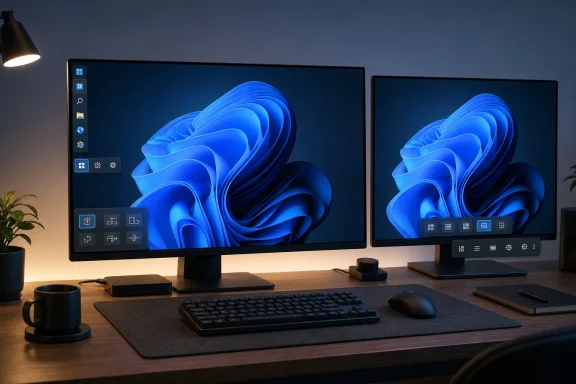
Windows personalization settings open on dual monitors with a taskbar alignment option selected.Microsoft Finally Concedes the Taskbar Was Not Just Decoration​

Windows 11’s centered taskbar was supposed to signal a cleaner, calmer, more approachable desktop. It did that, at least visually. But Microsoft achieved that polish partly by narrowing what the taskbar could do, and the cost showed up immediately among power users, multi-monitor workers, accessibility-minded users, and anyone who had spent years tuning Windows around muscle memory.
The old Windows taskbar was not merely a launcher. It was a spatial anchor, a notification surface, a window-management tool, and for some people a carefully placed strip of screen real estate. On ultrawide displays, vertical taskbars made practical sense. On laptops with limited vertical height, a side taskbar could preserve workspace. On machines used by people with very specific physical habits or ergonomic setups, the ability to move the taskbar was not cosmetic.
Windows 11 treated much of that as negotiable. The new shell shipped without support for top, left, or right taskbar placement, alongside other missing pieces such as richer taskbar context menus, drag-and-drop behavior, and label controls. Some of those features have since returned in stages, but the immovable taskbar became the symbol of the broader grievance: Windows 11 looked like progress while making longtime users feel managed.
That is why this reversal matters. Microsoft is not merely adding a checkbox. It is retreating from one of the defining assumptions of early Windows 11: that the company could simplify the desktop by removing old affordances and expect users to adapt.

The “Clean Slate” Excuse Aged Badly​

Microsoft’s defenders had a reasonable technical argument in 2021. Windows 11’s taskbar was not a lightly reskinned Windows 10 component; it was part of a redesigned shell with new layout assumptions, animation behavior, flyouts, alignment logic, and system tray plumbing. Rebuilding old functionality on top of a new implementation is often harder than users imagine.
But that explanation only carries a company so far. Windows is not a boutique operating system with a narrow hardware target and a single design philosophy. It is the general-purpose desktop platform for offices, developers, home users, gamers, schools, shops, labs, and industrial systems. If a feature had lived in Windows for decades, Microsoft needed a stronger answer than “the new thing was rewritten.”
The deeper problem was priority. Microsoft found engineering time for Copilot buttons, recommended content, Microsoft account nudges, cloud hooks, widgets, Start menu experiments, and a rotating cast of promotional surfaces. Meanwhile, users asking to put the taskbar on the left were told, directly or indirectly, to wait.
That imbalance poisoned the conversation. Even when Microsoft had legitimate technical constraints, its product choices made the company look inattentive to the basics. The more Windows 11 accumulated AI integrations and service-driven surfaces, the more the missing taskbar option looked less like a backlog item and more like a cultural choice.

A Familiar Windows Pattern Returns​

This is not the first time Microsoft has overcorrected on interface design and then spent years restoring what it removed. Windows 8 pushed too hard toward a touch-first future and had to be pulled back toward the desktop. Windows 10 partially repaired that breach by re-centering keyboard-and-mouse workflows while keeping some of the modern app platform intact.
Windows 11’s taskbar story is less dramatic than Windows 8’s Start screen, but it belongs to the same family of mistakes. Microsoft decided that a cleaner conceptual model was preferable to a messy, proven one. Users responded by reminding the company that messiness is often where productivity lives.
The irony is that Windows 11 is, in many respects, a more coherent operating system than Windows 10. It has a more consistent visual language, stronger security assumptions on supported hardware, better window snapping, and years of accumulated servicing improvements. But coherence becomes a liability when it hardens into paternalism. A desktop operating system earns loyalty by letting users shape the workspace, not by asking them to admire it.
The return of movable taskbars suggests Microsoft has rediscovered a lesson it keeps learning the hard way: Windows users do not reject modernization, but they resent modernization that arrives as subtraction.

The Timing Is Not an Accident​

Microsoft’s confirmation comes during a broader public campaign to improve Windows 11 quality, performance, reliability, and what the company now likes to call craft. That word is doing a lot of work. It signals that Microsoft understands the issue is not merely bug counts or benchmark deltas; it is the cumulative feel of using the OS every day.
The company has been talking more openly in 2026 about making Windows 11 more responsive, reducing friction, improving File Explorer, cleaning up rough edges, and making Insider testing easier to understand. The taskbar restoration fits neatly into that message because it is visible, emotionally resonant, and easy for normal users to grasp. You do not need to understand kernel scheduling or memory pressure to understand why a taskbar should move.
There is also a competitive context. Windows 10’s support deadline in October 2025 forced a large population of holdouts to confront Windows 11, and many did so reluctantly. Some stayed on Windows 10 because of hardware requirements. Others stayed because Windows 11 felt like a downgrade in everyday interaction. By 2026, Microsoft needs to make the migration feel less like surrender.
That makes the taskbar a trust repair project. Restoring it will not, by itself, convince a skeptical administrator to approve Windows 11 across an estate. But it gives Microsoft a tangible example to point to when it says it is listening. After years of being accused of pushing unwanted changes while neglecting requested ones, the company needs wins that cannot be dismissed as marketing copy.

Users Were Right to Treat This as a Serious Regression​

It is tempting to mock the taskbar fight as a niche obsession. Most Windows 11 users likely leave the taskbar at the bottom, just as most Windows users always have. But desktop platforms are defined not only by default behavior; they are defined by the escape hatches available when the default does not fit.
A vertical taskbar can be more efficient on wide monitors because horizontal space is abundant while vertical document space is precious. A top taskbar can suit users who keep application controls and browser tabs near the top of the screen. A side taskbar can help users who think spatially, separating launch and switching behavior from the conventional bottom edge.
Those preferences may be minority workflows, but they are not trivial workflows. Windows became dominant in part because it tolerated variation. You could run it on odd hardware, arrange it in unfashionable ways, and bend it around the needs of a job. Removing those degrees of freedom made Windows 11 feel less like Windows.
The lesson for Microsoft should be uncomfortable. A feature can be statistically uncommon and still strategically important. Power users, administrators, developers, and enthusiasts are not always representative of the market, but they are disproportionately influential in shaping Windows’ reputation. When those users feel ignored, the complaint does not stay niche for long.

The Start Menu Is Part of the Same Apology​

The taskbar is the headline, but Microsoft’s latest personalization push also touches the Start menu. The company has been experimenting with ways to make recommendations less intrusive and to give users more control over what appears when they open Start. That matters because the Start menu has become another battleground between user intent and Microsoft’s business goals.
Windows 11’s Start menu has often felt less like a personal launcher and more like negotiated territory. Users want their apps, recent files, pinned tools, and predictable layout. Microsoft wants discovery, cloud integration, Microsoft Store visibility, account engagement, and increasingly AI-adjacent pathways. Those goals are not inherently incompatible, but Windows 11 has frequently made them feel adversarial.
The most important change is not any single toggle. It is the signal that Microsoft recognizes Start and taskbar surfaces as user-owned spaces. That principle was clearer in older versions of Windows because the shell felt utilitarian. In Windows 11, the shell sometimes feels editorialized, as if Microsoft is curating the user’s attention.
If Microsoft is serious about restoring confidence, it has to treat these areas as infrastructure. A taskbar is closer to a steering wheel than a billboard. A Start menu is closer to a tool drawer than a content feed. When those metaphors get confused, users notice.

The Enterprise Angle Is Boring, Which Is Why It Matters​

For enterprise IT, movable taskbars are unlikely to drive upgrade policy on their own. Admins care more about hardware readiness, application compatibility, security baselines, deployment tooling, update reliability, and user disruption. But small interface regressions can become large support burdens when they land across thousands of machines.
A forced workflow change generates tickets. It slows training. It gives resistant departments one more reason to frame an OS migration as a downgrade. It encourages unofficial workarounds, third-party shell tools, registry hacks, and unsupported configurations that complicate management. The taskbar’s location may sound personal, but in business environments personal friction scales.
There is also a governance lesson. Microsoft’s cloud and AI businesses move fast, but Windows still sits under regulated, conservative, and operationally sensitive work. The desktop cannot behave like a web app where controversial changes are shipped, measured, and iterated in public. Enterprises expect stability not only in APIs and servicing channels, but in human workflows.
Restoring taskbar placement gives admins a small but useful pressure valve. Users who need the old behavior can have it without unofficial tools. Help desks can point to a supported setting. Image builders and policy managers may eventually have cleaner ways to standardize or permit the behavior, assuming Microsoft exposes the right controls.

The Third-Party Shell Economy Was a Warning Light​

One of the clearest signs that Microsoft misjudged the Windows 11 taskbar was the popularity of tools built to undo it. Utilities that restore old taskbar behavior, tweak Start, or revive Windows 10-style shell elements have become part of the Windows 11 survival kit for a certain class of user. That ecosystem exists because Microsoft left demand on the table.
There is nothing wrong with customization tools. Windows has always had them, and enthusiasts will always want to push beyond supported defaults. But when third-party tools are widely recommended simply to restore baseline features from the previous version, the platform owner has a problem. The aftermarket is no longer extending the product; it is patching the product’s perceived omissions.
That can create fragility. Shell replacement and modification tools often work by leaning on undocumented behavior, private implementation details, or compatibility layers that may change after updates. Users then blame Microsoft when an update breaks the tool, even if the tool was never supported. The more basic the missing feature, the more unreasonable the whole arrangement feels.
By bringing back movable taskbars natively, Microsoft reduces the need for one category of workaround. It also narrows the gap between Windows as Microsoft imagines it and Windows as users actually configure it. That gap has been one of Windows 11’s defining tensions.

AI Made the Basics More Important, Not Less​

The taskbar reversal lands in an era when Microsoft is trying to make Windows an AI-forward operating system. Copilot, Recall-style ideas, semantic search, cloud-connected assistance, and agentic workflows all depend on a fragile premise: users must trust the operating system enough to let it see more, infer more, and do more.
That trust is not built by keynote demos. It is built when the desktop behaves predictably, updates do not break routines, settings remain where users expect them, and long-requested fixes arrive before flashy experiments. If Microsoft wants users to accept AI at the OS layer, it cannot afford to appear indifferent to ordinary OS complaints.
This is the strategic importance of the taskbar. The feature itself is old-fashioned. It has nothing to do with large language models, neural processing units, or cloud inference. But it is exactly the sort of old-fashioned feature that determines whether users believe Microsoft is stewarding Windows for them or using Windows as a distribution channel for whatever corporate priority comes next.
AI raises the bar for consent. A user annoyed by a fixed taskbar may still tolerate it. A user annoyed by a fixed taskbar, unwanted recommendations, account pressure, and an AI assistant embedded across system surfaces may start to see the whole OS as hostile. Microsoft’s renewed attention to craft is therefore not nostalgic; it is defensive.

The Insider Program Becomes the Proving Ground Again​

For now, the returning taskbar options are part of the preview story, not a guarantee that every stable Windows 11 PC will receive the finished implementation immediately. That distinction matters. Microsoft has become more comfortable using controlled rollouts, feature flags, staged availability, and Insider channels that can make the same build behave differently on two machines.
This approach has benefits. Microsoft can test layout bugs, animation problems, multi-monitor behavior, tablet interactions, scaling issues, and accessibility concerns before shipping broadly. A taskbar that can live on every edge of the screen touches more code than a casual observer might assume. System tray flyouts, notification positioning, Start menu placement, search panels, widgets, Copilot entry points, and app badging all have to make sense in every orientation.
But Microsoft’s rollout complexity has also frustrated enthusiasts. Users read that a feature is “available,” install the latest preview, and then discover that it is not enabled for them. That may be rational experimentation from Redmond’s point of view, but it feels arbitrary from the user’s chair.
If Microsoft wants the taskbar restoration to serve as a trust-building moment, it should communicate plainly. Which channels get it first? Which placements are supported? Does the feature work across multiple monitors? Are there policy controls? Will smaller taskbar sizing ship at the same time? The more transparent Microsoft is, the less the return will feel like another shell-game rollout.

The Design Challenge Is Harder Than Restoring a Checkbox​

The old Windows taskbar could move, but it was not a perfect design artifact. Side taskbars could look cramped. App labels could become awkward. Notification areas were not always elegant. Touch behavior could be inconsistent. Simply recreating Windows 10 behavior inside Windows 11 would satisfy some users, but it would not automatically meet Microsoft’s current design standards.
That is the tricky part. Microsoft has to restore flexibility without making the shell feel like a regression. A left-side taskbar in Windows 11 must work with centered icons, left-aligned icons, labels, grouped and ungrouped windows, system tray overflow, notification badges, search affordances, and a Start menu that was originally designed around bottom placement.
The best version of this feature would remember separate preferences for different taskbar positions. A user might want centered icons on the bottom but a different alignment on the left. Labels might make sense in one orientation and not another. Multi-monitor setups may need per-display behavior, especially for people who use a vertical taskbar on a secondary screen.
That complexity is why the feature took real engineering work. It is also why users were right to keep asking for it. Windows is valuable precisely because it handles messy real-world configurations. A desktop shell that only looks good in the default layout is not a full Windows shell.

This Reversal Does Not Erase Windows 11’s Larger Debt​

Microsoft should get credit for changing course, but the company does not get to declare victory because one famous missing feature is coming back. Windows 11 still carries a backlog of user frustration. Some of it involves performance consistency. Some involves File Explorer lag and shell reliability. Some involves advertising-like surfaces, account pressure, and the feeling that user preferences are constantly being negotiated.
The taskbar is a useful test case because it is concrete. Microsoft removed something people used. People complained for years. Microsoft is bringing it back. That is a clean story. The messier question is whether the same listening posture will apply when the complaints are less visually obvious or less easy to demo.
A serious Windows quality push has to show up in boring places. It has to show up in fewer update regressions, faster context menus, reliable sleep and resume, quieter notifications, better default app respect, cleaner Settings migration from Control Panel, and fewer moments where the OS tries to redirect the user toward a Microsoft service. The taskbar can symbolize that work, but it cannot substitute for it.
The danger for Microsoft is that this becomes another cycle of removal, outrage, partial restoration, and celebration. Users should not have to spend five years lobbying for parity with the previous version. If Windows 11 is maturing, maturity should mean fewer self-inflicted wounds.

The Real Win Is Letting Windows Be Personal Again​

The most encouraging part of Microsoft’s move is not nostalgia for Windows 10. It is the possibility that Windows 11 is becoming more comfortable with user choice. The early Windows 11 design language often suggested that personalization was acceptable within narrow boundaries. The newer posture suggests Microsoft may finally understand that personalization is not a threat to coherence; it is part of the product’s value.
That distinction matters for the next phase of Windows. As Microsoft adds AI features, cloud intelligence, and new interaction models, it will be tempted to centralize and standardize the experience. Some of that will be necessary. But the desktop’s strength is that it can absorb new paradigms without forcing every user into the same one.
A movable taskbar is a small expression of that philosophy. It says the user’s workspace is not sacred because it is old, but because it is theirs. It says Microsoft can modernize Windows without treating every legacy behavior as clutter. It says the company may be learning to separate simplification from control.
Whether that lesson sticks will depend on what comes next. Restoring the taskbar is a meaningful concession, but it is also the minimum credible response after years of complaints. The real test is whether Microsoft stops creating these fights in the first place.

The Taskbar U-Turn Gives Microsoft One Clear Assignment​

Microsoft’s decision is best understood as a reset, not a revolution. The company has reopened a door it should never have locked, and now it has to prove that the restored choice is polished, manageable, and durable. The most concrete implications are already visible.
  • Windows 11 users are set to regain the ability to place the taskbar at the top, left, or right side of the screen instead of being locked to the bottom edge.
  • The change reverses one of the most criticized Windows 11 omissions from the operating system’s 2021 launch.
  • The feature is part of Microsoft’s broader 2026 effort to improve Windows quality, performance, reliability, and user trust.
  • The return of taskbar customization should reduce reliance on unsupported third-party shell modification tools for basic desktop behavior.
  • Microsoft still needs to clarify broad rollout timing, management controls, multi-monitor behavior, and how smaller taskbar sizing will be delivered.
  • The larger lesson is that Windows modernization works best when it expands user choice rather than replacing mature workflows with narrower defaults.
Microsoft’s backtrack is welcome because it restores a practical feature, but its real importance is diagnostic: the company has recognized, belatedly, that Windows users judge progress by whether the system helps them work the way they choose. If that thinking guides the next wave of Windows 11 updates, the movable taskbar may be remembered not as a grudging concession, but as the moment Microsoft started rebuilding the desktop from the user outward again.

References​

  1. Primary source: Demócrata
    Published: Tue, 19 May 2026 07:15:00 GMT
  2. Related coverage: windowscentral.com
  3. Related coverage: windowslatest.com
  4. Related coverage: mixvale.com.br
  5. Related coverage: techradar.com
  6. Related coverage: xda-developers.com
 

Microsoft began testing movable Windows 11 taskbar positions on May 15, 2026, in Insider Experimental Preview Build 26300.8493, letting testers place the taskbar on the bottom, top, left, or right edge of the screen through Settings. It is a small setting with a large symbolic load: Windows 11 is finally restoring one of the desktop freedoms it took away at launch. The feature is not yet a general release, and it does not perfectly recreate the old Windows 10 taskbar. But its return marks a quiet retreat from one of Windows 11’s most unpopular design bets.

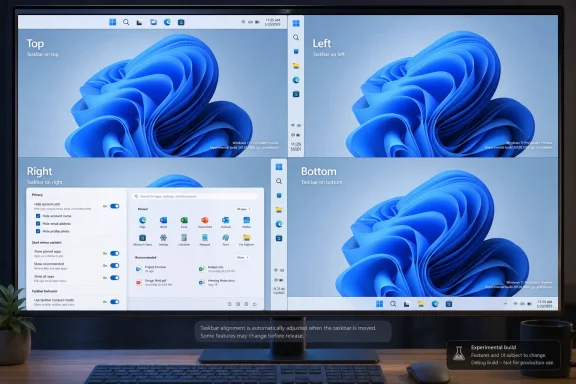
Windows settings screen showing taskbar alignment options: Top, Left, Right, Bottom on a blue desktop.Microsoft Finally Admits the Bottom Edge Was Not Enough​

When Windows 11 launched in October 2021, Microsoft sold the redesigned taskbar as part of a cleaner, calmer, more centered desktop. The Start button moved toward the middle. The taskbar was visually simplified. The shell looked more modern, more tablet-aware, and more aligned with the design language Microsoft wanted to project after years of Windows 10 sprawl.
The cost was control. Windows users who had spent years docking the taskbar to the top, left, or right side of the display suddenly found that the option was gone. Registry tweaks and third-party utilities could sometimes fake parts of the old behavior, but the official Windows 11 taskbar was pinned to the bottom.
That decision was always bigger than taskbar placement. It became an emblem of a broader Windows 11 complaint: Microsoft had rebuilt familiar parts of Windows with less functionality than the versions they replaced, then asked users to accept the loss as modernization. The movable taskbar was not some obscure enterprise checkbox. It was a decades-old behavior, used by people with ultrawide monitors, vertical displays, compact laptops, multi-monitor workstations, accessibility needs, and simple muscle memory.
Now Microsoft is reversing course. In the new Insider work, taskbar position is exposed under Settings > Personalization > Taskbar > Taskbar behaviors, with choices for bottom, top, left, and right. That is the headline. The real story is that Microsoft has decided the future of Windows 11 cannot be built only by pushing forward; it also has to repair the regressions users never stopped noticing.

The Taskbar Became a Proxy War Over Windows 11 Itself​

The Windows taskbar has always carried more emotional weight than its thin strip of pixels suggests. It is the thing users touch dozens or hundreds of times a day. It is where running apps, pinned apps, search, notifications, clocks, system trays, and muscle memory converge. When Microsoft changes it, users feel the change before they can articulate it.
Windows 11’s taskbar redesign removed or delayed several capabilities that had existed in Windows 10. Drag-and-drop support was missing at launch. Ungrouped taskbar buttons and labels took time to return. The system tray went through its own rounds of simplification and restoration. Each removed feature may have looked defensible in isolation, but together they fed the perception that Windows 11 was not simply redesigned — it was reduced.
That perception mattered because Windows is not a phone OS where users expect Apple-like design mandates or Android-style launcher churn. Windows is the general-purpose desktop platform for people who build their own workflows. A sysadmin with three monitors, a developer with a vertical display, a trader with a dense wall of windows, and a home user who just likes the taskbar at the top are not edge cases in the Windows ecosystem. They are the point of the Windows ecosystem.
Microsoft’s original justification for limiting taskbar positions was technical as much as aesthetic. Rebuilding shell components meant old assumptions had to be reconsidered, and supporting every orientation affects flyouts, animations, touch targets, notification placement, app previews, system tray behavior, and multi-monitor handling. That is real engineering work. But users were never wrong to notice that “hard” had somehow become “not available” for a feature Windows had supported for years.

The New Taskbar Is a Restoration, Not a Time Machine​

The returning movable taskbar should not be mistaken for a full rollback to Windows 10. The current implementation is being tested in Insider builds, and early reporting indicates that it behaves like a Windows 11 feature rather than a resurrected classic shell. That distinction matters.
Microsoft is not bringing back the old taskbar code wholesale. It is adapting the Windows 11 taskbar to support multiple positions. That means the feature must fit the newer Start menu, newer system tray, newer flyout behavior, Widgets, Copilot-related entry points, search variants, and whatever other shell work Microsoft is preparing for Windows 11’s next major wave.
The implementation also includes alignment controls that vary by orientation. When the taskbar is on the left or right side, icons can be top-aligned or centered. When it is at the top or bottom, icons can be left-aligned or centered. That is a more deliberate design than the old “drag it wherever and let the shell cope” model, and it shows Microsoft trying to preserve Windows 11’s visual rules while restoring user choice.
This is why the feature will probably satisfy some users and irritate others. People who simply wanted a vertical taskbar on the left edge may get what they wanted. People who wanted every Windows 10 behavior back — including exact sizing, spacing, drag mechanics, per-monitor quirks, and old-school taskbar density — may find the new version cleaner but less flexible. Microsoft is giving ground, but it is not surrendering the Windows 11 design system.

Experimental Builds Are a Signal, Not a Shipping Date​

The feature’s current home in the Windows Insider Experimental channel is important. It means Microsoft is publicly testing the work, not necessarily promising that every detail will ship unchanged to stable Windows 11 users next month. Experimental builds are where Microsoft can expose a direction, collect telemetry, absorb complaints, and still back away from edge cases that break too much.
That caveat should temper the “finally” headlines. Yes, the movable taskbar is back in testing. No, it is not yet something most production machines should expect to see in Windows Update tomorrow. For IT departments, the distinction is not pedantic. Preview shell changes can create support churn, documentation drift, and training mismatches if users read a headline and assume the feature exists on their managed laptop.
Still, Insider placement is not meaningless. Microsoft does not write official blog posts and expose Settings UI for every abandoned experiment. The company has now acknowledged that taskbar mobility is a priority, described it as one of the most requested features, and placed it inside the broader effort to make Taskbar and Start more personal. That language suggests a roadmap, not a weekend hack.
The more interesting timing question is whether this lands as part of Windows 11’s next major feature wave or arrives through a more incremental controlled rollout. Microsoft’s modern Windows delivery model makes that line blurry. Features can be present in a build, hidden behind configuration, rolled out gradually, or shipped to some regions and device classes before others. For administrators, the practical advice is simple: treat this as incoming, but not yet guaranteed in the exact form testers see today.

Start Menu Repairs Show Microsoft Is Fixing a Pattern​

The movable taskbar is arriving alongside another long-running Windows 11 sore point: the Start menu. Microsoft has also been testing Start improvements that give users more control over layout, recommendations, and app visibility. That pairing is not accidental.
Windows 11’s Start menu was designed to be simpler than Windows 10’s tile-heavy predecessor. Live Tiles disappeared. The layout became cleaner. The center of the screen became the new default stage for launching apps and searching. But the simplification came with its own frustrations, especially around the Recommended area, limited customization, and the sense that Microsoft had reserved too much Start menu real estate for things users did not explicitly ask to see.
The new Start work appears to recognize that simplicity is not the same as inflexibility. Letting users resize or tune Start, hide or control sections, and separate recommendation behavior from broader recent-file activity all point in the same direction as the movable taskbar. Microsoft is learning, slowly, that modern Windows cannot be a museum of defaults. It has to be adjustable without making users feel like they are fighting the product.
This matters because Windows 11’s most persistent criticism has not been that it looks bad. It is that it too often behaves like Microsoft knows the one correct way to use a PC. The taskbar and Start menu are where that philosophy becomes personal. By restoring choice in both places, Microsoft is not merely polishing the shell; it is trying to rebuild trust with users who saw Windows 11 as a downgrade in daily ergonomics.

The AI Era Makes Old Desktop Controls More Valuable, Not Less​

The return of taskbar mobility is happening while Microsoft is pushing Copilot deeper into Windows. That juxtaposition is hard to miss. On one track, Microsoft is talking about AI agents, taskbar-integrated assistants, and search experiences that blur the line between local files and cloud intelligence. On the other, it is restoring the ability to put a strip of icons on the left side of the screen.
The second track may be more important than it looks. AI features ask users to trust the operating system with more context, more interpretation, and more interruption. If the same operating system cannot be trusted to preserve basic desktop preferences, the pitch becomes harder. A user who feels ignored over taskbar placement is less likely to welcome an assistant embedded into the places they already use every day.
This is the tension Microsoft has to manage in 2026. The company wants Windows to become an AI-forward platform, especially on new hardware with NPUs and Copilot branding. But the Windows audience is not a blank-slate consumer base waiting for a new interaction model. It is a massive installed base with habits, scripts, pinned workflows, assistive setups, corporate images, and years of accumulated expectations.
Restoring the movable taskbar is therefore not nostalgia. It is table stakes. If Microsoft wants to make the Windows shell more intelligent, it first has to prove that intelligence does not mean taking away agency. The desktop can evolve, but users need to believe that evolution will add options rather than collapse them.

Enterprise IT Will Care Less About Emotion and More About Predictability​

For enterprise administrators, the movable taskbar is unlikely to be a crisis by itself. Most organizations standardize layouts loosely, if at all, and many users never change taskbar position. The bigger issue is predictability: when Microsoft changes shell behavior, help desks inherit the consequences.
A movable taskbar can create small but real support wrinkles. Screenshots in documentation may no longer match user desktops. Training material that assumes a bottom taskbar may need caveats. Remote support staff may have to orient themselves when the Start button lives on a vertical edge. Kiosk and shared-device configurations may need testing if the setting becomes available under standard user accounts.
Those are manageable problems, and they are far less severe than the productivity hit felt by users who lost the feature in the first place. But they illustrate why Microsoft’s rollout path matters. If taskbar positioning arrives with clear policy controls, stable defaults, and consistent behavior across display configurations, administrators will shrug. If it arrives as another staggered Windows feature with partial availability and undocumented quirks, they will add it to the growing list of shell changes that make Windows harder to govern.
The best enterprise outcome is not that every user gets a vertical taskbar. It is that Microsoft treats this as a configurable desktop capability with sane defaults, documented behavior, and minimal surprise. That is the difference between customization and chaos.

Developers and Power Users Were Right to Be Annoyed​

The most passionate complaints about Windows 11’s fixed taskbar often came from users who knew exactly why they wanted it elsewhere. Developers with ultrawide monitors may prefer a vertical taskbar because horizontal space is abundant while vertical space is precious. Users with top-mounted workflows may want window controls, browser tabs, and taskbar items near the same area of the display. Multi-monitor users may build habits around specific edges that reduce pointer travel.
These are not decorative preferences. They are workflow decisions. A left-side taskbar on a widescreen monitor can expose more running apps without eating vertical document space. A top taskbar can align with decades of personal habit or with layouts borrowed from other desktop environments. A right-side taskbar can keep controls away from left-docked tool panels in creative or development software.
Microsoft’s mistake was not merely removing a feature. It was underestimating how many Windows users treat the desktop as a workbench. You do not improve a workbench by welding every drawer shut because most people use the middle one.
The restoration validates the complaint even if Microsoft never says so bluntly. Users asked for the movable taskbar for years because the absence made Windows 11 worse for them. Microsoft listened late, but it listened.

The 98 Percent Argument Was Always Too Small​

One common defense of Microsoft’s original decision was usage share. If the overwhelming majority of Windows users kept the taskbar at the bottom, why spend engineering time supporting the small minority who moved it? In a telemetry-driven company, that argument has obvious appeal.
It is also incomplete. A feature used by a minority can still be central to a platform’s identity. Windows has long won loyalty not because every user changes every setting, but because users believe they could change the setting that matters to them. The long tail of customization is part of the product’s social contract.
The bottom-taskbar majority also masks the intensity of minority use. A person who never moves the taskbar does not care if the option exists. A person who relies on a vertical taskbar may care every single day. Removing an unused option for one group can be invisible; removing a core workflow for another can be alienating.
That asymmetry is where Windows 11 repeatedly stumbled. Microsoft optimized for cleaner defaults but sometimes treated low-percentage behaviors as disposable. The movable taskbar’s return suggests a more mature view: defaults can be opinionated, but the platform should not confuse default behavior with the only legitimate behavior.

The New Settings UI Matters More Than Dragging​

Some users will focus on whether Windows 11 allows the old drag-to-reposition behavior. That was part of the classic feel: unlock the taskbar, drag it to another edge, and keep working. It was direct, discoverable for some, and dangerously easy to trigger by accident for others.
The new approach, at least in testing, emphasizes Settings rather than freeform dragging. That may disappoint purists, but it is probably the right compromise for modern Windows. A Settings-based control is clearer for documentation, easier to manage, less likely to be triggered accidentally, and more compatible with the way Windows 11 centralizes personalization.
It also reflects how Microsoft now thinks about shell configuration. The taskbar is no longer just a strip that can be dragged around like a window. It is a managed surface with widgets, search, Copilot entry points, system tray components, overflow logic, and adaptive behavior. Moving it is not a gesture; it is a mode.
That framing may irritate longtime Windows users who prefer direct manipulation. But if the Settings model makes Microsoft more willing to support all four edges reliably, it is a trade worth considering. The priority is not recreating every affordance from 2009. The priority is restoring durable control in a shell that can survive the next decade of Windows features.

The Smaller Taskbar Is the Other Half of the Apology​

Alongside taskbar movement, Microsoft is also testing a smaller taskbar mode. That may sound secondary, but it speaks to the same underlying grievance. Windows 11’s taskbar often feels large, especially on compact laptops where every vertical pixel counts.
A smaller taskbar gives users back space. It also signals that Microsoft understands not every PC is a touch-first convertible or a spacious desktop monitor. The Windows hardware ecosystem includes cheap education laptops, dense enterprise notebooks, handheld experiments, remote desktops, and high-DPI displays where default sizing can feel wasteful.
The size issue is especially relevant because Windows 11’s centered, padded design language has always walked a fine line between elegance and bloat. Rounded corners, larger hit targets, and breathing room can make the OS feel modern. They can also make it feel like the interface is spending pixels it did not earn.
By pairing movement with size control, Microsoft is addressing both orientation and density. That is a better answer than simply letting users move the same oversized bar to a different edge. It suggests the company is thinking about taskbar ergonomics as a whole rather than checking off a single complaint.

Search, Copilot, and the Taskbar Are Now One Battlefield​

The taskbar’s future is not just about where it sits. It is about what Microsoft wants to put inside it. Search has already evolved from a local utility into a web-connected, recommendation-heavy surface. Copilot is being positioned as an optional but increasingly visible layer. The Start menu, search box, and taskbar are converging into a single contested zone.
That makes customization more politically important. If Microsoft wants to experiment with AI search boxes, dynamic prompts, or assistant entry points, users will demand the ability to say no, move things, shrink things, and reclaim space. The more ambitious the taskbar becomes, the more important it is that users can shape it.
This is where Microsoft’s incentives can collide. The company benefits when high-value services are visible. Users benefit when the desktop is quiet, predictable, and arranged around their work rather than Microsoft’s engagement goals. Windows 11’s shell controversies often emerge when those incentives are out of balance.
A movable taskbar does not solve that conflict. But it gives Microsoft a better foundation. Users are more tolerant of new ideas when old controls are respected. A taskbar that can move, shrink, and align according to user preference is a more credible home for future features than one that feels locked down for Microsoft’s convenience.

Windows 11 Is Learning the Difference Between Modern and Rigid​

The broader lesson is that Microsoft’s early Windows 11 design philosophy was too willing to equate modernity with constraint. A cleaner interface is not inherently better if it removes the affordances that made Windows useful to its most committed users. A simplified default is not a problem; a simplified ceiling is.
The company has spent the years since launch slowly patching that gap. Features have returned. Menus have gained options. Taskbar behaviors have been restored or reworked. The arc is unmistakable: Windows 11 is becoming more like the operating system many users expected it to be in 2021.
That does not mean every complaint has been answered. The shell still has inconsistencies. Settings and Control Panel remain a long-running split-brain story. Microsoft’s account prompts, ads, recommendations, and AI placements continue to test user patience. But the taskbar reversal is a useful case study in how the company can recover: acknowledge the missing capability, rebuild it in the new framework, and expose it as a normal setting rather than a hidden hack.
There is a humility in that, even if it took too long. Windows does not need to pretend that every old feature was sacred. It does need to understand which old features represented user trust.

The Return of the Side Taskbar Rewrites the Upgrade Argument​

For Windows 10 holdouts, the fixed Windows 11 taskbar was one item in a larger list of objections. Hardware requirements, UI changes, Start menu behavior, context menu redesigns, and Microsoft account pressure all contributed to resistance. But the taskbar was unusually visible because it affected the first minute of every session.
Restoring taskbar movement will not magically convert every Windows 10 loyalist. Some machines cannot officially upgrade. Some users prefer Windows 10’s Start menu and density. Others simply distrust Windows 11 after years of friction. Still, removing one of the most repeated objections matters, especially as Windows 10’s consumer support era has ended and organizations continue plotting migration timelines.
For Microsoft, this is not merely about pleasing enthusiasts. Every restored feature weakens the argument that Windows 11 is a prettier but less capable Windows 10. Every practical improvement gives IT departments and power users one fewer reason to delay. The upgrade case becomes stronger when it is based not on nagging or support deadlines, but on the product becoming less annoying.
That is why the movable taskbar matters even to people who will never move it. It is evidence that Windows 11 is still negotiable. The operating system launched with some bad calls, and Microsoft is willing to unwind at least a few of them.

The Real Test Comes After the Headline​

The next phase will be less glamorous than the announcement. Microsoft has to make the feature robust. Vertical taskbars need clean app previews, sensible tray behavior, correct notification placement, reliable auto-hide if supported, and sane behavior across multiple monitors. Touch and pen interactions need to make sense. Accessibility tools need to expose the right structure. Enterprise controls need to be clear.
Small visual bugs will matter because they will be read through years of frustration. If the left-side taskbar clips icons, if flyouts appear awkwardly, if search degrades outside the bottom position, or if Copilot entry points behave inconsistently, users will not treat those as normal preview rough edges. They will see them as proof that Microsoft still does not really value the feature.
That is the burden Microsoft created by waiting so long. A feature restored after years of requests does not get judged like a novelty. It gets judged like a debt repayment. Users expect interest.
The company can meet that bar by resisting the urge to ship too early. The right movable taskbar is not just one that appears in Settings. It is one that disappears into daily use, the way the old feature did. The highest compliment users can pay it is to stop talking about it.

The Fix Users Asked For Is Also a Warning Microsoft Should Heed​

The concrete story is simple, but the implications are wider.
  • Windows 11’s movable taskbar is now in Insider testing, not yet a guaranteed stable-channel feature for every PC.
  • The new implementation supports bottom, top, left, and right taskbar positions through the Windows 11 Settings app.
  • Microsoft is pairing taskbar movement with related personalization work, including alignment choices and a smaller taskbar mode.
  • The feature is being rebuilt for the Windows 11 shell rather than restored as a perfect copy of the Windows 10 taskbar.
  • The change matters because it reverses one of Windows 11’s clearest regressions and signals a broader shift toward repairing user trust.
  • Administrators should watch rollout timing, policy controls, and multi-monitor behavior before treating it as production-ready.
The movable taskbar’s return is a win for users, but it is also a warning label for Microsoft’s next wave of Windows design. The company can add Copilot, rebuild search, modernize Start, and rethink the shell, but it cannot treat user control as legacy clutter. Windows remains strongest when it gives people a good default and then gets out of their way. If this taskbar change is the beginning of that lesson rather than the end of a single complaint, Windows 11 may yet become the upgrade Microsoft promised instead of the compromise users feared.

References​

  1. Primary source: thewincentral.com
    Published: 2026-06-02T08:19:17.504834
  2. Related coverage: windowscentral.com
  3. Related coverage: windowslatest.com
  4. Official source: blogs.windows.com
  5. Related coverage: notebookcheck.net
  6. Related coverage: arstechnica.com
  1. Related coverage: thefpsreview.com
  2. Related coverage: pcworld.com
  3. Related coverage: pureinfotech.com
  4. Related coverage: techradar.com
  5. Related coverage: pcgamer.com
 

Microsoft began testing a substantially more customizable Windows 11 taskbar in Experimental Preview Build 26300.8493 on May 15, 2026, giving Windows Insiders options to move it to the top, left, or right edge of the screen and to make it genuinely smaller. This is not a cosmetic tweak hiding in the margins of Settings. It is Microsoft walking back one of Windows 11’s most stubborn design bets. After five years of telling users that the new taskbar was the future, the company is finally admitting that the future needed more of the past.

Dual computer monitors on a desk display the Windows 11 blue swirled desktop in a dim workspace.Microsoft’s Clean-Slate Taskbar Has Reached Its Apology Phase​

Windows 11 arrived with a taskbar that looked cleaner, behaved more predictably for casual users, and felt dramatically less capable to anyone who had spent years shaping Windows around a personal workflow. The centered icons became the visual shorthand for the new OS, but the deeper story was what disappeared: movable edges, smaller taskbar height, richer context menus, and a long tail of power-user affordances that had made Windows feel unusually pliable.
Microsoft’s defense was never entirely frivolous. The Windows 11 taskbar was not simply the Windows 10 taskbar wearing a new coat of paint; it was a substantial rewrite designed to support a modernized shell. Rewrites are where old features go to die temporarily, and sometimes permanently, because the engineering team has to decide which legacy behaviors are worth rebuilding rather than merely preserving.
The problem is that the taskbar is not just another surface. It is the operating system’s dashboard, launcher, window switcher, notification edge, and muscle-memory anchor. When Microsoft simplified it, the company did not merely remove clutter; it removed a set of small but cumulative declarations of ownership.
That is why the new Insider work matters. A movable and genuinely smaller taskbar does not transform Windows 11 into Windows 10. But it does suggest Microsoft has finally accepted that personalization is not a decorative layer on Windows; it is part of the product’s legitimacy.

The Missing Edges Became a Symbol Bigger Than Their User Base​

For years, Microsoft could point to telemetry and argue that relatively few people moved the taskbar away from the bottom of the screen. That may have been true, and it may still be true. But the complaint endured because Windows’ reputation was built on the idea that edge cases were not automatically second-class citizens.
A left-side or right-side taskbar is not just nostalgia. On modern widescreen displays, vertical space is more precious than horizontal space, especially on laptops and ultrawide monitors. Developers, spreadsheet users, writers, and anyone juggling dense window stacks can make a rational case that a side-mounted taskbar is more efficient than a bottom strip consuming scarce height.
The new implementation appears to understand that this is not merely about moving a rectangle. Taskbar-adjacent UI has to follow the taskbar: Start, Widgets, Search, jump lists, overflow behavior, animations, and alignment all have to feel native rather than bolted on. That is the difference between “we exposed a setting” and “we rebuilt the shell so the setting belongs.”
Still, this is not a perfect resurrection of the Windows 10 model. Reports from hands-on testing indicate that the new taskbar remembers different alignment and grouping behavior depending on position, but it does not restore every old resizing behavior or every historical degree of freedom. Microsoft is not undoing Windows 11; it is selectively rebuilding the parts whose absence became too expensive to justify.

The Smaller Taskbar Is the More Important Concession​

The ability to move the taskbar will draw the screenshots, but the smaller taskbar may matter more day to day. Windows 11’s default taskbar has always felt slightly too tall, especially on smaller laptop panels where every pixel surrendered to chrome is a pixel not available to apps. Earlier “small icon” behavior was frustrating because it shrank the icons without meaningfully shrinking the bar itself.
That distinction sounds petty until you live with it. A compact taskbar is not only about aesthetics; it changes how much document, terminal, browser, or editor space remains visible. For users who refused to auto-hide the taskbar because hiding the system’s primary navigation surface feels disruptive, a true compact mode is the cleaner compromise.
Microsoft’s current Experimental build finally connects the obvious dots: smaller taskbar buttons should produce a shorter taskbar. That is the sort of change that sounds embarrassingly basic when written down, yet it required Microsoft to revisit assumptions embedded in the Windows 11 shell.
This is where the company’s “pain points” language becomes useful. Microsoft is not inventing a new interaction model here. It is sanding down the places where the Windows 11 model kept reminding users that something useful had been taken away.

The Context Menu Fight Was the Warning Shot​

The taskbar controversy did not begin and end with screen edges. One of the earliest and loudest complaints was the missing Task Manager shortcut in the taskbar context menu. For ordinary users, that omission was invisible. For troubleshooters, admins, and enthusiasts, it was a flashing sign that Microsoft had misunderstood the taskbar’s job.
Task Manager came back. Drag-and-drop to taskbar icons came back. Ungrouping and labels came back in modernized form. Battery percentage, notification tweaks, and an optional End Task shortcut followed. Taken together, these reversals form a pattern: Windows 11’s original shell design over-indexed on simplicity, and Microsoft has spent much of the product’s life quietly returning the controls it removed.
The irony is that Microsoft’s best changes to Windows 11 lately are often not futuristic. They are restorative. They bring back expectations formed over decades, then present them through the newer design language rather than the older code path.
That is not a criticism by itself. Operating systems mature through this sort of reconciliation. The first release of a redesigned shell is a manifesto; the later releases are where real users negotiate with it.

Copilot Made the Taskbar Feel Like Rented Land​

The taskbar’s credibility problem worsened when Microsoft started using it as a staging ground for its AI ambitions. Copilot appeared, moved, changed identity on some systems, and became entangled with broader Microsoft 365 branding in ways that felt less like user-centered design and more like corporate priority injection.
This matters because the taskbar is uniquely sensitive real estate. A new icon in the taskbar is not the same as a new app in the Start menu. It sits at the edge of every session, claiming permanence before the user has necessarily granted trust.
For many Windows users, the Copilot shuffle reinforced the suspicion that Microsoft was more interested in steering behavior than respecting workflows. That suspicion made every missing customization option sting more. If the user cannot move or shrink the taskbar, but Microsoft can keep changing what it promotes there, the relationship feels lopsided.
The new taskbar work does not solve Microsoft’s AI trust problem. But it changes the tone. A Windows team that restores control over core shell surfaces is in a stronger position to ask users to tolerate new experiments elsewhere.

The Experimental Channel Is Doing Real Product Work Now​

The timing is important. These changes are landing in the newly reshaped Windows Insider Program’s Experimental channel, which is explicitly the place where Microsoft can test features that may still evolve before broad release. That gives the company room to adjust behavior before it hits mainstream Windows 11 builds.
It also signals that the Insider Program is becoming a more visible part of Microsoft’s quality reset. For years, Windows testing has sometimes felt split between public preview theater and opaque staged rollouts. The taskbar changes are the kind of tangible, user-facing work that can make preview channels feel relevant again.
There is still risk in celebrating too early. Experimental does not mean guaranteed, and Microsoft can change details before general availability. Features can ship slowly, roll out unevenly, or arrive tied to version gates that frustrate users who read about them months earlier.
But the direction is difficult to miss. Microsoft is not merely polishing a Settings page. It is using Insider builds to test whether Windows 11 can become more accommodating without losing the coherence the original redesign was meant to deliver.

Start and Taskbar Are Being Repaired as a Pair​

The taskbar work is arriving alongside broader Start menu changes, and that pairing is not accidental. Start and taskbar form the center of Windows’ daily navigation model. If one feels constrained and the other feels cluttered, the whole desktop experience feels less personal.
Microsoft has promised more consistent Search across Taskbar, Start, File Explorer, and Settings. That is a quieter but potentially significant ambition. Windows Search has long suffered from split personalities: local launcher, file finder, settings index, web search box, and Microsoft services funnel all competing for attention.
If Microsoft can make Search feel less arbitrary while making Start and taskbar more customizable, Windows 11 could become less irritating in the exact places users touch most often. That is more meaningful than another round of acrylic blur or icon refreshes. Desktop satisfaction is built from repetition, not spectacle.
The taskbar also has to coexist with future agent-based experiences. Microsoft clearly wants Windows to become more proactive and assistant-driven. But an agentic OS will be judged harshly if its basic shell still feels less flexible than the version users left behind.

Enterprise IT Will Care Less About Nostalgia Than Predictability​

For administrators, the return of movable and smaller taskbar options is not primarily a sentimental victory. It is another variable to manage. Any new personalization surface raises questions about policy, provisioning, support documentation, help desk scripts, and user training.
That does not make the feature bad for enterprises. In many organizations, allowing users to reclaim space on small screens or align the taskbar with specialized workflows could reduce friction. The important question is whether Microsoft exposes the behavior cleanly through policy and whether the settings survive upgrades, profile migrations, and multi-monitor changes reliably.
The side-mounted taskbar is especially interesting in multi-display environments. Windows 11 has improved its handling of multiple monitors over time, but taskbar behavior across displays remains one of those areas where small inconsistencies become daily annoyances. A feature that works beautifully on a single laptop panel still needs to behave sensibly on docking stations, hot desks, conference-room displays, and remote sessions.
This is where the “closer to completion” impression should be treated cautiously. A hands-on preview can show that the animations work and the Settings UI is coherent. Enterprise readiness requires boring dependability across configurations Microsoft’s own designers may not use every day.

The Old Windows Contract Is Reasserting Itself​

The larger story is not that Microsoft blinked on one feature. It is that Windows 11 is slowly rediscovering the contract that made Windows durable: Microsoft can modernize the interface, but users expect to retain meaningful control over the environment where they work.
That contract has always been messy. It produces option sprawl, inconsistent legacy behaviors, and settings pages that can feel like archaeological digs. But it also lets Windows serve gamers, accountants, developers, students, factory-floor operators, accessibility users, and sysadmins without pretending they all want the same desktop.
Windows 11’s original taskbar bet leaned too far toward one idealized user: someone who wanted a clean, centered, simplified, almost appliance-like shell. That user exists. But Windows cannot afford to design only for that user, because Windows’ market power comes from being the platform for everyone else too.
The new taskbar is therefore less a retreat than a correction. Microsoft is trying to keep the modern shell while restoring the old assumption that users get a say. If it succeeds, Windows 11 becomes more itself, not less.

The Taskbar Fixes That Actually Change Daily Windows Life​

The practical lesson from this preview is that Microsoft’s most valuable Windows work in 2026 may be deeply unglamorous. These changes do not need a keynote demo to matter. They need to survive daily use without getting in the way.
  • Windows 11 Insiders in the Experimental channel can now test taskbar placement on the bottom, top, left, or right edge of the screen.
  • The small taskbar option now reduces both icon size and taskbar height, making it useful for reclaiming screen space.
  • Taskbar-adjacent interfaces such as Start and Widgets are being adapted to open from the taskbar’s chosen position rather than assuming a bottom edge.
  • The restored flexibility does not appear to be a full Windows 10 rollback, because Microsoft is rebuilding selected behaviors within the Windows 11 shell model.
  • The changes fit a broader Microsoft push to address Windows 11 quality and usability complaints rather than merely adding new AI surfaces.
  • Administrators should treat the feature as promising but unfinished until policy behavior, multi-monitor reliability, and rollout timing become clearer.
The new taskbar is not revolutionary, and that is precisely why it matters. Microsoft spent the early Windows 11 era trying to prove that a cleaner shell could replace years of accumulated flexibility; now it is learning that the best version of Windows is not the cleanest one, but the one that lets users stop thinking about the shell and get back to the work they were trying to do.

References​

  1. Primary source: thurrott.com
    Published: 2026-06-02T16:20:06.718692
  2. Related coverage: windowscentral.com
  3. Related coverage: windowslatest.com
  4. Official source: learn.microsoft.com
  5. Official source: blogs.windows.com
  6. Related coverage: bleepingcomputer.com
 

Microsoft is testing Windows 11 taskbar placement on the top, left, right, and bottom of the screen in its Experimental channel, alongside new Start menu controls that let users hide sections, resize the menu, and reduce visible account information. That is a small sentence for a large admission. After nearly five years of Windows 11, Microsoft appears to be conceding that the operating system’s clean-lined interface too often confused simplicity with inflexibility. The result is not merely a prettier desktop; it is a partial retreat from one of Windows 11’s most controversial design bets.

Windows 11 taskbar alignment preview showing Top, Left, Right, and Bottom layouts on a monitor.Microsoft Finally Stops Treating the Bottom Edge as Sacred​

The movable taskbar should not feel revolutionary. Windows users spent decades dragging the taskbar to the top, sides, or bottom of the screen, depending on habit, monitor shape, accessibility needs, or simple preference. Windows 11 broke that expectation when it launched with a rebuilt taskbar that was visually tidier but functionally narrower.
That tradeoff became one of the earliest and most durable complaints about the operating system. Microsoft’s centered icons, simplified context menus, and stripped-down taskbar were meant to make Windows feel modern and approachable. But for many users, especially those coming from Windows 10, the redesign felt less like refinement and more like a landlord changing the locks.
The Experimental channel change reopens a door Microsoft had deliberately closed. The taskbar can now live on any side of the display, and Windows adjusts alignment behavior depending on where the bar sits. That matters because a vertical taskbar is not just an aesthetic preference. On modern widescreen monitors, side placement often makes more sense than consuming vertical pixels at the bottom.
The more revealing part is that Microsoft is not simply restoring a legacy switch. It is rebuilding surrounding behaviors as well: icon alignment, labels, smaller taskbar modes, and window identification all have to work in layouts that Windows 11’s original shell was not designed to prioritize. This is why the feature took years to return, but it is also why its return carries symbolic weight.
Windows 11 was designed around a fixed idea of how the desktop should look. This update suggests Microsoft is becoming more willing to let users decide how the desktop should work.

The Start Menu Becomes Less of a Microsoft Editorial Page​

The Start menu changes are just as important, even if they are less visually dramatic. Microsoft is adding controls to show or hide the Pinned, Recommended, and All Apps sections, while also letting users adjust the menu’s size. That means the Start menu can finally behave less like a fixed landing page and more like a configurable launcher.
The Recommended section has always been awkward because it sits at the intersection of convenience, clutter, and suspicion. For some users, recent files and suggested items are genuinely useful. For others, they are wasted space, privacy risk, or an invitation for Microsoft to turn the Start menu into a promotional surface.
Windows 11 never fully resolved that tension. The operating system offered some controls, but they were often indirect or incomplete. Users could reduce recommendations, but empty space frequently remained. They could change some behaviors, but not truly reshape the menu around their own priorities.
The new controls appear to attack that problem more directly. A user who wants a Start menu centered on pinned apps can remove the rest. A user who lives in All Apps can make that more prominent. A user who wants recommendations can keep them without forcing that layout on everyone else.
That is the right model for Windows. The Start menu is not a news feed, a storefront, or a brand statement. It is one of the most-used navigation surfaces in the operating system. Its job is to get out of the way as quickly as possible.

Privacy Gets a Small but Telling Desktop Win​

The option to hide the name, email address, and profile information shown in Start may sound minor, but it addresses a very modern Windows problem. PCs are no longer private islands. They are constantly projected, streamed, screen-shared, recorded, and used in hybrid meetings.
In that environment, the Start menu can leak more than users intend. A name, account picture, or email address may be harmless at home but inappropriate in a classroom, livestream, client demo, support session, or conference room. The fact that Microsoft is giving users an explicit way to reduce that exposure shows a more practical understanding of how Windows is used.
This is not a grand privacy reform. It does not change telemetry policy, account integration, advertising controls, or cloud identity defaults. But it is a useful example of privacy as interface design rather than legal disclosure.
Good privacy controls are often mundane. They remove friction before it becomes embarrassing. They acknowledge that people use their computers in public, semi-public, and shared environments. In that sense, hiding account details in Start is exactly the kind of feature Windows should have had from the beginning.

The Smaller Taskbar Is Really About Screen Economics​

The compact taskbar option is another case where a cosmetic-looking change has practical consequences. On a 32-inch desktop monitor, shaving a few pixels from the taskbar may not matter. On a 13-inch laptop, a handheld gaming PC, a remote desktop window, or a virtual machine, every strip of usable space counts.
Windows 11 arrived during a period when laptop displays were improving, but also when more work was being squeezed into browser windows, IDEs, Teams calls, dashboards, and cloud consoles. Vertical space became precious. That is one reason the inability to move the taskbar irritated developers, writers, spreadsheet users, and sysadmins more than Microsoft seemed to expect.
A smaller taskbar also gives Microsoft more room to satisfy competing constituencies. Touch users need larger targets. Desktop users often want density. Accessibility users may need scale and clarity. Power users may want labels, uncombined buttons, and maximum information. No single taskbar can satisfy all of those needs at once.
The only sane answer is flexibility. Microsoft does not have to pick one ideal taskbar for everyone. It has to provide coherent defaults and allow informed users to change them.

Labels Return Because Icons Alone Were Never Enough​

App labels across different taskbar placements are another nod to the productivity crowd. Windows 11’s icon-first taskbar fits Microsoft’s modern design language, but icons are not always the fastest way to distinguish work. When several windows from the same app are open, labels can save time and reduce mistakes.
This is particularly true for users who keep many documents, browser windows, terminals, or remote sessions open at once. A row of identical icons may look clean in a marketing screenshot, but it is not always efficient in real work. Labels are messy because work is messy.
The combination of vertical taskbar placement and labels could be especially useful on wide monitors. A side taskbar can show more window titles without stealing height from content. That was one of the classic advantages of vertical taskbars, and it is good to see Microsoft acknowledging it rather than merely offering a decorative relocation option.
Still, this is where the Experimental label matters. Early reporting indicates the restored taskbar behavior is not yet a complete return to the Windows 10 model. Some behaviors, such as auto-hide and tablet-optimized layouts, may still be limited outside the bottom position. Microsoft is not flipping a switch back to 2019; it is rebuilding old freedoms inside a newer shell.

Windows K2 Looks Like a Course Correction, Not a Revolution​

The broader personalization push has been associated with Microsoft’s reported Windows K2 work, an internal effort aimed at improving core Windows experiences such as Start, taskbar, File Explorer, and everyday shell behavior. Whether Microsoft uses that branding publicly is less important than the pattern now visible in preview builds. The company is revisiting the places where Windows 11 felt most rigid.
That does not mean Windows 11 is becoming Windows 10 again. Microsoft still wants a more modern, controlled, visually consistent desktop. The centered design language, simplified surfaces, and settings-driven customization model remain intact. But the company appears to be accepting that consistency cannot come at the cost of user agency.
This is the central tension of Windows as a product. It must serve beginners who want an uncluttered default and experts who want to tune every visible surface. It must work on tablets, desktops, laptops, ultrawides, virtual machines, cloud PCs, and accessibility setups. It must be opinionated enough to feel coherent and flexible enough not to feel hostile.
Windows 11 leaned hard toward coherence at launch. K2, if these changes are representative, looks like an attempt to rebalance the equation. The argument is no longer that Microsoft got everything wrong in 2021. The argument is that Microsoft overshot.

File Explorer and Accessibility Changes Matter Because the Shell Is a System​

The same Experimental build also points to improvements in File Explorer and accessibility features such as Magnifier and Voice Access. Those details may be less headline-grabbing than the taskbar, but they matter because the Windows shell is not one feature. It is a network of small interactions repeated hundreds of times per day.
File Explorer stability is a good example. Nobody buys a PC because File Explorer crashes less often, but everyone notices when it stutters, hangs, loses focus, or behaves unpredictably. The more Microsoft modernizes Explorer with tabs, cloud integration, gallery views, context menu changes, and performance work, the more important it becomes to keep the basics reliable.
Accessibility improvements are similarly central rather than peripheral. Magnifier and Voice Access are not niche conveniences for a separate class of users. They are part of the operating system’s claim to be general-purpose. A Windows desktop that can adapt visually, spatially, and verbally is a stronger desktop for everyone.
This is why the taskbar story should not be read in isolation. Microsoft is not just adding a few toggles for enthusiasts. It is acknowledging that the Windows interface has to bend around different bodies, workflows, screen sizes, and privacy contexts.

The Experimental Channel Is a Promise, Not a Shipping Date​

There is a danger in overreading preview builds. Experimental features can change, stall, ship in pieces, or disappear. Microsoft often tests features with subsets of Insiders, and a feature appearing in one channel does not guarantee a fast or universal rollout to stable Windows 11 systems.
That caveat is especially important here because taskbar behavior touches a lot of fragile territory. The taskbar interacts with notifications, app switching, window management, multi-monitor setups, system tray icons, widgets, Copilot surfaces, touch modes, and third-party utilities. Moving it to different edges sounds simple until every assumption in the shell has to be tested again.
Administrators should also avoid treating these changes as imminent fleet policy. There is no reason to build deployment plans around Experimental channel behavior until Microsoft documents what will ship, when it will ship, and how it can be managed. Enthusiasts can test now; enterprises should observe.
Still, preview builds are not meaningless. They show intent. Microsoft has publicly put engineering effort behind features users have been requesting since Windows 11’s debut. That changes the conversation from “why won’t Microsoft listen?” to “how completely will Microsoft follow through?”

The Real Competition Is Not macOS or Linux, but Windows’ Own Memory​

The reason these changes resonate is that Windows users remember having them. This is not like demanding an exotic new window manager or a developer-only shell extension. Movable taskbars, labels, dense layouts, and configurable Start behavior are part of Windows’ own history.
That creates a different kind of frustration. When a feature never existed, users may accept its absence. When a feature existed for years and then disappears during a redesign, its absence feels punitive. Windows 11’s taskbar became a symbol of that problem because it looked modern while doing less.
Microsoft has faced this pattern before. The Windows 8 Start screen tried to impose a touch-first future on desktop users and provoked a backlash that shaped Windows 10. Windows 11’s changes were less dramatic, but they carried a similar lesson: Windows cannot simply declare a new interaction model and expect its installed base to forget decades of muscle memory.
The company’s challenge is that old Windows flexibility was not always elegant. It produced clutter, inconsistency, legacy code paths, and settings sprawl. But those flaws were also part of why Windows could fit into so many environments. The trick is not to recreate every old behavior exactly. It is to preserve the freedom that made those behaviors useful.

Third-Party Tweakers Filled the Vacuum Microsoft Created​

The slow return of taskbar flexibility also validates the ecosystem of tools and workarounds that emerged after Windows 11 launched. Utilities that modified the taskbar, restored old context menus, changed Start behavior, or patched Explorer became popular because Microsoft left obvious gaps.
That is not ideal for anyone. Enthusiast tools can be excellent, but they also create support risk, compatibility problems, and uncertainty after cumulative updates. In managed environments, shell modification tools are often nonstarters. In consumer environments, they can become fragile dependencies.
When Microsoft restores core customization natively, it reduces the need for risky hacks. It also gives administrators a clearer support story and gives users a path that survives feature updates. The best Windows customization should not require registry spelunking or third-party shell surgery.
There will still be room for power-user utilities. Microsoft is unlikely to satisfy every preference, and Windows enthusiasts will always push beyond the supported surface. But the basics — taskbar placement, labels, menu sections, privacy display options — belong in Windows itself.

Enterprise IT Will Care About Predictability More Than Freedom​

For sysadmins, the interesting question is not whether a left-side taskbar is nice. It is whether these changes introduce new management complexity. Any visible shell change can generate tickets, training issues, documentation drift, and help-desk confusion.
If Microsoft exposes these options cleanly through Settings, policy, provisioning, or configuration profiles, they become manageable. If they arrive as consumer-facing toggles without adequate administrative control, they become another wrinkle in the Windows 11 support story. The difference matters in schools, call centers, kiosks, VDI environments, and regulated workplaces.
There is also a deployment psychology issue. Windows 11 adoption has often been shaped by hardware requirements, application compatibility, and user resistance to interface changes. Restoring familiar taskbar and Start behaviors could remove one small but emotionally potent objection.
That does not make the upgrade case by itself. TPM requirements, refresh cycles, Windows 10 end-of-support planning, and enterprise app validation remain bigger forces. But user acceptance is real. A desktop that feels less alien is easier to deploy.

Microsoft’s Design Lesson Is Arriving Late, but Not Too Late​

The charitable reading is that Microsoft needed time. Windows 11’s taskbar was rebuilt, and rebuilding old capabilities into a new architecture takes engineering work. Supporting different placements, labels, scale options, touch behavior, animation, and accessibility is harder than exposing a hidden switch.
The less charitable reading is that Microsoft underestimated how much users valued these controls. The company treated certain legacy behaviors as clutter, then discovered that many people saw them as core functionality. That gap between design intent and user reality has haunted Windows 11 from the beginning.
Both readings can be true. Software design involves tradeoffs, and Windows carries more historical baggage than almost any consumer operating system. But Microsoft’s job is not merely to simplify Windows for screenshots. It is to simplify without flattening the operating system into something less capable.
The new Experimental build suggests Microsoft is moving in that direction. The company is not abandoning modern Windows 11 design. It is adding back the adjustable parts that make a general-purpose desktop feel owned by the person using it.

The Desktop Starts Giving Space Back to the People Who Live There​

The most concrete lesson from this preview wave is that Microsoft is beginning to restore choice where Windows 11 removed it. These are not all finished features, and they should not be treated as stable-channel guarantees yet. But they show a meaningful shift in what Microsoft thinks the Windows desktop should allow.
  • The Windows 11 taskbar is being tested with placement on the top, left, right, and bottom edges of the screen.
  • The taskbar work includes alignment behavior, labels, and a smaller mode rather than only a simple location switch.
  • The Start menu is gaining controls to hide Pinned, Recommended, and All Apps sections independently.
  • Microsoft is adding Start menu size options and a way to hide visible account identity details.
  • File Explorer, Magnifier, and Voice Access improvements suggest the build is part of a wider shell quality effort, not just a taskbar experiment.
  • The Experimental channel status means users should treat these changes as directionally important but not yet guaranteed in their final form.
The larger point is that Windows 11’s next act may be less about inventing a new desktop than repairing trust in the old one. Microsoft does not need to turn every user into a shell tweaker, and it does not need to resurrect every Windows 10 behavior exactly as it was. It does need to remember that Windows became indispensable because it adapted to people, hardware, and workplaces that Microsoft could not fully predict. If these Experimental changes survive the trip to mainstream builds, the taskbar’s move away from the bottom edge may come to stand for something bigger: a Windows 11 that finally moves a little closer to its users.

References​

  1. Primary source: Qoo Media
    Published: 2026-06-02T20:54:07.541591
  2. Related coverage: windowscentral.com
  3. Official source: blogs.windows.com
  4. Related coverage: news.lavx.hu
  5. Related coverage: alternativeto.net
  6. Related coverage: techspot.com
  1. Related coverage: techradar.com
  2. Related coverage: arstechnica.com
  3. Official source: techcommunity.microsoft.com
  4. Related coverage: fdaytalk.com
  5. Related coverage: pcgamer.com
  6. Related coverage: tech.slashdot.org
 

Microsoft’s Windows 11 taskbar is finally regaining top, left, and right placement in 2026 through Insider testing, nearly five years after Windows 11 launched without one of the desktop’s oldest customization options. The return is small in pixels and large in symbolism. Microsoft is not merely adding a switch; it is conceding that the Windows shell cannot be treated like a phone launcher with legacy baggage trimmed away. For the users who never stopped asking, the top-mounted taskbar is less a nostalgia trip than a reminder that productivity habits are infrastructure.

Windows 11 desktop preview showing Start menu and “Taskbar placement (Beta)” selection UI.Microsoft Rebuilds the Door It Bricked Up​

When Windows 11 arrived in 2021, Microsoft sold the new taskbar as part of a cleaner, calmer, more modern desktop. The Start button moved to the center, the icons floated in a tidy row, and the whole thing looked designed for product photography as much as daily work. What disappeared in the process was the old freedom to drag the taskbar to the top, left, or right side of the screen.
That omission became one of those deceptively small Windows controversies that refused to die. It was not as flashy as hardware requirements, TPM debates, or the increasingly adhesive quality of Edge and OneDrive prompts. But it cut directly into the muscle memory of people who live in Windows all day: developers with ultrawide monitors, admins juggling remote sessions, accessibility-minded users, and anyone who had spent decades putting the taskbar where their eyes and hands expected it.
Microsoft’s new Insider work changes that equation. In current experimental testing, users can pick bottom, top, left, or right placement through Settings rather than registry hacks or third-party shell replacements. The company is also testing alignment controls so icons can be centered or edge-aligned depending on orientation, which matters because a vertical taskbar is not just a horizontal taskbar turned sideways.
That last point is important. The old Windows shell accumulated flexibility over decades, sometimes elegantly and sometimes through sheer sediment. Windows 11’s taskbar was rebuilt, and Microsoft’s early message was essentially that some inherited behaviors did not survive the reconstruction. The 2026 reversal suggests the company now understands that rebuilding a core interface is not finished when it looks modern; it is finished when the people who rely on it can work without negotiating with it.

The Taskbar Was Never Just a Strip of Icons​

The intensity of the reaction to taskbar placement has always puzzled casual observers because, on paper, this is just a bar at the edge of a screen. But the Windows taskbar is one of the few interface elements that is both always visible and always consequential. It is the launcher, the window switcher, the notification surface, the system status board, and the panic button when something goes wrong.
Moving it changes the geometry of work. A top taskbar puts app switching near browser tabs, title bars, and menus, which can reduce pointer travel for people whose workflow lives near the top of the display. A left or right taskbar can make better use of modern widescreen panels, where horizontal space is abundant and vertical space is precious. On ultrawides, a bottom taskbar can feel like a long pier attached to a continent of unused pixels.
This is why the “most people use the default” argument never settled the matter. Most people use the default because defaults are defaults, not because alternatives are valueless. Windows has historically won partly by tolerating difference: weird workflows, corporate images, assistive setups, and personal rituals that would make a UX researcher wince but make an accountant, engineer, or sysadmin faster.
The missing movable taskbar became a proxy fight over that tolerance. Windows 11 often felt like it had been designed around the median consumer and then slowly forced to remember everyone else. Restoring placement options is Microsoft acknowledging that the desktop’s power is not in how tightly it enforces a vision, but in how well it absorbs users’ own systems.

Windows 11’s Original Sin Was Confidence Without Parity​

The first version of Windows 11 made a bet that users would accept a cleaner shell even if it meant losing behaviors they had taken for granted. Some of those losses were understandable in isolation. Rebuilding shell components can be messy, and Microsoft had to balance legacy compatibility with a modern UI stack, new animations, touch assumptions, and a more controlled design language.
The problem was not simply that features were missing. The problem was that Windows 11 often acted as if their absence needed no apology. The taskbar could not move. Drag-and-drop behavior was curtailed before later being restored. Context menus hid familiar commands behind an extra click. The Start menu abandoned Live Tiles but did not immediately replace them with a richer or more configurable model.
That posture created a trust deficit. Users are more forgiving of missing features when they believe a platform is moving toward their needs. They are less forgiving when the product seems to confuse simplification with improvement, or when a feature used by a minority is treated as expendable because it complicates the design story.
The taskbar reversal lands differently because it comes after years of complaint, third-party workarounds, and competitive pressure from Microsoft’s own history. Windows 10 may not have had Windows 11’s polish, but it respected a broader range of desktop habits. For many users, Windows 11’s taskbar was not modern; it was narrower.

The Top Taskbar Is a Small Feature With a Long Memory​

Paul Thurrott’s hands-on look at the top-positioned taskbar captures why this particular placement carries emotional weight. The top taskbar is not the most exotic configuration, but it is the one that best exposes whether Microsoft has rebuilt the shell thoughtfully. Start, Search, flyouts, previews, menus, and animations all have to behave as if the top edge is a first-class home rather than an afterthought.
A crude implementation would be easy to spot. Menus would open in awkward directions, previews would collide with app chrome, notification surfaces would feel bolted on, and tablet-era assumptions would leak through. A credible implementation has to make the taskbar feel native wherever it sits, not merely relocated.
That is why this work likely took longer than angry users wanted. A modern taskbar is connected to multiple subsystems: window management, accessibility, touch targets, multi-monitor behavior, overflow handling, system tray controls, Copilot-era surfaces, Widgets, and the Start menu. When the taskbar moves, the desktop’s gravitational field moves with it.
Still, the engineering burden does not erase the original mistake. Microsoft chose to ship Windows 11 without this flexibility, then spent years absorbing complaints that could have been predicted from day one. The belated return is welcome, but it is also a case study in how costly it can be to remove mature affordances from a platform whose users remember exactly what they lost.

The Vertical Taskbar Tests Whether Microsoft Really Means It​

Top placement will please a vocal group, but left and right placement are the harder test. A vertical taskbar is where the old Windows flexibility meets modern design debt. Icons, labels, overflow areas, system tray elements, clock behavior, app badges, and touch spacing all become more complicated when the taskbar occupies a side edge.
This matters because vertical taskbars have a practical argument that has only grown stronger. Laptop screens are still vertically constrained, 16:9 monitors remain common, and many productivity apps consume vertical room with ribbons, tabs, headers, toolbars, and status bars. Giving some of that bottom-edge space back to documents, terminals, browsers, or code editors is not a cosmetic preference. It is reclaimed workspace.
The challenge is that Windows 11’s centered aesthetic was built around horizontal symmetry. A side taskbar breaks that postcard composition. It can look utilitarian, even strange, especially if Microsoft refuses to bring back every old behavior from Windows 10. But that is precisely the point: a professional operating system has to privilege function over screenshots when the two diverge.
If Microsoft delivers a vertical taskbar that feels constrained, it will invite the same criticism in a new form. Users will not be satisfied by a checkbox if the experience feels like a preview forever. If it works well, though, the company will have done more than restore a feature. It will have demonstrated that the Windows 11 shell can become more flexible without collapsing into the visual clutter Microsoft was trying to escape.

The Settings App Becomes the New Drag Handle​

One notable change is that Microsoft appears to be favoring explicit settings over the old drag-to-edge behavior. In previous Windows versions, users could unlock the taskbar and move it around with direct manipulation. In Windows 11’s new model, taskbar position lives in Settings under personalization and taskbar behavior.
That is a more controlled approach, and it reflects modern Windows. Microsoft wants fewer accidental changes, fewer support calls, and a cleaner mental model. The downside is that it turns a physical-feeling desktop action into another buried preference, which is less discoverable and less expressive.
There is a defensible compromise here. Dragging a taskbar by mistake is annoying, particularly on shared or managed machines. Settings-based placement gives administrators and ordinary users a clearer path, and it likely plays better with policy, provisioning, and Windows’ increasingly declarative configuration model.
But something is lost when the desktop stops feeling directly malleable. The classic Windows shell invited users to poke, drag, resize, unlock, stack, cascade, and generally treat the environment as a workbench. Windows 11 has often felt more like a curated surface. The movable taskbar’s return through Settings is progress, but it is progress in the language of a more managed operating system.

Enterprise IT Will Care Less About Nostalgia Than Predictability​

For enterprise administrators, the restored taskbar is not primarily about personal preference. It is about reducing friction during migrations and giving organizations one less reason to defer Windows 11. The calendar matters here: Windows 10’s mainstream support ended in October 2025, and many organizations have spent the years around that deadline balancing hardware refreshes, app compatibility, user training, and security posture.
A missing movable taskbar was never going to be the sole blocker for a serious migration. But it was the sort of grievance that accumulates in pilot feedback and help desk tickets. Users who feel that an upgrade has made their daily work worse will attach that frustration to everything else, from Teams notifications to File Explorer changes to security prompts.
Restoring placement options gives IT departments a small but useful pressure valve. It lets them say, “Yes, you can put that back.” That sentence has real value during an operating system transition. Not every complaint can be solved with policy or training, but every solved complaint reduces the emotional cost of change.
The manageability question remains. Enterprises will want to know how these settings behave across multi-monitor environments, whether they can be controlled through policy or provisioning, how they roam with user profiles, and whether Microsoft will preserve them consistently across feature updates. A movable taskbar that surprises users after an update would be worse than no option at all.

Third-Party Tools Forced the Issue Microsoft Wanted to Avoid​

The years-long gap created room for tools such as StartAllBack, ExplorerPatcher, and other shell customization utilities to become part of the Windows 11 story. Their popularity was not simply a sign that users like tinkering. It was evidence that Microsoft had left enough demand unmet for people to modify core shell behavior themselves.
That creates an awkward dynamic. Microsoft wants Windows to be secure, predictable, and supportable, especially in business environments. Yet by removing legitimate customization paths, it nudged power users toward deeper modifications that can break across updates or interact unpredictably with new shell components. The safer answer was always to restore supported options.
This is a recurring Windows pattern. Microsoft simplifies a surface, enthusiasts route around the simplification, and eventually the company reabsorbs part of the workaround into the product. Sometimes that cycle is healthy, because it lets real-world demand prove itself. Sometimes it is wasteful, because the demand was obvious before the feature was removed.
The taskbar belongs in the second category. Microsoft did not need five years of forum posts, Feedback Hub items, Reddit threads, and third-party utilities to learn that some users wanted movable taskbars. It needed to decide whether those users still mattered. The 2026 Insider work suggests the answer is finally yes.

Windows K2 Is Really a Trust Repair Program​

Microsoft’s broader 2026 push around Windows quality and personalization has been framed as a way to make Start and taskbar experiences more personal, reliable, and responsive to feedback. The branding and build numbers matter less than the theme: Windows 11 is being softened after years of sharp edges. Microsoft is trying to show that it can improve the product users already have rather than simply push them toward the next monetizable surface.
That context is essential. The taskbar change arrives in an era when Windows users are not merely asking for features; they are asking for restraint. They want fewer ads disguised as recommendations, fewer cloud prompts, fewer defaults that drift toward Microsoft services, and fewer moments where an update seems to prioritize corporate strategy over user agency.
Restoring a movable taskbar does not solve that larger problem. It does not make the Start menu a neutral launcher. It does not remove every upsell from the operating system. It does not answer deeper questions about Copilot integration, Microsoft account pressure, or the gradual transformation of Windows into a vehicle for services.
But it does signal that Microsoft can still hear a clear, practical complaint and respond with product work rather than messaging. That is not nothing. In a platform as mature as Windows, trust is often rebuilt through small reversals that prove the company is willing to be corrected.

The Design Lesson Is Bigger Than the Taskbar​

The broader lesson is that “modernization” cannot mean deleting affordances and waiting for users to adapt. Mature software carries history because history encodes use. Some old features are cruft. Others are load-bearing beams with ugly paint.
The taskbar-placement saga shows how hard it can be to tell the difference from inside a product organization. Designers may see inconsistent surfaces, underused options, and maintenance burden. Users see the place where their workday begins and ends. Both views are real, but only one group pays the switching cost when a familiar behavior disappears.
A better modernization strategy would treat power-user features as candidates for redesign, not removal. If the old movable taskbar was technically incompatible with the Windows 11 shell, Microsoft could have said so plainly and committed to restoring it on a timeline. Instead, the feature vanished into the ambiguity that so often surrounds Windows decisions: maybe it was gone forever, maybe it was too hard, maybe not enough people used it, maybe Microsoft had other priorities.
That ambiguity did damage. It encouraged the belief that Windows 11 was less a continuation of Windows than a narrowing of it. Bringing the taskbar back does not erase that impression, but it gives Microsoft a chance to establish a better pattern: remove less, explain more, and restore what the evidence shows still matters.

The Top Edge Becomes a Test of Windows Humility​

The concrete state of the feature still matters. Insider testing is not general availability, and experimental builds are where Microsoft measures bugs, sentiment, telemetry, and unfinished interactions. Users on production Windows 11 systems should not assume that a polished movable taskbar is arriving tomorrow, or that every legacy behavior will return exactly as it existed in Windows 10.
That caveat should not dilute the significance. Microsoft has moved from “Windows 11 does not do this” to “Windows 11 is being engineered to do this again.” For a company that often prefers forward motion to reversal, that is a notable shift. It also gives testers an unusually important role: this is the phase where awkward flyouts, broken multi-monitor behavior, accessibility regressions, and visual inconsistencies need to be reported before the feature hardens.
The top taskbar in particular will attract users who know exactly how it should feel. They will notice if Start opens with the wrong rhythm, if Search feels displaced, if app previews crowd browser chrome, or if notification behavior assumes a bottom edge. These are not pedantic complaints. They are the difference between a restored feature and a checkbox wearing a costume.
Microsoft should welcome that scrutiny. The people who care about taskbar placement are precisely the people who can help make it good. They are also the people Windows most needs to stop alienating: the enthusiasts and professionals who explain, defend, deploy, repair, and occasionally curse the platform on everyone else’s behalf.

The Return of Choice Does Not Cancel the Cost of Its Absence​

The celebration should be tempered by memory. Windows users lost years of supported taskbar flexibility during the transition to Windows 11. Some stayed on Windows 10 longer. Some installed third-party tools. Some adapted unhappily. Some treated the missing taskbar option as one more sign that Microsoft no longer understood desktop users.
That cost is difficult to measure because it hides in sentiment rather than telemetry. A user who stops trusting an operating system does not always file feedback. Sometimes they just stop upgrading early, stop recommending it, or become the person in the office who says, “Don’t click that yet.” Windows has always depended on informal advocates, and Windows 11 spent too much of its early life giving those advocates caveats.
The feature’s return also raises a sharper question: what else was removed too casually? The taskbar may be the most visible example, but it is part of a larger pattern of Windows 11 slowly restoring or reworking capabilities after launch. That rhythm makes the original release look less like a finished modernization and more like a design bet that needed years of correction.
Still, correction is better than stubbornness. Microsoft deserves credit for doing the engineering work now, especially if the final result is stable, accessible, and manageable. But the company should resist presenting the movable taskbar as a shiny new perk. It is a repair.

What the Top-Mounted Taskbar Really Tells Windows Users​

This change matters because it is both practical and symbolic. It gives users a visible way to reclaim control over the desktop, while giving Microsoft a chance to prove that Windows 11 can mature without becoming more restrictive.
  • Windows 11 Insider builds are testing taskbar placement on the bottom, top, left, and right edges of the screen.
  • The new implementation matters most if Start, Search, previews, system tray elements, and flyouts behave naturally in every position.
  • The feature is especially relevant for ultrawide monitors, vertically constrained laptops, accessibility workflows, and users with long-established desktop habits.
  • Enterprises should watch for policy controls, profile persistence, multi-monitor behavior, and update reliability before treating the feature as migration-ready.
  • Microsoft’s real win is not the top taskbar itself, but the admission that Windows personalization still has to serve serious desktop users.
The movable taskbar will not, by itself, settle the larger argument over where Windows 11 is headed. But it is a useful marker. If Microsoft treats this as the beginning of a broader return to user agency, Windows 11 can still become the operating system it was supposed to be: modern where modernization helps, familiar where familiarity is earned, and flexible enough to let the people doing the work decide where the work begins.

References​

  1. Primary source: thurrott.com
    Published: 2026-06-02T20:10:25.332151
  2. Related coverage: windowscentral.com
  3. Official source: blogs.windows.com
  4. Related coverage: windowslatest.com
  5. Related coverage: fdaytalk.com
  6. Related coverage: pureinfotech.com
  1. Related coverage: howtogeek.com
  2. Related coverage: windowsforum.com
  3. Related coverage: geekchamp.com
  4. Related coverage: techradar.com
  5. Related coverage: pcgamer.com
 

Back
Top