

 Windows 11 Is Testing “Indefinite” Update Pauses — But It’s 35 Days at a Time
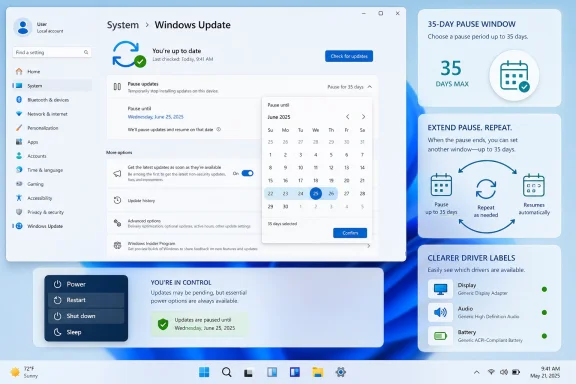
Microsoft is testing a major redesign of the Windows 11 update experience that gives users far more control over when updates install, including the ability to keep extending update pauses without a fixed overall limit.The change does not mean Windows Update gets a simple “never update again” switch. Instead, users will be able to pause updates for up to 35 days, then extend the pause again for another 35 days, repeating that cycle as often as needed. Microsoft says the new pause experience includes a calendar picker so users can choose a specific pause end date, rather than relying only on preset week-based options. citeturn4view0
What’s changing
Microsoft says the update redesign focuses on four areas: skipping updates during device setup, extending update pauses repeatedly, keeping normal Restart and Shut down options available even when updates are pending, and giving users clearer information about available updates. citeturn4view0The most headline-grabbing change is the new pause system. Windows 11 has historically allowed consumers to pause updates only temporarily, with Windows Update eventually requiring the latest updates before another pause. Microsoft’s new Insider-tested model keeps the 35-day pause window but removes the broader “you must stop pausing now” limitation by allowing repeated extensions. citeturn4view0turn2search1
Microsoft is also separating power actions from update actions. That means the Power menu should continue to show standard Restart and Shut down choices alongside Update and restart and Update and shut down when updates are waiting. If a user chooses plain Restart or Shut down, Microsoft says Windows will perform that action without unexpectedly starting the update install. citeturn4view0
Fewer restarts, clearer driver updates
The redesign also aims to reduce update interruptions by coordinating driver, .NET, and firmware updates with the monthly quality update. Microsoft says this should reduce the update experience to a single monthly restart for regular retail users who are not actively seeking early updates. citeturn4view0Driver updates are getting clearer labels as well. Microsoft says driver titles will include device-class information such as display, audio, battery, extension, or HDC, helping users understand what a pending driver update actually affects. citeturn4view0
Rollout status
For now, this is not a general Windows 11 release for everyone. Microsoft says many of the changes are beginning to roll out to Windows Insiders in the Dev Channel and the new Experimental Channel. The company has not yet provided a firm public rollout date for all Windows 11 users. citeturn4view0Why it matters
This is a significant shift in Microsoft’s approach to Windows Update. For years, one of the most common complaints about Windows 10 and Windows 11 has been that updates can arrive at inconvenient times, restart systems unexpectedly, or limit users’ ability to wait out problematic patches.The new controls give everyday Windows 11 users something closer to the flexibility that enterprise administrators have long had through management policies. However, there is an important tradeoff: pausing updates for long periods can leave a device without recent security fixes. Microsoft still recommends installing updates shortly after release to keep devices and data protected. citeturn4view0
In short: Windows 11 is not getting a true “disable updates forever” button. But if these Insider changes reach the public release channel as described, users will gain a much more practical way to delay updates on their own schedule — one 35-day block at a time.
Source: Trusted Reviews Finally, you can pause Windows 11 updates forever
Source: WinBuzzer Windows 11 Update Redesign Adds Indefinite Pause Control
