

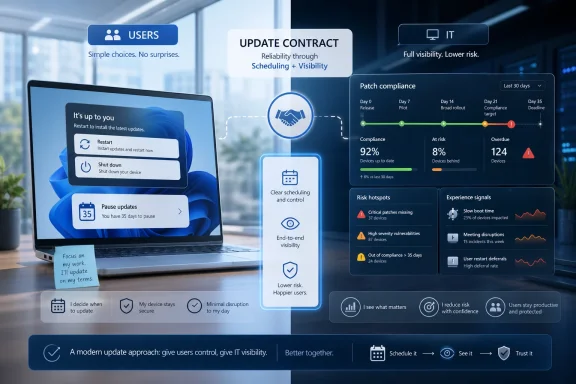
Microsoft is rolling out Windows 11 update changes through its Insider channels that let users skip setup-time updates, repeatedly extend 35-day update pauses, and choose ordinary shut down or restart commands without installing pending updates, shifting control away from Windows’ most resented forced-update behaviors. The change is more than a quality-of-life tweak. It is Microsoft admitting that reliability is not only a kernel, driver, or servicing-stack problem; it is also a scheduling problem. But as VMblog’s Howard McNamara argues from the digital employee experience side, the bill for that new freedom lands squarely on IT.
For years, Windows Update has been defended as a necessary irritation. The logic was simple enough: unmanaged machines drift, unpatched systems get compromised, and ordinary users are not always good judges of when a security update matters. If the operating system occasionally barged into the workday, that was the cost of maintaining a safer ecosystem.
That argument was never entirely wrong, but it was always incomplete. A laptop that decides the wrong moment is the right moment can be secure in theory and useless in practice. Anyone who has watched a machine enter the update tunnel before a meeting, a flight, a client demo, or a classroom presentation understands why the phrase “Windows is getting ready” carries more emotional freight than a status message should.
Microsoft’s new update controls are important because they treat user time as a first-class variable. The company is not simply adding another preference buried in Settings. It is changing the power menu, setup experience, pause behavior, and update presentation in ways that acknowledge a long-running complaint: users were not angry only because updates existed, but because Windows too often collapsed “you should update” into “you will update now.”
That distinction matters. Security teams see the patch. Employees feel the interruption. The old Windows model too often assumed those were the same event.
But the consumer logic bled into every corner of the platform. The power menu could become a trapdoor. A restart was not always a restart; it might be an update session wearing a familiar label. Initial setup could become a waiting room where a new PC was technically in the user’s hands but operationally still under Microsoft’s control.
The resentment this created was not limited to home users. In business settings, forced update behavior became part of a larger class of digital friction: slow boots, sluggish applications, frozen collaboration tools, failing VPN clients, bloated endpoint agents, and all the small delays that rarely generate a ticket but steadily tax the working day. VMblog’s piece, written by Nexthink’s Howard McNamara, frames Windows Update as one visible part of a much larger workplace experience problem.
That is the right frame. Windows Update is not just a patch mechanism; it is one of the most visible ways employees experience the IT estate. When it behaves badly, users do not distinguish between Microsoft, their employer’s device policy, the service desk, and the endpoint management stack. They simply conclude that the machine is in the way.
Microsoft now appears to understand that the old bargain — we interrupt you because it is good for you — has reached its limit. The new bargain is more subtle: Windows will still push toward currency, but it will give users more room to decide when the work happens.
The 35-day window preserves the old rhythm of Windows servicing while removing the hard stop that previously forced users back into the update stream before they could pause again. It is a compromise between user autonomy and Microsoft’s desire to keep the ecosystem from fragmenting completely. The user gets a calendar. Microsoft keeps the update model.
For enthusiasts, this is a welcome correction. There are legitimate reasons to hold updates: a known bad driver, a mission-critical deadline, a fragile audio setup, a gaming tournament, a machine on the road, or a production workstation that cannot afford surprise downtime. The ability to say “not this week” without entering registry hacks, metered-connection workarounds, or third-party update blockers is plainly better.
But in a company, every pause is also a data point. One user delaying updates for a week is a scheduling preference. A department delaying for six weeks may be a security pattern. A fleet of machines stuck across multiple patch levels becomes not a convenience feature but an exposure map.
That is why the harder part begins after the user clicks pause. Microsoft has removed friction at the endpoint. IT now has to prevent that reduction in friction from becoming a reduction in control.
This matters because first impressions count. The first hour with a machine is when a user decides whether the device feels premium, modern, and ready — or whether it feels like a procurement artifact wrapped in progress bars. If a newly issued laptop spends that first hour applying updates, rebooting, and showing ambiguous setup screens, IT starts the relationship in deficit.
There are exceptions, and Microsoft has signaled that managed commercial setups are a different case. That caveat is important. Enterprises already have Autopilot, Intune, Configuration Manager, update rings, enrollment status pages, compliance policies, and other mechanisms for staging and governing device readiness. In those environments, skipping setup updates is not merely a personal convenience; it can conflict with the organization’s definition of a ready device.
Still, the philosophical shift is meaningful. Microsoft is separating getting to the desktop from being fully current. That is a more honest model. Users often need access before perfection, and administrators often need to distinguish between a device that is usable, a device that is compliant, and a device that is optimally configured.
The risk is that many organizations already blur those categories. If IT does not know which devices skipped updates, which later caught up, which failed, and which remain stale, the setup improvement becomes another blind spot. The employee sees speed. The security team may inherit uncertainty.
That sounds obvious only because the old behavior was so hostile to expectation. A power menu is one of the most basic contracts in a graphical operating system. When that contract is conditional, users stop trusting the interface. They start developing folk remedies: long-pressing power buttons, disabling services, pulling network connections, or avoiding restarts until the machine becomes unstable.
Those behaviors are worse for everyone. They create failed installs, longer uptimes, driver weirdness, sleep-state bugs, and support tickets that look like mysterious endpoint instability but began as a user trying to avoid an unwanted update. Microsoft’s new approach may reduce some of that adversarial behavior simply by making the UI less coercive.
For IT, this should be read as a lesson beyond Windows Update. Users will work around systems they do not trust. If the official path feels punitive, unofficial paths proliferate. A predictable power menu is not just nicer; it is a containment strategy.
The challenge is that predictability cuts both ways. If Windows now does exactly what the user asks, organizations need stronger ways to observe the consequences. The machine that always restarts without updating is no longer being forced into compliance by the power menu. That may be better design, but it moves the compliance burden elsewhere.
A five-second delay here, a frozen app there, a laptop that takes too long to resume, an update prompt that arrives at the wrong moment, a video call that stutters, a browser profile that corrupts, an endpoint agent that chews CPU during a spreadsheet crunch. Individually, these incidents are too small to become a crisis. Collectively, they become an invisible tax on work.
The important point is that the service desk rarely sees the full tax. Employees adapt. They wait. They restart. They switch devices. They ask a colleague. They abandon the task. They do not file tickets for every delay because filing the ticket is itself another delay.
This is where forced updates became an easy villain. They are visible, narratively satisfying, and often badly timed. But McNamara’s argument is that updates are only one element of a larger observability gap. IT cannot fix what it does not measure, and it cannot govern what it cannot see.
That is the real collision between Microsoft’s new flexibility and enterprise reality. The operating system is becoming more deferential to the user. The management layer must become more aware of the endpoint.
Windows Update has always been where those clocks collide. Microsoft’s new controls make the collision less abrupt for the user, but they do not abolish the security clock. A vulnerability does not become less exploitable because the laptop owner had a busy week.
This is especially acute in regulated industries. Finance, healthcare, government contractors, legal services, and critical infrastructure operators cannot treat update deferral as a purely personal choice. Patch latency can become audit evidence. A stale fleet can become a finding. A deferred driver or OS update can intersect with encryption, identity, endpoint detection, browser security, or VPN posture in ways that are invisible until something breaks.
The danger is not that users will maliciously refuse updates en masse. The danger is that ordinary deferrals will accumulate quietly. One device is paused for travel. Another is offline. A third hits an update failure. A fourth is stuck behind a bandwidth constraint. A fifth belongs to an executive assistant who cannot afford downtime during quarter close. None of these is alarming alone; together they form a patchwork estate.
The old forced-update model hid this complexity by brute force. The new model exposes it. That is progress only if IT is prepared to look.
The VMblog article’s most useful observation is that the visibility gap extends beyond patching. Unused software, overpowered hardware, underreported incidents, and hidden productivity loss are all part of the same structural problem. Organizations buy devices and licenses with formal processes, but usage drifts in informal ways.
Software is installed and forgotten. Licenses remain assigned after projects end. High-spec machines sit under low-demand roles because procurement once standardized on a premium configuration. Meanwhile, users with genuinely demanding workloads may struggle on devices that look compliant in inventory but feel inadequate in daily use.
Update deferral fits this pattern. A machine can be technically present, enrolled, and healthy-looking while still drifting from the desired patch state. The problem is not merely whether a device has checked in. The problem is whether IT can interpret endpoint behavior in context.
That context is everything. A postponed update on a lab machine, a call-center desktop, a trading-floor workstation, a developer laptop, and a hospital endpoint does not carry the same risk. DEX tools and endpoint analytics promise value because they can connect technical state to user role, device behavior, experience signals, and business impact.
The caveat is that more telemetry is not automatically more wisdom. IT teams already drown in alerts. The goal should not be to punish every pause or chase every deviation. The goal is to distinguish harmless flexibility from meaningful drift.
But the better response to Microsoft’s update changes is not to recreate coercion at the management layer. If every new user-facing control is immediately nullified by group policy, employees will learn the same old lesson: the interface is theater, and real control lives somewhere else. That is bad for trust and, in the long run, bad for security.
The better model is conditional flexibility. Give users genuine room to avoid bad moments. Give IT genuine visibility into how that room is being used. Escalate only when deferral becomes risk, not when it exists.
That means policy design has to mature. A developer compiling code, a salesperson about to present, and a nurse documenting care may all have good reasons to delay. But a device holding a known exploited vulnerability for weeks is not an expression of autonomy; it is an unmanaged risk. The art is setting thresholds that reflect both realities.
Microsoft has hinted that more commercial controls are coming. Those controls will matter. The consumer update experience can afford to be simple. Enterprise update governance needs rings, deadlines, exemptions, reporting, remediation, and enough nuance to avoid turning flexibility into chaos.
That information should not require a war room. It should be routine operational hygiene. Patch compliance without experience context is blind enforcement. Experience management without patch context is soft-focus sentiment. The useful middle ground is a live map of technical risk and human impact.
This is where DEX advocates have a strong argument. The same endpoint intelligence that detects slow boots, crashes, freezes, and unused applications can help explain why update behavior diverges. Maybe a group of machines keeps pausing because a driver update breaks docking stations. Maybe a business unit avoids restarts because a line-of-business app does not restore session state cleanly. Maybe users are not resisting updates; they are avoiding a predictable failure IT has not yet correlated.
That is the difference between visibility and surveillance. The point is not to watch users for disobedience. The point is to see the system as employees experience it and govern from that reality.
If Microsoft’s changes reduce rage-clicking and power-button workarounds, they may also produce cleaner signals. Users who are given a legitimate pause button are less likely to use illegitimate methods. That makes endpoint state easier to reason about, provided IT is collecting and interpreting the right data.
For sysadmins, fewer restarts can also mean fewer weird edge cases. Update sequencing has always been a delicate business, especially when firmware, drivers, security patches, and application dependencies overlap. Consolidation does not eliminate complexity, but it gives users and administrators a clearer cadence.
That cadence also makes communication easier. “Expect one monthly restart window” is a message people can understand. “Your PC may or may not need multiple restarts depending on driver, firmware, OS, and application state” is accurate but useless as guidance. Predictability is a support feature.
The risk is that consolidation raises the stakes of the monthly event. If more work is bundled into a single restart, failures may feel more consequential. Microsoft’s servicing stack has improved over the years, but Windows’ hardware and driver diversity remains enormous. A bad update experience on even a small percentage of machines can still become a loud public story.
That is why the new flexibility must be paired with fast detection. If a monthly update begins causing trouble on a hardware class, IT needs to know before the whole fleet marches into it. The pause button then becomes not procrastination, but a safety valve.
That shift will reward organizations that already manage endpoints as living systems. It will punish those that treat device management as an inventory spreadsheet with occasional compliance scans. In the old model, a heavy hand could compensate for limited observability. In the new model, limited observability becomes the problem.
The most concrete consequences are already visible:
The change coordinates driver updates, .NET updates, firmware updates, and monthly Windows quality updates so they can be handled with the monthly quality update rather than producing separate restart prompts. For users, the practical effect should be fewer reboot interruptions across a month. For admins, it makes the monthly servicing event more important because more update work may be bundled into the same restart window.
The build also includes smaller fixes and polish: expanded Voice Access language support for Portuguese in Portugal, Portuguese in Brazil, and Korean in South Korea; improved Mongolian Baiti font shaping and rendering; and a fix for an Outlook issue where the close button did not respond.
 Microsoft Finally Concedes That Timing Is Part of Reliability
For years, Windows Update has been defended as a necessary irritation. The logic was simple enough: unmanaged machines drift, unpatched systems get compromised, and ordinary users are not always good judges of when a security update matters. If the operating system occasionally barged into the workday, that was the cost of maintaining a safer ecosystem.That argument was never entirely wrong, but it was always incomplete. A laptop that decides the wrong moment is the right moment can be secure in theory and useless in practice. Anyone who has watched a machine enter the update tunnel before a meeting, a flight, a client demo, or a classroom presentation understands why the phrase “Windows is getting ready” carries more emotional freight than a status message should.
Microsoft’s new update controls are important because they treat user time as a first-class variable. The company is not simply adding another preference buried in Settings. It is changing the power menu, setup experience, pause behavior, and update presentation in ways that acknowledge a long-running complaint: users were not angry only because updates existed, but because Windows too often collapsed “you should update” into “you will update now.”
That distinction matters. Security teams see the patch. Employees feel the interruption. The old Windows model too often assumed those were the same event.
The Old Bargain Was Security in Exchange for Obedience
Windows 10 and Windows 11 inherited a servicing philosophy shaped by the internet’s worst lessons. Worms, botnets, ransomware, vulnerable drivers, browser bugs, and exposed consumer PCs all pushed Microsoft toward a more assertive patching posture. The company had good reasons to make Windows less dependent on each user’s appetite for maintenance.But the consumer logic bled into every corner of the platform. The power menu could become a trapdoor. A restart was not always a restart; it might be an update session wearing a familiar label. Initial setup could become a waiting room where a new PC was technically in the user’s hands but operationally still under Microsoft’s control.
The resentment this created was not limited to home users. In business settings, forced update behavior became part of a larger class of digital friction: slow boots, sluggish applications, frozen collaboration tools, failing VPN clients, bloated endpoint agents, and all the small delays that rarely generate a ticket but steadily tax the working day. VMblog’s piece, written by Nexthink’s Howard McNamara, frames Windows Update as one visible part of a much larger workplace experience problem.
That is the right frame. Windows Update is not just a patch mechanism; it is one of the most visible ways employees experience the IT estate. When it behaves badly, users do not distinguish between Microsoft, their employer’s device policy, the service desk, and the endpoint management stack. They simply conclude that the machine is in the way.
Microsoft now appears to understand that the old bargain — we interrupt you because it is good for you — has reached its limit. The new bargain is more subtle: Windows will still push toward currency, but it will give users more room to decide when the work happens.
The Pause Button Was Never the Real Story
The headline feature is the ability to keep extending update pauses in 35-day increments. That sounds, at first glance, like Microsoft giving users a way to avoid Windows Update indefinitely. In practical terms, it is more complicated and more revealing.The 35-day window preserves the old rhythm of Windows servicing while removing the hard stop that previously forced users back into the update stream before they could pause again. It is a compromise between user autonomy and Microsoft’s desire to keep the ecosystem from fragmenting completely. The user gets a calendar. Microsoft keeps the update model.
For enthusiasts, this is a welcome correction. There are legitimate reasons to hold updates: a known bad driver, a mission-critical deadline, a fragile audio setup, a gaming tournament, a machine on the road, or a production workstation that cannot afford surprise downtime. The ability to say “not this week” without entering registry hacks, metered-connection workarounds, or third-party update blockers is plainly better.
But in a company, every pause is also a data point. One user delaying updates for a week is a scheduling preference. A department delaying for six weeks may be a security pattern. A fleet of machines stuck across multiple patch levels becomes not a convenience feature but an exposure map.
That is why the harder part begins after the user clicks pause. Microsoft has removed friction at the endpoint. IT now has to prevent that reduction in friction from becoming a reduction in control.
Setup-Time Skips Are a Gift to Users and a Warning to Admins
The out-of-box experience change may be the most human of the bunch. A new PC should feel like a new PC, not a hostage negotiation with an update service. Allowing users to skip updates during initial setup and land on the desktop faster fixes a moment that has long made Windows feel heavier than rival platforms.This matters because first impressions count. The first hour with a machine is when a user decides whether the device feels premium, modern, and ready — or whether it feels like a procurement artifact wrapped in progress bars. If a newly issued laptop spends that first hour applying updates, rebooting, and showing ambiguous setup screens, IT starts the relationship in deficit.
There are exceptions, and Microsoft has signaled that managed commercial setups are a different case. That caveat is important. Enterprises already have Autopilot, Intune, Configuration Manager, update rings, enrollment status pages, compliance policies, and other mechanisms for staging and governing device readiness. In those environments, skipping setup updates is not merely a personal convenience; it can conflict with the organization’s definition of a ready device.
Still, the philosophical shift is meaningful. Microsoft is separating getting to the desktop from being fully current. That is a more honest model. Users often need access before perfection, and administrators often need to distinguish between a device that is usable, a device that is compliant, and a device that is optimally configured.
The risk is that many organizations already blur those categories. If IT does not know which devices skipped updates, which later caught up, which failed, and which remain stale, the setup improvement becomes another blind spot. The employee sees speed. The security team may inherit uncertainty.
The Power Menu Becomes a Trust Test
The return of plain shut down and restart options is the smallest change with the largest symbolic payload. Microsoft is effectively promising that a power command will mean what it says. If users choose Restart, Windows should restart. If they choose Update and restart, Windows should update and restart.That sounds obvious only because the old behavior was so hostile to expectation. A power menu is one of the most basic contracts in a graphical operating system. When that contract is conditional, users stop trusting the interface. They start developing folk remedies: long-pressing power buttons, disabling services, pulling network connections, or avoiding restarts until the machine becomes unstable.
Those behaviors are worse for everyone. They create failed installs, longer uptimes, driver weirdness, sleep-state bugs, and support tickets that look like mysterious endpoint instability but began as a user trying to avoid an unwanted update. Microsoft’s new approach may reduce some of that adversarial behavior simply by making the UI less coercive.
For IT, this should be read as a lesson beyond Windows Update. Users will work around systems they do not trust. If the official path feels punitive, unofficial paths proliferate. A predictable power menu is not just nicer; it is a containment strategy.
The challenge is that predictability cuts both ways. If Windows now does exactly what the user asks, organizations need stronger ways to observe the consequences. The machine that always restarts without updating is no longer being forced into compliance by the power menu. That may be better design, but it moves the compliance burden elsewhere.
Digital Friction Is a Productivity Problem Before It Is a Morale Problem
The VMblog piece ties the update changes to a broader argument about digital employee experience, or DEX. That framing can sound like consultancy language, but the underlying problem is real: most workplace technology failures are not spectacular outages. They are tiny cuts.A five-second delay here, a frozen app there, a laptop that takes too long to resume, an update prompt that arrives at the wrong moment, a video call that stutters, a browser profile that corrupts, an endpoint agent that chews CPU during a spreadsheet crunch. Individually, these incidents are too small to become a crisis. Collectively, they become an invisible tax on work.
The important point is that the service desk rarely sees the full tax. Employees adapt. They wait. They restart. They switch devices. They ask a colleague. They abandon the task. They do not file tickets for every delay because filing the ticket is itself another delay.
This is where forced updates became an easy villain. They are visible, narratively satisfying, and often badly timed. But McNamara’s argument is that updates are only one element of a larger observability gap. IT cannot fix what it does not measure, and it cannot govern what it cannot see.
That is the real collision between Microsoft’s new flexibility and enterprise reality. The operating system is becoming more deferential to the user. The management layer must become more aware of the endpoint.
Compliance Does Not Care That the User Was Busy
Security teams live in a different clock than employees. The employee’s clock is the meeting, the deadline, the flight, the exam, the shift, the client call. The security clock is the disclosure date, exploit availability, patch age, exposure window, audit period, and incident timeline.Windows Update has always been where those clocks collide. Microsoft’s new controls make the collision less abrupt for the user, but they do not abolish the security clock. A vulnerability does not become less exploitable because the laptop owner had a busy week.
This is especially acute in regulated industries. Finance, healthcare, government contractors, legal services, and critical infrastructure operators cannot treat update deferral as a purely personal choice. Patch latency can become audit evidence. A stale fleet can become a finding. A deferred driver or OS update can intersect with encryption, identity, endpoint detection, browser security, or VPN posture in ways that are invisible until something breaks.
The danger is not that users will maliciously refuse updates en masse. The danger is that ordinary deferrals will accumulate quietly. One device is paused for travel. Another is offline. A third hits an update failure. A fourth is stuck behind a bandwidth constraint. A fifth belongs to an executive assistant who cannot afford downtime during quarter close. None of these is alarming alone; together they form a patchwork estate.
The old forced-update model hid this complexity by brute force. The new model exposes it. That is progress only if IT is prepared to look.
The Endpoint Estate Is Already More Fragmented Than the Dashboard Suggests
A common management fantasy is that the dashboard is the estate. It is not. The dashboard is the portion of the estate that reported correctly, recently, and in terms the tool understands.The VMblog article’s most useful observation is that the visibility gap extends beyond patching. Unused software, overpowered hardware, underreported incidents, and hidden productivity loss are all part of the same structural problem. Organizations buy devices and licenses with formal processes, but usage drifts in informal ways.
Software is installed and forgotten. Licenses remain assigned after projects end. High-spec machines sit under low-demand roles because procurement once standardized on a premium configuration. Meanwhile, users with genuinely demanding workloads may struggle on devices that look compliant in inventory but feel inadequate in daily use.
Update deferral fits this pattern. A machine can be technically present, enrolled, and healthy-looking while still drifting from the desired patch state. The problem is not merely whether a device has checked in. The problem is whether IT can interpret endpoint behavior in context.
That context is everything. A postponed update on a lab machine, a call-center desktop, a trading-floor workstation, a developer laptop, and a hospital endpoint does not carry the same risk. DEX tools and endpoint analytics promise value because they can connect technical state to user role, device behavior, experience signals, and business impact.
The caveat is that more telemetry is not automatically more wisdom. IT teams already drown in alerts. The goal should not be to punish every pause or chase every deviation. The goal is to distinguish harmless flexibility from meaningful drift.
Microsoft’s Move Forces a Better Conversation About Control
There is a reflex in enterprise IT to respond to user freedom by taking it away. That reflex is understandable. Standardization reduces variance. Variance creates support cost. Support cost becomes budget pressure. Budget pressure produces policy.But the better response to Microsoft’s update changes is not to recreate coercion at the management layer. If every new user-facing control is immediately nullified by group policy, employees will learn the same old lesson: the interface is theater, and real control lives somewhere else. That is bad for trust and, in the long run, bad for security.
The better model is conditional flexibility. Give users genuine room to avoid bad moments. Give IT genuine visibility into how that room is being used. Escalate only when deferral becomes risk, not when it exists.
That means policy design has to mature. A developer compiling code, a salesperson about to present, and a nurse documenting care may all have good reasons to delay. But a device holding a known exploited vulnerability for weeks is not an expression of autonomy; it is an unmanaged risk. The art is setting thresholds that reflect both realities.
Microsoft has hinted that more commercial controls are coming. Those controls will matter. The consumer update experience can afford to be simple. Enterprise update governance needs rings, deadlines, exemptions, reporting, remediation, and enough nuance to avoid turning flexibility into chaos.
The New Windows Update Contract Needs an Audit Trail
The next phase of Windows Update should be judged less by whether users can pause updates and more by whether organizations can understand the consequences. A modern update system should answer basic questions quickly: which devices are deferred, why they are deferred, how long they have been deferred, what vulnerabilities they carry, and what business process would be disrupted by forcing the issue.That information should not require a war room. It should be routine operational hygiene. Patch compliance without experience context is blind enforcement. Experience management without patch context is soft-focus sentiment. The useful middle ground is a live map of technical risk and human impact.
This is where DEX advocates have a strong argument. The same endpoint intelligence that detects slow boots, crashes, freezes, and unused applications can help explain why update behavior diverges. Maybe a group of machines keeps pausing because a driver update breaks docking stations. Maybe a business unit avoids restarts because a line-of-business app does not restore session state cleanly. Maybe users are not resisting updates; they are avoiding a predictable failure IT has not yet correlated.
That is the difference between visibility and surveillance. The point is not to watch users for disobedience. The point is to see the system as employees experience it and govern from that reality.
If Microsoft’s changes reduce rage-clicking and power-button workarounds, they may also produce cleaner signals. Users who are given a legitimate pause button are less likely to use illegitimate methods. That makes endpoint state easier to reason about, provided IT is collecting and interpreting the right data.
The Real Win Is Fewer Surprise Restarts, Not Fewer Updates
The most promising part of Microsoft’s update work may be the attempt to consolidate restarts. Coordinating driver, .NET, firmware, and quality updates around a single monthly restart acknowledges that interruption frequency matters as much as interruption duration. A ten-minute reboot once is annoying. A string of separate restart prompts across a month feels like harassment.For sysadmins, fewer restarts can also mean fewer weird edge cases. Update sequencing has always been a delicate business, especially when firmware, drivers, security patches, and application dependencies overlap. Consolidation does not eliminate complexity, but it gives users and administrators a clearer cadence.
That cadence also makes communication easier. “Expect one monthly restart window” is a message people can understand. “Your PC may or may not need multiple restarts depending on driver, firmware, OS, and application state” is accurate but useless as guidance. Predictability is a support feature.
The risk is that consolidation raises the stakes of the monthly event. If more work is bundled into a single restart, failures may feel more consequential. Microsoft’s servicing stack has improved over the years, but Windows’ hardware and driver diversity remains enormous. A bad update experience on even a small percentage of machines can still become a loud public story.
That is why the new flexibility must be paired with fast detection. If a monthly update begins causing trouble on a hardware class, IT needs to know before the whole fleet marches into it. The pause button then becomes not procrastination, but a safety valve.
The Patch Window Now Belongs to Both Sides
The practical lesson for Windows shops is not that Microsoft has solved updates. It is that the social contract around updates is changing. Users are being granted more control over timing, and administrators are being asked to earn their control through better insight rather than blunt force.That shift will reward organizations that already manage endpoints as living systems. It will punish those that treat device management as an inventory spreadsheet with occasional compliance scans. In the old model, a heavy hand could compensate for limited observability. In the new model, limited observability becomes the problem.
The most concrete consequences are already visible:
- Windows 11 users are gaining more explicit control over whether a restart or shutdown also installs pending updates.
- The ability to extend 35-day pauses repeatedly gives users more scheduling power, but it also makes patch drift easier to create.
- Skipping updates during initial setup improves the new-device experience, while increasing the importance of post-enrollment visibility.
- A single monthly restart cadence could reduce disruption, but it makes update health monitoring more important when problems appear.
- Enterprise IT should treat update deferral as a risk signal that needs context, not as automatic misconduct.
- The organizations that benefit most will be those that can connect patch status, device performance, user experience, and business criticality in one operational view.
Update: Beta build starts testing unified monthly reboots (July 7, 2026)
WindowsReport says Windows 11 Insider Beta Preview Build 26220.8764 now puts Microsoft’s unified update experience into Beta Channel testing, moving the “fewer monthly restarts” idea from roadmap-style promise into a specific Insider build.The change coordinates driver updates, .NET updates, firmware updates, and monthly Windows quality updates so they can be handled with the monthly quality update rather than producing separate restart prompts. For users, the practical effect should be fewer reboot interruptions across a month. For admins, it makes the monthly servicing event more important because more update work may be bundled into the same restart window.
The build also includes smaller fixes and polish: expanded Voice Access language support for Portuguese in Portugal, Portuguese in Brazil, and Korean in South Korea; improved Mongolian Baiti font shaping and rendering; and a fix for an Outlook issue where the close button did not respond.
References
- Primary source: VMblog
Published: Thu, 02 Jul 2026 15:01:15 GMT
Windows finally removed update friction - now comes the harder part
Microsoft is changing how Windows 11 handles updates.vmblog.com - Official source: support.microsoft.com
Pause updates in Windows | Microsoft Support
Under Settings, you can pause the Windows Update from being downloaded and installed for a period of time. You can also select a convenient time to restart your device after the updates are downloaded and installed.support.microsoft.com - Related coverage: windowscentral.com
Windows 11 is finally giving you real control over updates with new options to skip releases, pause longer, and stop forced restarts | Windows Central
New controls let you skip updates during setup, extend pauses, and avoid forced reboots.www.windowscentral.com - Related coverage: techspot.com
Windows Insiders can now pause updates indefinitely, in 35-day increments | TechSpot
A new Windows update, currently rolling out to Dev Channel and Experimental Channel Insiders, overhauls how users manage system updates. Windows Update now allows indefinite postponements, the...www.techspot.com - Related coverage: windowslatest.com
Microsoft just killed Windows 11's forced updates with new calendar pause, now rolling out
Windows 11 gets a calendar to pause updates for 35 days, indefinitely extendable, plus driver & .NET updates bundle into one monthly restart www.windowslatest.com
- Related coverage: pcworld.com
Microsoft is finally letting you skip updates during Windows 11 setup | PCWorld
Microsoft is rolling out a change that lets you skip post-installation updates during Windows 11's OOBE setup process.www.pcworld.com
- Related coverage: notebookcheck.net
Windows 11 lets you pause updates indefinitely, ends forced restarts for Insiders - Notebookcheck News
Microsoft is rolling out new Windows 11 update controls that let Insiders pause updates with no set limit and always choose to shut down without installing. www.notebookcheck.net
- Related coverage: winbuzzer.com
Windows 11 Update Redesign Adds Indefinite Pause Control
Microsoft has redesigned Windows 11's Windows Update, letting users pause monthly updates 35 days at a time and re-extend that pause window indefinitely. winbuzzer.com
- Official source: learn.microsoft.com
Windows updates during Windows 10 OOBE | Microsoft Learn
Describes how both critical and non-critical Windows updates can download during a user's Out of Box Experiencelearn.microsoft.com - Related coverage: tomshardware.com
Microsoft will allow users to indefinitely pause updates in Windows 11 — first change in over a decade to the mandatory update policy | Tom's Hardware
No more automatic restarts during important meetings or gaming sessionswww.tomshardware.com - Related coverage: allthings.how
How to Shut Down Windows 11 Without Updating
Learn multiple methods to power off or restart your Windows 11 PC without being forced to install pending system updates.allthings.how - Related coverage: windowsreport.com
Microsoft Starts Rolling Out Improvements to Windows Update Experience
Microsoft rolls out Windows Update improvements with more user control, fewer restarts, and smarter update timing based on user feedback. windowsreport.com
- Related coverage: pcgamer.com
Windows 11 now lets you skip the time-consuming updates on a fresh install. Neat! | PC Gamer
One small step towards rebuilding user goodwill.www.pcgamer.com - Related coverage: techradar.com
Microsoft is finally giving us full control over Windows 11 updates, including delaying them indefinitely, and I couldn't be happier | TechRadar
A major overhaul for Windows Updatewww.techradar.com - Official source: blogs.windows.com
Your Windows update experience just got updated
Hey Windows Insiders, Today, we’re excited to share some improvements to the Windows Update experience that are now starting to roll out. These improvements are the direct result of your feedback. We are continually reading the feedback submittedblogs.windows.com - Related coverage: thewincentral.com
Windows 11 Update UX Gets Smarter, vNext UI Hints - WinCentral
Windows 11 Insider update experience improves and hints at possible Windows vNext UI changes and future. - Read in Latest News on WinCentral thewincentral.com
- Related coverage: gigazine.net
Windows Update is getting a major improvement: it can now be paused indefinitely every 35 days. - GIGAZINE
Microsoft has released significant improvements to the update experience, giving users more control over when Windows updates occur. These changes allow users to pause Windows Update for up to 35 days, and extend the pause period any number of times without limit. Your Windows update experience...gigazine.net - Related coverage: app.daily.dev
Your Windows update experience just got updated | daily.dev
Microsoft is rolling out several improvements to the Windows Update experience based on user feedback. Key changes include: the ability to skip updates during... app.daily.dev
- Related coverage: techenclave.com
Changes coming to windows updates - Tech News - TechEnclave
Microsoft is improving the windows update experience.. You will now be able to get more control on windows updates. Skip updates during setup, increased pause window and an option to reboot without updating. S… techenclave.com
- Related coverage: notebookcheck-ru.com
Windows 11 позволяет приостанавливать обновления на неопределенный срок - Notebookcheck-ru.com
Компания Microsoft внедряет новые средства управления обновлениями Windows 11, которые позволяют участникам программы Insiders приостанавливать обновления без установленного лимита и всегда выбирать отключение без установки. www.notebookcheck-ru.com
Last edited:

