

Microsoft’s latest Windows 11 direction suggests a rare admission: the company knows the Start menu and File Explorer have become symbolic pain points, and it is now trying to fix both in parallel. On paper, that should be good news for anyone who has spent the last three years grumbling about a cluttered Start experience, sluggish Explorer behavior, and an operating system that sometimes feels designed around Microsoft’s priorities rather than users’ habits. In practice, the reaction remains cautious because Windows users have seen this movie before: promised cleanup, partial delivery, and a long wait before anything reaches the mainstream.
Windows 11 launched with a dramatic visual reset, but not everyone agreed that the redesign was an improvement. The Start menu in particular became a flashpoint because it traded familiar flexibility for a more curated layout, with recommendations taking up space that many users would rather reserve for pinned apps or a direct app list. Microsoft then spent the next several years iterating around the edges, adding features, testing alternatives in Insider builds, and slowly learning that “modern” does not automatically mean better.
That history matters because the Start menu is not just another UI panel. It is the entry point for the OS, the place users go to launch software, search files, and get their bearings after every reboot, login, or workflow switch. When that surface feels awkward, the rest of Windows 11 inherits the frustration. The same is true of File Explorer, which remains one of the most visible core apps in the entire Windows stack and a daily tool for both casual users and enterprise administrators.
Microsoft’s own Insider communications now show a clearer willingness to address these pain points more directly. In March 2026, the company said it was focusing on performance, reliability, and craft, including making core Windows experiences more responsive by moving more of them to WinUI 3 and improving responsiveness in the Start menu and File Explorer. It also said it wanted a more consistent search experience across Start, File Explorer, Taskbar, and Settings. That is the kind of language you use when you know the complaints are no longer niche; they are structural.
The timing is important too. Microsoft has already spent years modernizing File Explorer’s home view, address bar, and details pane, and those changes started appearing publicly in Insider builds back in 2023. That means the company is not inventing a new strategy now; it is finally trying to make the strategy coherent. The problem is that many users have been waiting long enough that they no longer trust promising signs alone.
That emotional gap matters because it shapes how users interpret every new Windows 11 update. If the first impression is still “Microsoft took away control,” then even helpful changes are judged through a skeptical lens. In other words, the Start menu is now a trust issue, not just a usability issue.
A wider panel also gives Microsoft room to breathe. It allows more pinned icons, more visible content, and fewer awkward compromises. It may not satisfy every power user, but it is the kind of adjustment that could make the menu feel less like a design statement and more like a tool.
That would be a significant concession. It would acknowledge that the objection is not just about poor recommendations; it is about the principle of giving users control over a space they use every day. If the software is personal, the first screen should feel personal too.
That is why Microsoft’s commitment to making Explorer faster in 2026 matters so much. In its March 2026 Windows quality update, the company specifically highlighted lower latency in search, navigation, and file operations, along with faster launch and responsiveness for common file tasks. The message is clear: Explorer’s perceived sluggishness has become a strategic problem.
The limitation is that point fixes do not necessarily change perception. Users do not experience Explorer as a list of isolated bugs; they experience it as either fast enough or not. That is why the broader performance push is more important than any single bug fix. A thousand minor delays still feel like one major slowdown.
The company’s own messaging reflects that tension. It is talking not just about new features, but about craft, responsiveness, and reliability. That vocabulary exists because the old language of feature drops and visual refreshes is no longer enough.
This is also why moving more experiences to WinUI 3 is significant. It is not just an engineering footnote; it is a sign that Microsoft wants the core shell to feel lighter and more unified. If the framework work pays off, users should feel it in small but recurring ways: faster menus, snappier transitions, and fewer interface oddities.
The option to disable recommendations is likely to resonate more strongly in consumer circles than any under-the-hood architecture detail. People notice what they can remove, not just what Microsoft has improved.
Microsoft’s 2026 focus on system reliability, driver quality, and app stability fits the enterprise narrative well. So do its efforts to make search more consistent across surfaces and its emphasis on trustworthy results. These are the kinds of improvements that reduce support load and improve rollout confidence.
That is why the current moment is precarious. Microsoft may genuinely be fixing things in the right direction, but the audience has become harder to convince.
The better question is not whether Microsoft can make Windows 11 prettier. It can. The question is whether it can make Windows feel more responsive, more personal, and less self-interested. That is a harder job, but it is also the one that matters most.
Source: TechRadar https://www.techradar.com/computing...ng-with-it-and-speeding-up-file-explorer-too/
 Background
Windows 11 launched with a dramatic visual reset, but not everyone agreed that the redesign was an improvement. The Start menu in particular became a flashpoint because it traded familiar flexibility for a more curated layout, with recommendations taking up space that many users would rather reserve for pinned apps or a direct app list. Microsoft then spent the next several years iterating around the edges, adding features, testing alternatives in Insider builds, and slowly learning that “modern” does not automatically mean better.That history matters because the Start menu is not just another UI panel. It is the entry point for the OS, the place users go to launch software, search files, and get their bearings after every reboot, login, or workflow switch. When that surface feels awkward, the rest of Windows 11 inherits the frustration. The same is true of File Explorer, which remains one of the most visible core apps in the entire Windows stack and a daily tool for both casual users and enterprise administrators.
Microsoft’s own Insider communications now show a clearer willingness to address these pain points more directly. In March 2026, the company said it was focusing on performance, reliability, and craft, including making core Windows experiences more responsive by moving more of them to WinUI 3 and improving responsiveness in the Start menu and File Explorer. It also said it wanted a more consistent search experience across Start, File Explorer, Taskbar, and Settings. That is the kind of language you use when you know the complaints are no longer niche; they are structural.
The timing is important too. Microsoft has already spent years modernizing File Explorer’s home view, address bar, and details pane, and those changes started appearing publicly in Insider builds back in 2023. That means the company is not inventing a new strategy now; it is finally trying to make the strategy coherent. The problem is that many users have been waiting long enough that they no longer trust promising signs alone.
Why the Start Menu Still Matters
The Start menu is one of those Windows components that people think about only when it annoys them. That makes it easy to underestimate how much product sentiment depends on it. When the menu is efficient, users barely notice it; when it is bloated, inconsistent, or overrun with recommendations, it becomes the first thing people blame when the OS feels off.The emotional center of Windows
A good Start menu does not have to be glamorous. It has to be predictable, fast, and easy to personalize without turning into a labyrinth. Microsoft’s current challenge is that the Windows 11 Start menu is still widely perceived as less useful than the one many users left behind, even if it is technically cleaner and more touch-friendly.That emotional gap matters because it shapes how users interpret every new Windows 11 update. If the first impression is still “Microsoft took away control,” then even helpful changes are judged through a skeptical lens. In other words, the Start menu is now a trust issue, not just a usability issue.
What users keep asking for
The complaints are remarkably consistent, and that is part of the reason Microsoft has struggled to wave them away. Users want a wider menu, a better app list, fewer distractions, and a way to reduce or eliminate recommendations they do not want. They also want the interface to feel responsive, not like a decorative shell sitting on top of a heavier framework.- More control over layout and content.
- Fewer promoted or recommended items.
- A clearer separation between pins and the full app list.
- Faster response times when opening or navigating the menu.
- Better consistency across different device types and screen sizes.
Why skepticism is rational
Users have learned to distinguish between a feature being spotted in a test build and a feature being real. Microsoft regularly experiments with Windows interfaces long before it commits to them, and not every experiment survives. That is why the reaction to the latest Start menu reports has been so mixed: people have been burned by promising prototypes that never made it out of preview. Hope is cheap; shipping is what counts.What Microsoft Appears to Be Changing
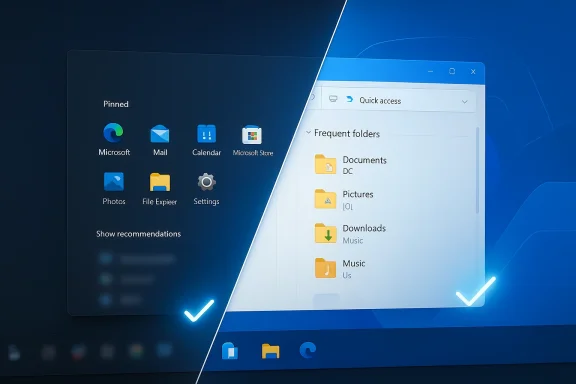
The newest wave of discussion centers on a more integrated Start menu design that rolls multiple elements into a single scrollable panel. In the test build described by TechRadar, the pinned apps, recommendations, and full app list appear to live in one larger space, with the option to turn off recommendations. That would be a meaningful philosophical shift, not just a cosmetic refresh.The single-panel approach
The biggest practical change is the collapse of the current two-panel model into something more continuous. Instead of switching between a pinned view and a separate list, users would scroll through a single layout. That sounds modest, but it changes the feel of the interaction in a big way because it reduces friction and makes the Start menu feel less fragmented.A wider panel also gives Microsoft room to breathe. It allows more pinned icons, more visible content, and fewer awkward compromises. It may not satisfy every power user, but it is the kind of adjustment that could make the menu feel less like a design statement and more like a tool.
The recommendations question
The recommendations section has been the most controversial piece of Windows 11 Start since launch. Microsoft previously said it would not remove the recommendations panel, instead promising to improve its quality. That position now appears to be under pressure, because the newly spotted test build reportedly includes the option to switch recommendations off entirely. TechRadar notes that this looks like a reversal of course, or at least a softer stance than before.That would be a significant concession. It would acknowledge that the objection is not just about poor recommendations; it is about the principle of giving users control over a space they use every day. If the software is personal, the first screen should feel personal too.
What this says about Microsoft’s priorities
This kind of change suggests Microsoft is listening more closely to the long tail of negative feedback that has accumulated since Windows 11 debuted. The company is also clearly trying to improve the credibility of its broader Windows 11 story before the next major release cycle. A better Start menu is not just a feature request; it is a signal that Microsoft understands why the interface continues to polarize its audience.- A more unified Start layout.
- A likely reduction in menu friction.
- Potentially stronger customization choices.
- Better alignment with user expectations.
- A chance to soften one of Windows 11’s most disliked defaults.
File Explorer Is Part of the Same Problem
The Start menu gets the headlines, but File Explorer is arguably just as important. Microsoft has spent years modernizing its look and behavior, including a Windows App SDK-based Home experience, a redesigned address bar, and a new details pane. That work started appearing in Insider builds in 2023, which means Microsoft has already been laying the foundation for a more modern Explorer for a while.Why Explorer performance is such a big deal
File Explorer is not a niche utility. It is one of the most frequently opened apps in Windows, and it is used in everything from casual file browsing to enterprise content workflows. If Explorer feels slow, the entire OS feels slower, even when other components are fine.That is why Microsoft’s commitment to making Explorer faster in 2026 matters so much. In its March 2026 Windows quality update, the company specifically highlighted lower latency in search, navigation, and file operations, along with faster launch and responsiveness for common file tasks. The message is clear: Explorer’s perceived sluggishness has become a strategic problem.
The recent fixes and their limits
Microsoft has already shipped several Explorer-related improvements in preview channels. In January 2026, it said it had made underlying changes to improve responsiveness when navigating network locations, and it also fixed a case where Explorer could hang at first login if certain startup apps were present. Those are useful improvements, but they also underline how many separate performance cliffs still exist in the app.The limitation is that point fixes do not necessarily change perception. Users do not experience Explorer as a list of isolated bugs; they experience it as either fast enough or not. That is why the broader performance push is more important than any single bug fix. A thousand minor delays still feel like one major slowdown.
Enterprise and consumer impact
For consumers, Explorer speed is a matter of convenience. For enterprises, it is a productivity tax. The difference matters because the enterprise case is stronger and easier to quantify. When network locations, synced sites, or file-heavy workflows cause Explorer to lag, that affects real work at scale, not just annoyance in the home.- Faster navigation reduces daily friction.
- Improved responsiveness helps multitasking.
- Better network-location handling can save time in managed environments.
- More reliable file operations reduce user complaints to IT.
- Performance gains improve the credibility of the whole Windows stack.
The Competitive Angle
The Windows desktop no longer competes only with Windows history; it competes with expectation. macOS, ChromeOS, and mobile operating systems have all helped normalize faster startup experiences, cleaner launch surfaces, and more opinionated interfaces that still allow meaningful personalization. Microsoft cannot afford to let Windows 11 feel like the slow, overcomplicated option in a world where users can switch ecosystems more easily than they once could.Why Microsoft is under pressure now
Microsoft has also been pushing hard into AI, cloud services, and cross-device integration, which means the core OS must not look neglected. If the Start menu and File Explorer continue to feel behind the times, those larger ambitions suffer because the everyday experience becomes the counterargument. That is especially true when Microsoft is trying to sell the idea of Windows as the best platform for both productivity and AI-assisted workflows.The company’s own messaging reflects that tension. It is talking not just about new features, but about craft, responsiveness, and reliability. That vocabulary exists because the old language of feature drops and visual refreshes is no longer enough.
Rival platforms benefit from Windows frustration
Every Windows irritation creates a small opening for alternatives. It does not mean users will abandon Windows en masse, but it does mean the platform’s default status cannot be taken for granted. A cleaner Start experience and a faster Explorer are not just quality-of-life improvements; they are defensive moves in a market where user patience has become thinner.- Better Windows defaults reduce migration temptation.
- More polished core UI helps Microsoft compete on feel.
- Faster Explorer narrows the everyday gap with rival platforms.
- Greater Start menu control reduces the “Windows is forcing me” narrative.
- Improved consistency supports both consumer and enterprise loyalty.
Why the timing matters
If Microsoft can deliver visible gains during 2026, it can reframe Windows 11 as a platform that listens and adapts. If it cannot, the criticism hardens into a story about inertia. That is why these changes matter even if they are not flashy. The OS is now being judged as much by responsiveness and restraint as by new capabilities.The Insider Strategy Behind the Scenes
Microsoft’s recent statements make one thing obvious: it is trying to turn Insider feedback into a more deliberate product process. The March 2026 quality message emphasized deeper validation, broader testing across real-world hardware, and a more intentional approach to introducing new capabilities. That is a stronger claim than simply saying it wants more feedback; it is saying the release pipeline itself needs discipline.Why this is different from earlier cycles
Earlier Windows 11 updates often felt like they were balancing too many goals at once: design consistency, AI integration, new panels, legacy compatibility, and varying degrees of performance polish. The result was a product that sometimes looked more modern while feeling less dependable. The latest messaging suggests Microsoft has finally acknowledged that users notice the trade-offs immediately.This is also why moving more experiences to WinUI 3 is significant. It is not just an engineering footnote; it is a sign that Microsoft wants the core shell to feel lighter and more unified. If the framework work pays off, users should feel it in small but recurring ways: faster menus, snappier transitions, and fewer interface oddities.
The risk of overpromising
There is, however, a danger in talking too loudly about quality improvements before they are broadly visible. Users remember promises, but they judge results. If Microsoft highlights responsiveness and Start menu changes now and then dribbles them out unevenly, the messaging will backfire. A better benchmark is not what a blog post says, but what a tired laptop user actually feels.What to watch in Insider builds
Microsoft has effectively turned Insider channels into a public rehearsal space for Windows rehabilitation. That creates opportunity, but it also creates expectation. Once a widely disliked component like Start gets identified as a priority, every build is scrutinized for signs of real progress.- More WinUI 3 migration in core surfaces.
- Faster launch times in File Explorer.
- More consistent Start and Search behavior.
- Broader availability of the redesigned Start layout.
- Less experimental clutter in test builds.
Consumer vs Enterprise: Different Stakes, Same Interface
Consumer users tend to judge Windows by immediate convenience. Enterprise users judge it by scale, manageability, and how often it interrupts work. The same Start menu redesign or Explorer optimization can matter to both, but for different reasons. That dual audience is one of Microsoft’s hardest balancing acts.Consumer expectations
For consumers, the biggest issue is emotional. They want an interface that feels theirs, not one that appears to be curating their choices on Microsoft’s behalf. They also want speed, because modern users are conditioned to expect software to get out of the way quickly.The option to disable recommendations is likely to resonate more strongly in consumer circles than any under-the-hood architecture detail. People notice what they can remove, not just what Microsoft has improved.
Enterprise expectations
For enterprise teams, the focus is stability and policy control. A redesigned Start menu is welcome only if it does not complicate standardization or introduce new support headaches. File Explorer performance is more important here than in the consumer market because it affects daily file operations, network shares, and synced environments.Microsoft’s 2026 focus on system reliability, driver quality, and app stability fits the enterprise narrative well. So do its efforts to make search more consistent across surfaces and its emphasis on trustworthy results. These are the kinds of improvements that reduce support load and improve rollout confidence.
The balancing act
The challenge is that consumers want freedom while enterprises want predictability. Microsoft has to build interfaces that can be simplified for one audience and standardized for another without fragmenting the product. That is why the Start menu debate matters so much: it is a test of whether Microsoft can offer choice without turning Windows into a configuration maze.Why the Haters Still Aren’t Impressed
The skepticism is not irrational. It is earned. Microsoft has promised to improve Windows 11 for years, and many users still feel they are waiting for the product to become the version that should have shipped in the first place. That sentiment is especially strong when changes show up as hidden tests, partial rollouts, or carefully worded blog posts about future improvements.The trust deficit
This is the core issue behind the “too little, too late” reaction. Windows users do not just want better features; they want evidence that Microsoft understands why the current defaults were frustrating. A new layout is helpful, but it does not erase years of skepticism. The company has to earn back enthusiasm with visible quality gains over time.The problem with incrementalism
Incremental improvements are sensible from an engineering standpoint, but they are often bad at changing public perception. If the Start menu looks better but still feels bounded by the same priorities, critics will say nothing fundamental changed. If File Explorer opens faster but still suffers from a handful of odd delays, users will say Microsoft only solved the part that was easiest to measure.That is why the current moment is precarious. Microsoft may genuinely be fixing things in the right direction, but the audience has become harder to convince.
Strengths and Opportunities
Microsoft is at least aiming at the right targets now, and that matters. Start menu control, File Explorer responsiveness, and consistent search are all foundational improvements that can reshape how Windows 11 is experienced day to day.- A more usable Start menu could immediately reduce user frustration.
- Better Explorer speed would improve the feel of the whole desktop.
- Removing or reducing recommendations would address a major user complaint.
- A wider, scrollable layout could make Start more efficient on modern screens.
- Deeper WinUI 3 adoption could improve responsiveness across core shell experiences.
- Stronger quality messaging may rebuild some lost trust if the delivery follows.
- Enterprise admins could benefit from fewer UI oddities and better workflow stability.
Risks and Concerns
The main risk is that Microsoft is raising expectations faster than it can ship meaningful improvements. If the redesign arrives slowly or inconsistently, the company will feed the same cynicism it is trying to defeat.- Hidden tests do not guarantee a public release.
- Feature rollouts can be uneven across editions and channels.
- New UI choices may still disappoint users who want a deeper rethink.
- Performance improvements may be too subtle to change broad sentiment.
- Enterprise environments could face new compatibility or policy questions.
- AI and recommendation features can still feel intrusive if not controlled well.
- Microsoft could be seen as reacting, not leading.
Looking Ahead
The next few Insider cycles will tell the real story. If Microsoft keeps pushing quality fixes and starts showing a Start menu that feels genuinely more user-controlled, the company may finally turn one of Windows 11’s biggest liabilities into a strength. If the changes remain half-visible and half-finished, the skepticism will harden further.The better question is not whether Microsoft can make Windows 11 prettier. It can. The question is whether it can make Windows feel more responsive, more personal, and less self-interested. That is a harder job, but it is also the one that matters most.
- Watch for broader availability of the redesigned Start menu.
- Track whether recommendations can truly be turned off.
- Monitor File Explorer launch and navigation speed in real-world use.
- Look for more WinUI 3 migration in core Windows surfaces.
- Pay attention to how Microsoft balances consumer choice with enterprise control.
Source: TechRadar https://www.techradar.com/computing...ng-with-it-and-speeding-up-file-explorer-too/
