Microsoft has improved Windows 11 over Windows 10 most clearly in security, update plumbing, default apps, window management, gaming features, and AI-ready hardware support, while leaving everyday app compatibility and core desktop productivity familiar enough that the upgrade still feels evolutionary rather than revolutionary. The uncomfortable truth is that Windows 11 is not a clean break with Windows 10 so much as Microsoft’s attempt to harden, polish, and monetize the Windows 10 era before it ages out. PCMag’s comparison gets the broad verdict right: Windows 11 is better in more categories, but not always in ways that users immediately feel. The operating system has improved, but Microsoft has also narrowed the definition of who gets to benefit.
The Windows 10 versus Windows 11 debate has always been distorted by timing. Windows 10 arrived as Microsoft’s apology tour after Windows 8, bringing back the Start menu, steadying the desktop, and promising a more continuous model of Windows development. Windows 11 arrived in a very different mood: not as a rescue mission, but as a gatekeeper.
That is why so many users still judge Windows 11 by what it took away first. The centered taskbar, simplified Start menu, missing taskbar behaviors, stricter hardware requirements, and early interface regressions made the upgrade feel less like progress and more like a trade. Microsoft has spent the years since trying to earn back that trust through incremental repairs.
PCMag’s category-by-category verdict reflects that reality. Windows 11 is now stronger in included apps, mobile integration, AI features, performance, gaming, and security, while price, interface, app compatibility, and peripheral compatibility remain closer calls. That is not a landslide, but it is no longer the shrug many users offered at launch.
The better question is not whether Windows 11 is “better” in the abstract. It is whether Microsoft improved the parts of Windows that matter most to real users: reliability, compatibility, performance, manageability, security, and the daily rhythm of using a PC. On that score, Windows 11 has made real gains, but it has also exposed Microsoft’s long-running tension between building a platform for users and steering users toward the platform Microsoft wants.
That makes “free” a slippery word. For a modern machine that meets Microsoft’s requirements, Windows 11 is indeed a no-cost operating-system upgrade. For older but perfectly usable hardware, the price of Windows 11 may be a new motherboard, a new CPU, a new TPM-capable system, or an entirely new PC.
This is where Microsoft’s improvement story becomes less about software and more about platform control. Windows 11’s hardware requirements are not arbitrary in the sense that they support a more secure baseline: TPM 2.0, Secure Boot, virtualization-based security, and newer processors do give Microsoft a firmer foundation. But the practical result is that Windows 11 divides the Windows installed base into the officially modern and the officially stranded.
That division matters more now that Windows 10 reached its end of mainstream support on October 14, 2025. Millions of machines did not become useless overnight, but they did cross into a different risk category. Extended Security Updates can buy time, but they do not change the strategic direction: Microsoft wants the Windows ecosystem on newer hardware, and Windows 11 is the lever.
So yes, Windows 11 wins the current price argument for anyone buying or building today. But Windows 10’s greatest value was its tolerance. It ran on a vast range of PCs and stretched the life of hardware that Windows 11 politely declines to bless.
But polish is not the same as power. Windows 10’s Start menu, with Live Tiles and denser layout options, gave users more information and customization than Windows 11’s stripped-down launcher. Windows 11’s taskbar also launched with missing behaviors that longtime Windows users rightly treated as regressions rather than modernization.
Microsoft has been clawing back ground ever since. The taskbar can be aligned left. File Explorer has gained tabs, improved archive support, cleaner context menus, and a more modern command bar. Snap Layouts remain one of Windows 11’s best interface additions because they improve a core desktop activity without demanding that users change how they think.
That is the best version of Windows 11: not a reinvention, but a refinement of the work people already do. Snap Layouts, better multi-monitor behavior, virtual desktop wallpapers, and File Explorer tabs are not flashy features. They are the sort of improvements that become invisible once you depend on them.
The problem is that Microsoft too often paired useful additions with unnecessary removals. Windows 11’s interface journey has been less “new desktop vision” than “controlled demolition followed by partial reconstruction.” It is better now, but some of that improvement is simply Microsoft returning functionality that should never have gone missing.
For mainstream desktop applications, the upgrade risk is low. Browsers, Microsoft 365, Adobe apps, Steam games, business utilities, VPN clients, password managers, and most productivity software generally treat Windows 11 as familiar ground. Windows 11 still runs 32-bit applications, and compatibility modes remain available for older programs.
The caveat is ancient software. Windows 11 is 64-bit only, which means users relying on 16-bit applications need to remain on 32-bit Windows 10 or virtualize older environments. That may sound niche until you encounter the industrial controller, accounting package, lab instrument, or custom line-of-business application that has not been touched in fifteen years.
Arm-based Copilot+ PCs complicate the picture further. Microsoft’s emulation story has improved, and major applications increasingly support Arm, but drivers, security tools, games, and hardware utilities remain the places where architecture matters. A Windows 11 laptop with a Snapdragon chip may be excellent for battery life and AI features while still being the wrong answer for a shop that depends on a particular USB device and its aging driver.
This is why IT pros should resist treating “Windows 11 compatible” as a single checkbox. Application compatibility is mostly excellent. Peripheral and driver compatibility is where the upgrade can still bite.
Notepad is the clearest example. Tabs and autosave do not turn it into a developer editor, but they do modernize a tool that millions use precisely because it is quick and uncomplicated. Paint, Photos, Snipping Tool, Sound Recorder, Media Player, and Clock have also received meaningful refreshes.
Clipchamp is more complicated. Windows badly needed a built-in video editor after the long decline and removal of older options, and Clipchamp fills that gap for casual users. But it also reflects modern Microsoft’s tendency to blend local operating-system features with service-oriented workflows.
The same tension appears in Teams, OneDrive, Widgets, and Microsoft account integration. Windows 11’s included apps are more capable than Windows 10’s, but they are also more visibly connected to Microsoft’s broader ecosystem. That may be convenient for users already living in Microsoft 365, and irritating for those who want an operating system to stay out of the way.
Still, the direction is positive. Windows 11’s inbox tools are no longer merely “good enough because they are there.” In several cases, they are genuinely useful.
The experience remains better with Android than with iPhone, because Apple’s ecosystem boundaries are real. But Windows 11 has improved the cross-device story with drag-and-drop file transfers, notification actions, clipboard improvements, broader device support, and resume-style workflows.
This is not glamorous, but it matters. The modern PC is rarely the only screen in a user’s life. A desktop operating system that cannot gracefully interact with phones feels increasingly dated, especially for students, hybrid workers, and anyone moving between a laptop and a mobile device all day.
Windows 10 had Phone Link too, but Windows 11 treats it more like a platform feature than a bolt-on. That is the right direction. Microsoft does not need to recreate the iPhone-Mac relationship perfectly; it needs Windows to stop feeling isolated.
The catch is that this vision is unevenly distributed. Many AI features require Copilot+ PCs with neural processing units capable of the required performance threshold. That means a large share of existing Windows 11 systems are technically on the new OS but outside the full AI feature set.
Recall remains the symbol of both Microsoft’s ambition and its risk. The feature promises to help users return to previous activity by making PC history searchable, but it has also drawn intense scrutiny because of the obvious privacy and security implications. Microsoft has revised and gated the feature more carefully than its first unveiling suggested, but the episode showed how quickly “helpful memory” can sound like “operating-system surveillance.”
The more practical AI features may prove more durable. Live Captions, Studio Effects, semantic search, and on-device image assistance are easier to understand and easier to justify. They solve recognizable problems without asking users to rethink whether their PC is watching them.
That is the dividing line Microsoft must respect. AI features that reduce friction will become part of the furniture. AI features that feel like telemetry with a friendly icon will meet resistance from exactly the power users and administrators Microsoft needs to persuade.
But performance is not only frame rates and application launch times. Update size, servicing efficiency, resume behavior, scheduler improvements, security overhead, and battery life all affect the lived experience of an operating system. Windows 11 has improved in several of those quieter areas.
The 24H2 release was especially important because Microsoft did work under the hood, including servicing changes designed to make updates smaller and faster. The company has talked up reduced download sizes and faster installation behavior, and that matters for both consumers and administrators. A Windows update that spends less time disrupting the machine is a performance improvement, even if it does not show up in Cinebench.
This is a subtle but important shift. Windows 10’s servicing model normalized frequent cumulative updates, but it also trained users to dread update interruptions. Windows 11’s update improvements are Microsoft admitting that the servicing system itself needed optimization, not just the code being serviced.
For IT departments, this is not a cosmetic win. Smaller, faster, more predictable updates reduce helpdesk noise, shorten maintenance windows, and make compliance easier. Windows 11’s performance story is therefore less about raw speed and more about operational drag.
The practical difference, however, depends heavily on hardware and games. Many titles perform similarly on Windows 10 and Windows 11. DirectStorage needs fast NVMe storage and game support to shine. Auto HDR is useful only if you have the right display and appreciate the effect.
That makes Windows 11’s gaming advantage real but not universally transformative. It is the better long-term bet, especially as developers target newer APIs and hardware assumptions. But the gamer who upgraded expecting a blanket frame-rate jump was always likely to be disappointed.
The more important point is lifecycle. Game developers, GPU vendors, anti-cheat makers, and peripheral companies will increasingly optimize around Windows 11. Windows 10 will not vanish from gaming overnight, but its center of gravity has already shifted.
That does not mean Windows 11 is magically safe. No operating system is. Users can still install bad software, fall for phishing, disable protections, run outdated drivers, and expose themselves through weak practices. But Windows 11 gives Microsoft more tools to reduce the blast radius.
The vulnerable-driver block list is a good example of the modern threat model. Attackers increasingly abuse legitimate but flawed drivers to gain kernel-level access. Blocking known-bad drivers is not glamorous, but it is exactly the sort of plumbing that makes a platform harder to compromise at scale.
Smart App Control is another example, though its clean-install requirement limits its reach. The idea is sound: use reputation and code-signing signals to stop untrusted or malicious applications before they run. The execution is constrained by Windows’ compatibility legacy, but the direction is sensible.
This is where Windows 10’s openness becomes a liability. The same flexibility that lets it run on older hardware and support older peripherals also limits how aggressively Microsoft can enforce modern protections. Windows 11 is safer partly because it is less accommodating.
Printers remain the classic villain. So do specialty scanners, label makers, audio interfaces, scientific instruments, capture devices, industrial adapters, and anything that depends on an old kernel driver. Windows 10’s tolerance for legacy driver models gave those devices more runway.
Windows 11’s stricter driver expectations improve stability and security, but they also expose years of neglect by hardware vendors. A device that still works electrically may be dead strategically if its vendor never produced a modern driver. That is not entirely Microsoft’s fault, but users experience it as a Windows problem.
For home users, this may mean replacing a printer. For businesses, it can mean validating fleets of peripherals before migration, isolating legacy machines, or keeping Windows 10 systems under extended support until a hardware refresh cycle catches up. The OS upgrade is the easy part; the ecosystem audit is the work.
This is why “eligible PC” is not the same as “ready PC.” A machine can pass Microsoft’s Windows 11 checks and still fail the practical test if the devices attached to it do not survive the transition.
That is what operating systems are supposed to do. The best desktop features do not demand applause every morning. They reduce friction until the old way feels clumsy.
But Microsoft keeps undercutting that quiet progress with noisier ambitions. Widgets, Copilot prompts, account nudges, cloud tie-ins, and AI branding can make Windows 11 feel less like a tool and more like a surface Microsoft continually wants to repurpose. The company’s challenge is not a lack of engineering; it is restraint.
Windows 10 had its own annoyances, including advertising-like prompts, forced update complaints, and confusing settings sprawl. Nostalgia should not launder those problems away. But Windows 10’s final form felt familiar, stable, and broadly permissive, which is why users were reluctant to leave it.
Windows 11 is technically more modern. The unresolved question is whether Microsoft can keep it from becoming more intrusive at the same time.
For administrators, the answer is more conditional. Windows 11 migration should be treated as a lifecycle project, not a cosmetic refresh. Hardware eligibility, firmware settings, BitLocker recovery planning, driver validation, application testing, user training, update rings, and rollback strategy all matter.
For holdouts, the strongest argument for Windows 10 is no longer that it is better. It is that it is known. Known systems have value, especially in environments where downtime is expensive and software dependencies are strange.
But known does not mean safe forever. As Windows 10 recedes from mainstream support, attackers will keep studying shared components, administrators will face increasing compliance pressure, and vendors will gradually test less against it. The risk curve bends upward even if the desktop still looks the same.
That is Microsoft’s leverage. Windows 11 does not have to be beloved to become inevitable. It only has to be the supported path forward.
Today’s Windows 11 is a stronger product. It has better security assumptions, better app defaults, better window management, better gaming features, better update mechanics, better cross-device integration, and the only serious path into Microsoft’s local AI roadmap. For most supported PCs, that is enough.
The asterisk is hardware. Windows 11’s improvements are inseparable from Microsoft’s decision to raise the floor. That makes the OS better for the machines inside the tent and less relevant to the machines left outside it.
That tradeoff may be defensible, especially for security. But Microsoft should not pretend it is frictionless. A free upgrade that requires a new PC is not free in the way users mean the word.
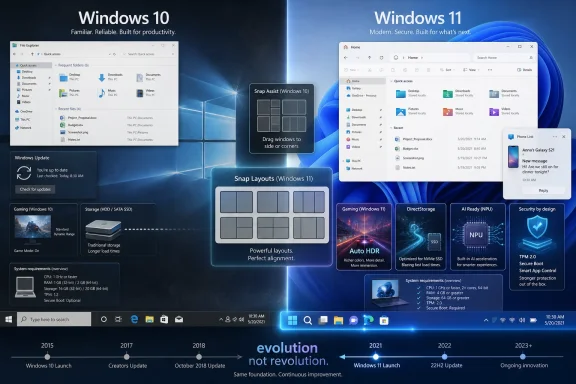 Windows 11 Wins More Categories Than It Wins Hearts
The Windows 10 versus Windows 11 debate has always been distorted by timing. Windows 10 arrived as Microsoft’s apology tour after Windows 8, bringing back the Start menu, steadying the desktop, and promising a more continuous model of Windows development. Windows 11 arrived in a very different mood: not as a rescue mission, but as a gatekeeper.That is why so many users still judge Windows 11 by what it took away first. The centered taskbar, simplified Start menu, missing taskbar behaviors, stricter hardware requirements, and early interface regressions made the upgrade feel less like progress and more like a trade. Microsoft has spent the years since trying to earn back that trust through incremental repairs.
PCMag’s category-by-category verdict reflects that reality. Windows 11 is now stronger in included apps, mobile integration, AI features, performance, gaming, and security, while price, interface, app compatibility, and peripheral compatibility remain closer calls. That is not a landslide, but it is no longer the shrug many users offered at launch.
The better question is not whether Windows 11 is “better” in the abstract. It is whether Microsoft improved the parts of Windows that matter most to real users: reliability, compatibility, performance, manageability, security, and the daily rhythm of using a PC. On that score, Windows 11 has made real gains, but it has also exposed Microsoft’s long-running tension between building a platform for users and steering users toward the platform Microsoft wants.
The Free Upgrade Is Real, but the Hardware Bill Is Hidden
On paper, the price comparison is simple. Windows 11 remains a free upgrade for eligible Windows 10 machines, and new PCs overwhelmingly ship with Windows 11. If you are buying a license for a new self-built PC, Windows 11 is the practical choice because Windows 10 is no longer sold through Microsoft as a normal retail option.That makes “free” a slippery word. For a modern machine that meets Microsoft’s requirements, Windows 11 is indeed a no-cost operating-system upgrade. For older but perfectly usable hardware, the price of Windows 11 may be a new motherboard, a new CPU, a new TPM-capable system, or an entirely new PC.
This is where Microsoft’s improvement story becomes less about software and more about platform control. Windows 11’s hardware requirements are not arbitrary in the sense that they support a more secure baseline: TPM 2.0, Secure Boot, virtualization-based security, and newer processors do give Microsoft a firmer foundation. But the practical result is that Windows 11 divides the Windows installed base into the officially modern and the officially stranded.
That division matters more now that Windows 10 reached its end of mainstream support on October 14, 2025. Millions of machines did not become useless overnight, but they did cross into a different risk category. Extended Security Updates can buy time, but they do not change the strategic direction: Microsoft wants the Windows ecosystem on newer hardware, and Windows 11 is the lever.
So yes, Windows 11 wins the current price argument for anyone buying or building today. But Windows 10’s greatest value was its tolerance. It ran on a vast range of PCs and stretched the life of hardware that Windows 11 politely declines to bless.
The Interface Has Improved, but Microsoft Is Still Rebuilding What It Broke
Windows 11 is prettier than Windows 10. Rounded corners, cleaner Settings pages, refreshed icons, better system dialogs, and a more consistent visual language make Windows 10 look increasingly like a product assembled across multiple eras. Windows 11 finally feels as though someone at Microsoft cared about the desktop as an object of design again.But polish is not the same as power. Windows 10’s Start menu, with Live Tiles and denser layout options, gave users more information and customization than Windows 11’s stripped-down launcher. Windows 11’s taskbar also launched with missing behaviors that longtime Windows users rightly treated as regressions rather than modernization.
Microsoft has been clawing back ground ever since. The taskbar can be aligned left. File Explorer has gained tabs, improved archive support, cleaner context menus, and a more modern command bar. Snap Layouts remain one of Windows 11’s best interface additions because they improve a core desktop activity without demanding that users change how they think.
That is the best version of Windows 11: not a reinvention, but a refinement of the work people already do. Snap Layouts, better multi-monitor behavior, virtual desktop wallpapers, and File Explorer tabs are not flashy features. They are the sort of improvements that become invisible once you depend on them.
The problem is that Microsoft too often paired useful additions with unnecessary removals. Windows 11’s interface journey has been less “new desktop vision” than “controlled demolition followed by partial reconstruction.” It is better now, but some of that improvement is simply Microsoft returning functionality that should never have gone missing.
Compatibility Remains Windows’ Great Unsexy Triumph
One of the most important facts in PCMag’s comparison is also one of the least dramatic: most Windows 10 software runs fine on Windows 11. That matters more than any new Start menu, widget panel, or AI flourish. Windows’ value has always depended on the boring miracle of backwards compatibility.For mainstream desktop applications, the upgrade risk is low. Browsers, Microsoft 365, Adobe apps, Steam games, business utilities, VPN clients, password managers, and most productivity software generally treat Windows 11 as familiar ground. Windows 11 still runs 32-bit applications, and compatibility modes remain available for older programs.
The caveat is ancient software. Windows 11 is 64-bit only, which means users relying on 16-bit applications need to remain on 32-bit Windows 10 or virtualize older environments. That may sound niche until you encounter the industrial controller, accounting package, lab instrument, or custom line-of-business application that has not been touched in fifteen years.
Arm-based Copilot+ PCs complicate the picture further. Microsoft’s emulation story has improved, and major applications increasingly support Arm, but drivers, security tools, games, and hardware utilities remain the places where architecture matters. A Windows 11 laptop with a Snapdragon chip may be excellent for battery life and AI features while still being the wrong answer for a shop that depends on a particular USB device and its aging driver.
This is why IT pros should resist treating “Windows 11 compatible” as a single checkbox. Application compatibility is mostly excellent. Peripheral and driver compatibility is where the upgrade can still bite.
Included Apps Finally Feel Like Someone Was Paying Attention
Windows bundled apps have spent years as punchlines, placeholders, or vehicles for Microsoft account nudges. Windows 11 does not completely escape that history, but it has improved the baseline. The default app set feels less neglected than it did in the Windows 10 era.Notepad is the clearest example. Tabs and autosave do not turn it into a developer editor, but they do modernize a tool that millions use precisely because it is quick and uncomplicated. Paint, Photos, Snipping Tool, Sound Recorder, Media Player, and Clock have also received meaningful refreshes.
Clipchamp is more complicated. Windows badly needed a built-in video editor after the long decline and removal of older options, and Clipchamp fills that gap for casual users. But it also reflects modern Microsoft’s tendency to blend local operating-system features with service-oriented workflows.
The same tension appears in Teams, OneDrive, Widgets, and Microsoft account integration. Windows 11’s included apps are more capable than Windows 10’s, but they are also more visibly connected to Microsoft’s broader ecosystem. That may be convenient for users already living in Microsoft 365, and irritating for those who want an operating system to stay out of the way.
Still, the direction is positive. Windows 11’s inbox tools are no longer merely “good enough because they are there.” In several cases, they are genuinely useful.
Phone Link Shows Microsoft Learning the Right Lesson From Apple
Microsoft lost the smartphone platform war, but it did not lose the need to connect PCs and phones. Phone Link is one of the places where Windows 11 makes the PC feel more current. Calls, messages, notifications, photo access, and file movement between phone and PC are now ordinary expectations rather than bonus features.The experience remains better with Android than with iPhone, because Apple’s ecosystem boundaries are real. But Windows 11 has improved the cross-device story with drag-and-drop file transfers, notification actions, clipboard improvements, broader device support, and resume-style workflows.
This is not glamorous, but it matters. The modern PC is rarely the only screen in a user’s life. A desktop operating system that cannot gracefully interact with phones feels increasingly dated, especially for students, hybrid workers, and anyone moving between a laptop and a mobile device all day.
Windows 10 had Phone Link too, but Windows 11 treats it more like a platform feature than a bolt-on. That is the right direction. Microsoft does not need to recreate the iPhone-Mac relationship perfectly; it needs Windows to stop feeling isolated.
AI Is the Loudest Difference and the Least Settled One
Windows 11 is now Microsoft’s AI operating system, whether users asked for one or not. Copilot, Copilot+ PCs, Recall, Cocreator, Click to Do, Live Captions, Studio Effects, semantic search, and NPU-driven features all point in the same direction. Microsoft sees the next major Windows upgrade cycle as being driven not by the desktop shell, but by local AI acceleration and cloud-assisted productivity.The catch is that this vision is unevenly distributed. Many AI features require Copilot+ PCs with neural processing units capable of the required performance threshold. That means a large share of existing Windows 11 systems are technically on the new OS but outside the full AI feature set.
Recall remains the symbol of both Microsoft’s ambition and its risk. The feature promises to help users return to previous activity by making PC history searchable, but it has also drawn intense scrutiny because of the obvious privacy and security implications. Microsoft has revised and gated the feature more carefully than its first unveiling suggested, but the episode showed how quickly “helpful memory” can sound like “operating-system surveillance.”
The more practical AI features may prove more durable. Live Captions, Studio Effects, semantic search, and on-device image assistance are easier to understand and easier to justify. They solve recognizable problems without asking users to rethink whether their PC is watching them.
That is the dividing line Microsoft must respect. AI features that reduce friction will become part of the furniture. AI features that feel like telemetry with a friendly icon will meet resistance from exactly the power users and administrators Microsoft needs to persuade.
Performance Improvements Are Real, but They Are Not the Old Benchmark Story
Windows 11 did not launch as a dramatically faster Windows 10. Early benchmark comparisons generally showed small differences, with Windows 11 sometimes ahead and sometimes effectively tied. For most users, the move from Windows 10 to Windows 11 was not like moving from a hard drive to an SSD.But performance is not only frame rates and application launch times. Update size, servicing efficiency, resume behavior, scheduler improvements, security overhead, and battery life all affect the lived experience of an operating system. Windows 11 has improved in several of those quieter areas.
The 24H2 release was especially important because Microsoft did work under the hood, including servicing changes designed to make updates smaller and faster. The company has talked up reduced download sizes and faster installation behavior, and that matters for both consumers and administrators. A Windows update that spends less time disrupting the machine is a performance improvement, even if it does not show up in Cinebench.
This is a subtle but important shift. Windows 10’s servicing model normalized frequent cumulative updates, but it also trained users to dread update interruptions. Windows 11’s update improvements are Microsoft admitting that the servicing system itself needed optimization, not just the code being serviced.
For IT departments, this is not a cosmetic win. Smaller, faster, more predictable updates reduce helpdesk noise, shorten maintenance windows, and make compliance easier. Windows 11’s performance story is therefore less about raw speed and more about operational drag.
Gaming Is Better on Paper, Familiar in Practice
For PC gaming, Windows 11 has the better feature sheet. Auto HDR, DirectStorage, improved spatial audio support, modern Xbox app integration, and ongoing graphics-stack work make it the platform Microsoft clearly wants gamers to use. If you are building a new gaming PC in 2026, installing Windows 10 makes little sense.The practical difference, however, depends heavily on hardware and games. Many titles perform similarly on Windows 10 and Windows 11. DirectStorage needs fast NVMe storage and game support to shine. Auto HDR is useful only if you have the right display and appreciate the effect.
That makes Windows 11’s gaming advantage real but not universally transformative. It is the better long-term bet, especially as developers target newer APIs and hardware assumptions. But the gamer who upgraded expecting a blanket frame-rate jump was always likely to be disappointed.
The more important point is lifecycle. Game developers, GPU vendors, anti-cheat makers, and peripheral companies will increasingly optimize around Windows 11. Windows 10 will not vanish from gaming overnight, but its center of gravity has already shifted.
Security Is Where Microsoft’s Argument Is Strongest
If Windows 11 has one unambiguous case over Windows 10, it is security. The stricter hardware requirements were unpopular, but they gave Microsoft permission to assume a more modern baseline. TPM 2.0, Secure Boot capability, virtualization-based security, memory integrity, vulnerable-driver blocking, Windows Hello improvements, passkeys, and Smart App Control all point toward a more defensive platform.That does not mean Windows 11 is magically safe. No operating system is. Users can still install bad software, fall for phishing, disable protections, run outdated drivers, and expose themselves through weak practices. But Windows 11 gives Microsoft more tools to reduce the blast radius.
The vulnerable-driver block list is a good example of the modern threat model. Attackers increasingly abuse legitimate but flawed drivers to gain kernel-level access. Blocking known-bad drivers is not glamorous, but it is exactly the sort of plumbing that makes a platform harder to compromise at scale.
Smart App Control is another example, though its clean-install requirement limits its reach. The idea is sound: use reputation and code-signing signals to stop untrusted or malicious applications before they run. The execution is constrained by Windows’ compatibility legacy, but the direction is sensible.
This is where Windows 10’s openness becomes a liability. The same flexibility that lets it run on older hardware and support older peripherals also limits how aggressively Microsoft can enforce modern protections. Windows 11 is safer partly because it is less accommodating.
The Peripheral Problem Is the Tax on Modernization
Windows has always been more than an operating system; it is the treaty between software, hardware, drivers, peripherals, and user habits. Windows 11 changes the terms of that treaty. Most modern devices work fine, but older peripherals can become the unexpected obstacle in an otherwise straightforward upgrade.Printers remain the classic villain. So do specialty scanners, label makers, audio interfaces, scientific instruments, capture devices, industrial adapters, and anything that depends on an old kernel driver. Windows 10’s tolerance for legacy driver models gave those devices more runway.
Windows 11’s stricter driver expectations improve stability and security, but they also expose years of neglect by hardware vendors. A device that still works electrically may be dead strategically if its vendor never produced a modern driver. That is not entirely Microsoft’s fault, but users experience it as a Windows problem.
For home users, this may mean replacing a printer. For businesses, it can mean validating fleets of peripherals before migration, isolating legacy machines, or keeping Windows 10 systems under extended support until a hardware refresh cycle catches up. The OS upgrade is the easy part; the ecosystem audit is the work.
This is why “eligible PC” is not the same as “ready PC.” A machine can pass Microsoft’s Windows 11 checks and still fail the practical test if the devices attached to it do not survive the transition.
Microsoft’s Best Improvements Are the Ones Users Stop Noticing
The most persuasive Windows 11 improvements are not the ones Microsoft markets hardest. They are the ones that fade into the background: better window snapping, fewer update disruptions, cleaner built-in apps, stronger default security, improved search on newer hardware, better phone integration, and a more coherent settings experience.That is what operating systems are supposed to do. The best desktop features do not demand applause every morning. They reduce friction until the old way feels clumsy.
But Microsoft keeps undercutting that quiet progress with noisier ambitions. Widgets, Copilot prompts, account nudges, cloud tie-ins, and AI branding can make Windows 11 feel less like a tool and more like a surface Microsoft continually wants to repurpose. The company’s challenge is not a lack of engineering; it is restraint.
Windows 10 had its own annoyances, including advertising-like prompts, forced update complaints, and confusing settings sprawl. Nostalgia should not launder those problems away. But Windows 10’s final form felt familiar, stable, and broadly permissive, which is why users were reluctant to leave it.
Windows 11 is technically more modern. The unresolved question is whether Microsoft can keep it from becoming more intrusive at the same time.
The Upgrade Math Is Now Less About Features Than Risk
For enthusiasts, the Windows 11 decision is mostly settled. If your hardware supports it, your apps are normal, and your peripherals are current, Windows 11 is the better operating system in 2026. It is more secure, more actively developed, better aligned with new hardware, and increasingly the default target for Microsoft’s desktop work.For administrators, the answer is more conditional. Windows 11 migration should be treated as a lifecycle project, not a cosmetic refresh. Hardware eligibility, firmware settings, BitLocker recovery planning, driver validation, application testing, user training, update rings, and rollback strategy all matter.
For holdouts, the strongest argument for Windows 10 is no longer that it is better. It is that it is known. Known systems have value, especially in environments where downtime is expensive and software dependencies are strange.
But known does not mean safe forever. As Windows 10 recedes from mainstream support, attackers will keep studying shared components, administrators will face increasing compliance pressure, and vendors will gradually test less against it. The risk curve bends upward even if the desktop still looks the same.
That is Microsoft’s leverage. Windows 11 does not have to be beloved to become inevitable. It only has to be the supported path forward.
The Scorecard Says Windows 11, but the Asterisk Still Matters
The fairest verdict is that Microsoft has improved Windows meaningfully since Windows 10, but unevenly. Windows 11 is not a revolution, and users who skipped the first few years were not irrational. Early Windows 11 asked for patience it had not yet earned.Today’s Windows 11 is a stronger product. It has better security assumptions, better app defaults, better window management, better gaming features, better update mechanics, better cross-device integration, and the only serious path into Microsoft’s local AI roadmap. For most supported PCs, that is enough.
The asterisk is hardware. Windows 11’s improvements are inseparable from Microsoft’s decision to raise the floor. That makes the OS better for the machines inside the tent and less relevant to the machines left outside it.
That tradeoff may be defensible, especially for security. But Microsoft should not pretend it is frictionless. A free upgrade that requires a new PC is not free in the way users mean the word.
What Windows 11 Actually Changed After the Windows 10 Era
The practical lesson from the Windows 10 versus Windows 11 comparison is that Microsoft has improved the operating system most where it could change the baseline and least where it tried to redesign user habits. The biggest gains are concrete, but the upgrade still deserves planning rather than blind acceptance.- Windows 11 is the better choice for new PCs because Windows 10 is no longer the normal retail path and has passed its mainstream support endpoint.
- Windows 11’s strongest advantage is security, especially on hardware that supports TPM 2.0, Secure Boot, virtualization-based protections, and modern driver controls.
- Windows 10 remains valuable mainly for legacy hardware, older peripherals, unusual drivers, and ancient software that does not fit Windows 11’s assumptions.
- Windows 11’s interface is now more polished than it was at launch, but some of its progress has come from restoring capabilities users expected all along.
- Copilot+ and AI features make Windows 11 the forward-looking platform, but many of those features require newer hardware and still need user trust.
- Businesses should treat Windows 11 migration as a hardware, driver, security, and workflow project rather than a simple operating-system swap.
References
- Primary source: PCMag
Published: Tue, 23 Jun 2026 19:52:09 GMT
Windows 10 vs. Windows 11: How Much Has Microsoft Actually Improved It? | PCMag
Even if you're perfectly content with Windows 10, you'll soon need to switch to Windows 11 for security reasons. We compare the two operating systems so you know what to expect upon upgrading.www.pcmag.com - Related coverage: techradar.com
Microsoft confirms Windows 11 26H2 is another boring update that does nothing — but here's why I'm happy about that | TechRadar
It's all about avoiding a repeat of the bug-fest that was 24H2www.techradar.com - Official source: support.microsoft.com
Making the transition to a new era of computing - Microsoft Support
 support.microsoft.com
- Official source: microsoft.com
End of support for Windows 10, Windows 8.1, and Windows 7 | Microsoft Windows
Make a smooth transition to Windows 11 from your unsupported operating system with help from Microsoft. Enjoy the benefits of upgrading to a Windows 11 PC.www.microsoft.com - Related coverage: hp.com
- Official source: learn.microsoft.com
Supported versions of Windows client | Microsoft Learn
Supported versions of Windows clientlearn.microsoft.com
- Related coverage: windowscentral.com
How to upgrade from Windows 10 to Windows 11 version 25H2 | Windows Central
As the support for Windows 10 comes to an end, you can now upgrade to Windows 11 version 25H2 through Windows Update or using the Installation Assistant.www.windowscentral.com - Related coverage: windowslatest.com
Windows 10 now directly upgrades to Windows 11 25H2, as Microsoft pitches AI-powered productivity
Windows 10 now directly installs Windows 11 25H2, rather than version 24H2 or 23H2, if you choose to upgrade instead of opting for ESU. www.windowslatest.com
- Related coverage: pcworld.com
Upgrading Windows 10 to 11: Here's everything you need to know | PCWorld
Support for Windows 10 ends in October 2025. We explain how to update to Windows 11 24H2 and what you need to keep in mind.www.pcworld.com - Related coverage: tomsguide.com
Microsoft will end Windows 10 security support in 30 days — here are your options | Tom's Guide
Microsoft has published a 30-day reminder to all Windows 10 users that end of life is coming for the aging OS. Here are your options.www.tomsguide.com - Related coverage: tomshardware.com
Microsoft to force updates to Windows 11 25H2 for PCs with older Windows 11 OS versions — 'intelligent' update system uses machine learning to determine when a device is ready | Tom's Hardware
Microsoft forces 25H2 rollout ahead of 24H2 end-of-supportwww.tomshardware.com - Official source: download.microsoft.com
- Related coverage: atomicdata.com
- Related coverage: my.avnet.com
- Related coverage: scscc.club
- Related coverage: wtps.org