

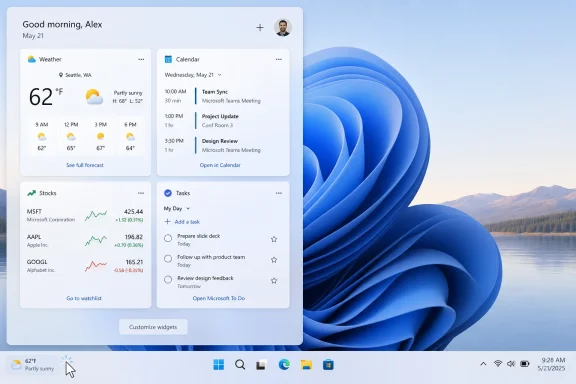
Microsoft began testing a quieter Windows 11 Widgets experience on May 1, 2026, in Insider Experimental builds, changing the board so it opens to user-selected widgets instead of the MSN-powered Discover feed and no longer launches merely because the pointer drifts over the taskbar weather icon. The change is small in code but large in symbolism. After years of treating the Windows desktop as a surface for engagement, Microsoft is admitting that the default behavior of Windows has become part of the product’s trust problem.
The MSN feed is not being deleted from existence, and anyone expecting Microsoft to abandon its content ecosystem should temper the celebration. But defaults are policy. By moving news, ads, alerts, and hover-triggered distractions out of the first-run path, Microsoft is conceding that Windows 11’s most annoying habits were not accidents of design; they were choices.
The Widgets board was supposed to be one of Windows 11’s friendly modern conveniences: a glanceable pane for weather, calendar events, stocks, sports, traffic, and other ambient information. In practice, for many users, it became a trapdoor into a noisy MSN feed. A small weather button on the taskbar could become a full-height panel of headlines, recommendations, promotional content, and algorithmic clutter.
That distinction matters because users did not necessarily object to widgets. They objected to the bargain Microsoft smuggled in with them. A weather tile is useful. A calendar card is useful. A panel that opens on hover and immediately competes for your attention with a feed you did not ask for is something else entirely.
The new Insider behavior changes that bargain. The Widgets panel is being tested with open-on-hover disabled by default, taskbar badging turned off by default, alerts limited until the user has engaged with the experience, and first launch aimed at widgets rather than the Discover feed. Microsoft is also reducing the default lock screen widgets to Weather, with more control left to the user.
That is not a revolution. It is a restoration of manners. Windows is an operating system, not a shopping mall kiosk, and the job of an operating system is to support intent rather than constantly manufacture it.
This is why the hover issue became more than a UX complaint. It felt like Windows was waiting for a mistake. Brush the wrong corner of the screen and the operating system seized the opportunity to show you content.
The change to click-only launch is therefore more meaningful than it sounds. A click is consent. A hover is often a coincidence. Microsoft’s move tells users that the Widgets board should appear when summoned, not when the system sees a chance to push itself into view.
That principle ought to be obvious, but Windows 11 has repeatedly blurred it. Search highlights, Start menu recommendations, Edge nudges, OneDrive prompts, Copilot placements, lock screen cards, and widgets have all contributed to a sense that the OS is no longer content to be infrastructure. It wants to be a destination, a funnel, and sometimes a billboard.
That made the feature feel misaligned with the rest of the desktop. Users came to Widgets for weather or a quick glance at their day, then found themselves staring at a feed optimized to keep them scrolling. The problem was not only that the content could be low quality or irrelevant. The deeper problem was that Windows had imported the logic of a news portal into a place where users expected tools.
Microsoft’s latest language about “calm” is corporate, but the diagnosis is right. Calm computing is not about making every interface beige and silent. It is about preserving user intent. If a person opens a widget board to check the forecast, the system should not treat that as permission to start a news session.
The company appears to be separating Widgets and Discover into more distinct destinations. That separation is important. A feed can exist for people who want it, but it should not wear a utility costume or be treated as the default reward for clicking the weather.
But K2 is not merely an engineering program. It is a trust campaign. Microsoft has spent the Windows 11 era asking users to accept more accounts, more cloud integration, more AI entry points, more recommended content, more telemetry-adjacent personalization, and more defaults that benefit Microsoft’s ecosystem. Some of those changes have real utility. Many have felt like the OS is negotiating against the person sitting at the keyboard.
The result is a strange credibility gap. Windows 11 is not a bad operating system in the mechanical sense; it is often fast, secure, attractive, and increasingly capable on modern hardware. Yet the emotional response from many power users is exhaustion. They do not merely want more features. They want fewer interruptions, fewer nags, and fewer moments where the OS seems to be asking, “What can I get you to click next?”
That is why removing the feed from the default Widgets path lands harder than a typical Insider tweak. Microsoft is touching one of the visible symbols of Windows 11’s overreach. It is saying, at least in this corner of the shell, that usefulness should come before engagement.
But that has always been a weak defense of bad defaults. “You can turn it off” is not the same thing as “it should have been off.” Defaults define the experience for the majority of users, including the people who never open Settings unless something is broken.
Microsoft understands this better than anyone. The company’s entire consumer strategy depends on the power of defaults: Edge as the built-in browser, Bing as the built-in search path, OneDrive as the encouraged backup layer, Microsoft accounts as the preferred identity, and MSN as the content surface lurking in system experiences. Defaults are distribution.
That is why the Widgets shift is a real concession. It does not merely add an option. It changes who bears the burden. Under the old model, users who disliked the feed had to remove or suppress it. Under the new model being tested, users who want the feed must choose it.
For enterprise IT, that distinction is everything. A quieter default means fewer help desk explanations, fewer user complaints, and fewer policy overrides just to make the OS feel professional. It also means Microsoft is acknowledging that unmanaged consumer defaults leak into business environments as a form of noise.
Weather is a reasonable default because it is broadly useful, location-aware, and glanceable. It does not require the user to enter a content ecosystem. It does not imply that the lock screen should become a miniature dashboard of everything Microsoft can syndicate.
The move away from a fuller default set of lock screen widgets is therefore part of the same retreat from ambient attention capture. It gives Microsoft a cleaner argument: Windows can provide useful information without turning every surface into a feed. That is the line the company should have drawn earlier.
There is still room for rich lock screen customization. Some users want stocks, sports, calendar items, traffic, or device information before they log in. But the lock screen should start minimal and expand by choice, not start busy and require pruning.
The MSN feed in Widgets was personalized in the broad platform sense, but not necessarily in the human sense. A user who wants a quiet desktop is not being served by a feed that accurately guesses which sports team, stock, or scandal might attract a click. Relevance is not the same as appropriateness.
The new Widgets defaults suggest Microsoft may finally be separating those ideas. A calm OS does not mean an OS with no intelligence. It means intelligence that waits for context, respects boundaries, and understands that the absence of interruption is itself a feature.
This is especially important as Microsoft continues to weave AI into Windows. Copilot, Recall, Click to Do, semantic search, and agentic settings tools all raise the stakes for trust. If users do not trust Microsoft to handle a weather widget politely, they will not trust it to mediate their files, screenshots, workflows, and personal context.
There is also the matter of monetization. MSN, Bing, Edge, and Microsoft Start are not hobbies. They are part of a broader advertising and engagement ecosystem, and Windows remains one of Microsoft’s most powerful distribution channels. Moving the feed out of the default view may reduce user irritation, but it also reduces a valuable funnel.
That tension will not disappear. Microsoft can make Widgets quieter while finding new ways to surface content elsewhere. It can remove one feed from first launch while adding another recommendation surface in Start, Search, Edge, Copilot, or the Store. The company’s incentives remain complicated.
Still, skepticism should not prevent recognition. If users complain for years that a system surface is too noisy, and Microsoft changes the default to make it quieter, that is progress. The proper response is not applause without memory, but pressure with receipts.
The failure was not the idea of widgets. It was the decision to subordinate widgets to a feed. Microsoft took a promising utility surface and made it feel like an engagement portal.
If the new defaults stick, the Widgets board has a chance to become boring in the best possible way. It can be a place that does a few small jobs quickly and then gets out of the way. That is not the kind of feature that wins keynote applause, but it is exactly the kind of feature that makes an operating system feel trustworthy over time.
Windows has historically been strongest when it behaves like a workbench: configurable, durable, and deferential to the user’s task. The more it behaves like a content platform, the more it invites comparison with devices and operating systems built around tighter, cleaner, less intrusive experiences.
That culture would require Microsoft to ask different questions before shipping Windows features. Does this appear because the user asked for it? Can it be dismissed permanently? Is the default useful without serving a Microsoft growth metric? Does it respect managed enterprise environments? Does it make Windows feel more like a tool or more like a funnel?
Those questions are not anti-business. They are pro-platform. Windows succeeds when users believe the operating system is on their side. Every unwanted badge, feed, prompt, recommendation, and forced pathway taxes that belief.
The Widgets change suggests someone inside Microsoft understands the cost. The company does not need to make Windows austere. It needs to make Windows respectful.
Source: OC3D Microsoft is finally axing Windows 11's MSN feed from widgets - OC3D
The MSN feed is not being deleted from existence, and anyone expecting Microsoft to abandon its content ecosystem should temper the celebration. But defaults are policy. By moving news, ads, alerts, and hover-triggered distractions out of the first-run path, Microsoft is conceding that Windows 11’s most annoying habits were not accidents of design; they were choices.
 Microsoft Finally Discovers That the Desktop Is Not a Billboard
The Widgets board was supposed to be one of Windows 11’s friendly modern conveniences: a glanceable pane for weather, calendar events, stocks, sports, traffic, and other ambient information. In practice, for many users, it became a trapdoor into a noisy MSN feed. A small weather button on the taskbar could become a full-height panel of headlines, recommendations, promotional content, and algorithmic clutter.That distinction matters because users did not necessarily object to widgets. They objected to the bargain Microsoft smuggled in with them. A weather tile is useful. A calendar card is useful. A panel that opens on hover and immediately competes for your attention with a feed you did not ask for is something else entirely.
The new Insider behavior changes that bargain. The Widgets panel is being tested with open-on-hover disabled by default, taskbar badging turned off by default, alerts limited until the user has engaged with the experience, and first launch aimed at widgets rather than the Discover feed. Microsoft is also reducing the default lock screen widgets to Weather, with more control left to the user.
That is not a revolution. It is a restoration of manners. Windows is an operating system, not a shopping mall kiosk, and the job of an operating system is to support intent rather than constantly manufacture it.
The Hover Gesture Became a Symbol of Everything Users Hated
The open-on-hover behavior was one of those design decisions that looked clever in a demo and felt hostile in daily use. It reduced friction for the user who wanted the panel, but it created friction for everyone else. A taskbar is prime operating-system real estate, and accidental activation there carries a special irritation because it interrupts the user at the edge of nearly every workflow.This is why the hover issue became more than a UX complaint. It felt like Windows was waiting for a mistake. Brush the wrong corner of the screen and the operating system seized the opportunity to show you content.
The change to click-only launch is therefore more meaningful than it sounds. A click is consent. A hover is often a coincidence. Microsoft’s move tells users that the Widgets board should appear when summoned, not when the system sees a chance to push itself into view.
That principle ought to be obvious, but Windows 11 has repeatedly blurred it. Search highlights, Start menu recommendations, Edge nudges, OneDrive prompts, Copilot placements, lock screen cards, and widgets have all contributed to a sense that the OS is no longer content to be infrastructure. It wants to be a destination, a funnel, and sometimes a billboard.
The Feed Was Never Just About News
The MSN feed inside Widgets was always a strange fit for Windows. It mixed the vocabulary of productivity with the mechanics of attention capture. The panel looked like a utility surface, but much of its energy came from the economics of web publishing: clicks, personalization, promoted stories, and recirculation.That made the feature feel misaligned with the rest of the desktop. Users came to Widgets for weather or a quick glance at their day, then found themselves staring at a feed optimized to keep them scrolling. The problem was not only that the content could be low quality or irrelevant. The deeper problem was that Windows had imported the logic of a news portal into a place where users expected tools.
Microsoft’s latest language about “calm” is corporate, but the diagnosis is right. Calm computing is not about making every interface beige and silent. It is about preserving user intent. If a person opens a widget board to check the forecast, the system should not treat that as permission to start a news session.
The company appears to be separating Widgets and Discover into more distinct destinations. That separation is important. A feed can exist for people who want it, but it should not wear a utility costume or be treated as the default reward for clicking the weather.
Windows K2 Is a Trust Campaign Dressed as Engineering
The Widgets change is being discussed as part of Microsoft’s broader Windows K2 effort, an internal push reportedly focused on making Windows 11 faster, calmer, less bloated, and less frustrating. That framing is useful because it places the MSN retreat in the same bucket as performance improvements, update refinements, interface polish, and reductions in unnecessary prompts.But K2 is not merely an engineering program. It is a trust campaign. Microsoft has spent the Windows 11 era asking users to accept more accounts, more cloud integration, more AI entry points, more recommended content, more telemetry-adjacent personalization, and more defaults that benefit Microsoft’s ecosystem. Some of those changes have real utility. Many have felt like the OS is negotiating against the person sitting at the keyboard.
The result is a strange credibility gap. Windows 11 is not a bad operating system in the mechanical sense; it is often fast, secure, attractive, and increasingly capable on modern hardware. Yet the emotional response from many power users is exhaustion. They do not merely want more features. They want fewer interruptions, fewer nags, and fewer moments where the OS seems to be asking, “What can I get you to click next?”
That is why removing the feed from the default Widgets path lands harder than a typical Insider tweak. Microsoft is touching one of the visible symbols of Windows 11’s overreach. It is saying, at least in this corner of the shell, that usefulness should come before engagement.
Defaults Are the Real Battleground
Power users have long known how to tame parts of Windows 11. You can disable Widgets entirely. You can turn off hover behavior. You can hide feeds. You can dig through Settings, Group Policy, registry edits, third-party tools, and enterprise management baselines to sand down the parts of Windows that feel too eager.But that has always been a weak defense of bad defaults. “You can turn it off” is not the same thing as “it should have been off.” Defaults define the experience for the majority of users, including the people who never open Settings unless something is broken.
Microsoft understands this better than anyone. The company’s entire consumer strategy depends on the power of defaults: Edge as the built-in browser, Bing as the built-in search path, OneDrive as the encouraged backup layer, Microsoft accounts as the preferred identity, and MSN as the content surface lurking in system experiences. Defaults are distribution.
That is why the Widgets shift is a real concession. It does not merely add an option. It changes who bears the burden. Under the old model, users who disliked the feed had to remove or suppress it. Under the new model being tested, users who want the feed must choose it.
For enterprise IT, that distinction is everything. A quieter default means fewer help desk explanations, fewer user complaints, and fewer policy overrides just to make the OS feel professional. It also means Microsoft is acknowledging that unmanaged consumer defaults leak into business environments as a form of noise.
The Lock Screen Retreat Shows the Same Lesson
The plan to reduce the default lock screen widgets to Weather follows the same logic. The lock screen is one of the most sensitive pieces of visual territory in an operating system. It appears before the user has even begun a session, which makes it especially poor ground for experimentation with content, recommendations, or informational clutter.Weather is a reasonable default because it is broadly useful, location-aware, and glanceable. It does not require the user to enter a content ecosystem. It does not imply that the lock screen should become a miniature dashboard of everything Microsoft can syndicate.
The move away from a fuller default set of lock screen widgets is therefore part of the same retreat from ambient attention capture. It gives Microsoft a cleaner argument: Windows can provide useful information without turning every surface into a feed. That is the line the company should have drawn earlier.
There is still room for rich lock screen customization. Some users want stocks, sports, calendar items, traffic, or device information before they log in. But the lock screen should start minimal and expand by choice, not start busy and require pruning.
Microsoft Is Learning the Difference Between Personalization and Imposition
For years, Microsoft has leaned on the language of personalization to justify surfacing more content in Windows. The premise sounds benign: if the system knows what you like, it can show you relevant information. The trouble is that personalization without restraint often feels indistinguishable from imposition.The MSN feed in Widgets was personalized in the broad platform sense, but not necessarily in the human sense. A user who wants a quiet desktop is not being served by a feed that accurately guesses which sports team, stock, or scandal might attract a click. Relevance is not the same as appropriateness.
The new Widgets defaults suggest Microsoft may finally be separating those ideas. A calm OS does not mean an OS with no intelligence. It means intelligence that waits for context, respects boundaries, and understands that the absence of interruption is itself a feature.
This is especially important as Microsoft continues to weave AI into Windows. Copilot, Recall, Click to Do, semantic search, and agentic settings tools all raise the stakes for trust. If users do not trust Microsoft to handle a weather widget politely, they will not trust it to mediate their files, screenshots, workflows, and personal context.
The Skeptics Have Earned Their Skepticism
The obvious caveat is that this is an Insider change, not a universal shipping guarantee. Microsoft tests features, reverses them, staggers them, and gates them by region, account type, hardware, channel, and server-side rollout. Windows watchers have learned not to confuse a preview build with a binding contract.There is also the matter of monetization. MSN, Bing, Edge, and Microsoft Start are not hobbies. They are part of a broader advertising and engagement ecosystem, and Windows remains one of Microsoft’s most powerful distribution channels. Moving the feed out of the default view may reduce user irritation, but it also reduces a valuable funnel.
That tension will not disappear. Microsoft can make Widgets quieter while finding new ways to surface content elsewhere. It can remove one feed from first launch while adding another recommendation surface in Start, Search, Edge, Copilot, or the Store. The company’s incentives remain complicated.
Still, skepticism should not prevent recognition. If users complain for years that a system surface is too noisy, and Microsoft changes the default to make it quieter, that is progress. The proper response is not applause without memory, but pressure with receipts.
The Weather Button Can Become Useful Again
There is a better version of Widgets hiding beneath the MSN controversy. A compact, fast, user-curated board could be genuinely valuable on Windows 11. Weather, calendar, tasks, device health, package deliveries, security status, battery levels, system performance, and enterprise notices all make sense as glanceable desktop elements.The failure was not the idea of widgets. It was the decision to subordinate widgets to a feed. Microsoft took a promising utility surface and made it feel like an engagement portal.
If the new defaults stick, the Widgets board has a chance to become boring in the best possible way. It can be a place that does a few small jobs quickly and then gets out of the way. That is not the kind of feature that wins keynote applause, but it is exactly the kind of feature that makes an operating system feel trustworthy over time.
Windows has historically been strongest when it behaves like a workbench: configurable, durable, and deferential to the user’s task. The more it behaves like a content platform, the more it invites comparison with devices and operating systems built around tighter, cleaner, less intrusive experiences.
The Real Test Is Whether Calm Survives the Next Growth Meeting
Microsoft’s “quiet by default” language will be judged not by this build, but by the next dozen product decisions. It is easy to remove one annoyance once it becomes a meme. It is harder to build a durable culture that treats user attention as a scarce resource.That culture would require Microsoft to ask different questions before shipping Windows features. Does this appear because the user asked for it? Can it be dismissed permanently? Is the default useful without serving a Microsoft growth metric? Does it respect managed enterprise environments? Does it make Windows feel more like a tool or more like a funnel?
Those questions are not anti-business. They are pro-platform. Windows succeeds when users believe the operating system is on their side. Every unwanted badge, feed, prompt, recommendation, and forced pathway taxes that belief.
The Widgets change suggests someone inside Microsoft understands the cost. The company does not need to make Windows austere. It needs to make Windows respectful.
The Small Retreat That Says the Most
The concrete implications of this change are simple, but the message underneath them is larger than a widget pane. Microsoft is testing whether Windows 11 can regain goodwill not by adding more, but by removing friction users never asked for.- Windows 11 Insider Experimental builds are testing a Widgets board that opens first to user-selected widgets rather than the MSN-powered Discover feed.
- The taskbar weather button is being changed so the Widgets board opens by click rather than hover by default.
- Microsoft is turning off Widgets taskbar badging by default and limiting alerts until users engage with the experience.
- The Discover feed is not disappearing, but it is being separated from the default Widgets experience.
- Lock screen widgets are being pared back by default to Weather, with users given more control over what else appears.
- The change matters because it shifts the burden from users disabling noise to Microsoft proving that extra content deserves a place.
Source: OC3D Microsoft is finally axing Windows 11's MSN feed from widgets - OC3D
