

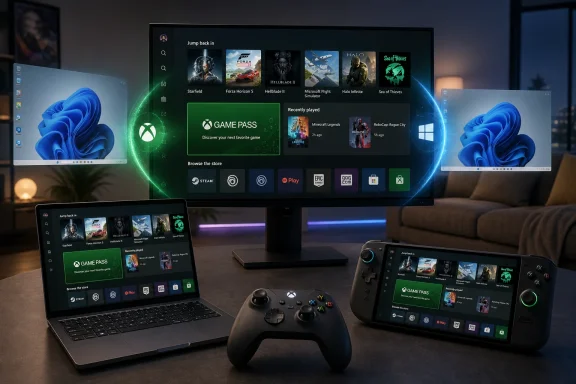
Microsoft began rolling out Xbox mode on April 30, 2026, to Windows 11 PCs in select markets, bringing a controller-first, full-screen Xbox interface to laptops, desktops, tablets, and handhelds through a gradual Windows update. That sounds like a cosmetic win for couch gaming, but it is more important than a launcher skin. Microsoft is using Windows itself as the next Xbox platform, and Xbox mode is the first consumer-visible proof that the company wants the PC to behave less like a desk machine and more like a console when the player asks it to. The gamble is that Windows can become simpler without becoming closed.
For decades, PC gaming’s greatest strength has also been its greatest tax: Windows lets you do almost anything, which means it also makes you deal with almost everything. Driver pop-ups, launchers, overlays, update prompts, notification badges, taskbar focus theft, and the general visual noise of the desktop are all tolerated because PC gaming is flexible, powerful, and endlessly modifiable.
Xbox mode is Microsoft’s admission that this bargain no longer works equally well across every form factor. A desktop tower with a mouse, keyboard, and three monitors can absorb Windows’ complexity. A handheld gaming PC, a docked laptop connected to a TV, or a living-room mini-PC cannot. In those contexts, the desktop is not a productivity surface; it is friction.
The new mode takes the Xbox app and turns it into a full-screen, controller-optimized shell. It offers an aggregated library, access to Game Pass, recently played titles, installed games from other PC storefronts, and the ability to move back to the Windows 11 desktop when needed. The shortcut Microsoft has promoted for moving between the experiences is Windows key + F11, provided the feature is available and enabled on the device.
That distinction matters. Xbox mode does not turn a Windows PC into an Xbox console, and it does not make Xbox Series X|S discs or console-only binaries magically run on a PC. It is still Windows underneath. But for the first time, Microsoft is treating the Windows shell as optional for gaming rather than inevitable.
Windows handhelds exposed the opposite problem. Devices like the ROG Ally, Legion Go, and other x86 handheld PCs have had access to more games than Steam Deck in many cases, especially where anti-cheat or launchers complicate Linux compatibility. But they also forced users to tap tiny window controls, wrestle with software keyboards, and navigate a desktop designed for monitors rather than thumbsticks.
Microsoft’s first serious answer was the Xbox full screen experience on Windows handhelds, later expanded in preview to more Windows 11 PC form factors. The rebranding to Xbox mode is not just cleaner marketing. It signals a broader ambition: this is not a handheld-only patch, but a Windows gaming posture.
That posture matters because Microsoft is no longer competing only with Sony and Nintendo. It is competing with Valve’s idea of the PC as a console-like device. It is competing with Android handhelds, cloud gaming boxes, smart TVs, and whatever hybrid Xbox hardware comes next. If Windows remains the most capable gaming OS but the least pleasant gaming interface, that weakness becomes strategic.
Both camps have a point. Microsoft says Xbox mode minimizes background distractions and is designed to reduce friction. Reports around the feature have described lower background activity and better resource focus, especially compared with launching games from the ordinary desktop. But users should be cautious about treating a claimed reduction in background processes as a universal performance upgrade. A full-screen shell can stop or suppress some noise; it cannot rewrite GPU drivers, eliminate shader compilation stutter, or fix a poorly optimized PC port.
The more meaningful change is experiential rather than raw performance. If the player can boot or switch into a game-first interface, pick up a controller, browse installed titles from multiple stores, and launch without touching a mouse, then Windows has crossed an important usability threshold. Performance gains would be welcome. Reduced anxiety is the bigger win.
That is where Xbox mode most closely resembles Steam Big Picture and SteamOS. The point is not that a library grid is revolutionary. The point is that the operating system recedes. On a gaming machine, disappearing can be the highest compliment an OS earns.
That is a delicate move. Microsoft cannot credibly win PC gamers by pretending Steam does not exist. Steam is not just a store; it is a social graph, a patching system, a controller database, a mod distribution layer, and a habit. Any Microsoft living-room PC strategy that requires users to abandon Steam is dead on arrival.
So Xbox mode appears to be taking the more pragmatic route: become the front door rather than the only room. If Microsoft can make the Xbox interface the place where players launch Steam games, Game Pass games, cloud games, and locally installed titles, it gains influence without requiring total ownership. That is the same logic behind modern platform power everywhere: control the surface where choice happens.
There is an obvious commercial upside. Game Pass becomes more visible. Xbox identity becomes more persistent. Microsoft Store games feel less isolated from the rest of a player’s PC library. The company can also use the interface to promote handheld-optimized titles, cloud options, cross-buy features, and Xbox Play Anywhere in a context where the user is already thinking like a console player.
But there is also risk. PC gamers are unusually sensitive to anything that smells like forced mediation. If Xbox mode becomes another layer of prompts, subscriptions, advertisements, or account nagging, it will be judged harshly. The best version of Xbox mode is not the one that shouts “Xbox” the loudest. It is the one that gets the player into Elden Ring, Forza, Balatro, Halo, Cyberpunk, or a 20-year-old modded PC game with the least ceremony.
This is not entirely new. Windows has long had tablet modes, kiosk modes, media-center experiments, and gaming overlays. The difference is that Xbox mode arrives at a moment when Microsoft’s gaming hardware strategy appears to be converging with PC architecture rather than standing apart from it. The old wall between “Xbox console” and “Windows PC” is getting thinner, at least at the software and services layer.
That does not mean the next Xbox is simply a beige box with a controller. Consoles still benefit from fixed hardware targets, simplified configuration, unified certification, and a predictable living-room experience. But Microsoft’s incentives are changing. The company sells games, subscriptions, cloud access, identity, and developer tools across screens. A Windows-based Xbox-like experience fits that world better than a sealed console island.
For WindowsForum readers, the important point is that Xbox mode is not merely a gaming feature. It is another example of Microsoft making Windows modular at the experience layer. The kernel, driver model, app platform, and security stack remain Windows. The user-facing shell becomes negotiable.
A full-screen shell that can replace the normal flow into the desktop may be useful for dedicated gaming rigs, esports rooms, trade-show demos, and entertainment PCs. It may also be one more experience administrators need to control, document, disable, or explain. The more Windows gains specialized modes, the more policy clarity matters.
Microsoft will need to make Xbox mode manageable in the boring ways that determine whether features survive outside enthusiast circles. Can administrators prevent it from launching? Can it be hidden from non-gaming profiles? How does it behave with standard users, child accounts, local accounts, domain-joined systems, and devices under mobile device management? Does it respect focus assist, update policies, power policies, and endpoint security tools?
Those questions are not glamorous, but they are the difference between a neat demo and a stable Windows feature. The consumer PC is increasingly shared territory: personal device, work machine, school laptop, family console, and streaming endpoint. If Xbox mode is another optional surface, it is harmless. If it becomes pushy, ambiguous, or difficult to govern, it will create support tickets.
Microsoft’s gradual rollout is sensible here. The feature is arriving in select markets first, with wider availability over several weeks. Users who want early access are being pointed toward the Windows Update setting that receives the latest updates as soon as they are available. That staggered approach gives Microsoft room to catch edge cases before Xbox mode lands on the stranger corners of the Windows hardware ecosystem.
That duality is more honest than previous attempts to simplify Windows. Microsoft does not need to pretend that one interface can serve every context. The desktop is still the right answer for file management, modding, productivity, multitasking, streaming setup, Discord configuration, OBS scenes, and driver troubleshooting. A controller-first shell is the right answer when the machine is ten feet away and the user wants to play.
The danger is that Microsoft underestimates how much polish console users expect. A console interface is not just a big UI. It is predictable sleep and resume. It is consistent controller behavior. It is fast updates that do not derail a session. It is legible error handling. It is minimal launcher recursion. It is the feeling that the system was built around play, not that play was layered over a general-purpose OS.
Windows has struggled with that feeling. It can be made excellent, but it rarely feels calm. Xbox mode is Microsoft’s opportunity to build a calm room inside Windows. Whether that room stays calm depends on how aggressively the company resists the temptation to fill it with banners, upsells, and half-integrated services.
Steam integration must feel natural, not tolerated. If launching a Steam game from Xbox mode drops users into another full-screen interface, opens unexpected windows, or breaks controller focus, the illusion collapses. The same goes for Epic, GOG, Battle.net, Ubisoft Connect, EA, and the many launchers PC gamers keep installed despite wishing they did not need them.
Sleep and resume may matter even more on handhelds and TV-connected PCs. Consoles and the Steam Deck have trained players to expect suspension to work reliably. Windows can sleep beautifully on some devices and behave like a haunted appliance on others. Xbox mode cannot fully solve firmware, driver, and power-state inconsistency, but it will be blamed for the experience anyway.
Then there is stutter. Microsoft has invested in DirectStorage, Auto SR, Game Bar, graphics settings, and other gaming features, but the PC remains a messy target. Xbox mode can reduce distractions and maybe trim some background load. It cannot guarantee a console-like frame pacing experience across thousands of hardware combinations. If Microsoft markets the mode too heavily as a performance booster, disappointment will follow.
The smartest pitch is not “your PC is now faster.” It is “your PC is now easier to play.” That promise is both more modest and more transformative.
That shift explains why Xbox mode matters even to people who never plan to use it. Microsoft is preparing for a future where the boundary between Xbox and PC is porous. A next-generation Xbox could share more with Windows PCs. Windows handhelds could become unofficial Xbox portables. Cloud gaming could fill compatibility gaps. Game Pass could be the commercial thread across all of it.
Sony and Nintendo still sell highly curated hardware-software experiences. Valve sells a PC gaming appliance with a Linux-based console shell. Microsoft’s bet is different: keep the openness of Windows, wrap it in Xbox when useful, and let hardware partners build the shapes. That is powerful if it works, because it scales across devices Microsoft does not have to manufacture.
It is also fragile. A console succeeds because the platform holder controls the whole experience. Microsoft is trying to approximate that feeling on machines with different GPUs, drivers, launchers, overlays, input devices, screen sizes, security software, and user habits. Xbox mode is therefore less like launching a new dashboard and more like imposing a little order on a city.
Source: GameGPU https://en.gamegpu.com/news/igry/rezhim-xbox-stal-dostupen-na-pk-pod-upravleniem-windows-11/
 Microsoft Finally Admits the Desktop Was the Problem
For decades, PC gaming’s greatest strength has also been its greatest tax: Windows lets you do almost anything, which means it also makes you deal with almost everything. Driver pop-ups, launchers, overlays, update prompts, notification badges, taskbar focus theft, and the general visual noise of the desktop are all tolerated because PC gaming is flexible, powerful, and endlessly modifiable.Xbox mode is Microsoft’s admission that this bargain no longer works equally well across every form factor. A desktop tower with a mouse, keyboard, and three monitors can absorb Windows’ complexity. A handheld gaming PC, a docked laptop connected to a TV, or a living-room mini-PC cannot. In those contexts, the desktop is not a productivity surface; it is friction.
The new mode takes the Xbox app and turns it into a full-screen, controller-optimized shell. It offers an aggregated library, access to Game Pass, recently played titles, installed games from other PC storefronts, and the ability to move back to the Windows 11 desktop when needed. The shortcut Microsoft has promoted for moving between the experiences is Windows key + F11, provided the feature is available and enabled on the device.
That distinction matters. Xbox mode does not turn a Windows PC into an Xbox console, and it does not make Xbox Series X|S discs or console-only binaries magically run on a PC. It is still Windows underneath. But for the first time, Microsoft is treating the Windows shell as optional for gaming rather than inevitable.
The Steam Deck Forced Microsoft to Solve an Old Windows Problem
Xbox mode did not emerge from nowhere. Valve’s Steam Deck changed expectations by proving that PC gaming could feel appliance-like without abandoning PC architecture. SteamOS works because it hides the usual Linux desktop until the user asks for it, presenting the machine first as a gaming device and only second as a computer.Windows handhelds exposed the opposite problem. Devices like the ROG Ally, Legion Go, and other x86 handheld PCs have had access to more games than Steam Deck in many cases, especially where anti-cheat or launchers complicate Linux compatibility. But they also forced users to tap tiny window controls, wrestle with software keyboards, and navigate a desktop designed for monitors rather than thumbsticks.
Microsoft’s first serious answer was the Xbox full screen experience on Windows handhelds, later expanded in preview to more Windows 11 PC form factors. The rebranding to Xbox mode is not just cleaner marketing. It signals a broader ambition: this is not a handheld-only patch, but a Windows gaming posture.
That posture matters because Microsoft is no longer competing only with Sony and Nintendo. It is competing with Valve’s idea of the PC as a console-like device. It is competing with Android handhelds, cloud gaming boxes, smart TVs, and whatever hybrid Xbox hardware comes next. If Windows remains the most capable gaming OS but the least pleasant gaming interface, that weakness becomes strategic.
A Console Interface Is Not a Console
The early reaction to Xbox mode has predictably split into two camps. One sees it as long-overdue relief from Windows clutter. The other sees it as a glorified Xbox app in full screen, with Microsoft once again promising a console-like PC experience while avoiding the harder work of making Windows itself leaner.Both camps have a point. Microsoft says Xbox mode minimizes background distractions and is designed to reduce friction. Reports around the feature have described lower background activity and better resource focus, especially compared with launching games from the ordinary desktop. But users should be cautious about treating a claimed reduction in background processes as a universal performance upgrade. A full-screen shell can stop or suppress some noise; it cannot rewrite GPU drivers, eliminate shader compilation stutter, or fix a poorly optimized PC port.
The more meaningful change is experiential rather than raw performance. If the player can boot or switch into a game-first interface, pick up a controller, browse installed titles from multiple stores, and launch without touching a mouse, then Windows has crossed an important usability threshold. Performance gains would be welcome. Reduced anxiety is the bigger win.
That is where Xbox mode most closely resembles Steam Big Picture and SteamOS. The point is not that a library grid is revolutionary. The point is that the operating system recedes. On a gaming machine, disappearing can be the highest compliment an OS earns.
Microsoft Wants the Library, Not Just the Launcher
The most consequential part of Xbox mode is the aggregated library. Microsoft is not merely pushing Game Pass in a larger window. It is trying to make the Xbox surface the place where a Windows user sees their PC games, including titles installed through other storefronts such as Steam and other major launchers.That is a delicate move. Microsoft cannot credibly win PC gamers by pretending Steam does not exist. Steam is not just a store; it is a social graph, a patching system, a controller database, a mod distribution layer, and a habit. Any Microsoft living-room PC strategy that requires users to abandon Steam is dead on arrival.
So Xbox mode appears to be taking the more pragmatic route: become the front door rather than the only room. If Microsoft can make the Xbox interface the place where players launch Steam games, Game Pass games, cloud games, and locally installed titles, it gains influence without requiring total ownership. That is the same logic behind modern platform power everywhere: control the surface where choice happens.
There is an obvious commercial upside. Game Pass becomes more visible. Xbox identity becomes more persistent. Microsoft Store games feel less isolated from the rest of a player’s PC library. The company can also use the interface to promote handheld-optimized titles, cloud options, cross-buy features, and Xbox Play Anywhere in a context where the user is already thinking like a console player.
But there is also risk. PC gamers are unusually sensitive to anything that smells like forced mediation. If Xbox mode becomes another layer of prompts, subscriptions, advertisements, or account nagging, it will be judged harshly. The best version of Xbox mode is not the one that shouts “Xbox” the loudest. It is the one that gets the player into Elden Ring, Forza, Balatro, Halo, Cyberpunk, or a 20-year-old modded PC game with the least ceremony.
Windows Is Becoming a Shape-Shifter
The broader Windows story is that Microsoft is slowly moving away from a single canonical desktop experience. Windows 11 already behaves differently across tablets, touch devices, enterprise-managed PCs, cloud PCs, and AI-branded hardware. Xbox mode adds another personality: Windows as a console-like gaming environment.This is not entirely new. Windows has long had tablet modes, kiosk modes, media-center experiments, and gaming overlays. The difference is that Xbox mode arrives at a moment when Microsoft’s gaming hardware strategy appears to be converging with PC architecture rather than standing apart from it. The old wall between “Xbox console” and “Windows PC” is getting thinner, at least at the software and services layer.
That does not mean the next Xbox is simply a beige box with a controller. Consoles still benefit from fixed hardware targets, simplified configuration, unified certification, and a predictable living-room experience. But Microsoft’s incentives are changing. The company sells games, subscriptions, cloud access, identity, and developer tools across screens. A Windows-based Xbox-like experience fits that world better than a sealed console island.
For WindowsForum readers, the important point is that Xbox mode is not merely a gaming feature. It is another example of Microsoft making Windows modular at the experience layer. The kernel, driver model, app platform, and security stack remain Windows. The user-facing shell becomes negotiable.
IT Pros Will See the Appeal and the Mess
In a home gaming context, Xbox mode is easy to understand. In managed environments, labs, shared machines, education deployments, and family PCs, it raises more complicated questions.A full-screen shell that can replace the normal flow into the desktop may be useful for dedicated gaming rigs, esports rooms, trade-show demos, and entertainment PCs. It may also be one more experience administrators need to control, document, disable, or explain. The more Windows gains specialized modes, the more policy clarity matters.
Microsoft will need to make Xbox mode manageable in the boring ways that determine whether features survive outside enthusiast circles. Can administrators prevent it from launching? Can it be hidden from non-gaming profiles? How does it behave with standard users, child accounts, local accounts, domain-joined systems, and devices under mobile device management? Does it respect focus assist, update policies, power policies, and endpoint security tools?
Those questions are not glamorous, but they are the difference between a neat demo and a stable Windows feature. The consumer PC is increasingly shared territory: personal device, work machine, school laptop, family console, and streaming endpoint. If Xbox mode is another optional surface, it is harmless. If it becomes pushy, ambiguous, or difficult to govern, it will create support tickets.
Microsoft’s gradual rollout is sensible here. The feature is arriving in select markets first, with wider availability over several weeks. Users who want early access are being pointed toward the Windows Update setting that receives the latest updates as soon as they are available. That staggered approach gives Microsoft room to catch edge cases before Xbox mode lands on the stranger corners of the Windows hardware ecosystem.
The Shortcut Is the Smallest Part of the Story
Win + F11 will get attention because shortcuts are easy to remember and easy to repeat. But the shortcut is not the strategy. The strategy is that Microsoft wants users to move between identities: PC when they need Windows, Xbox when they want games.That duality is more honest than previous attempts to simplify Windows. Microsoft does not need to pretend that one interface can serve every context. The desktop is still the right answer for file management, modding, productivity, multitasking, streaming setup, Discord configuration, OBS scenes, and driver troubleshooting. A controller-first shell is the right answer when the machine is ten feet away and the user wants to play.
The danger is that Microsoft underestimates how much polish console users expect. A console interface is not just a big UI. It is predictable sleep and resume. It is consistent controller behavior. It is fast updates that do not derail a session. It is legible error handling. It is minimal launcher recursion. It is the feeling that the system was built around play, not that play was layered over a general-purpose OS.
Windows has struggled with that feeling. It can be made excellent, but it rarely feels calm. Xbox mode is Microsoft’s opportunity to build a calm room inside Windows. Whether that room stays calm depends on how aggressively the company resists the temptation to fill it with banners, upsells, and half-integrated services.
The Real Test Will Be Steam, Sleep, and Stutter
The first wave of users will judge Xbox mode on simple grounds: does it see my games, does my controller work, does it launch quickly, and can I get back to the desktop without weirdness? Those are table stakes. The second wave will be less forgiving.Steam integration must feel natural, not tolerated. If launching a Steam game from Xbox mode drops users into another full-screen interface, opens unexpected windows, or breaks controller focus, the illusion collapses. The same goes for Epic, GOG, Battle.net, Ubisoft Connect, EA, and the many launchers PC gamers keep installed despite wishing they did not need them.
Sleep and resume may matter even more on handhelds and TV-connected PCs. Consoles and the Steam Deck have trained players to expect suspension to work reliably. Windows can sleep beautifully on some devices and behave like a haunted appliance on others. Xbox mode cannot fully solve firmware, driver, and power-state inconsistency, but it will be blamed for the experience anyway.
Then there is stutter. Microsoft has invested in DirectStorage, Auto SR, Game Bar, graphics settings, and other gaming features, but the PC remains a messy target. Xbox mode can reduce distractions and maybe trim some background load. It cannot guarantee a console-like frame pacing experience across thousands of hardware combinations. If Microsoft markets the mode too heavily as a performance booster, disappointment will follow.
The smartest pitch is not “your PC is now faster.” It is “your PC is now easier to play.” That promise is both more modest and more transformative.
The Console War Is Moving Into the Shell
Xbox mode also reframes Microsoft’s place in the console wars. For years, Xbox was a box, a controller, a store, and a network. Now it is increasingly an interface and account system that follows the player across hardware.That shift explains why Xbox mode matters even to people who never plan to use it. Microsoft is preparing for a future where the boundary between Xbox and PC is porous. A next-generation Xbox could share more with Windows PCs. Windows handhelds could become unofficial Xbox portables. Cloud gaming could fill compatibility gaps. Game Pass could be the commercial thread across all of it.
Sony and Nintendo still sell highly curated hardware-software experiences. Valve sells a PC gaming appliance with a Linux-based console shell. Microsoft’s bet is different: keep the openness of Windows, wrap it in Xbox when useful, and let hardware partners build the shapes. That is powerful if it works, because it scales across devices Microsoft does not have to manufacture.
It is also fragile. A console succeeds because the platform holder controls the whole experience. Microsoft is trying to approximate that feeling on machines with different GPUs, drivers, launchers, overlays, input devices, screen sizes, security software, and user habits. Xbox mode is therefore less like launching a new dashboard and more like imposing a little order on a city.
The April Rollout Leaves a Few Things Clear
Xbox mode is still early enough that users should approach it as a promising Windows gaming layer rather than a finished console replacement. The announcement is real, the rollout has begun, and the ambition is larger than the name suggests.- Xbox mode began rolling out on April 30, 2026, for Windows 11 PCs in select markets, with availability expanding gradually over the following weeks.
- The feature provides a full-screen, controller-optimized Xbox interface for laptops, desktops, tablets, and handheld gaming PCs.
- It does not replace Windows permanently or turn a PC into an Xbox console; it remains a Windows 11 experience that users can leave for the desktop.
- The mode is designed to surface Game Pass, the Xbox catalog, recently played games, and installed games from other PC storefronts in one gaming-focused interface.
- Users seeking early access should enable the Windows Update option to receive the latest updates as soon as they are available, though rollout timing still depends on device and market eligibility.
- The real measure of success will be reliability across controllers, launchers, sleep states, updates, and mixed game libraries rather than the novelty of a full-screen app.
Source: GameGPU https://en.gamegpu.com/news/igry/rezhim-xbox-stal-dostupen-na-pk-pod-upravleniem-windows-11/
