

Microsoft began rolling out Xbox Mode for Windows 11 on April 30, 2026, bringing a controller-first, full-screen gaming interface to desktops, laptops, and handheld PCs in select markets, with broader regional availability planned over the following weeks. The feature is not a new operating system, and that distinction matters. It is Microsoft’s most explicit attempt yet to make Windows behave like a console without surrendering the PC’s openness. The gamble is that gamers will accept a curated front door if the messy house behind it remains intact.
For decades, Windows gaming has carried a contradiction: it is the most capable gaming platform in the world and often the least graceful one to use from ten feet away. A keyboard-and-mouse desktop is a wonderful command center for modding, streaming, tweaking drivers, and juggling launchers. It is a miserable living-room interface.
Xbox Mode is Microsoft’s answer to that old problem. It puts the Xbox app into a full-screen, console-like shell designed for controllers, game libraries, recently played titles, and quick launching rather than taskbars, tray icons, and tiny window controls. It is meant for the moments when a PC is not being treated like a workstation but like a game machine.
The important part is not that Microsoft built another launcher. Steam Big Picture, Playnite, Armoury Crate, Legion Space, and a dozen OEM overlays have already proved there is demand for controller-friendly PC shells. The important part is that Microsoft is now baking the idea into Windows itself, under Settings, under Gaming, with a startup option that can take over after login.
That changes the politics of PC gaming. Microsoft is no longer merely offering Xbox as one app among many. It is positioning Xbox as the preferred living-room personality of Windows 11.
On paper, Windows handhelds had the killer advantage: they could run Game Pass, Steam, Epic, Battle.net, GOG, emulators, anti-cheat-protected multiplayer titles, and oddball utilities that Linux-based handhelds often struggled with. In practice, users had to fight pop-ups, update prompts, driver panels, login boxes, window focus bugs, and touch targets designed for monitors, not thumbs.
The Steam Deck succeeded not because SteamOS could run every PC game. It succeeded because it understood that a handheld should boot into a game shelf, suspend gracefully, update predictably, and hide the underlying computer until the user asks for it. Windows handhelds had broader compatibility but less confidence.
Microsoft’s full-screen experience began as a response to that embarrassment. The company could not keep telling players that Windows was the best gaming platform while making them jab at desktop dialog boxes on seven-inch screens. Xbox Mode is the scaled-up version of that correction: what began as a handheld patch is now becoming a general-purpose gaming posture for Windows PCs.
But dismissing it as “just a launcher” misses the subtler shift. Microsoft’s support documentation describes the full-screen experience as a mode that optimizes the Windows interface for controller navigation and can avoid loading certain background processes at startup when configured to enter the experience immediately. That is not merely a coat of paint. It is Windows beginning to treat gaming as a session type.
That matters because modern Windows is a noisy environment. Cloud sync tools, OEM utilities, updaters, RGB managers, telemetry agents, chat clients, launchers, browser helpers, and driver dashboards all compete for attention and resources. A mode that starts with fewer distractions and defers some desktop startup behavior is not equivalent to a stripped-down console, but it recognizes that foreground gaming deserves a different baseline.
The distinction will be crucial in how players judge it. If Xbox Mode feels like a clean boot path into games, it will be seen as progress. If it feels like the Xbox app wearing a Halloween costume while Windows Update waits behind the sofa, it will be treated as another layer in the pile.
The company knows this. The Xbox app has spent years trying to become less parochial, adding broader library views and acknowledging the reality that PC gamers do not live inside a single store. Game Pass may be Microsoft’s subscription crown jewel, but Steam remains the default social and commercial layer for much of the PC market.
Xbox Mode therefore has to perform a balancing act. It must make Microsoft’s ecosystem feel native and convenient without making rival ecosystems feel like second-class citizens. That is harder than it sounds, because interface hierarchy is power. The first tile, the default library, the store tab, the resume behavior, and the controller shortcut all communicate whose platform the user is really standing in.
If Microsoft gets the balance right, Xbox Mode becomes a pragmatic hub: Xbox at the center, Windows underneath, other stores within reach. If it gets greedy, PC gamers will route around it as they always have.
Xbox Mode gives that dream a more plausible foundation. Unlike Steam Machines, it does not ask users to buy into a new platform identity or hope developers support a different Linux stack. Unlike Windows Media Center, it is aligned with gaming rather than television. Unlike OEM overlays, it comes from the company that controls the OS.
The timing is also better. Controllers are now normal on PC. Game Pass has trained players to think across console and computer. Cloud saves and cross-play have blurred device boundaries. Mini PCs and compact GPUs have made quiet living-room rigs more practical. Handheld PCs have normalized the idea that Windows can be a game appliance, even when it remains a general-purpose computer underneath.
Still, the living-room test will be unforgiving. A console interface must survive family use, sleepy use, controller-only use, and “I just want to play for 20 minutes” use. Windows has traditionally been worst precisely when patience is shortest.
That distinction matters most on handhelds, but it extends to desktops connected to televisions and laptops used with controllers. If Windows boots into the Xbox experience, the desktop becomes secondary. The taskbar is no longer the home base. File Explorer is no longer the assumed starting point. The user begins in a game library and leaves only when necessary.
Microsoft has been circling this idea for years. Windows has modes for tablets, kiosks, gaming optimizations, focus sessions, and power profiles, but it has rarely been willing to let a consumer-facing shell displace the desktop so directly. Xbox Mode is not Windows Shell replacement in the classic sense, but psychologically it points in that direction.
This is why the rollout feels bigger than a feature toggle. It suggests Microsoft sees Windows not as one interface but as a substrate for multiple device identities. Work Windows, tablet Windows, gaming Windows, cloud Windows, and perhaps AI-agent Windows can all sit atop the same base. Xbox Mode is the gaming version of that strategy made visible.
The best-case scenario is easy to imagine. A handheld with limited RAM and a tight power budget boots into Xbox Mode, avoids loading unnecessary startup apps, keeps the interface controller-friendly, and spends more of its resources on the game. On that class of device, small reductions in overhead can translate into smoother frame pacing or longer battery life.
The desktop case is less obvious. A high-end tower with 64GB of RAM and a modern GPU will not suddenly become a different machine because the Xbox app takes over the screen. For those users, the value is convenience and cohesion, not raw frames. The performance story will be most persuasive where hardware constraints are real.
This is where Microsoft’s messaging needs precision. If it oversells Xbox Mode as a magic accelerator, enthusiasts will tear it apart. If it describes it as a cleaner session with possible resource benefits, especially on handhelds and startup-constrained systems, users are more likely to judge it fairly.
It is also the reminder that Xbox Mode cannot fully solve Windows gaming friction. The moment a third-party launcher demands credentials, a driver package throws a warning, an anti-cheat update fails, or an old game opens a configuration utility, the console illusion breaks. The user is back in Windows, with all the power and irritation that implies.
This is the central paradox. PC gamers want openness until openness interrupts them. They want every store, every mod, every peripheral, and every graphics option, but they also want the appliance-like reliability of a console. Xbox Mode can reduce the number of times Windows intrudes, but it cannot eliminate the causes without narrowing what Windows is.
Microsoft’s challenge is therefore not to make Windows invisible. It is to make Windows appear only when its presence is useful. That is a much harder design problem than drawing a full-screen dashboard.
Xbox Mode threatens to standardize part of that experience. If Microsoft provides the full-screen game library, controller navigation, startup behavior, and app switching, OEMs may have less room to distinguish themselves through broad launcher software. Their value shifts back toward hardware, thermals, controls, displays, battery life, and device-specific tuning.
That is probably healthy. The Windows handheld market has suffered from duplication, with each vendor trying to build a quasi-console layer while still relying on Microsoft for the parts that matter. A common baseline could reduce confusion and make reviews less about which overlay is least annoying.
But OEMs will not disappear from the software story. Handhelds still need fast TDP controls, fan curves, resolution switching, gyro settings, button remapping, BIOS updates, and per-game performance profiles. Xbox Mode may become the front door, while OEM utilities become the garage full of tools. The trick will be keeping those tools accessible without turning the front door into a junk drawer.
Xbox Mode is not a direct clone, but it is a response to the same insight: the interface around PC games is now as strategically important as the games themselves. The store that feels best from the couch or on a handheld gains daily leverage. It becomes the place users browse, resume, buy, and organize.
Microsoft has advantages Valve does not. It owns Windows, Game Bar, DirectX, Xbox services, Game Pass, and the OS-level settings path. It can integrate startup behavior and background process management in ways a third-party launcher cannot. That gives Xbox Mode a privileged position.
Valve has advantages Microsoft cannot simply copy. Steam is where many PC gamers’ libraries, friends, wishlists, reviews, forums, workshop mods, and purchase histories already live. Trust in Steam’s PC gaming instincts is deep. Microsoft must prove that Xbox Mode is not just a funnel into Game Pass, but a genuinely good shell for the whole PC gaming life.
On business devices, gaming features are usually irrelevant until they are not. A setting under Gaming, a startup shell option, a Game Bar pathway, and background process behavior all intersect with endpoint management assumptions. Even if Xbox Mode is harmless on managed hardware, admins will want to know whether it appears, whether it can be disabled, and whether it affects standard user environments.
Microsoft has been moving in parallel toward giving Enterprise and Education customers more control over bundled app removal and default Store packages. That context matters. The company knows it cannot keep adding consumer-facing experiences without offering IT a way to keep managed PCs boring.
For home users, Xbox Mode is a convenience feature. For admins, it is another reminder that Windows is not a single audience product. The same OS image is expected to satisfy gamers, students, developers, accountants, streamers, and kiosk operators. That flexibility is Windows’ superpower, but it is also why every new mode becomes a management question.
The feature also depends on more than one moving part. Users need current Windows updates, the relevant Xbox app behavior, supported settings exposure, and regional availability. Some will see the option immediately; others will not. Some devices will support the deeper startup behavior cleanly; others may experience the interface first as a launchable mode rather than a transformed boot path.
That ambiguity is inevitable in Windows land, but it should not be minimized. One reason consoles feel simple is that platform updates arrive against tightly controlled hardware and software expectations. Windows updates arrive into chaos. The same feature that feels polished on a new handheld may feel half-present on an older gaming laptop with years of startup cruft.
Microsoft’s best move is to be blunt about rollout stages and capability differences. Nothing irritates enthusiasts faster than being told a feature is “available” when the setting does not appear on their machine. Xbox Mode’s first few weeks will be judged as much by expectation management as by interface design.
That evolution has made some traditional console fans uneasy. If Xbox games are playable across console, PC, handheld, cloud, and rival hardware, what exactly is the Xbox? Microsoft’s answer appears to be that Xbox is the gaming environment, not necessarily the device. Xbox Mode is that answer rendered in Windows UI.
This is strategically coherent. Microsoft’s biggest gaming advantage is not selling one piece of hardware at the highest margin. It is tying together Windows, Azure, Game Pass, Xbox services, developer tools, and a massive cross-device audience. A full-screen Xbox interface on Windows makes the PC less like a separate kingdom and more like one province in the Xbox empire.
The risk is brand dilution. If everything is Xbox, then Xbox must stand for a quality of experience rather than a plastic box. Xbox Mode will therefore carry brand weight disproportionate to its feature list. If it feels fast, elegant, and respectful of PC openness, it strengthens the new Xbox thesis. If it feels like a slow launcher with ads, it weakens it.
To get there, Microsoft must resist the temptation to turn the interface into a billboard. The Xbox dashboard on consoles has often been criticized for promotional clutter, and PC gamers are even less tolerant of real estate being commandeered. A full-screen gaming mode should prioritize the user’s installed library, recent sessions, performance state, friends, captures, and settings. Store discovery has a place, but it cannot feel like the rent.
It must also be fast. Console-like interfaces live or die on latency: controller input, animation smoothness, library loading, resume behavior, and task switching. A beautiful shell that pauses to think will feel worse than the desktop it replaces. Windows users already know how to tolerate complexity; Xbox Mode must justify itself by reducing friction immediately.
And it must be predictable. If pressing the Xbox button sometimes opens Game Bar, sometimes the full-screen interface, sometimes a launcher overlay, and sometimes nothing because focus is trapped in a game, the illusion collapses. Controller-first design is not just larger buttons. It is a contract about what every button means.
The larger story is that Microsoft is building a sanctioned console posture for Windows without closing Windows down. That is the needle the company has to thread. It wants the simplicity of Xbox, the compatibility of Windows, the commerce of Game Pass, and the goodwill of PC gamers who distrust anything that smells like enclosure.
If Xbox Mode becomes good enough, it may change buying behavior. A mini PC under a television becomes easier to recommend. A Windows handheld becomes less of a tinkerer’s compromise. A gaming laptop becomes more plausible as a dockable console. None of that requires Windows to stop being Windows.
But if Microsoft leaves the rough edges to OEMs, launcher makers, and users, Xbox Mode will become another well-intentioned shell people disable after curiosity fades. PC gamers have a long memory for half-finished convenience.
Source: Neowin Windows 11's new full-screen Xbox Mode is now rolling out
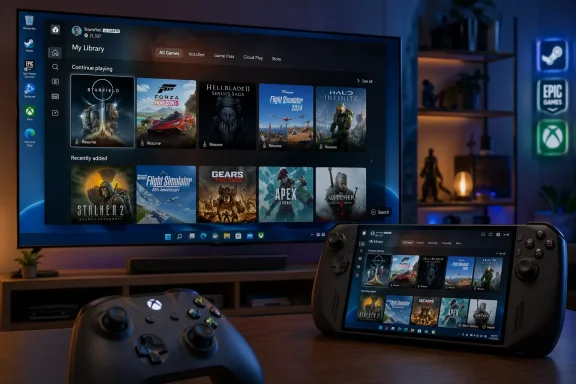 Microsoft Finally Admits the Desktop Is the Wrong Room for the Couch
For decades, Windows gaming has carried a contradiction: it is the most capable gaming platform in the world and often the least graceful one to use from ten feet away. A keyboard-and-mouse desktop is a wonderful command center for modding, streaming, tweaking drivers, and juggling launchers. It is a miserable living-room interface.Xbox Mode is Microsoft’s answer to that old problem. It puts the Xbox app into a full-screen, console-like shell designed for controllers, game libraries, recently played titles, and quick launching rather than taskbars, tray icons, and tiny window controls. It is meant for the moments when a PC is not being treated like a workstation but like a game machine.
The important part is not that Microsoft built another launcher. Steam Big Picture, Playnite, Armoury Crate, Legion Space, and a dozen OEM overlays have already proved there is demand for controller-friendly PC shells. The important part is that Microsoft is now baking the idea into Windows itself, under Settings, under Gaming, with a startup option that can take over after login.
That changes the politics of PC gaming. Microsoft is no longer merely offering Xbox as one app among many. It is positioning Xbox as the preferred living-room personality of Windows 11.
The Handheld PC Forced Windows to Confront Its Own Shape
Xbox Mode did not appear because desktop gamers suddenly forgot how to use Start. It appeared because handheld gaming PCs exposed Windows 11’s weakest assumptions. Devices like the ROG Ally, Lenovo Legion Go, MSI Claw, and later Xbox-branded handheld experiments turned a desktop OS into a small-screen console substitute, and the results were powerful but awkward.On paper, Windows handhelds had the killer advantage: they could run Game Pass, Steam, Epic, Battle.net, GOG, emulators, anti-cheat-protected multiplayer titles, and oddball utilities that Linux-based handhelds often struggled with. In practice, users had to fight pop-ups, update prompts, driver panels, login boxes, window focus bugs, and touch targets designed for monitors, not thumbs.
The Steam Deck succeeded not because SteamOS could run every PC game. It succeeded because it understood that a handheld should boot into a game shelf, suspend gracefully, update predictably, and hide the underlying computer until the user asks for it. Windows handhelds had broader compatibility but less confidence.
Microsoft’s full-screen experience began as a response to that embarrassment. The company could not keep telling players that Windows was the best gaming platform while making them jab at desktop dialog boxes on seven-inch screens. Xbox Mode is the scaled-up version of that correction: what began as a handheld patch is now becoming a general-purpose gaming posture for Windows PCs.
Xbox Mode Is a Mask, but Some Masks Change Behavior
The cynical read is simple: Xbox Mode is just a full-screen app. That is partly true, and it is the right place to start. This is not a console OS, not a Windows Gaming Edition, and not a clean break from the Win32 universe that makes PC gaming both glorious and exhausting.But dismissing it as “just a launcher” misses the subtler shift. Microsoft’s support documentation describes the full-screen experience as a mode that optimizes the Windows interface for controller navigation and can avoid loading certain background processes at startup when configured to enter the experience immediately. That is not merely a coat of paint. It is Windows beginning to treat gaming as a session type.
That matters because modern Windows is a noisy environment. Cloud sync tools, OEM utilities, updaters, RGB managers, telemetry agents, chat clients, launchers, browser helpers, and driver dashboards all compete for attention and resources. A mode that starts with fewer distractions and defers some desktop startup behavior is not equivalent to a stripped-down console, but it recognizes that foreground gaming deserves a different baseline.
The distinction will be crucial in how players judge it. If Xbox Mode feels like a clean boot path into games, it will be seen as progress. If it feels like the Xbox app wearing a Halloween costume while Windows Update waits behind the sofa, it will be treated as another layer in the pile.
The Launcher War Enters Its Diplomatic Phase
Microsoft has been careful to say that the Xbox game library can surface and launch games from other PC storefronts. That is the sentence designed to calm the room. Windows’ value as a gaming platform depends on the fact that it is not a console walled garden, and any Xbox-branded shell that appears to demote Steam or Epic would trigger immediate suspicion.The company knows this. The Xbox app has spent years trying to become less parochial, adding broader library views and acknowledging the reality that PC gamers do not live inside a single store. Game Pass may be Microsoft’s subscription crown jewel, but Steam remains the default social and commercial layer for much of the PC market.
Xbox Mode therefore has to perform a balancing act. It must make Microsoft’s ecosystem feel native and convenient without making rival ecosystems feel like second-class citizens. That is harder than it sounds, because interface hierarchy is power. The first tile, the default library, the store tab, the resume behavior, and the controller shortcut all communicate whose platform the user is really standing in.
If Microsoft gets the balance right, Xbox Mode becomes a pragmatic hub: Xbox at the center, Windows underneath, other stores within reach. If it gets greedy, PC gamers will route around it as they always have.
The Living-Room PC Gets a Second Chance
The living-room Windows PC has been promised, abandoned, and reinvented so many times that it deserves its own archaeology exhibit. Windows Media Center once suggested Microsoft understood the couch. Steam Machines tried to make PC gaming console-like and collapsed under fragmentation. Small-form-factor PCs and HDMI-connected gaming rigs kept the dream alive for hobbyists, but never made it mainstream.Xbox Mode gives that dream a more plausible foundation. Unlike Steam Machines, it does not ask users to buy into a new platform identity or hope developers support a different Linux stack. Unlike Windows Media Center, it is aligned with gaming rather than television. Unlike OEM overlays, it comes from the company that controls the OS.
The timing is also better. Controllers are now normal on PC. Game Pass has trained players to think across console and computer. Cloud saves and cross-play have blurred device boundaries. Mini PCs and compact GPUs have made quiet living-room rigs more practical. Handheld PCs have normalized the idea that Windows can be a game appliance, even when it remains a general-purpose computer underneath.
Still, the living-room test will be unforgiving. A console interface must survive family use, sleepy use, controller-only use, and “I just want to play for 20 minutes” use. Windows has traditionally been worst precisely when patience is shortest.
Microsoft Is Trying to Win the Boot Sequence
The most consequential option in Xbox Mode may be the least glamorous one: entering the full-screen experience at startup. Whoever owns the first screen after login owns the user’s mental model of the device. Is this a PC that can play games, or a game machine that can become a PC?That distinction matters most on handhelds, but it extends to desktops connected to televisions and laptops used with controllers. If Windows boots into the Xbox experience, the desktop becomes secondary. The taskbar is no longer the home base. File Explorer is no longer the assumed starting point. The user begins in a game library and leaves only when necessary.
Microsoft has been circling this idea for years. Windows has modes for tablets, kiosks, gaming optimizations, focus sessions, and power profiles, but it has rarely been willing to let a consumer-facing shell displace the desktop so directly. Xbox Mode is not Windows Shell replacement in the classic sense, but psychologically it points in that direction.
This is why the rollout feels bigger than a feature toggle. It suggests Microsoft sees Windows not as one interface but as a substrate for multiple device identities. Work Windows, tablet Windows, gaming Windows, cloud Windows, and perhaps AI-agent Windows can all sit atop the same base. Xbox Mode is the gaming version of that strategy made visible.
Performance Claims Will Meet the Reality of PC Variance
Microsoft and its partners have previously talked about performance gains from reducing background activity in full-screen gaming contexts, and some OEM claims have pointed to lower memory use or better frame rates under specific conditions. Those numbers are intriguing, but they should be treated carefully. PC performance is a swamp of drivers, firmware, launchers, overlays, anti-cheat systems, and thermal limits.The best-case scenario is easy to imagine. A handheld with limited RAM and a tight power budget boots into Xbox Mode, avoids loading unnecessary startup apps, keeps the interface controller-friendly, and spends more of its resources on the game. On that class of device, small reductions in overhead can translate into smoother frame pacing or longer battery life.
The desktop case is less obvious. A high-end tower with 64GB of RAM and a modern GPU will not suddenly become a different machine because the Xbox app takes over the screen. For those users, the value is convenience and cohesion, not raw frames. The performance story will be most persuasive where hardware constraints are real.
This is where Microsoft’s messaging needs precision. If it oversells Xbox Mode as a magic accelerator, enthusiasts will tear it apart. If it describes it as a cleaner session with possible resource benefits, especially on handhelds and startup-constrained systems, users are more likely to judge it fairly.
The Windows Desktop Remains the Escape Hatch and the Liability
One of Xbox Mode’s strengths is that users can switch back to the standard Windows desktop at any time. That preserves the essential PC promise. You can launch a game, mod it, troubleshoot it, stream it, install a fan patch, change a driver setting, or open a browser without leaving the platform.It is also the reminder that Xbox Mode cannot fully solve Windows gaming friction. The moment a third-party launcher demands credentials, a driver package throws a warning, an anti-cheat update fails, or an old game opens a configuration utility, the console illusion breaks. The user is back in Windows, with all the power and irritation that implies.
This is the central paradox. PC gamers want openness until openness interrupts them. They want every store, every mod, every peripheral, and every graphics option, but they also want the appliance-like reliability of a console. Xbox Mode can reduce the number of times Windows intrudes, but it cannot eliminate the causes without narrowing what Windows is.
Microsoft’s challenge is therefore not to make Windows invisible. It is to make Windows appear only when its presence is useful. That is a much harder design problem than drawing a full-screen dashboard.
Handheld Makers Just Lost Some Differentiation
OEMs have spent the last several years building their own software layers to compensate for Windows’ handheld shortcomings. Asus has Armoury Crate, Lenovo has Legion Space, MSI has its own control utilities, and smaller vendors often ship custom launchers or quick settings panels. Some are useful. Many feel like emergency scaffolding around an OS that was never designed for the device.Xbox Mode threatens to standardize part of that experience. If Microsoft provides the full-screen game library, controller navigation, startup behavior, and app switching, OEMs may have less room to distinguish themselves through broad launcher software. Their value shifts back toward hardware, thermals, controls, displays, battery life, and device-specific tuning.
That is probably healthy. The Windows handheld market has suffered from duplication, with each vendor trying to build a quasi-console layer while still relying on Microsoft for the parts that matter. A common baseline could reduce confusion and make reviews less about which overlay is least annoying.
But OEMs will not disappear from the software story. Handhelds still need fast TDP controls, fan curves, resolution switching, gyro settings, button remapping, BIOS updates, and per-game performance profiles. Xbox Mode may become the front door, while OEM utilities become the garage full of tools. The trick will be keeping those tools accessible without turning the front door into a junk drawer.
Steam Is the Unnamed Rival in Every Room
Microsoft’s announcement does not need to mention Steam for Steam to dominate the subtext. Valve has already proved that a PC game library can be wrapped in a console-grade interface. Steam Big Picture matured, Steam Input became a major controller abstraction layer, and SteamOS gave the Steam Deck an identity Windows handhelds lacked.Xbox Mode is not a direct clone, but it is a response to the same insight: the interface around PC games is now as strategically important as the games themselves. The store that feels best from the couch or on a handheld gains daily leverage. It becomes the place users browse, resume, buy, and organize.
Microsoft has advantages Valve does not. It owns Windows, Game Bar, DirectX, Xbox services, Game Pass, and the OS-level settings path. It can integrate startup behavior and background process management in ways a third-party launcher cannot. That gives Xbox Mode a privileged position.
Valve has advantages Microsoft cannot simply copy. Steam is where many PC gamers’ libraries, friends, wishlists, reviews, forums, workshop mods, and purchase histories already live. Trust in Steam’s PC gaming instincts is deep. Microsoft must prove that Xbox Mode is not just a funnel into Game Pass, but a genuinely good shell for the whole PC gaming life.
Enterprise IT Will Notice the Consumer Shell Creep
WindowsForum readers who manage fleets may look at Xbox Mode and shrug. Most corporate images are not built for couch gaming. Yet the feature is part of a larger Windows pattern that enterprise admins do care about: consumer experiences increasingly arrive as OS-level defaults, optional components, or policy-manageable features that must be understood, documented, and controlled.On business devices, gaming features are usually irrelevant until they are not. A setting under Gaming, a startup shell option, a Game Bar pathway, and background process behavior all intersect with endpoint management assumptions. Even if Xbox Mode is harmless on managed hardware, admins will want to know whether it appears, whether it can be disabled, and whether it affects standard user environments.
Microsoft has been moving in parallel toward giving Enterprise and Education customers more control over bundled app removal and default Store packages. That context matters. The company knows it cannot keep adding consumer-facing experiences without offering IT a way to keep managed PCs boring.
For home users, Xbox Mode is a convenience feature. For admins, it is another reminder that Windows is not a single audience product. The same OS image is expected to satisfy gamers, students, developers, accountants, streamers, and kiosk operators. That flexibility is Windows’ superpower, but it is also why every new mode becomes a management question.
The Rollout Strategy Is Conservative Because the Stakes Are Not
Microsoft is rolling Xbox Mode out first in select markets, with wider availability expected over the following weeks. That staged approach is typical, but here it is especially sensible. A broken Notepad update is annoying. A broken startup gaming shell on handhelds and living-room PCs is a trust event.The feature also depends on more than one moving part. Users need current Windows updates, the relevant Xbox app behavior, supported settings exposure, and regional availability. Some will see the option immediately; others will not. Some devices will support the deeper startup behavior cleanly; others may experience the interface first as a launchable mode rather than a transformed boot path.
That ambiguity is inevitable in Windows land, but it should not be minimized. One reason consoles feel simple is that platform updates arrive against tightly controlled hardware and software expectations. Windows updates arrive into chaos. The same feature that feels polished on a new handheld may feel half-present on an older gaming laptop with years of startup cruft.
Microsoft’s best move is to be blunt about rollout stages and capability differences. Nothing irritates enthusiasts faster than being told a feature is “available” when the setting does not appear on their machine. Xbox Mode’s first few weeks will be judged as much by expectation management as by interface design.
The Console War Is Becoming a Windows Strategy
Xbox Mode also lands at a moment when the meaning of “Xbox” has been expanding. Xbox is no longer just a box under the television. It is a console brand, a PC app, a cloud service, a subscription, a developer platform, a controller identity, and increasingly a layer across devices.That evolution has made some traditional console fans uneasy. If Xbox games are playable across console, PC, handheld, cloud, and rival hardware, what exactly is the Xbox? Microsoft’s answer appears to be that Xbox is the gaming environment, not necessarily the device. Xbox Mode is that answer rendered in Windows UI.
This is strategically coherent. Microsoft’s biggest gaming advantage is not selling one piece of hardware at the highest margin. It is tying together Windows, Azure, Game Pass, Xbox services, developer tools, and a massive cross-device audience. A full-screen Xbox interface on Windows makes the PC less like a separate kingdom and more like one province in the Xbox empire.
The risk is brand dilution. If everything is Xbox, then Xbox must stand for a quality of experience rather than a plastic box. Xbox Mode will therefore carry brand weight disproportionate to its feature list. If it feels fast, elegant, and respectful of PC openness, it strengthens the new Xbox thesis. If it feels like a slow launcher with ads, it weakens it.
The Best Version of Xbox Mode Is Quietly Boring
The highest compliment Xbox Mode could earn is that users stop thinking about it. They pick up a controller, wake a handheld or TV-connected PC, see their games, launch one, switch back when needed, and never wonder whether Windows is about to interrupt. That is boring in the way good infrastructure is boring.To get there, Microsoft must resist the temptation to turn the interface into a billboard. The Xbox dashboard on consoles has often been criticized for promotional clutter, and PC gamers are even less tolerant of real estate being commandeered. A full-screen gaming mode should prioritize the user’s installed library, recent sessions, performance state, friends, captures, and settings. Store discovery has a place, but it cannot feel like the rent.
It must also be fast. Console-like interfaces live or die on latency: controller input, animation smoothness, library loading, resume behavior, and task switching. A beautiful shell that pauses to think will feel worse than the desktop it replaces. Windows users already know how to tolerate complexity; Xbox Mode must justify itself by reducing friction immediately.
And it must be predictable. If pressing the Xbox button sometimes opens Game Bar, sometimes the full-screen interface, sometimes a launcher overlay, and sometimes nothing because focus is trapped in a game, the illusion collapses. Controller-first design is not just larger buttons. It is a contract about what every button means.
The First Weeks Will Reveal Whether This Is a Feature or a Foundation
The concrete story today is straightforward: update Windows 11, look under Settings, Gaming, and Full Screen Experience, choose a gaming home app, and optionally configure Xbox Mode to start after login. Users in the first rollout markets should begin seeing the new experience now, while others may need to wait as Microsoft expands availability.The larger story is that Microsoft is building a sanctioned console posture for Windows without closing Windows down. That is the needle the company has to thread. It wants the simplicity of Xbox, the compatibility of Windows, the commerce of Game Pass, and the goodwill of PC gamers who distrust anything that smells like enclosure.
If Xbox Mode becomes good enough, it may change buying behavior. A mini PC under a television becomes easier to recommend. A Windows handheld becomes less of a tinkerer’s compromise. A gaming laptop becomes more plausible as a dockable console. None of that requires Windows to stop being Windows.
But if Microsoft leaves the rough edges to OEMs, launcher makers, and users, Xbox Mode will become another well-intentioned shell people disable after curiosity fades. PC gamers have a long memory for half-finished convenience.
The Xbox Button Now Points at Microsoft’s Bigger Bet
Xbox Mode’s rollout gives Windows users a new interface, but its real importance is what it reveals about Microsoft’s direction.- Microsoft is turning Xbox into a cross-device Windows experience rather than treating it only as a console brand.
- Xbox Mode is rolling out first in select markets and should expand more broadly over the coming weeks.
- The feature is configured through Windows 11’s Gaming settings, where users can choose a home app and enable startup behavior.
- The experience is designed for controllers and full-screen play, especially on handhelds, laptops, desktops, and TV-connected PCs.
- The strongest benefits are likely to show up on handhelds and constrained systems where background activity, startup clutter, and desktop navigation hurt the most.
- The feature’s success will depend on whether Microsoft keeps the interface fast, library-focused, and open to non-Microsoft storefronts.
Source: Neowin Windows 11's new full-screen Xbox Mode is now rolling out
