

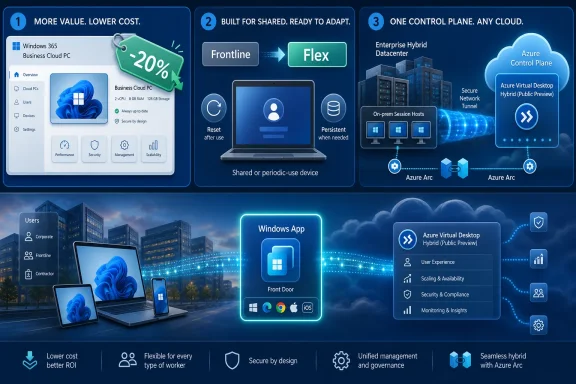
Microsoft announced on May 4, 2026, that Windows 365 Business pricing is dropping 20 percent, Windows 365 Frontline is being renamed Windows 365 Flex, and Azure Virtual Desktop Hybrid is entering public preview for organizations running session hosts on-premises through Azure Arc. That is not just a tidy product-line refresh. It is Microsoft admitting that cloud-delivered Windows has to meet customers somewhere messier than the all-in public-cloud future its marketing once implied. The new pitch is less “move everything to Azure” and more “let us manage the control plane while you decide where the desktop actually lives.”
The most immediately visible change is the simplest one: Windows 365 Business is getting cheaper. Microsoft says it reduced the list price of Windows 365 Business by 20 percent across all Cloud PC configurations as of May 1, 2026, targeting small and medium-sized businesses that want hosted Windows desktops without building a full virtualization practice.
That matters because Windows 365 Business has always occupied an awkward but important space in Microsoft’s portfolio. It is meant for organizations with up to 300 seats, the kind of companies that may have Microsoft 365 subscriptions, a few line-of-business apps, and no dedicated virtualization engineer. For them, “cloud PC” is not a grand architectural bet. It is a way to give a contractor, remote worker, temporary employee, or underpowered laptop a predictable Windows environment without buying and managing another physical PC.
The price cut is therefore not just a discount. It is an acknowledgement that the previous economics were still too close to enterprise VDI territory for many smaller customers. A Cloud PC may be simpler than deploying Azure Virtual Desktop, but simplicity does not erase the monthly bill, especially when a small business compares it against a depreciated desktop tower, a cheap laptop, or the unsatisfying but familiar habit of letting employees use whatever machine they already own.
Microsoft is also layering a time-limited promotion on top of the permanent cut, offering eligible new customers another 20 percent off the new lower price through June 30, 2026. The fine print matters: the promotion is limited to customers not currently subscribed to Windows 365, cannot be combined with other offers, and must be processed before Microsoft’s deadline. In other words, this is both a customer acquisition push and a signal to partners that Microsoft wants more proof-of-concept deployments in the SMB channel before the summer buying window closes.
But reducing price does not remove every barrier. Cloud PCs still require identity hygiene, access policies, endpoint security thinking, and a plan for what happens when the network becomes the new monitor cable. For a ten-person accounting firm, a twenty-person architecture practice, or a regional nonprofit, the operational question is not whether Microsoft can stream Windows. It is whether the organization can support a model where the desktop is now a service dependency.
That is where Windows 365 Business has a structural advantage over Azure Virtual Desktop. It packages the desktop as a more opinionated service, hiding much of the machinery that would otherwise turn a small deployment into a consulting project. The trade-off is reduced flexibility compared with AVD, but for many SMBs, reduced flexibility is the feature. They want fewer knobs because every knob is another thing nobody has time to own.
The price cut makes that bargain more attractive. It does not make Cloud PCs cheap in the abstract, and it does not make them the right answer for every user. But it narrows the gap between “interesting but too expensive” and “worth piloting for the users who are hardest to support with normal hardware.”
Still, this one is revealing. “Frontline” framed the product around shift workers: retail associates, healthcare staff, contact-center employees, warehouse teams, and other users who need periodic access to a Windows environment but not a dedicated PC. “Flex” broadens the category. It points to part-time staff, seasonal workers, contractors, task-based employees, developers with intermittent needs, and users whose work pattern does not justify a one-user-one-PC subscription.
That shift reflects a larger change in how organizations think about access. The old shared-PC model assumed people came to the same building, sat at the same kiosk, and used the same physical device. Hybrid work broke that model in two directions. Some users left the building entirely, while others remained shift-based but still needed access from distributed locations, personal devices, or shared terminals that could not be treated as trusted corporate desktops.
Windows 365 Flex is Microsoft’s attempt to sell a cloud version of that shared access model. In shared mode, a Cloud PC can be reset to a fresh state between uses, or it can optionally preserve user settings and application data across sessions. That distinction is crucial. Some scenarios demand a clean machine every time; others need enough persistence that the worker is not starting from scratch at every login.
App publishing has a long history in remote desktop environments, and Azure Virtual Desktop already supports RemoteApp scenarios. What is different here is the packaging. Microsoft is trying to make app streaming feel like a Windows 365 consumption model rather than a bespoke VDI project. For task workers, that could mean launching a specific corporate app without caring whether it is running locally, in a browser, or inside a remote Windows session.
For IT, the appeal is obvious: fewer local installs, less data on unmanaged endpoints, and a cleaner way to expose Windows apps to users who do not need the ceremony of a full desktop. For users, the appeal depends on performance, sign-in friction, printer and peripheral behavior, and whether the app feels like part of the workday or a bolted-on workaround. Cloud app delivery succeeds only when the infrastructure disappears.
This is also where Microsoft’s “Flex” branding earns its keep. The same product family can now describe a shared Cloud PC, a persistent periodic-use desktop, a clean-reset kiosk-like session, or an app-only experience. That is good messaging, but it also means admins will need to be precise. “Flex” is not a single user experience; it is a licensing and delivery umbrella for several different patterns of work.
That is a meaningful shift. For years, Azure Virtual Desktop’s appeal was tied to Azure as the natural home for the session hosts. Microsoft managed the service layer, customers paid for Azure compute and storage, and the architecture made sense for organizations willing to put virtual desktops near other Azure resources. Hybrid changes the gradient. It says the control plane can be cloud-managed while the workload plane remains local.
Microsoft frames this as a modernization path for organizations with regulatory constraints, existing datacenter investments, operational dependencies, or workloads that cannot move to public cloud overnight. That framing is realistic. Many enterprises are not refusing the cloud because they lack imagination. They have latency-sensitive apps, data locality requirements, sunk hardware costs, change-control processes, and support contracts wrapped around existing virtualization stacks.
The preview also preserves a familiar user entry point: people access their desktops through the Windows App. That detail matters because Microsoft has been consolidating remote Windows access under a single client experience across Windows 365, Azure Virtual Desktop, Dev Box, and related services. The less users need to know about the underlying delivery model, the more freedom IT has to change where the session actually runs.
For administrators, that means the deployment is not simply “install AVD on your old hosts.” It requires Arc onboarding, tenant alignment, host pool configuration, networking to required Azure Virtual Desktop endpoints, and the usual identity and access controls. Microsoft’s own documentation makes clear that the preview currently requires validation host pools, and production deployments created during preview may need to be redeployed when the feature reaches general availability.
That last point should not be hand-waved away. Public preview is an invitation to test, not a green light to move payroll, call-center desktops, or clinical workstations onto the architecture without a rollback plan. Validation host pools exist so organizations can see service updates early and test compatibility. They are not a substitute for the boring work of operational readiness.
The technical promise is still significant. Broad hypervisor support means Microsoft is not forcing customers into a narrow infrastructure lane, at least at this stage. Bare-metal Windows Server session host support also opens interesting possibilities for specialized environments. But the preview label should keep expectations grounded: this is a direction of travel, not yet a fully settled production pattern.
That segmentation is Microsoft’s answer to a problem it partly created. The Windows cloud portfolio has become powerful but confusing, with overlapping messages around Cloud PCs, remote apps, virtual desktops, Windows App, Intune, Azure, and Microsoft 365 licensing. A customer deciding between Windows 365 and Azure Virtual Desktop is not merely choosing a product. They are choosing how much infrastructure responsibility they want to retain.
Windows 365 says: Microsoft will give you a Cloud PC as a service. Azure Virtual Desktop says: Microsoft will provide the virtualization service, but you can design the environment. Azure Virtual Desktop Hybrid says: Microsoft will manage the service plane while you keep session hosts on your own infrastructure. That is a rational ladder, but only if Microsoft and its partners explain it honestly.
The danger is that every scenario gets described as “flexible,” which is true but not useful. Flexibility for an SMB means not needing a specialist. Flexibility for a hospital may mean keeping workloads on-premises. Flexibility for a retailer may mean one active session per shared worker pool. Flexibility for a developer team may mean bursty access to a configured environment. These are different problems with different failure modes.
But security is not automatic. A Cloud PC with weak identity controls is still a compromised desktop waiting to happen. A hybrid AVD deployment with poorly maintained on-premises hosts is not magically safer because Azure is involved. A shared Cloud PC model that resets between users can reduce residue, but only if apps, profiles, and storage are configured with discipline.
The more honest security case is that these services can give administrators better control points. Conditional Access, multifactor authentication, endpoint compliance signals, centralized image management, and reduced local data footprints can improve posture. They do not remove the need for patching, monitoring, least privilege, and incident response.
Cost is similarly nuanced. The 20 percent Windows 365 Business price cut is real, and shared-use models can improve economics for workers who do not need dedicated machines. Yet cloud desktop bills are recurring, visible, and sometimes politically harder to justify than capital purchases that disappear into hardware refresh cycles. The financial case improves when organizations count support, security, device replacement, office logistics, and contractor onboarding, not just the sticker price of a laptop.
But the preview’s current constraints should shape expectations. Validation host pool support, Arc prerequisites, required endpoint connectivity, tenant alignment, and possible redeployment at general availability all point to the same conclusion: test aggressively, but do not confuse preview availability with operational maturity. The organizations that benefit most from this preview are the ones with enough VDI experience to know what to measure.
Performance testing will matter. Login storms, profile handling, graphics workloads, local app dependencies, printing, scanners, smart cards, Teams optimization, and storage behavior have ruined many desktop virtualization projects that looked elegant in diagrams. Hybrid AVD does not repeal those realities. It simply changes where some of the management boundaries sit.
Partner involvement will also be telling. Microsoft names launch partners including LoginVSI, Nerdio, and Nutanix, each of which speaks to a different part of the VDI ecosystem: performance validation, operational management, and infrastructure modernization. That is a sign Microsoft knows hybrid desktop deployments will need more than a portal wizard. The enterprise desktop is still where clean cloud stories go to encounter messy peripherals, brittle apps, and users who remember every outage.
For users, the ideal is boring: open one app, see the resources you are entitled to, connect, and work. For IT, the bigger prize is abstraction. If the same front door can lead to a Windows 365 Business Cloud PC, a Flex shared session, an AVD RemoteApp, or a hybrid session host in a datacenter, Microsoft gains room to evolve the backend without retraining every worker.
That abstraction also strengthens Microsoft’s platform control. The more Windows access flows through Microsoft’s identity, client, and management layers, the easier it becomes to attach policy, telemetry, security features, and licensing logic. This is not sinister; it is the business model. Microsoft wants Windows to remain central even when the physical PC is no longer the center of the workday.
The question for customers is how much of that abstraction they want to buy. A unified front door can simplify support and user training. It can also make organizations more dependent on Microsoft’s interpretation of how remote Windows should be packaged, licensed, and accessed. As always with platform consolidation, convenience and lock-in travel together.
 Microsoft Lowers the Cloud PC Drawbridge
The most immediately visible change is the simplest one: Windows 365 Business is getting cheaper. Microsoft says it reduced the list price of Windows 365 Business by 20 percent across all Cloud PC configurations as of May 1, 2026, targeting small and medium-sized businesses that want hosted Windows desktops without building a full virtualization practice.That matters because Windows 365 Business has always occupied an awkward but important space in Microsoft’s portfolio. It is meant for organizations with up to 300 seats, the kind of companies that may have Microsoft 365 subscriptions, a few line-of-business apps, and no dedicated virtualization engineer. For them, “cloud PC” is not a grand architectural bet. It is a way to give a contractor, remote worker, temporary employee, or underpowered laptop a predictable Windows environment without buying and managing another physical PC.
The price cut is therefore not just a discount. It is an acknowledgement that the previous economics were still too close to enterprise VDI territory for many smaller customers. A Cloud PC may be simpler than deploying Azure Virtual Desktop, but simplicity does not erase the monthly bill, especially when a small business compares it against a depreciated desktop tower, a cheap laptop, or the unsatisfying but familiar habit of letting employees use whatever machine they already own.
Microsoft is also layering a time-limited promotion on top of the permanent cut, offering eligible new customers another 20 percent off the new lower price through June 30, 2026. The fine print matters: the promotion is limited to customers not currently subscribed to Windows 365, cannot be combined with other offers, and must be processed before Microsoft’s deadline. In other words, this is both a customer acquisition push and a signal to partners that Microsoft wants more proof-of-concept deployments in the SMB channel before the summer buying window closes.
The SMB Problem Was Never Just Licensing
Microsoft’s description of Windows 365 Business is carefully tuned for smaller organizations: ready-to-use Cloud PCs, simple management, and no requirement for other Microsoft licenses to get started. That positioning is important because the old enterprise virtualization story assumes a level of IT maturity many small businesses simply do not have. They do not want to design host pools, tune autoscaling, manage golden images, or debate storage profiles.But reducing price does not remove every barrier. Cloud PCs still require identity hygiene, access policies, endpoint security thinking, and a plan for what happens when the network becomes the new monitor cable. For a ten-person accounting firm, a twenty-person architecture practice, or a regional nonprofit, the operational question is not whether Microsoft can stream Windows. It is whether the organization can support a model where the desktop is now a service dependency.
That is where Windows 365 Business has a structural advantage over Azure Virtual Desktop. It packages the desktop as a more opinionated service, hiding much of the machinery that would otherwise turn a small deployment into a consulting project. The trade-off is reduced flexibility compared with AVD, but for many SMBs, reduced flexibility is the feature. They want fewer knobs because every knob is another thing nobody has time to own.
The price cut makes that bargain more attractive. It does not make Cloud PCs cheap in the abstract, and it does not make them the right answer for every user. But it narrows the gap between “interesting but too expensive” and “worth piloting for the users who are hardest to support with normal hardware.”
Windows 365 Flex Is a Rename With a Real Strategy Behind It
The second announcement looks cosmetic at first: Windows 365 Frontline is now Windows 365 Flex. Microsoft says the name change does not affect how the service works or how it is purchased. That kind of rebrand usually deserves skepticism, especially from a company that has never met a licensing label it could not rename.Still, this one is revealing. “Frontline” framed the product around shift workers: retail associates, healthcare staff, contact-center employees, warehouse teams, and other users who need periodic access to a Windows environment but not a dedicated PC. “Flex” broadens the category. It points to part-time staff, seasonal workers, contractors, task-based employees, developers with intermittent needs, and users whose work pattern does not justify a one-user-one-PC subscription.
That shift reflects a larger change in how organizations think about access. The old shared-PC model assumed people came to the same building, sat at the same kiosk, and used the same physical device. Hybrid work broke that model in two directions. Some users left the building entirely, while others remained shift-based but still needed access from distributed locations, personal devices, or shared terminals that could not be treated as trusted corporate desktops.
Windows 365 Flex is Microsoft’s attempt to sell a cloud version of that shared access model. In shared mode, a Cloud PC can be reset to a fresh state between uses, or it can optionally preserve user settings and application data across sessions. That distinction is crucial. Some scenarios demand a clean machine every time; others need enough persistence that the worker is not starting from scratch at every login.
The App-Only Cloud PC Is Microsoft’s Quietest Wedge
The most interesting part of the Flex story may not be the desktop at all. Windows 365 Flex in shared mode also underpins Windows 365 Cloud Apps, an app-only experience that lets users access individual applications without requiring a dedicated Cloud PC desktop experience. That gives Microsoft a more subtle on-ramp for organizations that do not want to explain to users why they suddenly have a whole second Windows desktop.App publishing has a long history in remote desktop environments, and Azure Virtual Desktop already supports RemoteApp scenarios. What is different here is the packaging. Microsoft is trying to make app streaming feel like a Windows 365 consumption model rather than a bespoke VDI project. For task workers, that could mean launching a specific corporate app without caring whether it is running locally, in a browser, or inside a remote Windows session.
For IT, the appeal is obvious: fewer local installs, less data on unmanaged endpoints, and a cleaner way to expose Windows apps to users who do not need the ceremony of a full desktop. For users, the appeal depends on performance, sign-in friction, printer and peripheral behavior, and whether the app feels like part of the workday or a bolted-on workaround. Cloud app delivery succeeds only when the infrastructure disappears.
This is also where Microsoft’s “Flex” branding earns its keep. The same product family can now describe a shared Cloud PC, a persistent periodic-use desktop, a clean-reset kiosk-like session, or an app-only experience. That is good messaging, but it also means admins will need to be precise. “Flex” is not a single user experience; it is a licensing and delivery umbrella for several different patterns of work.
Azure Virtual Desktop Hybrid Is the Bigger Architectural Concession
Azure Virtual Desktop Hybrid is the most consequential announcement for enterprise IT because it loosens one of the assumptions built into Microsoft’s cloud VDI story. In public preview, organizations can run Azure Virtual Desktop session hosts on-premises using existing hardware and a preferred hypervisor, with those machines connected through Azure Arc. The Azure Virtual Desktop service remains in Azure, but the desktops and apps can live in the customer’s datacenter.That is a meaningful shift. For years, Azure Virtual Desktop’s appeal was tied to Azure as the natural home for the session hosts. Microsoft managed the service layer, customers paid for Azure compute and storage, and the architecture made sense for organizations willing to put virtual desktops near other Azure resources. Hybrid changes the gradient. It says the control plane can be cloud-managed while the workload plane remains local.
Microsoft frames this as a modernization path for organizations with regulatory constraints, existing datacenter investments, operational dependencies, or workloads that cannot move to public cloud overnight. That framing is realistic. Many enterprises are not refusing the cloud because they lack imagination. They have latency-sensitive apps, data locality requirements, sunk hardware costs, change-control processes, and support contracts wrapped around existing virtualization stacks.
The preview also preserves a familiar user entry point: people access their desktops through the Windows App. That detail matters because Microsoft has been consolidating remote Windows access under a single client experience across Windows 365, Azure Virtual Desktop, Dev Box, and related services. The less users need to know about the underlying delivery model, the more freedom IT has to change where the session actually runs.
Azure Arc Becomes the Broker Between Cloud Ambition and Datacenter Reality
Azure Arc is the connective tissue in Azure Virtual Desktop Hybrid. The on-premises machines are onboarded as Arc-enabled servers, and the Azure Virtual Desktop Arc extension registers them into a host pool. That model fits Microsoft’s broader hybrid strategy: use Azure as the management plane for resources that may not physically reside in Azure.For administrators, that means the deployment is not simply “install AVD on your old hosts.” It requires Arc onboarding, tenant alignment, host pool configuration, networking to required Azure Virtual Desktop endpoints, and the usual identity and access controls. Microsoft’s own documentation makes clear that the preview currently requires validation host pools, and production deployments created during preview may need to be redeployed when the feature reaches general availability.
That last point should not be hand-waved away. Public preview is an invitation to test, not a green light to move payroll, call-center desktops, or clinical workstations onto the architecture without a rollback plan. Validation host pools exist so organizations can see service updates early and test compatibility. They are not a substitute for the boring work of operational readiness.
The technical promise is still significant. Broad hypervisor support means Microsoft is not forcing customers into a narrow infrastructure lane, at least at this stage. Bare-metal Windows Server session host support also opens interesting possibilities for specialized environments. But the preview label should keep expectations grounded: this is a direction of travel, not yet a fully settled production pattern.
Microsoft Is Rebuilding VDI as a Portfolio, Not a Product
Taken together, these announcements make more sense as portfolio management than as isolated product updates. Windows 365 Business is the simplified Cloud PC for smaller organizations. Windows 365 Flex is the periodic-use and shared-access model. Azure Virtual Desktop remains the customizable VDI platform. Azure Virtual Desktop Hybrid extends that platform back into the datacenter.That segmentation is Microsoft’s answer to a problem it partly created. The Windows cloud portfolio has become powerful but confusing, with overlapping messages around Cloud PCs, remote apps, virtual desktops, Windows App, Intune, Azure, and Microsoft 365 licensing. A customer deciding between Windows 365 and Azure Virtual Desktop is not merely choosing a product. They are choosing how much infrastructure responsibility they want to retain.
Windows 365 says: Microsoft will give you a Cloud PC as a service. Azure Virtual Desktop says: Microsoft will provide the virtualization service, but you can design the environment. Azure Virtual Desktop Hybrid says: Microsoft will manage the service plane while you keep session hosts on your own infrastructure. That is a rational ladder, but only if Microsoft and its partners explain it honestly.
The danger is that every scenario gets described as “flexible,” which is true but not useful. Flexibility for an SMB means not needing a specialist. Flexibility for a hospital may mean keeping workloads on-premises. Flexibility for a retailer may mean one active session per shared worker pool. Flexibility for a developer team may mean bursty access to a configured environment. These are different problems with different failure modes.
The Security Story Is Stronger Than the Cost Story, but Both Matter
Microsoft’s cloud Windows pitch often leans on security, and for good reason. A streamed desktop or app can reduce local data exposure, centralize management, and make it easier to revoke access when a contractor leaves or a device disappears. For unmanaged or lightly managed endpoints, that is a compelling argument.But security is not automatic. A Cloud PC with weak identity controls is still a compromised desktop waiting to happen. A hybrid AVD deployment with poorly maintained on-premises hosts is not magically safer because Azure is involved. A shared Cloud PC model that resets between users can reduce residue, but only if apps, profiles, and storage are configured with discipline.
The more honest security case is that these services can give administrators better control points. Conditional Access, multifactor authentication, endpoint compliance signals, centralized image management, and reduced local data footprints can improve posture. They do not remove the need for patching, monitoring, least privilege, and incident response.
Cost is similarly nuanced. The 20 percent Windows 365 Business price cut is real, and shared-use models can improve economics for workers who do not need dedicated machines. Yet cloud desktop bills are recurring, visible, and sometimes politically harder to justify than capital purchases that disappear into hardware refresh cycles. The financial case improves when organizations count support, security, device replacement, office logistics, and contractor onboarding, not just the sticker price of a laptop.
The Preview That IT Should Treat as a Lab, Not a Lifeboat
Azure Virtual Desktop Hybrid will attract organizations that have been waiting for Microsoft to meet them on-premises. It is easy to see why. Legacy VDI estates are expensive to maintain, specialized talent is scarce, and many companies want a way to modernize management without ripping out infrastructure that still works.But the preview’s current constraints should shape expectations. Validation host pool support, Arc prerequisites, required endpoint connectivity, tenant alignment, and possible redeployment at general availability all point to the same conclusion: test aggressively, but do not confuse preview availability with operational maturity. The organizations that benefit most from this preview are the ones with enough VDI experience to know what to measure.
Performance testing will matter. Login storms, profile handling, graphics workloads, local app dependencies, printing, scanners, smart cards, Teams optimization, and storage behavior have ruined many desktop virtualization projects that looked elegant in diagrams. Hybrid AVD does not repeal those realities. It simply changes where some of the management boundaries sit.
Partner involvement will also be telling. Microsoft names launch partners including LoginVSI, Nerdio, and Nutanix, each of which speaks to a different part of the VDI ecosystem: performance validation, operational management, and infrastructure modernization. That is a sign Microsoft knows hybrid desktop deployments will need more than a portal wizard. The enterprise desktop is still where clean cloud stories go to encounter messy peripherals, brittle apps, and users who remember every outage.
The Windows App Is Becoming the Front Door to Microsoft’s Desktop Cloud
One understated piece of this announcement is the continued role of the Windows App as the user-facing access point. Microsoft has been steering users toward a unified client for Cloud PCs, Azure Virtual Desktop, remote desktops, and related Windows-in-the-cloud experiences. That consolidation is strategic.For users, the ideal is boring: open one app, see the resources you are entitled to, connect, and work. For IT, the bigger prize is abstraction. If the same front door can lead to a Windows 365 Business Cloud PC, a Flex shared session, an AVD RemoteApp, or a hybrid session host in a datacenter, Microsoft gains room to evolve the backend without retraining every worker.
That abstraction also strengthens Microsoft’s platform control. The more Windows access flows through Microsoft’s identity, client, and management layers, the easier it becomes to attach policy, telemetry, security features, and licensing logic. This is not sinister; it is the business model. Microsoft wants Windows to remain central even when the physical PC is no longer the center of the workday.
The question for customers is how much of that abstraction they want to buy. A unified front door can simplify support and user training. It can also make organizations more dependent on Microsoft’s interpretation of how remote Windows should be packaged, licensed, and accessed. As always with platform consolidation, convenience and lock-in travel together.
The New Access Map Has Three Obvious Routes
Microsoft’s announcement is best read as a redrawn map for cloud Windows adoption, not as a single road everyone is expected to take. The practical implications are concrete enough for IT teams to start sorting pilots now.- Windows 365 Business is now more credible for small and medium-sized organizations that rejected Cloud PCs primarily on price.
- Windows 365 Flex gives Microsoft a broader label for shared, periodic, app-only, and task-based Windows access without changing the underlying purchase model.
- Windows 365 Cloud Apps could become the more acceptable first step for users who need one or two Windows applications, not a full remote desktop.
- Azure Virtual Desktop Hybrid gives enterprises a public-preview path to cloud-managed VDI while keeping session hosts on-premises through Azure Arc.
- The preview status of Azure Virtual Desktop Hybrid makes it suitable for labs, pilots, and architecture planning, not unqualified production migration.
- Microsoft’s Windows cloud portfolio is becoming more adaptable, but also more dependent on clear licensing, identity, networking, and endpoint-management decisions.
References
- Primary source: Windows IT Pro Blog
Published: Thu, 18 Jun 2026 13:31:22 GMT
Windows 365 and Azure Virtual Desktop: Expanding access
Updates to Windows 365 and Azure Virtual Desktop expand access—from SMB Cloud PCs to hybrid VDI options. techcommunity.microsoft.com
- Official source: learn.microsoft.com
Azure Virtual Desktop Hybrid Overview - Azure Virtual Desktop | Microsoft Learn
An overview of Microsoft's Azure Virtual Desktop Hybrid capability. This feature enables deploying virtual desktops and applications on-premises while managing them from a cloud-native service.learn.microsoft.com - Official source: microsoft.com
Windows 365 Flex | Windows 365
Learn how Microsoft Windows 365 Flex expands Cloud PC access, empowering employees with secure, flexible, and productive Windows experiences in the cloud.www.microsoft.com
- Official source: blogs.windows.com
Windows 365 と Azure Virtual Desktop:ポートフォリオの拡充 - Windows Blog for Japan
※本ブログは、米国時間5月4日に公開された Windows 365 and Azure Virtual Desktop: Expanding access” の意訳です。 執筆: Tristan Scott 人々の働き方は進化し続けており、組織がクラウド経由で提供する Windows... blogs.windows.com
- Official source: azure.microsoft.com
- Related coverage: techradar.com
Not ready for Cloud PCs just yet? Microsoft will still let you stream individual apps to get you started | TechRadar
Windows 365 Cloud Apps are now in public previewwww.techradar.com
- Related coverage: pcgamer.com
Microsoft Windows 365 goes down the day after Microsoft celebrates 'reimagining the PC as a cloud service that streams a Cloud PC' | PC Gamer
That cloud is looking a little grey.www.pcgamer.com - Official source: download.microsoft.com
- Related coverage: m365maps.com
- Official source: cdn-dynmedia-1.microsoft.com
