

Navigation section
You are using an out of date browser. It may not display this or other websites correctly.
You should upgrade or use an alternative browser.
You should upgrade or use an alternative browser.
Windows 8 windows 8 desktop bar
- Thread starter revid
- Start date
- 1 min read
Solution

You have not indicated whether this is a recent issue or it has been that way since day one.
If it is a recent issue, do a system restore. Pick a date when you did NOT have such a problem as your restore point.
Open Win 8 > go to Charm Bar > select Start > anywhere in the window, type recovery > right side under the search box, click Recovery > click Open System Restore > click Next > select a date BEFORE this issue ( if you can't find a suitable date, click show more restore points ) > click Next
If it is a recent issue, do a system restore. Pick a date when you did NOT have such a problem as your restore point.
Open Win 8 > go to Charm Bar > select Start > anywhere in the window, type recovery > right side under the search box, click Recovery > click Open System Restore > click Next > select a date BEFORE this issue ( if you can't find a suitable date, click show more restore points ) > click Next


davidhk129
Senior Member
- Joined
- May 19, 2012
- Messages
- 1,315
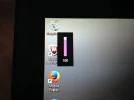
I have a windows 8 laptop and a small bar with percentage on it appeared on the desktop and I can't get rid of it.When you click on it the percentage refreshes and goes up to 100%.Any idea on how to get rid of it please?
I wonder if you are actually referring to Magnifier.
Does it look like this ?.........
and does it turn into a magnifier glass by itself ?
If yes, you can either....
right click at it, click Close.
or, click the X at top right of the small bar.
Last edited by a moderator:
davidhk129
Senior Member
- Joined
- May 19, 2012
- Messages
- 1,315
I never saw this "bar" until now.
My guess is it comes from one of your 3rd party programs.
If this happens only recently, think back ..... what had you installed during those time frame ?
I am sorry I am of no help to you.
My guess is it comes from one of your 3rd party programs.
If this happens only recently, think back ..... what had you installed during those time frame ?
I am sorry I am of no help to you.
Last edited:
- Thread Author
- #6
thanks bud but nothing was installed. Its up on the screen and I've looked through everything in control panel and device manager.Nothing new and nothing running.Its even slowed the system and taking forever to recharge.I got rid of it some how yesterday but when the wife opened her laptop it was back and I dont know how I got rid of it or it went away by itself.Its on an asus T1100 notebook
davidhk129
Senior Member
- Joined
- May 19, 2012
- Messages
- 1,315
You have not indicated whether this is a recent issue or it has been that way since day one.
If it is a recent issue, do a system restore. Pick a date when you did NOT have such a problem as your restore point.
Open Win 8 > go to Charm Bar > select Start > anywhere in the window, type recovery > right side under the search box, click Recovery > click Open System Restore > click Next > select a date BEFORE this issue ( if you can't find a suitable date, click show more restore points ) > click Next
If it is a recent issue, do a system restore. Pick a date when you did NOT have such a problem as your restore point.
Open Win 8 > go to Charm Bar > select Start > anywhere in the window, type recovery > right side under the search box, click Recovery > click Open System Restore > click Next > select a date BEFORE this issue ( if you can't find a suitable date, click show more restore points ) > click Next

- Thread Author
- #9
yep thanks leostr!!!! Got that solved!! Now the damn thing is taking forever to charge,thought that bar was doing it,but I have it gone and still taking forever to charge.If it doesn't sped up its going back to Staples.Before this you could almost watch the power meter go up and no strange apps running.Everything that came with it is the only thing on it,its the wife's system and she has just the basics on it.BTW did I mention I hate windows 8 !!!!lol
davidhk129
Senior Member
- Joined
- May 19, 2012
- Messages
- 1,315
Not in my knowledge.
Unless you are talking about a different kind of Volume indicator, this is the Volume indicator since Vista to Win 7 to Win 8/8.1

Unless you are talking about a different kind of Volume indicator, this is the Volume indicator since Vista to Win 7 to Win 8/8.1
Last edited by a moderator:
davidhk129
Senior Member
- Joined
- May 19, 2012
- Messages
- 1,315
Apparently some win 8 users have that vertical small volume bar near top left corner.
I never saw one on my Win 8 to Win 8.1.
Perhaps it has to do with using different sound drivers ?
I use Realtek High Definition audio driver as well as Sigma Tel Audio for my Dell laptop.
I never saw one on my Win 8 to Win 8.1.
Perhaps it has to do with using different sound drivers ?
I use Realtek High Definition audio driver as well as Sigma Tel Audio for my Dell laptop.

strollin
Honorable Member
- Joined
- Jul 21, 2013
- Messages
- 285
On my Toshiba laptop, it's part of the integrated volume control on F9, F10 (Volume Up/Volume Down) keys. It's referred to as a Toast notification. Toshiba provides a utility to enable/disable the notification. My guess is that Asus does too.
davidhk129
Senior Member
- Joined
- May 19, 2012
- Messages
- 1,315
its not the multiplyer.heres a screenshot
I have found the volume indicator you mentioned.
I was told MS included this feature in win 8/8.1
However, what I have found out is a bit different from your case.
I have found out that the indicator will come on ONLY if I hit the one of the volume keys on my keyboard.
Also it will disappear in about 3 seconds.
It does not stay on like yours.
Mitchell_A
Former Moderator
- Joined
- Feb 7, 2009
- Messages
- 4,984
Most users with laptops or tablets will likely see this notification anytime they adjust their volume with key combinations or a dedicated volume rocker. Same goes for brightness.
Sent from my iPad using WindowsForum
Sent from my iPad using WindowsForum
Similar threads

- Article
- Replies
- 0
- Views
- 935
- Article
- Replies
- 0
- Views
- 410
- Article
- Replies
- 0
- Views
- 2K
- Article
- Replies
- 2
- Views
- 542
- Article
- Replies
- 0
- Views
- 2K