

Microsoft veteran Raymond Chen said on June 1, 2026, that Windows 8’s internal placeholder for its new user interface was “the modern experience,” a plain development-era label used to distinguish it from Windows 7’s “classic experience” before abbreviations like MoSh, MoGo, MoSet, and MoCo followed. The anecdote is funny because it sounds almost aggressively unglamorous for one of the most radical Windows releases Microsoft ever shipped. But it also explains something deeper about Windows 8: the company was not merely building a product, it was trying to rename the center of gravity of personal computing. The problem was that users never agreed to move there.
The least surprising thing about Windows 8’s “modern experience” codename is that it was boring. Big platform companies often use dull internal names because the work begins before marketing knows what story it wants to tell. Engineers need a label before executives need a launch video.
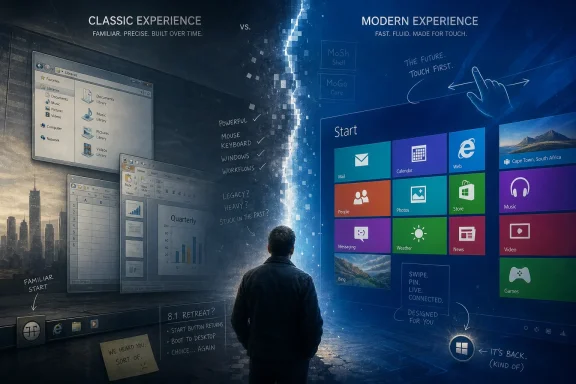
The more revealing part is the contrast Chen describes: Windows 7 became the “classic experience,” while the new Windows 8 environment became the “modern experience.” That is not neutral taxonomy. It quietly declares the old desktop to be inherited territory and the new touch-first shell to be the future.
That framing was everywhere in Windows 8. The Start screen did not feel like a replacement menu; it felt like a new operating system laid over the one people already knew. The desktop was still there, but it had been demoted from the main stage to a compatibility layer.
The codename, then, was not creative, but it was honest. Windows 8 was Microsoft’s attempt to divide Windows history into before and after: classic on one side, modern on the other.
This is the kind of internal shorthand that grows inside large engineering organizations because it saves seconds in meetings and eventually becomes impossible for outsiders to parse. Microsoft has always had this dialect, a mix of acronym, pun, and bureaucratic compression. It is charming until it starts shaping product assumptions.
The “Mo” names matter because they show how the modern environment became a parallel universe inside Windows. It had its own shell, its own controls, its own app model, its own settings surface, and its own vocabulary. The desktop was not being gradually evolved so much as bracketed off from a new world built beside it.
That parallelism was the technical and cultural bet of Windows 8. Microsoft wanted developers, OEMs, and users to treat the new environment as the default destination. The old desktop would remain, but the energy was supposed to go elsewhere.
The tragedy is that the abbreviations were probably more coherent inside Microsoft than the experience felt outside it.
The old Start menu had been a compact launcher, search entry point, application index, and comfort object. Windows 8 turned that idea into a tiled surface optimized for glanceable information and finger-sized targets. On tablets, the logic was obvious. On office desktops, multi-monitor workstations, and laptops without touch, it could feel like being thrown out of context.
Chen’s note that the Start experience came from “Go page” explorations is useful because it recasts the Start screen as more than a menu. Microsoft imagined it as the place users would go to search, launch, and begin tasks. That was a reasonable design thesis, but a thesis is not the same as consent.
The Start screen failed because it confused architectural ambition with user readiness. Microsoft had built a door into the future, then made it the front entrance before enough people wanted to live there.
In that context, “modern” was not merely descriptive. It was defensive. It said that Windows could be contemporary, that Microsoft could compete in tablets, and that the PC was not doomed to become the beige filing cabinet of the post-PC era.
But the word also carried a trap. If one experience is “modern,” the other becomes old by implication. That may be useful for internal momentum, but it is risky when the “old” experience is the one where customers run payroll, manage Active Directory, edit photos, write code, play games, and earn a living.
Windows 8 treated the desktop as both indispensable and embarrassing. It needed Win32 compatibility to preserve Windows’ value, but it wanted the new app model to define Windows’ future. Users could feel that tension even if they never knew the internal codenames.
The result was not a clean transition. It was a split personality wearing a launch-day grin.
So Windows 8 tried to move aggressively. It introduced a touch-first shell, a new app platform, a Store distribution model, edge gestures, live tiles, and a design language that rejected the skeuomorphic clutter of the previous decade. Some of that work was bold. Some of it was elegant. Much of it was premature.
Enterprise IT saw a different product. It saw retraining costs, help-desk load, workflow disruption, and a confusing split between Control Panel and the new settings world. It saw a user interface that seemed designed for hardware many organizations did not own.
Consumers were not universally hostile, but the backlash was real enough that Windows 8.1 had to retreat on several fronts. The Start button returned as a visible anchor, boot-to-desktop became easier, and Microsoft softened the forced march into the new environment. The company did not abandon the “modern” bet immediately, but it had to admit that the desktop still had veto power.
That is the pattern Windows users know too well: Microsoft sees the future, ships the future early, then spends years sanding down the edges cut by the first version.
The plainness of the name is exactly what makes it interesting. “Modern experience” was not a moonshot codename like Longhorn. It was an assertion masquerading as a placeholder. It told the team what mattered: not a feature, not a SKU, not a release number, but an experience that would be measurably different from Windows 7.
Windows 7 had been a trust-repair release after Vista. It refined, stabilized, and reassured. Windows 8 did the opposite. It asked users to accept that the familiar Windows interaction model was no longer sufficient for the decade ahead.
That made Windows 8 one of the most consequential failures in Microsoft history. Not because every idea was bad, but because the product tested how much change Windows could absorb before its own user base pushed back.
The answer was: less than Microsoft hoped, but more than critics sometimes admit.
The same fight now plays out around Copilot, Recall, ads, recommendations, Microsoft account prompts, and update control. The details are different, but the structure is familiar. Microsoft decides where computing is going, integrates that direction deeply into Windows, and then discovers that Windows users are not merely an audience. They are stakeholders with scripts, habits, policies, and scars.
Recent reporting around Microsoft’s Windows 11 course correction suggests the company knows this. Its reported Windows K2 effort, its pullback from unnecessary Copilot entry points, and its work on more flexible update pausing all point to a recognition that Windows’ problem is not a lack of ambition. It is a shortage of earned trust.
That is where the Windows 8 codename becomes more than trivia. “Modern” failed as a command, but parts of it survived as infrastructure, design language, and institutional memory. Microsoft learned that it can move Windows, but it cannot simply rename the destination and expect everyone to arrive.
IT departments care about predictability. They need to know how users launch apps, where settings live, how policies map to interfaces, and what will break in training materials when the next update lands. Windows 8 disrupted all of that while offering a touch-first payoff many businesses could not immediately use.
The same lesson applies to today’s Windows debates. When Microsoft adds AI affordances across the shell, changes update behavior, or inserts cloud prompts into local workflows, power users and administrators are not merely being cranky. They are reacting to a platform owner altering the terms of daily work.
Control is not the opposite of innovation. In Windows, control is often the condition that makes innovation deployable. A feature that cannot be disabled, postponed, governed, or explained becomes a risk before it becomes a benefit.
Windows 8’s “modern experience” was not doomed because it was modern. It stumbled because it made modernity feel mandatory.
Windows 8, by contrast, often felt as if it was arguing with its own customers. The company was not wrong that computing was becoming more touch-friendly, more mobile, more app-centric, and more service-driven. It was wrong to assume that the desktop could be shoved into the past tense on Microsoft’s schedule.
The internal language captured that mistake with accidental precision. “Classic” and “modern” are not just descriptions; they are judgments. Nobody wants to be told that the workflow they depend on is yesterday’s experience, especially when the replacement is less efficient for their hardware and habits.
This is why Windows 8 remains such a useful cautionary tale. It was not a lazy release. It was an overconfident one. It tried to solve a real strategic problem with a user experience that treated resistance as friction rather than information.
 Windows 8 Was Born in a Naming Vacuum
The least surprising thing about Windows 8’s “modern experience” codename is that it was boring. Big platform companies often use dull internal names because the work begins before marketing knows what story it wants to tell. Engineers need a label before executives need a launch video.The more revealing part is the contrast Chen describes: Windows 7 became the “classic experience,” while the new Windows 8 environment became the “modern experience.” That is not neutral taxonomy. It quietly declares the old desktop to be inherited territory and the new touch-first shell to be the future.
That framing was everywhere in Windows 8. The Start screen did not feel like a replacement menu; it felt like a new operating system laid over the one people already knew. The desktop was still there, but it had been demoted from the main stage to a compatibility layer.
The codename, then, was not creative, but it was honest. Windows 8 was Microsoft’s attempt to divide Windows history into before and after: classic on one side, modern on the other.
The Mo Prefix Turned Strategy Into Office Slang
Chen’s story gets more Microsoft as it goes. The “modern shell” became MoSh. The new Start destination, descended from earlier “Go page” experiments, became MoGo. Settings became MoSet. A “modern collection control” became MoCo.This is the kind of internal shorthand that grows inside large engineering organizations because it saves seconds in meetings and eventually becomes impossible for outsiders to parse. Microsoft has always had this dialect, a mix of acronym, pun, and bureaucratic compression. It is charming until it starts shaping product assumptions.
The “Mo” names matter because they show how the modern environment became a parallel universe inside Windows. It had its own shell, its own controls, its own app model, its own settings surface, and its own vocabulary. The desktop was not being gradually evolved so much as bracketed off from a new world built beside it.
That parallelism was the technical and cultural bet of Windows 8. Microsoft wanted developers, OEMs, and users to treat the new environment as the default destination. The old desktop would remain, but the energy was supposed to go elsewhere.
The tragedy is that the abbreviations were probably more coherent inside Microsoft than the experience felt outside it.
The Start Screen Was a Door Users Did Not Want to Walk Through
Windows 8’s Start screen was not just controversial because it was full-screen. It was controversial because it broke the muscle memory of a billion-PC installed base in the name of a future that had not arrived evenly. Touchscreens were common enough to scare Microsoft, but not common enough to justify making every mouse-and-keyboard user feel like a guest on their own machine.The old Start menu had been a compact launcher, search entry point, application index, and comfort object. Windows 8 turned that idea into a tiled surface optimized for glanceable information and finger-sized targets. On tablets, the logic was obvious. On office desktops, multi-monitor workstations, and laptops without touch, it could feel like being thrown out of context.
Chen’s note that the Start experience came from “Go page” explorations is useful because it recasts the Start screen as more than a menu. Microsoft imagined it as the place users would go to search, launch, and begin tasks. That was a reasonable design thesis, but a thesis is not the same as consent.
The Start screen failed because it confused architectural ambition with user readiness. Microsoft had built a door into the future, then made it the front entrance before enough people wanted to live there.
“Modern” Was Also a Defensive Word
By 2011, Microsoft was under pressure from every direction. The iPad had made touch-first computing look inevitable. Smartphones had trained users to expect app stores, live surfaces, and full-screen apps. Google was pushing cloud-first experiences, and Apple had made the PC feel less like the unquestioned center of the digital household.In that context, “modern” was not merely descriptive. It was defensive. It said that Windows could be contemporary, that Microsoft could compete in tablets, and that the PC was not doomed to become the beige filing cabinet of the post-PC era.
But the word also carried a trap. If one experience is “modern,” the other becomes old by implication. That may be useful for internal momentum, but it is risky when the “old” experience is the one where customers run payroll, manage Active Directory, edit photos, write code, play games, and earn a living.
Windows 8 treated the desktop as both indispensable and embarrassing. It needed Win32 compatibility to preserve Windows’ value, but it wanted the new app model to define Windows’ future. Users could feel that tension even if they never knew the internal codenames.
The result was not a clean transition. It was a split personality wearing a launch-day grin.
Microsoft’s Great Tablet Panic Produced a Desktop Rebellion
Windows 8 made much more sense if you viewed the PC market through Microsoft’s 2011 anxieties. The company could see the danger of waiting too long. If tablets became the next mass computing platform and Windows remained mouse-first, Microsoft risked repeating its mobile mistakes on a larger screen.So Windows 8 tried to move aggressively. It introduced a touch-first shell, a new app platform, a Store distribution model, edge gestures, live tiles, and a design language that rejected the skeuomorphic clutter of the previous decade. Some of that work was bold. Some of it was elegant. Much of it was premature.
Enterprise IT saw a different product. It saw retraining costs, help-desk load, workflow disruption, and a confusing split between Control Panel and the new settings world. It saw a user interface that seemed designed for hardware many organizations did not own.
Consumers were not universally hostile, but the backlash was real enough that Windows 8.1 had to retreat on several fronts. The Start button returned as a visible anchor, boot-to-desktop became easier, and Microsoft softened the forced march into the new environment. The company did not abandon the “modern” bet immediately, but it had to admit that the desktop still had veto power.
That is the pattern Windows users know too well: Microsoft sees the future, ships the future early, then spends years sanding down the edges cut by the first version.
The Codename Was Boring Because the Bet Was Not
There is a temptation to treat Chen’s anecdote as a bit of corporate comedy: Microsoft could not think of a cool codename, so it called the new thing “modern” and then shortened everything until it sounded like a lunch order. That reading is fair, but incomplete.The plainness of the name is exactly what makes it interesting. “Modern experience” was not a moonshot codename like Longhorn. It was an assertion masquerading as a placeholder. It told the team what mattered: not a feature, not a SKU, not a release number, but an experience that would be measurably different from Windows 7.
Windows 7 had been a trust-repair release after Vista. It refined, stabilized, and reassured. Windows 8 did the opposite. It asked users to accept that the familiar Windows interaction model was no longer sufficient for the decade ahead.
That made Windows 8 one of the most consequential failures in Microsoft history. Not because every idea was bad, but because the product tested how much change Windows could absorb before its own user base pushed back.
The answer was: less than Microsoft hoped, but more than critics sometimes admit.
The Ghost of Windows 8 Still Lives in Windows 11
Windows 8 is gone from support, and Windows 8.1’s support window closed years later, but the argument it started never really ended. Windows 10 kept pieces of the tiled vision while restoring desktop primacy. Windows 11 smoothed the interface, centered the taskbar, simplified the Start menu, and continued the long effort to make legacy Windows feel less visually chaotic.The same fight now plays out around Copilot, Recall, ads, recommendations, Microsoft account prompts, and update control. The details are different, but the structure is familiar. Microsoft decides where computing is going, integrates that direction deeply into Windows, and then discovers that Windows users are not merely an audience. They are stakeholders with scripts, habits, policies, and scars.
Recent reporting around Microsoft’s Windows 11 course correction suggests the company knows this. Its reported Windows K2 effort, its pullback from unnecessary Copilot entry points, and its work on more flexible update pausing all point to a recognition that Windows’ problem is not a lack of ambition. It is a shortage of earned trust.
That is where the Windows 8 codename becomes more than trivia. “Modern” failed as a command, but parts of it survived as infrastructure, design language, and institutional memory. Microsoft learned that it can move Windows, but it cannot simply rename the destination and expect everyone to arrive.
The Enterprise Lesson Was About Control, Not Nostalgia
It is easy to caricature Windows 8 resistance as nostalgia for the Start menu. That misses the point. Enterprises did not object only because the old button went missing; they objected because Microsoft changed the operating rhythm of Windows without giving organizations a graceful path to absorb it.IT departments care about predictability. They need to know how users launch apps, where settings live, how policies map to interfaces, and what will break in training materials when the next update lands. Windows 8 disrupted all of that while offering a touch-first payoff many businesses could not immediately use.
The same lesson applies to today’s Windows debates. When Microsoft adds AI affordances across the shell, changes update behavior, or inserts cloud prompts into local workflows, power users and administrators are not merely being cranky. They are reacting to a platform owner altering the terms of daily work.
Control is not the opposite of innovation. In Windows, control is often the condition that makes innovation deployable. A feature that cannot be disabled, postponed, governed, or explained becomes a risk before it becomes a benefit.
Windows 8’s “modern experience” was not doomed because it was modern. It stumbled because it made modernity feel mandatory.
The Real Codename Was Hubris
Microsoft has always been at its best when it treats Windows as a platform rather than a sermon. Windows 95 persuaded users into a new model with a coherent metaphor and enormous application gravity. Windows XP made consumer Windows feel stable enough for the mainstream. Windows 7 restored confidence by respecting what people liked about the old system while improving what they hated.Windows 8, by contrast, often felt as if it was arguing with its own customers. The company was not wrong that computing was becoming more touch-friendly, more mobile, more app-centric, and more service-driven. It was wrong to assume that the desktop could be shoved into the past tense on Microsoft’s schedule.
The internal language captured that mistake with accidental precision. “Classic” and “modern” are not just descriptions; they are judgments. Nobody wants to be told that the workflow they depend on is yesterday’s experience, especially when the replacement is less efficient for their hardware and habits.
This is why Windows 8 remains such a useful cautionary tale. It was not a lazy release. It was an overconfident one. It tried to solve a real strategic problem with a user experience that treated resistance as friction rather than information.
A Few Things Windows 8 Still Teaches Windows 11
The Windows 8 codename story is small, but it sharpens a larger point: Microsoft’s internal confidence often becomes visible in Windows before the outside world has bought into the premise. That is not always bad. It is how platforms move. But when the company confuses its roadmap with the user’s daily reality, backlash becomes product feedback delivered at volume.- Windows 8’s “modern experience” label was less a creative codename than an internal declaration that the Windows 7-era desktop was becoming the old world.
- The MoSh, MoGo, MoSet, and MoCo shorthand shows how completely Microsoft treated the new environment as a separate design and engineering system.
- The Start screen backlash was not simply about one missing menu; it was about context switching, retraining, and the feeling that desktop users had been subordinated to a tablet strategy.
- Windows 8.1’s retreat proved that Microsoft can reverse course when user resistance threatens adoption, but it also showed how expensive it is to correct a platform-level bet after release.
- Windows 11’s current struggles around Copilot, Recall, update control, and system clutter echo the same tension between Microsoft’s preferred future and users’ demand for agency.
References
- Primary source: Windows Central
Published: Wed, 03 Jun 2026 11:23:12 GMT
Microsoft's veteran engineer says Windows 8 was all built around "modern" codenames — including the polarizing Start menu | Windows Central
Raymond Chen admits that Windows 8 just wanted to be modern.www.windowscentral.com - Official source: learn.microsoft.com
Windows 8 - Microsoft Lifecycle | Microsoft Learn
Windows 8 follows the Fixed Lifecycle Policy.learn.microsoft.com - Official source: devblogs.microsoft.com
The placeholder name for the Windows 8 experience was "modern" - The Old New Thing
Modern this and that.devblogs.microsoft.com - Related coverage: techcrunch.com
Microsoft Today Ends Support For Windows 8, Old Versions Of Internet Explorer | TechCrunch
Microsoft's push towards Windows 10 continues. Today, Microsoft is ending support for Windows 8, as well as older versions of its Internet Explorer webtechcrunch.com - Related coverage: venturebeat.com
- Related coverage: pcworld.com
Upgrade now! Microsoft cuts off Windows 8's security updates on January 12 | PCWorld
Windows 8 must now upgrade to Windows 8.1 or Windows 10 to keep getting security patches. www.pcworld.com
- Related coverage: forbes.com
Microsoft Abandons 'Windows 8': Everything You Need To Know
Microsoft will no longer support Windows 8, this is why...www.forbes.com - Related coverage: computerworld.com
Microsoft revokes Windows 8’s patch privileges today – Computerworld
To continue to receive security updates, Windows 8 users must upgrade to Windows 8.1, the free 2013 edition available from the Windows Store, Microsoft's app warehouse. www.computerworld.com
- Related coverage: techspot.com
Official support for both Windows 7 and 8 ends in January, Microsoft Edge also losing support | TechSpot
The year is 2009. Nvidia's GTX 295 was ruling the graphics card market, Apple had recently released the iPhone 3G, and Microsoft had announced its newest operating...www.techspot.com - Related coverage: windowsforum.com
Windows 8 - Microsoft support for Windows 8 has now ended. | Windows Forum
The thread discusses the end of support for Windows 8 as of January 12, 2016, highlighting options to stay supported by upgrading to Windows 8.1 or Wind...windowsforum.com - Official source: microsoft.com
- Related coverage: old.alfatekcorp.com
</rdf:Alt> </dc:title> <dc:description> <rdf:Alt> <rdf:li xml:lang="x-default"/> </rdf:Alt> </dc:description> <dc:creator> <rdf:Seq> <rdf:li>Wct sys
</rdf:Alt> </dc:description> <dc:creator> <rdf:Seq> <rdf:li>Wct systemsold.alfatekcorp.com
- Related coverage: emazzanti.net
- Official source: download.microsoft.com
- Official source: support.microsoft.com
Pause updates in Windows | Microsoft Support
Under Settings, you can pause the Windows Update from being downloaded and installed for a period of time. You can also select a convenient time to restart your device after the updates are downloaded and installed.support.microsoft.com - Related coverage: windowslatest.com
Microsoft begins removing Copilot from Windows 11, starting with Notepad, Snipping Tool, but not entirely
Microsoft removes Copilot branding from Notepad and Snipping Tool after committing to scale back on AI, back in March. www.windowslatest.com
- Related coverage: tomshardware.com
Microsoft will allow users to indefinitely pause updates in Windows 11 — first change in over a decade to the mandatory update policy | Tom's Hardware
No more automatic restarts during important meetings or gaming sessionswww.tomshardware.com - Related coverage: slashgear.com
Microsoft Is Already Pulling Back On Its Windows Copilot AI Push
A Windows 11 Insider build from April has removed Copilot branding from apps such as Notepad, although the AI features themselves are still present.www.slashgear.com - Related coverage: techradar.com
Microsoft is finally giving us full control over Windows 11 updates, including delaying them indefinitely, and I couldn't be happier | TechRadar
A major overhaul for Windows Updatewww.techradar.com - Related coverage: tomsguide.com
Microsoft starts removing Copilot from Windows 11 — I’m saying that sarcastically because it's clearly just lip service | Tom's Guide
Is Microsoft finally fixing Windows 11 bloat? The new "Commitment to Windows Quality" update starts rolls back Copilot branding in favor of "Writing Tools," but the RAM-hungry AI might just be hiding in plain sight.www.tomsguide.com - Related coverage: ashgabattimes.com
