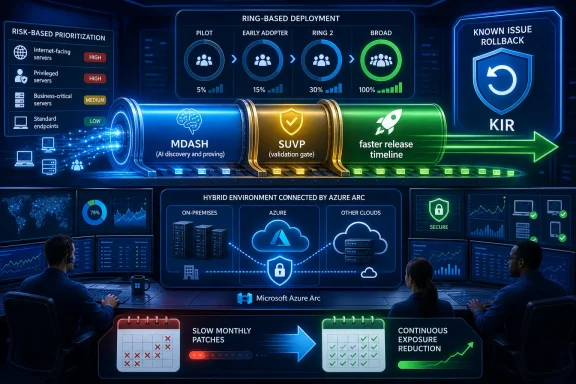
Microsoft said on July 9, 2026, that Windows is expanding AI-powered vulnerability detection and remediation across its codebase, using tools including MDASH to find flaws earlier, validate fixes faster, and push organizations toward continuous, risk-driven patching instead of calendar-bound update habits. The important part is not that Microsoft has found a new way to say “AI” in a security blog post. It is that Windows servicing is being pulled into the same acceleration curve as vulnerability research itself. If attackers, researchers, and vendors can all find bugs faster, then the old enterprise bargain — test for weeks, deploy by maintenance window, accept a little exposure — starts to look less like prudence and more like latency.
Petri IT Knowledgebase framed the move as Microsoft expanding AI vulnerability detection across Windows, and Microsoft’s own Windows Experience Blog gave the broader rationale: AI is changing the speed and scale of vulnerability discovery, so Windows engineering has to change the speed and scale of defense. That sounds obvious until you reach the operational consequence. Microsoft is telling IT departments that more security fixes may appear in each release, that faster remediation will still require human approval, and that customers should treat patching as a continuous risk-management function rather than a monthly chore.
Patch Tuesday has always been a compromise between engineering reality and customer sanity. Microsoft needs a predictable public cadence for security fixes; enterprises need a predictable window to test, stage, and deploy them. The model assumes that vulnerability discovery, fix development, validation, and deployment can be synchronized well enough that customers do not drown.
AI-powered vulnerability discovery stresses that model from both ends. On the discovery side, tools can scan more code, identify more candidate flaws, and revisit old assumptions at a scale that human review teams cannot match. On the exploitation side, the same broad acceleration raises the concern that attackers can move faster after disclosure, or use AI-assisted techniques to find variants before defenders have fully deployed updates.
Microsoft’s answer is to turn vulnerability discovery into a routine part of the Windows engineering system rather than a separate security activity that happens around it. Per Microsoft’s own explanation and Petri’s summary, the company is applying AI across security analysis to identify patterns faster, prioritize risk, and scale vulnerability discovery across the Windows codebase. The aim is to reduce the time between discovering a flaw and protecting customers.
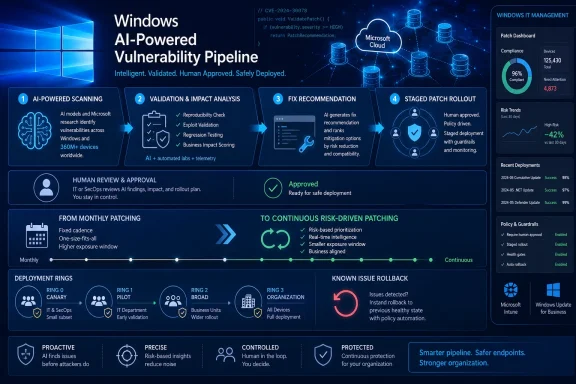
That is the strategic pivot. Microsoft is not merely adding an AI scanner to a bug database. It is describing a pipeline in which automated scanning, validation, prioritization, candidate fix generation, related-issue detection, and test recommendation all compress the distance between “this looks dangerous” and “this is ready for customers.”
There is an uncomfortable byproduct: customers may see more issues addressed in security releases. Microsoft says that should be read as evidence that defenders are getting better at identifying and fixing weaknesses. That is true as far as it goes, but it also means IT teams may have to abandon the instinct that a larger security release is necessarily a sign of sudden platform decay. In an AI-assisted world, a bigger patch payload may reflect better visibility into old risk rather than a new collapse in quality.
Still, Microsoft has to earn that interpretation. Windows has a long institutional memory of update regressions, compatibility surprises, and administrator skepticism. If the AI-assisted pipeline produces more fixes but also more breakage, the promised security advantage will quickly become an operations problem.
That distinction matters. Static analysis has existed for decades, and so have noisy security scanners. The hard problem in a codebase as large and weird as Windows is not producing possible bugs; it is producing useful ones. A tool that floods engineers with speculative findings becomes a tax on the people who are supposed to fix real vulnerabilities.
Microsoft’s framing of MDASH is aimed directly at that problem. According to Microsoft, Windows set up dedicated cloud infrastructure for scanning and proving, with scanner pipelines examining critical binaries and separate Windows-specific prove pipelines helping eliminate remaining false positives. That is a notable admission: at Windows scale, AI security tooling is not a chatbot feature. It is infrastructure.
The Windows codebase is also not a generic open-source project that a model has absorbed through public training data. It contains kernel paths, drivers, authentication components, compatibility layers, legacy behaviors, and internal conventions that do not lend themselves to simple pattern matching. Microsoft’s claim is that a multi-model system can reason across enough of that terrain to help security engineers find and validate flaws earlier.
The prudent reading is not “AI will now secure Windows.” It is AI will widen the aperture of what Microsoft can inspect before attackers do. That is useful, but it does not eliminate the need for triage. Petri’s report correctly emphasizes that human experts remain responsible for evaluating risks and approving fixes. Microsoft’s own post says the same thing in more operational language: AI helps identify potential issues earlier, while human expertise makes the risk-based decisions and ensures fixes meet the expected quality bar.
That human-in-the-loop qualifier is not decorative. It is the guardrail between a security acceleration system and an automated patch factory with global blast radius. Windows cannot afford hallucinated bug reports, unsafe fixes, or model-generated changes that satisfy a narrow test while breaking a real-world dependency. The most interesting part of Microsoft’s announcement is therefore not the existence of MDASH, but the company’s insistence that AI is being embedded into a disciplined engineering system.
Per Petri and Microsoft’s Windows blog, vulnerability discovery is being made a core part of the Windows development lifecycle rather than a separate activity. Microsoft says it is updating SDL best practices so secure-by-design work explicitly accounts for AI-enabled attack techniques and exploit paths. That is a meaningful shift in vocabulary. AI is no longer just a tool defenders use after code exists; it becomes part of the threat model for how code may be attacked.
This is where the announcement becomes broader than Windows Update mechanics. If AI lowers the cost of finding edge-case memory bugs, logic flaws, input parsing weaknesses, or exploit chains, then development teams need security checks earlier in the process. Waiting until a component is near release before running deeper vulnerability analysis leaves too much risk concentrated at the end of the schedule.
Microsoft’s older SDL modernization work already pointed toward continuous evaluation, automation, data-driven security evidence, and secure-by-default design. The July 2026 Windows message narrows that into a concrete product reality: Windows engineering is incorporating AI into the defect pipeline, the test pipeline, and the patch pipeline.
The advantage is obvious. If the same class of flaw appears in multiple places, AI-assisted analysis may help surface related issues elsewhere in the codebase. If a failure occurs, AI can help engineers understand it faster. If a fix touches a fragile subsystem, AI can recommend relevant regression tests. Those are mundane tasks, but in aggregate they are the difference between a vulnerability being fixed in time for a security release and one slipping into the next cycle.
The danger is also obvious. The more the process depends on generated recommendations, the more Microsoft must ensure that the evidence trail remains auditable. Enterprises do not simply want fast fixes; they want to know whether those fixes were reviewed, validated, and deployed through processes that reduce the risk of collateral damage.
That is why the SDL piece is so important. Microsoft is trying to tell customers that the AI layer sits inside a mature engineering discipline rather than outside it. Whether that is enough to satisfy regulated industries, government customers, and conservative IT shops will depend less on the announcement than on the lived experience of future security releases.
Microsoft’s post acknowledges that tension. Windows engineers are using AI to analyze failures, suggest fixes, detect related issues, and recommend relevant tests. But the company also says Windows security updates undergo broad validation through internal testing and programs including the Security Update Validation Program. Petri highlights the same point: Microsoft wants to accelerate remediation without compromising reliability.
The Security Update Validation Program is one of those behind-the-scenes mechanisms that matters more than its public profile suggests. The premise is straightforward: a limited group of customers can test security updates before broad release in controlled environments and report issues. In theory, that gives Microsoft earlier signal on compatibility and deployment problems across configurations it cannot fully reproduce internally.
The problem is that validation has to evolve along with discovery. If AI helps Microsoft discover more vulnerabilities and prepare more fixes, then the test matrix expands. More touched code means more potential interactions. A fix that is correct in isolation can still break an enterprise dependency, a driver assumption, a legacy authentication flow, or a line-of-business application.
This is where AI-assisted test selection may be genuinely useful. A model that can help map a code change to likely affected tests, related components, or similar past failures could reduce the validation gap. That does not mean the model proves the update is safe. It means engineers may waste less time guessing where to look.
Microsoft also points to Known Issue Rollback as part of its safety story. KIR can revert a targeted problematic change to prior behavior without forcing customers to uninstall an entire update, preserving the broader protection posture. That distinction is vital. Uninstalling a cumulative security update to escape one regression is often a terrible trade: it may restore productivity while reopening vulnerabilities the update was supposed to close.
Still, KIR should not be treated as a magic undo button. It is a mitigation technology, not a substitute for pre-release quality. The best use of KIR is to contain a regression that escaped validation; the worst interpretation would be to ship faster and rely on rollback to clean up. Microsoft’s argument only holds if validation scales with discovery and remediation.
Both things can be true in different ways. A higher count of addressed issues can reflect better discovery. It can also increase deployment complexity. For administrators, the relevant question is not whether a bigger release is good or bad in the abstract; it is whether Microsoft provides enough risk guidance, preview testing opportunity, and deployment tooling to turn that release into a controlled rollout.
Microsoft says it provides CVE information, risk guidance, and optional preview releases to help IT admins test updates before deployment. The Windows blog specifically describes optional non-security preview releases targeted for the fourth week of the month, giving organizations an opportunity to test quality improvements and features before they become part of the next monthly security update. That does not preview every security fix in the way many admins might wish, but it does help reduce surprise around the non-security portions of cumulative updates.
Security Update Guide information remains central because it gives organizations a way to build their own risk map. A vulnerability that matters urgently to one environment may be less exposed in another. A domain controller, VPN-exposed workload, internet-facing service, or high-value executive endpoint does not carry the same risk profile as a lightly used lab machine.
The lesson is that patch prioritization can no longer be purely chronological. A traditional “deploy everything after two weeks unless something breaks” model treats all supported assets too similarly. Microsoft’s preferred approach is continuous and risk-driven: identify exposure, prioritize high-value targets, accelerate where risk is greatest, and harden or isolate systems that cannot be updated immediately.
That is not just Microsoft selling cloud management. It reflects the reality that the interval between disclosure and exploitation is increasingly contested. If AI helps defenders find bugs earlier, it may also help attackers inspect patches, search for variants, or scale exploit development. The old deployment lag becomes a measurable security liability.
That is the deeper reason Windows 11 is central to this discussion. Patch management is necessary, but it is not enough. A system that depends entirely on perfect and instantaneous patching is already fragile. Microsoft’s security posture is increasingly based on layered defense: stronger identity, less ambient privilege, application trust, hardware-backed protections, endpoint detection, and faster update delivery.
Windows Hello matters because credential theft remains a durable route into enterprise environments. Reduced dependence on administrator privileges matters because too many endpoints still operate as if local admin is a convenience rather than a liability. Trusted application experiences matter because arbitrary code execution is more damaging when users and applications can run whatever they want without meaningful policy. Hardware-based security matters because some protections need roots below the operating system itself.
None of those features eliminates the need to patch. But they can change the consequences of delay. A machine with stronger identity controls, reduced privilege, modern application control, and current Defender protections is not equivalent to an unmanaged endpoint waiting weeks for the same cumulative update.
This is where Microsoft Defender and the broader security ecosystem enter the story. Microsoft says Defender and industry partners can provide additional protection during the window between vulnerability disclosure and update deployment. That interim layer is important, but it should not become an excuse for slow patching. Detection is not remediation; it is a chance to catch or block exploitation while the real fix is still being deployed.
The Windows 11 security pitch therefore has a practical reading for admins: do not treat operating-system version, hardware readiness, identity posture, endpoint protection, and patch cadence as separate projects. They are now one risk surface. If one layer lags, the others have to carry more weight.
The shape of that table matters more than the product names. Microsoft wants customers to tie patching to inventory, policy, vulnerability severity, device exposure, deployment rings, rollback mechanisms, and compliance enforcement. That is difficult to do with disconnected spreadsheets, ad hoc maintenance windows, and manual exception lists.
Windows Autopatch is the clearest expression of the new model on the client side. It is meant to automate staged rollouts and use reliability signals so problems can be contained before they spread broadly. Microsoft’s Windows blog also points to hotpatch-related capabilities in the broader modern update story, but the core message is more general: automate what can safely move fast, monitor what does not, and use rings or policy to avoid turning every update into a bespoke project.
Intune is the policy and compliance hub for many of those endpoint decisions. It can help teams identify devices that are missing updates, enforce desired state, and deploy fixes. When paired with compliance policies and Conditional Access, it can also make outdated or risky devices less able to access sensitive resources. That is where patching stops being a background IT task and becomes part of access control.
Azure Arc and Azure Update Manager extend the same logic to servers, especially hybrid and multicloud estates. This is important because many organizations have modernized endpoint management faster than server management. A Windows laptop enrolled in Intune may have better update visibility than a critical server sitting outside Azure with inconsistent maintenance discipline. Microsoft’s message is that server fleets need the same visibility and prioritization.
Defender Vulnerability Management supplies the risk lens. Patching every asset instantly is rarely possible. Prioritizing by exposure, severity, business importance, and exploitability is the only sane alternative. The more AI accelerates vulnerability discovery and attacker adaptation, the more valuable that prioritization becomes.
Microsoft’s July 2026 message challenges that cultural default. The company is not saying every organization should blindly install every update the moment it appears. It is saying the decision must be risk-driven, continuous, and supported by tools that can distinguish between assets and exposures.
That means a critical server, an executive laptop, a domain-connected endpoint, and a lab machine should not all move on the same lazy cadence. It also means exceptions need expiration dates. A device deferred because of an application conflict should trigger remediation work, compensating controls, or access restrictions — not disappear into a permanent “do not patch” group.
The AI angle makes this more urgent. If vulnerability discovery accelerates, then the half-life of obscurity shrinks. A flaw that once required specialized manual research may become easier to rediscover, variant-hunt, or weaponize. The longer an organization waits after a fix is available, the more it is betting that attackers will not reach its particular exposure before the maintenance window opens.
This is a hard message for IT teams because they are also judged on uptime. A bad update can break a business process immediately; an unpatched vulnerability may remain theoretical until it is not. Microsoft is trying to rebalance that calculus by promising better validation, rollback containment, preview releases, and management tooling. But the operational burden still lands on customers.
The most mature organizations will respond by making patch management more like incident response. They will classify exposure, accelerate high-risk deployment, monitor rollout health, document exceptions, and tie update state to access policy. The least mature will continue arguing about whether the second or third week of the month is safer while the threat landscape moves around them.
May 12, 2026 — Microsoft Security detailed MDASH, its multi-model agentic scanning harness, presenting it as part of a production-grade approach to AI-powered vulnerability discovery and remediation.
July 9, 2026 — Microsoft’s Windows Experience Blog said Windows is expanding AI-assisted vulnerability management across discovery, remediation, validation, and customer guidance; Petri IT Knowledgebase reported the move as Microsoft expanding AI vulnerability detection across Windows.
The practical work starts with visibility. If an organization cannot rapidly identify which Windows devices and servers are missing security updates, which are internet-exposed, which support critical business functions, and which are blocked by known compatibility issues, it cannot operate a risk-driven patch model. It can only hope that its default cadence is good enough.
The second shift is testing discipline. Optional preview releases, pilot rings, and validation groups are only useful if they represent real business configurations. Too many test rings are filled with IT department machines that do not run the applications, drivers, peripherals, and workflows that break in production. A serious patch strategy needs representative devices and fast feedback.
The third shift is exception management. Every deferred update should be treated as a risk object, not an administrative convenience. Who owns it? Why is it deferred? What compensating controls exist? When will it be remediated? What access should the device lose while it remains exposed?
There are at least three risks to watch. First, volume can overwhelm customers. If security releases grow in size because discovery improves, IT teams need better prioritization and clearer guidance. Otherwise, a theoretically better defensive pipeline becomes a larger monthly operational burden.
Second, confidence can be misplaced. AI systems can suggest fixes, tests, and related issues, but Windows quality depends on the messy long tail of real configurations. Microsoft’s validation programs, telemetry, rollback mechanisms, and customer feedback loops will matter as much as the models themselves.
Third, the attacker-defender symmetry remains unresolved. The same broad class of capabilities that helps Microsoft find vulnerabilities can help adversaries analyze code, inspect patches, and accelerate exploit work. Microsoft’s advantage is access to source, engineering context, telemetry, and deployment channels. Customers’ advantage is disciplined operations. Neither side gets to stand still.
This is also why Microsoft’s human-expert language is important. Security engineering is not merely the act of finding a bug. It involves deciding severity, exploitability, fix scope, compatibility risk, release timing, mitigation guidance, and customer communication. AI can compress parts of that workflow, but accountability still belongs to people and institutions.
That trade is not unreasonable. The security environment has changed, and the old model was already showing its age. But it does place pressure on organizations that have underinvested in endpoint management, server visibility, and patch governance. The more Microsoft automates its side of the pipeline, the more exposed customer-side manual processes will look.
For WindowsForum readers, the practical conclusion is not to panic over AI-discovered vulnerabilities or assume every larger security release signals disaster. It is to treat Microsoft’s announcement as a warning that patch latency is becoming more expensive. The organizations that adapt will be those that can see their estate, classify risk, test quickly, deploy in rings, monitor regressions, and close exceptions.
Jeremy Chapman, a Microsoft 365 director, warned that delaying updates for several weeks gives AI-assisted attackers enough time to identify and exploit weaknesses on unpatched systems.
Microsoft is also promoting a new Windows Autopatch reporting view that identifies devices still exposed after deployment begins. Eligible organizations can additionally use Hotpatch to apply certain security fixes without restarting supported Windows systems, including Windows Server systems managed through Azure Arc.
For IT departments, Microsoft’s guidance turns “continuous patching” into a significantly tighter operational expectation. Organizations with lengthy compatibility testing will need more representative pilot rings, rapid rollout monitoring, and clearly controlled exceptions to approach the recommended deadline safely.
Petri IT Knowledgebase framed the move as Microsoft expanding AI vulnerability detection across Windows, and Microsoft’s own Windows Experience Blog gave the broader rationale: AI is changing the speed and scale of vulnerability discovery, so Windows engineering has to change the speed and scale of defense. That sounds obvious until you reach the operational consequence. Microsoft is telling IT departments that more security fixes may appear in each release, that faster remediation will still require human approval, and that customers should treat patching as a continuous risk-management function rather than a monthly chore.
 Microsoft Is Rebuilding Patch Tuesday for an AI-Speed Defect Pipeline
Patch Tuesday has always been a compromise between engineering reality and customer sanity. Microsoft needs a predictable public cadence for security fixes; enterprises need a predictable window to test, stage, and deploy them. The model assumes that vulnerability discovery, fix development, validation, and deployment can be synchronized well enough that customers do not drown.AI-powered vulnerability discovery stresses that model from both ends. On the discovery side, tools can scan more code, identify more candidate flaws, and revisit old assumptions at a scale that human review teams cannot match. On the exploitation side, the same broad acceleration raises the concern that attackers can move faster after disclosure, or use AI-assisted techniques to find variants before defenders have fully deployed updates.
Microsoft’s answer is to turn vulnerability discovery into a routine part of the Windows engineering system rather than a separate security activity that happens around it. Per Microsoft’s own explanation and Petri’s summary, the company is applying AI across security analysis to identify patterns faster, prioritize risk, and scale vulnerability discovery across the Windows codebase. The aim is to reduce the time between discovering a flaw and protecting customers.
That is the strategic pivot. Microsoft is not merely adding an AI scanner to a bug database. It is describing a pipeline in which automated scanning, validation, prioritization, candidate fix generation, related-issue detection, and test recommendation all compress the distance between “this looks dangerous” and “this is ready for customers.”
There is an uncomfortable byproduct: customers may see more issues addressed in security releases. Microsoft says that should be read as evidence that defenders are getting better at identifying and fixing weaknesses. That is true as far as it goes, but it also means IT teams may have to abandon the instinct that a larger security release is necessarily a sign of sudden platform decay. In an AI-assisted world, a bigger patch payload may reflect better visibility into old risk rather than a new collapse in quality.
Still, Microsoft has to earn that interpretation. Windows has a long institutional memory of update regressions, compatibility surprises, and administrator skepticism. If the AI-assisted pipeline produces more fixes but also more breakage, the promised security advantage will quickly become an operations problem.
MDASH Is the Signal That Microsoft Wants AI in the Bug-Finding Loop
The center of Microsoft’s public story is MDASH, the multi-model agentic scanning system cited by Petri and described by Microsoft as part of its AI-powered security tooling. Microsoft’s security blog has already presented MDASH as more than a single model pointed at source code. The company describes it as a multi-model agentic scanning harness: a system that uses multiple models, debate, validation, and proof-oriented workflows to move from candidate findings toward higher-confidence vulnerabilities.That distinction matters. Static analysis has existed for decades, and so have noisy security scanners. The hard problem in a codebase as large and weird as Windows is not producing possible bugs; it is producing useful ones. A tool that floods engineers with speculative findings becomes a tax on the people who are supposed to fix real vulnerabilities.
Microsoft’s framing of MDASH is aimed directly at that problem. According to Microsoft, Windows set up dedicated cloud infrastructure for scanning and proving, with scanner pipelines examining critical binaries and separate Windows-specific prove pipelines helping eliminate remaining false positives. That is a notable admission: at Windows scale, AI security tooling is not a chatbot feature. It is infrastructure.
The Windows codebase is also not a generic open-source project that a model has absorbed through public training data. It contains kernel paths, drivers, authentication components, compatibility layers, legacy behaviors, and internal conventions that do not lend themselves to simple pattern matching. Microsoft’s claim is that a multi-model system can reason across enough of that terrain to help security engineers find and validate flaws earlier.
The prudent reading is not “AI will now secure Windows.” It is AI will widen the aperture of what Microsoft can inspect before attackers do. That is useful, but it does not eliminate the need for triage. Petri’s report correctly emphasizes that human experts remain responsible for evaluating risks and approving fixes. Microsoft’s own post says the same thing in more operational language: AI helps identify potential issues earlier, while human expertise makes the risk-based decisions and ensures fixes meet the expected quality bar.
That human-in-the-loop qualifier is not decorative. It is the guardrail between a security acceleration system and an automated patch factory with global blast radius. Windows cannot afford hallucinated bug reports, unsafe fixes, or model-generated changes that satisfy a narrow test while breaking a real-world dependency. The most interesting part of Microsoft’s announcement is therefore not the existence of MDASH, but the company’s insistence that AI is being embedded into a disciplined engineering system.
The Secure Development Lifecycle Gets Pulled Into the AI Era
Microsoft’s Secure Development Lifecycle has always been one of the company’s post-Trustworthy Computing success stories: a way to institutionalize security practices instead of treating them as heroic cleanup after release. The new Windows vulnerability-management push updates that story for AI-enabled attack methods and emerging exploit techniques.Per Petri and Microsoft’s Windows blog, vulnerability discovery is being made a core part of the Windows development lifecycle rather than a separate activity. Microsoft says it is updating SDL best practices so secure-by-design work explicitly accounts for AI-enabled attack techniques and exploit paths. That is a meaningful shift in vocabulary. AI is no longer just a tool defenders use after code exists; it becomes part of the threat model for how code may be attacked.
This is where the announcement becomes broader than Windows Update mechanics. If AI lowers the cost of finding edge-case memory bugs, logic flaws, input parsing weaknesses, or exploit chains, then development teams need security checks earlier in the process. Waiting until a component is near release before running deeper vulnerability analysis leaves too much risk concentrated at the end of the schedule.
Microsoft’s older SDL modernization work already pointed toward continuous evaluation, automation, data-driven security evidence, and secure-by-default design. The July 2026 Windows message narrows that into a concrete product reality: Windows engineering is incorporating AI into the defect pipeline, the test pipeline, and the patch pipeline.
The advantage is obvious. If the same class of flaw appears in multiple places, AI-assisted analysis may help surface related issues elsewhere in the codebase. If a failure occurs, AI can help engineers understand it faster. If a fix touches a fragile subsystem, AI can recommend relevant regression tests. Those are mundane tasks, but in aggregate they are the difference between a vulnerability being fixed in time for a security release and one slipping into the next cycle.
The danger is also obvious. The more the process depends on generated recommendations, the more Microsoft must ensure that the evidence trail remains auditable. Enterprises do not simply want fast fixes; they want to know whether those fixes were reviewed, validated, and deployed through processes that reduce the risk of collateral damage.
That is why the SDL piece is so important. Microsoft is trying to tell customers that the AI layer sits inside a mature engineering discipline rather than outside it. Whether that is enough to satisfy regulated industries, government customers, and conservative IT shops will depend less on the announcement than on the lived experience of future security releases.
Faster Fixes Are Only Valuable If Validation Scales Too
Speed is seductive in security. A faster fix sounds inherently better than a slower one, especially when exploit code can spread quickly after disclosure. But Windows updates are not app-store releases for a single runtime. They land on consumer laptops, embedded-ish business PCs, domain-joined fleets, virtual desktops, servers, kiosks, specialty workstations, and devices carrying years of driver and application history.Microsoft’s post acknowledges that tension. Windows engineers are using AI to analyze failures, suggest fixes, detect related issues, and recommend relevant tests. But the company also says Windows security updates undergo broad validation through internal testing and programs including the Security Update Validation Program. Petri highlights the same point: Microsoft wants to accelerate remediation without compromising reliability.
The Security Update Validation Program is one of those behind-the-scenes mechanisms that matters more than its public profile suggests. The premise is straightforward: a limited group of customers can test security updates before broad release in controlled environments and report issues. In theory, that gives Microsoft earlier signal on compatibility and deployment problems across configurations it cannot fully reproduce internally.
The problem is that validation has to evolve along with discovery. If AI helps Microsoft discover more vulnerabilities and prepare more fixes, then the test matrix expands. More touched code means more potential interactions. A fix that is correct in isolation can still break an enterprise dependency, a driver assumption, a legacy authentication flow, or a line-of-business application.
This is where AI-assisted test selection may be genuinely useful. A model that can help map a code change to likely affected tests, related components, or similar past failures could reduce the validation gap. That does not mean the model proves the update is safe. It means engineers may waste less time guessing where to look.
Microsoft also points to Known Issue Rollback as part of its safety story. KIR can revert a targeted problematic change to prior behavior without forcing customers to uninstall an entire update, preserving the broader protection posture. That distinction is vital. Uninstalling a cumulative security update to escape one regression is often a terrible trade: it may restore productivity while reopening vulnerabilities the update was supposed to close.
Still, KIR should not be treated as a magic undo button. It is a mitigation technology, not a substitute for pre-release quality. The best use of KIR is to contain a regression that escaped validation; the worst interpretation would be to ship faster and rely on rollback to clean up. Microsoft’s argument only holds if validation scales with discovery and remediation.
More Vulnerabilities Fixed May Look Like More Vulnerabilities Found
One of the strangest communication challenges Microsoft now faces is psychological. If AI-assisted tools increase the number of flaws found and fixed, customers may see larger security releases and conclude that Windows has become less secure. Microsoft wants the opposite interpretation: more fixed vulnerabilities can mean defenders are finding weaknesses earlier and reducing exposure before attackers exploit them.Both things can be true in different ways. A higher count of addressed issues can reflect better discovery. It can also increase deployment complexity. For administrators, the relevant question is not whether a bigger release is good or bad in the abstract; it is whether Microsoft provides enough risk guidance, preview testing opportunity, and deployment tooling to turn that release into a controlled rollout.
Microsoft says it provides CVE information, risk guidance, and optional preview releases to help IT admins test updates before deployment. The Windows blog specifically describes optional non-security preview releases targeted for the fourth week of the month, giving organizations an opportunity to test quality improvements and features before they become part of the next monthly security update. That does not preview every security fix in the way many admins might wish, but it does help reduce surprise around the non-security portions of cumulative updates.
Security Update Guide information remains central because it gives organizations a way to build their own risk map. A vulnerability that matters urgently to one environment may be less exposed in another. A domain controller, VPN-exposed workload, internet-facing service, or high-value executive endpoint does not carry the same risk profile as a lightly used lab machine.
The lesson is that patch prioritization can no longer be purely chronological. A traditional “deploy everything after two weeks unless something breaks” model treats all supported assets too similarly. Microsoft’s preferred approach is continuous and risk-driven: identify exposure, prioritize high-value targets, accelerate where risk is greatest, and harden or isolate systems that cannot be updated immediately.
That is not just Microsoft selling cloud management. It reflects the reality that the interval between disclosure and exploitation is increasingly contested. If AI helps defenders find bugs earlier, it may also help attackers inspect patches, search for variants, or scale exploit development. The old deployment lag becomes a measurable security liability.
Windows 11 Is the Client-Side Bet on Reducing Blast Radius
Microsoft’s Windows 11 argument sits underneath the patching story: even when vulnerabilities exist, the platform should reduce exposure and limit impact. Petri cites built-in protections including Windows Hello, reduced dependence on administrator privileges, trusted application experiences, and hardware-based security capabilities. Microsoft’s own blog similarly points to strong identity protection, reduced reliance on admin privileges, trusted application experiences, and hardware-rooted security.That is the deeper reason Windows 11 is central to this discussion. Patch management is necessary, but it is not enough. A system that depends entirely on perfect and instantaneous patching is already fragile. Microsoft’s security posture is increasingly based on layered defense: stronger identity, less ambient privilege, application trust, hardware-backed protections, endpoint detection, and faster update delivery.
Windows Hello matters because credential theft remains a durable route into enterprise environments. Reduced dependence on administrator privileges matters because too many endpoints still operate as if local admin is a convenience rather than a liability. Trusted application experiences matter because arbitrary code execution is more damaging when users and applications can run whatever they want without meaningful policy. Hardware-based security matters because some protections need roots below the operating system itself.
None of those features eliminates the need to patch. But they can change the consequences of delay. A machine with stronger identity controls, reduced privilege, modern application control, and current Defender protections is not equivalent to an unmanaged endpoint waiting weeks for the same cumulative update.
This is where Microsoft Defender and the broader security ecosystem enter the story. Microsoft says Defender and industry partners can provide additional protection during the window between vulnerability disclosure and update deployment. That interim layer is important, but it should not become an excuse for slow patching. Detection is not remediation; it is a chance to catch or block exploitation while the real fix is still being deployed.
The Windows 11 security pitch therefore has a practical reading for admins: do not treat operating-system version, hardware readiness, identity posture, endpoint protection, and patch cadence as separate projects. They are now one risk surface. If one layer lags, the others have to carry more weight.
The Tooling Message Is Really a Management Model
Microsoft’s recommended tools — Windows Autopatch, Microsoft Intune, Azure Arc, Azure Update Manager, and Defender Vulnerability Management — are easy to read as a product checklist. That misses the point. Microsoft is outlining a management model in which endpoint and server patching are governed by exposure, compliance, telemetry, and automation rather than by a calendar entry.| Capability | Primary role in Microsoft’s patching model | Where it fits |
|---|---|---|
| Windows Autopatch | Automates deployment of Windows security updates, driver updates, and firmware updates based on reliability signals | Windows endpoint update rollout |
| Microsoft Intune | Helps identify gaps, enforce compliance, deploy fixes, and manage Windows Autopatch policies | Endpoint management and compliance |
| Azure Arc | Connects Windows Servers outside Azure into Microsoft’s management plane | Hybrid and multicloud server visibility |
| Azure Update Manager | Assesses, schedules, and deploys operating-system patches across server fleets | Server patch orchestration |
| Defender Vulnerability Management | Helps teams understand exposure and prioritize remediation | Risk-based vulnerability prioritization |
| Microsoft Defender | Provides detections and protections while updates are being deployed | Interim protection and threat detection |
Windows Autopatch is the clearest expression of the new model on the client side. It is meant to automate staged rollouts and use reliability signals so problems can be contained before they spread broadly. Microsoft’s Windows blog also points to hotpatch-related capabilities in the broader modern update story, but the core message is more general: automate what can safely move fast, monitor what does not, and use rings or policy to avoid turning every update into a bespoke project.
Intune is the policy and compliance hub for many of those endpoint decisions. It can help teams identify devices that are missing updates, enforce desired state, and deploy fixes. When paired with compliance policies and Conditional Access, it can also make outdated or risky devices less able to access sensitive resources. That is where patching stops being a background IT task and becomes part of access control.
Azure Arc and Azure Update Manager extend the same logic to servers, especially hybrid and multicloud estates. This is important because many organizations have modernized endpoint management faster than server management. A Windows laptop enrolled in Intune may have better update visibility than a critical server sitting outside Azure with inconsistent maintenance discipline. Microsoft’s message is that server fleets need the same visibility and prioritization.
Defender Vulnerability Management supplies the risk lens. Patching every asset instantly is rarely possible. Prioritizing by exposure, severity, business importance, and exploitability is the only sane alternative. The more AI accelerates vulnerability discovery and attacker adaptation, the more valuable that prioritization becomes.
The Old Maintenance Window Is Becoming a Security Liability
Many enterprises still treat patching as a monthly ritual with exceptions. Updates are reviewed, deployed to pilot groups, delayed for business units, negotiated around maintenance windows, and finally applied when the organization can tolerate disruption. That process was never perfect, but it was understandable in a world where stability often felt more measurable than exposure.Microsoft’s July 2026 message challenges that cultural default. The company is not saying every organization should blindly install every update the moment it appears. It is saying the decision must be risk-driven, continuous, and supported by tools that can distinguish between assets and exposures.
That means a critical server, an executive laptop, a domain-connected endpoint, and a lab machine should not all move on the same lazy cadence. It also means exceptions need expiration dates. A device deferred because of an application conflict should trigger remediation work, compensating controls, or access restrictions — not disappear into a permanent “do not patch” group.
The AI angle makes this more urgent. If vulnerability discovery accelerates, then the half-life of obscurity shrinks. A flaw that once required specialized manual research may become easier to rediscover, variant-hunt, or weaponize. The longer an organization waits after a fix is available, the more it is betting that attackers will not reach its particular exposure before the maintenance window opens.
This is a hard message for IT teams because they are also judged on uptime. A bad update can break a business process immediately; an unpatched vulnerability may remain theoretical until it is not. Microsoft is trying to rebalance that calculus by promising better validation, rollback containment, preview releases, and management tooling. But the operational burden still lands on customers.
The most mature organizations will respond by making patch management more like incident response. They will classify exposure, accelerate high-risk deployment, monitor rollout health, document exceptions, and tie update state to access policy. The least mature will continue arguing about whether the second or third week of the month is safer while the threat landscape moves around them.
Timeline
March 7, 2024 — Microsoft publicly described the evolution of its Secure Development Lifecycle toward continuous SDL, emphasizing automation, data-driven security evidence, and modernized practices for emerging threats including AI.May 12, 2026 — Microsoft Security detailed MDASH, its multi-model agentic scanning harness, presenting it as part of a production-grade approach to AI-powered vulnerability discovery and remediation.
July 9, 2026 — Microsoft’s Windows Experience Blog said Windows is expanding AI-assisted vulnerability management across discovery, remediation, validation, and customer guidance; Petri IT Knowledgebase reported the move as Microsoft expanding AI vulnerability detection across Windows.
Where Admins Should Change Behavior Now
The immediate temptation is to wait for a concrete new console, policy toggle, or licensing bundle. That would miss the point. Microsoft’s announcement is mostly a process warning: the rate of security change is increasing, and organizations that still treat patching as a slow monthly compliance exercise will fall further behind.The practical work starts with visibility. If an organization cannot rapidly identify which Windows devices and servers are missing security updates, which are internet-exposed, which support critical business functions, and which are blocked by known compatibility issues, it cannot operate a risk-driven patch model. It can only hope that its default cadence is good enough.
The second shift is testing discipline. Optional preview releases, pilot rings, and validation groups are only useful if they represent real business configurations. Too many test rings are filled with IT department machines that do not run the applications, drivers, peripherals, and workflows that break in production. A serious patch strategy needs representative devices and fast feedback.
The third shift is exception management. Every deferred update should be treated as a risk object, not an administrative convenience. Who owns it? Why is it deferred? What compensating controls exist? When will it be remediated? What access should the device lose while it remains exposed?
Action checklist for admins
- Inventory Windows endpoints and servers, including unmanaged, hybrid, and non-Azure systems that may sit outside normal update reporting.
- Use CVE information and Microsoft risk guidance to prioritize high-value and exposed assets instead of deploying purely by date.
- Configure staged rollout rings through management tooling such as Windows Autopatch and Intune where available.
- Use optional preview releases and representative pilot groups to test compatibility before the next monthly security update.
- Review Defender Vulnerability Management or equivalent exposure data to identify devices and servers that remain vulnerable after rollout.
- Document update exceptions, assign owners, apply compensating controls, and set expiration dates for deferrals.
The Real Test Is Whether AI Reduces Risk or Just Moves It
Microsoft’s public language is careful: AI helps, humans approve; automation accelerates, validation remains broad; more fixes may appear, quality still matters. That is the right posture. The danger is not that Microsoft is using AI in Windows security engineering. The danger is that the industry mistakes AI-assisted speed for security maturity.There are at least three risks to watch. First, volume can overwhelm customers. If security releases grow in size because discovery improves, IT teams need better prioritization and clearer guidance. Otherwise, a theoretically better defensive pipeline becomes a larger monthly operational burden.
Second, confidence can be misplaced. AI systems can suggest fixes, tests, and related issues, but Windows quality depends on the messy long tail of real configurations. Microsoft’s validation programs, telemetry, rollback mechanisms, and customer feedback loops will matter as much as the models themselves.
Third, the attacker-defender symmetry remains unresolved. The same broad class of capabilities that helps Microsoft find vulnerabilities can help adversaries analyze code, inspect patches, and accelerate exploit work. Microsoft’s advantage is access to source, engineering context, telemetry, and deployment channels. Customers’ advantage is disciplined operations. Neither side gets to stand still.
This is also why Microsoft’s human-expert language is important. Security engineering is not merely the act of finding a bug. It involves deciding severity, exploitability, fix scope, compatibility risk, release timing, mitigation guidance, and customer communication. AI can compress parts of that workflow, but accountability still belongs to people and institutions.
The Windows Patch Contract Is Being Renegotiated
The clearest reading of Microsoft’s July 2026 message is that the Windows patch contract is changing. Microsoft is promising to find more vulnerabilities earlier, use AI to shorten remediation, validate updates through established and evolving programs, and provide tooling for safer deployment. In return, it expects customers to stay current faster and manage risk continuously.That trade is not unreasonable. The security environment has changed, and the old model was already showing its age. But it does place pressure on organizations that have underinvested in endpoint management, server visibility, and patch governance. The more Microsoft automates its side of the pipeline, the more exposed customer-side manual processes will look.
For WindowsForum readers, the practical conclusion is not to panic over AI-discovered vulnerabilities or assume every larger security release signals disaster. It is to treat Microsoft’s announcement as a warning that patch latency is becoming more expensive. The organizations that adapt will be those that can see their estate, classify risk, test quickly, deploy in rings, monitor regressions, and close exceptions.
What This Changes for Windows Shops
The announcement is less a one-off product update than a direction of travel for Windows security servicing. The concrete message is that Microsoft wants AI-assisted discovery and remediation on its side, and continuous risk-based deployment on yours.- Microsoft is expanding AI-powered vulnerability detection across the Windows codebase, including use of MDASH.
- Human experts remain responsible for evaluating risk, reviewing code, and approving fixes.
- Windows engineers are using AI to analyze failures, suggest fixes, detect related issues, and recommend tests.
- Security updates still rely on validation programs, internal testing, and mitigation mechanisms such as Known Issue Rollback for problematic changes.
- Windows 11’s built-in protections and Microsoft Defender reduce exposure during the patch window, but do not replace timely updates.
- Admins should move from scheduled patching habits toward continuous, risk-driven patch operations using tools such as Autopatch, Intune, Azure Arc, Azure Update Manager, and Defender Vulnerability Management.
Update: Microsoft Recommends Three-Day Windows Update Deadline (July 10, 2026)
Security Boulevard reports that Microsoft is now attaching specific deployment targets to its call for faster, risk-driven patching. The company recommends deferring Windows quality updates for fewer than three days, beginning enforcement on release day or the following day, and giving users no more than two additional days to install them.Jeremy Chapman, a Microsoft 365 director, warned that delaying updates for several weeks gives AI-assisted attackers enough time to identify and exploit weaknesses on unpatched systems.
Microsoft is also promoting a new Windows Autopatch reporting view that identifies devices still exposed after deployment begins. Eligible organizations can additionally use Hotpatch to apply certain security fixes without restarting supported Windows systems, including Windows Server systems managed through Azure Arc.
For IT departments, Microsoft’s guidance turns “continuous patching” into a significantly tighter operational expectation. Organizations with lengthy compatibility testing will need more representative pilot rings, rapid rollout monitoring, and clearly controlled exceptions to approach the recommended deadline safely.
References
- Primary source: Petri IT Knowledgebase
Published: Thu, 09 Jul 2026 17:00:23 GMT
Microsoft Expands AI Vulnerability Detection Across Windows
Microsoft is using AI-powered tools to detect vulnerabilities faster, accelerate remediation, and improve Windows security update quality. petri.com
- Official source: learn.microsoft.com
Known Issue Rollback - Windows Server | Microsoft Learn
Learn how Known Issue Rollback technology improves the Windows update experience and makes it even more reliable for organizations.learn.microsoft.com - Official source: microsoft.com
Defense at AI speed: Microsoft’s new multi-model agentic security system tops leading industry benchmark | Microsoft Security Blog
Today Microsoft is announcing a major step forward in AI-powered cyber defense: a new multi-model agentic scanning harness (codenamed MDASH).www.microsoft.com - Official source: techcommunity.microsoft.com
- Official source: support.microsoft.com
- Official source: news.microsoft.com
Build 2026: 開発ライフサイクル全体でコード、AI エージェント、モデルを保護する - Source Asia
MDASH を中心に、コード、AI エージェント、モデルを包括的に守る最新セキュリティを解説。Build 2026 で発表された開発と安全性を両立する取り組みを紹介します。news.microsoft.com

- Official source: download.microsoft.com
- Related coverage: sites.wp.odu.edu
- Related coverage: bd.com
whitelisted microsoft and third party patches bd alaris products february 2026
PDF documentwww.bd.com
- Related coverage: windowscentral.com
Microsoft confirms Windows 11’s May 2026 update is failing to install with error 0x800f0922 and outlines a mitigation for affected PCs | Windows Central
Windows 11 May 2026 update fails on some PCs, but Microsoft has already shipped a workaround, and it's working on a permanent fix.www.windowscentral.com - Related coverage: techradar.com
Microsoft unveils MDASH, its AI agent-driven security platform — and it's already spotted a host of new Windows flaws | TechRadar
100 AI agents worked in unison to discover 16 flawswww.techradar.com - Related coverage: tomshardware.com
Microsoft's April patch puts Windows domain controllers into reboot loops — third known issue from KB5082063 is affecting Windows Server 2016 through 2025 | Tom's Hardware
Microsoft has confirmed the issuewww.tomshardware.com - Related coverage: pcgamer.com
Last edited: