

Microsoft is quietly moving Windows toward a single place for app update management — an “App updates” page inside Settings that aims to bring Store-managed updates into parity with the OS update experience, but the feature’s scope, timing, and reach remain mixed signals for users, IT admins, and developers alike.
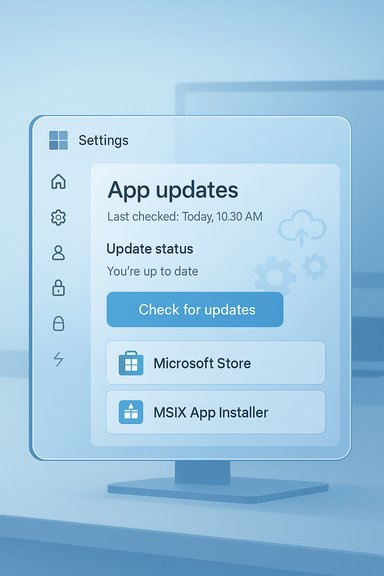
Microsoft recently surfaced a new App updates page inside Windows 11 Settings on Insider preview builds, a compact interface that shows a Last checked timestamp, a prominent Check for updates button, and a simple status list for apps that can be updated via the Store pipeline. Early hands‑on testing shows the UI exists but often doesn’t trigger a complete update flow yet, which suggests the feature is still being flighted and backend services are not fully wired in for every tester. At the same time Microsoft has been changing how the Microsoft Store manages automatic app updates: the option to permanently disable automatic app updates appears to have been removed in favor of a pause model (typically one to five weeks), aligning app updates behavior more closely with Windows Update. That change centralizes update enforcement and improves the platform’s security posture, but also reduces the ability of end users to opt out indefinitely. Parallel work on Microsoft’s update ecosystem — including a Windows Update “orchestration” platform concept — shows the company’s intent to support a wider class of apps (beyond Store-hosted packages) through native update channels in the future. The orchestration platform is being previewed for enterprise scenarios and aims to give developers an integration path so that third‑party apps can take advantage of Windows’ update scheduling, telemetry, and delivery infrastructure.
That said, the headline benefit — a single Settings page that updates every app on your PC — is not here yet. Current previews indicate the feature is scoped to Store‑managed apps and is still maturing technically. Enterprises and advanced users should treat the Settings page as one more tool in the toolbox rather than a replacement for existing package managers, DevOps workflows, or update controls.
If you value security and reduced maintenance overhead, this development is promising. If you value strict control over app versions and update timing, plan to continue using established management tools while monitoring Microsoft’s orchestration pilot programs and MSIX/App Installer progress for future shifts.
Conclusion: Microsoft is lining the pieces needed to make a single update surface plausible, and the new Settings “App updates” page is a visible step. The critical questions that remain — will non‑Store, legacy, and independently hosted apps be fully updateable from Settings? and how fast will developers and enterprises adopt the integration paths? — are not yet answered. Until those are settled, expect incremental progress, preview‑driven surprises, and an evolving balance between convenience, control, and security.
Source: XDA Microsoft may soon let you update all your apps directly from Windows 11's Settings
 Background
Microsoft recently surfaced a new App updates page inside Windows 11 Settings on Insider preview builds, a compact interface that shows a Last checked timestamp, a prominent Check for updates button, and a simple status list for apps that can be updated via the Store pipeline. Early hands‑on testing shows the UI exists but often doesn’t trigger a complete update flow yet, which suggests the feature is still being flighted and backend services are not fully wired in for every tester. At the same time Microsoft has been changing how the Microsoft Store manages automatic app updates: the option to permanently disable automatic app updates appears to have been removed in favor of a pause model (typically one to five weeks), aligning app updates behavior more closely with Windows Update. That change centralizes update enforcement and improves the platform’s security posture, but also reduces the ability of end users to opt out indefinitely. Parallel work on Microsoft’s update ecosystem — including a Windows Update “orchestration” platform concept — shows the company’s intent to support a wider class of apps (beyond Store-hosted packages) through native update channels in the future. The orchestration platform is being previewed for enterprise scenarios and aims to give developers an integration path so that third‑party apps can take advantage of Windows’ update scheduling, telemetry, and delivery infrastructure. What the new App updates page actually shows (and what it doesn’t)
The UI elements you’ll find
- Location: Settings → Apps → App updates (present in Insider preview builds in recent testing).
- Key fields: a Last checked timestamp, an Update status area, and a Check for updates button.
- Behavior: the page appears to surface the same Store-driven update status without forcing you to open the full Microsoft Store app.
Important limitations observed so far
- In preview builds the Check for updates control sometimes does nothing visible; the UI has arrived earlier than the supporting backend plumbing for every user. That strongly suggests the feature is being gradually enabled server-side and in islands of Insider rings.
- The page currently appears to enumerate and control only Store-managed apps or those that are integrated with the Store’s metadata and update mechanism. It does not yet behave like a Linux package manager or system‑wide package index that updates arbitrary Win32/MSI apps installed outside the Store.
- Apps with their own update engines (for example, Steam, Google Chrome, Adobe products) are not expected to be centrally updated by this page until those vendors explicitly adopt a supported integration path.
Why Microsoft is building this — strategic context
Security and platform consistency
Microsoft has strong incentives to reduce the number of unmanaged, out‑of‑date binaries on Windows devices. By centralizing update controls into Settings and the Store, Microsoft can:- Increase patch adoption for Store-distributed apps, reducing attack surface from outdated software.
- Provide a consistent update experience for users who otherwise rely on multiple third‑party update mechanisms.
- Align app update lifecycle rules with Windows Update policies to simplify compliance and enterprise management.
Platform unification and developer outreach
Long-term, Microsoft appears to want a multi-pronged solution:- Improve Store capabilities and surface them in Settings for general users.
- Offer an orchestration platform and APIs so independent developers and enterprise apps can integrate update delivery into Windows’ native update controls.
- Support App Installer / MSIX update semantics for Win32 and modern Windows apps to enable automatic checks or to be managed centrally.
What this means for different user groups
Casual users and everyday desktops
For most non-technical users the addition is primarily convenience. The App updates page:- Reduces friction by letting people check for updates from Settings (instead of hunting through the Store UI).
- Makes the update status for Store apps more visible and consistent with how they manage Windows Updates.
- In practice, won’t immediately centralize updates for non‑Store apps such as many legacy Win32 programs, unless those apps adopt the Store or MSIX/App Installer integration.
Power users and enthusiasts
Power users who already rely on package managers (winget, Chocolatey, Scoop) or centralized tools will see limited immediate benefit because:- The Settings app currently appears to focus on Store-managed pipelines.
- Existing third‑party updaters and package managers remain indispensable for updating software that is not offered via the Store or MSIX. However, Microsoft’s orchestration work signals an eventual convergence that could make some workflows simpler at scale.
IT administrators and enterprise
Enterprises should read this as a cautious, positive step:- A Store-centric Settings page will help unify management for apps delivered via Microsoft-managed channels.
- The Windows Update orchestration platform and MSIX/App Installer facilities are the critical pieces for broad enterprise adoption; IT teams will likely rely on those APIs and configuration profiles for full control and rollout strategies.
Strengths: why this is a useful change
- Convenience: A central Settings panel avoids the cognitive overhead of opening the Store or launching multiple app updaters.
- Security gains: Tighter enforcement for Store apps reduces the window attackers have to exploit outdated software.
- Consistency: Surface parity between OS updates and app updates reduces confusion for less technical users.
- Developer hooks exist: MSIX/App Installer already supports update metadata and automatic behaviors, giving a path for apps to integrate into Windows’ update model.
Risks and downsides: what to watch out for
Reduced user control
By moving toward enforced or limited‑pause auto‑updates for Store apps, Microsoft lowers the ability of users to freeze app versions indefinitely. That has real consequences when:- Users need older versions for compatibility with specific workflows or hardware.
- Updates introduce regressions that affect productivity (even if those regressions are rare).
Vendor adoption and fragmentation
The feature’s real value depends on developer participation:- If major publishers do not adopt MSIX/App Installer or the orchestration APIs, then the Settings page will remain a Store‑only convenience rather than a universal updater.
- Many major vendors have entrenched update systems (broad examples include Steam, Chrome, Adobe), and persuading them to adopt a new delivery route is nontrivial.
UX and reliability in previewing
Early previews reveal the UI before backend readiness. That can:- Create confusion among Insiders who see UI but can’t perform updates.
- Generate false expectations that Windows will manage third‑party apps system-wide immediately.
Centralization and single point of failure
Consolidating update flows increases the systemic impact when rollout mistakes happen. A buggy Store update or a bad metadata mapping could:- Cause multiple users to receive problematic app versions simultaneously.
- Make rollback and mitigation arguably more complex at scale.
How the pieces fit technically (developer and admin view)
MSIX / App Installer auto-update model
MSIX and App Installer already contain update settings that let apps check for updates from specified URIs, set intervals, and even prevent launch until updates are applied. Those capabilities are important because they:- Allow developers to host updates themselves while still exposing metadata that Windows can read.
- Enable Windows Settings and management tools to toggle automatic update behavior where permitted.
Windows Update orchestration platform
Microsoft’s orchestration initiative proposes a native backend to:- Schedule and deliver updates for third‑party apps in a way that respects battery and activity heuristics.
- Expose update history in Windows Update and allow enterprise policy controls for staged rollouts. Early previews target enterprise scenarios first, but the plan indicates broader ambitions.
Microsoft Store metadata reconciliation
For apps listed in the Store but hosted on developer servers, the Store can reconcile metadata and present an “update available” entry without the Store hosting the full package. That model lowers friction for integration but doesn’t translate to updating every program on disk.Practical guidance: what to do now
- If you’re curious and comfortable with preview builds:
- Join Windows Insider (Canary/Dev) and ensure your Microsoft Store is up to date; look for Settings → Apps → App updates to appear and experiment cautiously on non‑critical machines. Expect UI-only exposure in many cases until server-side features are enabled.
- For power users who want centralized updates today:
- Continue using established tools like winget, Chocolatey, or Ninite for independent package management across non‑Store apps.
- Consider packaging frequently used Win32 tools as MSIX where feasible to gain future compatibility with Store/Settings-centered update flows.
- For IT admins:
- Track the Windows Update orchestration preview and plan pilot projects with vendors that can integrate using MSIX or the orchestrator APIs.
- Evaluate Group Policy or MDM controls around Store updates and test pause behaviors so that update windows match your organization’s patch cycles.
- For developers:
- Review MSIX/App Installer auto-update documentation and ensure app metadata supports version discovery and update URIs.
- Consider offering a Store entry (even if hosted by your servers) to make your app visible to Windows’ central update surfaces sooner.
The road ahead — outlook and timelines
- Short term: The App updates page in Settings will act primarily as a convenience surface for Store-integrated apps. Expect incremental rollouts to Insiders and server-side gating that makes the UI active in phases. Early behavior is limited and sometimes nonfunctional until Microsoft flips more backend switches.
- Medium term: Microsoft’s orchestration work and MSIX tooling may enable a broader set of apps (including Win32 packaged appropriately) to be surfaced in Windows’ native update channels. That will require developer participation and enterprise pilots.
- Long term: If Microsoft succeeds in convincing publishers and enterprises to adopt the supported update model, Windows could approach a Linux‑style single‑update flow for a large fraction of the ecosystem — but that outcome is contingent on adoption, not merely product changes.
Final assessment: progress with caveats
The addition of an App updates page in Settings is a concrete, user-facing step toward a more centralized app lifecycle on Windows. It addresses a long-standing usability gap: users should not need to visit lots of separate update dialogs to keep their systems current. The move also complements Microsoft’s ongoing Store improvements and enterprise orchestration efforts, which together begin to close the gap between Windows and the single‑update experience enjoyed on platforms like many Linux distributions.That said, the headline benefit — a single Settings page that updates every app on your PC — is not here yet. Current previews indicate the feature is scoped to Store‑managed apps and is still maturing technically. Enterprises and advanced users should treat the Settings page as one more tool in the toolbox rather than a replacement for existing package managers, DevOps workflows, or update controls.
If you value security and reduced maintenance overhead, this development is promising. If you value strict control over app versions and update timing, plan to continue using established management tools while monitoring Microsoft’s orchestration pilot programs and MSIX/App Installer progress for future shifts.
Conclusion: Microsoft is lining the pieces needed to make a single update surface plausible, and the new Settings “App updates” page is a visible step. The critical questions that remain — will non‑Store, legacy, and independently hosted apps be fully updateable from Settings? and how fast will developers and enterprises adopt the integration paths? — are not yet answered. Until those are settled, expect incremental progress, preview‑driven surprises, and an evolving balance between convenience, control, and security.
Source: XDA Microsoft may soon let you update all your apps directly from Windows 11's Settings
