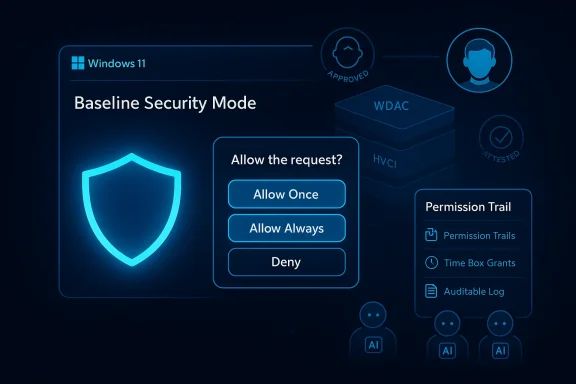
Microsoft’s plan to make Windows “secure by default” hinges on two tightly coupled ideas: a default-deny runtime integrity posture called Windows Baseline Security Mode (BSM), and a system-wide User Transparency and Consent (UTC) model that surfaces mobile-style permission prompts and auditable permissions for apps and AI agents. These changes, announced as part of Microsoft’s Secure Future Initiative and the Windows Resiliency Initiative, mark a deliberate shift away from the long-standing permissive posture of the platform toward a consent-first, auditable security baseline.
For years Microsoft has built defenses into Windows as optional or add-on features—things like Windows Defender Application Control (WDAC), Device Guard, Hypervisor‑Protected Code Integrity (HVCI), and Smart App Control. Those features have hardened endpoints when deployed, but they were typically opt‑in or complex to manage. The new announcements aim to consolidate those primitives into a single, auditable baseline that the OS will advertise and enforce by default, while pairing the baseline with a clear, revocable permission model for runtime resource access.
Microsoft frames this move as a response to modern threat trends—particularly supply‑chain and signing abuse, and the rise of agentic or AI‑driven tools that can automate misconfigurations into large-scale compromises. By locking down what can execute by default and requiring explicit consent for sensitive actions, Microsoft is attempting to close widely exploited blind spots while still offering controlled escape hatches for legitimate workflows.
Key points about BSM:
Together, BSM and UTC are intended to (1) reduce the attack surface by limiting what code can run and what resources can be accessed silently, and (2) create an auditable trail of consent decisions that both users and administrators can review.
Core enforcement mechanics:
Caveat: some details around policy semantics (exact certificate chains, attestation formats, and how Microsoft will manage cross‑platform or legacy driver signing) remain implementation details in the announcement. Organizations should treat these specifics as subject to change until Microsoft publishes the BSM technical specification.
Notable features:
However, the move will not be friction‑free. Compatibility issues, helpdesk load, signing key management, and potential prompt fatigue are real operational hazards. To realize the security promise while minimizing cost and disruption, organizations should:
In the coming months expect deeper technical guidance from Microsoft, preview builds that reveal real-world compatibility impacts, and a flurry of vendor activity to modernize signing and installer behavior. The direction is clear: Windows intends to be more assertive about what it allows to run, and it will require users and administrators to make fewer blind trusts and more explicit, auditable decisions.
Source: heise online Signed applications and consent prompts: How Windows is to become more secure
 Background
For years Microsoft has built defenses into Windows as optional or add-on features—things like Windows Defender Application Control (WDAC), Device Guard, Hypervisor‑Protected Code Integrity (HVCI), and Smart App Control. Those features have hardened endpoints when deployed, but they were typically opt‑in or complex to manage. The new announcements aim to consolidate those primitives into a single, auditable baseline that the OS will advertise and enforce by default, while pairing the baseline with a clear, revocable permission model for runtime resource access.Microsoft frames this move as a response to modern threat trends—particularly supply‑chain and signing abuse, and the rise of agentic or AI‑driven tools that can automate misconfigurations into large-scale compromises. By locking down what can execute by default and requiring explicit consent for sensitive actions, Microsoft is attempting to close widely exploited blind spots while still offering controlled escape hatches for legitimate workflows.
What Microsoft announced
Windows Baseline Security Mode (BSM)
BSM establishes a default-deny runtime integrity posture: at runtime, Windows will refuse to execute applications, services, or drivers that do not meet specified signing and attestation requirements unless an explicit, auditable exception exists. The feature consolidates and standardizes protections offered separately by WDAC, Device Guard, HVCI and Smart App Control into one canonical OS-level baseline. Administrators can pre-authorize apps across fleets; unmanaged users can request and grant exceptions; and developers will have APIs to detect whether BSM is active and whether particular components have exceptions.Key points about BSM:
- Only properly signed binaries, services, and drivers are allowed to run by default.
- Exceptions are auditable, revocable, and manageable at scale by IT.
- Developer-facing APIs let installers and apps query enforcement state and fail gracefully with remediation guidance.
User Transparency and Consent (UTC)
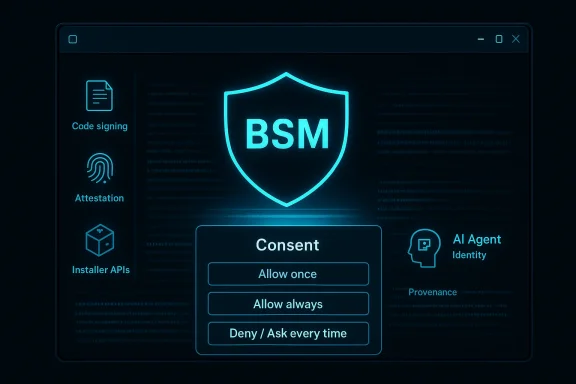
UTC brings a mobile-style permission model to Windows. From the moment an app—or an AI agent acting on behalf of the user—attempts to access sensitive resources (file system locations, camera, microphone, or the ability to install additional software), Windows will show a clear, human-readable consent prompt that names the requesting principal and the action requested. Choices will include options such as Allow once, Allow always, or Deny / Ask every time, with time‑boxed permissions that expire when the process closes. All decisions are logged so users and IT can audit who accessed what and when. Microsoft also plans special handling for agentic AI principals, treating them as distinct identities with their own recorded provenance.Together, BSM and UTC are intended to (1) reduce the attack surface by limiting what code can run and what resources can be accessed silently, and (2) create an auditable trail of consent decisions that both users and administrators can review.
How BSM enforces integrity (technical overview)
BSM is a policy-and-enforcement layer that sits on top of Windows’ existing integrity primitives. It is not simply another userland whitelist; the approach is enforced at a lower level—kernel policy decisions analogous to how HVCI and WDAC operate—so it aims to be harder to bypass than third‑party AV whitelists.Core enforcement mechanics:
- Signing and attestation checks at runtime: When the OS evaluates an executable, service, or driver, it consults the baseline policy to verify signatures and attestation claims before allowing execution.
- Kernel‑level enforcement: Decisions are made at a level intended to survive tampering, similar to virtualization-based protections and HVCI.
- Auditable exceptions: Exceptions are recorded and visible to administrators; the policy supports centralized simulation, rollouts, and pre‑authorization of known-good binaries for enterprise fleets.
Caveat: some details around policy semantics (exact certificate chains, attestation formats, and how Microsoft will manage cross‑platform or legacy driver signing) remain implementation details in the announcement. Organizations should treat these specifics as subject to change until Microsoft publishes the BSM technical specification.
How User Transparency and Consent will behave in practice
UTC focuses on authorization at the resource level rather than just on execution. The system introduces standardized runtime prompts for sensitive actions and revocable, auditable permissions. This is a substantial UX change for desktop Windows, aligning it more closely with mobile platforms while keeping PC workflows in mind.Notable features:
- Granular, named prompts: Dialogs that clearly identify the requesting app or agent, the exact resource (e.g., a folder path, microphone, camera), and action requested.
- Temporary grants: Options to allow access only for the current session (time‑boxed), reducing long‑lived permission creep.
- Audit trails and admin visibility: Every grant and denial is logged; enterprise tools will be able to surface permission histories centrally.
- Agent-aware controls: AI agents will carry distinct identities; their actions and permissions will be tracked separately from the hosting app or OS, yielding better provenance for automated behaviors.
Why this matters: threat models and anticipated benefits
- Smaller default attack surface: By blocking unsigned or improperly signed code from executing by default, BSM removes many traditional channels attackers use for persistence and privilege escalation (unsigned installers, rogue services, and permissive driver loading). This change reduces the utility of “living-off-the‑land” and unsigned payloads.
- Better protection against supply‑chain and signing abuse: Requiring stronger provenance and offering auditable exceptions makes it harder for attackers to leverage forged or repurposed signing artifacts without being detected.
- Auditability and governance: UTC’s logs and revocable permissions create forensic trails and governance controls that enterprises can use during incident response and compliance audits.
- Agentic AI mitigation: Treating AI agents as first‑class principals with identity and provenance reduces the risk of opaque automation performing sensitive actions unnoticed. This is an explicit response to concerns about autonomous agent behavior in adversarial hands.
Risks, trade-offs and potential pitfalls
The technical promise is strong, but the transition carries measurable operational and security risks:- Compatibility backlash: Windows’ historical strength has been compatibility. Locking the default runtime posture could break legitimate legacy applications, specialized drivers, or internal tools that lack modern signing. Enterprises that rely on bespoke software will need careful exception governance.
- Helpdesk and operations load: Expect an initial spike in support tickets related to blocked installers, drivers, and services. IT teams must prepare workflows to approve, audit, and remediate exceptions without crippling user productivity.
- Prompt fatigue and user behavior: More dialogs can lead to habituation; users may grant permissions reflexively, negating UTC’s protection unless prompts are designed to be informative and rate-limited for frequent legitimate actions.
- Signing key security: Moving trust onto code signing increases the impact of compromised signing keys. If an attacker obtains a vendor’s signing key or successfully forges attestations, BSM’s protections could be bypassed. Robust key management, revocation, and attestation protections will be crucial. This is a high‑risk scenario that Microsoft and vendors must address operationally.
- False sense of security: Organizations might over-rely on default guards and neglect telemetry, patching, and least-privilege practices. BSM and UTC are powerful layers, but not panaceas.
Preparing developers: technical and operational steps
Developers and ISVs must treat this change as a platform shift. The following steps are pragmatic preparedness actions:- Ensure robust code signing
- Adopt platform‑recommended signing algorithms and certificate chains. Protect private keys with hardware-backed HSMs or equivalent. Monitor for and plan key rotation. Signing is now a first-order security control.
- Adopt attestation where appropriate
- Use device or app attestation features when available to provide stronger provenance for drivers or privileged components. This helps meet BSM attestation requirements.
- Implement permissive, clear failure modes
- Use the developer APIs to detect BSM enforcement and provide clear, actionable remediation UX—e.g., offer an “Open support page” or “Request exception” flow rather than crashing silently.
- Test against simulated baselines
- Use Microsoft’s promised simulation tooling to run apps in an environment that mirrors BSM before production rollout. This reduces surprises for customers.
- Prepare installer and driver lifecycles
- Revisit installer technologies and driver update mechanisms to ensure they work under a consent-first model. Minimize behaviors that require broad, persistent permissions.
- Document agent behaviors and provenance
- If your app ships with or exposes AI agents, design agent identities and auditing metadata so UTC can identify actions and prompt users appropriately.
- Plan customer education
- Provide guidance to users and admins explaining why prompts appear, and how to distinguish legitimate requests from suspicious ones to avoid naive approvals.
Preparing IT and security teams
Enterprise readiness needs governance, tooling, and training. Recommended steps:- Create an exceptions policy and approval workflow that balances security with productivity.
- Use simulation tools to identify likely blockers and high‑risk apps before enabling BSM broadly.
- Train helpdesk staff and automate common exception approvals for trusted vendor applications.
- Instrument centralized audit dashboards to monitor UTC grants and BSM exception events.
- Coordinate with software vendors to ensure critical apps are signed and tested against BSM.
Realistic security gains and remaining attack paths
BSM and UTC close many common avenues of exploitation, but some high-risk vectors remain:- Compromised or stolen signing keys — if an attacker gains access to legitimate signing material, they can produce artifacts that pass BSM checks. This makes key protection and revocation mechanisms critical.
- Social engineering to obtain consent — UTC is only as strong as users; determined attackers can craft convincing prompts or phish users into approving malicious actions. User education and contextual UX signals are necessary mitigations.
- Misconfigured exceptions — poorly governed exceptions lists in enterprise environments can become a backdoor; exception governance must be auditable and periodically reviewed.
- Attacks on attestation infrastructure — if attestation services are attacked or subverted, the trust chain breaks; Microsoft and partners must defend attestation endpoints vigorously.
UX and human factors: getting prompts right
The success of UTC depends on prompt quality and context:- Prompts must name the principal and action clearly, avoiding technical jargon.
- Offer contextual cues (why does this app need access now?) and an easy path to revoke permissions.
- Use time‑boxed allowances by default for high‑sensitivity actions and only escalate to persistent grants when the user demonstrates a repeatable need.
Timeline, rollout and what to expect next
Microsoft has described a phased rollout that begins with greater visibility (insider previews and enterprise simulation tools), then moves to developer APIs and finally to broader enablement across consumer and enterprise channels. Exact dates and the cadence of each phase were not specified in the announcement, so organizations should watch preview channels closely, validate behavior in test rings, and plan migration windows rather than assuming an immediate switch. Treat the current messaging as a roadmap rather than a final schedule.Final assessment and recommended actions
Microsoft’s twin announcements—Windows Baseline Security Mode and User Transparency and Consent—represent a meaningful evolution in how Windows defends endpoints. The approach intelligently combines low‑level integrity enforcement with a user‑visible, auditable consent model, and it directly targets modern threats such as signing abuse and agentic automation. If executed with the promised developer APIs, robust signing and attestation support, and careful UX design, this could be one of the most impactful platform security changes in years.However, the move will not be friction‑free. Compatibility issues, helpdesk load, signing key management, and potential prompt fatigue are real operational hazards. To realize the security promise while minimizing cost and disruption, organizations should:
- Start pilots now in test rings and use Microsoft’s simulation tooling.
- Harden signing key management and adopt attestation where appropriate.
- Build exception governance and automated approval workflows.
- Educate users and helpdesk teams about the new consent model and safe behaviors.
In the coming months expect deeper technical guidance from Microsoft, preview builds that reveal real-world compatibility impacts, and a flurry of vendor activity to modernize signing and installer behavior. The direction is clear: Windows intends to be more assertive about what it allows to run, and it will require users and administrators to make fewer blind trusts and more explicit, auditable decisions.
Source: heise online Signed applications and consent prompts: How Windows is to become more secure