

Dave Plummer opens his short, blunt video with four words—“Windows sucks”—and then does something increasingly rare in tech commentary: he doesn’t just complain, he draws a tight, engineer-first blueprint for repair. What follows is not a nostalgic plea to return to 1990s UI chrome; it’s a practical set of product and engineering prescriptions aimed at restoring predictability, control, and trust to the platform that still powers the world’s desktops. Those prescriptions center on a single, discoverable system profile for advanced users, radical telemetry transparency, a unified control plane, safer updates with simple rollback, and making developer tooling first-class rather than afterthoughts. The recommendations are small in scope but potentially immense in impact—if Microsoft treats them as product priorities rather than marketing metrics.
Dave Plummer is not a random critic. He’s the veteran Windows engineer credited with the original Windows Task Manager, the ZIP‑folders integration, and the NT port of the Space Cadet Pinball game—tools and features that still show up in Windows workflows decades after he left active product teams. That history gives his critique technical credibility: Plummer speaks from the production trade-offs and constraints that shape system-level software, not from the ivory tower of UX theory. His video reframes a familiar complaint—that modern Windows is noisy, promotional, and second‑guesses users—into an implementable roadmap for change.
Plummer’s central thesis is simple and stark: Windows didn’t “become bad” overnight. It drifted. Over many releases Microsoft optimized the default experience for mass-market adoption—making the UI forgiving, guidance-rich, and encouraging of cloud services—at the expense of the deterministic, low‑noise behavior power users expect. The result is an OS that, for many seasoned operators, feels more like a sales channel or concierge than a tool under their control.
What Expert/Pro mode would do:
Why this matters: Hunting for settings across disparate UIs is a productivity tax and a source of errors. Surface-level consolidation reduces support load and makes complex trade-offs visible. This isn’t purely cosmetic—the UX must also expose policy provenance (local choice vs. Group Policy) so advanced users and IT admins understand trust boundaries.
Source: PCWorld 'Windows sucks': How the dev who created Task Manager would fix things
 Background
Dave Plummer is not a random critic. He’s the veteran Windows engineer credited with the original Windows Task Manager, the ZIP‑folders integration, and the NT port of the Space Cadet Pinball game—tools and features that still show up in Windows workflows decades after he left active product teams. That history gives his critique technical credibility: Plummer speaks from the production trade-offs and constraints that shape system-level software, not from the ivory tower of UX theory. His video reframes a familiar complaint—that modern Windows is noisy, promotional, and second‑guesses users—into an implementable roadmap for change.Plummer’s central thesis is simple and stark: Windows didn’t “become bad” overnight. It drifted. Over many releases Microsoft optimized the default experience for mass-market adoption—making the UI forgiving, guidance-rich, and encouraging of cloud services—at the expense of the deterministic, low‑noise behavior power users expect. The result is an OS that, for many seasoned operators, feels more like a sales channel or concierge than a tool under their control.
The diagnosis: why experienced users are frustrated
Plummer enumerates a short list of repeatable irritants that, together, erode trust and productivity:- Promotions and suggestion pipelines: Recommended apps, promoted store entries, and persistent nudges (for example, to switch or reinstall Microsoft’s own apps) appear in places users expect to be private, like the Start menu and search surfaces. These are often toggled on by default and poorly explained when a user tries to turn them off.
- Mitten mode (over-cautious defaults): In the effort to flatten the learning curve for novices, Windows has “rounded off” some of the sharp edges power users rely on—hiding capabilities, layering protective behaviors, and encouraging cloud or web fallbacks that interrupt local workflows.
- Fragmented settings and hidden control surfaces: Settings are spread across Settings, Control Panel, Group Policy, Registry, and vendor-specific tools. Hunting for the right toggle is a recurring productivity tax for users and admins.
- Defaults that override user intent: Handlers, defaults, and behavioral fallbacks sometimes revert or reassert themselves after users make explicit choices—creating the sense that the OS doesn’t respect deliberate operator decisions.
- Opaque telemetry and surprise updates: Users find it hard to know what data leaves their machine and why, while update behavior sometimes prioritizes cadence and distribution over a machine‑owner’s schedule. Unexpected reboots and behavioral changes after updates are frequent sources of complaint.
The prescription: five pragmatic changes that matter
Plummer’s proposals are concentrated, technical, and deliberately scoped to what product teams could plausibly deliver without rewriting Windows from the kernel up. Each recommendation is narrowly targeted and actionable.1) Ship a first‑class “Expert” or “Pro” mode
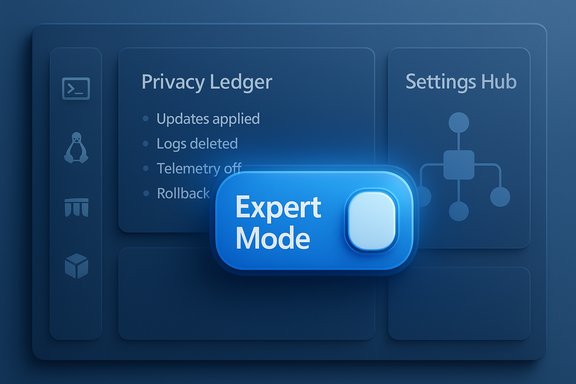
At the core: a single, discoverable, system‑wide switch—exposed at setup and in Settings—that flips Windows from “safe and chatty” into a deterministic, terse operating mode for knowledgeable operators.What Expert/Pro mode would do:
- Remove promotional content, suggested apps, and sponsored tiles from Start and Search.
- Silence product nudges (for example, repeated “switch to X” prompts).
- Default local search to local results and disable web fallbacks unless explicitly requested.
- Honor explicit user choices and avoid automatic reconfiguration of defaults.
2) Radical telemetry transparency: the “privacy ledger”
Plummer does not demand the elimination of telemetry—he recognizes its role in diagnostics and security. His ask is for auditable, human‑readable transparency:- A real‑time, always‑available privacy ledger that records outbound telemetry entries with plain‑English reasons for each packet and links for deeper documentation.
- Per‑category muting of telemetry that persists through updates unless the system explicitly re‑asks and justifies the need.
- Durable controls so that updates cannot silently re-enable previously muted telemetry.
3) A single authoritative settings hub
Consolidation: one discoverable control plane that explains every setting’s scope, affected subsystems, and potential telemetry or network activity. When a setting is toggled, the UI should show exactly what changes and why.Why this matters: Hunting for settings across disparate UIs is a productivity tax and a source of errors. Surface-level consolidation reduces support load and makes complex trade-offs visible. This isn’t purely cosmetic—the UX must also expose policy provenance (local choice vs. Group Policy) so advanced users and IT admins understand trust boundaries.
4) Make developer and power tools first‑class
Plummer’s checklist for developer ergonomics is refreshingly concrete:- Make Windows Terminal the default console and ensure classic consoles are consistent.
- Ship WinGet, SSH, tar, curl and similar CLI tooling on PATH by default for advanced installs.
- Make WSL a comfortable, supported experience and treat CLI tooling as part of the OS baseline rather than optional add‑ons.
5) Safer updates and simple rollback
Updates must be choreographed around the user’s productivity and be easy to reverse:- Respect scheduled maintenance windows and never forcibly reboot during active hours.
- Provide plain‑English update notes and health checks that validate a successful install.
- Offer one‑click or automatic rollback when an update fails a health check.
Cross‑checking the facts: what already exists and where the gaps are
Plummer’s wishlist frequently intersects with existing Windows features, which both strengthens his argument and identifies implementation gaps:- Windows currently exposes diagnostic categories and a Diagnostic Data Viewer, and enterprise SKUs have more granular controls. However, consumer SKUs cannot disable all telemetry and the Diagnostic Data Viewer is not designed as an always‑on, human‑readable ledger. That gap is the target of his transparency ask.
- Windows ships purpose‑specific modes—S Mode, Developer Mode—and enterprise policy tooling. The missing piece is a durable, discoverable global profile for power users that’s honored everywhere rather than a set of siloed options.
- Developer tooling improvements are real: WSL, Windows Terminal, and WinGet exist and have matured. Plummer’s ask is not invention but prioritization—make these tools the default experience for advanced installs so developers don’t have to reconstruct the environment themselves.
- Update recovery primitives (System Restore, uninstalling recent updates, WinRE) exist, but predictable automatic rollback based on runtime health checks is not a first‑class consumer experience. Enterprise ringing and staged rollouts already contain this logic; Plummer argues it should be applied to protect individual users as well.
Strengths of Plummer’s plan
- Pragmatic and scoped: The proposals are focused on defaults, UX, and visibility rather than massive system rewrites. That keeps engineering costs contained and lets Microsoft deliver meaningful wins quickly.
- Engineer‑grade fixes: The ask is familiar to anyone who ships systems: make the defaults respectful of operator intent, expose provenance for changes, and make diagnostic data auditable. These are product and engineering hygiene items with high ROI.
- Alignment with developer expectations: Prioritizing WSL, Windows Terminal, and WinGet signals that Windows is serious about developers—something that has long-term platform benefits.
- Trust as product strategy: Offering an Expert mode or paid ad‑free tier would trade short-term engagement metrics for durable trust—an investment that could reduce churn, lower support costs, and preserve Windows’ centrality for power users.
Risks and trade‑offs
Plummer’s remedies are technically modest but politically charged. The core tensions:- Business incentives vs. user trust: Many of the “nuisances” originate in legitimate business experiments—store promotions, suggested apps, and product nudges generate measurable engagement and revenue. Turning those off by default for a sizable cohort reduces short‑term commercial opportunity. Product leaders will need to reweigh metrics like activation and upsell against retention and brand trust.
- Telemetry complexity: Telemetry is not monolithic. Crash dumps, driver telemetry, update health signals, and security pings differ in size, sensitivity, and regulatory posture. Building a meaningful ledger that is both comprehensive and comprehensible is an engineering and UX challenge that requires careful scoping to avoid overload and false reassurance.
- Security and compliance: Some telemetry and update signals are necessary for secure device operation or regulatory compliance. Durable muting must be designed with exception pathways and transparent justifications so users understand trade‑offs.
- Surface‑area for regressions: Making diagnostic and high‑privilege tooling more visible increases the risk that less skilled operators will change system state in dangerous ways. Expert mode must therefore be discoverable and gated appropriately—an explicit consent model and clear warnings will be necessary.
Practical steps users and IT admins can take today
While Microsoft considers whether to adopt an Expert mode, power users and administrators can reduce friction using existing controls. These steps are pragmatic stopgaps rather than a full cure.- Disable Start suggestions and promoted content:
- Settings > Personalization > Start → turn off “Show suggestions occasionally in Start.”
- Use Group Policy or Registry to suppress “Microsoft consumer experiences” on Pro/Enterprise machines to limit upsell surfaces.
- Make Windows Terminal the default and add developer tools to PATH:
- Install Windows Terminal from the Store/winget and set it as the default terminal host; enable WinGet and add CLI tools where appropriate.
- Inspect telemetry with Diagnostic Data Viewer:
- Settings > Privacy & security > Diagnostics & feedback, and use the Diagnostic Data Viewer to see some of the outbound telemetry. Remember this is not a complete ledger; use it to inform choices.
- Use active hours and pause options to avoid surprise reboots; for mission‑critical devices, defer optional preview updates until they pass staged testing. Use enterprise rings for phased deployment and testing.
- If privacy is a primary concern, consider local account setup at install where appropriate; Plummer recommends clearer upfront choices, and you can choose them today in the setup flow when available.
Organizational and strategic implications for Microsoft
The heart of Plummer’s ask is a political one inside product organizations: what do you optimize for—short‑term engagement or long‑term trust? Every change he requests cuts against short‑term activation metrics but raises the platform’s long‑term defensibility.- If Microsoft adopts a durable Expert mode, it signals a commitment to respecting owner intent and the developer ecosystem—an investment in retention among the most influential Windows advocates.
- If product teams resist because those pipelines fund features and partner economics, the default will stay noisy and promotional—an approach that risks slow erosion of power‑user goodwill over years and many small purchases.
Conclusion
Dave Plummer’s “Windows sucks” provocation is effective because it’s paired with a repair manual. His proposals—an Expert/Pro mode, a privacy ledger, consolidated settings, developer defaults, and safer updates—are modest in engineering scope but profound in product impact. They reframe the problem as a matter of defaults, discoverability, and trust rather than architectural obsolescence. Many of the technical building blocks already exist inside Windows; what’s missing is prioritization and a willingness to trade some engagement metrics for durable user trust. The final choice rests with product leadership: preserve short‑term promotional levers, or invest in a clearer social contract between the operator and the operator’s machine. The decision will shape daily productivity, platform loyalty, and the lived experience of millions of Windows users for years to come.Source: PCWorld 'Windows sucks': How the dev who created Task Manager would fix things
