

Microsoft’s June 2026 Windows AI signals show dictation and transcription moving toward on-device, low-latency Windows capabilities through Insider build changes, Fluid Dictation language expansion, preview Windows AI speech APIs, and new MAI-Transcribe model availability announced around Build 2026. The practical enterprise answer is simple: start a controlled pilot now, before general availability turns voice input from a novelty into another expected Windows endpoint capability. Waiting for GA may feel safer, but it risks leaving IT with untested hardware assumptions, unclear language coverage, and no policy position when users begin treating dictation as part of the desktop.
The right move is not a broad rollout. It is a narrow, instrumented pilot across real devices, real accents, real apps, and real privacy constraints. Microsoft has not published the concrete latency, accuracy, offline behavior, SKU matrix, or inbox model inventory that an enterprise would normally want before standardizing on a speech workflow, and that absence is precisely why the pilot should begin now.
The early test plan should be mundane and disciplined. IT should put Copilot+ PCs and representative non-Copilot+ Windows 11 systems in front of users who actually dictate: legal staff, clinicians, field workers, accessibility users, multilingual support teams, executives, and anyone who lives in Outlook, Teams, Word, ticketing systems, CRM forms, or browser-based line-of-business apps. The question is not whether Microsoft’s demos look good. The question is whether Windows dictation behaves predictably in the places where employees already type.
The concrete actions are straightforward: validate the current Insider experience on a non-production ring, test Fluid Dictation where available, compare it with existing cloud transcription tools, document which languages work for your workforce, and decide where voice data is allowed to be processed. If your organization cannot answer those questions today, it will not magically be ready when these features graduate from preview language to default Windows behavior.
This is also a procurement issue hiding inside a usability story. A low-latency dictation experience depends on microphones, drivers, silicon, model availability, battery behavior, and endpoint policy. Enterprises that treat it as “just another AI feature” will discover late that the difference between a delightful voice workflow and a support-ticket generator may be the laptop fleet, not the model branding.
Then came the June 12 Release Preview builds, 26100.8728 and 26200.8728, which moved voice typing animations to the dictation key and described dictation as being made smoother with fewer manual edits. The animation change sounds small because it is small. But UI polish in Release Preview usually matters because it signals that Microsoft is preparing the experience for more ordinary users, not just the subset willing to tolerate rough edges.
Build 2026 added the platform story. Microsoft introduced MAI-Transcribe 1.5 on June 2, with support for 43 languages and streaming coming soon. Separately, Microsoft’s Windows AI positioning says Windows AI APIs are available in preview for CPU and GPU, including real-time speech-to-text, while Foundry Local is generally available. Put together, the direction is obvious: speech-to-text is being pulled closer to Windows, closer to the device, and closer to developer workflows.
The meaningful shift is not merely “AI dictation exists.” Windows has had speech features for years, and third-party dictation tools have long served specialists. The new story is that Microsoft appears to be folding low-friction, model-assisted, local-capable dictation into the Windows AI platform itself. That changes the audience from enthusiasts and accessibility users to every organization managing Windows endpoints at scale.
That matters because endpoint capabilities need governance before they become ubiquitous. A cloud transcription add-on can be approved, blocked, or licensed as a service. An OS-level capability is harder to ignore because it appears inside the user’s normal workflow and may be invoked across arbitrary text fields. Once the dictation key becomes the visible affordance and the corrections happen in-line, users stop thinking about a separate tool and start thinking about voice as another input method.
The phrase low latency is doing a lot of work here. Low latency is not just a performance metric; it changes user behavior. If a transcription tool lags, users reserve it for long-form notes or meetings. If it feels immediate, they use it for passwords-adjacent workflows, customer records, chat replies, ticket comments, search boxes, code comments, and every small burst of text they would otherwise type.
That is why privacy and policy cannot be deferred. Microsoft’s May Insider note frames on-device SLM processing as fast and private, but enterprises still need to know where audio is buffered, how model components are delivered, what telemetry exists, which administrative controls apply, and how the experience behaves when connectivity is absent or restricted. “On-device” is a useful starting point, not a complete compliance answer.
That kind of refinement usually arrives after the underlying workflow is considered strategically durable. Full-screen overlays and intrusive state changes are acceptable when a feature is experimental or narrowly used. A quieter animation on the dictation key says the company wants users to keep their eyes on the current task. The system becomes less performative and more ambient.
For IT, ambient features are harder to inventory. A big app is visible in procurement and software metering. A subtle OS capability spreads through behavior. Users discover it, share it, and then expect it to work in every app where text entry exists. By the time the help desk hears about it, the question is no longer “Should we allow this?” but “Why does this work on one laptop and not another?”
There is also an accessibility angle that deserves more than a footnote. Better dictation is not only about saving time for power users. It can reduce friction for employees with mobility limitations, repetitive strain injuries, temporary injuries, neurodivergent workflows, or language needs that make keyboard-first work harder. The enterprise mistake would be to treat this as a shiny AI feature rather than part of a broader input strategy.
MAI-Transcribe 1.5 supporting 43 languages broadens the strategic picture, but it does not answer the operational questions by itself. Model support is not the same thing as a polished Windows inbox experience, and an announced model capability is not the same thing as validated performance in a call center in Montréal, a warehouse in Texas, a sales office in Madrid, or a support desk serving mixed-language customers. Enterprises need to separate the model roadmap from what is actually exposed, supported, and manageable in Windows at any given time.
This is where the pilot should be deliberately multilingual. Do not merely test whether Spanish and French appear. Test punctuation behavior, name handling, domain vocabulary, mixed-language utterances, accents, background noise, headset quality, and app-specific text insertion. Test whether users trust the corrections or spend more time undoing them.
The phrase “fewer manual edits” is promising but not measurable enough for IT. A pilot should convert it into local evidence: how often users correct output, what kinds of errors appear, and whether errors are benign typos or business-risk mistakes. Dictation failures are not all equal. A missed comma in a personal note is not the same as a wrong medication name, customer ID, legal clause, or incident severity.
The missing numbers are the numbers IT actually needs. How fast does real-time speech-to-text feel on CPU versus GPU? Which devices fall back gracefully, and which feel sluggish? How much memory does the experience consume during heavy multitasking? How does battery life behave on a laptop used for hours of dictated notes? What happens when an endpoint is offline, on a metered network, behind strict proxy controls, or running endpoint security tools that inspect model downloads?
There is also no public inbox SLM list that lets administrators build a clean status matrix. Which models are present by default? Which are downloaded on demand? Which are optional, removable, versioned, or tied to language packs? Which experiences require Copilot+ hardware, and which can run on CPU or GPU through broader Windows AI APIs? These are not pedantic questions. They determine help-desk scripts, compliance documentation, and procurement standards.
The safest reading is that Microsoft is still assembling the stack in public. That is not a criticism; it is how Windows platform transitions often look. But it means IT should not wait for a finished chart from Redmond before beginning its own. The first useful artifact from a pilot may simply be a spreadsheet showing which combinations of hardware, build, language, microphone, and app produce acceptable results.
Real-time speech-to-text is the obvious fit when an app needs to convert audio into text quickly: captions, notes, search input, form entry, accessibility scenarios, and live meeting artifacts. A small language model layered on top can improve grammar, punctuation, and fluency, but it can also alter user intent. That is helpful when dictating a polished email. It is dangerous when capturing a verbatim statement, technical command, legal quote, or regulated record.
This distinction should shape app design. If the text is supposed to be exact, developers should expose a clear review state and avoid silent rewriting. If the text is supposed to be polished, they should make corrections visible enough that users understand what changed. The worst interface is one that feels magical until a user realizes it “helped” by changing meaning.
For enterprise developers, the path probably splits by workload. Internal productivity apps may benefit from Windows-level dictation and cleanup if the output is user-reviewed. Regulated capture systems may need stricter transcription modes and audit trails. Customer-facing apps may need language fallback and a way to disable correction when accuracy matters more than readability.
The preview status of Windows AI APIs also matters. Preview APIs are a signal to experiment, not a promise to freeze architecture. Developers should prototype against them, measure performance, and understand the packaging model, but they should avoid hard dependencies that would make production apps brittle before the platform contracts settle.
A laptop with poor microphones can make a state-of-the-art model look mediocre. A noisy office can turn a pilot into a complaint factory. A cheap headset can outperform an expensive laptop mic in the real world. Conversely, a well-tuned device with good audio capture may make local dictation feel like a native productivity upgrade rather than another half-finished AI experiment.
The compute question is equally practical. Microsoft’s Windows AI page says APIs are in preview for CPU and GPU, and Foundry Local is generally available, which suggests a broader hardware story than “only the newest Copilot+ PC matters.” But broader availability does not mean equivalent experience. CPU, GPU, and NPU execution paths can differ in responsiveness, power draw, thermals, and background-task interference.
That is why procurement should not wait for the brand language to settle. Test your actual fleet. If dictation is acceptable only on a subset of devices, write that down now. If certain microphones or docks cause problems, discover it before a refresh cycle. If a future standard image needs language components, model packages, or policy exceptions, the endpoint team should know before the annual device order is locked.
Some environments will welcome on-device processing because it may reduce dependence on cloud transcription services. Others will be cautious because local processing still involves audio capture, model execution, and potentially sensitive text output. A call center may need different rules from a software team. A hospital may need different controls from a marketing department. A government contractor may need to know whether the feature behaves differently across disconnected networks and managed images.
Administrators should also consider the social side of voice input. Dictation in open offices can create confidentiality problems even if the model never sends audio to the cloud. Employees speaking customer data aloud may violate internal norms or regulatory expectations. Low latency makes dictation more tempting, but it does not make every workspace suitable for voice.
Training should therefore be part of the pilot, not an afterthought. Users need to know when to review output carefully, when not to dictate sensitive material aloud, and when a polished AI correction may be inappropriate. The goal is not to frighten people away from the feature. The goal is to turn voice input into a governed workflow rather than a shadow habit.
The Speechify angle is especially useful context because it shows that Microsoft is not moving in a vacuum. Third-party voice AI tools are pushing hard on local dictation, reading, and model-assisted workflows. If Windows itself becomes “good enough” at low-latency dictation, enterprises may consolidate around inbox capabilities. If Windows remains uneven, specialist tools will continue to win in departments that depend heavily on voice.
That competitive pressure is good for users but complicates IT strategy. The organization may end up supporting several layers: Windows inbox dictation for general use, Microsoft model-based transcription for developers or business apps, and specialist tools for high-accuracy or domain-specific work. Pretending there will be one universal answer is wishful thinking.
The better posture is layered governance. Let Windows provide the baseline where it is reliable and policy-compliant. Let specialist tools justify themselves through measurable accuracy, vocabulary control, workflow integration, or compliance features. Let developers choose platform APIs when they need native integration, and model services when they need capabilities Windows does not yet expose cleanly.
Start with latency as users experience it, not as a lab number. Does text appear quickly enough that users keep speaking naturally? Does correction happen in a way that helps rather than interrupts? Does the dictation UI stay out of the way? Does the experience degrade gracefully under CPU load, on battery, or while Teams, Outlook, browsers, and endpoint agents are running?
Then measure correction burden. Ask users to capture how often they need to fix punctuation, names, jargon, numbers, and formatting. The advertised goal of fewer manual edits should be evaluated against your vocabulary, not Microsoft’s demo script. A finance team, a service desk, and a legal department will have very different tolerance for “almost right.”
Finally, map language and device coverage. If Spanish and French Fluid Dictation are relevant to your workforce, test them now. If MAI-Transcribe 1.5’s 43-language support sounds promising, treat it as a model-level signal rather than an automatic Windows deployment answer. If real-time speech-to-text on CPU and GPU matters because your fleet is mixed, build that matrix yourself.
The deliverable should be plain enough for management to understand: which users benefit, which devices qualify, which languages are acceptable, which workflows are excluded, and which policies must be written before rollout. That is more valuable than waiting for a Microsoft marketing page to become more specific.
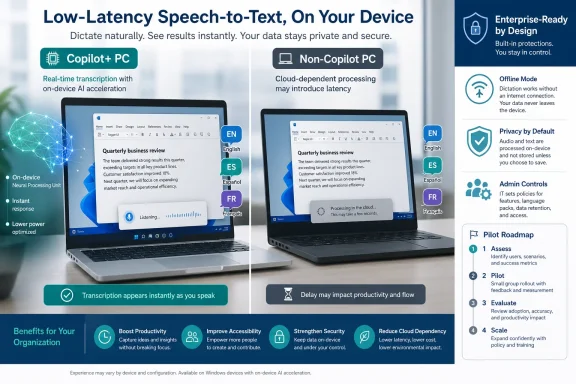 The Enterprise Verdict Is to Pilot, Not Deploy Blindly
The right move is not a broad rollout. It is a narrow, instrumented pilot across real devices, real accents, real apps, and real privacy constraints. Microsoft has not published the concrete latency, accuracy, offline behavior, SKU matrix, or inbox model inventory that an enterprise would normally want before standardizing on a speech workflow, and that absence is precisely why the pilot should begin now.The early test plan should be mundane and disciplined. IT should put Copilot+ PCs and representative non-Copilot+ Windows 11 systems in front of users who actually dictate: legal staff, clinicians, field workers, accessibility users, multilingual support teams, executives, and anyone who lives in Outlook, Teams, Word, ticketing systems, CRM forms, or browser-based line-of-business apps. The question is not whether Microsoft’s demos look good. The question is whether Windows dictation behaves predictably in the places where employees already type.
The concrete actions are straightforward: validate the current Insider experience on a non-production ring, test Fluid Dictation where available, compare it with existing cloud transcription tools, document which languages work for your workforce, and decide where voice data is allowed to be processed. If your organization cannot answer those questions today, it will not magically be ready when these features graduate from preview language to default Windows behavior.
This is also a procurement issue hiding inside a usability story. A low-latency dictation experience depends on microphones, drivers, silicon, model availability, battery behavior, and endpoint policy. Enterprises that treat it as “just another AI feature” will discover late that the difference between a delightful voice workflow and a support-ticket generator may be the laptop fleet, not the model branding.
Microsoft’s Signals Point in One Direction
The evidence is not one single announcement. It is the pattern across May and June 2026. Windows Insider Beta Build 26220.8474, released May 15, 2026, expanded Fluid Dictation to Spanish and French and described the experience as powered by on-device small language models for fast, private processing. That is not a cosmetic update. It is Microsoft saying that dictation quality is increasingly being improved locally, at the point of input.Then came the June 12 Release Preview builds, 26100.8728 and 26200.8728, which moved voice typing animations to the dictation key and described dictation as being made smoother with fewer manual edits. The animation change sounds small because it is small. But UI polish in Release Preview usually matters because it signals that Microsoft is preparing the experience for more ordinary users, not just the subset willing to tolerate rough edges.
Build 2026 added the platform story. Microsoft introduced MAI-Transcribe 1.5 on June 2, with support for 43 languages and streaming coming soon. Separately, Microsoft’s Windows AI positioning says Windows AI APIs are available in preview for CPU and GPU, including real-time speech-to-text, while Foundry Local is generally available. Put together, the direction is obvious: speech-to-text is being pulled closer to Windows, closer to the device, and closer to developer workflows.
The meaningful shift is not merely “AI dictation exists.” Windows has had speech features for years, and third-party dictation tools have long served specialists. The new story is that Microsoft appears to be folding low-friction, model-assisted, local-capable dictation into the Windows AI platform itself. That changes the audience from enthusiasts and accessibility users to every organization managing Windows endpoints at scale.
Dictation Is Becoming an Endpoint Capability
Enterprise IT tends to classify speech tools as either accessibility accommodations or productivity add-ons. Microsoft’s recent moves make that taxonomy look dated. If dictation is powered by local models, exposed through Windows AI APIs, polished through inbox UI, and connected to Microsoft’s model catalog, it starts to resemble an endpoint capability in the same family as camera effects, biometric sign-in, notification control, or local search.That matters because endpoint capabilities need governance before they become ubiquitous. A cloud transcription add-on can be approved, blocked, or licensed as a service. An OS-level capability is harder to ignore because it appears inside the user’s normal workflow and may be invoked across arbitrary text fields. Once the dictation key becomes the visible affordance and the corrections happen in-line, users stop thinking about a separate tool and start thinking about voice as another input method.
The phrase low latency is doing a lot of work here. Low latency is not just a performance metric; it changes user behavior. If a transcription tool lags, users reserve it for long-form notes or meetings. If it feels immediate, they use it for passwords-adjacent workflows, customer records, chat replies, ticket comments, search boxes, code comments, and every small burst of text they would otherwise type.
That is why privacy and policy cannot be deferred. Microsoft’s May Insider note frames on-device SLM processing as fast and private, but enterprises still need to know where audio is buffered, how model components are delivered, what telemetry exists, which administrative controls apply, and how the experience behaves when connectivity is absent or restricted. “On-device” is a useful starting point, not a complete compliance answer.
The UI Change Is Small, but the Intent Is Not
Moving voice typing animations to the dictation key sounds like the sort of change that only a release-note completionist could love. In practice, it is part of the normalization process. The best operating-system features disappear into muscle memory, and Microsoft is reducing the visual ceremony around dictation so it feels less like launching a tool and more like pressing a key.That kind of refinement usually arrives after the underlying workflow is considered strategically durable. Full-screen overlays and intrusive state changes are acceptable when a feature is experimental or narrowly used. A quieter animation on the dictation key says the company wants users to keep their eyes on the current task. The system becomes less performative and more ambient.
For IT, ambient features are harder to inventory. A big app is visible in procurement and software metering. A subtle OS capability spreads through behavior. Users discover it, share it, and then expect it to work in every app where text entry exists. By the time the help desk hears about it, the question is no longer “Should we allow this?” but “Why does this work on one laptop and not another?”
There is also an accessibility angle that deserves more than a footnote. Better dictation is not only about saving time for power users. It can reduce friction for employees with mobility limitations, repetitive strain injuries, temporary injuries, neurodivergent workflows, or language needs that make keyboard-first work harder. The enterprise mistake would be to treat this as a shiny AI feature rather than part of a broader input strategy.
Language Coverage Is the First Real Test
The May 15 expansion of Fluid Dictation to Spanish and French is important because language coverage is where enterprise pilots often collide with reality. English-first demos can look excellent while global deployment remains uneven. A multinational company cannot build a serious voice strategy on a single-language success story.MAI-Transcribe 1.5 supporting 43 languages broadens the strategic picture, but it does not answer the operational questions by itself. Model support is not the same thing as a polished Windows inbox experience, and an announced model capability is not the same thing as validated performance in a call center in Montréal, a warehouse in Texas, a sales office in Madrid, or a support desk serving mixed-language customers. Enterprises need to separate the model roadmap from what is actually exposed, supported, and manageable in Windows at any given time.
This is where the pilot should be deliberately multilingual. Do not merely test whether Spanish and French appear. Test punctuation behavior, name handling, domain vocabulary, mixed-language utterances, accents, background noise, headset quality, and app-specific text insertion. Test whether users trust the corrections or spend more time undoing them.
The phrase “fewer manual edits” is promising but not measurable enough for IT. A pilot should convert it into local evidence: how often users correct output, what kinds of errors appear, and whether errors are benign typos or business-risk mistakes. Dictation failures are not all equal. A missed comma in a personal note is not the same as a wrong medication name, customer ID, legal clause, or incident severity.
The Missing Benchmarks Are the Story IT Must Fill In
The competitive coverage around Build 2026 has understandably focused on the Windows AI platform, Foundry Local, Windows developer tooling, and Microsoft’s growing family of AI models. That is useful context, but it leaves the operational gap untouched. No enterprise should pretend that the public material now provides enough information to standardize on low-latency Windows dictation.The missing numbers are the numbers IT actually needs. How fast does real-time speech-to-text feel on CPU versus GPU? Which devices fall back gracefully, and which feel sluggish? How much memory does the experience consume during heavy multitasking? How does battery life behave on a laptop used for hours of dictated notes? What happens when an endpoint is offline, on a metered network, behind strict proxy controls, or running endpoint security tools that inspect model downloads?
There is also no public inbox SLM list that lets administrators build a clean status matrix. Which models are present by default? Which are downloaded on demand? Which are optional, removable, versioned, or tied to language packs? Which experiences require Copilot+ hardware, and which can run on CPU or GPU through broader Windows AI APIs? These are not pedantic questions. They determine help-desk scripts, compliance documentation, and procurement standards.
The safest reading is that Microsoft is still assembling the stack in public. That is not a criticism; it is how Windows platform transitions often look. But it means IT should not wait for a finished chart from Redmond before beginning its own. The first useful artifact from a pilot may simply be a spreadsheet showing which combinations of hardware, build, language, microphone, and app produce acceptable results.
Developers Face a Fork Between Transcription and Correction
Developers building Windows apps now face a more subtle decision than “use AI or do not use AI.” They need to decide whether their application needs raw transcription, model-assisted cleanup, or a combination of both. Those are different product experiences with different risk profiles.Real-time speech-to-text is the obvious fit when an app needs to convert audio into text quickly: captions, notes, search input, form entry, accessibility scenarios, and live meeting artifacts. A small language model layered on top can improve grammar, punctuation, and fluency, but it can also alter user intent. That is helpful when dictating a polished email. It is dangerous when capturing a verbatim statement, technical command, legal quote, or regulated record.
This distinction should shape app design. If the text is supposed to be exact, developers should expose a clear review state and avoid silent rewriting. If the text is supposed to be polished, they should make corrections visible enough that users understand what changed. The worst interface is one that feels magical until a user realizes it “helped” by changing meaning.
For enterprise developers, the path probably splits by workload. Internal productivity apps may benefit from Windows-level dictation and cleanup if the output is user-reviewed. Regulated capture systems may need stricter transcription modes and audit trails. Customer-facing apps may need language fallback and a way to disable correction when accuracy matters more than readability.
The preview status of Windows AI APIs also matters. Preview APIs are a signal to experiment, not a promise to freeze architecture. Developers should prototype against them, measure performance, and understand the packaging model, but they should avoid hard dependencies that would make production apps brittle before the platform contracts settle.
Hardware Procurement Just Became a Voice Strategy
The old hardware checklist for knowledge workers was predictable: CPU tier, RAM, storage, display, webcam, battery life, manageability, and maybe a better microphone for executives. Local AI speech changes that calculus. The input device is now part of the AI pipeline.A laptop with poor microphones can make a state-of-the-art model look mediocre. A noisy office can turn a pilot into a complaint factory. A cheap headset can outperform an expensive laptop mic in the real world. Conversely, a well-tuned device with good audio capture may make local dictation feel like a native productivity upgrade rather than another half-finished AI experiment.
The compute question is equally practical. Microsoft’s Windows AI page says APIs are in preview for CPU and GPU, and Foundry Local is generally available, which suggests a broader hardware story than “only the newest Copilot+ PC matters.” But broader availability does not mean equivalent experience. CPU, GPU, and NPU execution paths can differ in responsiveness, power draw, thermals, and background-task interference.
That is why procurement should not wait for the brand language to settle. Test your actual fleet. If dictation is acceptable only on a subset of devices, write that down now. If certain microphones or docks cause problems, discover it before a refresh cycle. If a future standard image needs language components, model packages, or policy exceptions, the endpoint team should know before the annual device order is locked.
Policy Needs to Catch Up Before Users Do
The policy question is not simply whether dictation is allowed. It is where dictation is allowed, for whom, under what processing mode, and with what review expectations. A blanket yes or no will be too crude for most organizations.Some environments will welcome on-device processing because it may reduce dependence on cloud transcription services. Others will be cautious because local processing still involves audio capture, model execution, and potentially sensitive text output. A call center may need different rules from a software team. A hospital may need different controls from a marketing department. A government contractor may need to know whether the feature behaves differently across disconnected networks and managed images.
Administrators should also consider the social side of voice input. Dictation in open offices can create confidentiality problems even if the model never sends audio to the cloud. Employees speaking customer data aloud may violate internal norms or regulatory expectations. Low latency makes dictation more tempting, but it does not make every workspace suitable for voice.
Training should therefore be part of the pilot, not an afterthought. Users need to know when to review output carefully, when not to dictate sensitive material aloud, and when a polished AI correction may be inappropriate. The goal is not to frighten people away from the feature. The goal is to turn voice input into a governed workflow rather than a shadow habit.
WindowsForum Readers Have Seen This Pattern Before
WindowsForum readers have already been tracking the broader march of AI into Windows productivity features, including writing assistance, dictation, Outlook summaries, and on-device voice tools from third-party vendors. The pattern is familiar: a feature arrives first as a preview or device-specific enhancement, then spreads through Insider channels, then becomes something users expect to find in normal Windows builds. By the time mainstream coverage notices the default behavior, administrators are already dealing with the consequences.The Speechify angle is especially useful context because it shows that Microsoft is not moving in a vacuum. Third-party voice AI tools are pushing hard on local dictation, reading, and model-assisted workflows. If Windows itself becomes “good enough” at low-latency dictation, enterprises may consolidate around inbox capabilities. If Windows remains uneven, specialist tools will continue to win in departments that depend heavily on voice.
That competitive pressure is good for users but complicates IT strategy. The organization may end up supporting several layers: Windows inbox dictation for general use, Microsoft model-based transcription for developers or business apps, and specialist tools for high-accuracy or domain-specific work. Pretending there will be one universal answer is wishful thinking.
The better posture is layered governance. Let Windows provide the baseline where it is reliable and policy-compliant. Let specialist tools justify themselves through measurable accuracy, vocabulary control, workflow integration, or compliance features. Let developers choose platform APIs when they need native integration, and model services when they need capabilities Windows does not yet expose cleanly.
The Pilot Should Produce Evidence Microsoft Has Not Published Yet
A useful pilot is not a vibe check. It should produce the missing evidence that current public coverage and release notes do not provide. That means defining success before the first user presses the dictation key.Start with latency as users experience it, not as a lab number. Does text appear quickly enough that users keep speaking naturally? Does correction happen in a way that helps rather than interrupts? Does the dictation UI stay out of the way? Does the experience degrade gracefully under CPU load, on battery, or while Teams, Outlook, browsers, and endpoint agents are running?
Then measure correction burden. Ask users to capture how often they need to fix punctuation, names, jargon, numbers, and formatting. The advertised goal of fewer manual edits should be evaluated against your vocabulary, not Microsoft’s demo script. A finance team, a service desk, and a legal department will have very different tolerance for “almost right.”
Finally, map language and device coverage. If Spanish and French Fluid Dictation are relevant to your workforce, test them now. If MAI-Transcribe 1.5’s 43-language support sounds promising, treat it as a model-level signal rather than an automatic Windows deployment answer. If real-time speech-to-text on CPU and GPU matters because your fleet is mixed, build that matrix yourself.
The deliverable should be plain enough for management to understand: which users benefit, which devices qualify, which languages are acceptable, which workflows are excluded, and which policies must be written before rollout. That is more valuable than waiting for a Microsoft marketing page to become more specific.
The Dictation Readiness Memo Writes Itself
The near-term lesson from Microsoft’s June 2026 speech moves is not that every organization should standardize on Windows AI dictation tomorrow. It is that every Windows organization should stop treating dictation as a future curiosity. The feature category is moving toward the OS, and endpoint teams need evidence before defaults arrive.- Enterprises should pilot Windows dictation and transcription now on non-production Insider rings rather than waiting for general availability.
- The pilot should compare Copilot+ PCs and representative non-Copilot+ Windows 11 systems because CPU, GPU, and local model paths may not feel equivalent.
- Language testing should include Spanish and French Fluid Dictation where relevant, while treating MAI-Transcribe 1.5’s broader language support as a strategic signal rather than a deployment guarantee.
- Developers should distinguish raw transcription from SLM-assisted rewriting because correction can improve readability while also changing meaning.
- Administrators should define policies for sensitive speech, open-office use, offline behavior, model availability, and user review before voice input becomes routine.
- Procurement teams should test microphones, headsets, battery behavior, and endpoint security interactions because the voice experience is only as good as the full hardware and software chain.
References
- Primary source: learn.microsoft.com
Release Preview Build 28000.2176 - Windows Insider Program | Microsoft Learn
release notes for release preview 28000.2176learn.microsoft.com - Independent coverage: developer.microsoft.com
Windows AI | Microsoft Developer
A unified, reliable and secure platform supporting the AI developer lifecycle from model selection, fine-tuning, optimizing and deployment across CPU, GPU, NPU and cloud.developer.microsoft.com - Independent coverage: blogs.microsoft.com
Microsoft Build 2026: Be yourself at work - The Official Microsoft Blog
Platforms shift when developers build. We explore, choose tools, dream, create. This platform shift comes with more information than ever, ready at your fingertips. This shift, it’s about building fast AND THEN: it’s about building, operating, optimizing and observing. Securing your...blogs.microsoft.com - Independent coverage: news.microsoft.com
Microsoft Foundry (国际版) 推出全新 MAI 模型 - Source Asia
 news.microsoft.com
- Independent coverage: techcommunity.microsoft.com
Introducing MAI-Transcribe-1, MAI-Voice-1, and MAI-Image-2 in Microsoft Foundry | Microsoft Community Hub
Another Step Towards a Complete AI Platform Since inception, our goal with Microsoft Foundry has been to deliver the most complete AI and app agent factory;... techcommunity.microsoft.com
- Independent coverage: microsoft.com
Microsoft Build 2026: 5 Announcements Every Startup Should Know
Discover the top Microsoft Build 2026 announcements for startups, including AI models, Microsoft Foundry, Marketplace updates, and Startup credits.www.microsoft.com
- Independent coverage: devblogs.microsoft.com
What's new in Microsoft Foundry | Build Edition | Microsoft Foundry Blog
Microsoft Build 2026 brings a major set of Microsoft Foundry updates for developers building agents: hosted runtimes, Toolboxes, memory, Voice Live, Foundry IQ, new models, managed compute, and trust, evaluation, and observability tools.devblogs.microsoft.com - Primary source: WindowsForum
Windows 11 AI tools arrive: writing, dictation, and Outlook summaries on Copilot+ devices | Windows Forum
Microsoft’s Windows 11 roadmap is rolling out a tightly focused set of AI productivity tools that aim to make writing, dictation, message triage, and image...windowsforum.com
