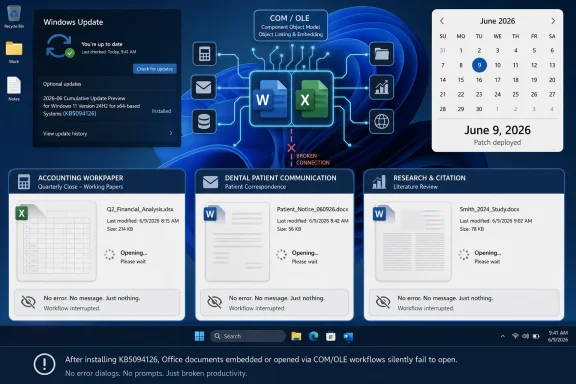
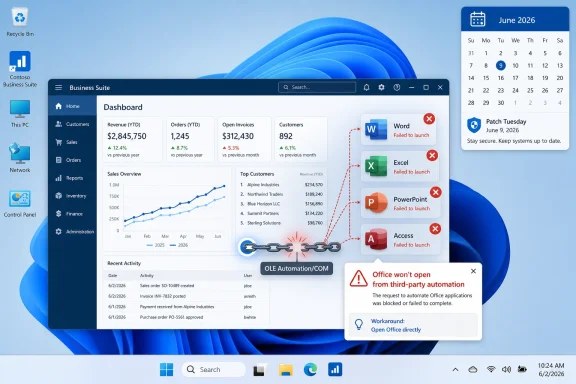
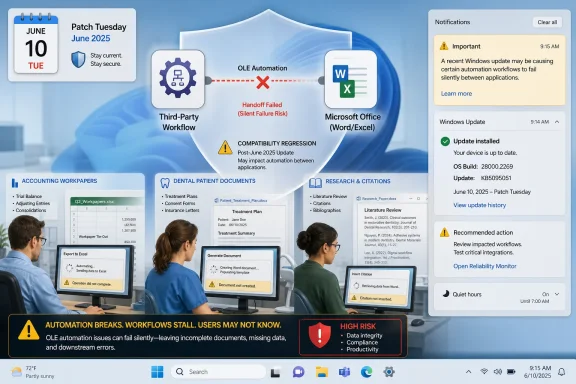
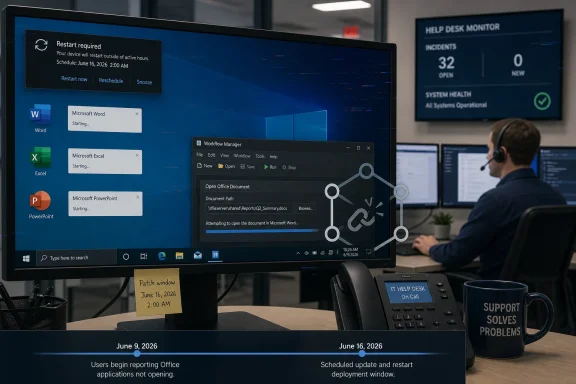
Microsoft confirmed on June 16, 2026, that Windows updates released on or after June 9, including Windows 11 KB5094126 and KB5093998, can prevent some third-party applications from launching Microsoft Office apps or opening Office documents through OLE automation on affected PCs after installation. The important part is not that Word, Excel, or PowerPoint suddenly forgot how to open files. The important part is that Windows appears to have disturbed one of the oldest and most business-critical plumbing layers between Office and the software that surrounds it. That makes this less a simple Patch Tuesday mishap than a reminder that “legacy integration” is often just another name for production infrastructure.
The June 2026 Patch Tuesday rollout was already attracting the usual post-update smoke: user reports of cloud-storage oddities, BitLocker recovery prompts, blue screens, and other symptoms that may or may not share a common root. Microsoft has not confirmed all of those complaints as known issues. It has, however, acknowledged the Office-launch failure, and that makes this bug more concrete than the wider forum noise around the update.
The affected Windows 11 updates are KB5094126 for versions 24H2 and 25H2 and KB5093998 for version 23H2. Microsoft’s language is broader than those two packages, saying the issue can follow Windows updates released on or after June 9, 2026, and that Windows 10 is also affected. That matters because this is not merely a Windows 11 feature-release quirk; it is a servicing change with cross-version reach.
The symptom is deceptively narrow. Office applications may still launch normally when opened directly, and documents may still open from File Explorer or inside the Office apps themselves. The failure appears when another application tries to summon Office on the user’s behalf.
That distinction is why this bug will be so frustrating in the field. To an end user, “Word won’t open from our workpaper system” is functionally the same as “Word is broken.” To an administrator, the difference determines whether the next hour is spent repairing Office, rolling back Windows, calling a line-of-business vendor, or opening a Microsoft support case.
Accounting suites, dental practice tools, research managers, document systems, and vertical-market applications often treat Word or Excel as a component rather than a destination. A user clicks a patient note, workpaper, citation document, or report inside another product, and Office appears as if it were part of that workflow. Under the hood, the third-party app may be creating or controlling an Office application instance through OLE automation.
Microsoft says reports mention CCH Engagement, Workpaper Manager, Dentrix, Softdent, and Zotero, while leaving the door open to other applications built on similar integration patterns. That list is revealing. It spans accounting, dental practice management, and academic research rather than one vendor stack or one niche coding mistake.
This is the uncomfortable bargain of Windows compatibility. Microsoft has spent decades telling businesses that Windows is the platform where old software keeps working. But every security hardening change, every revised trust boundary, and every update to code integrity or automation behavior tests that promise against software written for assumptions that may no longer be safe.
That implies the Office apps themselves are not necessarily corrupt, misconfigured, or unable to process the files. The failure sits in the handoff. Something about the path from third-party application to Office automation is breaking badly enough that the requested app or document may not open, sometimes without an error message.
This is why Microsoft’s “may not be our fault” framing is both plausible and incomplete. It may be true that some third-party applications rely on older or fragile automation behavior. It may also be true that a Windows security update changed the rules in a way that exposed those assumptions overnight.
For users and IT teams, the blame calculus is less useful than the blast radius. If an update changes platform behavior and multiple unrelated applications fail in similar ways, the platform owner owns at least part of the operational problem. Windows is not just an operating system; it is the compatibility contract that thousands of vendors build against.
Silent failure creates diagnostic fog. A user clicks a document in a practice-management app, nothing happens, and the first assumption is often local corruption or user error. Someone repairs Office. Someone clears temp files. Someone reboots. Someone reinstalls the third-party app. Only after enough machines fail in the same way does Patch Tuesday become the suspect.
That lag is expensive in vertical industries because the affected workflows are not decorative. A dental office that cannot open document templates from patient records is not merely inconvenienced. An accounting firm that cannot open workpapers from its engagement system may lose billable time during a deadline-sensitive period. A researcher whose citation manager cannot update a Word document may face a broken writing workflow at exactly the wrong moment.
The software still “works” in the narrow sense, but the workflow is broken. Windows incidents are often measured in crashes and boot failures, yet many enterprise outages are really workflow outages. The machine is up, the app is installed, the file exists, and the work still cannot proceed.
This is the pattern administrators have been living with for years. Microsoft hardens a long-standing behavior because attackers have learned to abuse ambiguity, implicit trust, or automatic execution. Most machines get safer. A smaller set of workflows, often built long before the hardening model existed, suddenly behaves differently.
OLE automation is an especially sensitive area because it lives near Office, documents, scripting, and user-driven business processes. Those are precisely the places attackers like to hide. Any security team can understand why Microsoft might be cautious about automated Office launch paths from third-party software.
The problem is not that security hardening happens. The problem is that Windows’ value proposition rests on backward compatibility, and backward compatibility often depends on behaviors that security teams would not design the same way today. Every cumulative update is therefore a negotiation between “keep the old thing working” and “stop trusting the old thing so much.”
But predictability is not the same as low risk. When a cumulative update touches a platform-level integration path, the resulting problem does not look like one bug in one app. It looks like a pattern across every product that depended on that path.
That is what makes this Office automation issue awkward. The affected applications are not merely “third-party apps” in the consumer sense. They are workflow engines for regulated, professional, or documentation-heavy environments. They also tend to be exactly the applications that are hardest to replace and slowest to modernize.
Enterprise IT can test Windows updates against common productivity apps, browsers, VPN clients, endpoint security agents, and device drivers. Testing every OLE-driven action inside every vertical-market platform is a different burden. The failure may only appear when a specific document type is opened from a specific screen under a specific user context.
For organizations, Microsoft says a workaround is available for affected managed devices through Microsoft Support for business. That phrasing suggests the mitigation is not something Microsoft wants casually copied into every consumer forum thread, either because it is environment-specific, carries trade-offs, or touches policy areas that should be handled deliberately.
The absence of a permanent fix is not surprising so soon after acknowledgement. Microsoft says a resolution is in progress and will arrive in a future Windows update. The unresolved question is whether that fix restores previous behavior broadly, adds a compatibility shim for affected automation paths, or requires vendors to adjust their own launch logic.
The distinction matters. A broad rollback may reduce breakage but weaken whatever hardening or behavioral correction triggered the problem. A narrow compatibility fix may leave some smaller vendors or custom in-house applications exposed. A vendor-side fix may be cleaner architecturally but slower operationally.
Microsoft owns the Windows platform and the update that preceded the confirmed issue. Third-party vendors own the code that invokes Office through OLE automation. Customers own the deployment processes that determine whether a Patch Tuesday update lands everywhere immediately or moves through rings. None of those responsibilities cancels out the others.
For IT departments, the practical lesson is not to assign blame faster. It is to maintain an inventory of workflows, not just applications. “We run Dentrix” is less specific than “staff open Word-based forms from inside Dentrix patient records.” “We use Zotero” is less useful than “researchers insert and update citations through Word integration.”
That workflow-level inventory is tedious, but it is what separates controlled troubleshooting from guesswork. When a Windows update breaks an integration layer, knowing which business processes depend on that layer becomes more important than knowing which executable is installed.
That direction is broadly correct. The old Windows ecosystem was astonishingly flexible, and attackers took advantage of that flexibility. But flexibility was also why decades of business software could be stitched together into workflows that outlived their original designers.
The cost of modernizing that model is no longer abstract. It appears as a document that will not open from a tax application, a custom folder icon that disappears, a driver that refuses to load, or a script that stops behaving as expected. Each individual change may be defensible. The cumulative effect is a compatibility tax.
Enterprises should treat that tax as part of security budgeting. If an organization depends on Office automation, COM add-ins, embedded document workflows, or legacy shell behavior, it should assume those areas will face more scrutiny over time, not less. Microsoft’s direction of travel is toward tighter defaults and more explicit trust.
Vendors integrate with Office because customers demand it. A dental office does not want to export a document, browse to a folder, open Word manually, edit the document, save it, and reattach it to a patient record. A citation manager that cannot drive Word is no longer a citation manager for many users. An accounting workpaper tool that cannot invoke Excel or Word loses a central part of its value.
The ecosystem needs more modern, well-supported, and security-conscious integration paths. Microsoft has alternatives in some areas, including file-format APIs, Microsoft Graph, add-in models, and cloud-based automation. But those do not always replace local Office automation in mature desktop workflows, especially where latency, offline access, compliance controls, or legacy document templates matter.
Until there is a clean migration path, OLE will remain part of the business substrate. Pretending otherwise only ensures that the next hardening change produces the same surprise.
The harder cases are custom applications written years ago by a contractor, a retired internal developer, or a vendor that no longer exists. These tools may have no public forum, no active support channel, and no one who remembers how their Office automation layer works. They may still sit at the center of invoicing, case management, records, or reporting.
Those environments will discover the issue slowly. A department will report that a button stopped working. Desktop support will test Office directly and find nothing wrong. The application owner will say nothing changed. Eventually someone will correlate the failure with the June 9 Windows updates.
That is why Microsoft’s acknowledgement is valuable even if the fix is not ready. It gives administrators a known issue to test against and a vocabulary for escalation. “Office does not open through OLE automation after June 2026 updates” is a far better incident description than “Office broken after patching.”
For smaller shops, that may be a manual checklist. For larger organizations, it argues for application-owner signoff during pilot rings, especially in finance, healthcare, legal, engineering, education, and research departments. The more specialized the workflow, the less likely Microsoft’s broad validation matrix is to catch it before release.
The immediate operational advice is straightforward. Confirm whether the affected workflow fails only when launched from a third-party app. Test direct opening of the same Office document. Avoid assuming that repairing Office will solve the issue. If managed devices are affected at scale, open a Microsoft Support for business case rather than relying solely on uninstalling security updates.
Uninstalling the update may be tempting, and in some environments it may become a temporary emergency measure. But it also removes security fixes from June’s Patch Tuesday payload. That trade-off should be explicit, documented, and time-limited, not performed machine by machine because a workaround was faster than an incident review.
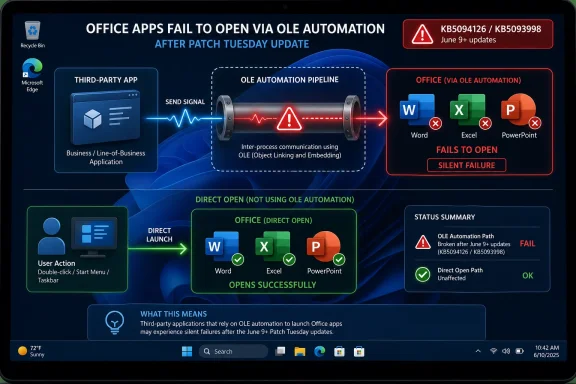 Patch Tuesday Hits the Office Plumbing
The June 2026 Patch Tuesday rollout was already attracting the usual post-update smoke: user reports of cloud-storage oddities, BitLocker recovery prompts, blue screens, and other symptoms that may or may not share a common root. Microsoft has not confirmed all of those complaints as known issues. It has, however, acknowledged the Office-launch failure, and that makes this bug more concrete than the wider forum noise around the update.The affected Windows 11 updates are KB5094126 for versions 24H2 and 25H2 and KB5093998 for version 23H2. Microsoft’s language is broader than those two packages, saying the issue can follow Windows updates released on or after June 9, 2026, and that Windows 10 is also affected. That matters because this is not merely a Windows 11 feature-release quirk; it is a servicing change with cross-version reach.
The symptom is deceptively narrow. Office applications may still launch normally when opened directly, and documents may still open from File Explorer or inside the Office apps themselves. The failure appears when another application tries to summon Office on the user’s behalf.
That distinction is why this bug will be so frustrating in the field. To an end user, “Word won’t open from our workpaper system” is functionally the same as “Word is broken.” To an administrator, the difference determines whether the next hour is spent repairing Office, rolling back Windows, calling a line-of-business vendor, or opening a Microsoft support case.
OLE Is Old, Boring, and Everywhere That Matters
The technology at the center of this mess is Object Linking and Embedding, better known as OLE. In modern Windows discourse, OLE sounds like a museum piece from the era of embedded spreadsheets in Word documents and Visual Basic macros that nobody wants to audit. In practice, its automation model remains one of the ways business software asks Office to do useful work.Accounting suites, dental practice tools, research managers, document systems, and vertical-market applications often treat Word or Excel as a component rather than a destination. A user clicks a patient note, workpaper, citation document, or report inside another product, and Office appears as if it were part of that workflow. Under the hood, the third-party app may be creating or controlling an Office application instance through OLE automation.
Microsoft says reports mention CCH Engagement, Workpaper Manager, Dentrix, Softdent, and Zotero, while leaving the door open to other applications built on similar integration patterns. That list is revealing. It spans accounting, dental practice management, and academic research rather than one vendor stack or one niche coding mistake.
This is the uncomfortable bargain of Windows compatibility. Microsoft has spent decades telling businesses that Windows is the platform where old software keeps working. But every security hardening change, every revised trust boundary, and every update to code integrity or automation behavior tests that promise against software written for assumptions that may no longer be safe.
The Bug May Not Be Office’s Bug
The headline temptation is to say Windows updates are “bugging out Office apps.” That is understandable, but not quite precise. Microsoft’s own workaround tells the story: open the Office application or document directly instead of launching it from the affected third-party program.That implies the Office apps themselves are not necessarily corrupt, misconfigured, or unable to process the files. The failure sits in the handoff. Something about the path from third-party application to Office automation is breaking badly enough that the requested app or document may not open, sometimes without an error message.
This is why Microsoft’s “may not be our fault” framing is both plausible and incomplete. It may be true that some third-party applications rely on older or fragile automation behavior. It may also be true that a Windows security update changed the rules in a way that exposed those assumptions overnight.
For users and IT teams, the blame calculus is less useful than the blast radius. If an update changes platform behavior and multiple unrelated applications fail in similar ways, the platform owner owns at least part of the operational problem. Windows is not just an operating system; it is the compatibility contract that thousands of vendors build against.
Silent Failure Is the Cruelest Failure Mode
The detail that some affected launches fail without an error message should make administrators wince. A clean error is a gift. It tells help desks what subsystem failed, gives vendors a string to search, and lets users report something more useful than “it did nothing.”Silent failure creates diagnostic fog. A user clicks a document in a practice-management app, nothing happens, and the first assumption is often local corruption or user error. Someone repairs Office. Someone clears temp files. Someone reboots. Someone reinstalls the third-party app. Only after enough machines fail in the same way does Patch Tuesday become the suspect.
That lag is expensive in vertical industries because the affected workflows are not decorative. A dental office that cannot open document templates from patient records is not merely inconvenienced. An accounting firm that cannot open workpapers from its engagement system may lose billable time during a deadline-sensitive period. A researcher whose citation manager cannot update a Word document may face a broken writing workflow at exactly the wrong moment.
The software still “works” in the narrow sense, but the workflow is broken. Windows incidents are often measured in crashes and boot failures, yet many enterprise outages are really workflow outages. The machine is up, the app is installed, the file exists, and the work still cannot proceed.
Security Hardening Keeps Finding the Same Soft Spots
The June update also included a security hardening change around how Windows processes desktop.ini files, which can affect custom folder icons or localized folder names from downloaded or remote locations. That is a separate known change, but it sits in the same narrative neighborhood: Windows is tightening old behaviors that were once treated as harmless convenience features.This is the pattern administrators have been living with for years. Microsoft hardens a long-standing behavior because attackers have learned to abuse ambiguity, implicit trust, or automatic execution. Most machines get safer. A smaller set of workflows, often built long before the hardening model existed, suddenly behaves differently.
OLE automation is an especially sensitive area because it lives near Office, documents, scripting, and user-driven business processes. Those are precisely the places attackers like to hide. Any security team can understand why Microsoft might be cautious about automated Office launch paths from third-party software.
The problem is not that security hardening happens. The problem is that Windows’ value proposition rests on backward compatibility, and backward compatibility often depends on behaviors that security teams would not design the same way today. Every cumulative update is therefore a negotiation between “keep the old thing working” and “stop trusting the old thing so much.”
The Patch Tuesday Model Leaves Little Room for Fragile Integrations
Monthly cumulative updates are efficient for Microsoft and necessary for defenders. They package security fixes, servicing-stack changes, quality improvements, and sometimes visible behavioral changes into a single operational event. For managed environments, that model is predictable enough to plan around.But predictability is not the same as low risk. When a cumulative update touches a platform-level integration path, the resulting problem does not look like one bug in one app. It looks like a pattern across every product that depended on that path.
That is what makes this Office automation issue awkward. The affected applications are not merely “third-party apps” in the consumer sense. They are workflow engines for regulated, professional, or documentation-heavy environments. They also tend to be exactly the applications that are hardest to replace and slowest to modernize.
Enterprise IT can test Windows updates against common productivity apps, browsers, VPN clients, endpoint security agents, and device drivers. Testing every OLE-driven action inside every vertical-market platform is a different burden. The failure may only appear when a specific document type is opened from a specific screen under a specific user context.
Microsoft’s Workaround Is Sensible but Thin
Microsoft’s public workaround is simple: open the Office application or document directly instead of launching it through the affected third-party application. For a single user trying to get through the afternoon, that may be enough. It proves the document is not necessarily damaged and keeps some work moving.For organizations, Microsoft says a workaround is available for affected managed devices through Microsoft Support for business. That phrasing suggests the mitigation is not something Microsoft wants casually copied into every consumer forum thread, either because it is environment-specific, carries trade-offs, or touches policy areas that should be handled deliberately.
The absence of a permanent fix is not surprising so soon after acknowledgement. Microsoft says a resolution is in progress and will arrive in a future Windows update. The unresolved question is whether that fix restores previous behavior broadly, adds a compatibility shim for affected automation paths, or requires vendors to adjust their own launch logic.
The distinction matters. A broad rollback may reduce breakage but weaken whatever hardening or behavioral correction triggered the problem. A narrow compatibility fix may leave some smaller vendors or custom in-house applications exposed. A vendor-side fix may be cleaner architecturally but slower operationally.
Admins Should Resist the Comfort of a Single Villain
The cleanest story is that Microsoft broke Office. The second-cleanest story is that third-party vendors used old automation tricks and got caught. The real story is messier, which makes it more useful.Microsoft owns the Windows platform and the update that preceded the confirmed issue. Third-party vendors own the code that invokes Office through OLE automation. Customers own the deployment processes that determine whether a Patch Tuesday update lands everywhere immediately or moves through rings. None of those responsibilities cancels out the others.
For IT departments, the practical lesson is not to assign blame faster. It is to maintain an inventory of workflows, not just applications. “We run Dentrix” is less specific than “staff open Word-based forms from inside Dentrix patient records.” “We use Zotero” is less useful than “researchers insert and update citations through Word integration.”
That workflow-level inventory is tedious, but it is what separates controlled troubleshooting from guesswork. When a Windows update breaks an integration layer, knowing which business processes depend on that layer becomes more important than knowing which executable is installed.
Windows Compatibility Is Becoming a Security Budget Line
This incident lands at a time when Windows administrators are already being asked to absorb more trust-boundary changes. Secure Boot certificate updates, virtualization-based security, code integrity enforcement, driver blocklists, macro restrictions, protected print changes, and identity-aware access controls all push Windows toward a more constrained model.That direction is broadly correct. The old Windows ecosystem was astonishingly flexible, and attackers took advantage of that flexibility. But flexibility was also why decades of business software could be stitched together into workflows that outlived their original designers.
The cost of modernizing that model is no longer abstract. It appears as a document that will not open from a tax application, a custom folder icon that disappears, a driver that refuses to load, or a script that stops behaving as expected. Each individual change may be defensible. The cumulative effect is a compatibility tax.
Enterprises should treat that tax as part of security budgeting. If an organization depends on Office automation, COM add-ins, embedded document workflows, or legacy shell behavior, it should assume those areas will face more scrutiny over time, not less. Microsoft’s direction of travel is toward tighter defaults and more explicit trust.
The Vendor Ecosystem Needs a Better Escape Route
One reason OLE automation persists is that it solves real problems. Office is still the document surface of business. Word remains the place where forms, letters, reports, and heavily formatted narratives end up. Excel remains the universal calculation and review canvas. PowerPoint remains the lingua franca of internal persuasion.Vendors integrate with Office because customers demand it. A dental office does not want to export a document, browse to a folder, open Word manually, edit the document, save it, and reattach it to a patient record. A citation manager that cannot drive Word is no longer a citation manager for many users. An accounting workpaper tool that cannot invoke Excel or Word loses a central part of its value.
The ecosystem needs more modern, well-supported, and security-conscious integration paths. Microsoft has alternatives in some areas, including file-format APIs, Microsoft Graph, add-in models, and cloud-based automation. But those do not always replace local Office automation in mature desktop workflows, especially where latency, offline access, compliance controls, or legacy document templates matter.
Until there is a clean migration path, OLE will remain part of the business substrate. Pretending otherwise only ensures that the next hardening change produces the same surprise.
The Real Risk Is the Unknown Custom App
Named products get attention because users can compare notes. If CCH Engagement or Zotero users see the same failure, a pattern emerges quickly. Vendors can publish advisories, Microsoft can reference them cautiously, and administrators can coordinate mitigations.The harder cases are custom applications written years ago by a contractor, a retired internal developer, or a vendor that no longer exists. These tools may have no public forum, no active support channel, and no one who remembers how their Office automation layer works. They may still sit at the center of invoicing, case management, records, or reporting.
Those environments will discover the issue slowly. A department will report that a button stopped working. Desktop support will test Office directly and find nothing wrong. The application owner will say nothing changed. Eventually someone will correlate the failure with the June 9 Windows updates.
That is why Microsoft’s acknowledgement is valuable even if the fix is not ready. It gives administrators a known issue to test against and a vocabulary for escalation. “Office does not open through OLE automation after June 2026 updates” is a far better incident description than “Office broken after patching.”
The June Patch Turns Office Automation Into a Canary
This episode should change how IT teams think about update validation. It is not enough to open Word, Excel, and PowerPoint after a patch and declare Office healthy. The test has to include the software that launches Office, embeds Office, automates Office, or depends on Office being scriptable.For smaller shops, that may be a manual checklist. For larger organizations, it argues for application-owner signoff during pilot rings, especially in finance, healthcare, legal, engineering, education, and research departments. The more specialized the workflow, the less likely Microsoft’s broad validation matrix is to catch it before release.
The immediate operational advice is straightforward. Confirm whether the affected workflow fails only when launched from a third-party app. Test direct opening of the same Office document. Avoid assuming that repairing Office will solve the issue. If managed devices are affected at scale, open a Microsoft Support for business case rather than relying solely on uninstalling security updates.
Uninstalling the update may be tempting, and in some environments it may become a temporary emergency measure. But it also removes security fixes from June’s Patch Tuesday payload. That trade-off should be explicit, documented, and time-limited, not performed machine by machine because a workaround was faster than an incident review.
The Facts IT Should Carry Into the Next Change Window
The shape of this bug is now clear enough to guide triage, even though the final repair is still pending. It is a Windows servicing issue with Office-facing symptoms, and it punishes assumptions buried inside third-party workflows. Treating it as a generic Office failure will waste time.- The confirmed issue affects Windows updates released on or after June 9, 2026, including the Windows 11 Patch Tuesday updates KB5094126 and KB5093998.
- The visible failure occurs when certain third-party applications use OLE automation to launch Office apps or open Office documents.
- Word, Excel, PowerPoint, Access, and other Office applications may still work normally when opened directly by the user.
- Microsoft has named reports involving CCH Engagement, Workpaper Manager, Dentrix, Softdent, and Zotero, but similar applications may also be affected.
- The public workaround is to open the Office application or document directly, while organizations with managed devices can request an additional mitigation through Microsoft Support for business.
- A permanent resolution is not yet available, and Microsoft says it will arrive in a future Windows update.
References
- Primary source: Neowin
Published: Wed, 17 Jun 2026 04:24:00 GMT
Windows 11 KB5094126, KB5093998 bugging out Office apps but it may not be Microsoft's fault - Neowin
Microsoft has confirmed the latest Windows 11 Patch Tuesday updates are breaking Office apps. However it may not be Microsoft's fault at all. www.neowin.net
- Official source: support.microsoft.com
June 9, 2026—KB5094126 (OS Builds 26200.8655 and 26100.8655) - Microsoft Support
 support.microsoft.com
- Official source: learn.microsoft.com
Application was unable to start correctly error when accessing Microsoft 365 apps - Microsoft 365 Apps | Microsoft Learn
Discusses the error message with the error code 0xc0000715 that appears when you try to open Microsoft 365 apps, and provides a resolution.learn.microsoft.com - Related coverage: berrall.com
Windows 11 KB5094126 BSODs some PCs (HP?), breaks OneDrive in File Explorer, and other issues confirmed - Peer Networks UK
Wales & West leading provider of PC repairs & IT support for home & business. Peer Networks delivers prompt, no fuss, PC repair services to customers.www.berrall.com
- Related coverage: windowscult.com
Windows 11 KB5094126 Fails to Install with Error 0x80240069 (Fix Guide)
Windows 11 KB5094126 fails to install with error 0x80240069? Learn what causes this error and how to fix Windows 11 update installation failures step by step.www.windowscult.com - Related coverage: techtimes.com
Windows 11 June 2026 Update Kills Folder Icons: 23-Year-Old Shell Bug Finally Closed
Windows 11 desktop.ini update June 2026 breaks custom folder icons on network drives — but it is intentional. KB5094126 closes an unchecked-buffer code execution risk in Windows Shell folder parsingwww.techtimes.com