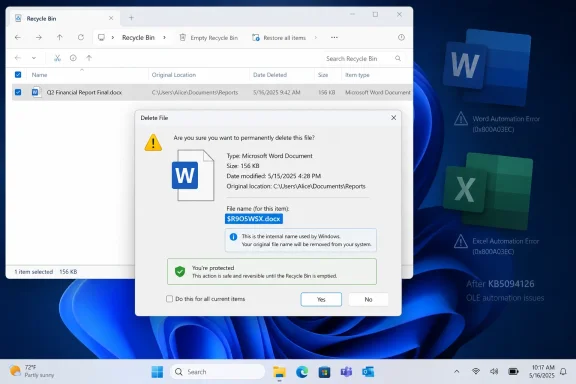
Microsoft has confirmed that the June 9, 2026 Windows security update KB5094126 can cause the Recycle Bin’s permanent-delete confirmation dialog to show an internal system name instead of the original file name across affected supported Windows releases. The bug is small, almost comically so, but it lands in a part of Windows where users expect absolute clarity. A deletion prompt is not decoration; it is the final checkpoint before a file is gone. That is why this particular regression matters more than its “cosmetic” label suggests.
The reported behavior is straightforward. After installing the June 2026 Patch Tuesday update, a user opens the Recycle Bin, chooses to permanently delete an item, and Windows displays a confirmation prompt that may identify the file by an internal name rather than the familiar file name visible in the Recycle Bin list.
Microsoft says the file itself is not renamed, damaged, corrupted, or restored incorrectly. The original name remains visible in the Recycle Bin view, and if the user restores the item, it comes back with the expected name. In other words, Windows is not losing track of the file; it is exposing the wrong piece of its bookkeeping at precisely the moment when the user is being asked to make a destructive decision.
That distinction is technically important and practically unsatisfying. A confirmation dialog exists to reduce ambiguity. If the dialog substitutes a system-facing identifier for the human-facing name, the system has preserved the data but weakened the user interface contract.
For everyday users, this may be little more than a moment of hesitation. For help desks, managed desktops, legal departments, and anyone dealing with sensitive files, hesitation is not nothing. A confusing delete prompt can turn a routine cleanup task into a support ticket, a compliance concern, or a reason to delay broader rollout.
That is the paradox of Windows servicing in 2026. Microsoft has made cumulative updates predictable, automatic, and broadly safer than the patching chaos of earlier eras. But the same model also means a small shell regression can ride alongside security fixes and arrive on millions of machines with the authority of a critical maintenance event.
The Recycle Bin bug is not in the same league as a boot failure, a BitLocker recovery loop, or a broken line-of-business application. Microsoft’s framing that it does not cause data loss appears consistent with the observed behavior. Still, the bug belongs to a category administrators know well: regressions that do not break the machine but do erode confidence in the update.
That confidence is the currency of modern Windows maintenance. Microsoft wants organizations to move faster, keep update deferrals shorter, and treat monthly security patches as routine hygiene. Users and administrators, meanwhile, remember every month in which the hygiene came with a surprise.
That mediation is why the bug is revealing. The Recycle Bin’s job is to hide complexity until the user needs it. The list view presents the file as the user remembers it. The restore path knows where to put it. The delete prompt is supposed to translate a permanent action into plain language: this is the file you are about to remove.
When that prompt displays an internal name, the abstraction leaks. The system still knows what it is doing, but the user no longer sees the same thing at every step. That mismatch is exactly what confirmation dialogs are designed to avoid.
In security terms, clarity is part of safety. Users should not be trained to click through confusing prompts because “it is probably fine.” The more Windows normalizes odd-looking system names in irreversible workflows, the more it weakens the muscle memory Microsoft has spent decades trying to build around cautious deletion.
But “cosmetic” can be an evasive word in user-interface failures. A misspelled label on an unused settings page is cosmetic. A misleading prompt before permanent deletion is cosmetic only if one defines the interface as separate from the operation it governs.
Enterprise IT tends to care less about philosophical distinctions and more about user behavior. If a confusing prompt generates calls to the service desk, it has a cost. If users stop trusting the Recycle Bin to show them what they are deleting, it has a cost. If administrators have to publish guidance explaining that a weird internal name is harmless, it has a cost.
The affected surface area also matters. Microsoft has indicated that the issue spans multiple supported Windows client and server releases that received the June security updates, even if the public documentation has not presented the kind of neat, exhaustive table administrators prefer. Broad but shallow regressions are still broad.
The company has also said commercial customers who need a workaround can contact Microsoft Support for Business. That is a familiar split in Windows servicing: enterprises with support channels may get targeted mitigation guidance, while consumers are told to wait for the next update.
There are good reasons for Microsoft to handle workarounds cautiously. Registry edits, policy changes, or shell-level mitigations can carry their own risks, especially if the workaround applies only to certain builds or deployment states. Publishing a half-understood workaround to every Windows user can create a second support problem larger than the first.
Still, the optics are not ideal. If the issue is harmless, consumers may wonder why there is a private workaround. If it is operationally significant enough to warrant a workaround for business customers, administrators may wonder why the public documentation remains sparse. That gap is where speculation grows.
The Server 2016 case is especially instructive because it shows how brittle older servicing stacks can become near the end of a platform’s life. The June security update for Windows Server 2016, KB5094122, depends on the appropriate servicing stack update. Microsoft’s own update documentation points administrators toward the latest SSU and warns that installation may fail if prerequisites are missing.
That is a different class of problem from the Recycle Bin dialog, but it contributes to the same administrative mood. Patch Tuesday is no longer a single event; it is a chain of dependencies, rollout rings, known issues, mitigations, and post-release clarifications. Each new acknowledged problem adds another branch to the decision tree.
For Windows enthusiasts, the shell bug is interesting because it touches a familiar interface. For sysadmins, it is another reminder that the question is rarely “Should we patch?” The real question is how quickly, in which rings, with what rollback plan, and with what communication to users when the patch changes visible behavior.
Underneath that familiar surface, Windows has changed dramatically. The shell is now interwoven with cloud sync clients, virtualization-based security, controlled folder access, enterprise policy, localization systems, accessibility layers, and modern app plumbing. A minor regression in one shell path can be the visible edge of much deeper refactoring or security hardening elsewhere.
That is why these bugs are not always as trivial as they look. A file name in the Recycle Bin is not just text; it is the product of shell namespace translation, deleted item metadata, filesystem paths, localization, security context, and UI rendering. A wrong name in one dialog suggests that one layer is asking for, or receiving, the wrong representation of the item.
Microsoft does not need to expose all of that plumbing to users, and usually should not. But Windows’ credibility depends on the plumbing staying invisible. When internal names appear in consumer-facing prompts, the product suddenly feels less like a polished operating system and more like a debug build that escaped.
Microsoft’s reassurance that the underlying file remains intact is therefore necessary but incomplete. Users want to know not only that Windows did the right thing, but that Windows can explain what it is doing in language they recognize. A permanent-delete prompt that shows an internal name fails that test.
The same principle applies at fleet scale. Administrators do not merely deploy patches; they preserve confidence in the managed environment. When a user sees a strange identifier in a deletion prompt and asks whether the system is broken, the answer “no, Microsoft says it is cosmetic” may be accurate, but it is not reassuring.
This is the softer cost of visible regressions. They consume trust faster than they consume uptime. And trust, once spent, makes the next update harder to sell.
The more likely path is a fix folded into a scheduled cumulative update, unless Microsoft discovers that the bug has a broader cause or affects business workflows more seriously than currently described. That means many users may live with the issue until the next regular servicing window.
From a security standpoint, uninstalling the June cumulative update solely to avoid the Recycle Bin naming bug would be a poor trade for most users. The update contains security fixes, and the confirmed Recycle Bin problem does not appear to damage files or cause incorrect deletion. The safer temporary behavior is to verify the correct file name in the Recycle Bin list before confirming permanent deletion.
That advice is not glamorous, but it is the practical center of the story. Do not panic. Do not assume the file is corrupt. Do not remove a security update without a stronger reason. But do recognize that Microsoft has allowed a basic shell confirmation path to become less clear than it should be.
Yet acknowledgement is only part of the pipeline. The real test is whether Microsoft can reduce the number of small, visible regressions that escape into broad production updates. Windows is too large and too varied for perfection, but the shell remains a high-visibility layer where small mistakes feel outsized.
There is also a communication challenge. Microsoft’s known-issue language tends to be precise but bloodless. It tells users whether data loss occurs, whether a workaround exists, and whether a fix is planned. What it often does not explain is why a bug matters to people who are not already fluent in Windows internals.
That is where community publications and administrators end up translating. The translation here is simple: the Recycle Bin still works, but its final confirmation prompt may temporarily be less trustworthy as a visual cue. Treat the list view as authoritative until Microsoft ships the fix.
For home users, the immediate adjustment is modest. If the permanent-delete dialog shows an unfamiliar internal name, cancel if uncertain, check the item directly in the Recycle Bin list, and then proceed only when the selected file is clear. Restoring the file should preserve its original name if the user changes their mind.
For IT departments, the response depends on deployment stage. Organizations still in pilot rings can add the issue to release notes for support staff. Organizations already broadly deployed can warn users without encouraging update removal. Highly regulated environments may want to document the behavior in case deletion workflows require user attestation or audit clarity.
The important thing is to keep the bug in proportion. It is not a reason to distrust the filesystem. It is a reason to remember that interface correctness is part of operational correctness.
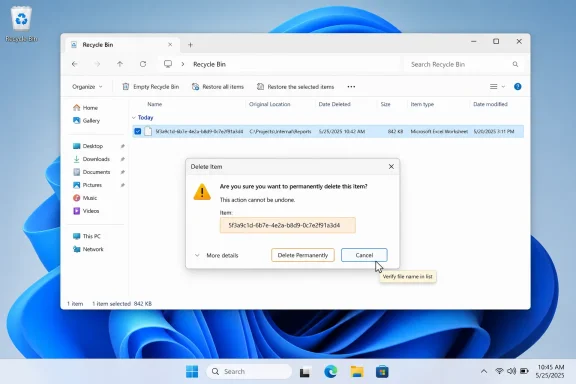 Microsoft’s Small Recycle Bin Bug Lands in the Wrong Place
The reported behavior is straightforward. After installing the June 2026 Patch Tuesday update, a user opens the Recycle Bin, chooses to permanently delete an item, and Windows displays a confirmation prompt that may identify the file by an internal name rather than the familiar file name visible in the Recycle Bin list.Microsoft says the file itself is not renamed, damaged, corrupted, or restored incorrectly. The original name remains visible in the Recycle Bin view, and if the user restores the item, it comes back with the expected name. In other words, Windows is not losing track of the file; it is exposing the wrong piece of its bookkeeping at precisely the moment when the user is being asked to make a destructive decision.
That distinction is technically important and practically unsatisfying. A confirmation dialog exists to reduce ambiguity. If the dialog substitutes a system-facing identifier for the human-facing name, the system has preserved the data but weakened the user interface contract.
For everyday users, this may be little more than a moment of hesitation. For help desks, managed desktops, legal departments, and anyone dealing with sensitive files, hesitation is not nothing. A confusing delete prompt can turn a routine cleanup task into a support ticket, a compliance concern, or a reason to delay broader rollout.
Patch Tuesday’s Familiar Trade-Off Gets Another Exhibit
June 2026 Patch Tuesday was not supposed to be about the Recycle Bin. Like every monthly security release, it was primarily a vehicle for vulnerability fixes, platform hardening, servicing updates, and the accumulated maintenance work that keeps Windows viable across consumer PCs, enterprise fleets, and older server estates.That is the paradox of Windows servicing in 2026. Microsoft has made cumulative updates predictable, automatic, and broadly safer than the patching chaos of earlier eras. But the same model also means a small shell regression can ride alongside security fixes and arrive on millions of machines with the authority of a critical maintenance event.
The Recycle Bin bug is not in the same league as a boot failure, a BitLocker recovery loop, or a broken line-of-business application. Microsoft’s framing that it does not cause data loss appears consistent with the observed behavior. Still, the bug belongs to a category administrators know well: regressions that do not break the machine but do erode confidence in the update.
That confidence is the currency of modern Windows maintenance. Microsoft wants organizations to move faster, keep update deferrals shorter, and treat monthly security patches as routine hygiene. Users and administrators, meanwhile, remember every month in which the hygiene came with a surprise.
The Confirmation Dialog Was the Safety Feature
It is tempting to dismiss this as a naming oddity. Windows has always had layers of file identity beneath the name users see: paths, object IDs, security identifiers, metadata, shell namespace abstractions, and the special handling that makes the Recycle Bin look simple despite its implementation. The Recycle Bin is not a literal folder in the ordinary sense; it is a mediated view over deleted items stored in per-volume structures.That mediation is why the bug is revealing. The Recycle Bin’s job is to hide complexity until the user needs it. The list view presents the file as the user remembers it. The restore path knows where to put it. The delete prompt is supposed to translate a permanent action into plain language: this is the file you are about to remove.
When that prompt displays an internal name, the abstraction leaks. The system still knows what it is doing, but the user no longer sees the same thing at every step. That mismatch is exactly what confirmation dialogs are designed to avoid.
In security terms, clarity is part of safety. Users should not be trained to click through confusing prompts because “it is probably fine.” The more Windows normalizes odd-looking system names in irreversible workflows, the more it weakens the muscle memory Microsoft has spent decades trying to build around cautious deletion.
The Bug Is Cosmetic, but the Operational Impact Is Real
Microsoft’s statement that the issue is cosmetic is narrowly defensible. The file name is correct in the Recycle Bin list. Restoration preserves the original name. Permanent deletion still targets the selected item rather than some unrelated object. On the evidence available, this is not a data integrity problem.But “cosmetic” can be an evasive word in user-interface failures. A misspelled label on an unused settings page is cosmetic. A misleading prompt before permanent deletion is cosmetic only if one defines the interface as separate from the operation it governs.
Enterprise IT tends to care less about philosophical distinctions and more about user behavior. If a confusing prompt generates calls to the service desk, it has a cost. If users stop trusting the Recycle Bin to show them what they are deleting, it has a cost. If administrators have to publish guidance explaining that a weird internal name is harmless, it has a cost.
The affected surface area also matters. Microsoft has indicated that the issue spans multiple supported Windows client and server releases that received the June security updates, even if the public documentation has not presented the kind of neat, exhaustive table administrators prefer. Broad but shallow regressions are still broad.
Commercial Customers Get a Door Consumers Do Not
Microsoft says it is working on a fix for a future Windows update. It has not committed publicly to whether that fix will arrive on the next Patch Tuesday or through an out-of-band release. That ambiguity is normal for a bug Microsoft believes is non-destructive; out-of-band updates are generally reserved for more urgent or broadly disruptive failures.The company has also said commercial customers who need a workaround can contact Microsoft Support for Business. That is a familiar split in Windows servicing: enterprises with support channels may get targeted mitigation guidance, while consumers are told to wait for the next update.
There are good reasons for Microsoft to handle workarounds cautiously. Registry edits, policy changes, or shell-level mitigations can carry their own risks, especially if the workaround applies only to certain builds or deployment states. Publishing a half-understood workaround to every Windows user can create a second support problem larger than the first.
Still, the optics are not ideal. If the issue is harmless, consumers may wonder why there is a private workaround. If it is operationally significant enough to warrant a workaround for business customers, administrators may wonder why the public documentation remains sparse. That gap is where speculation grows.
The June Update Already Had a Heavier Shadow
The Recycle Bin issue is not arriving in isolation. Reports around the June 2026 Windows updates have included other problems, including Office application launch issues that Microsoft has acknowledged separately and installation failures affecting Windows Server 2016 systems under certain servicing conditions.The Server 2016 case is especially instructive because it shows how brittle older servicing stacks can become near the end of a platform’s life. The June security update for Windows Server 2016, KB5094122, depends on the appropriate servicing stack update. Microsoft’s own update documentation points administrators toward the latest SSU and warns that installation may fail if prerequisites are missing.
That is a different class of problem from the Recycle Bin dialog, but it contributes to the same administrative mood. Patch Tuesday is no longer a single event; it is a chain of dependencies, rollout rings, known issues, mitigations, and post-release clarifications. Each new acknowledged problem adds another branch to the decision tree.
For Windows enthusiasts, the shell bug is interesting because it touches a familiar interface. For sysadmins, it is another reminder that the question is rarely “Should we patch?” The real question is how quickly, in which rings, with what rollback plan, and with what communication to users when the patch changes visible behavior.
Windows’ Old Shell Keeps Meeting Modern Security Servicing
The Recycle Bin is one of those Windows features that looks unchanged because it has to. Users understand it instinctively. It is one of the few desktop metaphors that survived the transition from Windows 95 to Windows 11 with its basic social contract intact: deleted files go there first, users get a second chance, and permanent deletion asks for confirmation.Underneath that familiar surface, Windows has changed dramatically. The shell is now interwoven with cloud sync clients, virtualization-based security, controlled folder access, enterprise policy, localization systems, accessibility layers, and modern app plumbing. A minor regression in one shell path can be the visible edge of much deeper refactoring or security hardening elsewhere.
That is why these bugs are not always as trivial as they look. A file name in the Recycle Bin is not just text; it is the product of shell namespace translation, deleted item metadata, filesystem paths, localization, security context, and UI rendering. A wrong name in one dialog suggests that one layer is asking for, or receiving, the wrong representation of the item.
Microsoft does not need to expose all of that plumbing to users, and usually should not. But Windows’ credibility depends on the plumbing staying invisible. When internal names appear in consumer-facing prompts, the product suddenly feels less like a polished operating system and more like a debug build that escaped.
The Risk Is Not Data Loss, It Is Trust Loss
There is a reason users react sharply to file-management bugs. Files are still the part of computing people understand most personally. A document, a photo archive, a tax folder, a project export, or a legal record carries a different emotional weight than a transient widget glitch.Microsoft’s reassurance that the underlying file remains intact is therefore necessary but incomplete. Users want to know not only that Windows did the right thing, but that Windows can explain what it is doing in language they recognize. A permanent-delete prompt that shows an internal name fails that test.
The same principle applies at fleet scale. Administrators do not merely deploy patches; they preserve confidence in the managed environment. When a user sees a strange identifier in a deletion prompt and asks whether the system is broken, the answer “no, Microsoft says it is cosmetic” may be accurate, but it is not reassuring.
This is the softer cost of visible regressions. They consume trust faster than they consume uptime. And trust, once spent, makes the next update harder to sell.
Why Microsoft Probably Will Not Rush an Out-of-Band Fix
Out-of-band updates sound attractive whenever a confirmed Windows bug appears, but Microsoft has to ration them carefully. Every emergency update is itself another update to test, deploy, document, and support. Shipping one for a non-destructive dialog problem could introduce more risk than it removes.The more likely path is a fix folded into a scheduled cumulative update, unless Microsoft discovers that the bug has a broader cause or affects business workflows more seriously than currently described. That means many users may live with the issue until the next regular servicing window.
From a security standpoint, uninstalling the June cumulative update solely to avoid the Recycle Bin naming bug would be a poor trade for most users. The update contains security fixes, and the confirmed Recycle Bin problem does not appear to damage files or cause incorrect deletion. The safer temporary behavior is to verify the correct file name in the Recycle Bin list before confirming permanent deletion.
That advice is not glamorous, but it is the practical center of the story. Do not panic. Do not assume the file is corrupt. Do not remove a security update without a stronger reason. But do recognize that Microsoft has allowed a basic shell confirmation path to become less clear than it should be.
The Patch Pipeline Is Working, but the Polish Layer Is Showing Strain
Microsoft deserves credit for acknowledging the bug. The Windows release health model is far better than the older pattern of scattered forum reports, vague support replies, and silent fixes weeks later. When known issues are documented quickly, administrators can make informed decisions instead of reverse-engineering symptoms from Reddit threads and help-desk noise.Yet acknowledgement is only part of the pipeline. The real test is whether Microsoft can reduce the number of small, visible regressions that escape into broad production updates. Windows is too large and too varied for perfection, but the shell remains a high-visibility layer where small mistakes feel outsized.
There is also a communication challenge. Microsoft’s known-issue language tends to be precise but bloodless. It tells users whether data loss occurs, whether a workaround exists, and whether a fix is planned. What it often does not explain is why a bug matters to people who are not already fluent in Windows internals.
That is where community publications and administrators end up translating. The translation here is simple: the Recycle Bin still works, but its final confirmation prompt may temporarily be less trustworthy as a visual cue. Treat the list view as authoritative until Microsoft ships the fix.
Windows Users Should Not Overcorrect
The worst response to a bug like this is to turn a minor regression into a major security exposure. Pausing all updates indefinitely, uninstalling cumulative security patches across a fleet, or advising users to ignore Patch Tuesday because the Recycle Bin prompt looks odd would be a disproportionate reaction.For home users, the immediate adjustment is modest. If the permanent-delete dialog shows an unfamiliar internal name, cancel if uncertain, check the item directly in the Recycle Bin list, and then proceed only when the selected file is clear. Restoring the file should preserve its original name if the user changes their mind.
For IT departments, the response depends on deployment stage. Organizations still in pilot rings can add the issue to release notes for support staff. Organizations already broadly deployed can warn users without encouraging update removal. Highly regulated environments may want to document the behavior in case deletion workflows require user attestation or audit clarity.
The important thing is to keep the bug in proportion. It is not a reason to distrust the filesystem. It is a reason to remember that interface correctness is part of operational correctness.
The Recycle Bin’s Weird Name Is a Warning Label for June
The concrete guidance is not complicated, but it is worth spelling out because this is exactly the sort of bug that spreads through screenshots faster than through documentation. The danger is not that Windows is secretly deleting the wrong file; the danger is that users may not know what they are being asked to confirm.- The June 9, 2026 Windows security update KB5094126 can cause the Recycle Bin permanent-delete confirmation dialog to show an internal system name rather than the file’s original name.
- Microsoft says the issue affects the confirmation prompt only and does not corrupt the file, rename it, or prevent correct restoration from the Recycle Bin.
- Users should verify the file name in the Recycle Bin list view before confirming permanent deletion if the dialog text looks unfamiliar.
- Microsoft is working on a fix for a future Windows update, but it has not publicly committed to a specific release date or out-of-band patch.
- Commercial customers that need mitigation guidance can contact Microsoft Support for Business, while consumers currently have no public workaround beyond caution.
References
- Primary source: Windows Report
Published: 2026-06-19T06:39:10.256317
Microsoft Confirms New Windows Recycle Bin Bug After June Patch Tuesday Update
Microsoft is investigating a Recycle Bin issue affecting supported Windows versions after users installed the June 2026 security updates. windowsreport.com
- Official source: support.microsoft.com
June 9, 2026—KB5094122 (OS Build 14393.9234) - Microsoft Support
 support.microsoft.com
- Related coverage: techtimes.com
Windows 11 June 2026 Update Kills Folder Icons: 23-Year-Old Shell Bug Finally Closed
Windows 11 desktop.ini update June 2026 breaks custom folder icons on network drives — but it is intentional. KB5094126 closes an unchecked-buffer code execution risk in Windows Shell folder parsingwww.techtimes.com - Related coverage: pcworld.com
Windows 11 update is breaking some PCs with boot and BitLocker issues | PCWorld
A Windows 11 update is causing major problems on some PCs: devices are failing to start up, entering BitLocker recovery mode or displaying blue screens. OneDrive and File Explorer functions are also affected in some cases.www.pcworld.com - Related coverage: igorslab.de
Windows 11 KB5094126: Microsoft's desktop.ini hardening causes some f…
Windows occasionally manages to make even a security measure look like a small defect.www.igorslab.de - Related coverage: bd.com
- Related coverage: hologic.com
- Official source: learn.microsoft.com