

Microsoft confirmed in June 2026 that Windows updates released on June 9 can make the Recycle Bin’s permanent-delete confirmation dialog show internal “$R” file names instead of users’ original file names across supported Windows client and server versions.
That is not the worst Windows update failure imaginable, and Microsoft says it does not damage files, prevent restores, or rename anything in the Recycle Bin view itself. But it is exactly the kind of low-level polish failure that makes users question whether the operating system is still being tested as a coherent product rather than as a pile of separately serviced components. The bug matters less because it breaks deletion, and more because it exposes how thin the membrane can be between Windows’ friendly shell and the decades-old machinery beneath it.
The Recycle Bin has always been a little bit of theater. Users see a familiar file name, a folder-like holding area, and a warning before final deletion; Windows, underneath, stores the deleted object under an internal name while keeping the original details in metadata. That indirection is normal. Showing it to the user is not.
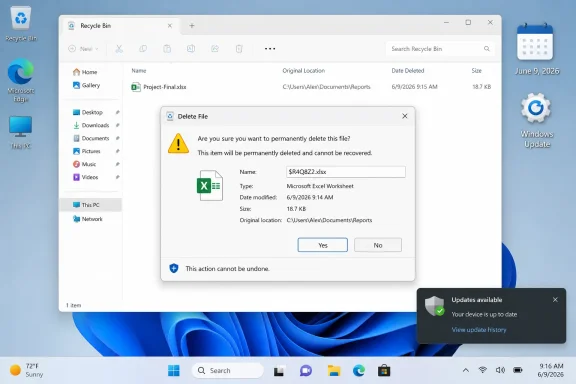
After the June 9 security updates, the confirmation prompt for permanently deleting a single item may display a name like “$Rxxxxx.ext” rather than the file’s actual name. Microsoft’s own wording makes clear that the bug is confined to the confirmation dialog: the Recycle Bin list still shows the original file name, and restoring the item brings it back under that original name.
That makes the issue cosmetic in the narrow engineering sense. It does not appear to corrupt data, scramble file records, or change the deletion target. But the confirmation dialog is not decorative. It is the last checkpoint before a user deliberately destroys something.
A dialog that says “Are you sure you want to delete Project-Final.xlsx?” communicates risk in human terms. A dialog that says the same thing about “$R4Q8Z2.xlsx” asks the user to trust the system’s hidden bookkeeping at precisely the moment the system is supposed to be reassuring them.
The Recycle Bin prompt is a small example of a larger truth: Windows has countless places where internal identifiers must be translated back into meaningful names. Drive letters, SIDs, package identities, app container paths, shell namespaces, OneDrive placeholders, and Win32 file records all need interpretation before they become something a person can safely act on. When that translation layer leaks, confusion follows.
For home users, the confusion may be brief. They can close the prompt, check the Recycle Bin list, and try again with more confidence. For support desks, shared machines, classrooms, labs, and regulated environments, ambiguity is more expensive. A user who cannot verify what they are deleting may stop, call support, or make the wrong guess.
That is why the bug feels more important than its severity rating would suggest. Windows is full of dangerous operations wrapped in plain-language prompts. If those prompts stop speaking plain language, the system has not merely lost polish; it has lost a small piece of its contract with the user.
That is the uncomfortable bargain of modern Windows maintenance. The same cumulative update that closes serious holes also carries the risk of regressions in ordinary workflows. Microsoft has spent years pushing Windows toward a monthly servicing model where skipping updates is risky, delaying updates is bounded, and separating one fix from another is largely impossible for ordinary users.
The upside is obvious: fewer machines remain exposed to known vulnerabilities for long periods. The downside is equally obvious: when something breaks, it breaks at scale. A Recycle Bin prompt bug can travel through the same pipeline as a kernel fix, a BitLocker change, a shell improvement, and a security hardening measure.
That bundling is not new, but its consequences become more visible when defects land in familiar places. Most users will never knowingly interact with a patched privilege escalation flaw. Everyone understands a trash can.
There may be good reasons for that. Workarounds distributed through support channels can involve policy changes, registry edits, controlled deployment instructions, or mitigations Microsoft does not want copied casually across consumer PCs. A bad workaround can be worse than a benign bug, especially if it touches shell behavior or file deletion flows.
Still, the optics are familiar. When Windows breaks in a way that ordinary users can see, Microsoft’s first operational answer is often framed for managed fleets. That reflects the economics of Windows. Enterprises need predictable mitigations, and Microsoft’s support machinery is built around them.
But Windows is also the operating system of family laptops, gaming rigs, school PCs, and small offices with no dedicated IT staff. Those users are told, effectively, to live with the weirdness until the next servicing vehicle arrives. In this case that may be tolerable. In aggregate, it feeds the sense that Windows quality is negotiated with administrators and merely delivered to everyone else.
That distinction matters. If the Recycle Bin itself were losing original names, this would be a much more serious incident. If restored files came back with internal “$R” names, users would face cleanup work and possible application confusion. If the wrong file were being selected for deletion, Microsoft would have a data-loss-class problem.
Instead, the failure sits at the seam between metadata and dialog text. That is why users can mitigate it with caution: check the Recycle Bin list before permanently deleting, restore the item if unsure, or avoid permanent deletion until Microsoft ships a fix. None of those is elegant, but none requires heroic recovery tools.
The irony is that the Recycle Bin’s robustness makes the leak more conspicuous. The system is keeping the right records, yet the one place designed to explain the final action to a person is pulling from the wrong label.
The practical problem is volume. If an organization has thousands of Windows endpoints, even a small user-facing glitch can generate tickets. “Why is Windows asking me to delete a file with a strange name?” is not a sophisticated failure report, but it is a perfectly reasonable question from someone trying not to destroy the wrong document.
There is also a training issue. Many organizations teach users to pause before deleting files, verify names, and avoid irreversible actions unless they are sure. The bug undermines that training. It asks users to accept that a meaningless identifier represents the file they selected.
That may sound minor, but security culture depends on consistency. The same organization that tells users not to ignore strange prompts now has to explain that this strange prompt is probably harmless. Every exception weakens the lesson.
Most of the time, that design is invisible. The shell presents a friendly abstraction, and only forensic tools, command-line spelunking, or low-level inspection reveal what is happening underneath. The June bug briefly turns an everyday confirmation box into a backstage pass.
That is charming if you are a Windows enthusiast. It is less charming if you are a user trying to delete one tax document from a shared PC. Enthusiasts may enjoy glimpsing the machinery; normal users reasonably expect the machinery to stay behind the wall.
Windows carries a huge compatibility burden, and that burden often explains why its internals look the way they do. The problem is not that the internals exist. The problem is that the shell’s job is to mediate them, and here the mediation failed.
That distinction is important. A Reddit thread is not the same thing as a confirmed known issue. A broken machine after Patch Tuesday is not always a machine broken by Patch Tuesday. Drivers, firmware, security software, unsupported tweaks, deployment tools, and half-installed updates all complicate the picture.
But perception does not wait for perfect attribution. When Microsoft confirms one visible regression, it becomes easier for users to believe the whole patch cycle is shaky. The Recycle Bin bug becomes a symbol, fairly or unfairly, for a broader anxiety about cumulative updates.
This is the bind Microsoft has created for itself. It needs users to install security updates promptly, especially in a threat environment where public exploit details can move quickly. Yet each conspicuous regression gives cautious users another reason to delay.
A file deletion confirmation prompt is not an exotic edge case. It is not a niche enterprise feature, a deprecated control panel, or an obscure management snap-in. It is part of the basic desktop grammar that has taught generations of Windows users how deletion works.
That is why this bug lands awkwardly. It suggests that a regression in a widely understood shell workflow made it through whatever validation preceded the June release. Perhaps the bug appears only under narrow conditions. Perhaps it affects only single-item permanent deletes from the Recycle Bin. Even so, the workflow is common enough that Microsoft had to document it publicly.
Quality does not mean no bugs. Windows is too large, too old, and too hardware-diverse for that fantasy. Quality means the bugs that do escape do not repeatedly strike the places where users form their basic confidence in the system.
Users should not uninstall a major security update solely because of this bug unless they have a specific operational reason and understand the exposure they are accepting. The June patches address significant vulnerabilities, and removing them to fix a cosmetic dialog problem would usually be a bad trade. In managed environments, administrators should communicate the issue before it becomes a help-desk rumor.
The more nuanced decision is timing for organizations that have not yet deployed the June updates broadly. If they are still in pilot rings, this bug belongs in the known-issues note, not necessarily in the blocker column. Security exposure, application compatibility, BitLocker posture, and user support capacity should drive the deployment decision.
The Recycle Bin issue is annoying. It is not, by itself, a reason to freeze patching across a fleet.
That is not the worst Windows update failure imaginable, and Microsoft says it does not damage files, prevent restores, or rename anything in the Recycle Bin view itself. But it is exactly the kind of low-level polish failure that makes users question whether the operating system is still being tested as a coherent product rather than as a pile of separately serviced components. The bug matters less because it breaks deletion, and more because it exposes how thin the membrane can be between Windows’ friendly shell and the decades-old machinery beneath it.
 The Trash Can Became a Debug Window
The Recycle Bin has always been a little bit of theater. Users see a familiar file name, a folder-like holding area, and a warning before final deletion; Windows, underneath, stores the deleted object under an internal name while keeping the original details in metadata. That indirection is normal. Showing it to the user is not.After the June 9 security updates, the confirmation prompt for permanently deleting a single item may display a name like “$Rxxxxx.ext” rather than the file’s actual name. Microsoft’s own wording makes clear that the bug is confined to the confirmation dialog: the Recycle Bin list still shows the original file name, and restoring the item brings it back under that original name.
That makes the issue cosmetic in the narrow engineering sense. It does not appear to corrupt data, scramble file records, or change the deletion target. But the confirmation dialog is not decorative. It is the last checkpoint before a user deliberately destroys something.
A dialog that says “Are you sure you want to delete Project-Final.xlsx?” communicates risk in human terms. A dialog that says the same thing about “$R4Q8Z2.xlsx” asks the user to trust the system’s hidden bookkeeping at precisely the moment the system is supposed to be reassuring them.
Cosmetic Bugs Are Still Trust Bugs
Calling this a cosmetic bug is accurate, but insufficient. In consumer software, cosmetics are often treated as surface work; in operating systems, they are part of the safety model. The user interface tells people what action they are taking, what object they are acting on, and whether they should pause.The Recycle Bin prompt is a small example of a larger truth: Windows has countless places where internal identifiers must be translated back into meaningful names. Drive letters, SIDs, package identities, app container paths, shell namespaces, OneDrive placeholders, and Win32 file records all need interpretation before they become something a person can safely act on. When that translation layer leaks, confusion follows.
For home users, the confusion may be brief. They can close the prompt, check the Recycle Bin list, and try again with more confidence. For support desks, shared machines, classrooms, labs, and regulated environments, ambiguity is more expensive. A user who cannot verify what they are deleting may stop, call support, or make the wrong guess.
That is why the bug feels more important than its severity rating would suggest. Windows is full of dangerous operations wrapped in plain-language prompts. If those prompts stop speaking plain language, the system has not merely lost polish; it has lost a small piece of its contract with the user.
Patch Tuesday Fixed the Roof and Cracked the Doorbell
The timing makes the story sharper. The June 2026 Patch Tuesday release was a large security event, with reporting across the security industry describing roughly 200 vulnerabilities addressed across Microsoft products. Those patches matter. Administrators do not get to shrug at security updates because a Recycle Bin dialog looks strange.That is the uncomfortable bargain of modern Windows maintenance. The same cumulative update that closes serious holes also carries the risk of regressions in ordinary workflows. Microsoft has spent years pushing Windows toward a monthly servicing model where skipping updates is risky, delaying updates is bounded, and separating one fix from another is largely impossible for ordinary users.
The upside is obvious: fewer machines remain exposed to known vulnerabilities for long periods. The downside is equally obvious: when something breaks, it breaks at scale. A Recycle Bin prompt bug can travel through the same pipeline as a kernel fix, a BitLocker change, a shell improvement, and a security hardening measure.
That bundling is not new, but its consequences become more visible when defects land in familiar places. Most users will never knowingly interact with a patched privilege escalation flaw. Everyone understands a trash can.
Microsoft’s Workaround Tells You Who the Real Customer Is
Microsoft says a workaround exists for affected devices, but it directs organizations to contact Microsoft Support for business. That is a revealing split. Enterprise customers with support contracts get a path to mitigation; everyone else waits for a future Windows update.There may be good reasons for that. Workarounds distributed through support channels can involve policy changes, registry edits, controlled deployment instructions, or mitigations Microsoft does not want copied casually across consumer PCs. A bad workaround can be worse than a benign bug, especially if it touches shell behavior or file deletion flows.
Still, the optics are familiar. When Windows breaks in a way that ordinary users can see, Microsoft’s first operational answer is often framed for managed fleets. That reflects the economics of Windows. Enterprises need predictable mitigations, and Microsoft’s support machinery is built around them.
But Windows is also the operating system of family laptops, gaming rigs, school PCs, and small offices with no dedicated IT staff. Those users are told, effectively, to live with the weirdness until the next servicing vehicle arrives. In this case that may be tolerable. In aggregate, it feeds the sense that Windows quality is negotiated with administrators and merely delivered to everyone else.
The Bug Is Small Because the Recycle Bin Is Resilient
The good news is that the underlying Recycle Bin model appears to be doing its job. Windows stores deleted files under internal names and separately preserves original metadata. The bug is in presentation, not identity. The system still knows what the file was called, where it should be restored, and how to display it in the main Recycle Bin view.That distinction matters. If the Recycle Bin itself were losing original names, this would be a much more serious incident. If restored files came back with internal “$R” names, users would face cleanup work and possible application confusion. If the wrong file were being selected for deletion, Microsoft would have a data-loss-class problem.
Instead, the failure sits at the seam between metadata and dialog text. That is why users can mitigate it with caution: check the Recycle Bin list before permanently deleting, restore the item if unsure, or avoid permanent deletion until Microsoft ships a fix. None of those is elegant, but none requires heroic recovery tools.
The irony is that the Recycle Bin’s robustness makes the leak more conspicuous. The system is keeping the right records, yet the one place designed to explain the final action to a person is pulling from the wrong label.
Administrators Will Treat This as Noise, Until Users Make It a Ticket
In a managed environment, this bug is unlikely to top the priority board. Security teams will care far more about the vulnerabilities fixed in the June updates than about a confusing confirmation string. Endpoint teams will note the issue, update knowledge-base articles, and tell help desks what users may see.The practical problem is volume. If an organization has thousands of Windows endpoints, even a small user-facing glitch can generate tickets. “Why is Windows asking me to delete a file with a strange name?” is not a sophisticated failure report, but it is a perfectly reasonable question from someone trying not to destroy the wrong document.
There is also a training issue. Many organizations teach users to pause before deleting files, verify names, and avoid irreversible actions unless they are sure. The bug undermines that training. It asks users to accept that a meaningless identifier represents the file they selected.
That may sound minor, but security culture depends on consistency. The same organization that tells users not to ignore strange prompts now has to explain that this strange prompt is probably harmless. Every exception weakens the lesson.
Windows’ Old Plumbing Keeps Winning Screen Time
Part of the fascination here is the “$R” name itself. It is not random gibberish in the mystical sense; it is a sign of Windows’ internal file management. The operating system has long used generated names and companion metadata to manage deleted items safely without colliding with user-facing names.Most of the time, that design is invisible. The shell presents a friendly abstraction, and only forensic tools, command-line spelunking, or low-level inspection reveal what is happening underneath. The June bug briefly turns an everyday confirmation box into a backstage pass.
That is charming if you are a Windows enthusiast. It is less charming if you are a user trying to delete one tax document from a shared PC. Enthusiasts may enjoy glimpsing the machinery; normal users reasonably expect the machinery to stay behind the wall.
Windows carries a huge compatibility burden, and that burden often explains why its internals look the way they do. The problem is not that the internals exist. The problem is that the shell’s job is to mediate them, and here the mediation failed.
The June Update Cycle Was Already Under Scrutiny
The Recycle Bin defect did not arrive in a vacuum. Reports around the June 2026 updates have also described other problems, including Office launch issues through third-party integrations and user reports of BitLocker recovery prompts, crashes, installation trouble, and performance complaints. Microsoft has not necessarily acknowledged every reported problem, and update folklore can quickly outrun evidence.That distinction is important. A Reddit thread is not the same thing as a confirmed known issue. A broken machine after Patch Tuesday is not always a machine broken by Patch Tuesday. Drivers, firmware, security software, unsupported tweaks, deployment tools, and half-installed updates all complicate the picture.
But perception does not wait for perfect attribution. When Microsoft confirms one visible regression, it becomes easier for users to believe the whole patch cycle is shaky. The Recycle Bin bug becomes a symbol, fairly or unfairly, for a broader anxiety about cumulative updates.
This is the bind Microsoft has created for itself. It needs users to install security updates promptly, especially in a threat environment where public exploit details can move quickly. Yet each conspicuous regression gives cautious users another reason to delay.
The Mandatory Update Model Needs Better Visible Quality
Microsoft’s servicing model rests on trust. Users and administrators accept limited choice because the security benefits are real. In return, Microsoft has to make the ordinary parts of Windows feel stable, especially after mandatory updates.A file deletion confirmation prompt is not an exotic edge case. It is not a niche enterprise feature, a deprecated control panel, or an obscure management snap-in. It is part of the basic desktop grammar that has taught generations of Windows users how deletion works.
That is why this bug lands awkwardly. It suggests that a regression in a widely understood shell workflow made it through whatever validation preceded the June release. Perhaps the bug appears only under narrow conditions. Perhaps it affects only single-item permanent deletes from the Recycle Bin. Even so, the workflow is common enough that Microsoft had to document it publicly.
Quality does not mean no bugs. Windows is too large, too old, and too hardware-diverse for that fantasy. Quality means the bugs that do escape do not repeatedly strike the places where users form their basic confidence in the system.
The Safest Advice Is Boring, Which Is Usually the Right Advice
For now, the user guidance is simple. Do not assume the strange “$R” name means the file itself has been renamed. Check the Recycle Bin’s main view before permanently deleting anything. If you are unsure, restore the file first and verify it from its original location.Users should not uninstall a major security update solely because of this bug unless they have a specific operational reason and understand the exposure they are accepting. The June patches address significant vulnerabilities, and removing them to fix a cosmetic dialog problem would usually be a bad trade. In managed environments, administrators should communicate the issue before it becomes a help-desk rumor.
The more nuanced decision is timing for organizations that have not yet deployed the June updates broadly. If they are still in pilot rings, this bug belongs in the known-issues note, not necessarily in the blocker column. Security exposure, application compatibility, BitLocker posture, and user support capacity should drive the deployment decision.
The Recycle Bin issue is annoying. It is not, by itself, a reason to freeze patching across a fleet.
The Trash Bug Leaves a Short Paper Trail for IT
The concrete facts are narrow, which is part of the point. This is not a sweeping file-system failure; it is a visible regression in a trust-sensitive prompt.- The issue appears after installing Windows updates released on June 9, 2026, including the June Patch Tuesday cumulative updates associated with affected Windows client and server releases.
- The confirmation dialog for permanently deleting a single item from the Recycle Bin may show an internal “$Rxxxxx.ext” style name instead of the original file name.
- Microsoft says the Recycle Bin’s main view still displays the correct original file name, and restoring the item brings it back with that original name.
- Microsoft says a workaround is available for organizations through Support for business, while a permanent resolution is planned for a future Windows update.
- Users who are unsure what they are deleting should verify the item in the Recycle Bin list or restore it before permanently removing it.
References
- Primary source: TechRepublic
Published: 2026-06-22T19:20:09.147963
Microsoft Confirms Windows Recycle Bin Bug Affects All Supported Versions
Microsoft confirmed a Windows June update bug that shows internal Recycle Bin file names during permanent deletion, with a fix planned.www.techrepublic.com
- Related coverage: windowscentral.com
Microsoft confirms Recycle Bin glitch affecting all supported Windows versions — yes, even the trash needs debugging | Windows Central
Recycle Bin bug makes deleting files a bit confusing.www.windowscentral.com - Official source: support.microsoft.com
- Official source: learn.microsoft.com
Windows release health | Microsoft Learn
Quickly find official information on Windows updates and servicing milestones. Access resources, tools, and news about known issues and safeguards to help you plan your next update. Want the latest Windows release health updates? Follow @WindowsUpdate on X.learn.microsoft.com - Related coverage: allthings.how
KB5094126 for Windows 11 (June 2026): Builds 26200.8655 and 26100.8655
The June Patch Tuesday update brings the Low Latency Profile, Shared Audio, multi-app camera streaming, and the Secure Boot certificate push.allthings.how - Related coverage: que.es
Microsoft confirma un fallo en Windows: la Papelera de reciclaje ya no muestra los nombres de los archivos eliminados
La actualización KB5094125 de junio de 2026 ha provocado que la Papelera de reciclaje de Windows muestre códigos en lugar de los nombres de archivo. Microsoft ya lo sabe. www.que.es

- Related coverage: windowslatest.com
Windows 11 KB5094126 out with CPU boost for performance, direct download links for offline installer (.msu)
Windows 11 KB5094126 is now rolling out with Low Latency Profile, Shared audio, Secure Boot certificate update, and more. www.windowslatest.com
- Related coverage: techtimes.com
Windows 11 June 2026 Update Kills Folder Icons: 23-Year-Old Shell Bug Finally Closed
Windows 11 desktop.ini update June 2026 breaks custom folder icons on network drives — but it is intentional. KB5094126 closes an unchecked-buffer code execution risk in Windows Shell folder parsingwww.techtimes.com - Official source: catalog.update.microsoft.com
- Related coverage: techradar.com
Microsoft says it's hard at work on a patch for this worrying Defender zero-day | TechRadar
RoguePlanet now has a CVE and a patch in the workswww.techradar.com - Related coverage: techspot.com
Microsoft's June Patch Tuesday fixes a record 200 vulnerabilities, including five being actively exploited | TechSpot
Microsoft recently released its latest batch of monthly security fixes for vulnerabilities found in Windows, Office, and other products sold by the company. This month's Patch Tuesday...www.techspot.com - Related coverage: thecyberexpress.com
Microsoft Patches Record 200 Vulnerabilities in June 2026 Patch Tuesday
Microsoft's June 2026 Patch Tuesday, released on June 10, 2026, addressed 200 security vulnerabilities across Windows, Office, Azure, and relatedthecyberexpress.com - Related coverage: atworkstudio.it
June 2026 Patch Tuesday: 200 vulnerabilities, six zero-days and the KB5087424 printing bug | AtWorkStudio
The June 2026 Patch Tuesday fixes around 200 vulnerabilities (33 critical) and closes six zero-days, including GreenPlasma, YellowKey (BitLocker bypass) and HTTP/2 Bomb. And if printing stopped working on Windows Server 2022, the culprit is hotpatch KB5087424. What to do this week.www.atworkstudio.it - Related coverage: netizen.net
June 2026 Patch Tuesday: Microsoft Addresses 200 Flaws, Including BitLocker and HTTP/2 Zero-Days | Netizen
Microsoft’s June 2026 Patch Tuesday includes security updates for 200 vulnerabilities, making it one of the largest patch releases in recent years. The update addresses three publicly disclosed zero-days and 33 critical vulnerabilities, the majority of which are remote code execution flaws...www.netizen.net
- Related coverage: securityweek.com
Microsoft Patches 200 Vulnerabilities - SecurityWeek
Microsoft’s June 2026 Patch Tuesday updates fix roughly 200 vulnerabilities discovered in the company’s products.www.securityweek.com
- Related coverage: bleepingcomputer.com
Microsoft June 2026 Patch Tuesday fixes 6 zero-days, 200 flaws
Today is Microsoft's June 2026 Patch Tuesday, with security updates for 200 flaws, including five publicly disclosed zero-day vulnerabilities and one actively exploited in attacks.www.bleepingcomputer.com
- Related coverage: crowdstrike.com
June 2026 Patch Tuesday: Updates and Analysis | CrowdStrike
Microsoft patches 206 vulnerabilities in June 2026 Patch Tuesday, including three publicly disclosed zero-days.www.crowdstrike.com
- Related coverage: hivepro.com
- Related coverage: gblock.app
Microsoft Patches 200 Flaws and 6 Zero Days in June 2026
Microsoft just patched 200 flaws and 6 zero days, then a researcher dropped a new Defender exploit hours later. RoguePlanet grants SYSTEM on patched PCs. www.gblock.app
- Related coverage: hexnode.com
Microsoft June 2026 Patch Tuesday Fixes 200 Vulnerabilities
Microsoft June 2026 Patch Tuesday fixed around 200 vulnerabilities, including 32 critical flaws and three zero-days affecting enterprises. www.hexnode.com
- Related coverage: ap7i.com
ap7i.com | Microsoft's June 2026 Patch Tuesday: A Record 200 Flaws, 3 Zero-Days
The largest Patch Tuesday ever shipped: roughly 200 vulnerabilities, 33 Critical, three publicly disclosed zero-days, and a CVSS 9.8 in Nuance PowerScribe that radiology shops should not sit on. The Secure Boot certificate deadline is 17 days out — this is the last Patch Tuesday before it.ap7i.com - Related coverage: tomshardware.com
Windows Server vulnerability can grant system privileges with just a malformed packet — domain controllers are being exploited in the wild | Tom's Hardware
System administrators, run the May 12 patch immediately if you haven't already.www.tomshardware.com - Related coverage: sra.io

